


Turn every policy into automated workflows with built-in enforcement and audit-ready proof.


Human in the Loop AI Agents
Last updated:
Human in the loop AI agents are autonomous or semi-autonomous systems that pause at defined points so a person can review context, make a decision, correct the plan, or authorize an action. The human is part of the execution design, not an emergency contact added after deployment.
The pattern matters when agents can affect customers, money, access, regulated records, production systems, or external communications. It lets teams automate research, preparation, classification, and routine action while keeping consequential decisions under accountable human control.
This guide explains how human oversight works, where approval belongs, what reviewers need to see, how to avoid rubber-stamp gates, and how to turn the pattern into an auditable operating process.
In this article, we are going to cover:
- What are human in the loop AI agents?
- How human in the loop AI agents work
- Human in the loop vs human on the loop vs autonomous agents
- When should AI agents require human review?
- How to design human approval checkpoints
- Common human in the loop failure modes
- How Process Street operationalizes human oversight
- A human in the loop implementation roadmap
- Human in the loop AI agent FAQs
What are human in the loop AI agents?
A human in the loop agent can plan and act on its own within a boundary, but a workflow transfers control to a named person when a decision exceeds that boundary. The reviewer can approve, reject, revise, request evidence, narrow permissions, or stop the run. The system records the decision and continues only through an allowed route.
This makes HITL an operating pattern for AI agents, not merely a model-training technique. In business operations, the important question is not whether a human appears somewhere in the lifecycle. It is whether the right person receives the right case before a risky side effect occurs.
Human review is a control transition
The strongest design treats review as a change in authority. Before the checkpoint, the agent may gather information, compare records, calculate a recommendation, or prepare a proposed action. At the checkpoint, it loses the ability to proceed. A human decision creates the permission, instruction, or correction that allows the workflow to move again.
The human should review a decision, not reconstruct the work
A reviewer needs the proposed action, relevant source evidence, policy or threshold that triggered review, uncertainty or exception details, affected systems, and the consequence of each choice. If the person must open six tools and reverse-engineer the agent’s reasoning, the gate will become slow or superficial.
Human oversight is risk-based
Not every step deserves manual approval. Excessive review creates delay, weakens attention, and encourages people to click through. Use deterministic rules and sampling for routine, reversible work. Reserve mandatory approval for high-impact, ambiguous, exceptional, or difficult-to-reverse actions.
How human in the loop AI agents work
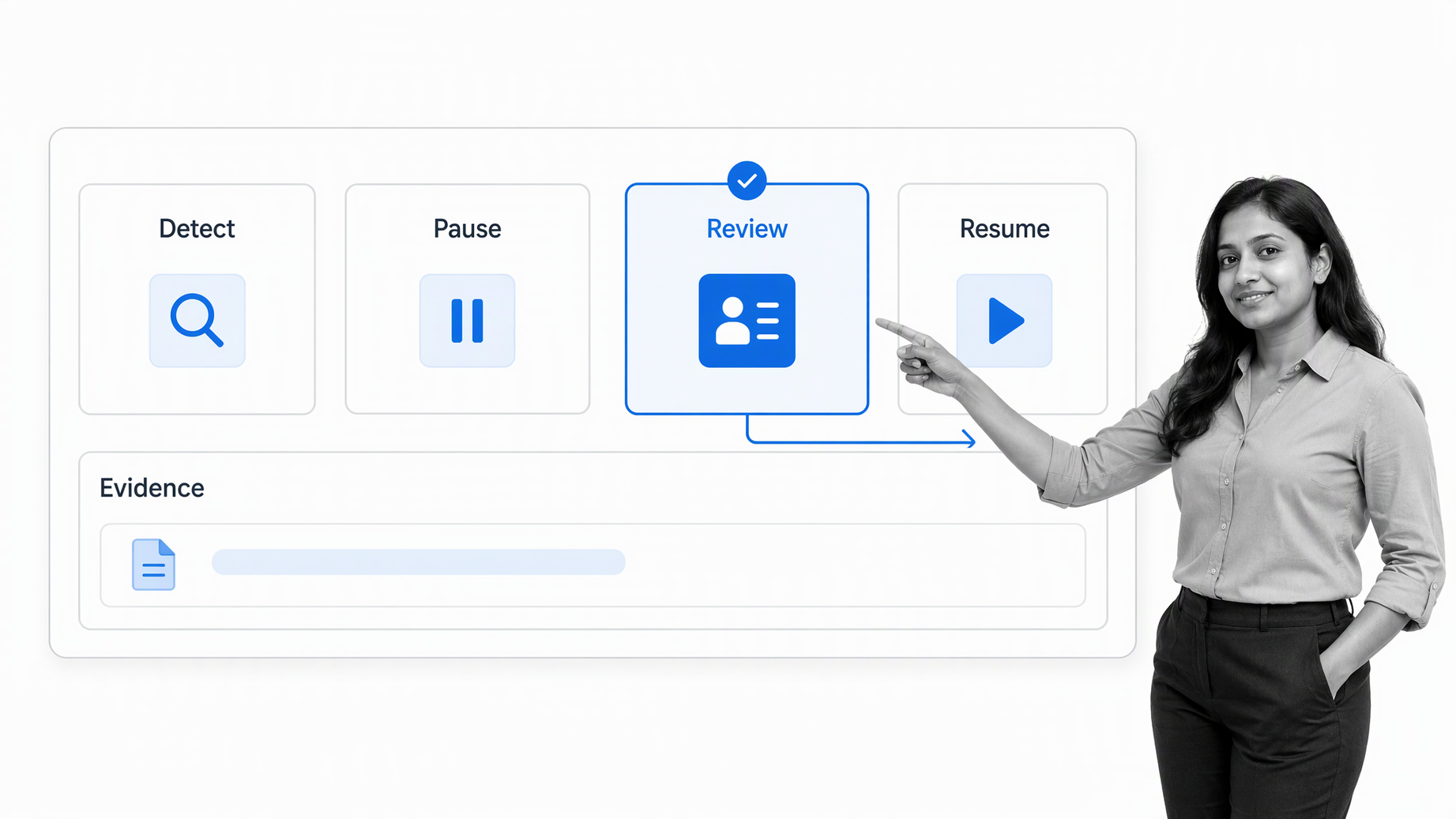
A reliable oversight loop has four states: detect, pause, review, and resume. Each state has a clear owner and a durable record. The agent does not merely send a notification and continue. It enters a waiting state before the side effect, preserving enough workflow context to continue safely after the decision.
1. Detect a review condition
The trigger can be an explicit rule, a confidence threshold, a policy exception, a tool permission, a sensitive data category, a monetary limit, an unusual pattern, or a failed validation. The trigger should be testable. Vague instructions such as ask when uncertain are not enough unless uncertainty is measured and tied to a route.
2. Pause before the side effect
The workflow must stop before an email is sent, a payment is released, an account is changed, a record is deleted, or an external commitment is made. OpenAI guidance on guardrails and approvals describes approval as an interruption before a tool call, followed by resumption from the same state. That sequence prevents approval from becoming a retrospective alert.
3. Assemble a review packet
The packet should show the requested action, business context, sources, rule results, affected subject, alternative choices, and downstream consequence. Preserve the exact inputs and tool outputs that informed the proposal. A summary is useful, but it should not replace the evidence a reviewer may need to inspect.
4. Route to an accountable reviewer
Assignment should follow subject matter, authority, separation of duties, availability, and escalation policy. The person who requested an action may not be allowed to approve it. High-risk cases may require sequential or parallel review across security, legal, finance, compliance, or business ownership.
5. Record the decision and rationale
Store the reviewer identity, decision, time, reason, evidence considered, conditions imposed, and any edited values. A simple approved flag cannot explain what the person authorized. Structured outcomes make later testing, audit, and process improvement possible.
6. Resume, revise, escalate, or stop
Approval should release only the scoped action the reviewer saw. Revision returns the case to the appropriate planning stage. Escalation transfers authority without losing history. Rejection or timeout should end the run or move it to a defined recovery route. The workflow must never interpret silence as consent for consequential action.
Human in the loop vs human on the loop vs autonomous agents
Human involvement can take several forms. The names sound similar, but they create different control models. Teams should choose one deliberately for each action type rather than describing an entire system with a single label.
Human in the loop
The system cannot cross a defined checkpoint without a human decision. This is appropriate for actions with material impact, unclear policy, sensitive access, or limited reversibility. The person has real authority to change the outcome before execution.
Human on the loop
The system acts within limits while a person monitors performance and can intervene. This works when actions are frequent, bounded, observable, and recoverable. The monitoring interface needs timely signals and an effective stop mechanism; passive visibility alone is not oversight.
Human over the loop
People design policy, set permissions, test the system, review aggregate outcomes, and decide whether autonomy should expand or contract. This governance layer matters even when individual actions do not require approval. It connects execution to broader AI governance.
Fully autonomous execution
An agent may act without case-by-case review when the work is low impact, well constrained, reversible, and continuously evaluated. Autonomy still needs authentication, least privilege, rate limits, logging, failure handling, and an accountable owner. No human click does not mean no human responsibility.
When should AI agents require human review?
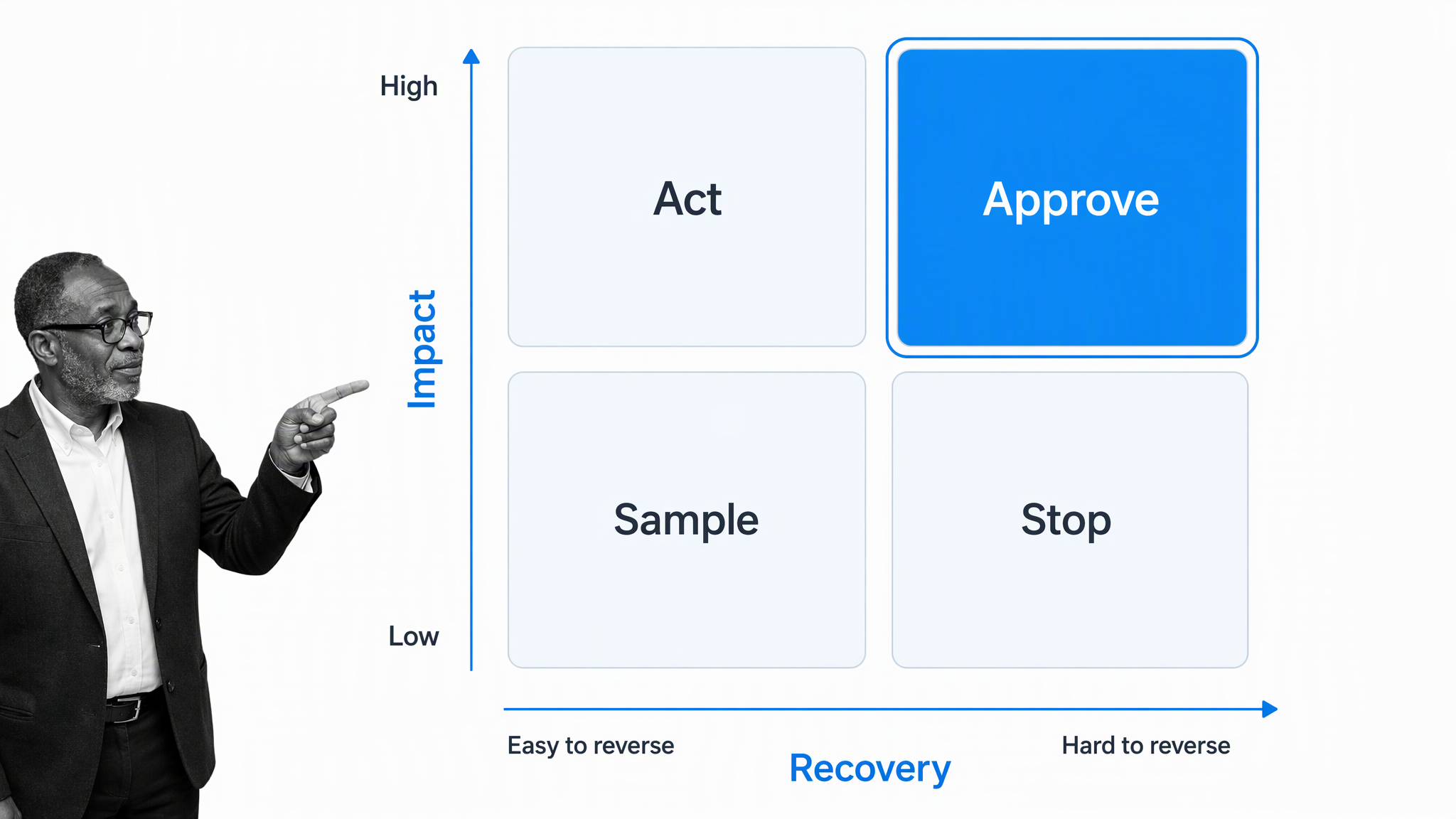
The best approval rule combines impact with recoverability. A high-impact action that is difficult to reverse deserves stronger control than a low-impact action that can be rolled back immediately. Add uncertainty, data sensitivity, external exposure, and regulatory obligations to refine the decision.
Customer and external communication
Require review when an agent will make a promise, provide regulated guidance, respond to a complaint, change a contract term, or send a message that could materially affect trust. Lower-risk drafts can be sampled, while sensitive or exceptional messages should pause every time.
Money, contracts, and purchasing
Payments, refunds, pricing exceptions, purchase commitments, and contract changes need thresholds and separation of duties. A structured invoice approval workflow shows how evidence and authorization can sit inside the sequence rather than in an untracked message thread.
Identity, access, and system changes
Account provisioning, privilege changes, production deployment, deletion, and configuration changes can create lasting security or availability effects. Use an IT change request process to connect risk, approval, implementation, validation, and rollback evidence.
Compliance, legal, and policy exceptions
Agents can assemble evidence and flag gaps, but accountable people should decide policy exceptions, legal interpretations, and control waivers. A compliance audit checklist gives the reviewer a stable structure for requirements, proof, findings, and follow-up.
Incident and safety response
An agent can gather signals, classify severity, and recommend a runbook step, while containment actions with broad effects remain gated. An incident management process keeps escalation, ownership, action, and closure evidence connected under time pressure.
Ambiguous or novel cases
Route cases that fall outside known policy, contain conflicting evidence, or trigger repeated tool failures. Novelty is a review signal because a confident answer can still be unsupported. The reviewer should be able to create a one-time decision or feed a new rule back into the process.
How to design human approval checkpoints
A checkpoint succeeds when it produces a focused, informed decision without making reviewers the hidden engine of the process. Design the gate as carefully as the autonomous path around it.
Place the gate at the last responsible moment
Let the agent complete safe preparation before review, but stop before commitment. This gives the reviewer a concrete proposal and complete context while preserving control. Placing the gate too early forces people to approve an idea with no evidence; placing it too late makes approval meaningless.
Give reviewers bounded choices
Approve, reject, revise, request evidence, and escalate are clearer than a free-form response box. Each choice should have a defined next state. If conditional approval is allowed, capture the conditions as structured fields the workflow can enforce.
Separate the decision from execution
The reviewer should authorize a specific action, while a separate controlled component executes it. OWASP agent security guidance recommends human approval for high-risk operations and separation between decision and execution. That boundary reduces the chance that a persuasive model output becomes direct authority.
Define timeouts and escalation
Every gate needs a response window, backup reviewer, escalation route, and safe timeout behavior. Expired approval should not silently release the action. For urgent processes, predefine which bounded actions may continue and which must stop when no reviewer is available.
Protect reviewer attention
Prioritize cases by consequence and age, deduplicate repeated requests, suppress low-value alerts, and show what changed since the last review. Periodically measure approval rate, reversal rate, reviewer time, escalation, and post-approval failure. A gate that approves nearly everything may be poorly placed or poorly informed.
Preserve replayable evidence
Keep the request, policy version, agent output, tool arguments, retrieved evidence, reviewer decision, execution result, and downstream confirmation under one case identifier. The record should show both what the system proposed and what actually happened.
Common human in the loop failure modes
Human presence does not automatically make an agent safe. Several common designs create the appearance of control without dependable oversight.
Approval after execution
A notification sent after the agent acts is monitoring, not approval. Move the pause before the irreversible side effect and prove that execution cannot bypass the gate.
Rubber-stamp review
Reviewers approve quickly when context is missing, queues are overloaded, or every case looks the same. Improve the packet, reduce unnecessary gates, and sample routine cases instead of forcing empty clicks.
The wrong reviewer
Availability is not authority. Route by expertise, role, business ownership, and separation-of-duties policy. Give reviewers a clear escalation path when the case exceeds their authority.
Approval without scope
A broad approve button can accidentally authorize more than the reviewer understood. Show exact fields, systems, recipients, amounts, and permissions. Bind the resulting authorization to that precise proposal and expire it when the proposal changes.
No recovery route
Rejected or timed-out work often disappears into chat. Keep revise, remediate, escalate, cancel, and retry as explicit workflow states with owners. This is especially important for agents with real system access, where the exception path reveals whether oversight is real.
Learning from approvals without governance
Past decisions can improve routing and recommendations, but do not let an agent silently convert approvals into permanent policy. Review patterns, test proposed rules, document ownership, and version the change before expanding autonomy.
How Process Street operationalizes human oversight
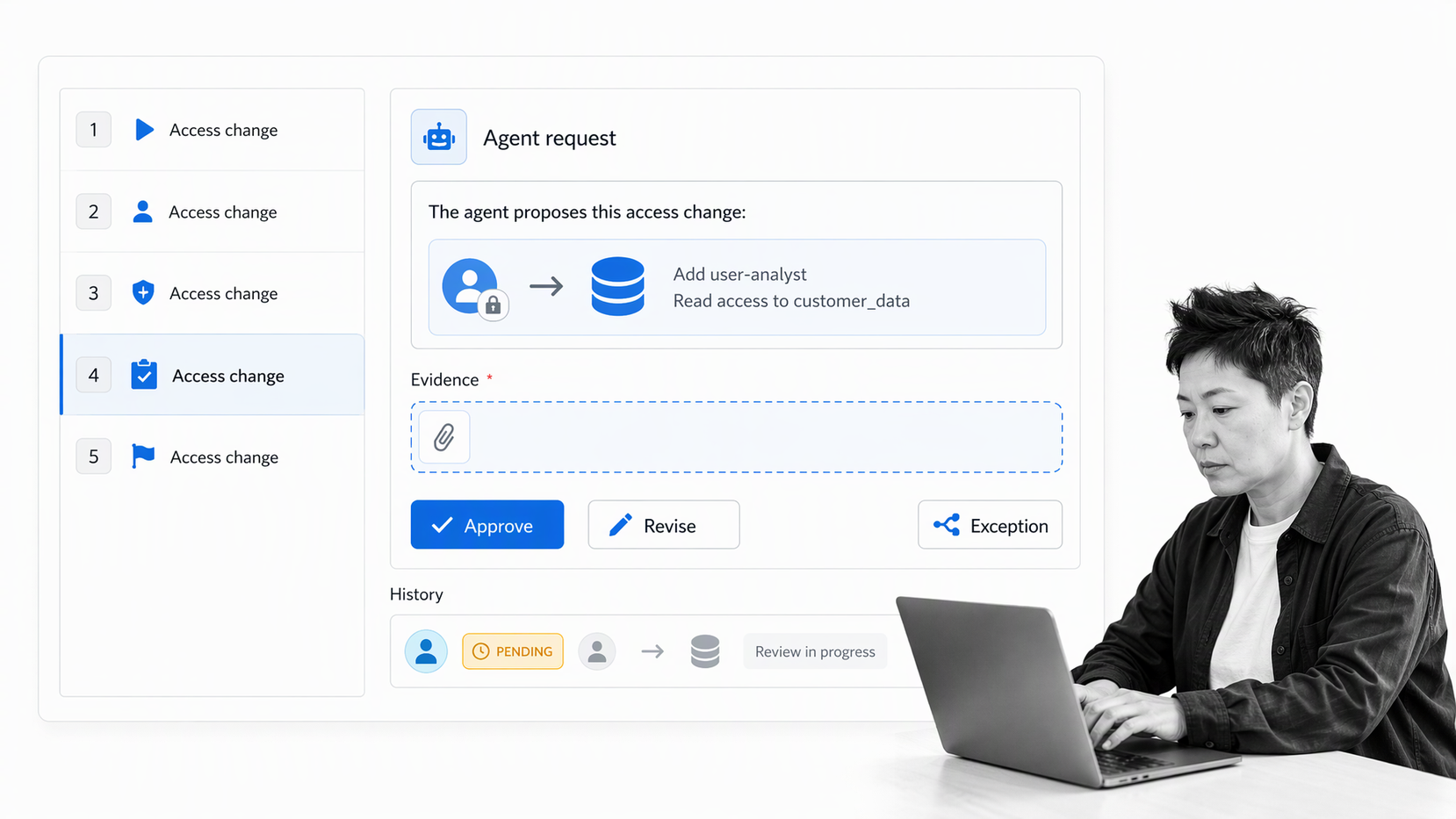
Process Street provides an executable process layer for human oversight. Teams can place AI-assisted preparation and tool use inside workflows with assigned tasks, structured forms, approval gates, conditional routes, deadlines, evidence, and history.
Build the decision into the workflow
A workflow defines what the agent may prepare, which conditions trigger review, who receives the case, and which outcomes are allowed. Approvals keep the decision attached to the task and prevent the next controlled step from beginning until the reviewer responds.
The same design principles apply across approval workflow software: present a specific request, require an authorized decision, preserve the evidence, and release only the action that was reviewed.
Show context in one review surface
Structured fields can hold the requested action, affected record, risk class, agent recommendation, supporting evidence, and exception reason. The reviewer sees the proposal in process context instead of searching across disconnected systems.
Route risk and exceptions dynamically
Conditional logic can reveal different review tasks, evidence requirements, or escalation paths based on impact, amount, department, data sensitivity, or an earlier result. Routine work stays fast while exceptions receive more scrutiny.
Keep execution and proof connected
Once approved, a controlled integration or downstream system can perform the scoped action and return the result to the same run. This joins agentic AI workflow execution with the approval, evidence, and audit trail that govern it.
Use history to improve the control
Workflow history shows which cases waited, changed, escalated, failed, or were rejected. Teams can use that evidence to adjust thresholds, improve reviewer packets, add rules for recurring exceptions, and decide where autonomy can safely expand.
A human in the loop implementation roadmap
1. Inventory proposed agent actions
List the systems, tools, data, messages, records, and decisions an agent may touch. Describe the side effect, business owner, expected volume, reversibility, and maximum consequence for each action.
2. Classify impact and recoverability
Use a consistent risk method, such as a tailored risk management process. Add data sensitivity, external exposure, uncertainty, and legal or policy requirements. Assign each action to autonomous, sampled, approval-required, or prohibited execution.
3. Build one end-to-end pilot
Choose a repeated process with a named owner and a verifiable outcome. Include the normal path, missing evidence, rejected approval, timeout, escalation, execution failure, and rollback. The failure path is part of the product, not a later enhancement.
4. Measure decision quality
Track reviewer response time, approval and revision rates, post-approval failures, false escalations, missed escalations, repeated exceptions, and evidence completeness. Compare the agent proposal with the final human decision to find where context or policy needs improvement.
5. Expand autonomy deliberately
The NIST AI Risk Management Framework emphasizes governance across the AI lifecycle. Use production evidence to loosen or tighten boundaries, then version the control and retest it. Do not equate a quiet period with proof that risk has disappeared.
6. Review the oversight system itself
The EU AI Act’s human oversight provisions illustrate why oversight must be appropriate to risk, autonomy, and context. Whether or not a specific use case falls under that law, the operating lesson is useful: test whether people can understand, intervene, and stop the system in practice.
Human in the loop AI agent FAQs
What are human in the loop AI agents?
Human in the loop AI agents are systems that can plan or act autonomously within defined boundaries but pause at specified checkpoints for a person to review, approve, revise, escalate, or stop a consequential action before execution.
When should an AI agent require human approval?
Require approval when an action has high impact, limited reversibility, sensitive data, external exposure, ambiguous policy, unusual evidence, financial or legal consequence, or permissions that could materially change a system or record.
What is the difference between human in the loop and human on the loop?
Human in the loop means the system must receive a human decision before crossing a defined checkpoint. Human on the loop means the system acts within limits while a person monitors it and can intervene or stop execution.
Does human in the loop make AI agents safe?
Not by itself. Safety depends on placing the gate before the side effect, routing to an authorized reviewer, showing sufficient evidence, binding approval to a specific action, defining timeout behavior, and preserving an execution record.
How do you prevent rubber-stamp approvals?
Use risk-based routing, remove low-value gates, provide a concise evidence packet, highlight what changed, give reviewers bounded choices, monitor decision patterns, and sample routine work instead of requiring approval for every action.
How does Process Street support human in the loop AI agents?
Process Street connects agent-assisted work to executable workflows with structured forms, assigned reviewers, approval tasks, conditional routes, evidence capture, deadlines, escalation, integrations, and workflow history.
