


Turn every policy into automated workflows with built-in enforcement and audit-ready proof.



Every Client Onboarding Template You’ll Ever Need (Free Examples)

A client onboarding template turns the gap between a signed agreement and confident delivery into a process your team can run. It defines what to collect, who owns each step, when the kickoff can happen, how systems are configured, and what must be true before the account moves into ongoing service.
Use the template as a starting point, then adapt it to the client’s risk, complexity, service model, and desired outcome. A small advisory engagement may need a short intake and kickoff. An enterprise implementation may require security review, multiple approvals, training, migration, and a formal handoff. The structure should stay consistent while the path changes.
Process Street provides a library of client onboarding templates and a general new-client workflow you can customize. This guide explains how to choose the right starting point and turn it into a controlled, repeatable onboarding motion.
What is a client onboarding template?
A client onboarding template is a reusable workflow for moving a new client from sale to active delivery. It is more than a welcome email or a checklist. A useful template connects tasks, owners, due dates, information requests, decisions, approvals, and exit criteria in one sequence.
The template should make the next action obvious to both your team and the client. It should also prevent work from starting with missing context. When a dependency is incomplete, the workflow needs a visible blocked state, an owner, and a follow-up path. When the requirements are satisfied, the workflow should move forward without someone rebuilding the plan from memory.
| Template component | What it controls | Evidence of completion |
|---|---|---|
| Internal handoff | Scope, promises, risks, commercial context | Delivery owner accepts the brief |
| Client intake | Contacts, goals, data, documents, access | Required fields and files are complete |
| Kickoff | Success criteria, roles, timeline, communication | Decisions and actions are recorded |
| Setup | Accounts, permissions, configuration, migration | Setup is tested and approved |
| Handoff | Ownership after onboarding | Ongoing owner accepts the account |
| Follow-up | Adoption, first value, open risks | Review is completed and next milestones are set |
A static document can describe these components. A runnable workflow adds accountability. Owners receive the work when it becomes ready, deadlines are tied to the onboarding timeline, and decisions remain attached to the client record.
Which client onboarding template should you use?
Choose the closest template by onboarding motion, not by industry label alone. Two companies in the same industry may need different workflows because one delivers a standardized service and the other runs a complex implementation. Start with the sequence that matches how value is delivered, then add the controls required by the client and the work.
Customer success onboarding template
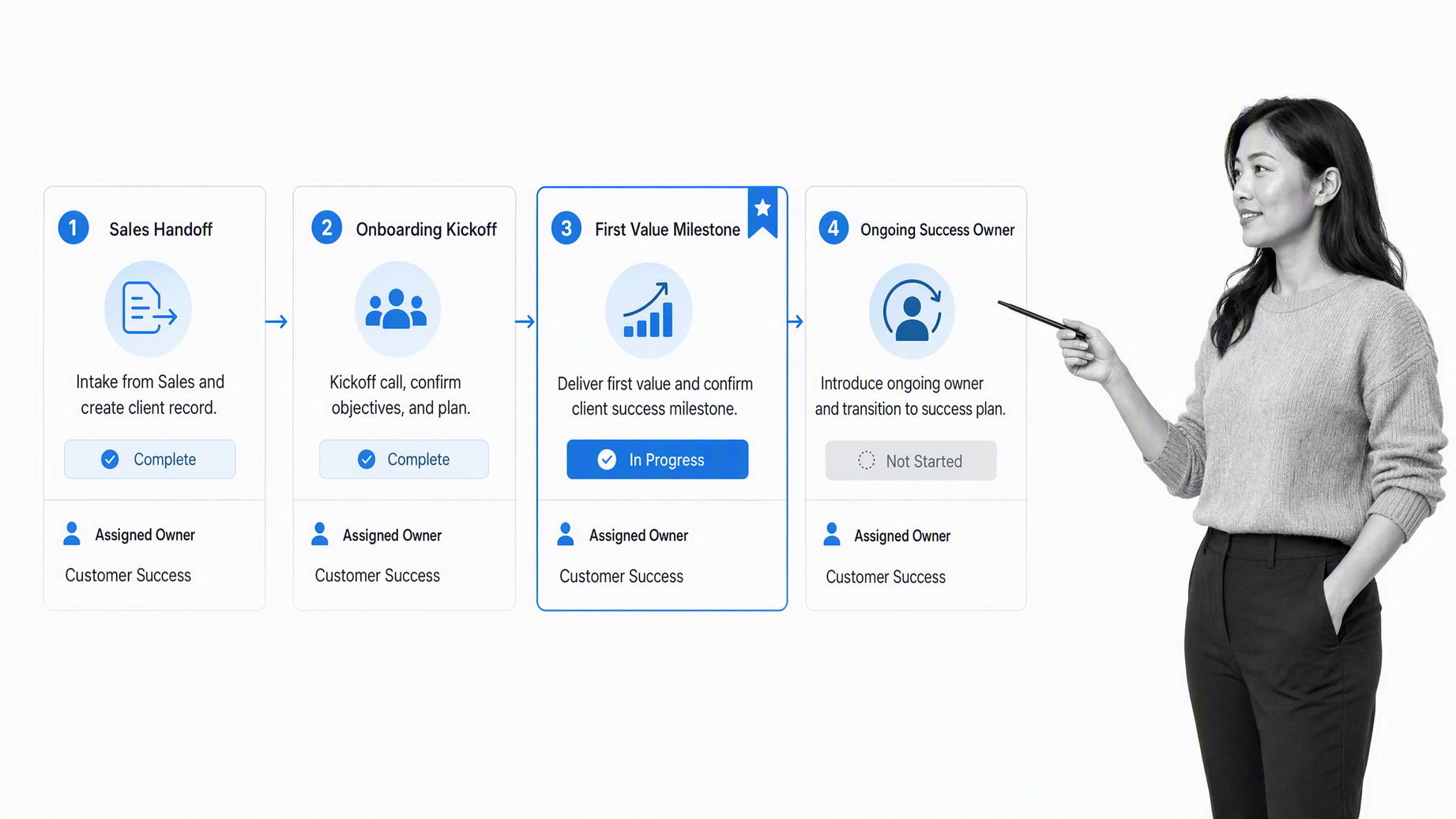
Use this template when a customer success team owns the path from closed deal to adoption. Begin with a sales-to-success handoff that captures the client’s goal, the outcome promised during the sale, key stakeholders, the product or service purchased, and known risks. The customer success manager should accept the handoff before the welcome message is sent.
The working sequence should include a welcome, discovery or intake, kickoff, enablement, a first-value milestone, and a transition into the ongoing success plan. Do not make meeting attendance the only evidence of progress. Record decisions, completed setup, training outcomes, usage or delivery milestones, and unresolved blockers. Add a check-in after the first value event so the team can compare the actual result with the success criteria agreed at kickoff.
- Name the success owner and escalation contact.
- Define the first measurable outcome the client should reach.
- Schedule the transition from onboarding to the ongoing success cadence.
Enterprise client onboarding template
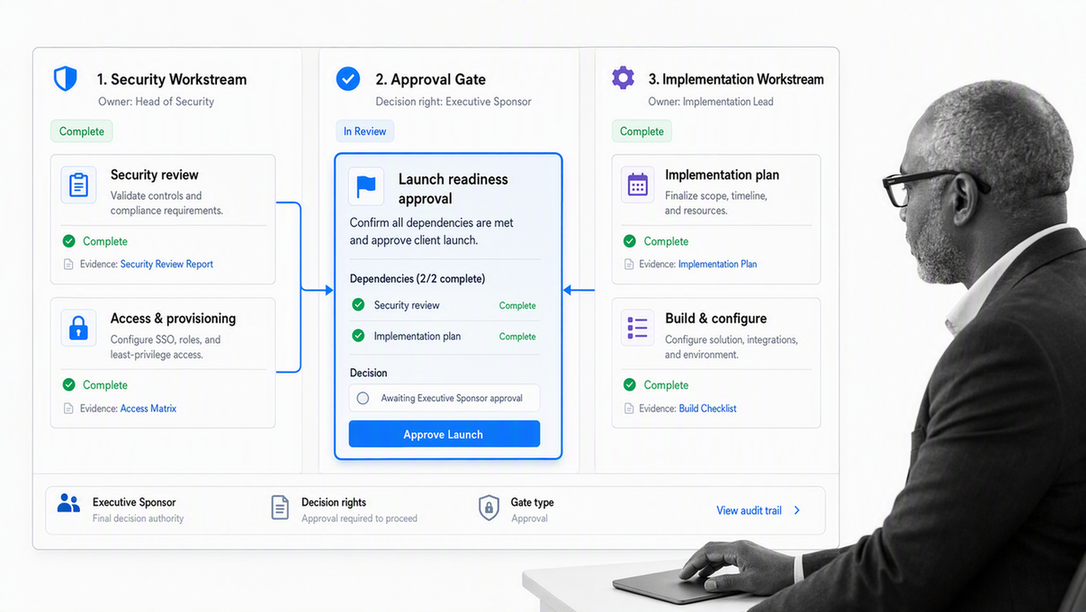
Enterprise onboarding needs more governance because the account usually includes several teams, approval layers, security dependencies, and parallel workstreams. Build the workflow around a stakeholder map, decision rights, dependency owners, review gates, and an agreed escalation path. Separate client-visible milestones from internal readiness work so neither side mistakes activity for completion.
Use approval tasks for decisions that must be accepted before the process continues. Process Street documents how approval tasks can be paired with due dates, permissions, and stop tasks. That structure is useful for solution design, migration readiness, security acceptance, and the final handoff. Keep each approval narrow enough that the reviewer can see exactly what is being accepted.
- Assign an executive sponsor, operational owner, and technical owner.
- Track dependencies by workstream and organization.
- Require acceptance criteria for configuration, training, and launch.
Remote client onboarding template
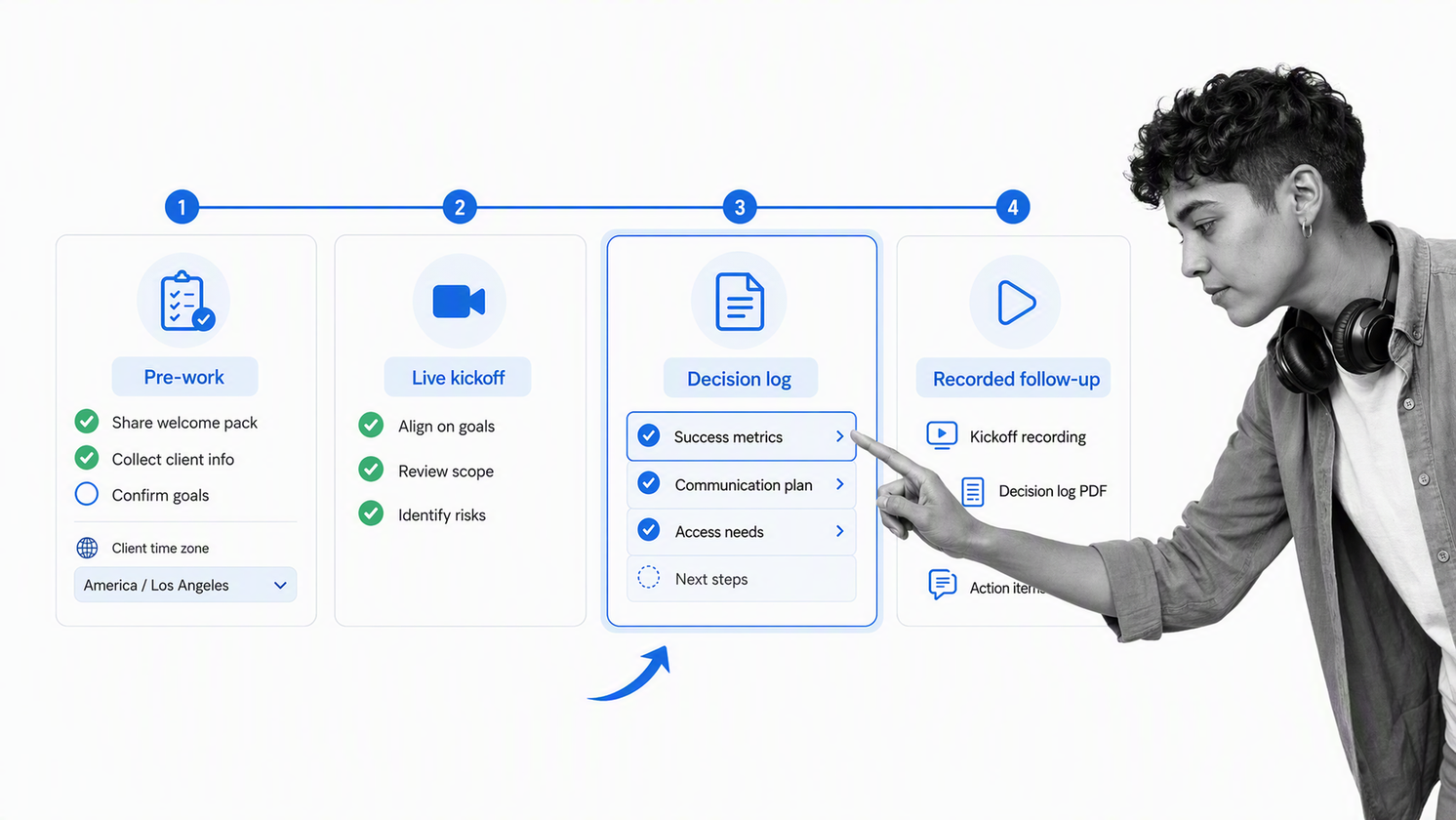
Remote onboarding should be designed for clarity without requiring every person to be online at the same time. Put the timeline, decisions, recordings, notes, files, and open questions in a shared workflow. Send pre-work before the kickoff, reserve live meetings for decisions and relationship-building, and capture what happened afterward.
Use explicit response windows, time zones, meeting owners, and backup contacts. Every synchronous session should produce an asynchronous artifact: a decision log, approved plan, recorded demonstration, or updated action list. That approach keeps distributed stakeholders aligned and lets people recover context without asking the onboarding manager to repeat it.
- Confirm the client’s preferred channel and time zone.
- Share the kickoff agenda and required pre-work early.
- Store meeting outputs and decisions in the workflow.
Financial planner client onboarding template
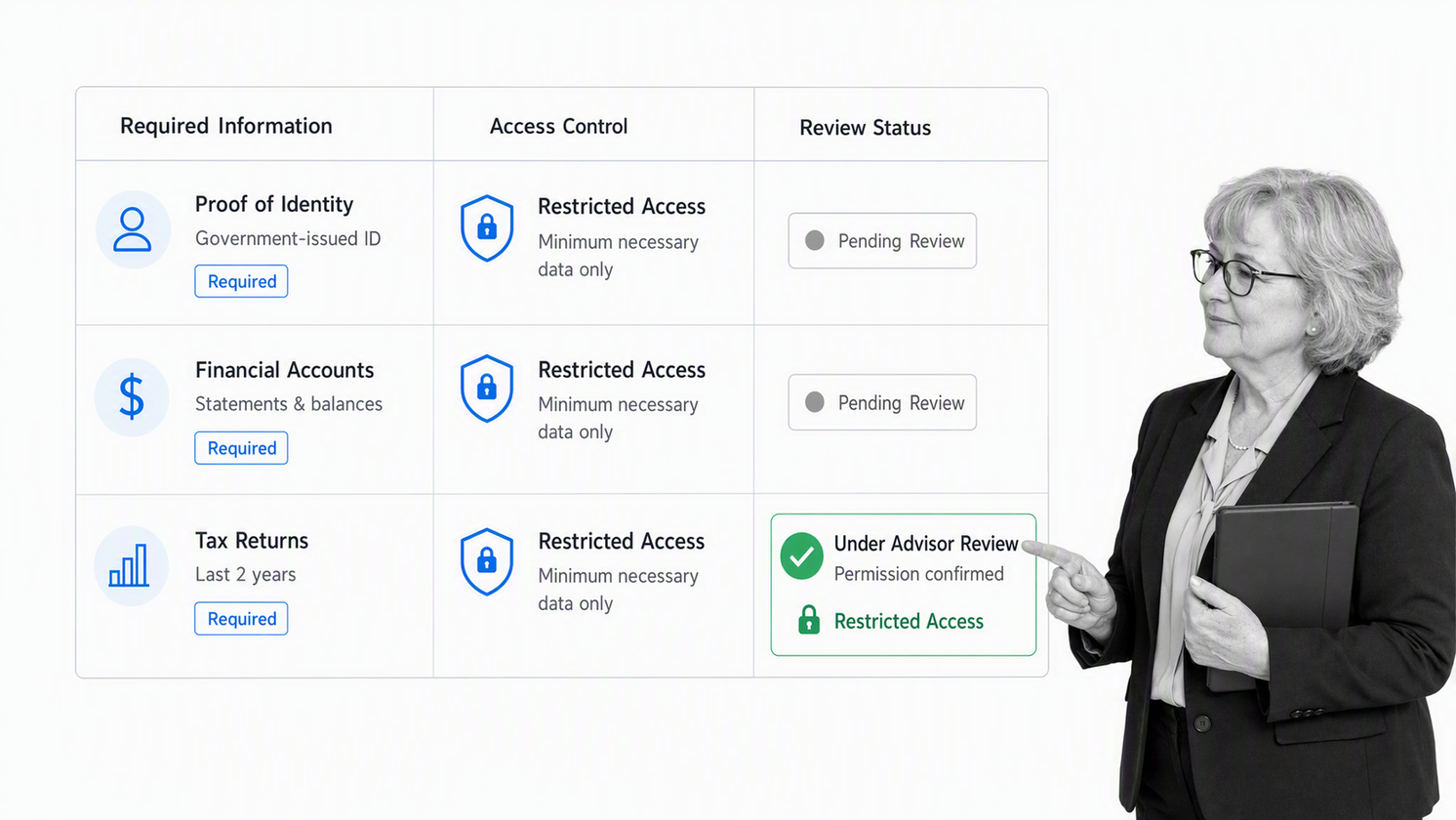
Financial planning onboarding combines relationship-building with sensitive information collection and a defined review process. Start with identity and contact details, service scope, goals, household or entity information, required agreements, document requests, and the people authorized to participate. Route missing or inconsistent information for review rather than allowing it to disappear into email.
Only collect information required for the engagement, protect it according to its sensitivity, and define who can access it. The FTC guidance for protecting personal information advises businesses to keep only what they need and apply least-privilege access. Treat those controls as onboarding design requirements, not cleanup tasks.
- Separate required documents from optional discovery material.
- Add review steps for agreements and sensitive records.
- Confirm the ongoing review cadence before closing onboarding.
Software development client onboarding template
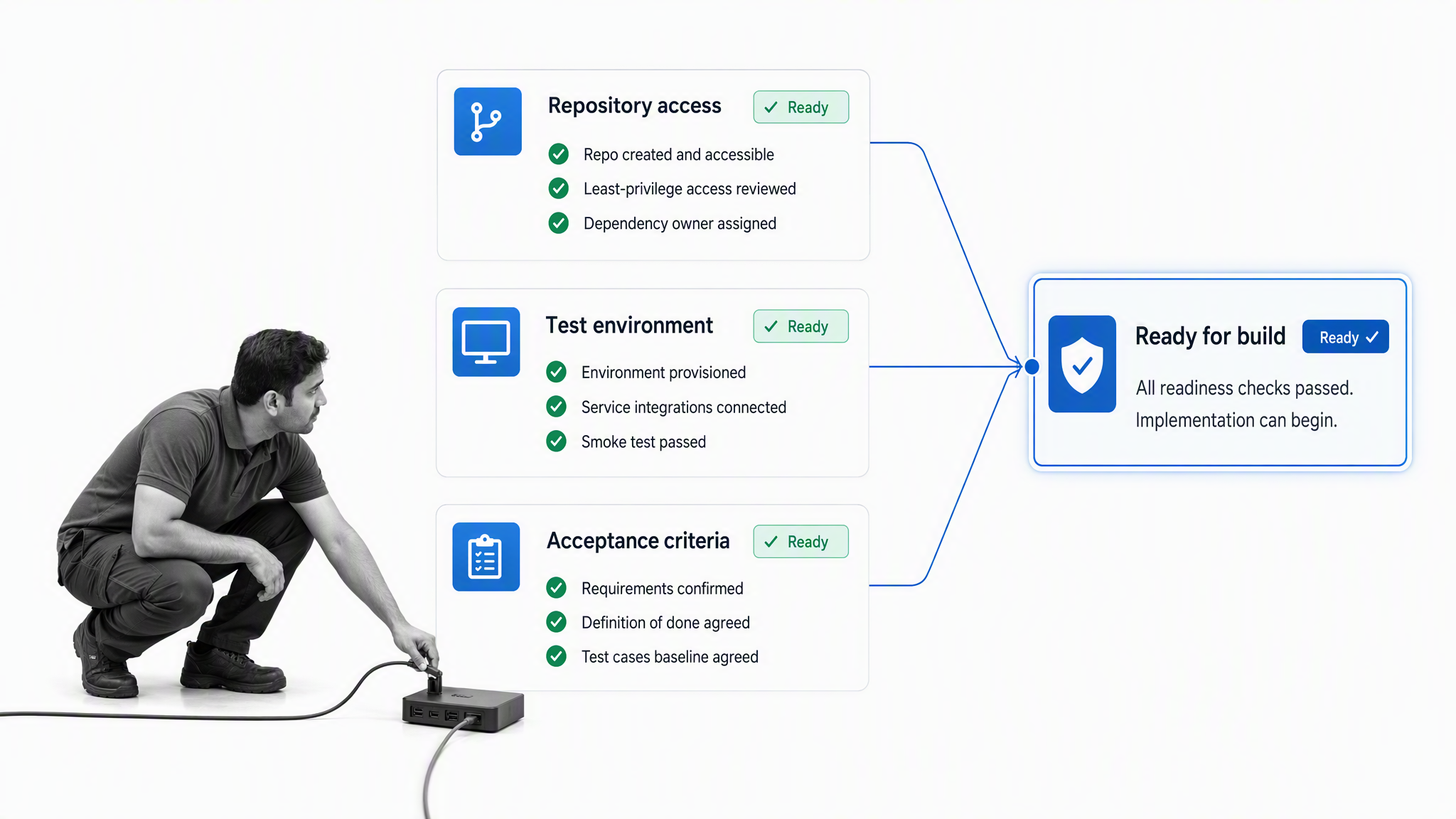
Software development onboarding must turn a commercial scope into a delivery-ready technical brief. Capture the business outcome, users, in-scope functionality, exclusions, environments, repositories, dependencies, security requirements, acceptance criteria, and decision-makers. The kickoff should resolve how work is prioritized, how changes are approved, and how the client will review completed work.
Access requests deserve their own controlled section. Apply the least-privilege principle, grant only the access needed for assigned work, record who approved it, and remove temporary access when it is no longer required. NIST access-control guidance defines least privilege as allowing only the authorized access needed to accomplish assigned tasks.
- Verify repositories, environments, test data, and credentials.
- Define acceptance criteria before implementation begins.
- Record architecture and scope decisions with an owner.
Accounting firm client onboarding template
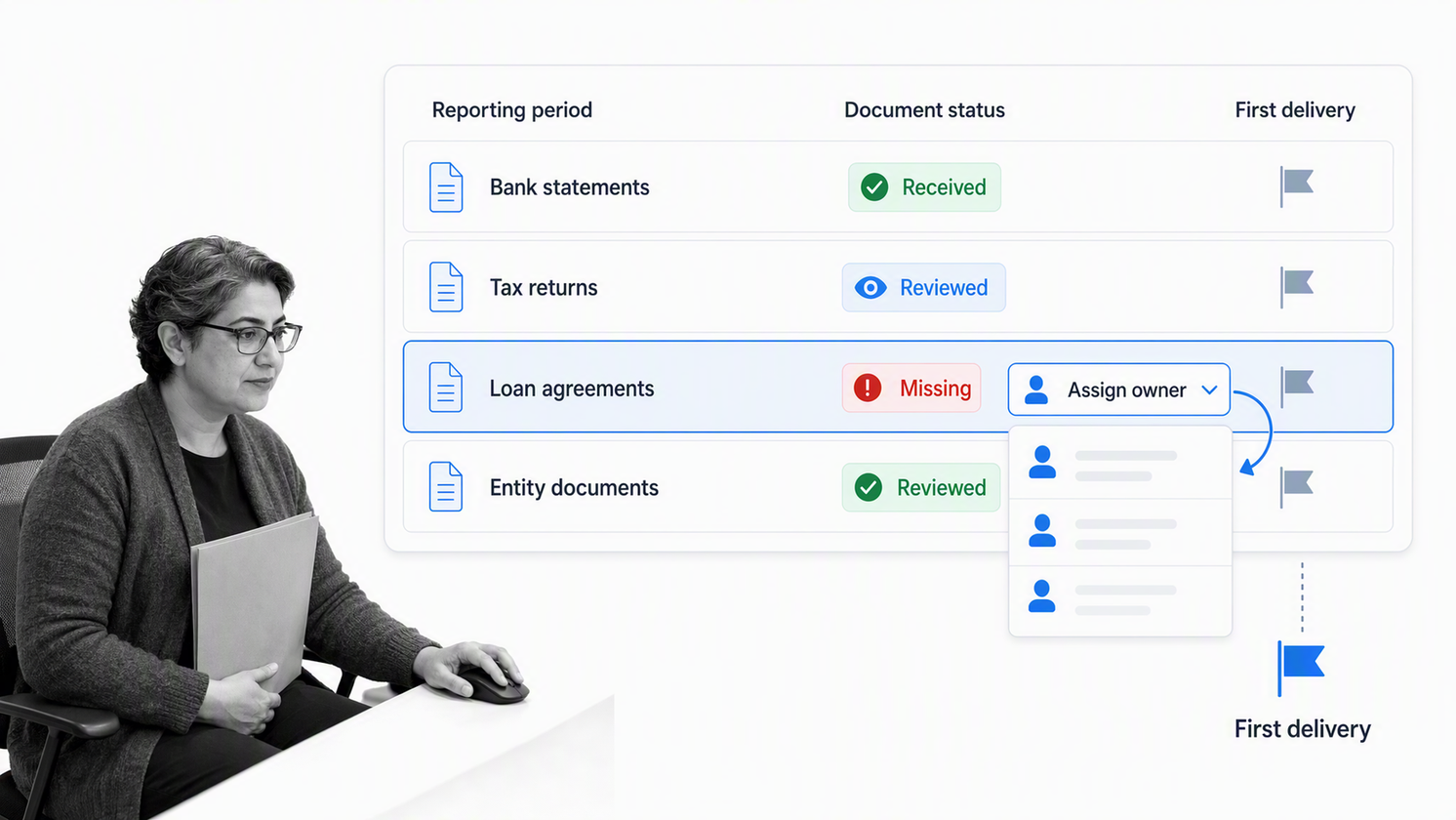
Accounting onboarding should make recurring deadlines, client responsibilities, document requirements, and service boundaries unmistakable. Start with the engagement letter, entity details, reporting periods, prior records, system access, tax or bookkeeping responsibilities, and a list of missing documents. Give every request a due date and a clear status so the firm can distinguish client delay from internal delay.
When a payer needs a taxpayer identification number for information reporting, the IRS explains the purpose of Form W-9. The workflow should link to the current official form or instruction rather than storing an aging copy in a general welcome packet. Add review and secure-retention rules appropriate to the firm, jurisdiction, and engagement.
- Confirm entity, reporting period, and service scope.
- Track each required record separately.
- Set the first recurring delivery and review dates.
Real estate agency client onboarding template
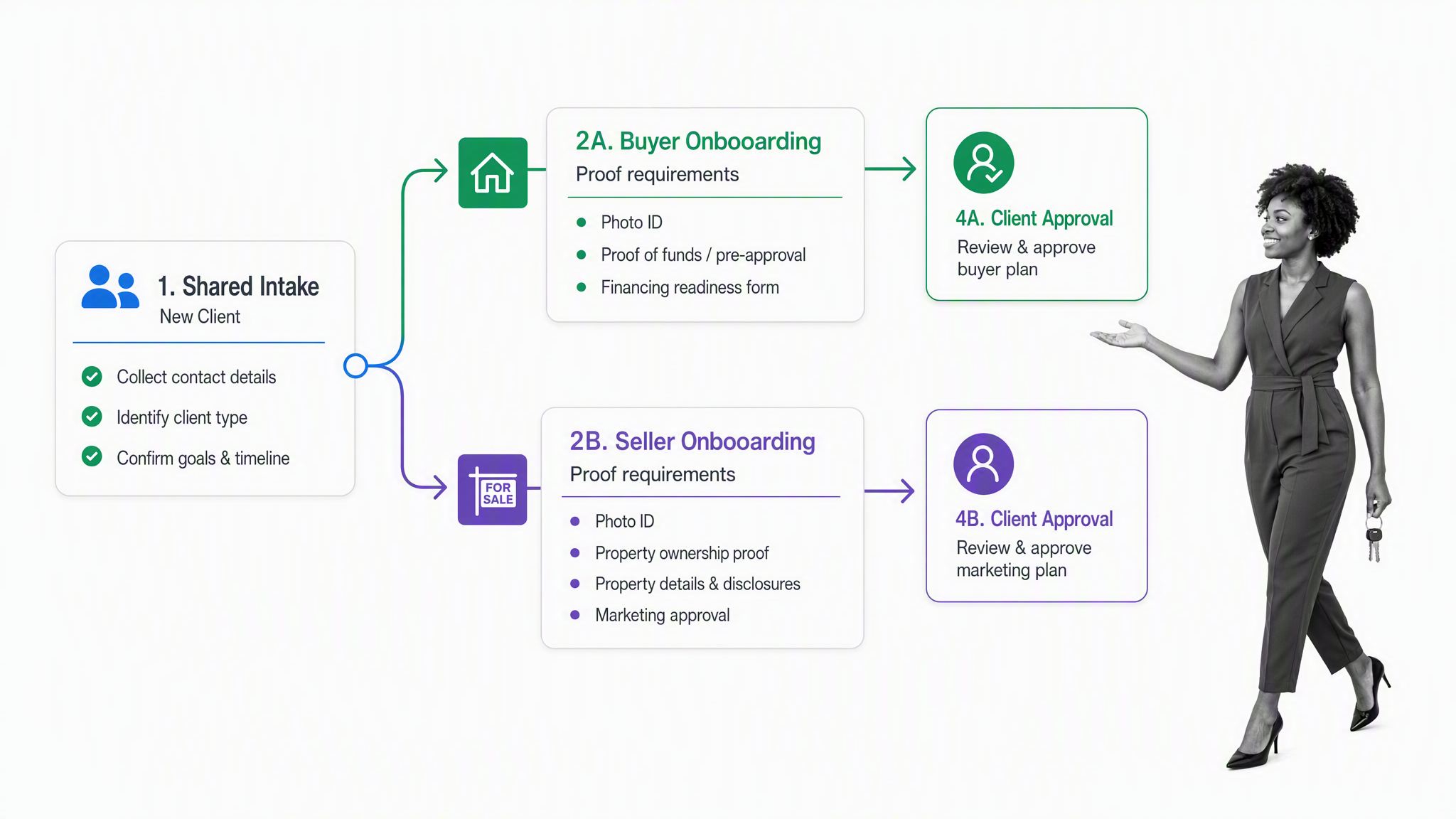
Real estate agency onboarding should connect client goals to property, market, communication, and representation requirements. For a seller, gather property facts, ownership records, disclosures, access instructions, marketing approvals, and listing milestones. For a buyer, capture financing readiness, criteria, decision-makers, availability, and communication preferences. Keep the two paths separate inside one controlled template.
Build gates before any external action that requires client acceptance. The workflow should show when documents are ready for review, who is waiting on whom, and what must be approved before marketing, viewings, offers, or another material step. Local legal and regulatory requirements vary, so the operating team should validate the template with qualified counsel before use.
- Branch the workflow by buyer, seller, landlord, or tenant representation.
- Record property-specific access and communication rules.
- Require approval before client-facing materials or commitments move forward.
Landlord client onboarding template
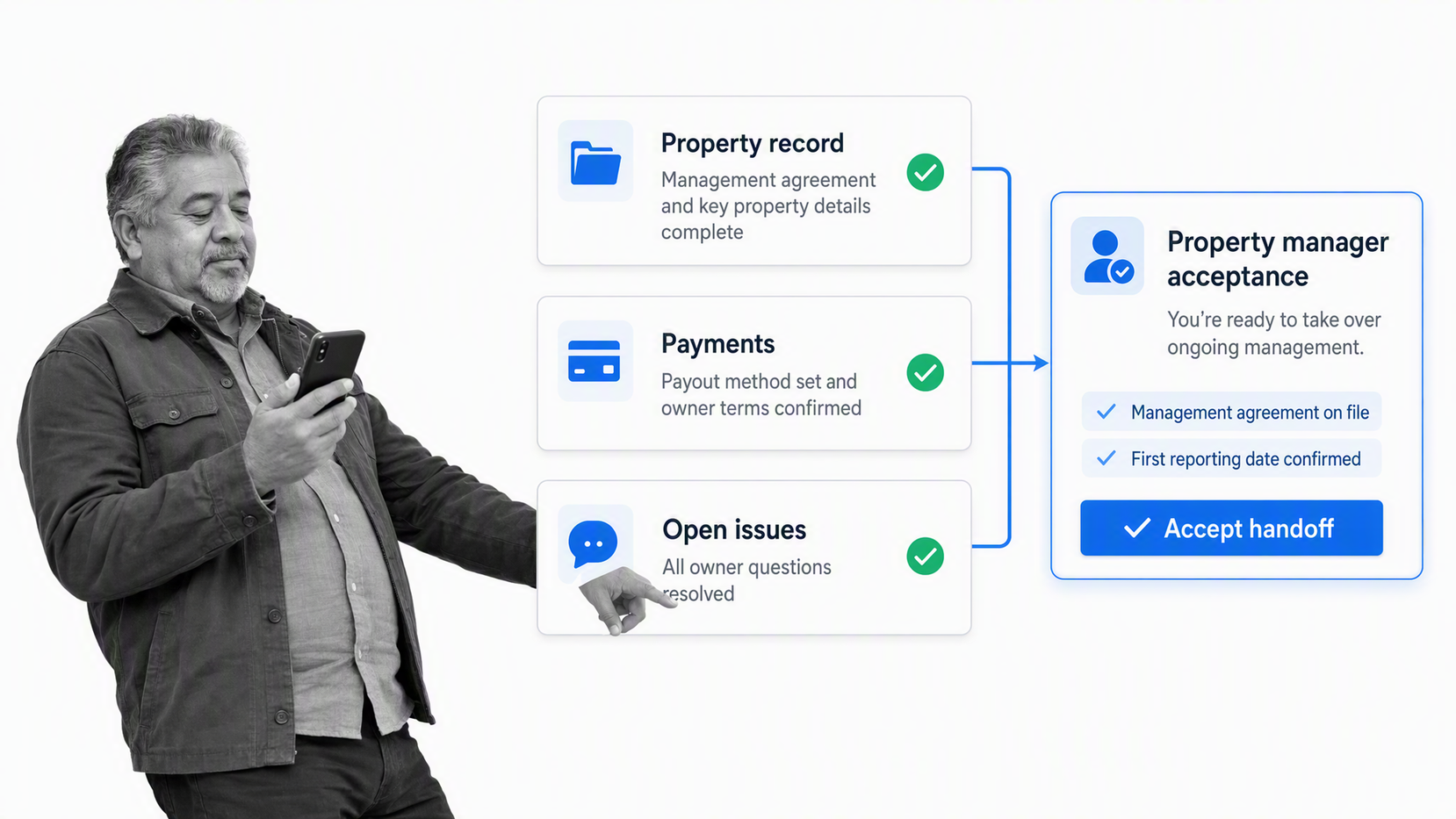
Use this template when a property manager or agency is bringing a landlord and their property into an ongoing management service. Begin with the management agreement, ownership and payment details, property data, insurance and compliance records, existing tenancy information, maintenance contacts, access arrangements, pricing decisions, and communication preferences.
The handoff is complete only when the operating team can manage the property without reconstructing context. Confirm that records are stored in the right system, permissions are correct, open maintenance or tenant issues have owners, payment instructions are tested, and the landlord understands the service cadence and escalation route.
- Verify authority, property records, and payment instructions.
- Log every open property or tenancy issue.
- Confirm the named ongoing property manager and first reporting date.
How do you choose a client onboarding workflow?
Choose by onboarding motion
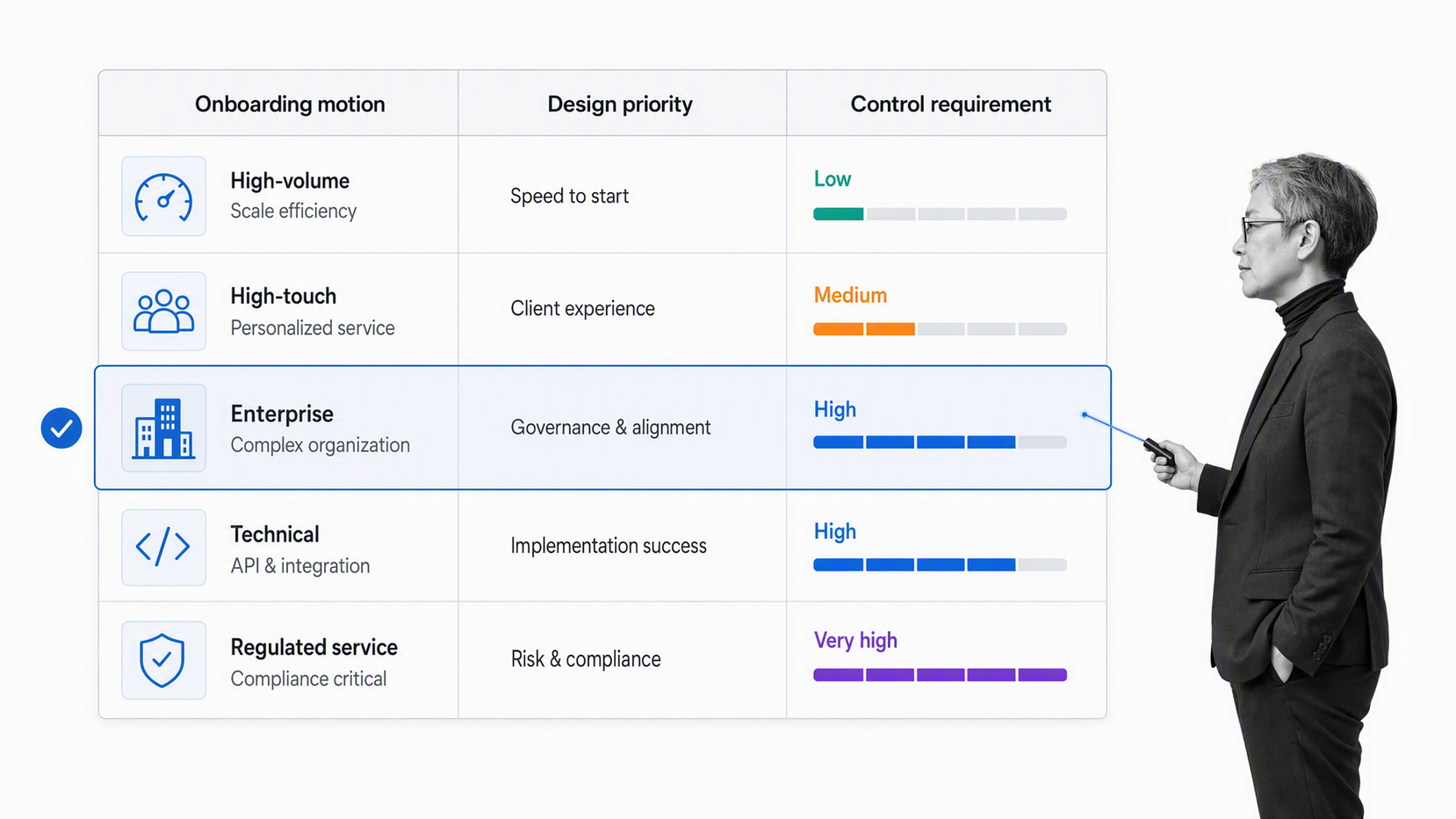
Classify the work before you customize the template. A high-volume standardized service needs a short path with automation and exception handling. A high-touch advisory service needs deeper discovery, explicit decision records, and more human interaction. A technical implementation needs dependency and access controls. A regulated engagement needs review, retention, permission, and evidence requirements built into execution.
| Onboarding motion | Design priority | Typical control |
|---|---|---|
| High volume | Fast, consistent intake | Required fields and exception routing |
| High touch | Shared understanding | Discovery notes and client acceptance |
| Enterprise | Coordination across workstreams | Decision rights and approval gates |
| Technical implementation | Dependency readiness | Access review and test evidence |
| Regulated service | Control and proof | Permissions, review, retention, audit trail |
Complexity should add branches, not duplicate the whole workflow. Keep a stable core and reveal additional tasks only when the client type, service, risk, or response requires them.
Intake, kickoff, setup, and handoff
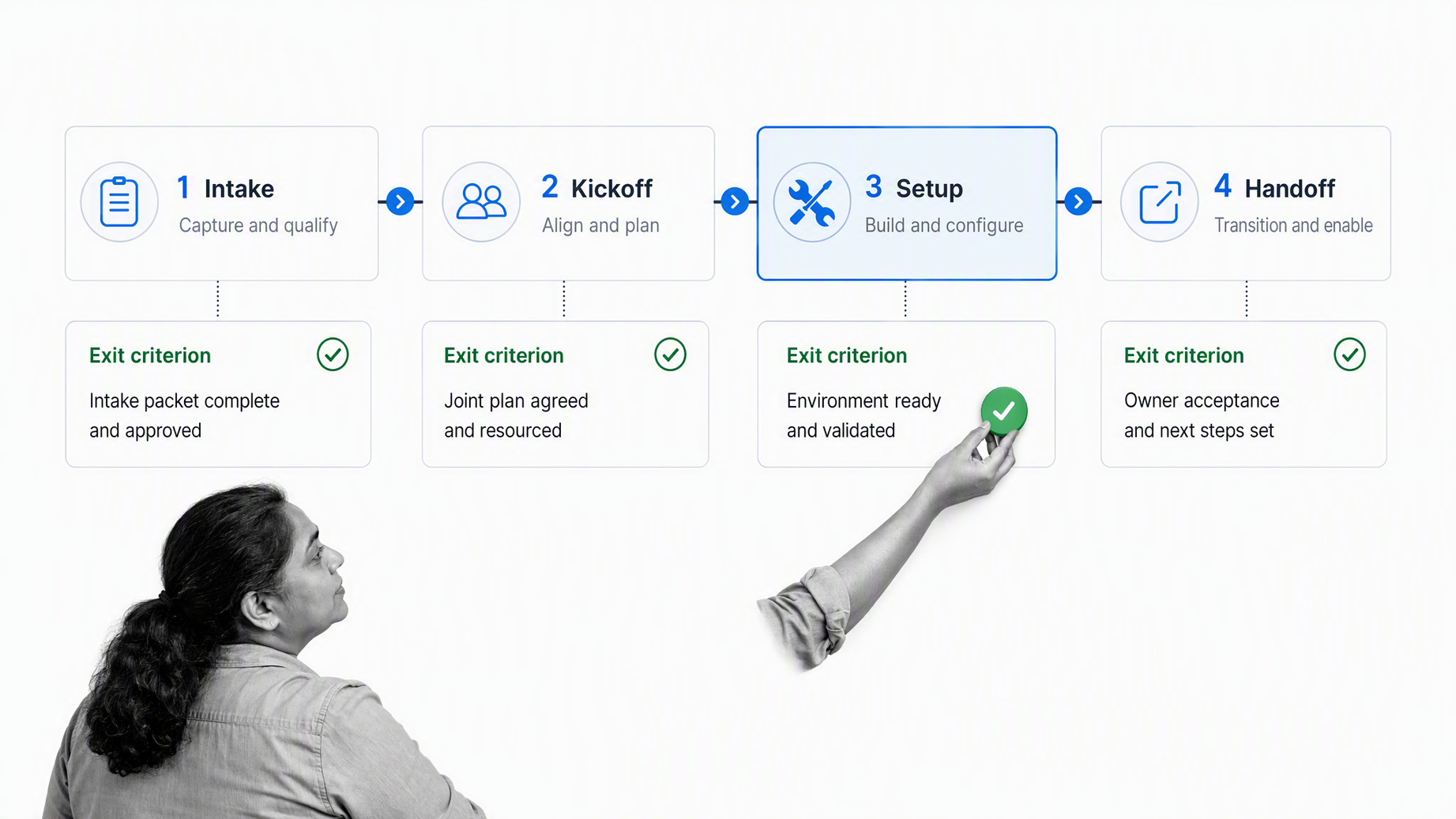
Most client onboarding workflows can be understood as four connected motions. Intake collects the minimum context required to work. Kickoff aligns people on outcomes and decisions. Setup creates the accounts, access, configuration, and delivery environment. Handoff transfers complete context to the person or team responsible for ongoing service.
- Intake: accept the internal handoff, identify stakeholders, collect required information, and surface missing dependencies.
- Kickoff: confirm goals, scope, roles, timeline, communication, risks, and the first value milestone.
- Setup: provision access, configure systems, migrate or validate data, deliver training, and complete required reviews.
- Handoff: summarize decisions, transfer ownership, schedule follow-up, and close or assign every open item.
Each motion needs an exit criterion. Intake is not complete because a form was sent. It is complete when required information has been reviewed. Kickoff is not complete because a meeting ended. It is complete when decisions and owners are recorded. Handoff is not complete because the onboarding manager sent an email. It is complete when the ongoing owner accepts the account and can see every unresolved item.
How should you customize the client onboarding template?
Start with the smallest workflow that can control the work. Remove tasks that do not change an outcome, decision, risk, or handoff. Add fields only when someone will use the information. Assign each task to one accountable role, even when several people contribute. Tie due dates to the kickoff, contract date, launch date, or another event the team can verify.
Use conditional logic to show or hide tasks and form fields based on client responses. This keeps a shared core while supporting different services, risk levels, and client types. Use dynamic task due dates so timing adjusts from a workflow event instead of relying on copied calendar dates.
- Define the start trigger and the person allowed to launch onboarding.
- Write the exit criterion for each phase before adding detailed tasks.
- List the minimum client information and evidence required to proceed.
- Assign internal owners, client responsibilities, due dates, and escalation rules.
- Add conditional paths for service type, complexity, risk, and missing information.
- Place approvals only where a decision must block progression.
- Test the workflow with a realistic client scenario and one exception scenario.
Treat automation as a way to move approved work, not a substitute for judgment. Automate reminders, task creation, routine messages, record updates, and handoffs after the underlying rule is clear. Keep relationship moments, risk acceptance, scope changes, and ambiguous decisions with accountable people.
What should you check before launching the workflow?
Before you launch the workflow
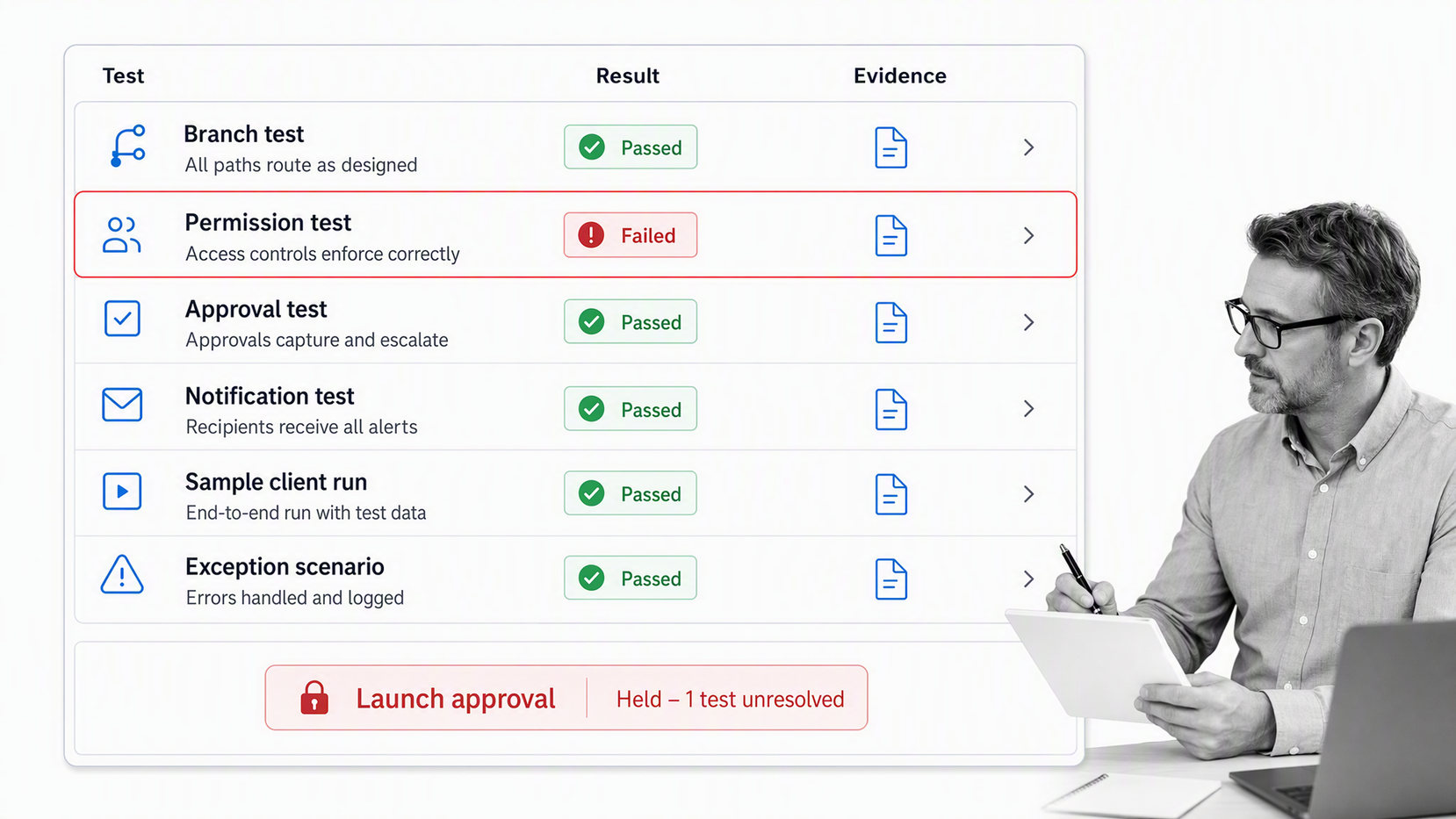
Run the template with sample data before using it with a client. Test the default path, every conditional branch, overdue behavior, approvals, permissions, notifications, and handoff. Confirm that client-facing language is clear and that internal notes cannot accidentally appear in a client-visible task.
- The launch trigger, owner, and first due date are explicit.
- Every required field has a business purpose.
- Sensitive data is collected, stored, and shared appropriately.
- Client and internal responsibilities are distinguishable.
- Each approval names the decision and evidence under review.
- Every phase has a verifiable exit criterion.
- The ongoing owner is assigned before the final handoff.
- A first-value or follow-up milestone is already scheduled.
After the first few runs, review where clients wait, where team members improvise, which fields remain unused, and which decisions arrive too late. Improve the template from evidence in completed runs. The goal is not a longer checklist. The goal is a workflow that makes correct execution easier and missing context visible.
How can Process Street run client onboarding?
Process Street turns the template into an executable workflow. Forms collect client and project data inside the run. Conditional paths adapt the tasks to the client. Assignments and due dates move work to the right owner. Approvals hold important decisions at the right gate. The completed run provides a record of what happened, who did it, and what remains open.
That structure also gives AI agents a process to follow. Routine execution can be automated while owners remain in control of approvals, exceptions, sensitive information, and client commitments. The result is a repeatable onboarding motion that can support a simple service or a high-stakes enterprise implementation without losing proof at the handoffs.
Start with the complete client onboarding guide if you need to design the broader experience, then choose a template from the library and adapt it to the motion described above.
What else should you know about client onboarding templates?
What should a client onboarding template include?
Include an internal handoff, client intake, kickoff, setup, training where needed, approval gates, a transfer to the ongoing owner, and a scheduled follow-up. Give every task an owner and every phase an exit criterion.
How long should client onboarding take?
The timeline depends on service complexity, risk, dependencies, and client responsiveness. Set target dates by phase and measure waiting time separately from active work so delays have a visible cause and owner.
Who owns client onboarding?
Assign one accountable onboarding owner, then name task owners for sales handoff, operations, technical setup, security, finance, training, and ongoing service. The client should also know their primary contact and responsibilities.
Can one template support different client types?
Yes. Keep a shared core and use conditional paths for service type, client size, risk, region, technical requirements, or selected options. Avoid maintaining separate copies when the underlying process is mostly the same.
What is the difference between onboarding and kickoff?
Onboarding is the complete transition from signed agreement to active delivery. Kickoff is one decision and alignment event inside that process. Intake should begin before kickoff, and setup and handoff usually continue afterward.
When is client onboarding complete?
Onboarding is complete when the agreed setup and first-value criteria are met, every open issue has an owner, and the ongoing service owner has accepted the account with the required context and follow-up schedule.
