


Turn every policy into automated workflows with built-in enforcement and audit-ready proof.



10 Best Client Onboarding Software (with Definition, Benefits, & Features)

Client onboarding software helps businesses structure, automate, and scale the process of bringing new clients from signed contract to fully operational. The right platform reduces time-to-value, eliminates missed steps, and creates a consistent experience that builds trust from day one.
Choosing the wrong tool costs more than money. Disorganized onboarding leads to client churn, support escalations, and internal frustration. Research consistently shows that clients who do not see value quickly are far more likely to disengage during implementation. Teams can evaluate AI assistance for drafting, summarization, and status visibility, but the onboarding controls still need to be configured and tested.
This guide covers what client onboarding software is, why it matters, how to evaluate your options, and the 10 best platforms available today.
In this article, we are going to cover:
- What Is Client Onboarding Software?
- Why Client Onboarding Software Matters
- How to Choose Client Onboarding Software
- What makes onboarding scalable for a compliance team?
- 10 Best Client Onboarding Software
- Best Practices for Client Onboarding
- How Process Street Simplifies Client Onboarding
- FAQs
What Is Client Onboarding Software?
Client onboarding software is a platform that helps businesses manage and automate the process of welcoming and integrating new clients after a deal closes. It replaces scattered spreadsheets, email threads, and tribal knowledge with structured workflows that guide both your team and your clients through every required step.
These platforms typically include task management, document collection, client-facing portals, automated notifications, and progress tracking. The goal is to move clients from signed contract to live and successful as quickly and consistently as possible. When a platform offers AI assistance, verify its role, permission boundary, evidence trail, and human review path.
Key capabilities of client onboarding software
- Workflow automation: Trigger tasks, assignments, and notifications based on client progress and milestones
- Client-facing portals: Give clients visibility into their onboarding status, required actions, and timelines
- Document collection: Gather contracts, compliance forms, credentials, and other required materials in one place
- Internal task coordination: Assign and track tasks across implementation, success, and support teams
- Playbook templates: Standardize onboarding processes across client segments and service tiers
- Analytics and reporting: Track time-to-value, bottlenecks, and onboarding health metrics
Client onboarding software differs from generic project management tools. While you can use Asana or Monday.com to track onboarding tasks, purpose-built platforms provide client-facing visibility, onboarding-specific analytics, and playbook structures that generic tools lack. That distinction is what separates a functional workaround from a scalable customer onboarding solution.
Why Client Onboarding Software Matters
The onboarding experience sets the tone for the entire client relationship. A structured, well-executed client onboarding process directly impacts retention, expansion revenue, and client satisfaction. Here is why investing in the right software matters.
Faster time-to-value
Automated workflows eliminate the manual back-and-forth that slows onboarding. When tasks trigger automatically, documents route to the right people, and clients see exactly what they need to do next, the entire process compresses. Teams using structured onboarding platforms consistently report 30-50% reductions in implementation time.
Reduced churn risk
Poor onboarding is one of the top drivers of early churn. When clients feel confused, unsupported, or stuck during implementation, they disengage. Onboarding software gives both sides visibility into progress, flags stalled accounts before they become churn risks, and ensures no critical steps get skipped.
Consistency at scale
Without software, onboarding quality depends on whoever runs the project. That works with five clients. It breaks at fifty. Playbook-driven platforms ensure every client gets the same structured experience, regardless of which team member leads the engagement.
Regulatory compliance
In regulated industries such as financial services, healthcare, and legal, client onboarding can involve mandatory identity, document, approval, and evidence requirements. Configure and test each required control in the selected platform, including the exception and rework path, before relying on it operationally.
Cross-team coordination
Client onboarding rarely involves just one team. Sales hands off to implementation, implementation coordinates with product and support, and success takes over for ongoing management. Onboarding software creates a single source of truth across all of these handoffs, reducing dropped balls and communication gaps.
How to Choose Client Onboarding Software
Not every onboarding platform fits every business. The right choice depends on your onboarding model, team size, client volume, and tech stack. Here are the key evaluation criteria.
Onboarding model fit
High-touch onboarding with dedicated implementation managers requires different tooling than self-serve or low-touch models. Some platforms excel at project-based, milestone-driven implementations. Others focus on automated, scalable onboarding flows. Match the tool to your actual delivery model.
Client-facing experience
Does the platform provide a branded, intuitive portal where clients can see their progress, complete tasks, and access resources? The best tools make onboarding feel organized and professional from the client’s perspective, not just from your internal view.
Integration with your stack
Your onboarding tool needs to connect with your CRM (Salesforce, HubSpot), communication tools (Slack, email), and any other systems your team relies on. Data should flow between systems without manual re-entry.
Automation depth
Look beyond basic task assignment. The strongest platforms offer conditional logic, automated triggers based on client actions, and workflow branching that adapts to different client segments without manual intervention.
AI and automation capabilities
AI can help draft onboarding workflows, summarize portfolio status, and identify information that may need review. It should not be described as automatically finding compliance gaps or producing reliable compliance reports without a configured control, appropriate data, and human validation.
Reporting and visibility
You need to know which onboardings are on track, which are stalled, and where bottlenecks exist. Portfolio-level dashboards, time-to-value metrics, and health scoring separate serious platforms from basic task trackers.
What makes onboarding scalable for a compliance team?
| Control to evaluate | Evidence to request in a product test | Why it matters |
|---|---|---|
| Required data and documents | Attempt to complete a step without the required fictional evidence | Prevents incomplete handoffs |
| Named owner and due date | Show who owns each active onboarding and what is late | Makes the queue manageable at volume |
| Conditional routing | Send a high-risk fictional client down an enhanced-review path | Aligns effort with risk |
| Approval and rework | Reject a submission, amend it, and resubmit it | Proves exceptions can be corrected without losing history |
| Task permissions | Show that the client, operator, approver, and auditor see only the intended work | Supports separation of duties and data minimization |
| Enforced order | Try to bypass a prerequisite step | Tests whether critical sequencing is configurable |
| Audit history | Retrieve the owner, timestamps, submissions, decision, and final status | Supports review and evidence requests |
| Integration controls | Document the system of record, trigger, credentials, error path, and retry owner | Prevents silent gaps between systems |
| Change governance | Update a procedure and show how the new version applies to future work | Keeps the operating process current |
| Portfolio reporting | Filter active onboardings by stage, age, owner, exception, and risk | Gives managers visibility beyond one client at a time |
10 Best Client Onboarding Software
This list reflects the current market for purpose-built client onboarding platforms. We evaluated each tool based on onboarding-specific capabilities, client-facing experience, automation depth, integration ecosystem, and real-world adoption.
1. Process Street
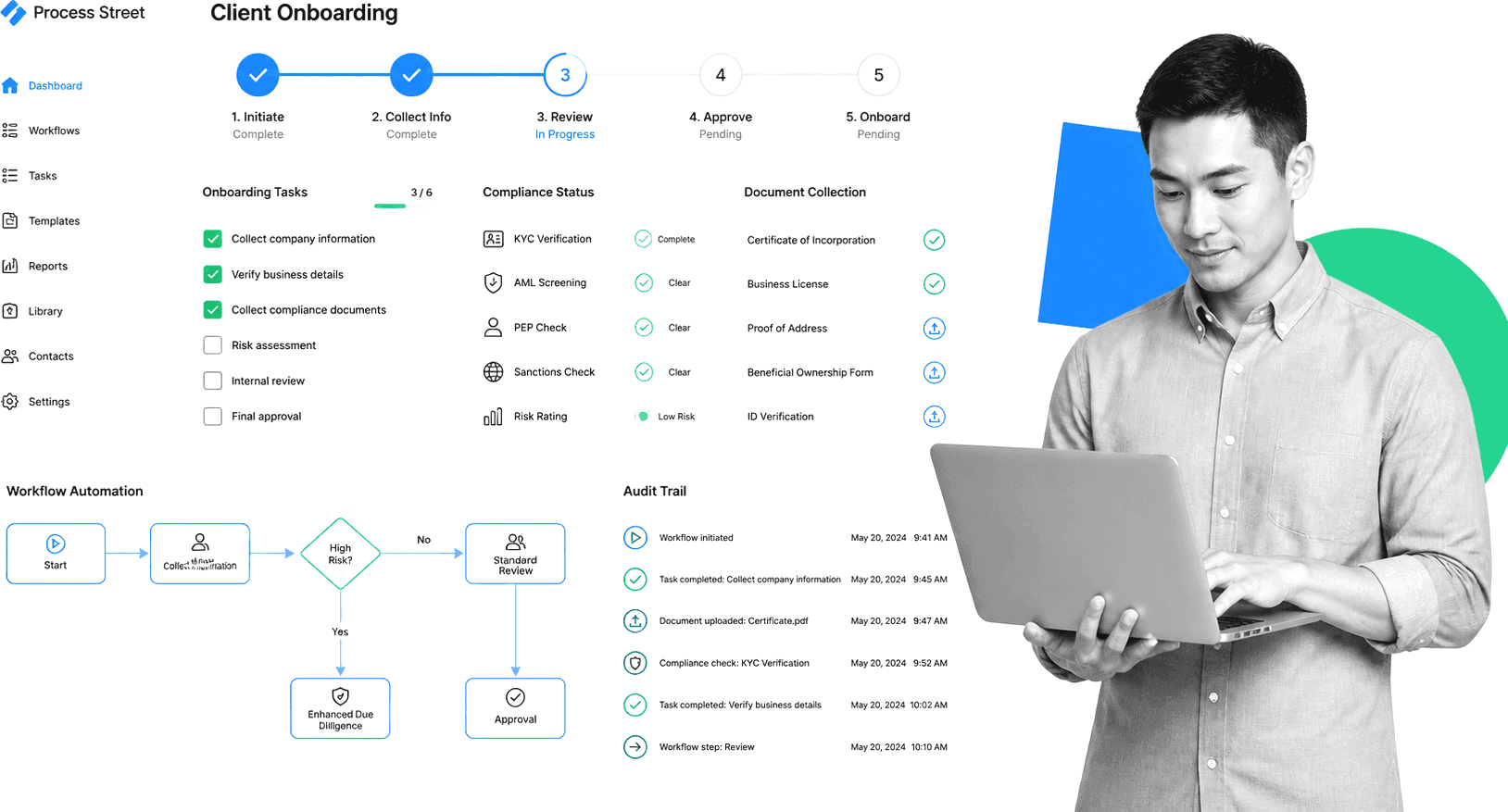
Process Street can be configured with required information, task order, permissions, due dates, conditions, and approvals. The quality of the control depends on the workflow design, plan, permissions, integration setup, and how exceptions are handled. Test the configured process before treating it as a compliance control.
Process Street is a Compliance Operations Platform for turning onboarding procedures into repeatable workflows. Teams can assign owners, collect required information, route work conditionally, request approvals, enforce task order, and keep the completion record attached to each onboarding. Evaluate the current product as one platform. Do not use the retired Cora or separate Docs/Ops architecture in current copy.
Process Street’s client onboarding templates let you launch structured workflows in minutes. Each workflow run tracks task completion, collects required documents, triggers automated approvals, and creates a full audit trail. Teams like Avion Wealth cut their client onboarding time by 30% using Process Street’s workflow automation.
Best for: Teams that need enforced, compliant onboarding workflows with AI-powered monitoring, audit trails, and no-code automation.
Key features:
- No-code workflow automation with conditional logic
- Document governance with version control and approvals
- Integration routes for Salesforce, Slack, DocuSign, and connector platforms
- SOC 2 Type II certified with full audit logs
2. GUIDEcx
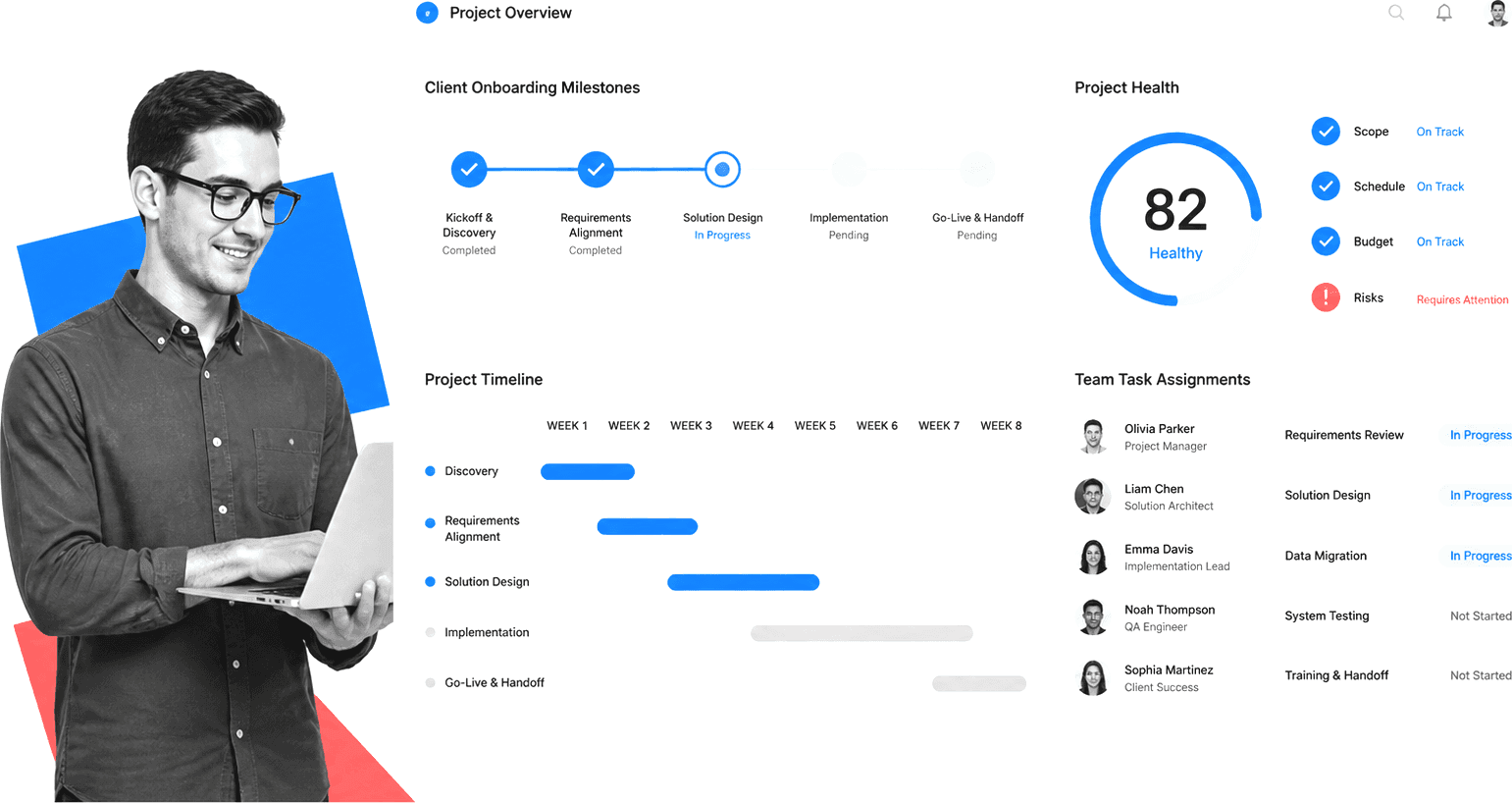
GUIDEcx is a purpose-built customer onboarding and implementation platform designed for teams running complex, high-touch onboarding projects. The platform treats onboarding as a collaborative, client-facing process rather than an internal delivery workflow.
GUIDEcx provides a shared workspace where implementation teams and their clients can see timelines, milestones, risks, and responsibilities in one place. The platform includes project health scoring, automated task assignment, and portfolio-level visibility across all active onboardings.
Best for: Implementation teams managing high-volume, milestone-driven onboarding projects with external stakeholder visibility.
Key features:
- Client-facing project portals with real-time progress tracking
- Project health scoring and risk alerts
- Automated task triggers and milestone management
- Portfolio dashboards for team leads
- Mobile-friendly client experience
3. Rocketlane
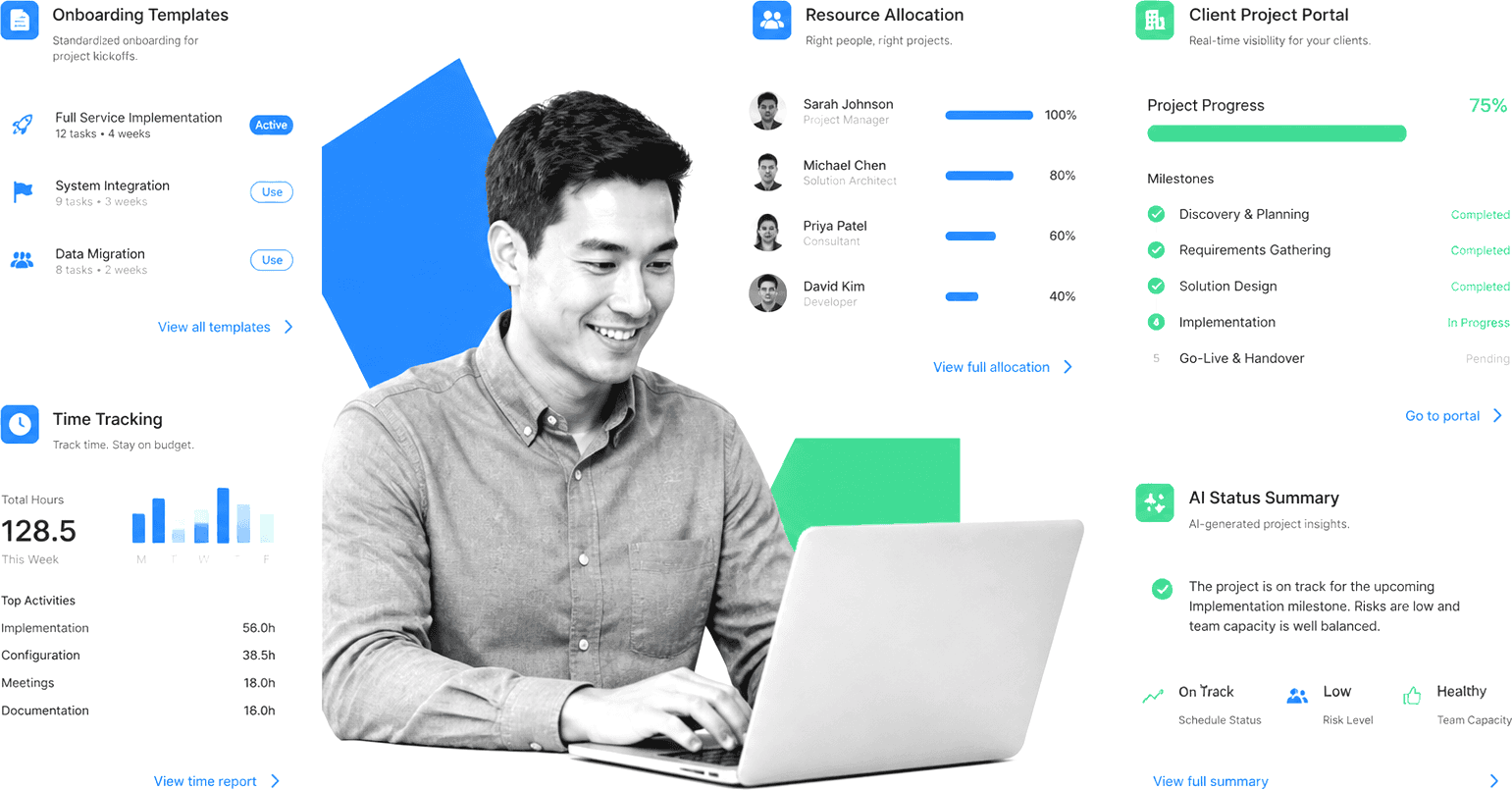
Rocketlane is built specifically for post-sale implementation and customer onboarding. The platform stands out for connecting customer-facing delivery to back-office services execution, giving teams a single place to coordinate projects, track effort, and run predictable services delivery at scale.
Rocketlane replaces the ad-hoc emails and spreadsheets that many implementation teams rely on with standardized onboarding templates, time tracking, and resource management. G2 reviewers consistently highlight its user-friendly interface and AI-driven project updates.
Best for: Professional services and implementation teams that need to track capacity, effort, and project delivery alongside client onboarding.
Key features:
- Templatized onboarding playbooks
- Time tracking and resource management
- Client-facing project portals
- AI-powered status updates and summaries
- Revenue recognition and services analytics
4. OnRamp
OnRamp differentiates itself with a dual-interface system: a customer portal designed specifically for end-users and a separate internal project management platform for the onboarding team. This separation means clients see a clean, simple experience while your team manages the complexity behind the scenes.
OnRamp focuses on making onboarding feel easy for the client. The customer-facing portal guides clients through their required actions with clear instructions, embedded content, and progress indicators that reduce confusion and support requests.
Best for: Teams that want to deliver a polished, client-facing onboarding experience while managing internal complexity separately.
Key features:
- Separate client portal and internal management views
- Guided client task completion
- Embedded content and resource sharing
- Automation triggers based on client actions
- Centralized onboarding analytics
5. ChurnZero
ChurnZero is a customer success platform with strong onboarding automation capabilities. The platform connects onboarding workflows to the broader customer lifecycle, giving teams visibility into how onboarding quality impacts retention and expansion.
ChurnZero’s onboarding playbooks automate task sequences, in-app walkthroughs, and communication cadences based on where each client stands in their journey. The platform also includes health scoring that starts during onboarding, so teams can identify at-risk accounts before they ever reach steady state.
Best for: SaaS companies that want to connect onboarding execution directly to retention and customer success onboarding outcomes.
Key features:
- Automated onboarding playbooks and task sequences
- Real-time customer health scoring
- In-app product walkthroughs
- Usage analytics and engagement tracking
- CRM integrations with Salesforce and HubSpot
6. Dock
Dock creates personalized client workspaces for onboarding, implementation, and ongoing collaboration. Each workspace acts as a centralized hub where clients can access documents, track tasks, review timelines, and interact with your team without needing to log into multiple systems.
Dock is positioned as an AI revenue enablement platform, combining digital sales rooms with onboarding workspaces. This makes it a strong fit for teams that want a seamless handoff from sales to implementation within the same client-facing environment.
Best for: Teams that want a unified client-facing workspace spanning sales handoff through onboarding and ongoing engagement.
Key features:
- Branded client workspaces with no login required
- Embedded content, templates, and task tracking
- Sales-to-onboarding handoff in one workspace
- Engagement analytics per workspace
- Integrations with Slack, HubSpot, and Salesforce
7. HubSpot Service Hub
HubSpot Service Hub extends HubSpot’s CRM platform with customer onboarding and success tools. For teams already using HubSpot for sales and marketing, Service Hub adds onboarding pipelines, ticket-based task management, a knowledge base, and customer feedback surveys within the same platform.
The main advantage is deep CRM integration. Client data, deal context, and communication history carry over from sales to onboarding without any manual data transfer. The trade-off is that HubSpot’s onboarding capabilities are more generalized compared to purpose-built platforms.
Best for: Teams already invested in the HubSpot ecosystem that want onboarding capabilities integrated with their CRM.
Key features:
- Onboarding pipelines within HubSpot CRM
- Automated sequences and task assignment
- Knowledge base for client self-service
- Customer feedback surveys and NPS
- Full marketing, sales, and service data in one platform
8. Planhat
Planhat is a customer platform built for teams that treat client onboarding as a defined operational process. The platform’s highest-rated features on G2 are checklists and workflows (88%) and tasks (86%), reflecting its strength in execution discipline.
Reviewers describe consistent use of onboarding playbooks to keep delivery predictable as teams grow. Planhat also provides customer health scoring, revenue tracking, and lifecycle management that extends well beyond the onboarding phase.
Best for: Customer success teams that need structured onboarding playbooks alongside full lifecycle management and health scoring.
Key features:
- Onboarding playbooks with checklists and task workflows
- Customer health scoring and risk alerts
- Revenue and usage analytics
- Lifecycle management beyond onboarding
- Flexible data model for custom reporting
9. Moxo
Moxo focuses on secure, client-facing onboarding coordination with AI-powered workflow automation. The platform provides branded interaction workflows that guide clients through document submission, approvals, e-signatures, and multi-party coordination in a single interface.
Moxo is particularly strong for industries where client onboarding involves sensitive document exchange and multi-step approval chains, such as financial services, legal, and managed services client onboarding.
Best for: Regulated businesses that need secure, branded client interaction workflows with document management and approvals.
Key features:
- AI-powered workflow automation
- Secure document exchange and e-signatures
- Branded client-facing portals
- Multi-party coordination and approvals
- White-label deployment options
10. Arrows
Arrows is a HubSpot-native onboarding platform that embeds onboarding plans directly inside HubSpot deals and tickets. Rather than operating as a separate tool, Arrows extends HubSpot with purpose-built onboarding functionality: interactive client-facing plans, task tracking, and progress visibility that lives inside the CRM.
This tight HubSpot integration means onboarding data stays in the CRM, reporting is unified, and the sales-to-onboarding handoff requires no data migration. The trade-off is that Arrows only works with HubSpot.
Best for: HubSpot-first teams that want native onboarding plans embedded directly in their CRM workflows.
Key features:
- Interactive onboarding plans inside HubSpot
- Client-facing task completion tracking
- Automated triggers synced with HubSpot workflows
- Onboarding analytics within HubSpot reporting
- No separate login for clients
Best Practices for Client Onboarding
Having the right software is only half the equation. How you design and run your onboarding process determines whether clients reach value quickly or stall out. These practices apply regardless of which platform you choose.
Map the client journey before building workflows
Start by documenting every step from contract signature to “live and successful.” Identify the handoffs, dependencies, and decision points. Build your workflows around this map, not the other way around. A strong onboarding playbook starts with clarity about what “done” looks like for each client segment.
Standardize first, then customize
Build a core onboarding workflow that works for 80% of your clients. Then add conditional branches for different tiers, industries, or product configurations. This approach scales far better than building custom processes for every new client. Use client onboarding templates as your starting point.
Automate the repeatable, personalize the meaningful
Automate document collection, task assignment, notification sequences, and status updates. Save human effort for the interactions that actually matter: kickoff calls, strategic alignment conversations, and problem-solving sessions. The goal is to eliminate busywork without losing the human touch.
Set clear expectations from day one
Share a timeline, milestone definitions, and required actions with clients at the start of onboarding. When clients know what to expect and what you need from them, bottlenecks decrease and engagement increases.
Embed compliance into the workflow
Do not treat compliance as a separate checklist. Build regulatory requirements, identity verification, document approvals, and audit logging directly into your onboarding workflows. This ensures compliance happens by default rather than depending on someone remembering to check a box. Teams handling digital onboarding at scale find this approach essential.
Measure and iterate
Track time-to-value, client satisfaction scores, and bottleneck frequency across your onboardings. Use this data to identify where clients get stuck and where your process needs tightening. The best onboarding processes improve continuously, not just when something breaks.
Use AI to accelerate and monitor onboarding
AI agents are now a practical layer for teams running onboarding at volume. Rather than relying on managers to manually review every active onboarding, AI agents can monitor execution across the full portfolio, surface accounts that are stalled or behind schedule, and flag compliance gaps the moment they appear. Some teams use AI to auto-generate post-onboarding reports, suggest workflow improvements based on historical completion patterns, and push proactive nudges to both internal teams and clients when action is needed. The result is faster detection of problems, more consistent delivery, and less time spent on status checks that should never require a human.
How Process Street Simplifies Client Onboarding
Process Street approaches client onboarding differently from typical project management tools. Instead of tracking tasks and hoping people follow the process, Process Street enforces the process itself. Every step, approval, document collection, and handoff runs through automated workflows that cannot be skipped or done out of order.
For portfolio oversight, configure the workflow so managers can review active onboardings by owner, due date, stage, exception, and approval status. Confirm what the selected plan reports and how the team will handle missing evidence, stalled work, and rework.
Here is how teams use Process Street for client onboarding:
- Structured onboarding checklists: Build detailed workflows that guide your team through every onboarding step. Conditional logic adapts the workflow based on client type, industry, or service tier.
- Automated task routing: Tasks assign automatically to the right team members at the right time. Approvals escalate when deadlines approach. Notifications fire when client action is needed.
- Document governance: Collect, track, and approve onboarding documents within the workflow. Version control and approval chains ensure the right documents reach the right people.
- Compliance by default: Every completed task creates an audit trail. Required steps cannot be bypassed. Approval workflows enforce sign-off before critical milestones.
- Industry templates: Pre-built templates for marketing agency onboarding, SaaS client onboarding, financial services, and professional services let teams launch in hours, not weeks.
Process Street supports native integrations and connector-based routes to other systems. Verify the exact trigger, action, credential owner, failure path, retry behavior, and plan requirements for the applications used in your onboarding process.
FAQs
What is client onboarding software and how does it work?
Client onboarding software automates the process of bringing new clients from signed contract to fully operational. It provides structured workflows, task management, document collection, and client-facing portals that guide both your team and your clients through every required step. The software replaces manual email chains and spreadsheets with repeatable, trackable processes.
What is the difference between client onboarding software and project management tools?
Client onboarding software is purpose-built for post-sale client implementation. It includes client-facing portals, onboarding-specific analytics, playbook templates, and compliance features that generic project management tools like Asana or Monday.com lack. While you can adapt a PM tool for onboarding, purpose-built platforms deliver a better client experience and more accurate onboarding metrics.
How long does it take to implement client onboarding software?
Most teams can set up a basic client onboarding workflow within a day using pre-built templates. Full implementation, including integrations, custom workflows, and team training, typically takes one to four weeks depending on complexity. Platforms like Process Street offer ready-made onboarding templates that let you launch structured workflows in hours.
What features should I look for in client onboarding software?
Look for workflow automation, client-facing portals, document collection and management, conditional logic, integration with your CRM and communication tools, and onboarding analytics. If you operate in a regulated industry, also prioritize compliance features like audit trails, approval workflows, and version-controlled documentation. In 2026, AI monitoring capabilities are an increasingly important evaluation criterion as well.
Can client onboarding software help with regulatory compliance?
Client onboarding software can support a compliance program by making required information, approvals, permissions, evidence, and history part of the workflow. It does not make an organization compliant automatically. Map each required control to the product configuration, responsible owner, test evidence, and review cadence.
How does client onboarding software reduce churn?
Structured onboarding reduces churn by getting clients to value faster. When clients see progress, understand next steps, and feel supported during implementation, they are far more likely to adopt and retain the product. Onboarding software also provides health scoring and risk alerts that help teams intervene with struggling accounts before they disengage.
How is AI changing client onboarding in 2026?
AI can help teams draft onboarding instructions, summarize status, identify missing information, and suggest next steps. Treat those outputs as assistance, not proof that a control was performed or a regulatory requirement was met. Verify the configured workflow, permissions, evidence, and review process.
