


Turn every policy into automated workflows with built-in enforcement and audit-ready proof.



9 Change Management Tools That Improve Rollouts
Change management tools help leaders turn a decision into a transition that people can understand, follow, and sustain. The right platform gives each stage an owner, keeps communication tied to the work, captures feedback, and shows whether the new way of working is actually being adopted.
No single product handles every part of change equally well. A workflow platform can control execution, a digital adoption platform can guide people inside new software, an organizational change platform can measure readiness, and an IT service management tool can govern technical changes. Choosing well starts with the job you need the software to do.
This guide compares nine change management tools by their strongest use case. It also explains the capabilities to evaluate, the questions to ask vendors, and a practical way to implement the software without creating another layer of administration.
Jump to:
- What are change management tools?
- Which change management tools are best for different jobs?
- How should you compare change management tools?
- What capabilities matter most?
- How do you implement change management software?
- Frequently asked questions
What are change management tools?
Change management tools are software products that help an organization plan, communicate, execute, and measure a transition. The transition might be a new operating procedure, a software rollout, a policy change, a restructuring, a merger, or a technical release. These tools reduce the distance between the decision to change and the daily behavior required to make that change stick.
The category includes several distinct product types:
- Workflow and process platforms turn the new procedure into assigned, repeatable work with approvals, reminders, evidence, and an audit trail.
- Digital adoption platforms place guidance and support inside the software employees are learning to use.
- Organizational change platforms help change teams map stakeholders, assess impact, coordinate communication, and measure readiness or adoption.
- IT service management platforms control technical changes through risk assessment, approvals, service context, and release records.
- Project and work management platforms coordinate milestones, dependencies, resources, communications, and decisions across a rollout.
- Documentation and training tools capture the new process and give users clear instructions at the moment they need them.
A mature change program often uses more than one category. The important design choice is to name one system as the execution record. Without that center, teams may have a project plan, a training portal, a communication calendar, and an adoption dashboard, yet still lack proof that the required work happened.
Which change management tools are best for different jobs?
The strongest shortlist depends on the type of change, the people affected, and the evidence leaders need after rollout. These nine tools cover controlled execution, software adoption, organizational participation, portfolio analysis, IT change, training, and project coordination.
Process Street
Best for: turning a new policy or operating model into controlled, repeatable execution.
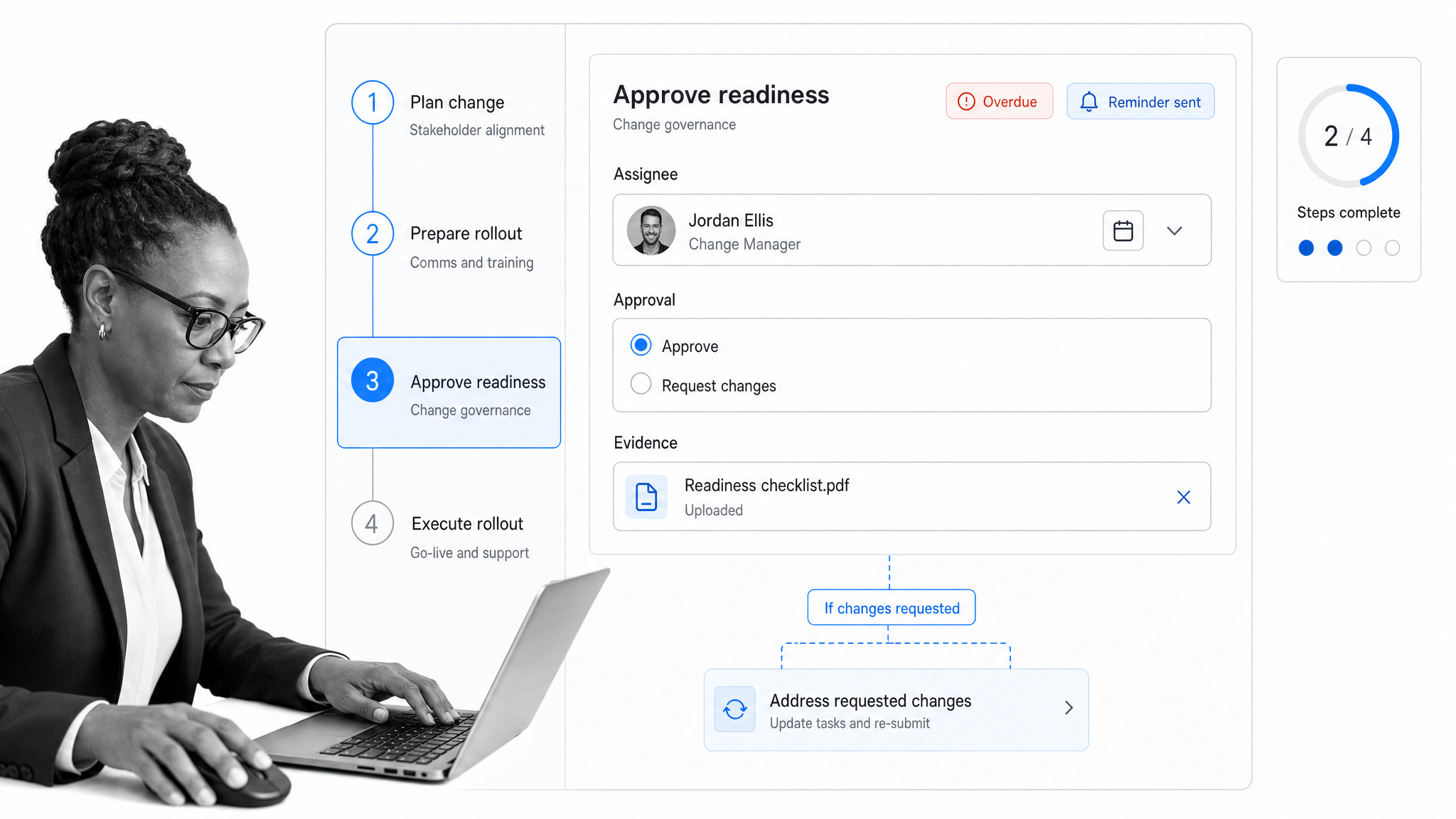
Process Street is the category anchor when the outcome depends on people completing the new process correctly. Leaders can turn a rollout into guided workflows, assign owners, set due dates, automate reminders, route approvals, and monitor completion from dashboards. The same workflow keeps the instruction beside the task, so employees do not have to translate a presentation or policy document into action on their own.
This is especially useful for policy rollouts, standard operating procedure changes, onboarding programs, quality processes, and regulated work. Each run creates a record of what happened, who approved it, what evidence was collected, and where work stalled. That makes adoption measurable at the point of execution rather than through a later survey alone.
Process Street works best as the operational center of the stack. A digital adoption or communication product can support the rollout, while Process Street controls the steps, accountability, exceptions, and proof. See how the platform supports change management execution and explore the broader change management software use case.
Whatfix
Best for: guiding employees inside unfamiliar enterprise applications.
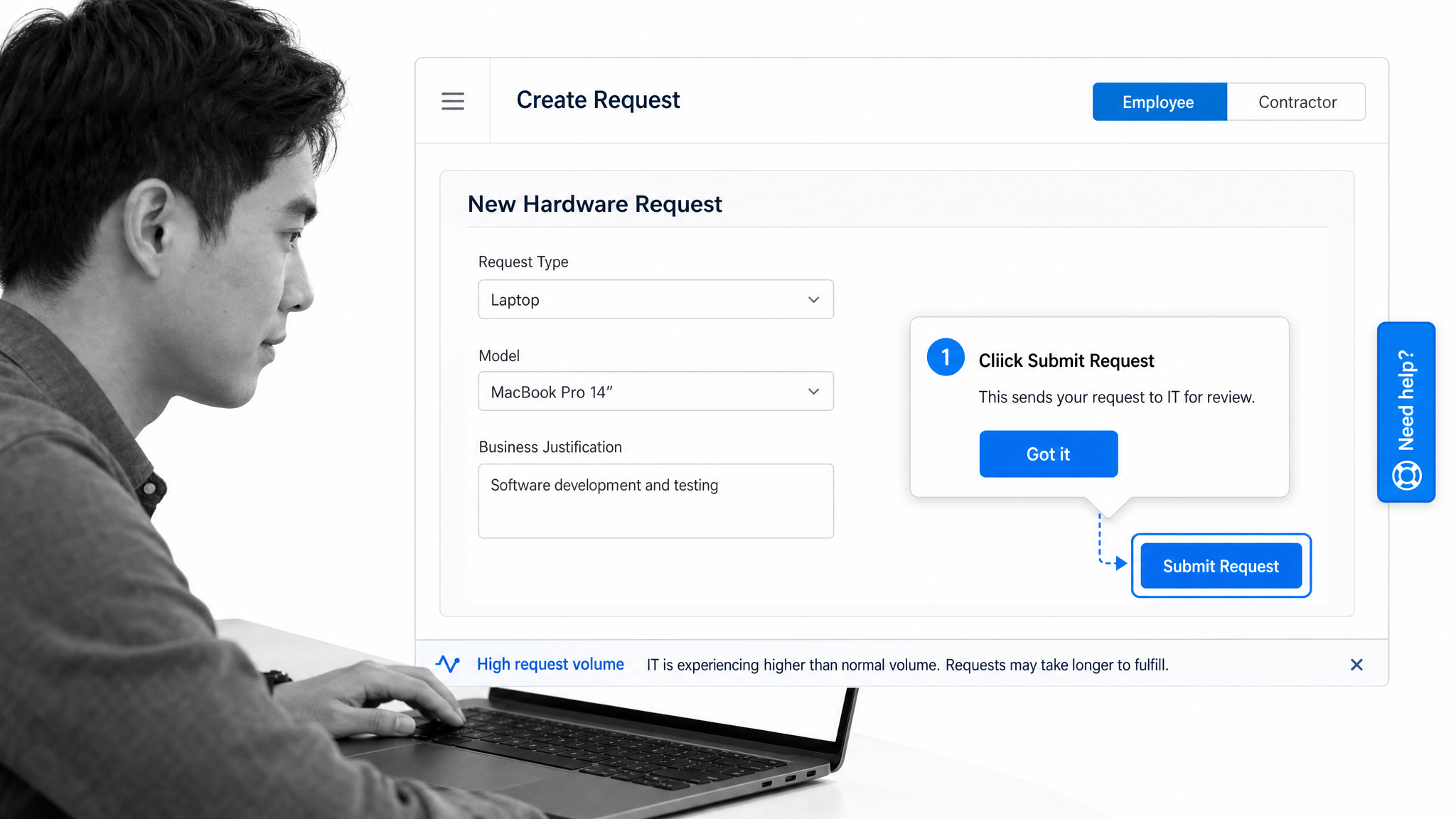
Whatfix is a digital adoption platform for software led change. It places step by step guidance, contextual self help, and support inside the applications employees use. Product analytics can help teams identify friction and see where users struggle with a new workflow. That combination makes Whatfix a strong fit for enterprise application launches, process changes inside a core system, and programs where proficiency matters as much as awareness.
The product is most valuable when the change happens on screen. It can reduce the gap between formal training and the moment an employee must complete a task in the live application. Change leaders still need an execution system for work that crosses applications, teams, and offline approvals. Use Whatfix when the central risk is poor application adoption, not as the only control layer for the complete change program. Review its current digital adoption capabilities.
WalkMe
Best for: enterprise digital adoption programs that need in application guidance and usage analysis.
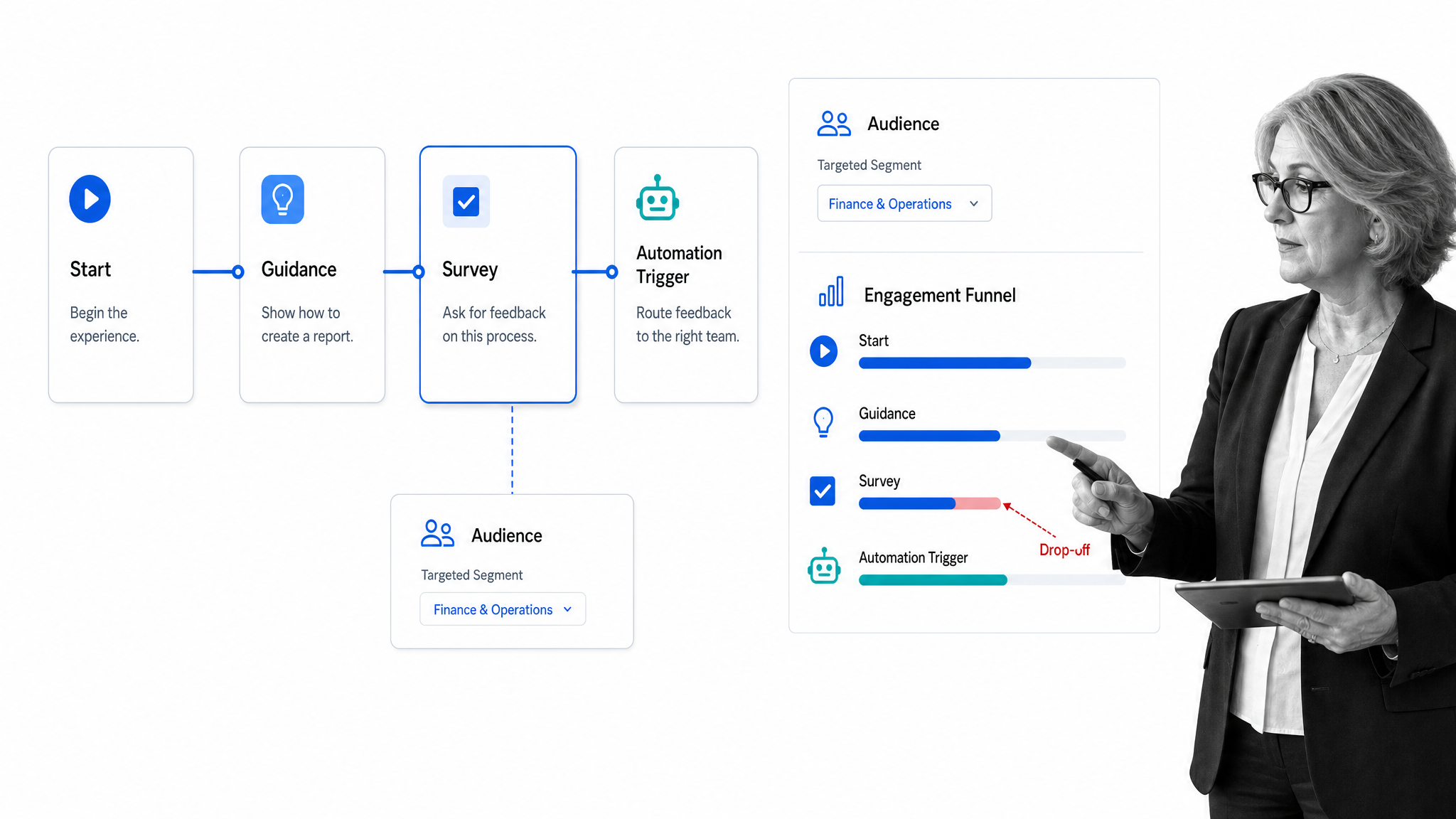
WalkMe combines content authoring, interactive in application guides, onboarding experiences, audience targeting, surveys, workflow automation, and analytics. Change teams can use it to provide guidance inside software, segment experiences for different user groups, and examine engagement or drop off across workflows.
Its scope makes it relevant to large digital transformation programs with many user groups and business applications. Buyers should define the exact workflows that need guidance, the analytics required to prove adoption, and the internal team that will maintain the content. WalkMe is a specialist layer for digital behavior inside applications. It does not replace the need to govern cross functional rollout tasks, policy approvals, or operational evidence.
Howspace
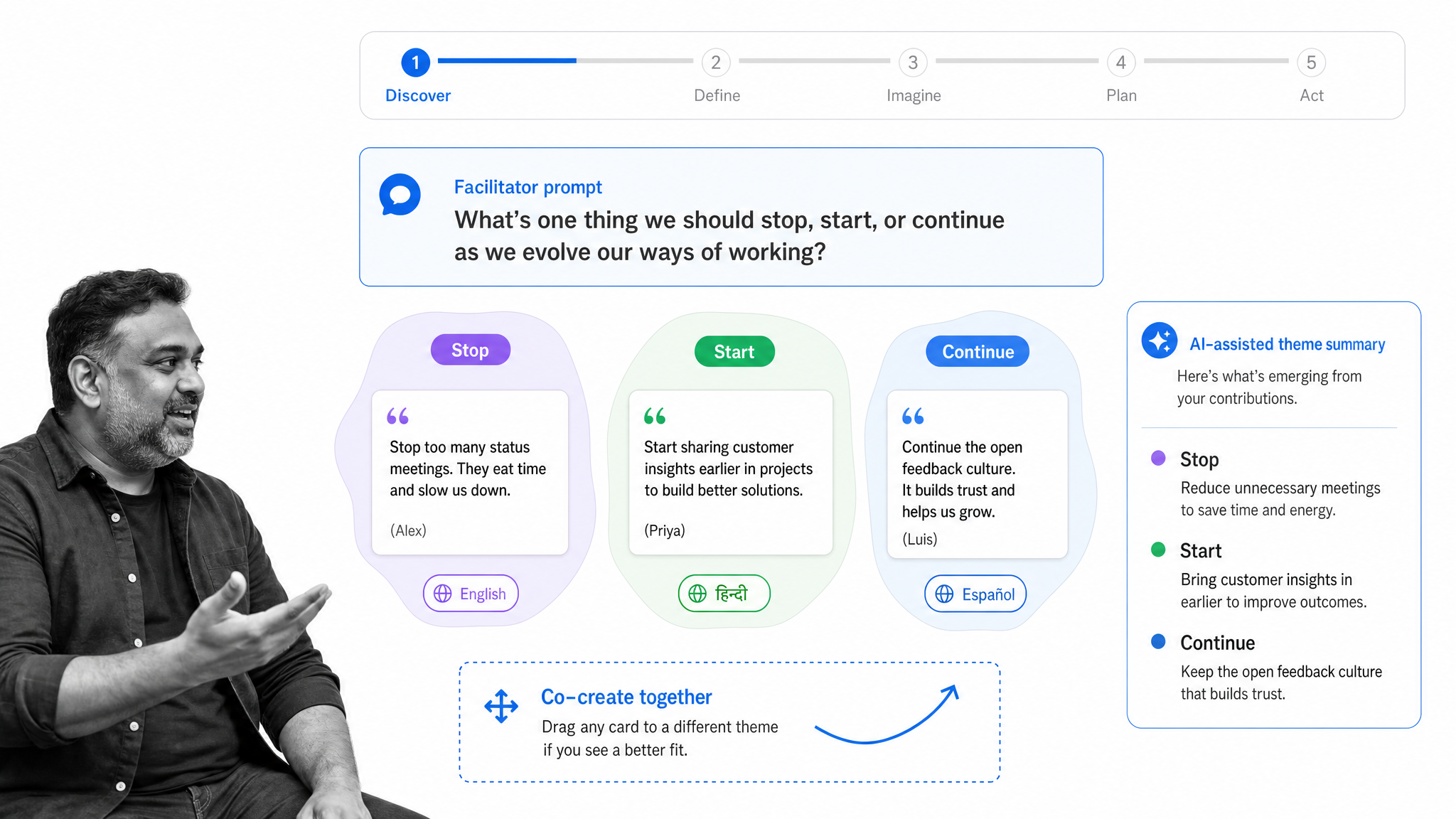
Best for: participative organizational change, facilitated learning, and strategy co creation.
Howspace is designed for collaborative learning and organizational development. It gives facilitators a digital space where employees and stakeholders can discuss ideas, contribute feedback, learn together, and move through a structured transformation journey. The platform supports AI assisted analysis of discussion, multilingual participation, and progress tracking.
That makes Howspace useful when involvement is part of the change method. Culture work, leadership development, strategy alignment, and broad transformation programs often require more than a task list. People need a place to interpret the change and shape how it will work. Howspace supports that participative layer. Pair it with an execution platform when the program also needs assigned operational steps, approvals, and evidence. Explore its organizational development platform.
The Change Compass
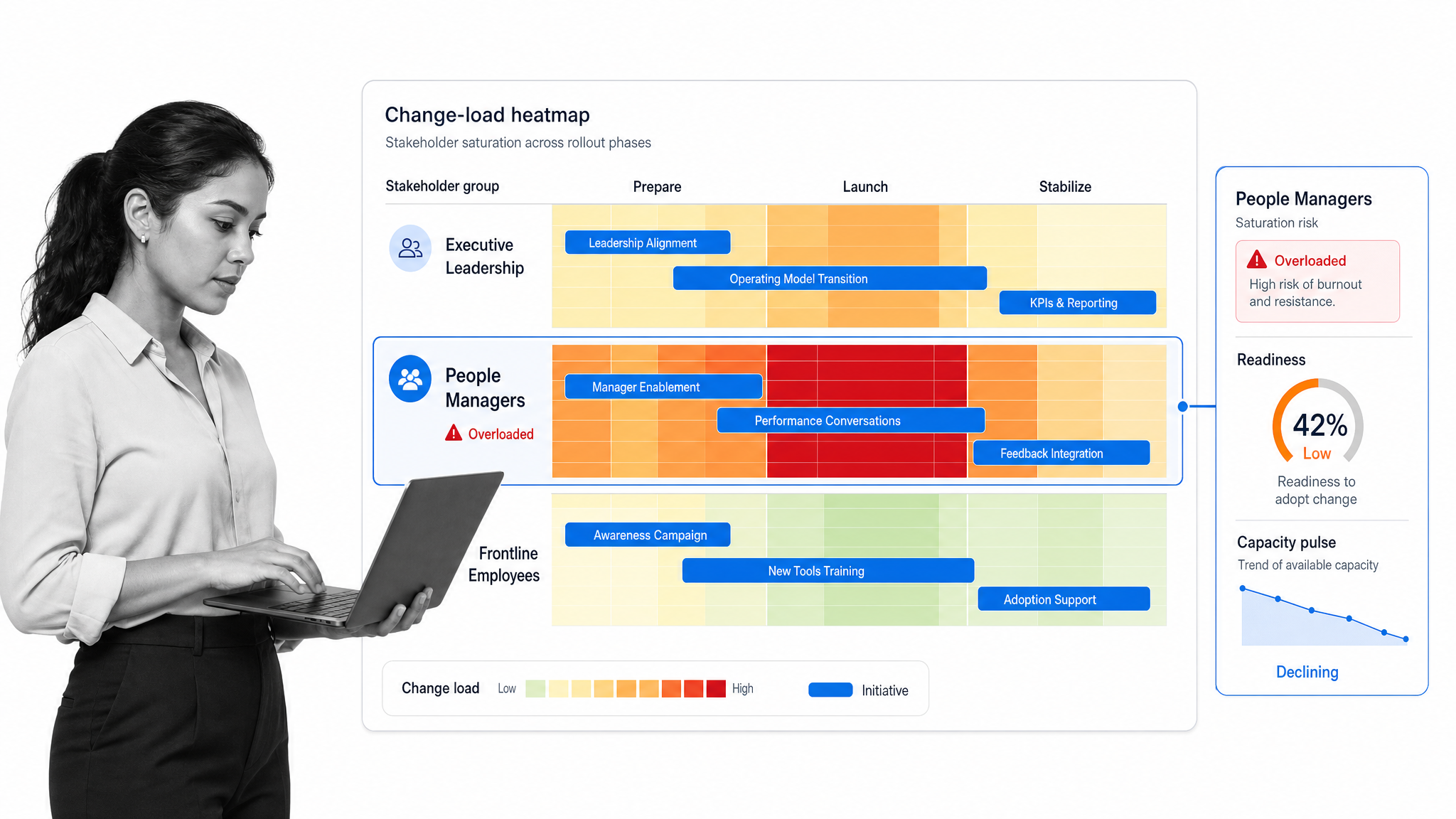
Best for: enterprise change portfolios, impact analysis, readiness, and adoption measurement.
The Change Compass focuses on the information change leaders need across multiple initiatives. Its platform visualizes change load, stakeholder saturation, and readiness across a portfolio. Data collection tools can feed surveys and pulse checks into dashboards, while automated analysis helps teams examine risks and adoption signals.
This is valuable when several programs affect the same business units at the same time. A portfolio view helps leaders spot collision risk, sequence initiatives, and direct support toward groups carrying too much change. The tool is strongest as an analysis and decision surface for a change office. It should connect to the systems where projects and operational work are executed so portfolio insight leads to a specific intervention. See the current change analytics features.
Freshservice
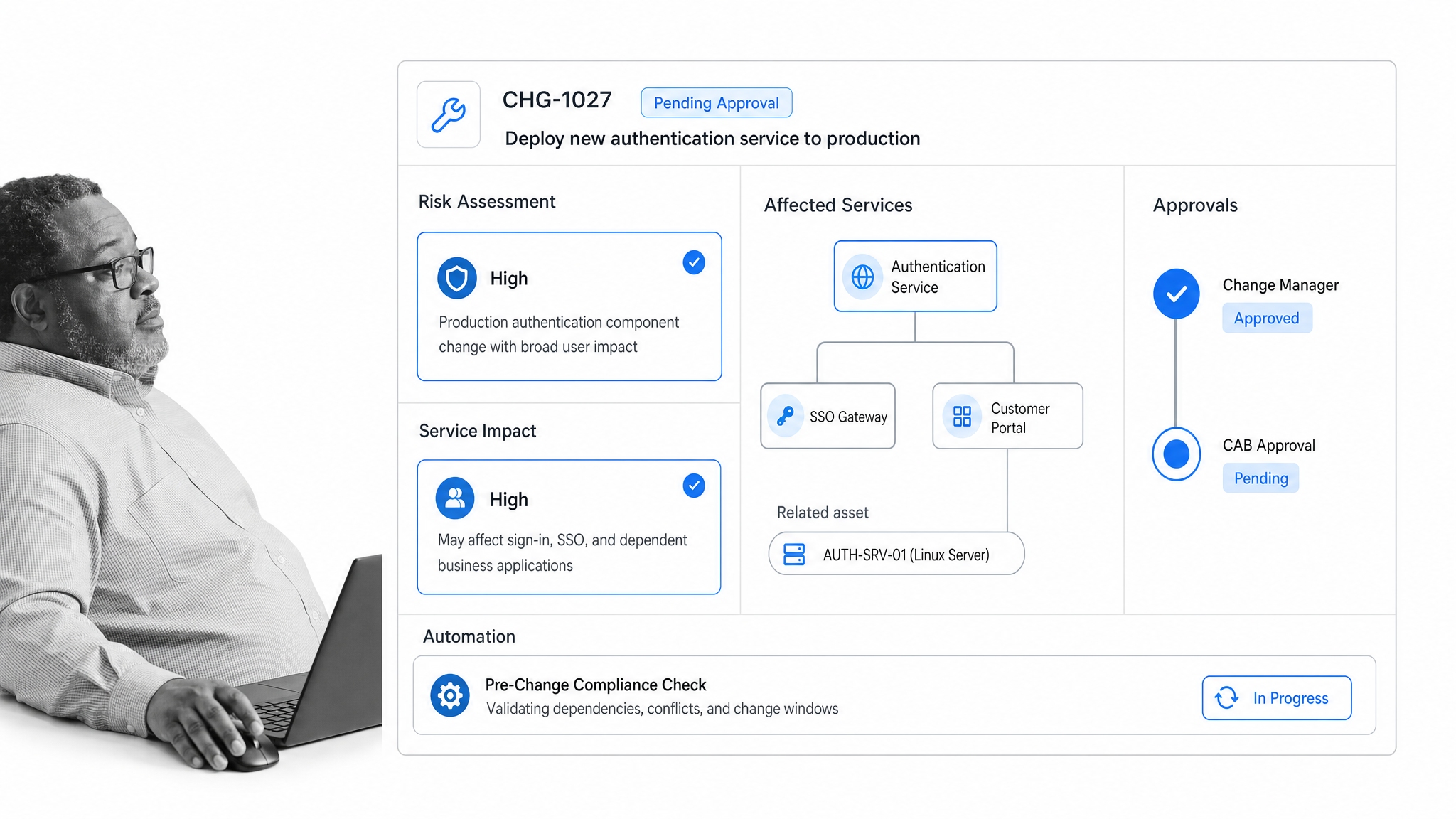
Best for: IT service changes that require service context, risk control, and approvals.
Freshservice is an IT management platform with change management inside its service management capabilities. IT teams can assess impact using service context, identify risk, coordinate approvals, and use workflow automation around requests and service work. Asset and configuration information can provide additional context for a proposed technical change.
Choose Freshservice when the change is primarily technical and the authoritative record belongs in the service desk. Examples include infrastructure changes, application releases, access changes, and work that must be coordinated with incidents or service dependencies. Organizational adoption still needs communication, training, and manager reinforcement beyond the IT record. Review the official Freshservice feature set.
Jira Service Management
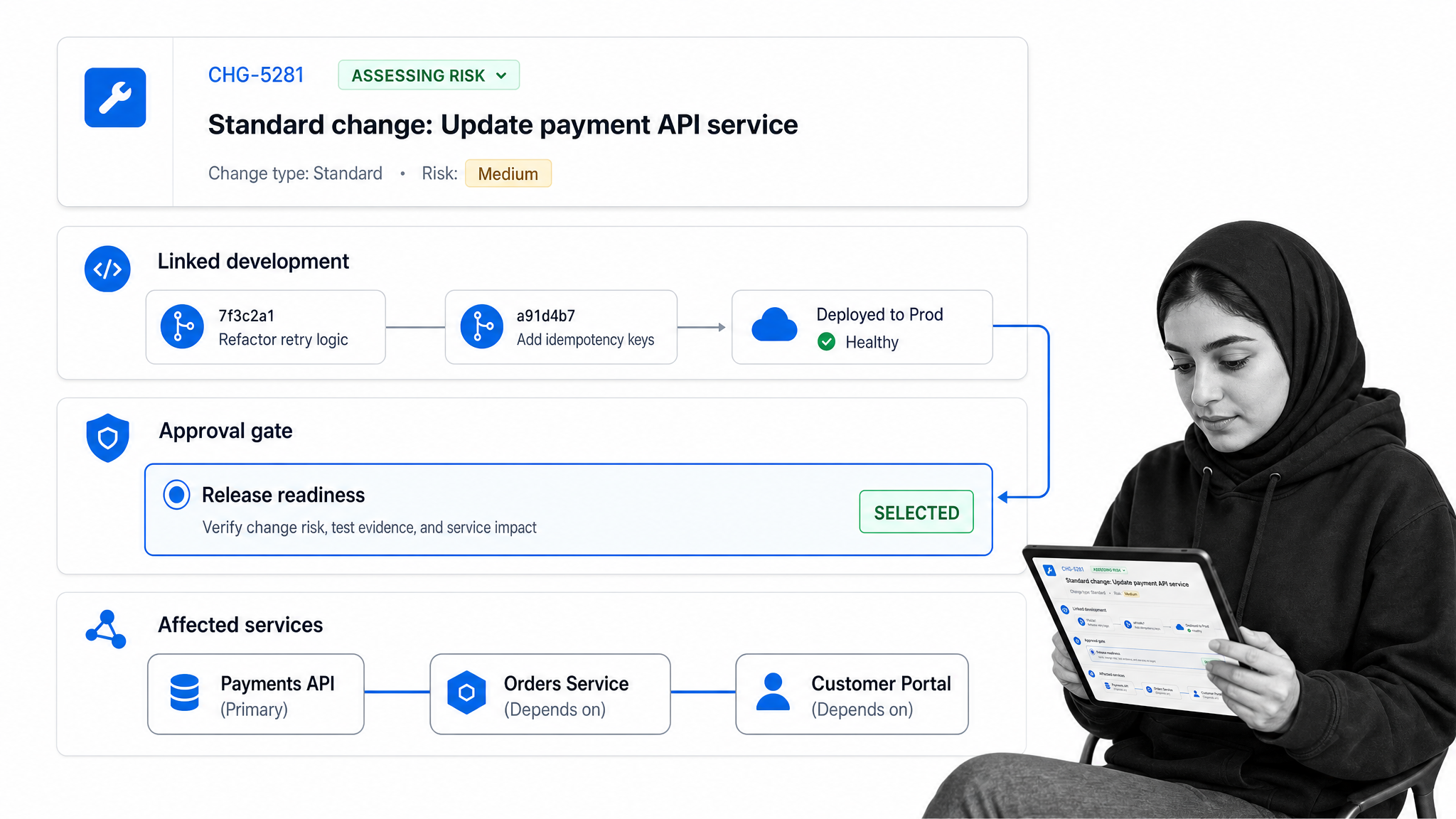
Best for: IT change control closely connected to software development and operations.
Jira Service Management supports request, incident, problem, change, asset, and configuration management. Its change management capability brings context from software development tools into IT decisions, while configuration information helps teams understand the services and dependencies that may be affected.
This makes it a natural option for organizations that already coordinate development and operations work in the Atlassian ecosystem. It can connect technical delivery with the change record and reduce duplicate handoffs between engineering and service teams. It remains an IT service management tool, so broader organizational change work may require a separate workflow, communications, or adoption layer. Review the official Jira Service Management features.
Scribe
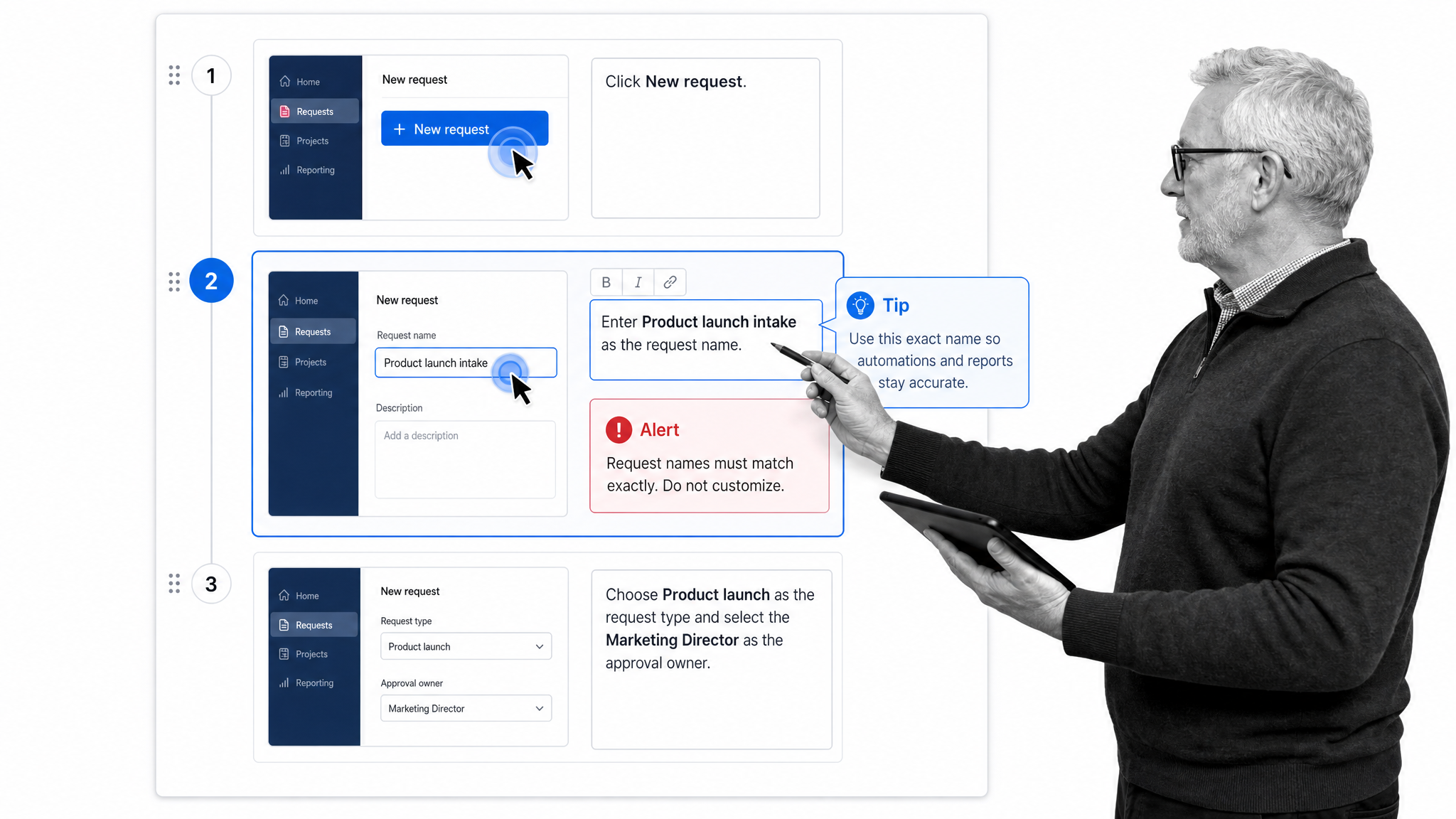
Best for: quickly documenting a new digital process for training and support.
Scribe automatically turns a recorded digital process into a step by step guide with screenshots, text, and cursor actions. Authors can edit steps, add tips or alerts, rearrange the sequence, and share the finished guide. That makes it useful when a software or process change creates an immediate documentation gap.
Scribe solves the capture and explanation problem. It helps a subject matter expert show the new method without manually assembling every screenshot. The guide can support training, self service, and manager reinforcement. It is not a complete change control system: owners, deadlines, approvals, exceptions, and adoption evidence still need to live in a workflow or project platform.
Wrike
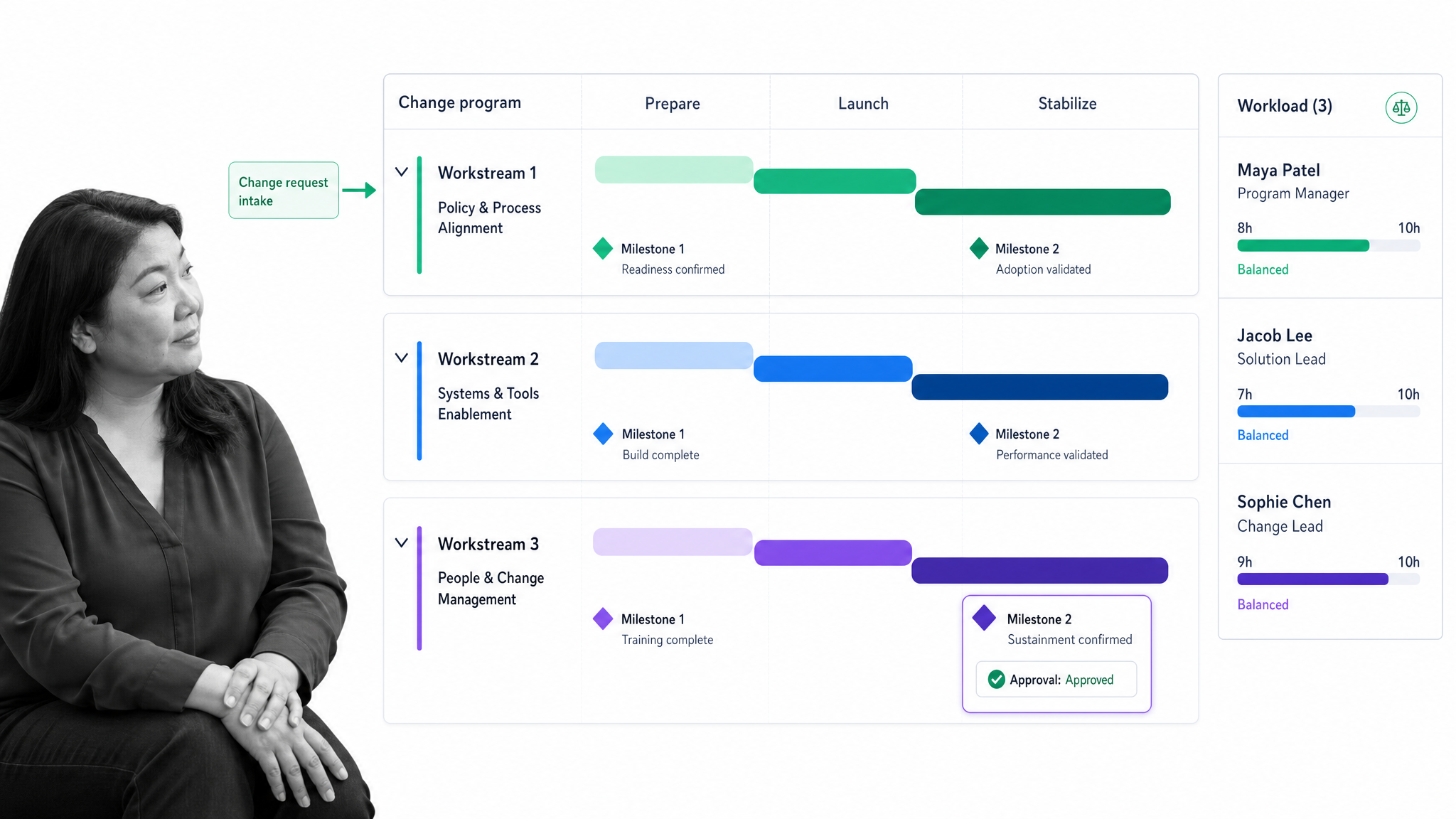
Best for: coordinating rollout projects, milestones, resources, and stakeholder approvals.
Wrike is a work management platform with request forms, project and task structures, timelines, workload planning, approvals, automation, dashboards, and reporting. Change teams can use it to coordinate the program plan, track dependencies, manage work intake, and keep stakeholders aligned around delivery.
Wrike fits change initiatives that behave like complex projects with many workstreams and deadlines. It provides flexibility for communications plans, training production, stakeholder tasks, and rollout milestones. Buyers should decide whether they need flexible project coordination or strict repeatable execution. When policy adherence and evidence are central, a workflow platform should govern the recurring operating process after the project reaches go live.
How should you compare change management tools?
Start with the failure you are trying to prevent. A broad feature checklist can make unrelated products look interchangeable. A better evaluation connects each requirement to a real rollout risk.
- Missed execution: prioritize assigned workflows, due dates, reminders, approvals, exception handling, and completion evidence.
- Poor software adoption: prioritize in application guidance, contextual support, segmentation, behavior analytics, and maintainable content.
- Stakeholder overload: prioritize impact mapping, portfolio views, readiness signals, change calendars, and audience analysis.
- Weak participation: prioritize facilitated discussion, feedback, multilingual access, learning journeys, and progress tracking.
- Technical disruption: prioritize risk assessment, service context, configuration data, release coordination, and change approvals.
- Program drift: prioritize milestones, dependencies, resource planning, decision logs, dashboards, and stakeholder reporting.
Then test the product against one real change. Ask the vendor to model the actual approval path, show how an exception is handled, demonstrate what a manager sees, and explain how the final evidence is exported. A polished generic demonstration is less useful than watching the product handle your most difficult handoff.
Finally, define the system boundary. Name where the source policy lives, where the rollout plan lives, where employees complete the new process, where adoption is measured, and which system holds the authoritative record. The tool should remove coordination work, not create another disconnected reporting obligation.
What capabilities matter most?
The right capabilities depend on the change, but several requirements consistently separate useful software from a passive repository.
- Clear ownership: every action, approval, decision, and exception has an accountable person.
- Guided execution: instructions appear with the work instead of living in a separate slide deck or document.
- Conditional routing: the process changes based on risk, location, role, business unit, or response.
- Communication in context: stakeholders receive the right message when their action becomes relevant.
- Evidence capture: the system records completion, approvals, documents, comments, and other proof.
- Feedback and readiness signals: leaders can see confusion, resistance, training gaps, and workload pressure early.
- Operational reporting: dashboards reveal delays, exceptions, adoption gaps, and accountable owners.
- Governance: permissions, version control, audit history, and controlled release protect the integrity of the new process.
- Integration: the tool can exchange information with the systems where people already work without making the change program dependent on manual copying.
AI can help draft communications, summarize feedback, generate guidance, or identify patterns. It should not weaken control. High stakes changes still need named owners, explicit approval points, traceable evidence, and a reliable record of what the organization asked people to do.
How do you implement change management software?
Implement the tool around a real change, not as a separate technology project. The fastest path is to choose one important rollout with visible operational consequences and build the minimum control system it needs.
- Define the outcome. State the behavior, process, or system use that must be different after the rollout. Avoid vague goals such as awareness or alignment unless you also define how they will be observed.
- Map the affected groups. Identify sponsors, process owners, managers, operators, reviewers, support teams, and people who will experience the change indirectly.
- Design the execution path. Convert the rollout into steps, owners, due dates, approvals, decision points, evidence, and escalation rules. Separate one time implementation work from the recurring process that follows.
- Place guidance at the moment of work. Link the policy, training, or in application support to the task where an employee needs it. Do not rely on people remembering a launch presentation.
- Pilot with a representative group. Include users who face the normal workload and edge cases. Observe where the process creates confusion, duplicate entry, or an unrealistic handoff.
- Measure behavior and exceptions. Track completions, delays, approvals, support needs, feedback, and adoption signals. Look for patterns that require a process fix rather than more reminders.
- Close the loop. Update the governed process, communicate the correction, and keep the audit trail. A change program is complete when the new method becomes the normal operating system.
A practical stack may combine several products from this list. For example, an application rollout could use a portfolio tool to assess impact, a digital adoption platform to guide users inside the software, and Process Street to run manager readiness checks, approvals, cutover tasks, exception handling, and post launch verification. The stack is coherent when every tool has a defined job and one platform owns execution.
Frequently asked questions about change management tools
What is the best change management tool?
The best tool depends on the job. Process Street is strongest when the change must become controlled, repeatable execution. Digital adoption platforms fit software guidance, organizational change platforms fit impact and readiness analysis, and IT service management tools fit technical change control.
What is the difference between change management and project management software?
Project management software coordinates scope, tasks, milestones, dependencies, and resources. Change management software focuses on adoption, stakeholder impact, communication, training, execution, and evidence that the new behavior or process took hold. Many programs need both capabilities.
Can one platform manage an entire change program?
One platform can own the execution record, but specialist tools may add value for digital adoption, facilitated participation, portfolio analysis, or IT service control. Define one authoritative system for tasks, approvals, exceptions, and proof so the stack does not fragment accountability.
How do you measure adoption with change management tools?
Measure the behavior that defines success. Useful signals include workflow completion, correct use of the new process, approval and exception patterns, application behavior, support demand, readiness feedback, and performance outcomes. Combine self reported feedback with evidence from actual work.
When should a company buy change management software?
Buy software when the transition affects enough people, systems, locations, risk, or recurring work that spreadsheets and meetings cannot provide reliable ownership and proof. The case becomes stronger when missed steps create compliance, customer, financial, or operational consequences.
