


Turn every policy into automated workflows with built-in enforcement and audit-ready proof.



10 Test Management Tools for QA Teams

Test management tools give quality assurance teams one place to plan coverage, organize test cases, execute manual and automated tests, track defects, and judge release readiness. The right system replaces scattered spreadsheets and status messages with a controlled testing record.
That record matters most when a release is under pressure. Teams need to know which requirements were tested, which failures remain open, what changed after a retest, and who accepted the remaining risk. Good software keeps those answers connected to the work instead of reconstructing them after the deadline.
The harder question is fit. A QA lead managing exploratory sessions has different needs from an enterprise quality program that requires requirements traceability, portfolio reporting, and governed approvals. This guide compares ten credible options, then explains how to evaluate them against the way your team actually tests.
- Best test management tools
- What are test management tools?
- How should you choose a test management tool?
- Which features matter most?
- What are common use cases?
- Why do teams use test management software?
- How do you implement test management software?
- FAQs
Best test management tools for QA teams
Start with operating model, not feature volume. Process Street is strongest when test execution is part of a broader controlled workflow. TestRail and several standalone platforms focus directly on QA repositories and runs. Xray and Zephyr keep testing close to Jira. Enterprise suites add deeper governance and portfolio analysis, but usually require more administration.
Process Street
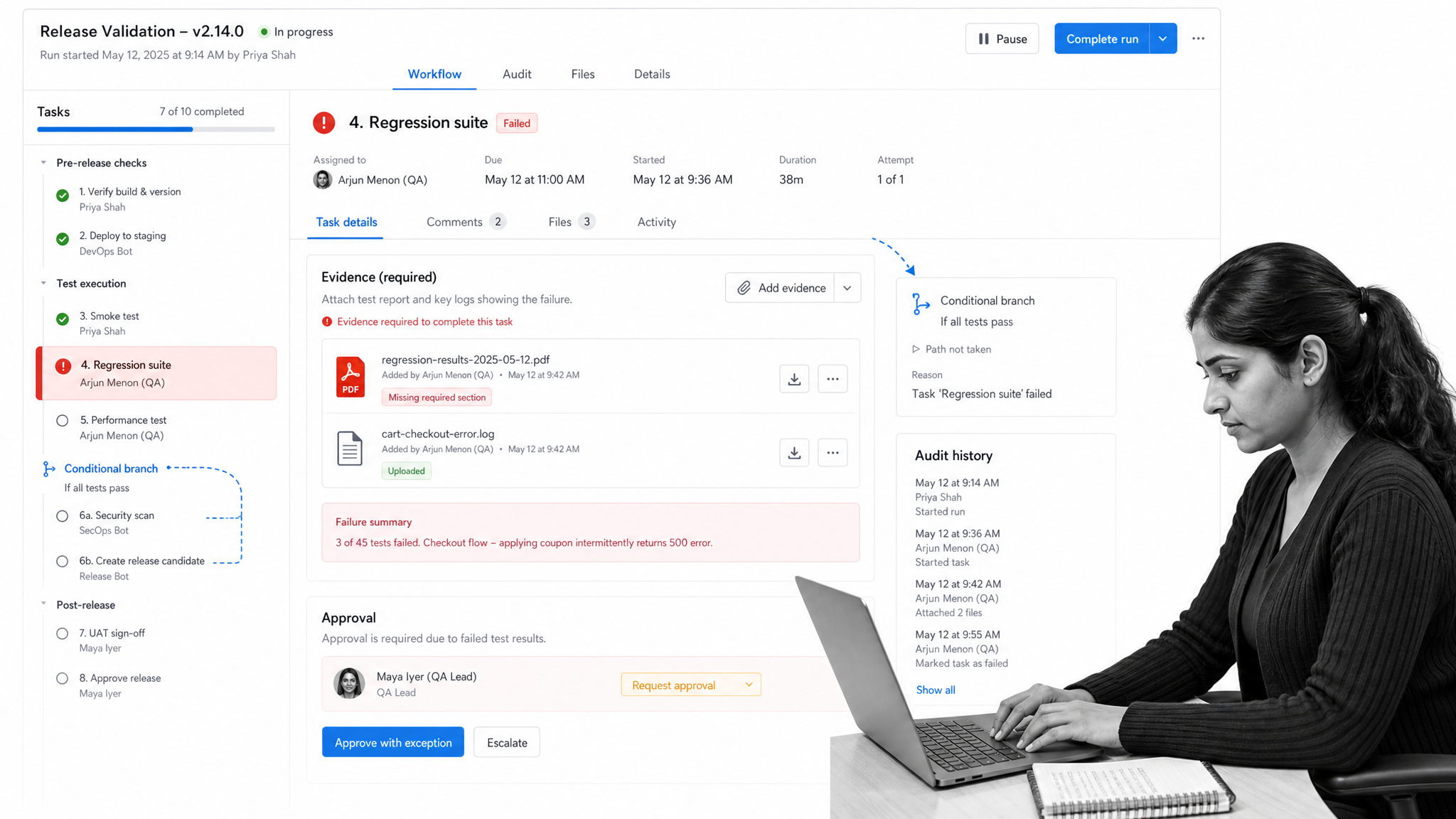
Process Street is the best choice when testing is one controlled stage in a larger operational process. Teams can turn release checks, validation procedures, regression signoffs, incident reviews, and evidence collection into repeatable workflows with owners, required fields, approvals, conditional paths, automations, and audit history.
That makes Process Street especially useful for regulated or cross-functional teams. A workflow can route a failed test to remediation, require evidence before approval, and preserve the complete decision record. Its conditional logic documentation shows how tasks and form fields can control the path of a workflow run.
Best for: QA processes that require controlled handoffs, approvals, evidence, accountability, and audit-ready execution beyond the test repository itself.
TestRail
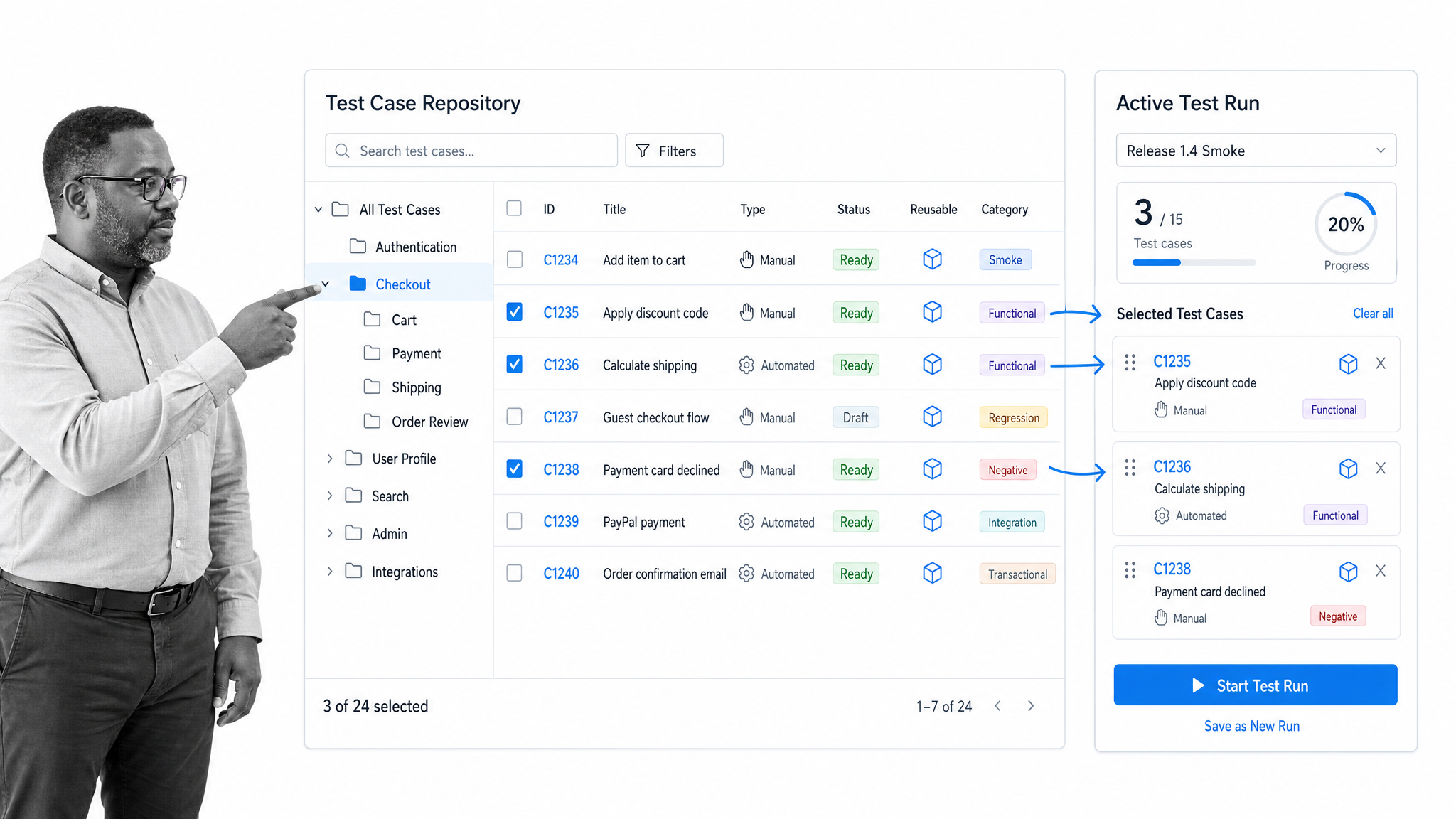
TestRail is a dedicated test management platform for centralizing manual, exploratory, and automated testing. Its repository organizes cases in hierarchical folders, supports reusable cases and custom fields, and connects test assets with runs and results. The official TestRail platform overview emphasizes centralized test management and scalable QA workflows.
Best for: teams that want a purpose-built QA system of record with structured case organization, repeatable runs, and reporting outside Jira.
Xray
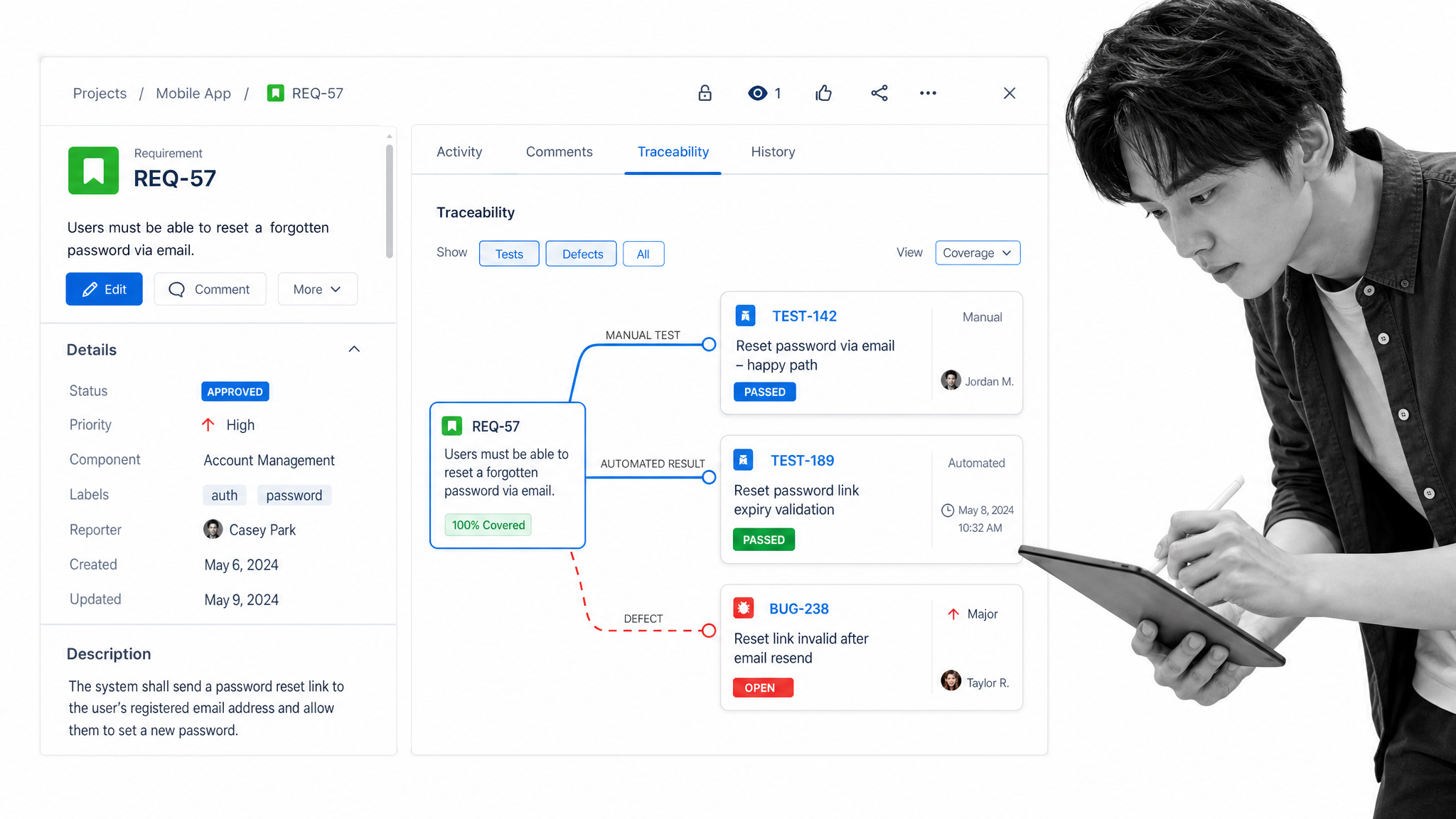
Xray brings test management into Jira so development and QA can work in the same environment. Requirements can be linked to tests, while manual and automated testing contribute to a shared coverage view. The official Xray product page positions the platform around Jira-native quality management, test design, coverage, and collaboration.
Best for: Jira-centered organizations that want requirements, defects, tests, and delivery work connected in one flow.
Zephyr
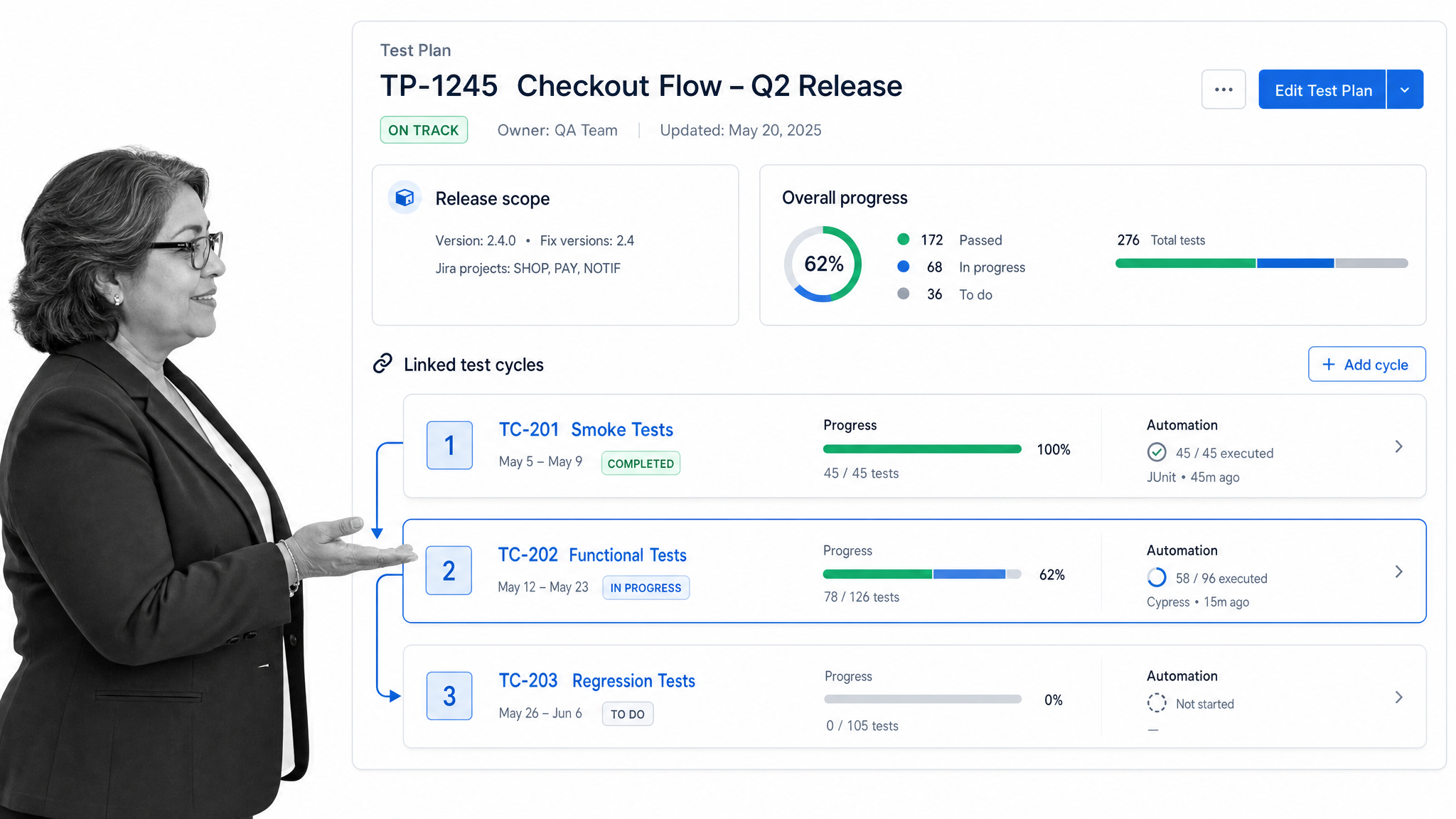
Zephyr is another Jira-native option. It supports test planning, case management, cycles, execution tracking, reporting, and automation within Jira. SmartBear now presents Zephyr as one product family with editions for different levels of test management and automation. The official Zephyr overview describes planning, tracking, reporting, and automation directly in Jira.
Best for: teams that want Jira-based testing with a choice of capability levels and a clear path from foundational management to broader automation.
Tricentis qTest
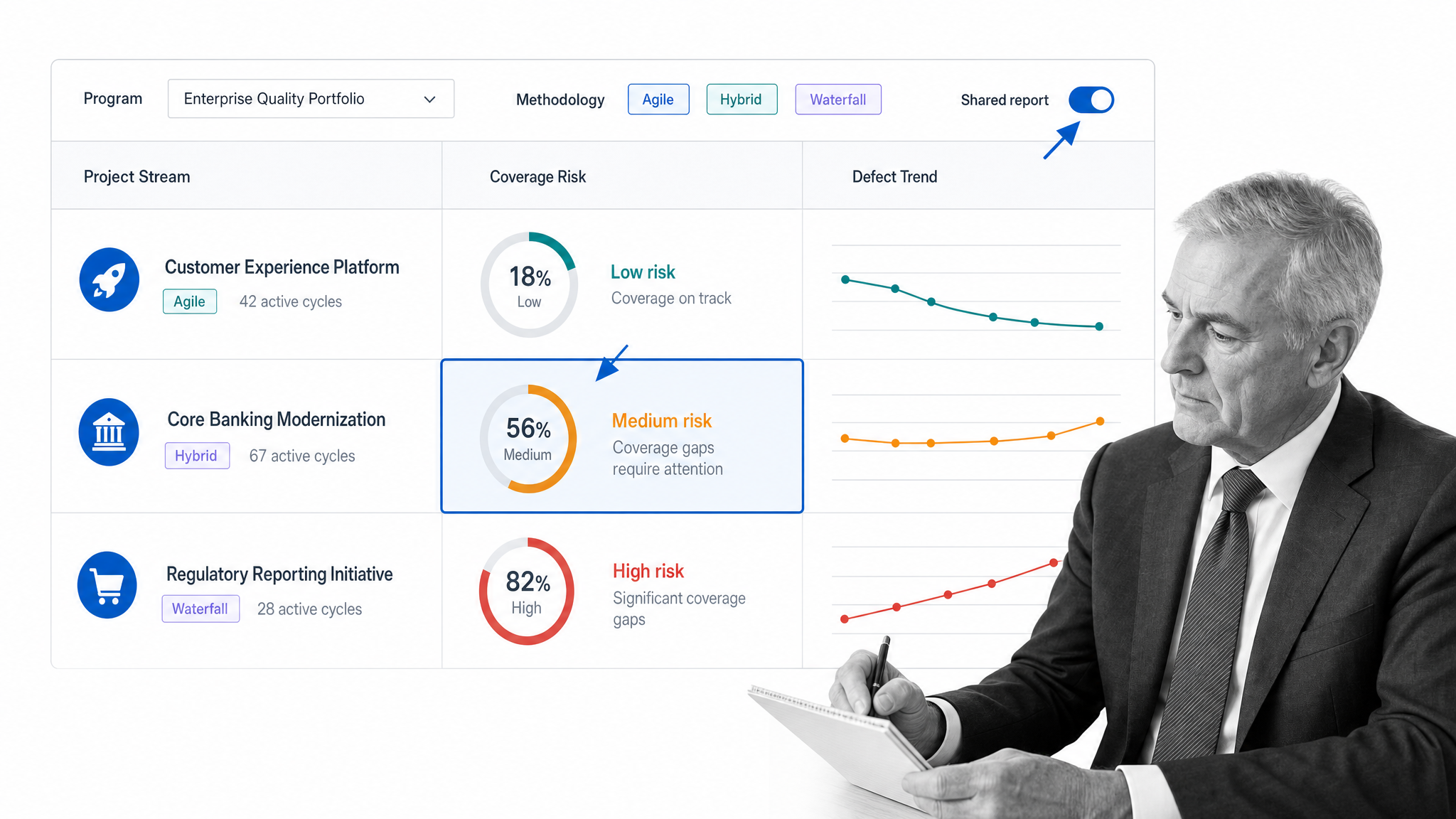
Tricentis qTest is designed for centralized test operations across large or complex organizations. It supports multiple delivery methods, connects manual and automated testing, integrates with development systems, and provides dashboards for coverage, defects, velocity, and release status. Its emphasis is standardization across teams without forcing every project into the same delivery method.
Best for: enterprise QA programs that need governance, portfolio reporting, traceability, and orchestration across varied toolchains.
PractiTest
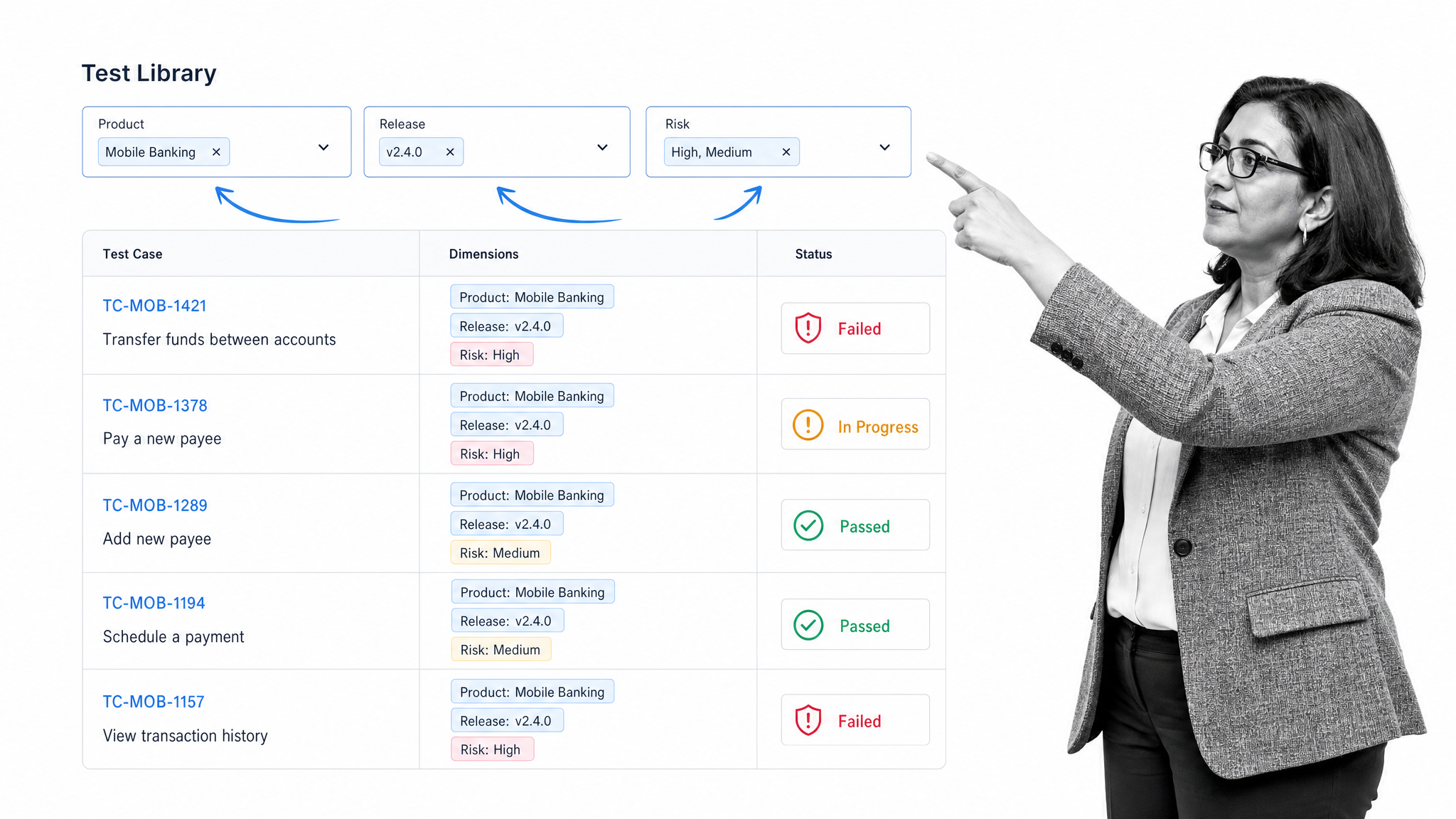
PractiTest centralizes test management while using flexible fields and filters instead of relying only on folder trees. It connects planning, execution, defects, dashboards, and reporting in a shared QA view. That structure can help organizations analyze the same test data from different product, release, risk, or business perspectives.
Best for: QA leaders who need flexible organization, traceability, and reporting across multiple dimensions of a quality program.
Qase
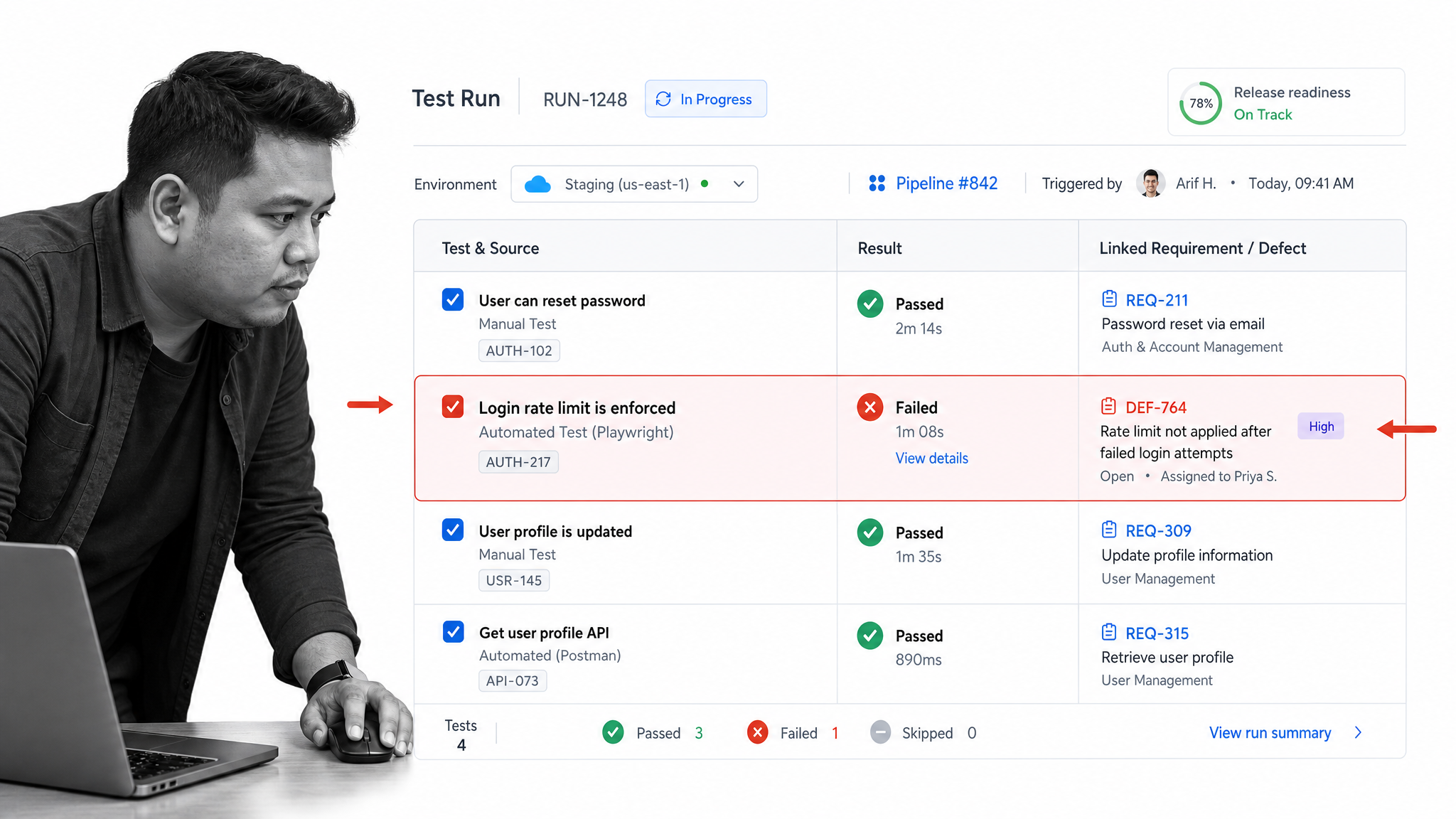
Qase combines test design, execution, traceability, automation results, defects, and reporting in a modern platform. Teams can organize cases by product structure, run suites across environments, link tests to requirements, and feed pipeline results into release views. The official Qase product page explains its test execution, structured suites, traceability matrix, integrations, and customizable reporting.
Best for: software teams seeking an approachable standalone platform with strong collaboration between QA, engineering, and automated pipelines.
Testmo
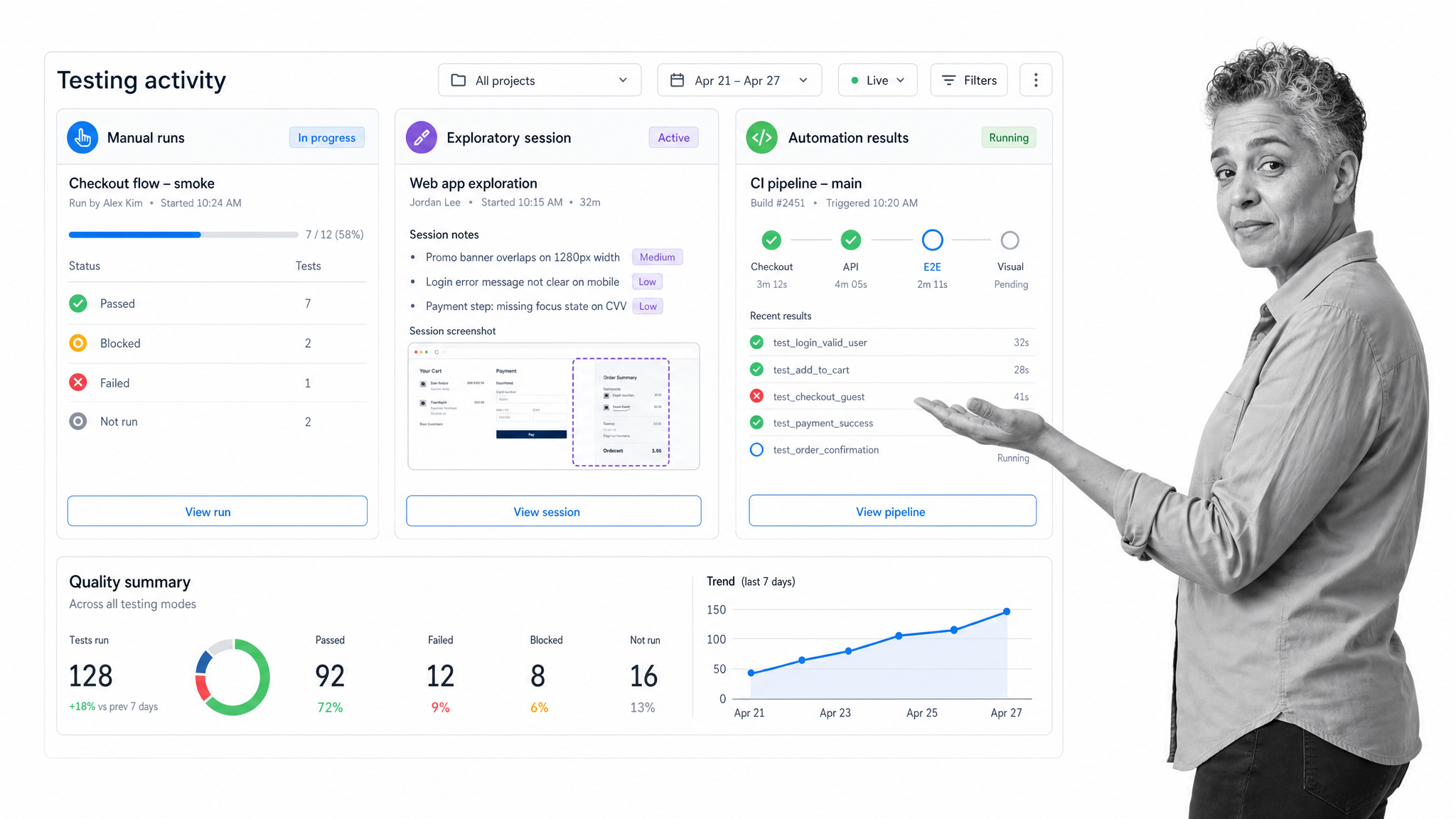
Testmo unifies manual case management, exploratory sessions, and automated test results. Its workflow centers on a fast QA interface, integrations with development and continuous delivery systems, and real-time reporting across different testing modes. Bringing exploratory notes and automation results beside structured cases helps teams avoid separate reporting silos.
Best for: small and growing QA teams that want manual, exploratory, and automated testing in one focused workspace.
Katalon True Platform
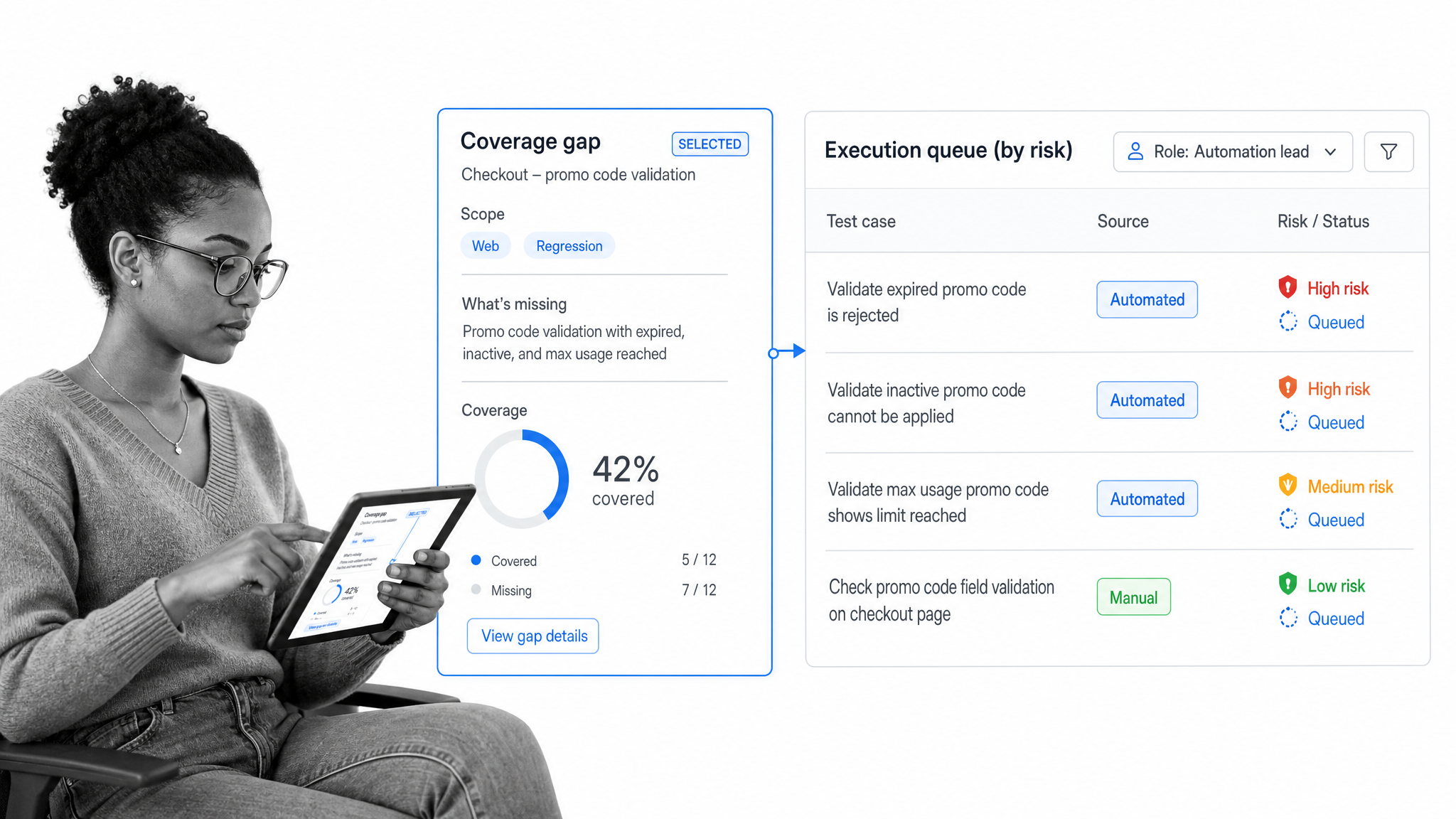
Katalon True Platform connects manual and automated testing with centralized planning, execution, reporting, and role-based controls. Its reporting surfaces progress, coverage gaps, risk, and release readiness, while the broader platform also supports test automation and execution environments. This gives teams one quality layer across different testing approaches.
Best for: teams that want test management closely connected to a broader test automation and execution platform.
SpiraTest
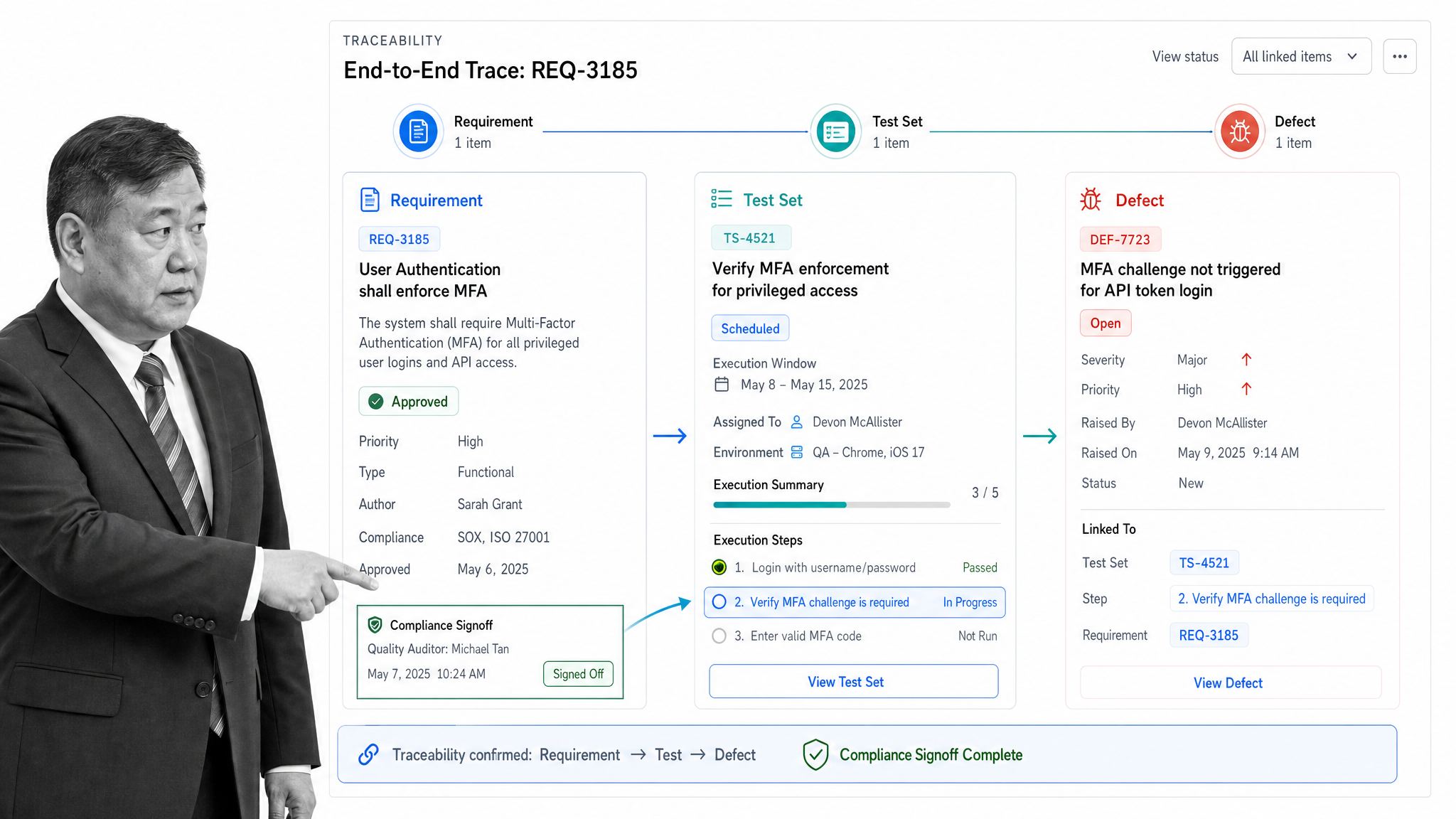
SpiraTest combines requirements, test cases, runs, defects, release planning, reporting, and customizable workflows. Test cases can map to requirements, defects can link back to execution steps, and test sets group work for scheduling and assignment. The integrated model is useful when traceability must span the full quality lifecycle.
Best for: teams that need requirements, testing, defects, and compliance controls in one integrated QA environment.
What are test management tools?
Test management tools are software systems used to plan, organize, execute, and analyze testing. They create a controlled home for test cases, plans, runs, results, defects, requirements links, evidence, and reports. Their purpose is not merely storage. A useful platform makes testing repeatable, shows what has and has not been covered, and gives stakeholders a defensible release picture.
Test automation frameworks execute scripts. Issue trackers manage development work. Test management software connects those activities into a quality record. It can import automation results, link failed tests to defects, organize manual sessions, and preserve the relationship between a requirement and the evidence that it was tested.
How should you choose a test management tool?
Begin with one release process and map the decisions your team must make. Identify where requirements enter, who designs cases, how runs are assigned, where automation results land, how defects are created, who approves release readiness, and what evidence must remain afterward.
- Choose the system boundary. Decide whether the tool is only a test repository or the control layer for the complete quality workflow.
- Match the delivery environment. Jira-native products reduce context switching for Jira-centered teams. Standalone products can provide a cleaner QA system of record across several delivery tools.
- Test real traceability. Link a requirement to cases, executions, defects, retests, and approval evidence. Confirm that the relationship remains understandable after change.
- Use a representative automation feed. Import real pipeline results and see whether failures remain actionable rather than becoming a noisy archive.
- Evaluate administration. The platform must be maintainable by the people who own QA operations, not only by consultants or a dedicated tools team.
Run the evaluation with a real regression cycle. A polished demonstration cannot reveal the cost of case maintenance, permissions, failed integrations, duplicate data, or report preparation. The best tool is the one the team can keep accurate under release pressure.
Include the people who consume testing evidence, not only the people who execute tests. Product managers need coverage tied to requirements. Engineers need failures with enough context to reproduce them. Compliance reviewers need an intact history. Executives need a release view that separates material risk from routine noise. A platform that works beautifully for one role but creates manual translation for every other role has not solved the management problem.
Also examine exit cost. Confirm that cases, steps, attachments, results, defects, and relationships can be exported in usable formats. Ask how permissions, archived projects, and historical evidence are handled when teams reorganize. Test management data often becomes part of the product’s institutional memory. The buying decision should protect that record as carefully as it improves current execution.
Which test management features matter most?
Feature checklists are useful only when each capability supports a real decision or handoff. A large library of reports cannot compensate for cases that nobody maintains. An impressive integration catalog does not help if imported results lack the environment, build, owner, and defect context needed to act. Evaluate the complete path from requirement to release decision.
Test case design and reuse: Teams need clear steps, expected results, parameters, attachments, reusable components, bulk editing, and controlled change. Reuse should reduce maintenance without hiding the effect of an update.
Planning and execution: Plans, cycles, suites, assignments, environments, statuses, and retest flows should make the current release easy to understand. Testers should see the next action without navigating a reporting maze.
Requirements traceability: A quality lead should be able to move from a requirement to its cases, results, defects, and supporting evidence. Traceability is most valuable when requirements change and the team needs to identify affected coverage quickly.
Automation and delivery integrations: Automated results should arrive with enough context to diagnose failures, identify unstable tests, connect defects, and judge the build. Integration is not successful if it only creates more data for someone to reconcile manually.
Reporting and release decisions: Reports should answer specific questions: what remains untested, which failures block release, where coverage is weak, which defects recur, and whether risk is moving in the right direction. Dashboards that cannot drive a decision are decoration.
Workflow control and evidence: High-stakes testing may require approvals, required evidence, permissions, audit history, and exception routing. This is where a workflow management system can complement or replace a narrow repository.
What are common test management use cases?
Regression testing: A reusable regression library lets teams select the cases affected by a change, assign execution, record environments, and compare results across builds. Good management prevents the regression suite from becoming an ever-growing archive. Owners can retire redundant cases, identify unstable automation, and focus each run on release risk.
Requirements validation: Product requirements, acceptance criteria, and controls can link directly to the cases that verify them. When a requirement changes, traceability helps the team find affected tests and determine whether previous evidence is still relevant. This is important for complex products and any environment where a reviewer must understand why the team believed a requirement was satisfied.
Exploratory testing: Exploratory work needs more than a blank notes field. A useful system captures the mission, environment, tester, observations, screenshots, defects, and follow-up actions while preserving room for investigation. Connecting those findings to structured cases helps the team turn valuable discoveries into repeatable coverage without reducing exploration to a rigid script.
Continuous delivery: Automated results can flow from delivery pipelines into a central release view. The management layer should preserve which build ran, which environment was used, which tests failed, whether the failure is new, and who owns the next decision. Without that context, a large volume of results creates noise rather than faster feedback.
User acceptance testing: Business reviewers often need a simpler experience than the core QA team. Test management software can package scenarios, assign reviewers, collect evidence and comments, record approval, and show which business requirements remain unresolved. Conditional workflow routing is valuable when a failed acceptance test must trigger remediation and a controlled retest.
Audit and compliance evidence: Regulated teams may need to prove who tested a control, which version was used, what evidence was collected, which exceptions were found, and who approved the result. A repository can hold the cases, while a governed workflow can enforce required evidence, segregation of duties, exception review, and final signoff.
Why do teams use test management software?
Centralization is the immediate benefit, but control is the durable one. A shared repository reduces duplicated cases and makes current test assets easier to find. Defined ownership and execution states reduce ambiguity about what is planned, running, blocked, failed, or ready for review. Links among requirements, cases, defects, and results preserve the reasoning behind a release decision.
Test management software also makes quality work visible without relying on manual status reports. Leaders can examine coverage gaps, unresolved failures, defect patterns, retest progress, and release risk from the same operating record used by testers. That alignment matters because reporting created separately from execution becomes stale quickly and encourages arguments about whose spreadsheet is correct.
The final benefit is learning. Historical results can show where failures recur, which areas generate the most rework, which cases rarely find defects, and where automation is unstable. Teams can use that evidence to improve both the product and the testing process. The tool does not create the discipline, but it makes disciplined review possible.
How do you implement test management software?
Start with a bounded release or product area. Define the case structure, status model, ownership rules, defect flow, evidence requirements, and release decision before importing a large archive. Clean the source data first. Moving duplicate, obsolete, or ownerless cases into a new platform simply makes the disorder easier to search.
Configure the smallest viable workflow, connect one issue tracker and one automation pipeline, then run a complete cycle. Measure whether the team finds cases faster, executes with fewer handoff gaps, resolves failures more clearly, and produces release evidence with less manual work. Expand only after the model survives real use.
Assign a named owner for taxonomy, permissions, integrations, reports, and case hygiene. Test management systems decay when everyone can add structure but nobody owns it. A regular review should retire obsolete cases, merge duplicates, inspect unstable automation, and confirm that reports still reflect the decisions leaders need to make.
FAQs
What is a test management tool?
A test management tool is software for planning coverage, organizing test cases, executing runs, tracking results and defects, linking requirements, and reporting release readiness.
How do test management tools improve software quality?
They make coverage, ownership, results, defects, and evidence easier to control. This helps teams find gaps earlier, repeat important tests consistently, and make release decisions from a shared record.
Can test management tools handle manual and automated testing?
Many platforms support both. Manual cases and exploratory sessions can sit beside results imported from automation frameworks and delivery pipelines, giving the team one quality view.
Do test management tools replace Jira?
Not necessarily. Jira-native tools manage testing inside Jira, while standalone platforms often integrate with Jira so defects and delivery work stay connected to the QA record.
What should a test management pilot include?
Use one representative release with requirements, reusable cases, manual execution, automation results, defects, retesting, reporting, and a release approval. Evaluate the complete workflow, not an empty workspace.
