


Turn every policy into automated workflows with built-in enforcement and audit-ready proof.


Accounting Workflow Software
Last updated:
Accounting workflow software turns recurring finance work into a defined sequence of assignments, rules, reviews, approvals, and records. It helps accounting teams run work consistently without relying on memory, inbox follow-ups, or disconnected spreadsheets.
The value is not simply a cleaner task list. Accounting work carries deadlines, dependencies, evidence requirements, and control expectations. A workflow platform connects those requirements to the work itself, so the right person receives the right task with the right context and cannot quietly skip the steps that protect accuracy.
This guide explains where accounting workflows fail, which processes benefit most, what capabilities to evaluate, how Process Street supports controlled execution, and how to implement the software without disrupting the close or client service.
In this article, we are going to cover:
- What is accounting workflow software?
- Where accounting workflows break
- Core accounting workflows to standardize
- Accounting workflow software capabilities
- How to evaluate accounting workflow software
- How Process Street runs accounting workflows
- Accounting workflow implementation plan
- Measure accounting workflow performance
- FAQs
What is accounting workflow software?
Accounting workflow software is a system for designing, launching, assigning, routing, tracking, and improving repeatable accounting processes. A template defines the standard process. Each workflow run records the real execution, including who completed each task, which information they supplied, what reviewers approved, and where exceptions occurred. This execution model can support a single accounting procedure or a broader finance workflow that connects multiple recurring processes.
That execution layer is different from a general ledger, ERP, tax platform, or practice management database. Those systems store transactions and records. Workflow software coordinates the human decisions and cross-system handoffs around them. A useful accounting workflow layer connects systems of record to the sequence of work that keeps them accurate.
The template and run model
The template contains the approved procedure: tasks, instructions, form fields, owners, due dates, conditions, approvals, and automations. A run is one instance, such as the November close for one entity, an invoice approval for one vendor, or onboarding for one client. Separating the standard from each execution gives teams consistency without losing the details of a specific case.
Accounting workflow software versus a shared checklist
A shared checklist can describe steps, but it usually cannot enforce routing, collect structured evidence, branch for exceptions, update connected systems, or show a complete approval history. Workflow software adds those controls while keeping the process readable for the people doing the work.
That is especially useful across the accounting cycle, where entries, reconciliations, adjustments, review, reporting, and close depend on one another. A missed upstream task can delay every downstream review.
Where accounting workflows break
Accounting workflows usually fail at handoffs, not at the technical accounting step. A preparer finishes a reconciliation but does not alert the reviewer. An invoice arrives without the correct coding. A client request sits in an inbox. An exception is discussed in chat but never added to the record. The work may eventually finish, but the path is slow and difficult to reconstruct.
Unclear ownership
If ownership lives in institutional knowledge, managers spend close week asking for status. A controlled workflow assigns each task to a person or role and makes overdue work visible before it becomes a reporting delay.
Incomplete intake
Poor intake creates avoidable rework. Requests arrive without an entity, period, amount, account, supporting document, or business reason. Structured forms can require those details before the workflow moves forward and can route the work based on the answers.
Approvals outside the process
Email and chat approvals are easy to miss and difficult to audit. The reviewer may approve a message without seeing the latest attachment or may not explain a rejection. Keeping the decision inside the workflow connects the approver, evidence, comments, and resulting next step.
Evidence scattered across systems
The IRS recordkeeping guidance emphasizes maintaining records that support reported items. Even when tax recordkeeping is not the immediate goal, accounting teams benefit from linking the supporting file, explanation, and approval to the work that produced the final record.
Core accounting workflows to standardize
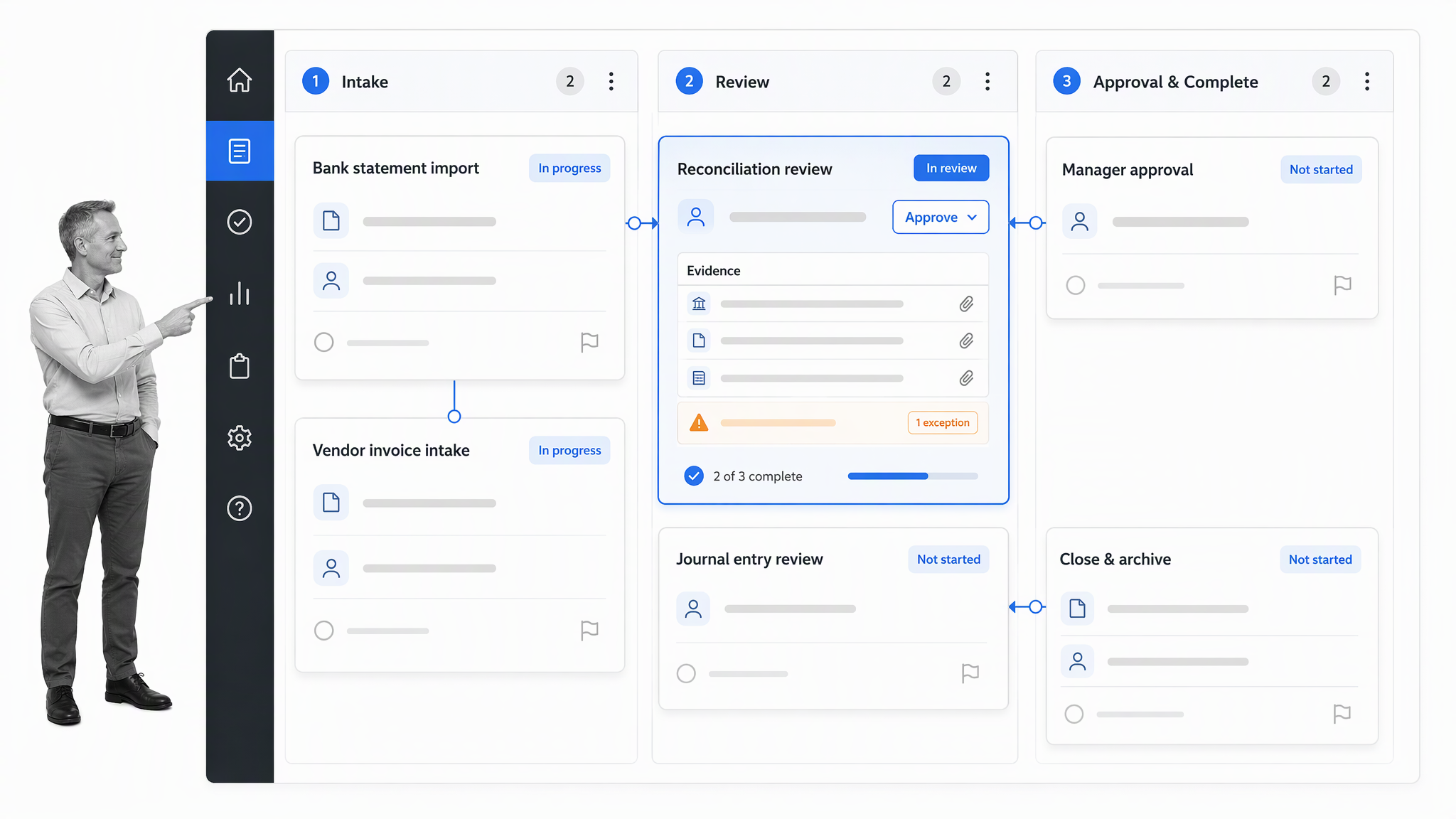
The strongest first workflows are recurring, cross-functional, and sensitive to delays or missed controls. They have a clear trigger, a repeatable sequence, identifiable owners, and a concrete definition of done.
Month-end close
Recurring accounting processes such as month-end close coordinate journal entries, reconciliations, variance review, consolidations, financial statement preparation, and signoff. Workflow software can schedule recurring runs, assign entity-specific work, expose dependencies, route unusual variances, and preserve review evidence.
Accounts payable and invoice approval
An accounts payable process may include intake, duplicate checking, coding, purchase-order matching, budget-owner approval, payment authorization, and posting. A defined purchase order workflow helps connect the request, authorization, matching, and exception path. Conditional routing can send high-value or non-PO invoices through additional review without slowing routine items. Teams can use an accounts payable workflow template as a starting structure and then adapt it to their own approval policy and accounting system.
Accounts receivable and collections
Receivables workflows can coordinate invoice preparation, delivery confirmation, aging review, customer follow-up, dispute handling, promise-to-pay tracking, and escalation. The workflow gives the team one view of the next action while the accounting system remains the source of truth for balances.
Client onboarding and recurring service
Accounting firms can standardize document collection, access requests, engagement setup, service calendars, review, and client handoffs. The Acuity customer story shows how standardized workflows can span onboarding, training, month-end close, and billing rather than treating each activity as an isolated checklist.
Audit preparation and control testing
Audit preparation benefits from defined evidence requests, owners, reviewer signoff, exception logs, and completion history. The PCAOB AS 2201 resource provides useful context for organizations evaluating how internal control work relates to financial reporting.
Accounting workflow software capabilities
The right feature set depends on the complexity and risk of the process. A small firm may value fast template building and client request tracking. A multi-entity finance team may prioritize permissions, dependencies, evidence, and reporting. The capabilities below matter in both environments, even if the implementation depth differs.
Structured forms and required fields
Forms should capture the information needed to start and complete the process. Required fields reduce incomplete requests, while field types such as dates, numbers, selections, attachments, and long-form explanations keep information consistent enough for routing and reporting.
Conditional routing
Conditional logic adapts the process to the transaction or engagement. A routine expense can take the standard path, while an unusual amount, missing purchase order, new jurisdiction, or high-risk exception can reveal additional tasks. The route changes without requiring separate copies of the workflow for every scenario.
Approvals and segregation of duties
Approvals should identify the reviewer, present the relevant evidence, record the decision, and block progression when signoff is required. Finance teams can use routing and permissions to keep preparation, review, and release responsibilities distinct. A practical internal controls design connects each control objective to a specific owner, action, evidence requirement, and review state. The COSO internal control guidance is a useful reference when teams map those objectives to workflow steps.
Dynamic ownership, due dates, and escalation
The software should assign work by role, entity, client, or submitted data. Due dates may need to calculate from the close date, filing date, service-level target, or completion of a prior task. Escalations should surface risk without flooding everyone with generic reminders.
Integrations and automation
Accounting workflows touch document storage, email, spreadsheets, ERP systems, practice management tools, ticketing platforms, e-signature services, and reporting systems. Process Street has 5,000+ integrations. Connections should remove duplicate entry while keeping the workflow as the coordination and evidence layer. A finance process automation strategy should still show operators why an action occurred, which decision authorized it, and what happens when the connection fails.
Audit history and reporting
A useful history shows task completion, form data, comments, attachments, approvals, changes, and timestamps. Reporting should reveal overdue tasks, cycle time, bottlenecks, exceptions, and recurring evidence gaps, not merely count completed checklists.
How to evaluate accounting workflow software
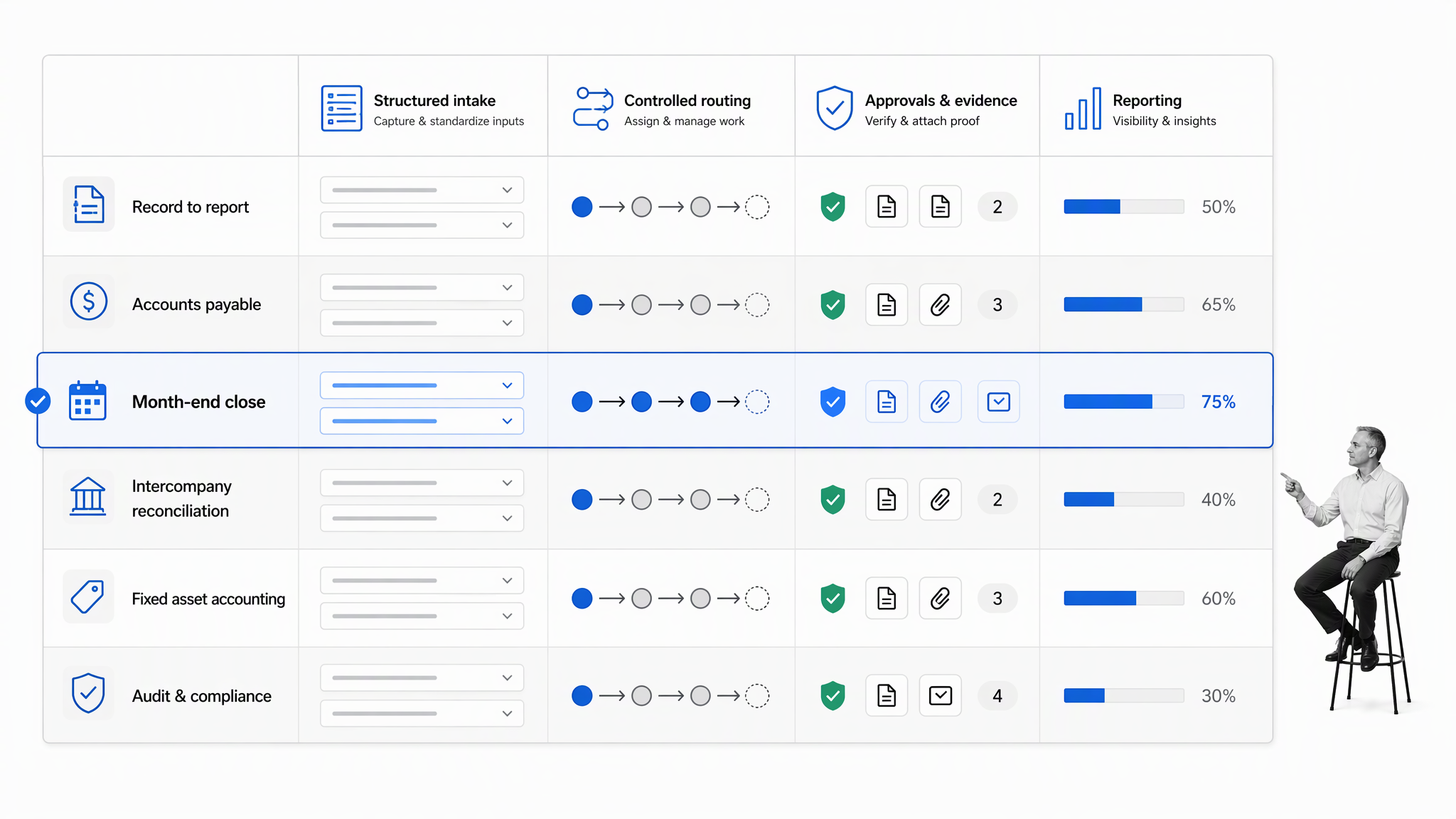
Evaluation should begin with a real accounting process, not a generic feature grid. Choose a workflow that includes intake, at least two owners, an exception path, an approval, evidence, and one connected system. Then ask each platform to run that scenario end to end.
Fit the software to the operating model
A client-service firm may need repeatable client runs, external requests, and portfolio visibility. A corporate accounting team may need entity-level assignments, close dependencies, control evidence, and permission boundaries. Write down the operating model before comparing interfaces.
Test the exception path
Happy-path demonstrations hide the work that creates delays. Test a missing document, rejected approval, unusual amount, late task, changed owner, and reopened step. The software should make the exception visible and recoverable without breaking the history.
Evaluate control without creating friction
More fields and approvals do not automatically create a better control environment. Every required step should serve a clear risk, quality, or coordination purpose. The best design makes the safe path the easy path and reserves additional review for genuine exceptions.
Confirm administration and change management
Accounting teams need to adjust workflows as entities, clients, policies, and systems change. Confirm who can edit templates, how changes affect active runs, whether versions remain traceable, and how quickly a process owner can improve the workflow without engineering support.
Review permissions and data boundaries
Accounting workflows can contain payroll details, bank information, customer records, vendor documents, forecasts, and draft financial results. Test whether access can be limited by role, workflow, organization, client, or task. Review what administrators can see, how external participants are invited, how attachments are handled, and whether the permission model remains understandable as the team grows. A feature is only useful when the team can apply it consistently without creating accidental visibility.
Plan for continuity and export
The workflow should continue to make sense when an owner is absent, a reviewer changes roles, or a connected system is temporarily unavailable. Test reassignment, delegated approval, retry behavior, notifications, and manual recovery. Confirm that workflow history and captured data can be reported or exported in a usable form. Finance teams should be able to explain what happened during a period without depending on one administrator or a fragile integration.
Finally, evaluate the experience at deadline pressure. Ask a preparer to complete a realistic run while a reviewer handles two exceptions and a manager checks portfolio status. The platform should reduce questions and expose decisions. If participants need a separate spreadsheet to understand progress, the workflow design or the software is not yet doing enough.
How Process Street runs accounting workflows
Process Street is an agentic process automation platform for recurring work that must be completed consistently and leave a reliable record. Accounting teams can turn procedures into workflows with task instructions, structured form fields, assignments, due dates, conditional paths, approvals, automations, and run history.
Build the accounting standard into the workflow
The workflow template can hold the procedure next to the task, require supporting documents, and reveal guidance only when it applies. That reduces the gap between an SOP stored in a document and the actual work performed during a close, approval, or client service cycle.
Route work by entity, client, risk, or amount
Process Street conditional logic can adapt the task path from structured data. Teams can use the same governed template while sending exceptions, high-value items, or specialized cases to the right reviewer.
Keep approvals and evidence together
Built-in approval tasks place the decision in the workflow with the information being reviewed. Required fields and attachments can ensure the reviewer receives the evidence needed before work advances.
Coordinate systems without losing process context
Automations can create records, update fields, send notifications, and move information between connected systems. The workflow retains the reason, owner, approval state, and evidence around those system actions, giving operators a coherent process rather than a chain of invisible automations.
Accounting workflow implementation plan
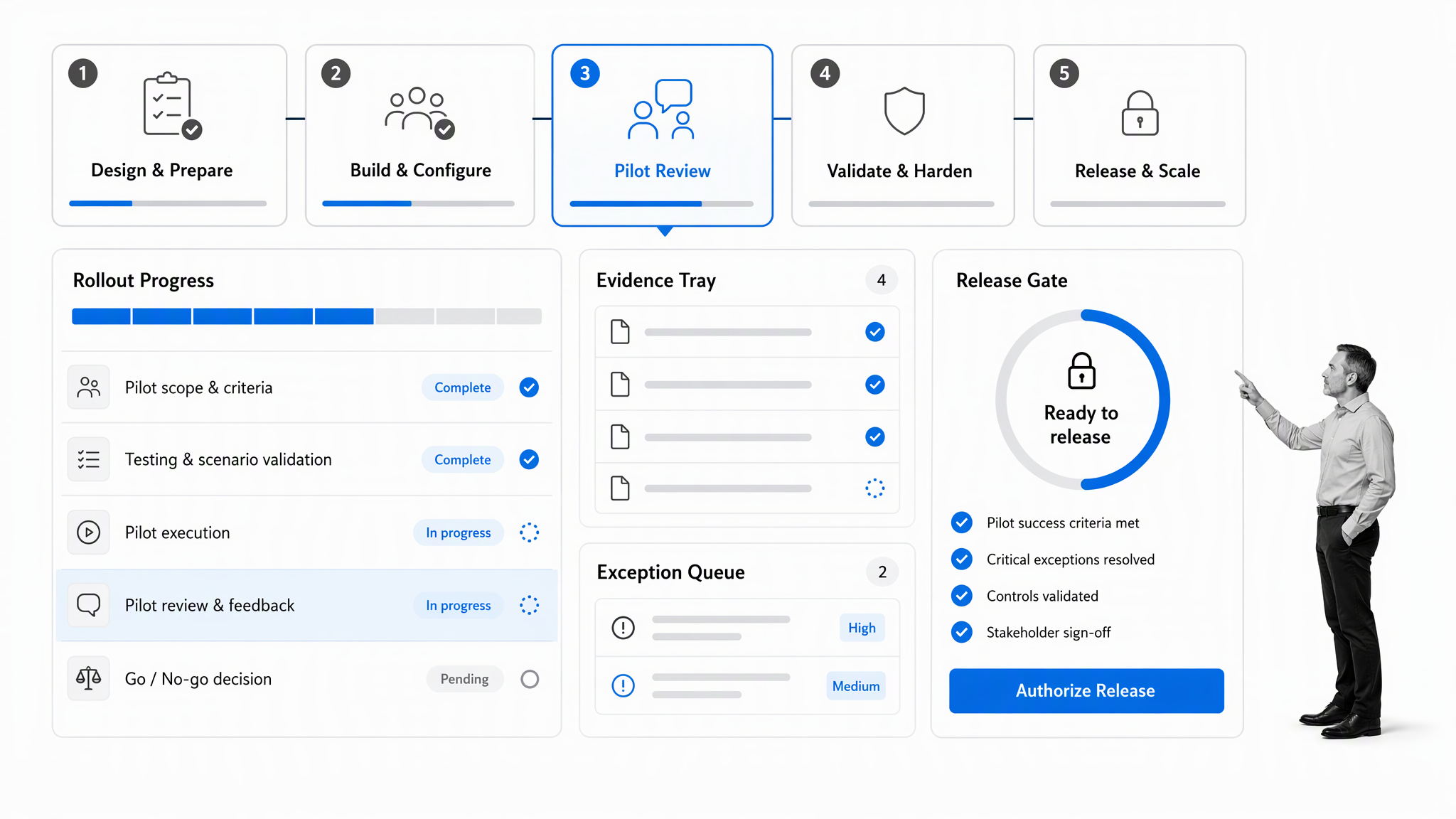
Implementation works best as a controlled process of its own. Start narrow, preserve the current accounting source of truth, and improve the workflow using evidence from real runs. Avoid moving every procedure at once or automating a process before the team agrees on the standard.
1. Select one high-value workflow
Choose a recurring process with visible pain and a committed owner. Month-end account reconciliation, invoice approval, client onboarding, or recurring reporting can work well because the trigger, participants, handoffs, and completion criteria are clear.
2. Map the current and desired states
Document the trigger, inputs, steps, owners, dependencies, decision points, approvals, evidence, systems, and definition of done. Remove duplicate or obsolete steps before building. Preserve a reason for every control that remains.
3. Configure the pilot and test roles
Build the template, then test it as the requester, preparer, reviewer, approver, and administrator. Check permissions, task visibility, due-date calculations, rejection paths, evidence requirements, and integration failures. A pilot should include realistic exceptions, not only a clean sample.
4. Run in parallel where necessary
For a close-critical or regulated process, a limited parallel run can compare the new workflow with the existing control. Define the duration and exit criteria in advance so parallel work does not become permanent duplication.
5. Release, train, and govern
Train people on why the workflow exists, what changed, how exceptions are handled, and where the source of truth remains. Assign a process owner who reviews feedback, monitors performance, controls template changes, and schedules periodic improvement.
Measure accounting workflow performance
Measure whether the workflow makes accounting work faster, more reliable, and easier to prove. Raw completion volume can grow while quality declines, so pair speed metrics with control and evidence metrics.
Cycle time and on-time completion
Track total cycle time, time spent waiting for review, percentage completed by the deadline, and overdue work by task or owner. These measures reveal whether the workflow reduces coordination delays rather than merely recording them.
First-pass quality and rework
Measure rejected approvals, reopened tasks, missing evidence, coding corrections, duplicate requests, and repeat exceptions. A good workflow should improve first-pass completeness and make the remaining exceptions easier to diagnose.
Control and evidence quality
Monitor whether required reviews occurred, whether evidence was attached, whether incompatible roles were separated, and whether exceptions received the right approval. The SEC Sarbanes-Oxley Section 404 resources provide additional context for public companies considering internal control reporting obligations.
Adoption and process health
Look at workflow usage, abandoned runs, manual workarounds, frequently skipped optional tasks, and changes requested by operators. Combine the data with short retrospectives. The goal is a process people can follow under deadline pressure, not a perfect diagram that only works in training.
For a broader view of recurring finance work, financial workflows can connect close, payables, receivables, reporting, controls, and client service into one operating system instead of a collection of isolated checklists.
FAQs
What is accounting workflow software?
Accounting workflow software is a platform for designing, assigning, routing, tracking, automating, and documenting repeatable accounting work. It connects process instructions, owners, due dates, forms, approvals, evidence, and integrations in one execution layer.
Which accounting processes should be automated first?
Start with a recurring process that has clear ownership, multiple handoffs, visible delays, and a measurable definition of done. Month-end reconciliations, invoice approvals, client onboarding, recurring reporting, and audit preparation are common starting points.
How is accounting workflow software different from accounting software?
Accounting software stores transactions, balances, and financial records. Accounting workflow software coordinates the people, decisions, approvals, evidence, and cross-system steps required to create, review, and maintain those records.
Can accounting workflow software support internal controls?
Yes. It can require fields and evidence, separate preparation from approval, route exceptions, restrict access, record decisions, and preserve workflow history. The control design still needs a responsible owner and must fit the organization’s risk and reporting requirements.
What should accounting firms look for in workflow software?
Accounting firms should evaluate repeatable client workflows, structured intake, role-based assignments, portfolio visibility, approvals, evidence, due-date rules, integrations, permissions, reporting, and the ease of changing templates as services evolve.
How long does it take to implement accounting workflow software?
The timeline depends on process complexity, integrations, controls, and change management. A focused pilot can begin with one workflow, but teams should allow enough time to map the process, test exception paths, train participants, and measure real runs before broader rollout.
