


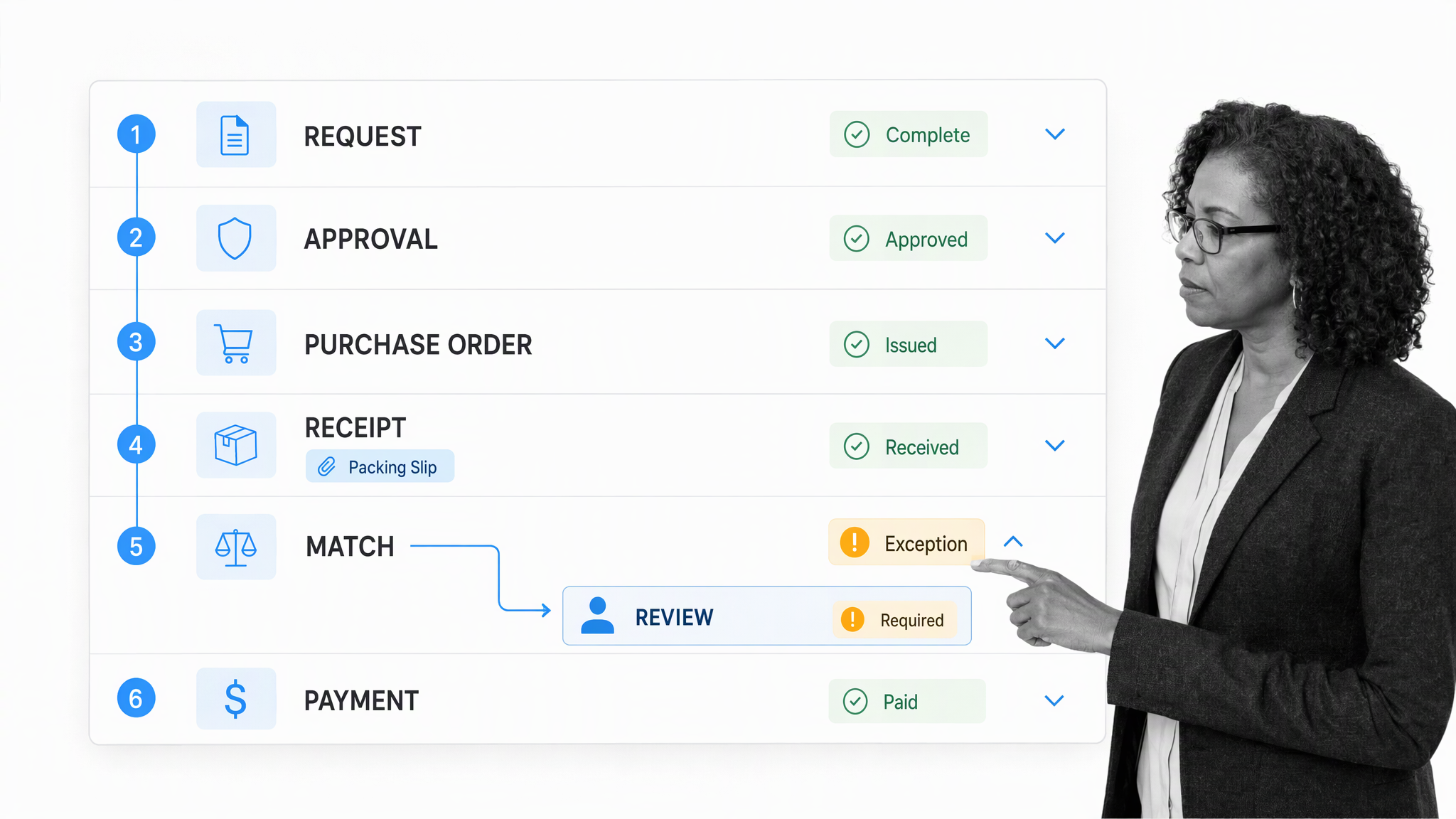
A purchase order workflow is the controlled sequence a company uses to request a purchase, approve it, issue the purchase order, confirm receipt, match the invoice, and authorize payment.
A better workflow gives procurement, finance, accounts payable, and suppliers one traceable path for ownership, approvals, evidence, and exceptions. Process Street turns that path into an automated purchase order workflow so each handoff happens on time and every consequential decision leaves an audit trail.
The importance of efficient purchase order management
Effectively managing purchase orders is a critical component of healthy vendor relationships. From creating a requisition to gaining approval and receiving an invoice from the vendor, the purchasing cycle can involve several documents. That is a lot to keep track of for a single purchase, and it only gets more complex as a business grows.
Purchase order management connects an internal need with a controlled financial commitment. The process begins before a purchase order exists, when an employee submits a purchase requisition with the item, quantity, supplier, cost center, business reason, and required date.
From there, the request may need budget, department, procurement, security, legal, or finance approval. Once approved, the purchase order goes to the supplier. Receiving records what arrived, and accounts payable compares the order, receipt, and supplier invoice before payment.
Paper, email, and spreadsheets make those records difficult to reconcile. The frustration and inefficiency that comes with managing piles of paperwork is no longer an unavoidable obstacle. By establishing an automated purchase order workflow, you can centralize documentation, seamlessly track progress in real-time, and shorten purchasing cycles.
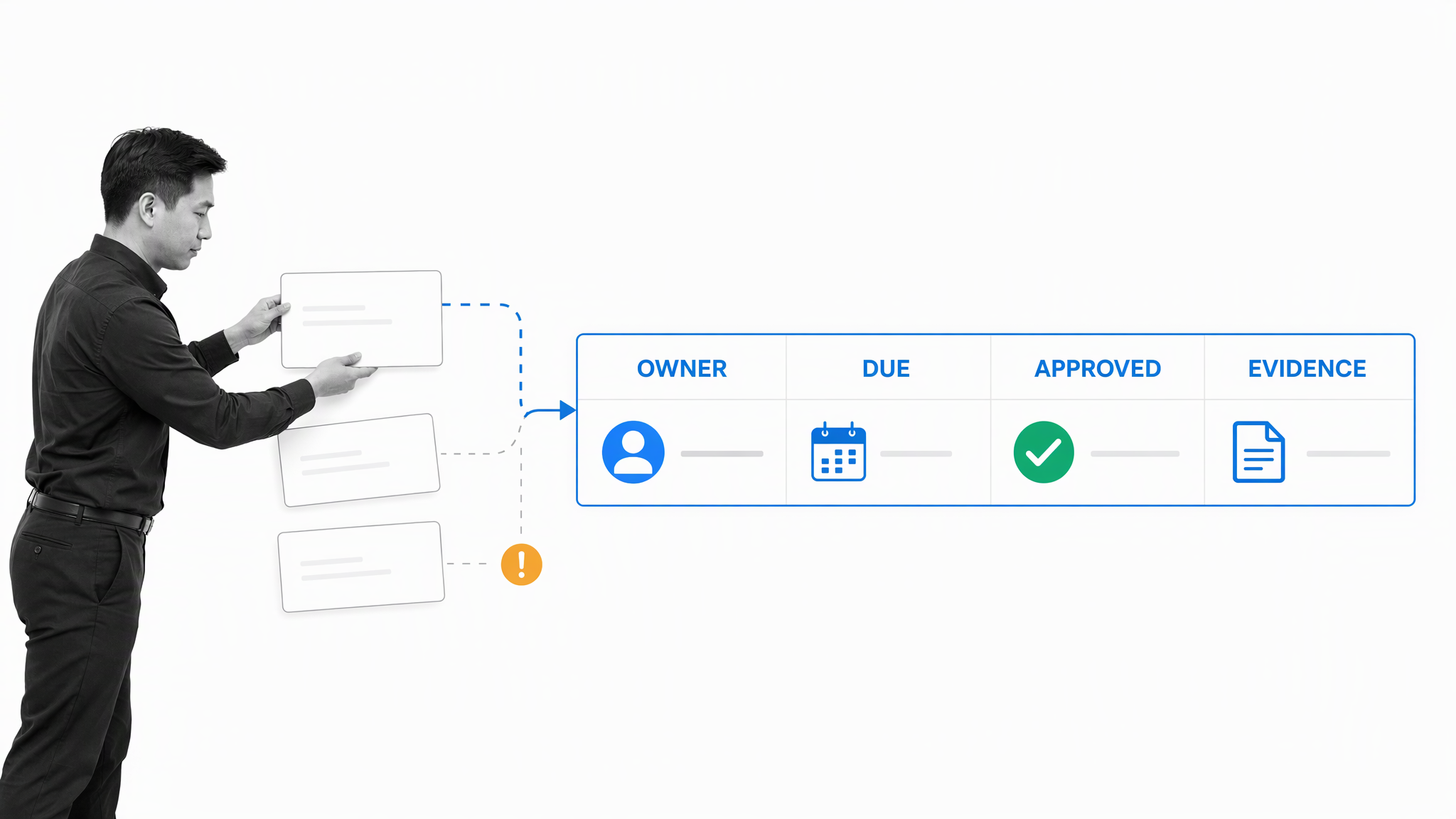
The problem grows when approvers change, a delivery is partial, a price differs, or an invoice arrives before receiving confirms the goods. An automated purchase order system keeps the current status, owner, due date, supporting evidence, and exception path in one place.
The goal is not simply to digitize forms. A reliable purchase order process enforces purchasing policy, separates incompatible duties, prevents unauthorized commitments, and gives teams the evidence needed to resolve a mismatch quickly.
Strong buyer-supplier relationships are essential for growth
Purchase orders are operational promises. They tell a supplier what the buyer expects, when delivery is due, which terms apply, and who can answer a question. When that information is complete and approvals are timely, suppliers can plan with confidence.
CIPS guidance on supplier relationship management emphasizes consistent communication, clear processes, and active risk management. Those practices are hard to sustain when purchasing status lives in individual inboxes or filing cabinets.
Building and nurturing strong vendor relationships should be one of procurement’s core strategies. Businesses cannot grow in a vacuum: buyers and suppliers grow together by learning to leverage the resources that each brings to the table.
A controlled workflow gives both sides a dependable handoff. The supplier can confirm acceptance, provide a reason for declining, commit to a delivery date, and respond to an exception without forcing the buyer to reconstruct the history.
The next section shows a purchase order checklist that keeps those steps connected from the first request through receiving and accounts payable.
A simple checklist to get you going on the right path
The Purchase Order Workflow template provides a practical starting point for a purchase requisition workflow. Adapt the fields, approval thresholds, roles, and exception rules to your purchasing policy before running it with live orders.
A complete purchase order workflow usually follows this sequence:
- Capture the purchase request. The checklist begins with recording the purchase order’s basic details and creating the requisition for internal approval. Record the supplier, items, quantity, expected cost, business reason, cost center, contract reference, and required date.
- Route the PO approval workflow. The requisition needs to be approved by an authorized manager and the finance department before the purchase order is created and sent to the supplier. Apply business rules for value, department, category, budget, supplier status, and risk.
- Create and send the purchase order. Generate the approved order from the request data, assign a unique identifier, and send the controlled version to the supplier. The supplier is automatically notified and invited to review the purchase order.
- Record the supplier response and receipt. The supplier either accepts the order or declines it, in which case a reason must be provided and sent back to the buyer. When the order is accepted, confirm the delivery date, send final details to receiving, and file the order for internal records.
- Connect procurement with accounts payable. Perform a three-way match across the purchase order, receiving record, and invoice. A mismatch routes to a named reviewer; a successful match proceeds to payment approval.
Open the Purchase Order Workflow template and review the sequence in context:
Designed to be integrated with procurement software
Process Street is a single Compliance Operations Platform. Its Docs and Ops capability areas, together with built-in AI, connect the purchasing procedure that defines the standard with the workflow that executes it. Teams can govern purchase order procedures, run approvals, collect evidence, and prove what happened without separating the policy from the work.
Process Street has direct, universal integrations to 5,000+ systems. Need a new one? An AI agent builds it on the fly. That lets a workflow exchange request, supplier, order, receipt, invoice, and payment data with the systems your teams already use.
Built-in AI can extract structured fields from a request or invoice, check records for missing information, surface discrepancies, and route exceptions. People still retain authority over approvals, supplier decisions, and payment release.
If your accounting or procurement system already creates purchase orders, use Process Street to orchestrate the surrounding controls. A new order can start a workflow run, an approval can trigger the next system action, and a failed match can assign a review with the evidence attached.
How paper-based purchase orders waste time and money
Paper does more than slow filing. It separates the request, approval, purchase order, delivery record, invoice, and payment decision, which makes exceptions harder to detect and ownership harder to prove.
Inability to prevent late deliveries
If you are shuffling around various documents to track the progress of multiple purchase orders, it is difficult to take effective measures to prevent late deliveries. The most teams can do is start calling or emailing the vendor after the commitment is already at risk.
A late delivery is easier to prevent when the workflow records the promised date, current owner, supplier confirmation, and escalation rule. In a paper process, teams often discover the problem only after someone needs the goods and starts searching for the order.
A controlled workflow can notify the supplier before a commitment slips, assign a follow-up to procurement, and show receiving what to expect. If the supplier changes the date, that decision becomes part of the order history rather than another email thread.
Exposure to fraud
Purchase-order fraud can involve unauthorized suppliers, changed quantities or prices, forged approvals, duplicate invoices, false receiving records, or an employee controlling too many steps. The ACFE Report to the Nations continues to document purchasing, billing, bribery, and bid-rigging schemes across organizations.
Controls should make those schemes harder to execute and easier to investigate. Segregation of duties prevents one person from requesting, approving, receiving, and paying for the same purchase. Approval thresholds send material commitments to an authorized reviewer. Supplier validation, restricted permissions, and complete timestamps preserve evidence.
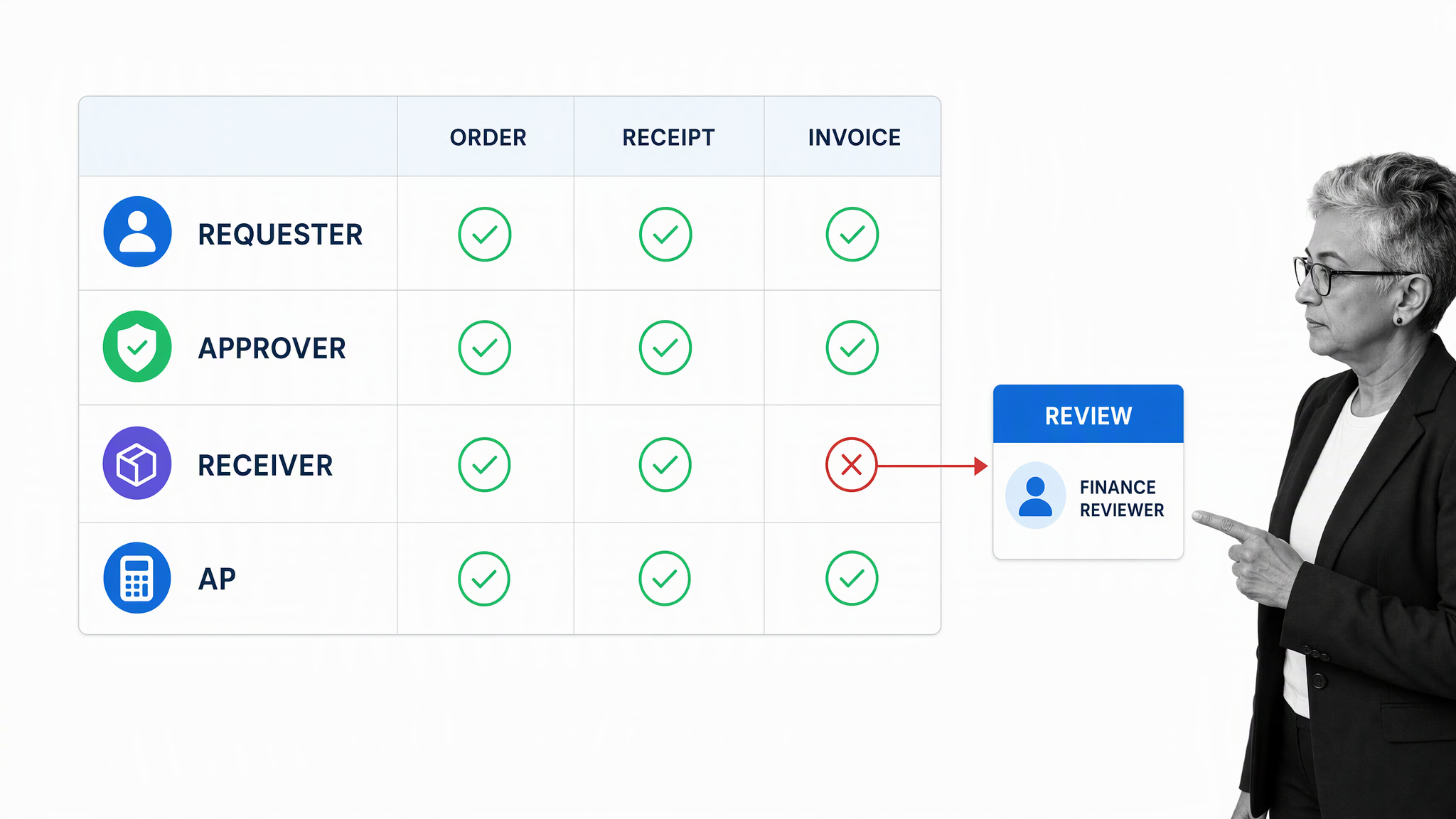
A three-way match compares the approved purchase order, the receiving record, and the supplier invoice. If quantity, price, supplier, tax, or delivery details disagree, the workflow should stop the payment path and assign the exception to a named owner. APEX Analytix and Oversight describe the red flags these controls are designed to surface.
By using procurement software to manage your purchase order workflow, you can ensure that every purchase order and the activity related to it is traceable, and that nobody without proper permission can manipulate the documentation. You can also verify that purchasing follows a three-way match to ensure accuracy.
The Accounts Payable Process template shows how to validate the records that connect a purchase order to payment:
The accounts payable checklist provides guidance on how to validate all documentation involved in the purchase order workflow and helps ensure that payment is executed properly without late fees or misunderstandings with the supplier.
Encourages rogue spending
Maverick buying occurs when purchases bypass approved suppliers, contracts, catalogs, or authorization rules. The result can be inconsistent pricing, weak negotiating leverage, duplicated subscriptions, avoidable risk, and commitments that finance did not expect.
The root cause of unreasonably high levels of rogue spend is often a lack of visibility into the company’s spending. A lack of visibility equals a lack of accountability, and the problem snowballs when purchase orders from different vendors are dumped into disconnected filing systems.
A purchase request should be checked against budget, category, supplier status, contract terms, and approval authority before the order is issued. Amazon Business procurement KPI guidance treats purchase-order cycle time, contract compliance, and maverick spend as measurable parts of procurement performance.
Inefficiency due to human error
Manual re-entry creates opportunities for the wrong supplier, duplicate order, transposed price, missing tax treatment, incorrect quantity, or incomplete delivery record. Those mistakes can distort spend reporting and delay payment even when nobody acted improperly.
In the context of paper-based purchase orders, human error represents a high-risk inefficiency that can result in wasted time and money and cause difficult financial situations for the organization as a whole. Inaccurate calculations about company spending can flow into official reports and undermine financial decisions.
Structured fields, required evidence, validation rules, duplicate checks, and conditional routing reduce routine errors. For ambiguous cases, the right control is not blind automation. It is a clear review path that gives a qualified person the context needed to decide.
This is where accounts payable workflow software completes the control loop: it keeps invoice matching, exception approval, and payment evidence connected to the purchasing record.
3 key benefits of an automated purchase order workflow
The strongest benefits come from controlling the whole sequence, not automating one form. A reliable workflow shortens routine processing, exposes exceptions early, and gives buyers and suppliers a shared operating record.
Increase efficiency (faster processing times)
Purchase order workflow software can move a complete request to the right approver immediately, generate the controlled order from approved data, and notify the supplier without repeated copying and follow-up. The end-to-end process of order creation, approval, and fulfillment can be securely automated, relieving colleagues of the need to spend time manually tracking progress.
The same workflow can automate purchase requests without removing judgment. Rules handle assignment, reminders, data transfer, and evidence checks. People make the consequential decisions, including approving spend, resolving a mismatch, changing a supplier, or releasing payment. Automation and seamless communication result in faster processing times and shorter purchasing cycles.
Track progress in real-time
When all information is centralized in an online platform, an automated purchase order system provides visibility into spend at a granular level and makes it possible to track progress on pending purchase orders. A current record shows whether a request is waiting for information, approval, supplier confirmation, receiving, invoice matching, or payment.
The audit trail also improves management. Procurement can see approval time, supplier response, on-time receipt, match rate, exception volume, and resolution time. Repeated exceptions show where the policy, supplier, training, or workflow needs attention.
Improve supplier relationships
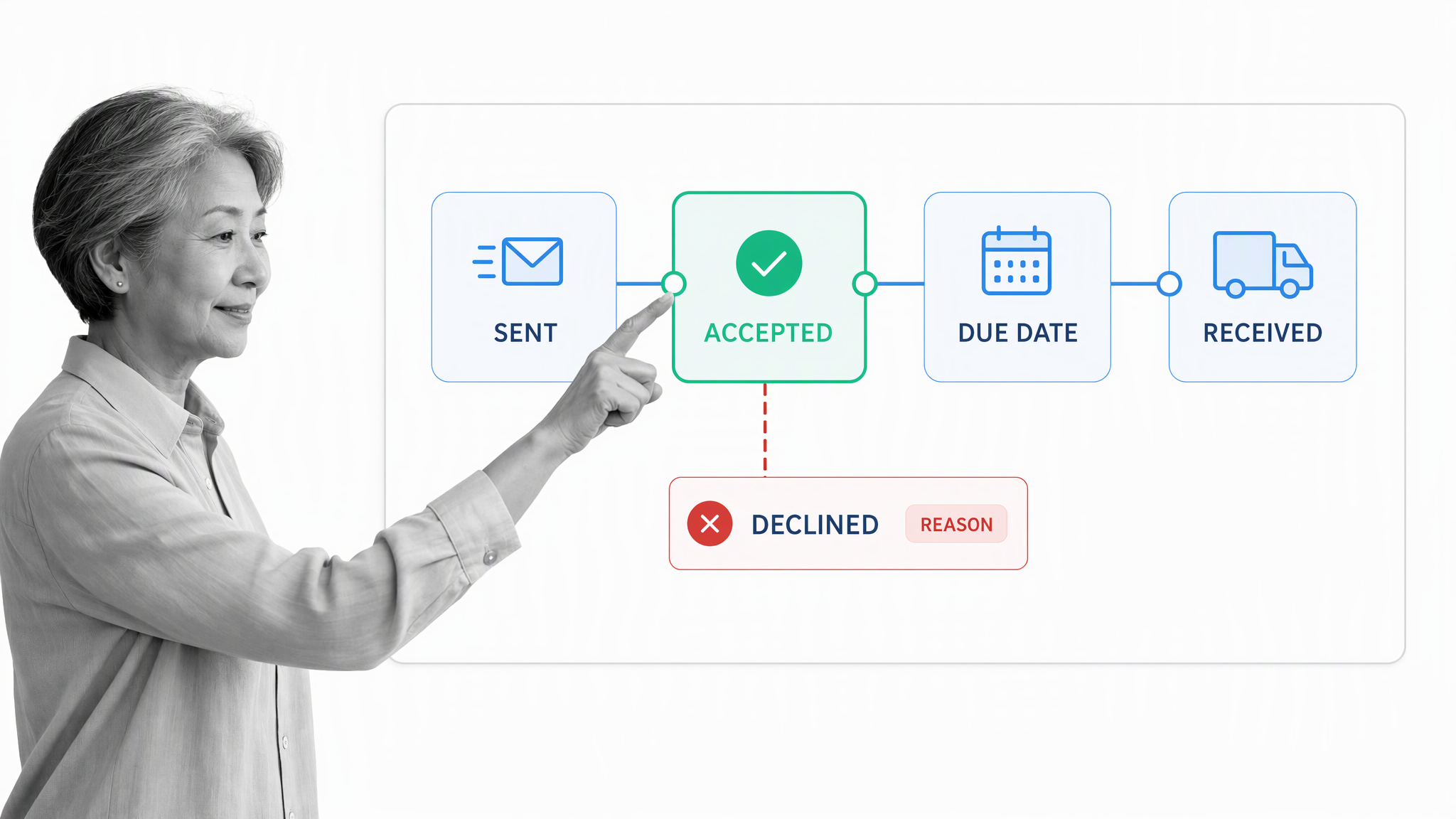
Suppliers work better with buyers who send complete orders, respond quickly, and pay against agreed terms. A controlled workflow makes expectations explicit and gives both sides a dependable way to confirm acceptance, record changes, and resolve exceptions.
The relationship improves because the operating process is reliable. Procurement can follow up before a missed delivery becomes a crisis, receiving knows what to expect, and accounts payable can resolve discrepancies without asking the supplier to resend the same information.
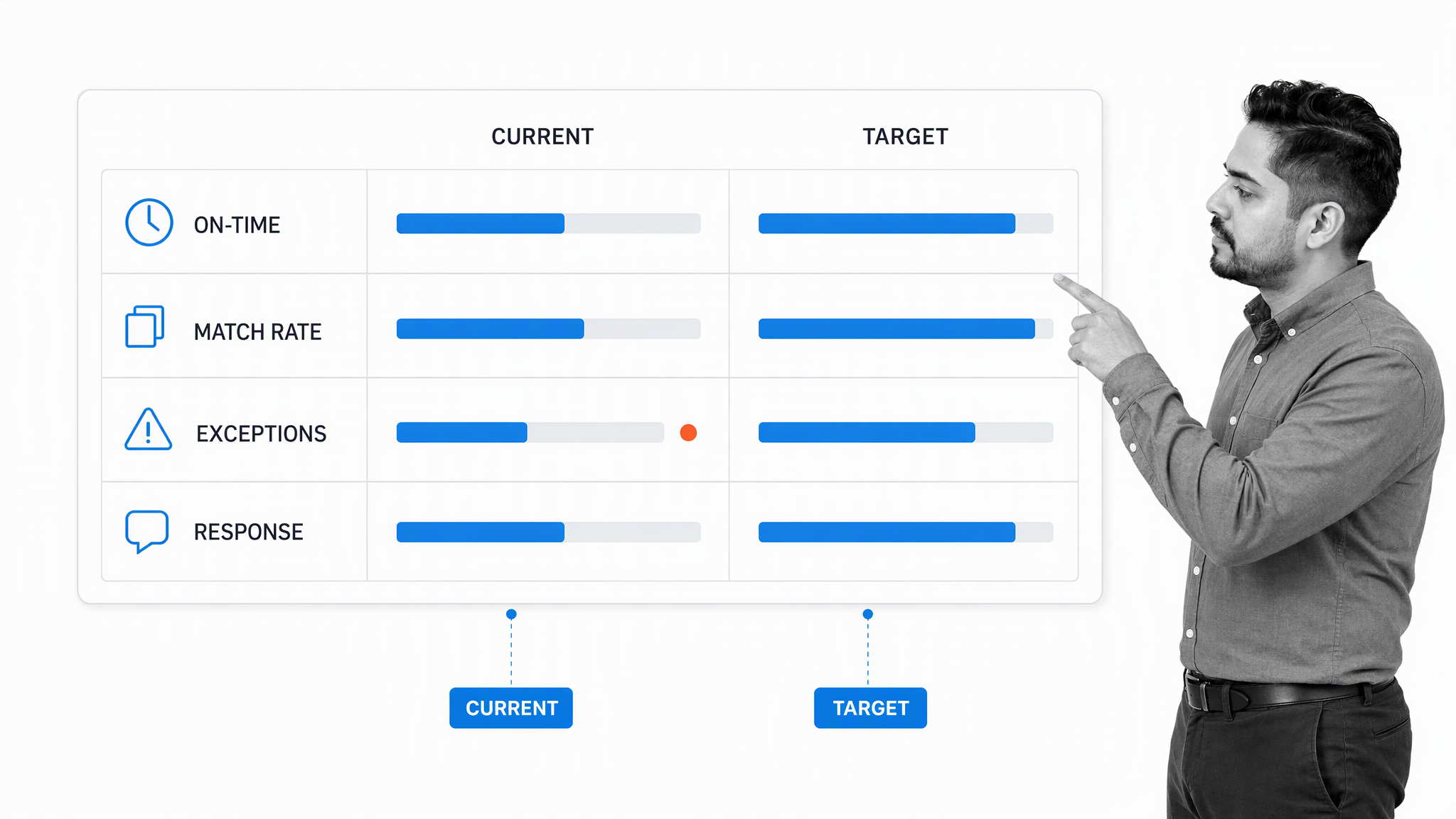
Review supplier performance with context. On-time delivery, match rate, exception patterns, and response time reveal more than a single late order. Use that evidence to improve the workflow, clarify the purchase order, or address a supplier issue directly.
Conclusion
Purchase orders are only one component of buyer-supplier relationships, yet they carry enormous potential for causing operational inefficiencies and, at worst, major fraud that can destroy valuable relationships. That threat is greater when organizations use outdated, paper-based legacy systems that expose them to risk.
A better purchase order workflow connects the purchase requisition, PO approval workflow, supplier response, receipt, three-way match, accounts payable review, and payment. Each handoff has an owner, each exception has a path, and each consequential decision leaves evidence.
Start with the Purchase Order Workflow template, adapt the controls to your policy, and test the common exception paths before rollout. The objective is an automated purchase order system that helps teams act quickly without weakening approval authority or financial control.
By integrating accounting or procurement management software with the Process Street purchase order workflow template, you can work with your supplier to ensure that every task is completed properly and on time. That means no unauthorized access to sensitive documents, no unnecessary delays, and no misunderstandings caused by a lack of communication.
For related supplier work, use the Supplier Evaluation and Contract Negotiation templates.
Purchase order workflow FAQs
What is a purchase order workflow?
A purchase order workflow is the controlled sequence for requesting a purchase, approving it, issuing the order, confirming receipt, matching the invoice, resolving exceptions, and authorizing payment.
What are the main steps in a purchase order process?
The core steps are purchase request, policy and budget approval, purchase order creation, supplier confirmation, receiving, three-way matching, accounts payable review, and payment.
How do purchase orders connect procurement with accounts payable?
Procurement creates and approves the purchasing commitment. Accounts payable uses the purchase order, receiving record, and supplier invoice to verify that the payment is valid before it is released.
How can a company automate purchase requests?
Use a structured intake form, required fields, conditional approval rules, system integrations, reminders, and exception routing. Keep people responsible for material approvals and ambiguous cases.
What controls should a PO approval workflow include?
Common controls include approval thresholds, segregation of duties, supplier validation, budget checks, permissions, required evidence, three-way matching, duplicate detection, exception ownership, and a complete audit trail.