


Turn every policy into automated workflows with built-in enforcement and audit-ready proof.



What is AIOps? AI for IT Operations

AIOps, or artificial intelligence for IT operations, is the practice of using AI, machine learning, and automation to make IT operations faster, more reliable, and easier to govern. It helps teams turn logs, metrics, events, traces, tickets, and configuration data into decisions about what is wrong, who should act, and what response should happen next.
The useful version of AIOps is not a magic button that fixes every system by itself. It is an operating model. Good AIOps connects observability, incident management, automation, and workflow control so teams can reduce alert noise without losing accountability.
That distinction is important for buyers and operators. AIOps can improve detection and triage, but it does not automatically create the policies, ownership model, or change controls that make operations safe. Those controls have to be designed into the workflow around the intelligence layer.
For IT, SRE, DevOps, security, and operations leaders, the goal is simple: fewer missed signals, faster triage, cleaner escalation, and safer remediation. Process Street helps with the workflow layer around that goal, turning incident and change procedures into governed workflows with owners, approvals, evidence, and audit trails.
What is AIOps?
AIOps is the application of analytics, machine learning, and AI techniques to IT operations. TechTarget defines AIOps as the use of big data analytics, machine learning, and other AI technologies to automate and enhance IT operations. In practice, that means an AIOps system ingests operational data, learns normal behavior, detects unusual patterns, correlates related events, and helps teams decide what to do.
The key word is operations. AIOps should connect intelligence to action. A dashboard that says something is unusual is useful, but it is not enough. The stronger model tells the right team what changed, shows the probable blast radius, links the incident to a service or owner, recommends the next response, and triggers a controlled workflow when action is approved.
AIOps usually sits between observability tools, incident management tools, service management systems, runbooks, and automation platforms. It does not replace every one of those systems. It uses their data and turns it into a cleaner operational path.
How does AIOps work?
AIOps works by moving operational data through a repeatable loop: collect, normalize, correlate, decide, act, and learn. The loop matters because IT environments create too many signals for manual review. Without correlation, teams drown in symptoms. Without workflow control, automation can move faster than the organization can govern.
Telemetry intake and normalization
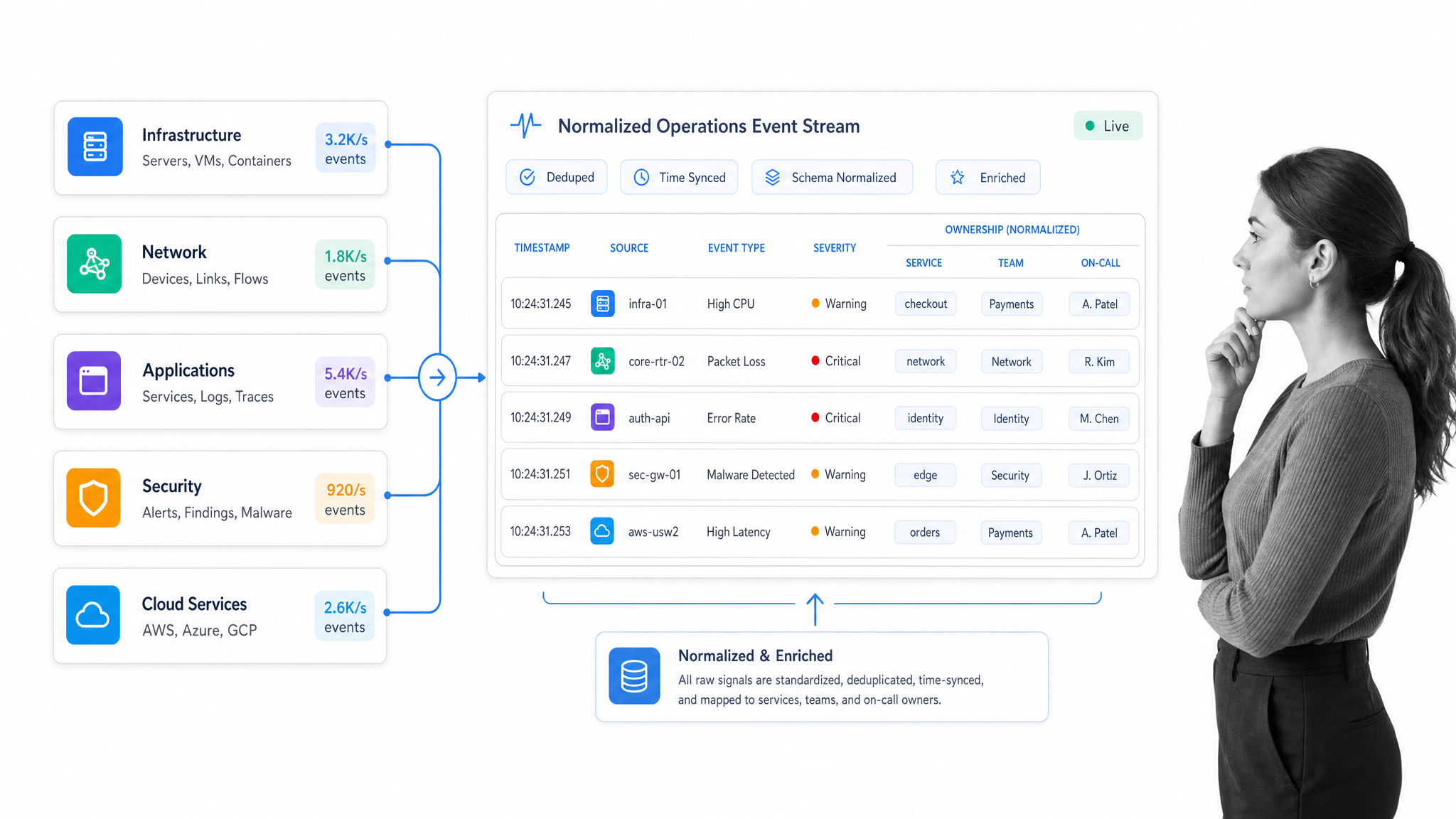
The first layer is data intake. AIOps platforms commonly draw from logs, metrics, traces, events, tickets, deployment history, service catalogs, configuration data, and network telemetry. The system has to normalize that data so signals from different tools can be compared. A CPU spike, failed deployment, customer ticket, and network event may be separate records, but they can describe the same operational problem.
This is why data quality is the first adoption constraint. If telemetry is missing ownership, service context, change history, or severity rules, the model can still find patterns, but the recommendations will be weak. The best implementations improve the data model before expanding automation.
Incident correlation and probable cause
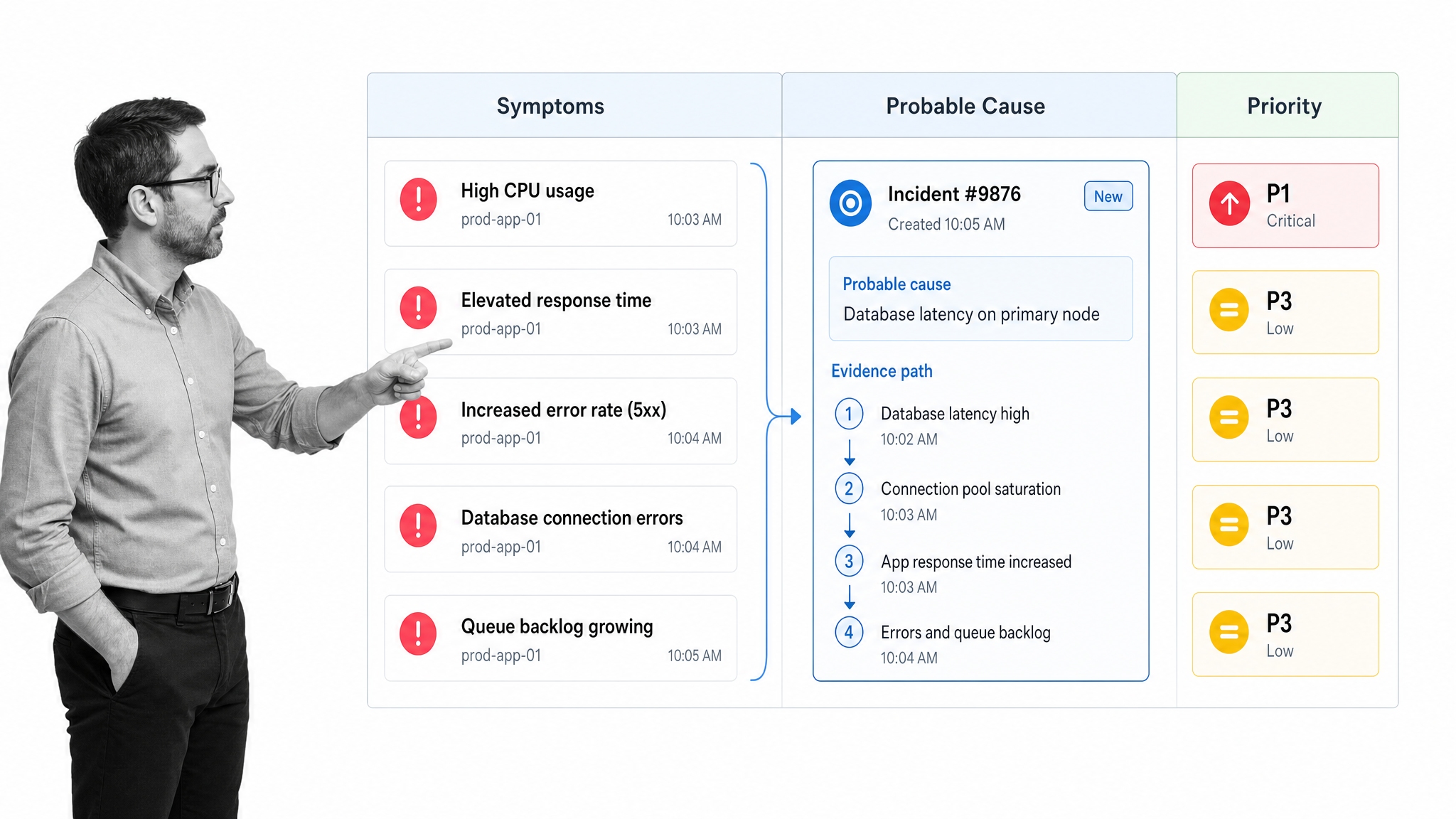
The second layer is correlation. AIOps groups related alerts, suppresses duplicate symptoms, detects abnormal behavior, and ranks incidents by likely business impact. IBM describes AIOps platforms as tools that can centralize monitoring and use advanced analytics to detect, correlate, and triage alerts across complex environments in its Cloud Pak for AIOps materials.
Correlation is valuable because the first alert is rarely the real cause. A database latency warning, application error, failed job, and support ticket may all come from one upstream change. AIOps should help the team see the cluster instead of chasing each symptom separately.
Controlled remediation workflow
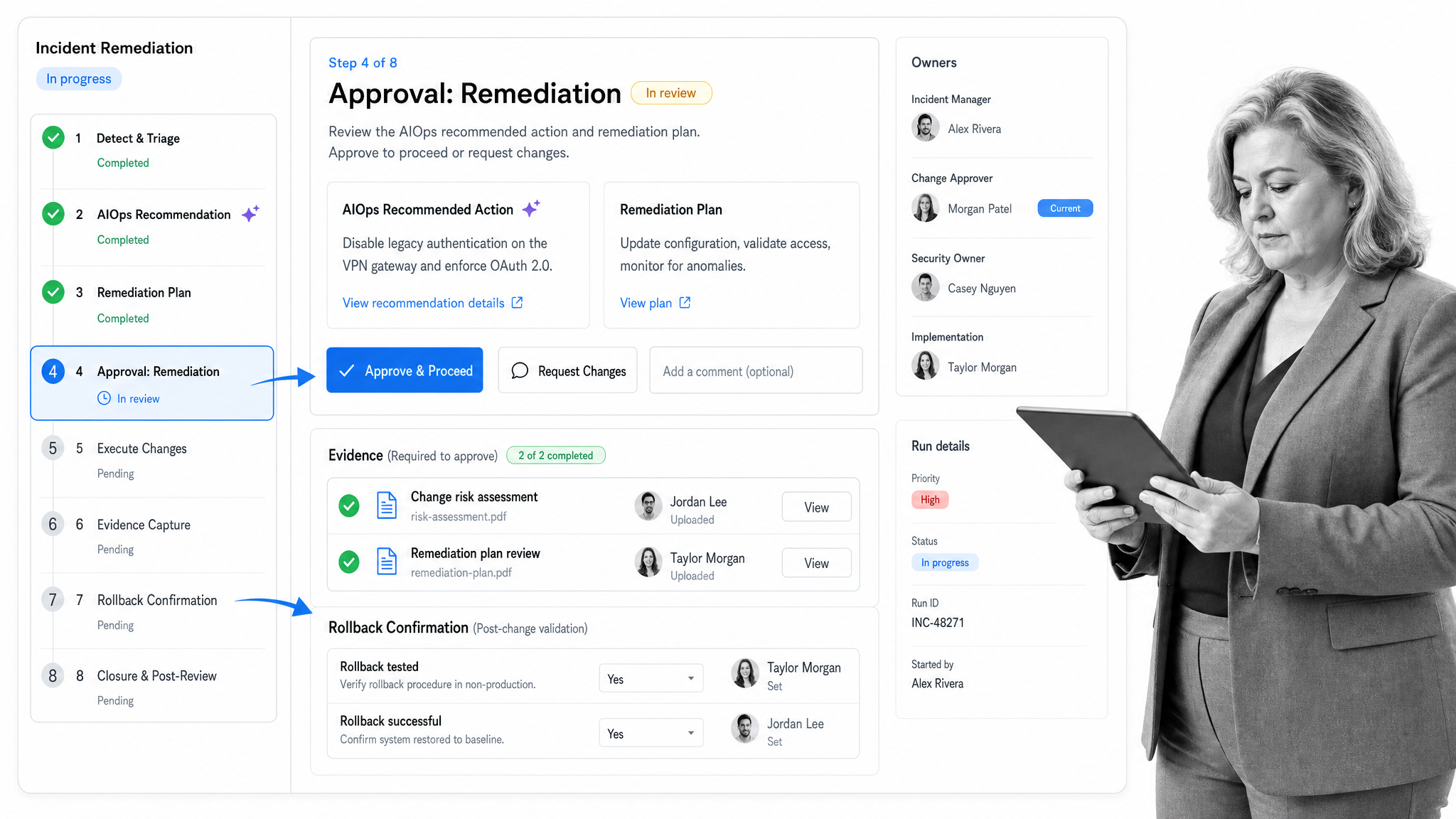
The third layer is action. Some actions can be automated safely, such as opening an incident, routing it to the right owner, collecting diagnostics, or restarting a low risk service. Other actions need approvals, evidence, rollback steps, or change windows. AIOps becomes operationally useful when recommended action is wrapped in a workflow that defines who can approve it, what evidence is captured, and how exceptions are handled.
This is the point where Process Street becomes relevant. It gives teams a governed workflow surface for the human and automated work around AIOps: triage checklists, escalation paths, remediation approvals, postmortems, audit evidence, and recurring improvement tasks.
Why does AIOps matter now?
Modern IT operations are distributed across cloud services, internal applications, vendor platforms, APIs, identity systems, security tooling, and data pipelines. Each system emits signals. Each team owns part of the response. Manual triage does not scale when incidents cross service boundaries.
The monitoring discipline behind AIOps is not new. Google SRE guidance on monitoring distributed systems emphasizes that alerting should focus on symptoms that need human attention, not every possible cause. AIOps extends that principle by using machine learning and automation to reduce noise and route work more intelligently.
The timing also matters because AI is now entering operational workflows directly. Teams are not only asking AI to summarize incidents. They are asking AI to recommend remediation, draft postmortems, create change requests, update runbooks, and trigger actions. That raises the bar for governance. If AI can influence operational work, the workflow around the AI needs controls.
What should an AIOps workflow include?
An AIOps workflow should define the path from signal to resolution. It should be specific enough that an engineer, manager, auditor, or AI agent can understand what happened and why.
- Data sources: logs, metrics, traces, events, tickets, deployment history, ownership data, and configuration context.
- Triage rules: severity, service impact, customer impact, escalation threshold, and duplicate suppression logic.
- Ownership: primary responder, backup responder, service owner, approver, and communication owner.
- Decision gates: what can be automated, what requires approval, and what must wait for a change window.
- Evidence capture: diagnostic snapshots, timeline notes, action history, approvals, and rollback confirmation.
- Learning loop: postmortem tasks, runbook updates, monitoring changes, and recurring improvement reviews.
The workflow should also separate recommendation from authorization. AI can suggest a response. The organization still needs a rule for when that response is allowed to run. That rule is what prevents useful automation from becoming uncontrolled automation.
How do you implement AIOps without losing control?
A safe AIOps rollout starts narrow. Pick one workflow where the pain is obvious and the data is available. Common starting points include alert triage, incident routing, capacity review, failed job handling, recurring service health checks, or postmortem follow up.
Then build the control model before expanding automation. The NIST AI Risk Management Framework is useful here because it focuses on trustworthiness across AI design, deployment, use, and evaluation. NIST describes the AI Risk Management Framework as a voluntary framework for incorporating trustworthiness into AI systems. For AIOps, that means clarity about ownership, reliability, explainability, privacy, security, and human oversight.
A practical rollout usually follows this sequence:
- Map the current incident or operations workflow before adding AI.
- Identify the telemetry sources and ownership data needed for accurate correlation.
- Define severity rules and escalation paths in plain language.
- Start with recommendations and evidence collection before allowing automated remediation.
- Route high impact actions through approvals and rollback checks.
- Review outcomes after each incident and update the workflow when the process fails.
The best AIOps programs do not remove humans from operations. They remove repetitive parsing, duplicate triage, missing context, and manual handoffs so human judgment is used where it matters.
Where Process Street fits
Process Street is a Compliance Operations Platform for governed workflows. It is not a replacement for observability or incident detection tools. It is the workflow layer that helps teams turn AIOps recommendations into accountable action.
Use Process Street when the operational response needs repeatability, approvals, evidence, and proof. That includes incident response, change approval, remediation review, access reviews, vendor escalations, postmortems, and recurring reliability checks.
In Process Street, teams can document the procedure, run the workflow, assign owners, enforce required steps, collect evidence, route approvals, and track completion. Automations can connect the workflow to the systems around it, while the process record shows what was done and who approved it.
This matters for AIOps because the hardest part is often not detection. It is execution. AIOps can identify a likely cause, but the business still needs a governed path for the response. Process Street gives that path structure.
AIOps examples by IT operations workflow
AIOps is easiest to understand through the workflows it improves. Here are practical examples that connect AI insight to operational execution.
Alert triage
AIOps groups duplicate alerts, identifies the affected service, suggests likely cause, and opens a triage workflow. The workflow assigns the responder, captures diagnostic evidence, checks customer impact, and routes escalation when severity rules are met.
Change risk review
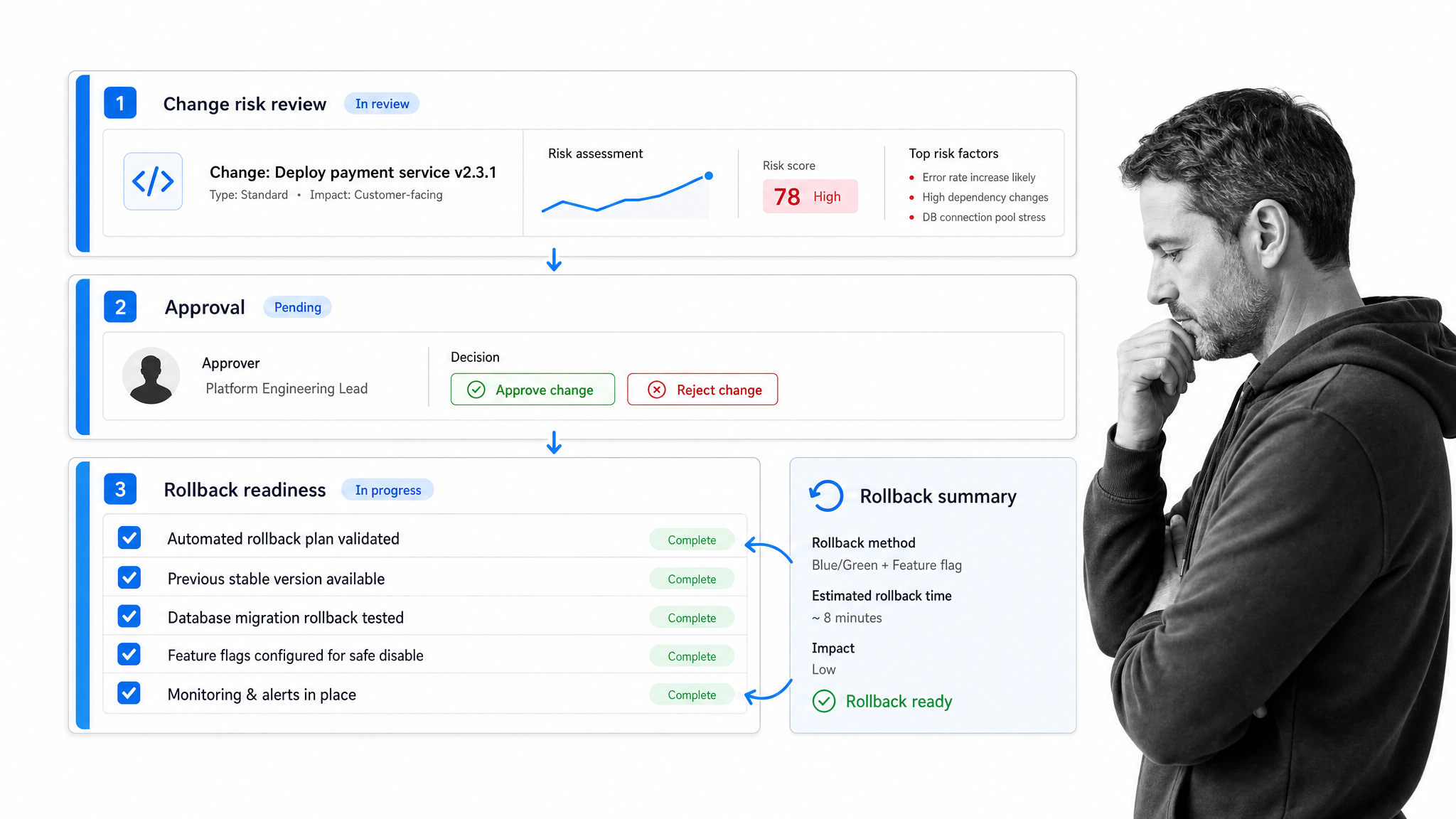
Before a deployment or configuration change, AIOps can compare recent incidents, dependency data, and service health. A governed workflow can require approval for risky changes, capture the reason, and confirm rollback readiness.
Capacity planning
AIOps can detect usage patterns and forecast where capacity pressure may occur. The workflow turns that signal into review tasks, owner assignments, budget checks, and implementation steps.
Postmortem follow up
After an incident, AI can summarize the timeline and surface likely contributing factors. The workflow makes sure corrective actions are assigned, reviewed, completed, and linked back to the incident record.
What are the common AIOps mistakes?
The most common AIOps mistake is starting with automation before the operating model is clear. If a team cannot explain who owns an alert, what counts as a material incident, which actions require approval, and where evidence is stored, AI will only accelerate confusion. The process has to be explicit before it can be automated safely.
Another mistake is treating every signal as equally important. AIOps should help teams focus on service impact, customer impact, security impact, and compliance impact. If every anomaly becomes a ticket, the platform creates a cleaner looking version of the same alert fatigue problem.
A third mistake is hiding the reasoning path. Teams need to know why an incident was grouped, why a probable cause was suggested, and why a remediation path was recommended. Explanations do not need to be perfect, but the workflow should capture the signal cluster, the decision, the owner, and the outcome so the team can improve the system after each incident.
The last mistake is skipping post incident learning. AIOps improves when the organization closes the loop. If an alert was noisy, update the rule. If an escalation missed an owner, fix the ownership map. If remediation needed approval, encode that approval path. The system gets better when operational learning becomes part of the workflow, not a side conversation after the incident is closed.
AIOps also fails when teams measure the wrong outcome. A lower alert count is useful only when serious incidents are still detected. Faster remediation is useful only when the response is correct and reversible. A mature program measures signal quality, time to ownership, time to safe action, evidence completeness, repeat incident reduction, and whether the workflow improved after each meaningful event.
AIOps FAQ
What does AIOps stand for?
AIOps stands for artificial intelligence for IT operations. It uses analytics, machine learning, and automation to help IT teams detect issues, correlate events, prioritize incidents, and trigger controlled responses.
Is AIOps the same as observability?
No. Observability collects and explains telemetry from systems. AIOps uses that telemetry to reduce noise, infer probable cause, recommend next actions, and automate approved operational workflows.
What data does an AIOps system need?
AIOps usually needs logs, metrics, events, traces, tickets, configuration data, deployment history, and service ownership context. The better the context, the more useful the correlation and automation become.
Can AIOps automate incident response?
Yes, but the safest model is controlled automation. Low risk actions can run automatically, while high impact remediation should route through approvals, evidence capture, rollback steps, and human review.
How does Process Street support AIOps workflows?
Process Street turns incident, change, and remediation procedures into governed workflows. Teams can assign owners, enforce approvals, capture evidence, trigger automations, and keep an audit ready record of what happened.
Where should a team start with AIOps?
Start with one high volume, high pain workflow such as alert triage, escalation, capacity review, or recurring incident postmortems. Prove the data sources, ownership model, and remediation controls before expanding.
