


Turn every policy into automated workflows with built-in enforcement and audit-ready proof.



Best Workflow Management Software for Accountants: 8 Tools Compared
The best workflow management software for accountants turns recurring client work into a controlled operating system. It should make ownership, deadlines, dependencies, reviews, client requests, and completion evidence visible without forcing staff to coordinate every handoff through email or memory.
Process Street is the strongest overall choice for firms that want to run repeatable accounting procedures with conditional routes, approvals, required inputs, and a clear activity record. Accounting-specific suites can be a better fit when the buying decision centers on a bundled client portal, billing, document management, or tight alignment with an existing accounting ecosystem.
This comparison focuses on workflow execution, not general ledger capability. Use it to shortlist the operating layer that will move onboarding, bookkeeping, close, tax, payroll, advisory, and review work from intake to completion.
- Which tools are best at a glance?
- What is accounting workflow software?
- Which workflow tools should accountants compare?
- How should you choose accounting workflow software?
- How do you implement a new workflow platform?
- Frequently asked questions
Which accounting workflow tools are best at a glance?
| Tool | Best fit | Operating model | Watch for |
|---|---|---|---|
| Process Street | Controlled recurring processes | Executable workflows with routing and approvals | Confirm how specialist accounting systems will connect |
| Karbon | Collaborative accounting practices | Practice work, email, tasks, and client context together | Test setup depth and team adoption |
| TaxDome | Firms seeking a broad practice suite | Client pipelines connected to firm operations | Check regional feature availability |
| Canopy | Tax and accounting practice management | Modular client, workflow, document, and billing operations | Map the modules your firm truly needs |
| Financial Cents | Deadline and workload clarity | Accounting workflow dashboard with templates and recurring work | Test reporting against your service mix |
| Jetpack Workflow | Focused recurring work management | Templates, projects, deadlines, and team workload | Decide whether you need a broader suite |
| Aero Workflow | Procedure-led bookkeeping and CAS work | Tasks connected to procedures, schedules, and time tracking | Validate the interface with daily users |
| Xero Practice Manager | Xero-centered firms | Jobs, time, invoices, reports, and Xero synchronization | Check availability and partner requirements in your region |
The table is a starting point, not a universal ranking. A tax practice that wants client documents and billing in the same suite has a different requirement from a finance team that needs strict review gates across several systems. The winning product is the one that can run your real workflow with the fewest manual gaps.
What is accounting workflow management software?
Accounting workflow management software coordinates the sequence of work required to deliver a client service. A workflow may begin with a new-client form, a recurring date, a document arrival, or a staff request. The software then creates work, assigns owners, sets due dates, reveals the next step, routes exceptions, requests review, and records completion.
That operating layer is different from the accounting system of record. The ledger records financial transactions. Tax software prepares and files returns. Payroll software calculates and distributes pay. Workflow software coordinates the people, decisions, inputs, and evidence around those systems so the firm can deliver work consistently.
The distinction also separates workflow management from ordinary project management. A project usually ends when a unique outcome is delivered. Accounting firms repeat similar services across many clients and periods. They need templates, recurring schedules, dependencies, standardized review, workload balancing, and a reliable record of what happened each time.
A useful platform should make the process executable. A written procedure explains what to do, but an executable workflow can require a field, block completion until evidence is attached, change the path through conditional logic, and route a decision through approval steps.
Which workflow management tools should accountants compare?
The shortlist below prioritizes products that can coordinate recurring accounting work. It includes a process execution platform and accounting-specific practice systems, because firms buy for different operating problems. Process Street ranks first for controlled workflow execution. The remaining tools are grouped by the practice-management job they handle best.
Process Street
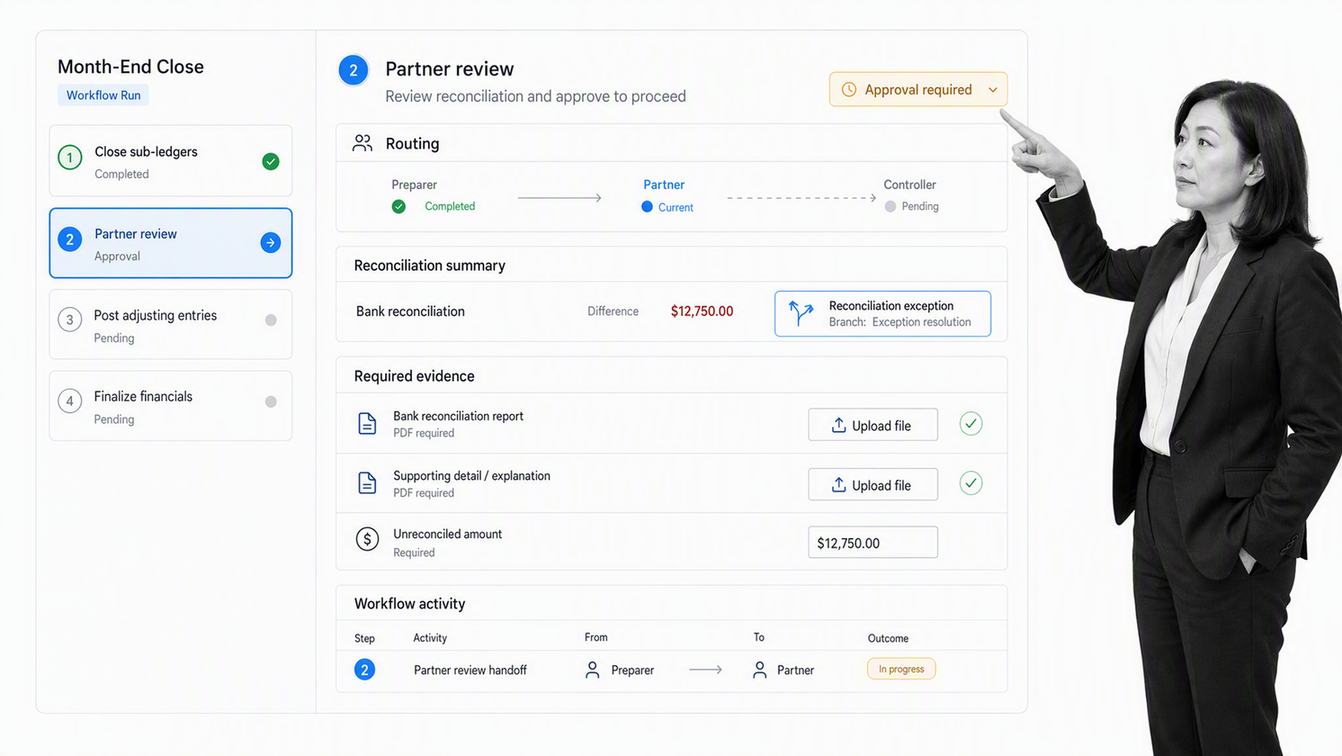
Process Street is an agentic process automation platform for teams that need repeatable work to follow a defined path. Its workflows support conditional logic and single or sequential approvals, so a firm can route client work by service, risk, entity type, or exception while keeping review inside the process.
That makes it a strong fit for onboarding, monthly close, tax preparation, quality review, client offboarding, internal controls, and other processes that cross people or systems. Required inputs and approval gates help turn a checklist into controlled execution. The activity record gives managers a shared source for status and follow-up.
Process Street is not a general ledger or tax preparation system. Its role is to orchestrate the work around those systems, enforce the procedure, and retain proof that the required steps occurred. That separation is useful when a firm already has specialist accounting tools but lacks one dependable operating layer.
Best for: accounting firms and finance teams that prioritize process control, routing, approvals, and execution evidence
- Evaluate: Build one complete client workflow with a normal path and an exception path.
- Evaluate: Test whether review gates, evidence requirements, and ownership match the firm’s quality controls.
- Evaluate: Confirm how data will pass to and from the firm’s accounting, tax, document, and communication systems.
Karbon
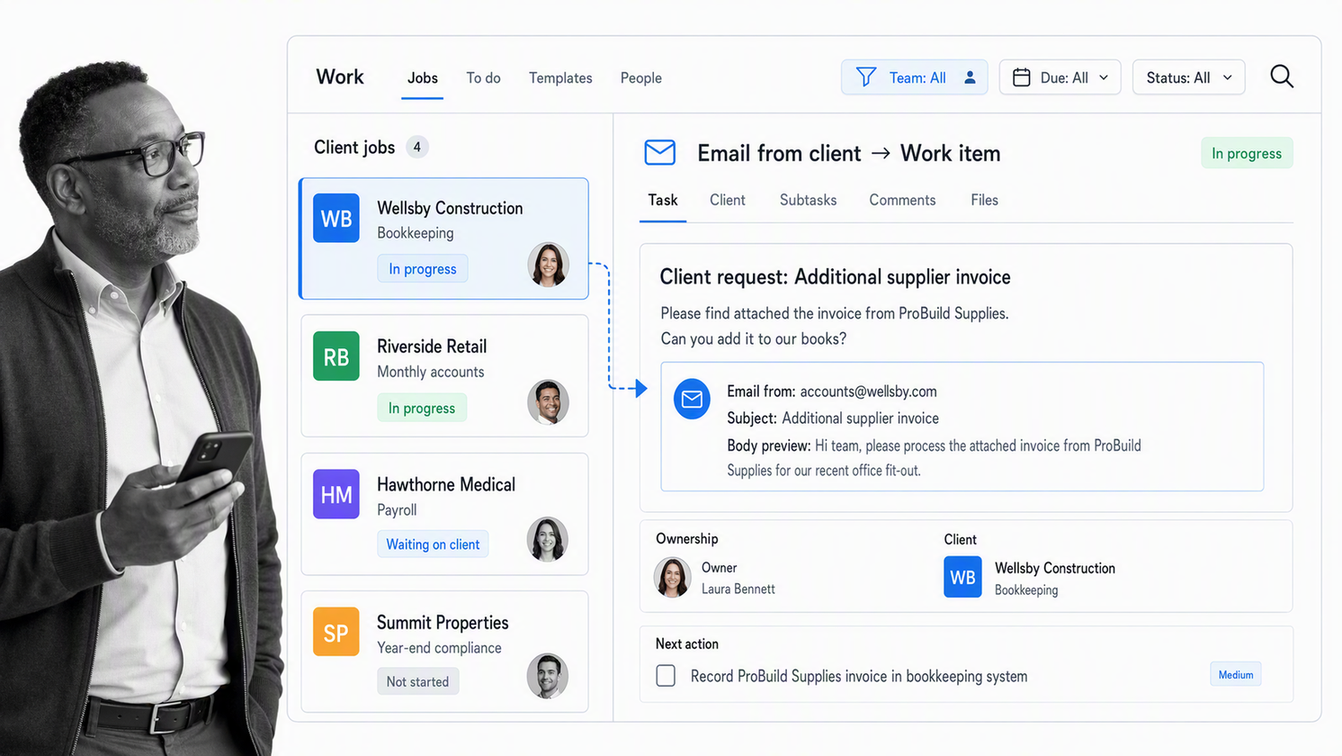
Karbon combines accounting practice workflows with email, tasks, client work, team collaboration, and workflow automation. That shared context can suit firms where client communication and internal delivery are tightly connected.
Karbon deserves a close look when coordination problems begin in the inbox. A team can evaluate whether the product makes client history, work status, ownership, and upcoming actions easy to understand without switching between disconnected tools.
The buying test should focus on adoption and operating fit. Configure a recurring service, move a client request through the workflow, reassign work during a capacity crunch, and confirm whether partners can see the right level of detail without creating reporting overhead for staff.
Best for: growing accounting practices that want communication, client context, and work management in one environment
- Evaluate: Test email-to-work handling with real client threads.
- Evaluate: Measure the effort required to design templates and migrate active work.
- Evaluate: Check whether workload, budget, and status views answer the questions partners ask each week.
TaxDome
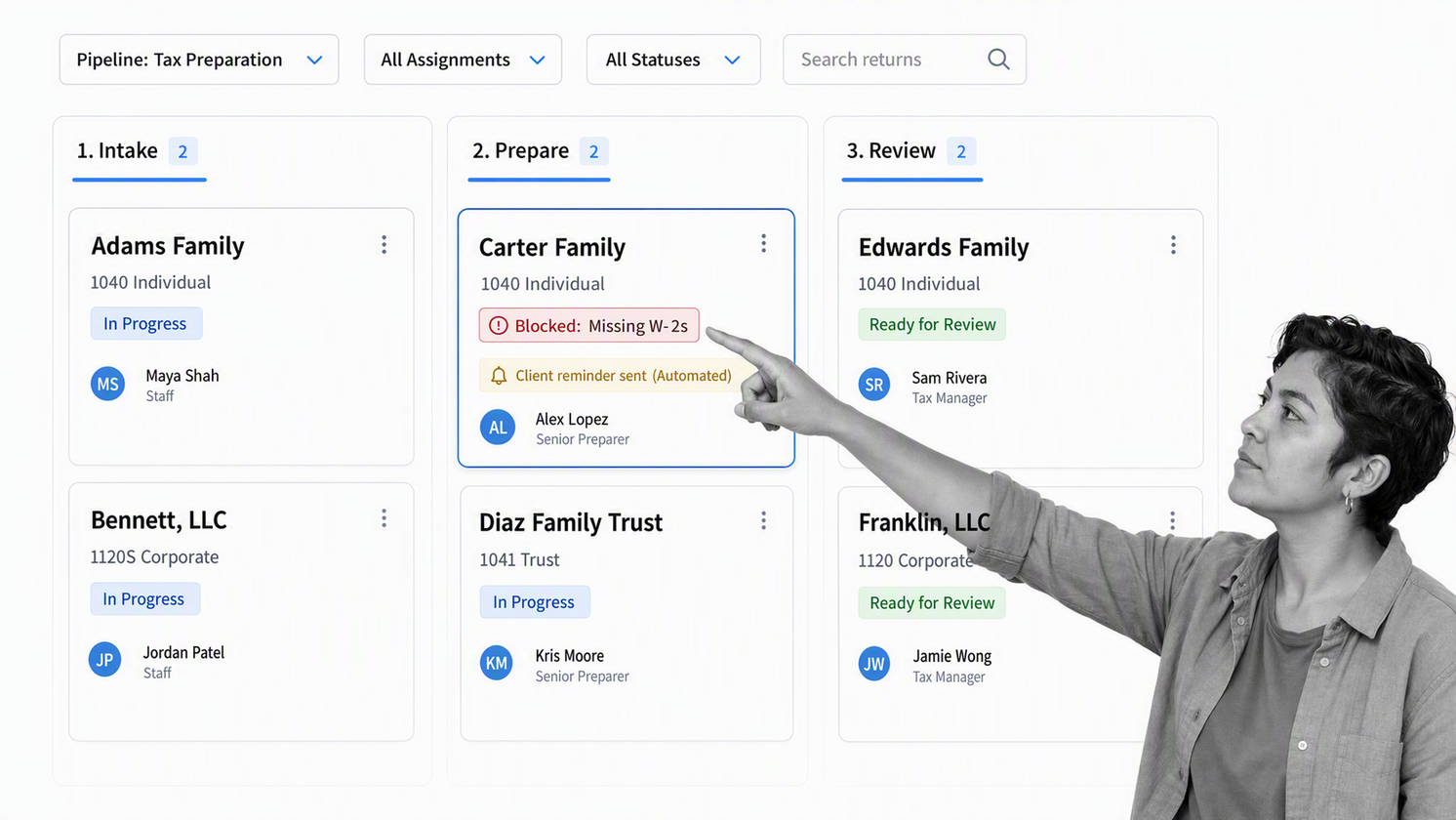
TaxDome supports customizable pipelines, automated task assignment and reminders, dependencies, and recurring workflows for accounting services. It also connects workflow with broader practice operations, which can appeal to firms seeking a more consolidated system.
Its pipeline model is easy to map to services such as bookkeeping, payroll, tax preparation, and advisory work. The useful question is whether those stages represent meaningful operating states or become a decorative board that staff must constantly update by hand.
A serious pilot should include client requests, dependencies, reassignment, a late document, an exception, and a final review. Firms operating across regions should also confirm which features and integrations are available where their clients and staff work.
Best for: tax, bookkeeping, and accounting firms that want workflow tied to a broad practice-management suite
- Evaluate: Run a complete service pipeline from intake through delivery.
- Evaluate: Test automated reminders without overwhelming clients.
- Evaluate: Verify regional availability for the integrations and communication channels the firm requires.
Canopy
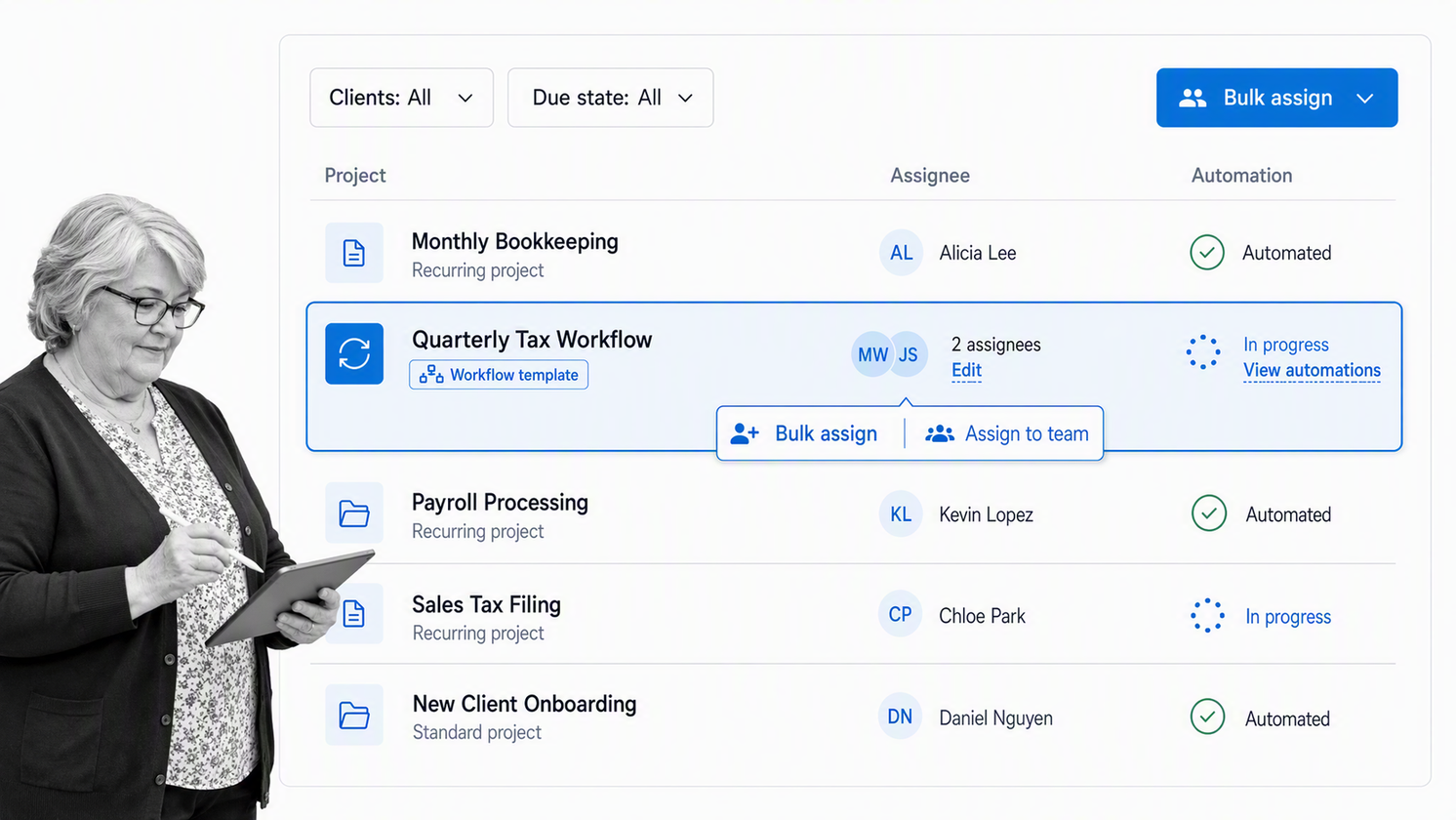
Canopy provides accounting workflow templates, bulk task assignment, automations, and firm-wide work visibility. Its broader practice platform can connect workflow with client, document, billing, intake, and communication needs.
Canopy is worth evaluating when a firm wants to reduce the number of separate practice applications. That breadth can be valuable, but only if the connected modules match the firm’s actual services and client experience. Buying unused breadth creates a different form of complexity.
The pilot should follow a client record through intake, document collection, task assignment, review, communication, and billing handoff. Managers should verify that the workflow view exposes blocked work early enough to act, while staff should confirm that routine updates do not become extra administration.
Best for: accounting and tax firms evaluating a connected practice-management platform
- Evaluate: Map required modules before comparing packages.
- Evaluate: Test bulk assignment and recurring templates during a realistic busy-period scenario.
- Evaluate: Confirm that client documents, messages, tasks, and billing context stay attached to the right work.
Financial Cents
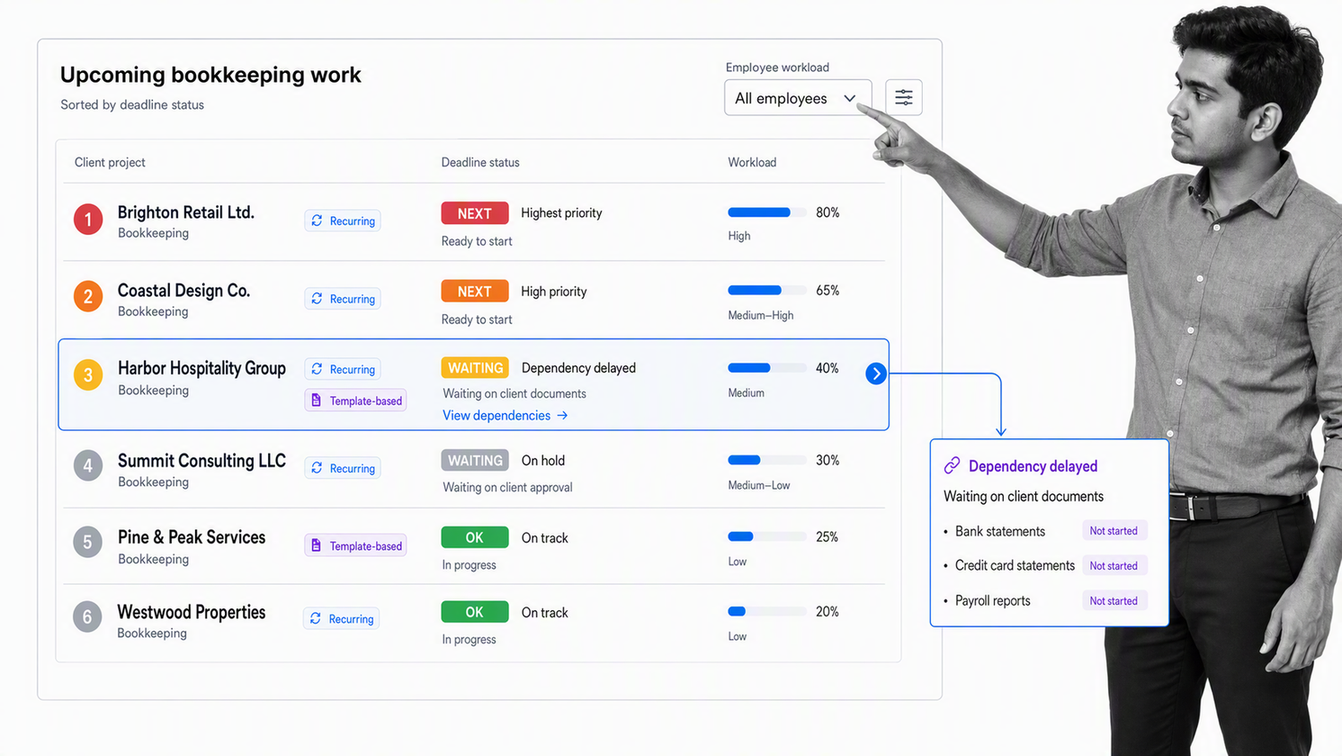
Financial Cents provides a client-work dashboard, recurring-work automation, workflow templates, dependencies, and team collaboration for accounting and bookkeeping firms. Its central promise is straightforward control over who is working on what and which deadlines are approaching.
This focus makes Financial Cents a practical candidate for firms moving beyond spreadsheets or general task lists. The dashboard should be tested against the real segmentation partners use, including service line, preparer, reviewer, client, due date, and blocked status.
Templates matter most when they preserve the firm’s method without becoming difficult to maintain. Build one monthly service and one seasonal service, then change a step, due-date rule, or dependency to see whether the template system stays manageable as the firm evolves.
Best for: small and midsize accounting firms that need clearer deadlines, workloads, and recurring work
- Evaluate: Recreate the firm’s busiest recurring workflow.
- Evaluate: Test dependency and handoff behavior when client information arrives late.
- Evaluate: Confirm whether reporting reveals bottlenecks without manual spreadsheet cleanup.
Jetpack Workflow
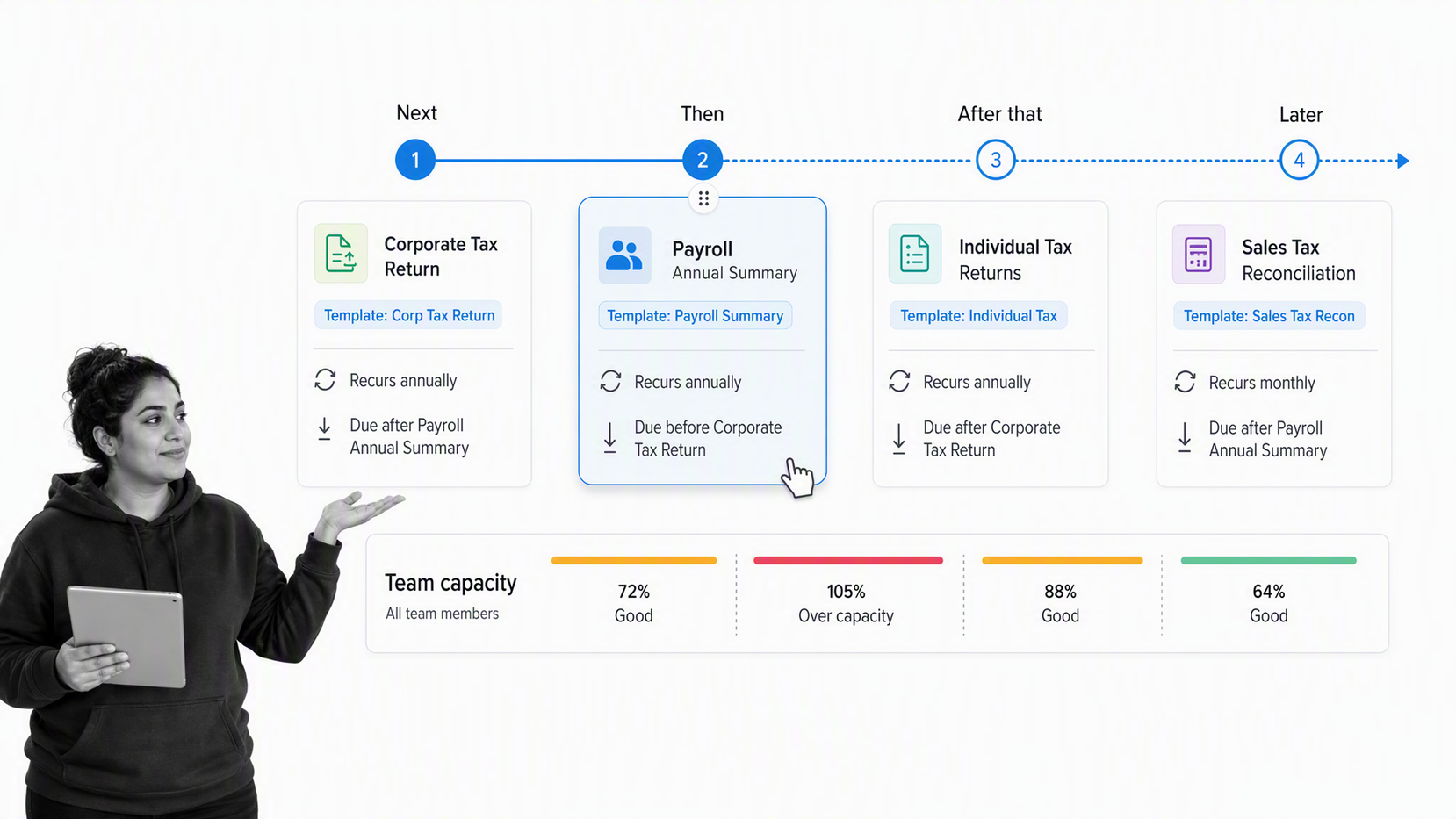
Jetpack Workflow is focused workflow and project management software for accounting and bookkeeping firms. It provides reusable templates, recurring task and deadline automation, team workload views, and visibility into future work.
The narrower scope can be an advantage for a firm that already likes its accounting, billing, and client systems. Instead of replacing the practice stack, Jetpack Workflow can concentrate on making recurring service delivery dependable.
That focus is also the main tradeoff. Buyers should decide whether they want a dedicated work-management layer or a wider practice suite. Test how client requests, documents, billing events, and communication connect to the workflow when those functions remain elsewhere.
Best for: firms that want a focused system for recurring projects, tasks, deadlines, and team capacity
- Evaluate: Compare setup speed against the depth of control the firm needs.
- Evaluate: Review future-work and capacity views with managers.
- Evaluate: Trace every handoff to systems that will remain outside the product.
Aero Workflow
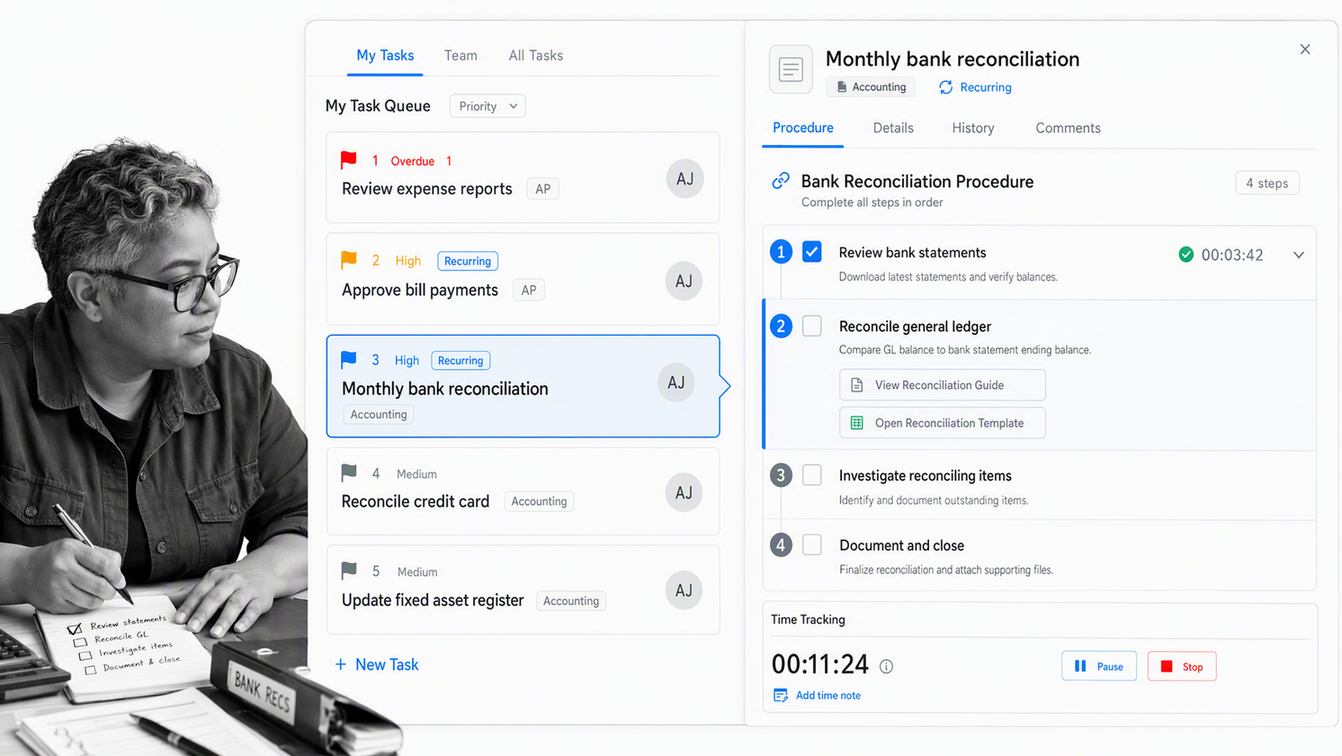
Aero Workflow provides pre-built accounting workflows, recurring task scheduling, integrated time tracking, a live firm dashboard, and reporting. It connects scheduled work with procedures, which can help firms make the method of completing a task available where the task is assigned.
That procedure-led model is useful for bookkeeping, client accounting services, and other repeatable services where consistency and scope control matter. Built-in time tracking can also support a closer comparison between the planned process and the actual effort required.
During evaluation, ask daily users to work from their real queue rather than a sample project. Managers should inspect overdue work, staff assignments, time, and job-cost information, then test how easily a procedure can change without confusing existing scheduled work.
Best for: bookkeeping and client accounting service firms that want tasks, procedures, schedules, and time connected
- Evaluate: Test a recurring service with a detailed procedure attached.
- Evaluate: Check whether staff can prioritize today’s work from one clear queue.
- Evaluate: Compare time and job information with the firm’s pricing and scope-review process.
Xero Practice Manager
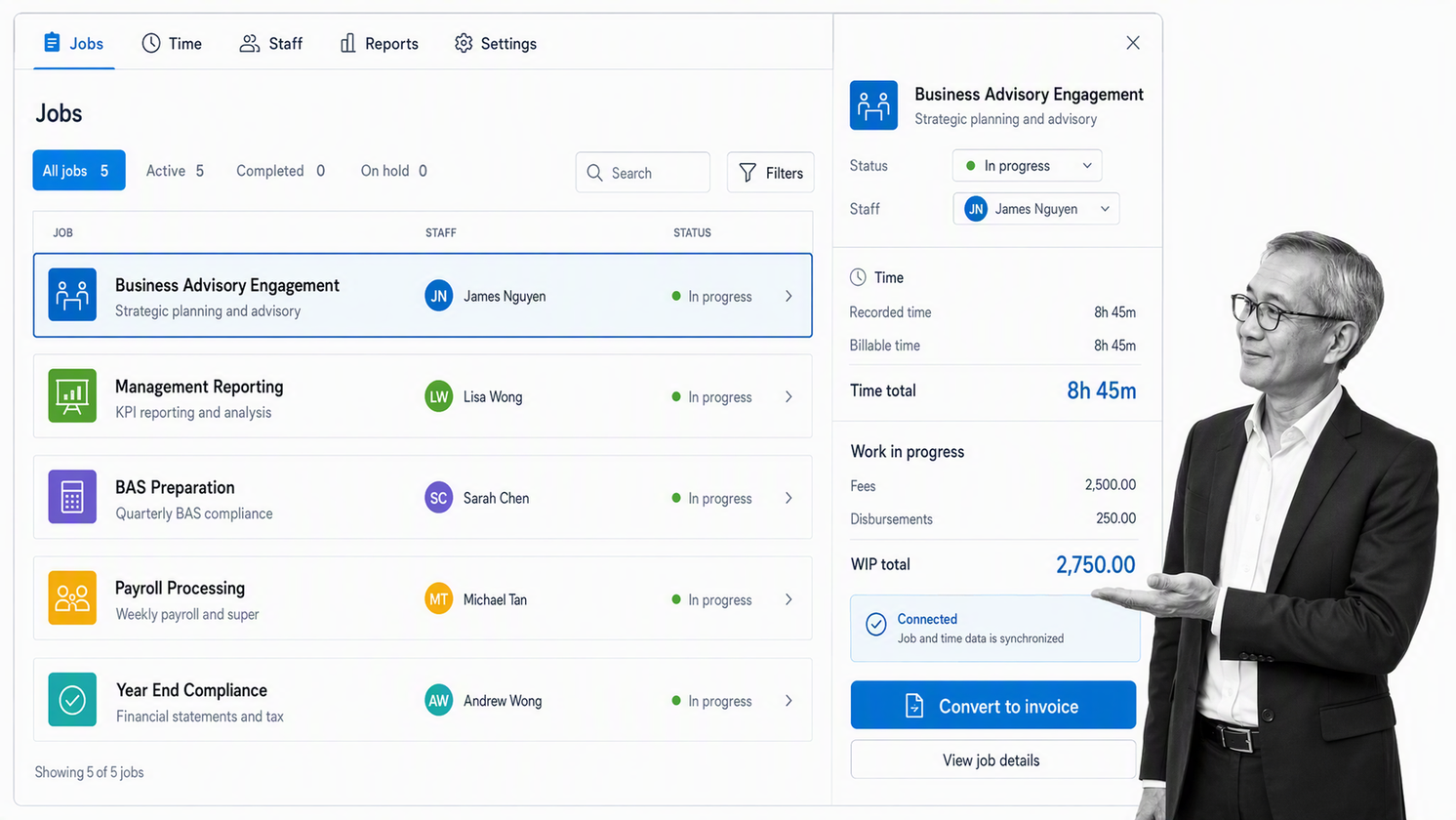
Xero Practice Manager supports jobs, tasks, due dates, time tracking, invoicing, custom reports, and synchronization with Xero. It is a natural candidate for firms whose client and practice operations already center on the Xero ecosystem.
The product can connect scheduled jobs and staff assignments with work in progress and invoicing. That alignment can reduce handoffs when the practice wants operational and financial views to share client and job context.
Availability, partner requirements, and packaging can vary by region, so the evaluation should begin with the firm’s location and Xero status. The workflow pilot should then test job templates, milestones, staff schedules, time entry, invoice conversion, and the synchronization rules that affect client records.
Best for: Xero-centered accounting and bookkeeping practices that want job, time, reporting, and invoice workflows connected
- Evaluate: Confirm regional availability and partner requirements.
- Evaluate: Test client, invoice, payment, and job synchronization with a controlled sample.
- Evaluate: Build reports that match the firm’s productivity, work-in-progress, and recoverability review.
How should you choose accounting workflow software?
Start with the operating problem, not the category label. A firm that misses review steps needs stronger control. A firm that cannot see upcoming deadlines needs better scheduling and workload views. A firm that spends hours chasing client documents needs a better request and reminder path. A firm with scattered communication may need practice context around the workflow.
| Evaluation area | What to test | Evidence of fit |
|---|---|---|
| Recurring work | Create monthly, quarterly, and annual schedules | Future work appears at the right time without duplicate setup |
| Ownership | Assign preparer, reviewer, and partner roles | Every active item has a clear accountable owner |
| Dependencies | Delay a client document and a prior task | Downstream work waits or reroutes predictably |
| Review control | Require evidence and approval before completion | The workflow records the decision and blocks premature closure |
| Client coordination | Request documents and send reminders | Clients receive clear requests while staff retain context |
| Capacity | Move work during a busy-period scenario | Managers can rebalance work before deadlines fail |
| Reporting | Inspect overdue, blocked, completed, and upcoming work | The reports answer operating questions without manual reconstruction |
| Integration | Pass data to and from core accounting systems | The connection has defined owners, error handling, and recovery |
Security and access should be evaluated with the same specificity. Identify what client information enters the platform, who can see it, how access changes when staff roles change, what appears in exports and notifications, and how the firm retrieves activity records. Do not accept a generic security page as proof that the configured workflow matches the firm’s obligations.
Implementation effort is part of product fit. Ask who will design templates, maintain integrations, train staff, monitor exceptions, and own improvements. A powerful platform with no internal owner will decay into inconsistent usage. A focused tool with a clear operating owner can deliver more value than a broad suite that nobody governs.
How do you implement a new workflow platform?
- Choose one high-volume service with a clear beginning and end. Monthly bookkeeping, client onboarding, tax preparation, payroll, or close are good candidates because the firm can compare multiple completed runs.
- Map the current path. Record the trigger, required inputs, tasks, owners, dependencies, client requests, review points, systems touched, exception routes, and completion evidence.
- Remove unnecessary steps before automation. Software will make a weak process run more consistently, but it will not make every inherited approval or handoff useful.
- Build the workflow with real roles and sample client data. Include the normal route and at least one common exception so the pilot tests operating reality rather than a perfect demo.
- Define success before launch. Track cycle time, overdue work, blocked items, rework, review failures, client response delays, and the percentage of work completed through the intended path.
- Run a bounded pilot, review every exception, and update the template. Expand only after staff can use the workflow without parallel spreadsheets or private tracking lists.
The platform should become the place where work is run, not another place where status is copied. If staff still maintain a spreadsheet, inbox folder, and private task list for the same client service, find the missing decision, field, view, or integration before expanding the rollout.
For firms that need stricter routing and proof, build the pilot in Process Street and test the complete path from intake through approval. A Process Street demo can focus on the real accounting workflow, systems, roles, and exception cases your team needs to govern.
Accounting workflow software FAQs
What is the best workflow management software for accountants?
Process Street is the strongest overall choice when an accounting team needs repeatable procedures, conditional routes, approvals, required evidence, ownership, and an execution record in one workflow. Firms that want a practice-management suite with a client portal, billing, or document management should also compare accounting-specific platforms against their exact service model.
What is accounting workflow management software?
Accounting workflow management software organizes recurring client work into defined stages, tasks, owners, deadlines, dependencies, reviews, and completion records. It replaces informal coordination through inboxes, spreadsheets, and memory with a shared operating path.
Which accounting workflows should a firm automate first?
Start with high-volume, repeatable work such as client onboarding, monthly bookkeeping, close, tax preparation, payroll, or document collection. Choose a workflow with clear inputs, owners, review points, deadlines, and a measurable completion standard.
Do small accounting firms need workflow software?
A small firm benefits when recurring work has become hard to track through memory, email, or a spreadsheet. The right tool can clarify ownership and deadlines without forcing the firm to buy a broad suite it will not use.
How should an accounting firm compare workflow software?
Run the same real client workflow in each finalist. Test intake, assignment, recurring schedules, dependencies, review, client requests, exceptions, reporting, and the final activity record. Score the complete path, not the vendor demo or the length of the feature list.
Can workflow software replace accounting software?
Usually not. Workflow software coordinates how work moves, while accounting, tax, payroll, and ledger systems remain systems of record for financial data. A strong setup connects the operating workflow to those specialist systems without confusing their roles.
