


Turn every policy into automated workflows with built-in enforcement and audit-ready proof.



Checklist Creator
A checklist creator is a tool that lets you build structured, repeatable checklists for any process, whether you are onboarding a new employee, running a compliance audit, or launching a product. Unlike a simple to-do list scribbled on paper, a checklist creator turns your operational knowledge into a reusable system that your entire team can follow.
The difference between teams that execute consistently and teams that rely on memory comes down to one thing: documented, enforceable processes. A checklist creator gives you the structure to capture what needs to happen, assign responsibility, and verify completion every single time.
This guide covers everything you need to know about checklist creators: what they are, what features matter, how to build effective checklists, and how Process Street works as a checklist creator for teams that need more than a simple list.
In this article, we are going to cover everything you need to know about checklist creators, including:
- What Is a Checklist Creator?
- Why Checklists Matter for Teams and Operations
- Key Features to Look for in a Checklist Creator
- Types of Checklists You Can Create
- How to Create a Checklist: Step by Step
- Best Practices for Building Effective Checklists
- How Process Street Works as a Checklist Creator
- Industries That Use Checklist Creators
- FAQs
What Is a Checklist Creator?
A checklist creator is software that enables you to design, distribute, and track structured checklists for business processes. It goes beyond basic note-taking by adding features like task assignments, conditional logic, approval workflows, and completion tracking so that every step is accounted for.
Think of it as the difference between a grocery list and a pilot’s pre-flight checklist. Both are lists, but the pilot’s version is standardized, enforced, and verified at every step. A checklist creator gives your team that same level of operational rigor for any repeatable process.
Checklist Creator vs. To-Do List
A to-do list captures tasks you need to remember. A checklist creator captures a process you need to follow. To-do lists are personal and disposable. Checklists are shared, reusable, and auditable. When compliance, quality, or safety depends on consistent execution, a to-do list is not enough.
Checklist Creator vs. Project Management Tool
Project management tools like Asana or Monday.com track unique projects with variable timelines. A checklist creator is built for recurring processes that need to run the same way every time. You would use a project management tool to plan a product launch. You would use a checklist creator to run the 47-step launch process that makes the product launch happen reliably.
Why Checklists Matter for Teams and Operations
In 2009, surgeon Atul Gawande published The Checklist Manifesto, documenting how simple checklists reduced surgical complications by 36% and deaths by 47% across eight hospitals worldwide. The insight was straightforward: even highly trained professionals make fewer errors when they follow a structured checklist.
Aviation figured this out first. After a Boeing Model 299 crashed during a 1935 demonstration flight because the pilot forgot to release a gearlock, Boeing developed the first pre-flight checklist. That checklist, and its descendants referenced in FAA pilot handbooks, turned the “too complex to fly” aircraft into a workhorse that helped win World War II.
Reduce Errors
Human memory is unreliable under pressure. A checklist creator ensures that critical steps are never skipped, whether you are closing a financial quarter, onboarding a client, or preparing an audit package. Every missed step is a risk. Every completed checklist is proof that the risk was managed.
Ensure Consistency
When ten people run the same process, you get ten variations unless you standardize. A checklist creator enforces the same sequence, the same quality gates, and the same documentation requirements across every execution. This is what ISO 9001 quality management and similar frameworks require: documented, repeatable processes with evidence of completion.
Create Accountability
A checklist with assigned tasks and timestamps creates an audit trail. You can see who completed each step, when they completed it, and whether they followed the required sequence. This accountability is the foundation of compliance in regulated industries, from financial services to healthcare.
Key Features to Look for in a Checklist Creator
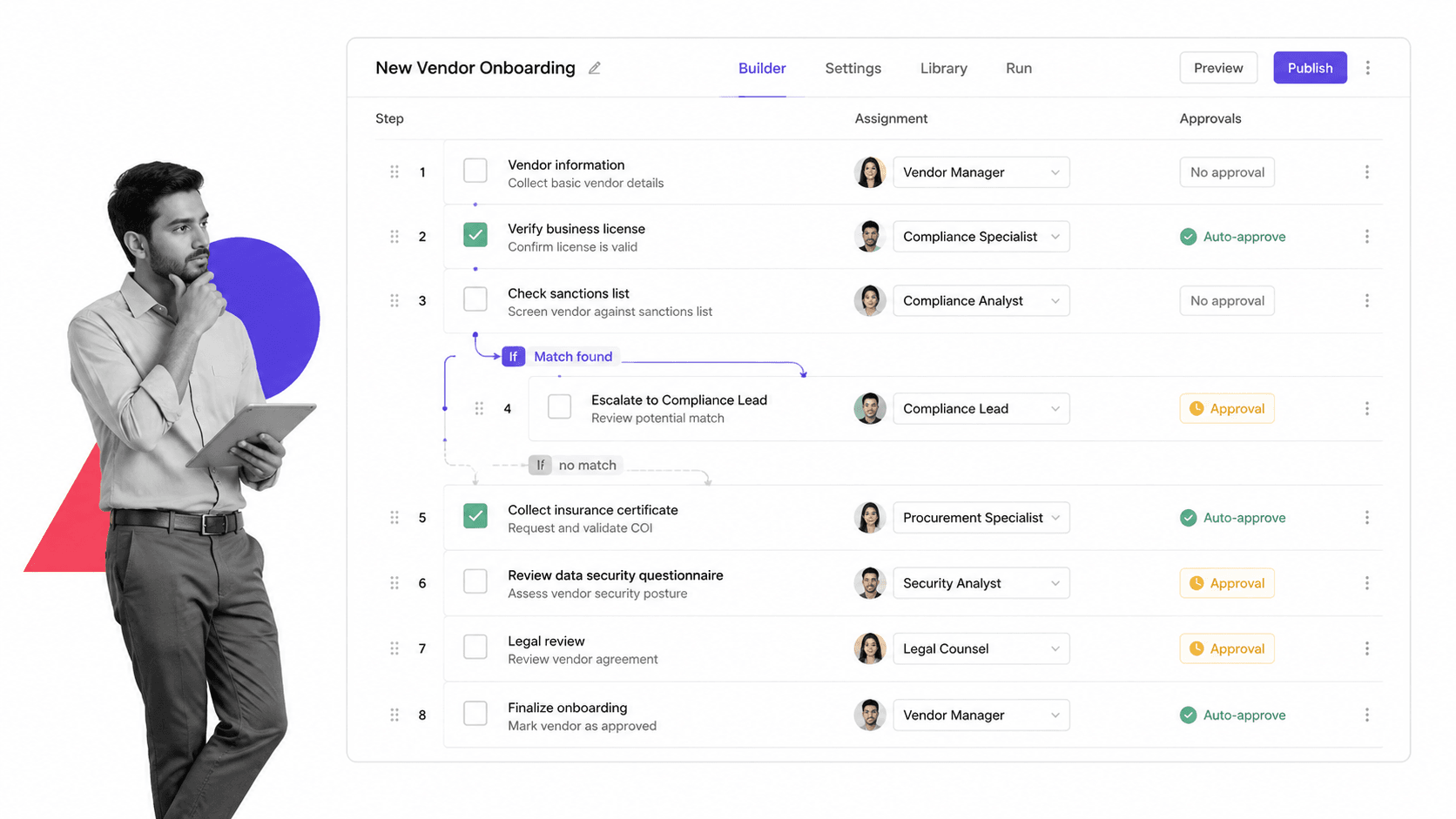
Not every checklist creator is built the same way. Free tools like Checkli or Cheqmark handle basic lists well, but teams running complex operations need more. Here are the features that separate a basic checklist maker from an operational platform.
Templates and Reusability
The best checklist creators let you build templates once and run them hundreds of times. Each run creates a unique instance with its own data, timestamps, and assignees while keeping the master template intact. Look for a checklist builder that supports template versioning so you can update your process without breaking active runs.
Conditional Logic
Real processes are not linear. A client onboarding checklist for an enterprise account requires different steps than one for a small business. Conditional logic lets you build branching paths into your checklists: if a customer selects “enterprise,” show the security review steps; if they select “starter,” skip them. This keeps checklists relevant and prevents teams from wading through irrelevant steps.
Task Assignments and Roles
A checklist that sits in a document with no ownership is a checklist that gets ignored. Look for a creator that lets you assign individual steps to specific team members, set due dates, and send automatic reminders. Role-based assignments are even better: assign a step to “IT Admin” rather than a specific person, and the system routes it to whoever holds that role.
Integrations
Your checklist creator should connect to the tools your team already uses. The most valuable integrations include Slack for notifications, your CRM for data sync, cloud storage for document attachments, and automation platforms like Zapier for triggering actions when checklist steps complete. A checklist that exists in isolation creates busy work. A connected checklist drives workflow automation.
Reporting and Analytics
Completing checklists is step one. Understanding how your processes perform is step two. Look for a checklist creator with built-in reporting: average completion times, bottleneck identification, overdue task rates, and compliance scoring. This data helps you optimize processes over time rather than just running them.
Mobile Access
Field teams, warehouse staff, and inspectors need to complete checklists from their phones. A checklist creator without a mobile experience forces these teams back to paper, which defeats the purpose. Ensure the tool works on iOS and Android with offline capability for locations with unreliable connectivity.
Types of Checklists You Can Create
A good checklist creator supports multiple checklist types across departments and use cases. Here are the most common categories.
Onboarding Checklists
Employee and client onboarding are among the most common use cases for checklist creators. An onboarding checklist ensures every new hire gets the same equipment setup, compliance training, and system access in the right order. Without one, the experience depends entirely on which manager happens to remember what.
Compliance and Audit Checklists
Regulated industries rely on checklists to prove compliance. A SOX compliance checklist documents every control test. An internal audit checklist verifies that policies are followed. The checklist itself becomes evidence during regulatory examinations, which is why audit trail features matter more here than in any other use case.
Quality Assurance Checklists
Manufacturing, software development, and service delivery all use QA checklists to catch defects before they reach customers. A quality assurance checklist template standardizes inspection criteria so that every reviewer applies the same standards to every output.
Project Launch Checklists
Product launches, campaign launches, and website launches involve dozens of coordinated steps across multiple teams. A launch checklist ensures that legal has reviewed the copy, engineering has deployed the code, marketing has scheduled the emails, and support has updated the knowledge base, all before the go-live button is pressed.
Daily Operations Checklists
Opening and closing procedures, shift handoffs, facility inspections, and equipment maintenance all benefit from daily operational checklists. These run every day, sometimes multiple times per day, making template reusability and mobile access essential features.
How to Create a Checklist: Step by Step
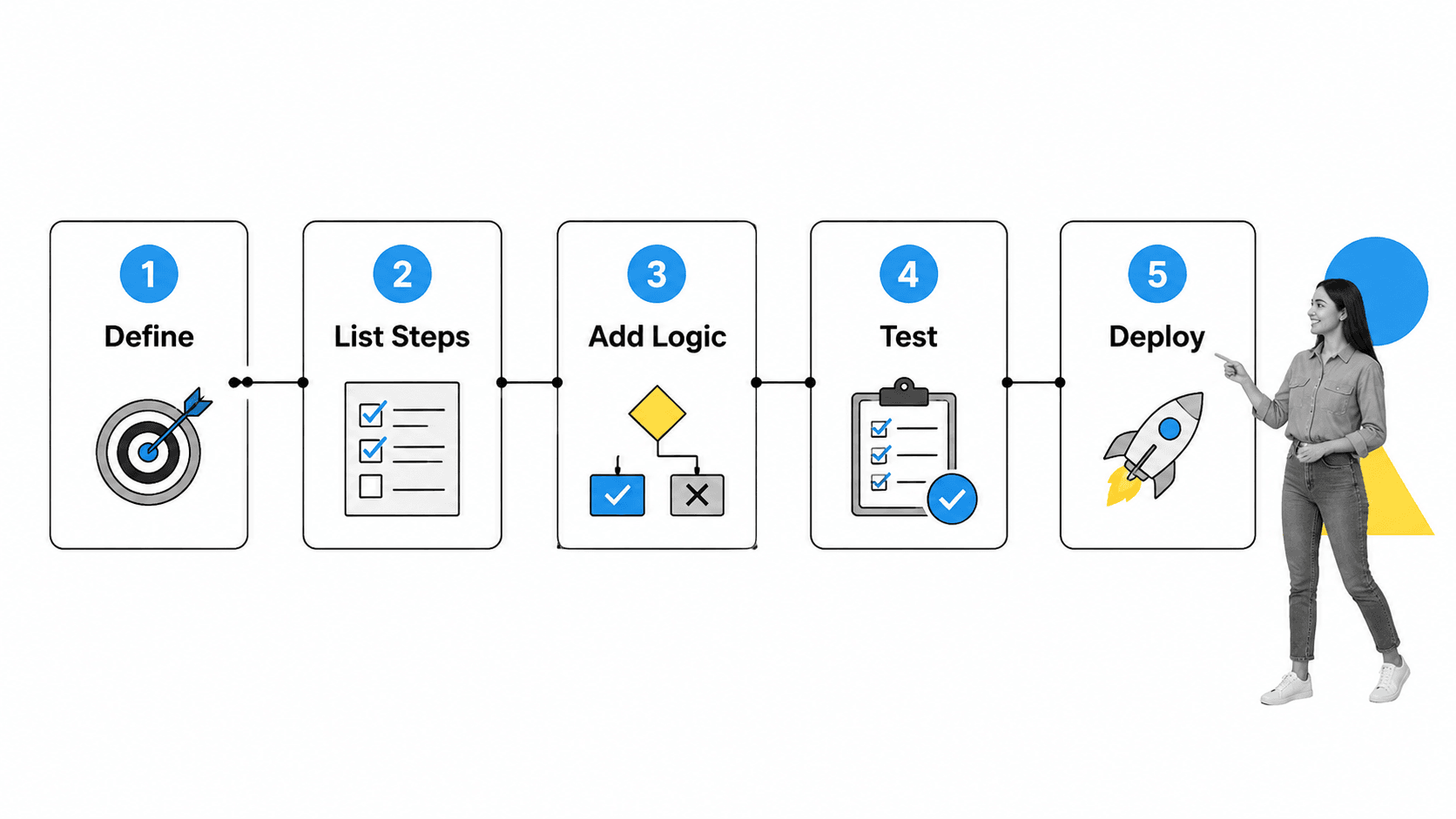
Building an effective checklist is a process in itself. Follow these five steps to create checklists that people actually use, not just ones that sit in a shared drive collecting dust.
Step 1: Define the Process Boundaries
Start by identifying what triggers the process and what counts as “done.” An employee onboarding checklist starts when an offer letter is signed and ends when the new hire completes their 30-day review. Without clear boundaries, checklists either bloat with unrelated tasks or stop short of the actual finish line.
Step 2: List Every Step in Sequence
Walk through the process from start to finish and write down every action, decision point, and handoff. Talk to the people who actually do the work, not just the managers who designed it. The gap between the documented process and the real process is where errors live.
Step 3: Add Logic, Assignments, and Data Fields
Once you have the steps, enrich them. Add conditional logic for branching paths. Assign each step to the right person or role. Include form fields for data capture: dates, file uploads, approval signatures, dropdown selections. This is where a form checklist app adds real value over a static document.
Step 4: Test with a Real Run
Before deploying your checklist to the team, run it yourself on a real scenario. Note where the sequence feels wrong, where steps are missing, and where the instructions are ambiguous. Testing catches problems that design never reveals. Treat your first run as a pilot, not a production launch.
Step 5: Deploy, Track, and Iterate
Launch the checklist, monitor completion rates and time-to-complete, and iterate. The first version of any checklist is a draft. The tenth version, shaped by real usage data and team feedback, is the one that works. Use your checklist creator’s reporting features to identify steps that consistently stall or get skipped, and fix them.
Best Practices for Building Effective Checklists
A badly designed checklist is worse than no checklist at all. It creates false confidence while hiding the same risks it was supposed to prevent. Follow these best practices to build checklists that drive real operational improvement.
Keep Items Actionable and Specific
Each checklist item should describe a concrete action, not a vague aspiration. “Verify client identity documents” is actionable. “Ensure compliance” is not. The person completing the step should know exactly what to do without asking follow-up questions. Write items as verb-first instructions: review, verify, upload, approve, notify.
Group Related Steps into Sections
Long checklists become overwhelming without structure. Group related steps under section headings: “Pre-Meeting Preparation,” “During the Meeting,” “Post-Meeting Follow-Up.” Sections help the assignee understand where they are in the process and make it easier to delegate blocks of work to different team members.
Include Verification Points
Critical processes need more than task completion. They need verification. Add approval steps at key milestones, require a supervisor sign-off before proceeding past compliance-sensitive steps, and build in quality checks that force the team to pause and confirm that previous steps were done correctly.
Review and Update Regularly
Processes change. Regulations update. Tools get replaced. A checklist that was accurate six months ago might be dangerously outdated today. Schedule quarterly reviews of your most critical checklists. Use your checklist creator’s version history to track what changed and why. A process checklist is a living document, not a one-time creation.
How Process Street Works as a Checklist Creator
Process Street is a Compliance Operations Platform that turns procedures into automated, AI-enforced workflows. As a checklist creator, it goes beyond basic list-making by combining structured templates, real-time execution tracking, and AI-powered compliance enforcement into a single platform.
Template Library with Pre-Built Checklists
Process Street includes a library of pre-built checklist templates covering onboarding, compliance, operations, and more. Start with a documentation checklist, an operational checklist, or any of hundreds of industry-specific templates. Customize them to match your organization’s requirements, then launch them as recurring workflows that run on schedule.
AI-Powered Workflows
Process Street uses AI to automate the parts of checklist execution that do not require human judgment. AI fills form fields, routes tasks based on data, and flags anomalies in real time. Combined with integrations to your existing tools through workflow automation tools and native connectors, this turns a static checklist into a living workflow that drives itself forward.
Compliance Enforcement and Proof of Control
For teams in regulated industries, the audit trail is as important as the checklist itself. Process Street captures every action, timestamp, and data entry in an immutable log. This creates the proof of control that auditors and regulators require: not just that you have policies, but that your team follows them, every time, with evidence. Explore the broader category of workflow automation software to understand how this fits into your operations stack.
Industries That Use Checklist Creators
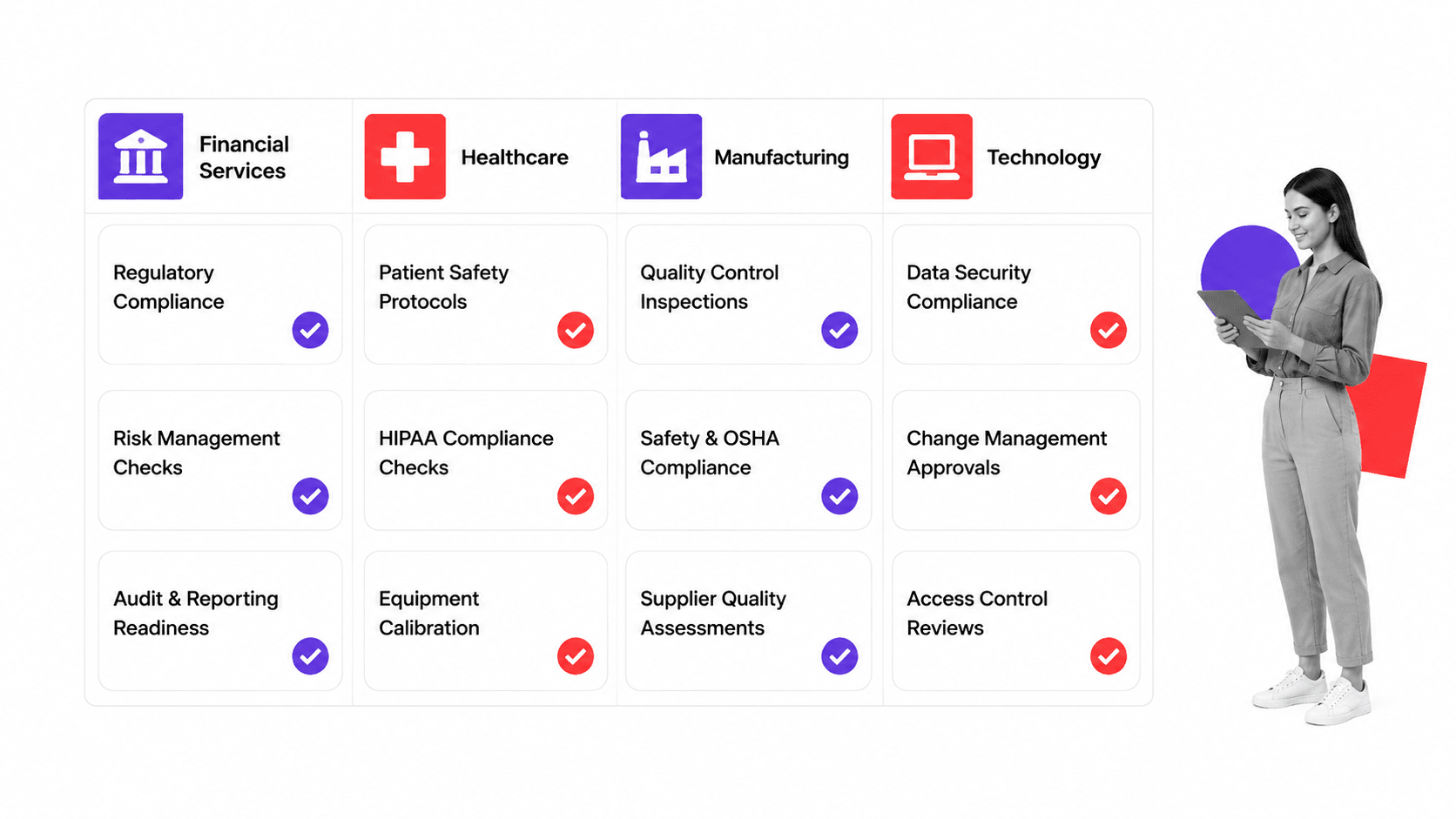
Checklist creators are used across every industry where repeatable processes matter. Here are the sectors where they deliver the most impact.
Financial Services
Banks, wealth managers, and insurance companies use checklist creators to enforce regulatory compliance workflows. From Know Your Customer (KYC) onboarding to quarterly compliance reviews, every step needs documentation and proof of completion. The cost of a missed step in financial services is not just inefficiency; it is regulatory penalties and reputational damage.
Healthcare
The WHO Surgical Safety Checklist demonstrated that structured checklists save lives. Healthcare organizations use checklist creators for patient intake, medication administration, infection control protocols, and discharge procedures. Compliance with HIPAA and other healthcare regulations requires documented, auditable processes.
Manufacturing
Quality control inspections, equipment maintenance schedules, safety audits, and production line changeovers all depend on consistent execution. Manufacturing teams use checklist creators to standardize these processes across shifts, facilities, and geographies. Mobile access is particularly critical here, as inspectors work on the floor, not at a desk.
Technology
Software teams use checklist creators for deployment runbooks, incident response procedures, code review protocols, and security audit workflows. The checklist app replaces tribal knowledge in the engineering team’s head with a documented, repeatable process that survives team turnover and organizational growth.
FAQs
What is a checklist creator?
A checklist creator is a software tool that lets you design, share, and track structured checklists for business processes. It includes features like task assignments, conditional logic, due dates, and completion tracking that go beyond what a simple to-do list or document can offer. Teams use checklist creators to standardize repeatable processes across departments and locations.
What features should a checklist creator have?
The most important features to look for are reusable templates, conditional logic for branching paths, task assignments with notifications, integrations with your existing tools (Slack, CRM, cloud storage), built-in reporting and analytics, and mobile access. For regulated industries, audit trail capabilities and approval workflows are essential.
Can I create checklists for free?
Yes. Several checklist creators offer free tiers, including Process Street, Checkli, and Cheqmark. Free plans typically support basic checklist creation and sharing. Paid plans add advanced features like conditional logic, role-based assignments, integrations, reporting, and compliance-grade audit trails that teams in regulated industries require.
What is the difference between a checklist creator and a project management tool?
Project management tools track unique, one-time projects with variable timelines and dependencies. Checklist creators are designed for recurring processes that need to run the same way every time. A project management tool helps you plan a product launch. A checklist creator helps you execute the repeatable launch process consistently across every release.
How do I share checklists with my team?
Most checklist creators let you share checklists via direct link, email invitation, or team workspace access. Advanced tools like Process Street let you assign specific steps to specific team members, set role-based permissions, and trigger automatic notifications when it is someone’s turn to act. For external stakeholders, some tools support guest access without requiring a full account.
