


Turn every policy into automated workflows with built-in enforcement and audit-ready proof.



Clinical Lab Workflow Management Software

Process Street helps teams turn clinical lab workflow management software into a practical operating layer for specimen handoffs, quality checks, approvals, and documented exceptions. The goal is not simply to digitize a checklist. It is to make the path of work visible, assign each step, surface the right instructions, and retain evidence that the work happened as intended.
Clinical laboratories already depend on specialized systems for orders, accessioning, instrument data, and results. Workflow management adds structure around the human work that connects those systems. It can standardize what happens when a specimen is rejected, a control is out of range, an analyzer is unavailable, or a result needs an additional review.
In this guide
- What clinical lab workflow management software is
- The clinical lab path of workflow
- Capabilities clinical laboratories need
- Quality, compliance, and patient safety
- How to design a clinical lab workflow
- How Process Street supports lab operations
- A practical implementation plan
- How to measure performance
- Frequently asked questions
What is clinical lab workflow management software?
Clinical lab workflow management software coordinates the tasks, decisions, people, and evidence required to move work through a laboratory. It provides a repeatable sequence for activities such as specimen receipt, quality control review, equipment maintenance, competency assessment, deviation handling, and result-release checks.
An operating layer around laboratory systems
A laboratory information system, or LIS, typically manages patient orders, specimens, test records, and results. A laboratory information management system, or LIMS, often manages samples, methods, inventory, and scientific data. Workflow software complements these systems by orchestrating the human and cross-system work around each record. For example, the LIS may record a rejected specimen while the workflow controls who documents the cause, who contacts the collection site, and who confirms the replacement plan.
Where workflow management adds value
The strongest use cases involve recurring work with several owners, decision points, and evidence requirements. A well-designed workflow gives each role the instructions and context needed at that moment. It also makes exceptions part of the process rather than informal side work. Teams can start with documented effective lab procedures, then convert the most operationally important procedures into assigned, trackable runs.
The category also differs from a static document repository. A repository helps people find a procedure, but it does not necessarily create a case, assign each action, wait for required evidence, or show a manager which work is blocked. Workflow management connects the controlled procedure to execution. It can preserve the context of a specific run while the approved source procedure remains governed through the laboratory’s document-control process.
The clinical lab path of workflow
A clinical laboratory process is easier to manage when the team separates the normal path from its exception paths. The normal path usually spans pre-analytic, analytic, and post-analytic work. Exceptions can occur in any phase and often require additional review, communication, or corrective action.
Pre-analytic work
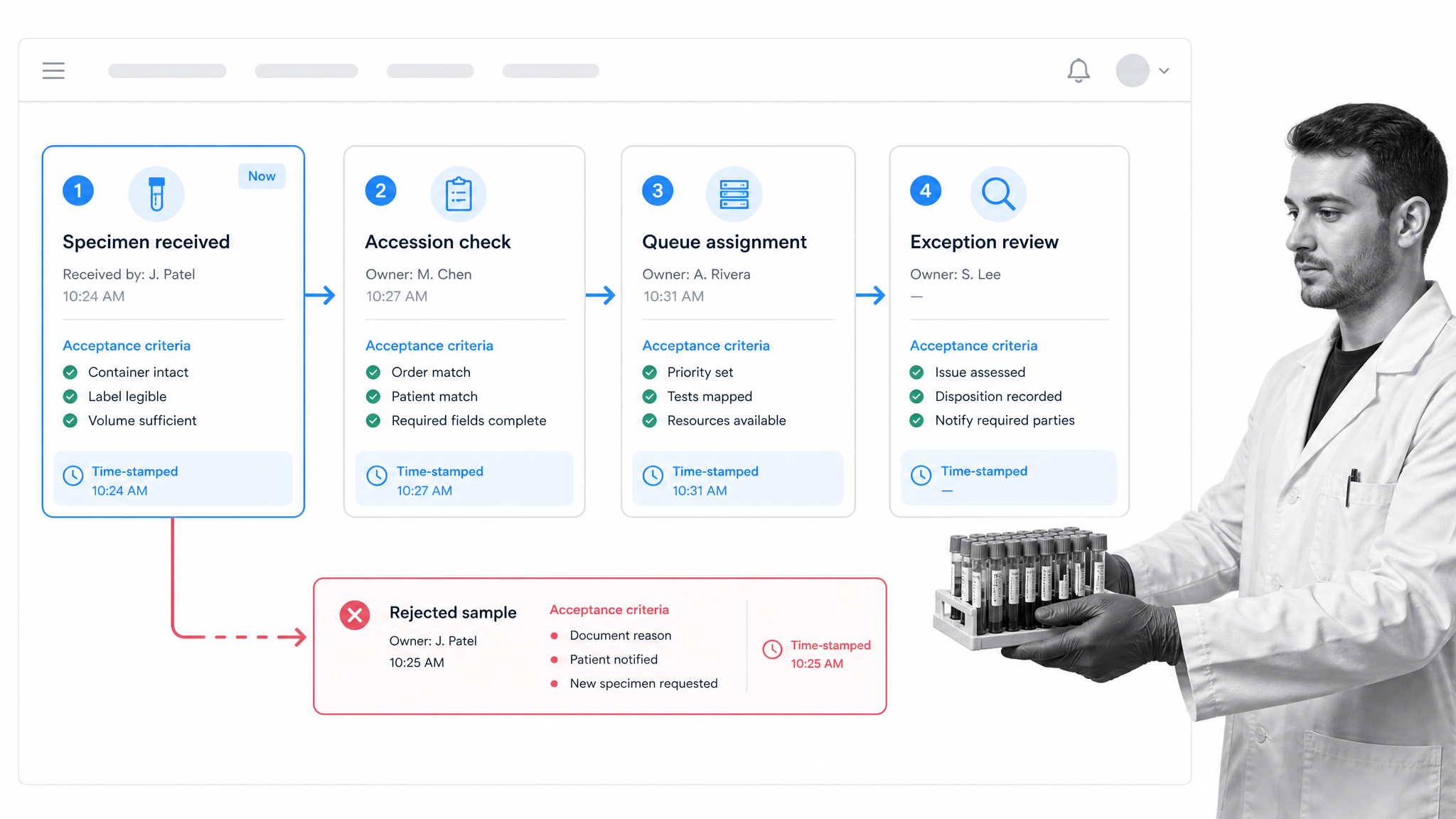
The pre-analytic phase includes order review, patient preparation, collection, labeling, transport, receipt, accessioning, and preparation. It contains many handoffs and is sensitive to missing identifiers, unsuitable containers, insufficient volume, delayed transport, and compromised samples. A specimen tracking workflow should state acceptance criteria, capture collection and receipt times, record chain-of-custody events where relevant, and route unsuitable specimens to a defined disposition process.
Standardization is most useful when it makes the decision rule explicit. A lab SOP creation workflow can establish the approved method, while an operational workflow presents the applicable rule during the actual handoff.
Analytic and post-analytic work
Analytic workflows coordinate instrument readiness, reagent and control checks, run setup, testing, reruns, and escalation. Post-analytic workflows cover result review, critical-value communication, amendments, report release, and record retention. The workflow should not duplicate every data element already stored in the LIS. It should capture the decisions and actions that the lab needs to assign, verify, or audit.
Cross-cutting workflows support the path of testing. Examples include a laboratory equipment maintenance checklist, shift handoffs, inventory replenishment, corrective action, and a laboratory competency assessment checklist. Connecting these processes to daily operations helps prevent a separate documentation system from drifting away from actual work.
Downtime deserves its own path. If an analyzer, interface, or laboratory system is unavailable, staff need an authorized way to continue, defer, or redirect work. The workflow should identify who can activate downtime procedures, which records must be created, how pending work is reconciled after restoration, and who confirms that no result or corrective action was lost. Testing this route before an outage is more useful than discovering its gaps during one.
Capabilities clinical laboratories need
Clinical laboratory management software should fit the lab’s operating model instead of forcing every process into one rigid sequence. Evaluate capabilities against real scenarios, including routine work, urgent work, failed controls, staffing changes, and system downtime.
Clear ownership and timed handoffs
Every step should have an owner, a due point, and an escalation route. Role-based assignment is usually more resilient than naming one person in the procedure because shifts and coverage change. The system should show what is waiting, what is late, and what cannot proceed. For broader service coordination, the same discipline applies to healthcare resource management and healthcare operations control.
Rules, branching, and gated decisions
The workflow should adapt when facts change. A hemolyzed specimen needs a different path from an acceptable specimen. An out-of-range control needs a different path from a passing control. Branches should reveal only the relevant tasks and instructions, while gated decisions should prevent the next phase from starting before the required review is complete.
Look for configurable rules, required fields, role assignments, approvals, and notifications. These controls reduce reliance on memory without removing professional judgment. The workflow should document who made the decision and what evidence supported it.
Evidence, integration, and reporting
Useful evidence can include timestamps, instrument screenshots, maintenance records, temperature logs, review comments, and attached corrective-action documents. Integrations should exchange the minimum data needed to start, update, or close a workflow without creating conflicting systems of record. Reporting should help managers find delayed work, recurring exceptions, and process steps that create rework.
Usability matters as much as configuration depth. Staff should be able to identify the next action, the applicable rule, and the required evidence without interpreting a crowded screen. Mobile or shared-workstation access may be important in some environments, but access controls and device practices must still fit the laboratory’s security model. During evaluation, have end users complete representative cases rather than relying only on a feature demonstration.
Adjacent regulated operations, including a medical device quality management system, use the same basic pattern: controlled procedures, accountable execution, retained evidence, and governed change. The laboratory context determines the specific records and decision rights.
Quality, compliance, and patient safety
Workflow software does not make a laboratory compliant by itself. It can, however, help the lab operationalize its approved procedures, make required reviews visible, and retain execution evidence. The CMS overview of CLIA explains that CLIA regulates human laboratory testing in the United States, with requirements intended to support accurate, reliable, and timely patient test results.
Put controls inside the path of work
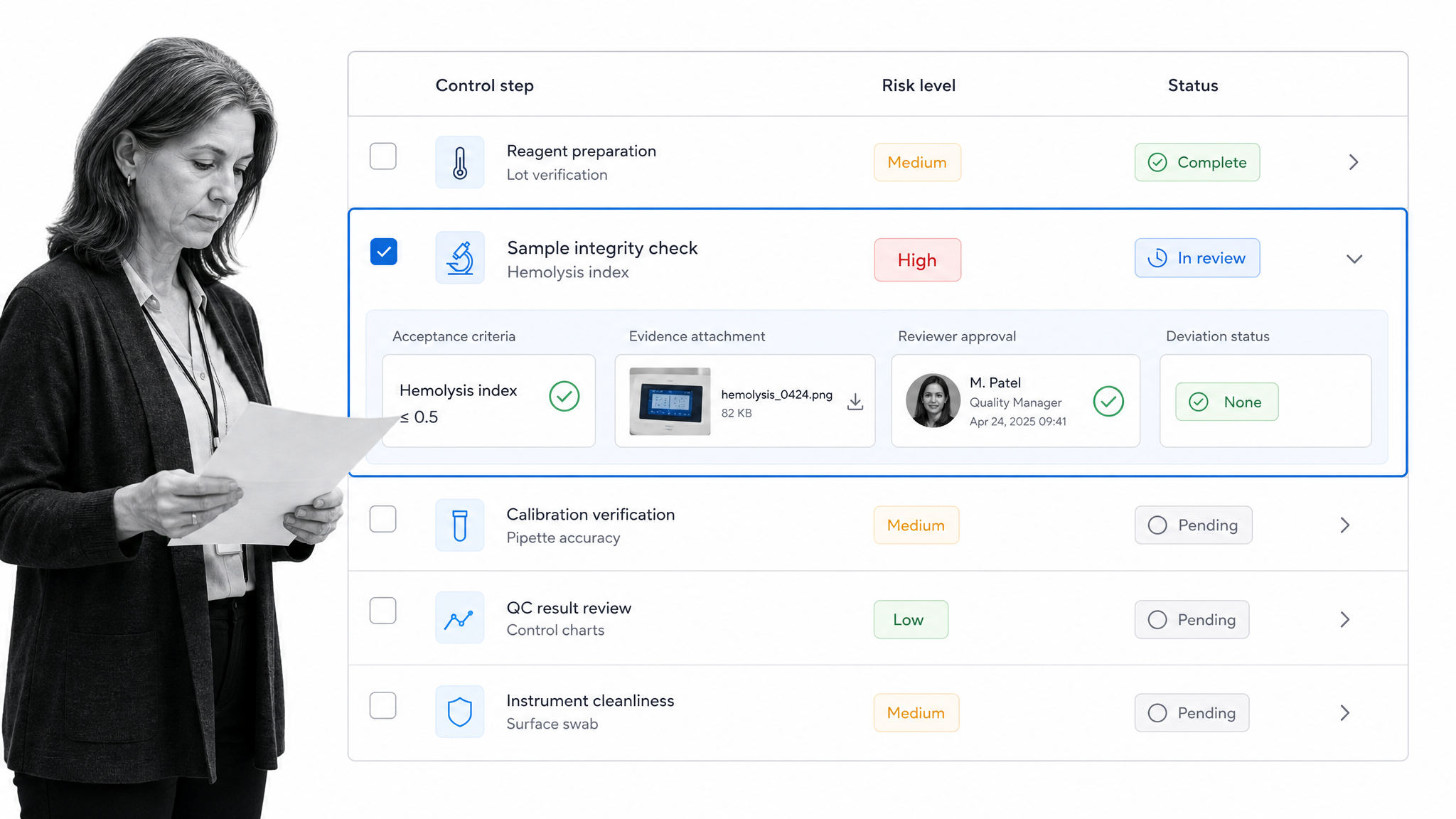
A control is stronger when it appears at the point where the decision is made. Required acceptance criteria, evidence fields, and reviewer gates can help prevent a high-risk step from being silently skipped. The CDC laboratory QMS tools provide practical resources for quality management, while CDC individualized quality control plan guidance addresses risk-based quality control planning for eligible testing.
Quality workflows can cover daily controls, calibration verification, maintenance, temperature review, lot changes, and corrective action. A laboratory safety procedure audit and a healthcare compliance audit checklist provide additional structures for scheduled review.
Keep the evidence proportional to the risk and purpose of the step. Requiring an attachment for every routine action can create noise, while accepting an unchecked completion for a high-risk control can leave too little support for review. Define which fields are mandatory, what constitutes acceptable evidence, and when a second person must verify the work. The workflow should make those expectations visible before completion.
Protect information and preserve traceability
Access should follow job responsibilities, and workflows should avoid copying protected health information into tools or fields that do not need it. The HHS HIPAA guidance is the authoritative starting point for covered entities and business associates. Teams can translate their policies into a recurring HIPAA compliance audit checklist, then review access, evidence retention, integrations, and incident routes with security and privacy stakeholders.
Proficiency testing also needs clear ownership, timing, and review. The CMS proficiency testing guidance should inform the laboratory’s documented procedure. Workflow management can assign each administrative and review step while keeping the laboratory’s approved policy as the controlling source.
How to design a clinical lab workflow
1. Map the current state
Start with one real process and follow it across people, shifts, locations, and systems. Record the trigger, inputs, normal sequence, decisions, handoffs, evidence, and endpoint. Observe what people actually do, not only what the policy says. Identify duplicate entry, unclear ownership, informal messages, waiting time, and hidden rework.
2. Define the controlled future state
Write the minimum safe sequence. For each step, define the responsible role, required information, acceptance criteria, evidence, timing, and escalation. Separate mandatory controls from useful guidance. Keep the normal path short, then add exception branches for foreseeable conditions such as recollection, downtime, failed quality control, missing approval, or unavailable staff.
3. Test with realistic cases
Test the workflow with clean cases and difficult cases. Include urgent specimens, incomplete data, repeated exceptions, shift changes, and integration failures. Ask operators whether the instructions are usable during actual work. Ask quality leaders whether the evidence supports review. Ask system owners whether data moves to the correct record without unnecessary duplication.
Document the expected result for each test case, then compare the actual route, assignments, notifications, and retained record. If a test fails, correct the design and rerun the affected cases. The validation record should show what was tested, by whom, in which environment, and how discrepancies were resolved. Match the rigor of this activity to the laboratory’s policies and the intended use of the workflow.
4. Govern changes
Assign an owner for the workflow and an approval route for changes. Record why a step, rule, or form field changed. Review workflows after incidents, policy updates, new instruments, or recurring exceptions. A broader quality management system software strategy can define how procedures, training, execution records, deviations, and improvement activities remain aligned.
How Process Street supports clinical lab workflow management software
Process Street is a workflow automation platform that can coordinate recurring laboratory operations around an LIS, LIMS, quality system, and other systems of record. Teams can build a workflow for a controlled procedure, run it for each case or scheduled event, assign the work, and retain the resulting task history and evidence.
Route the right work to the right role
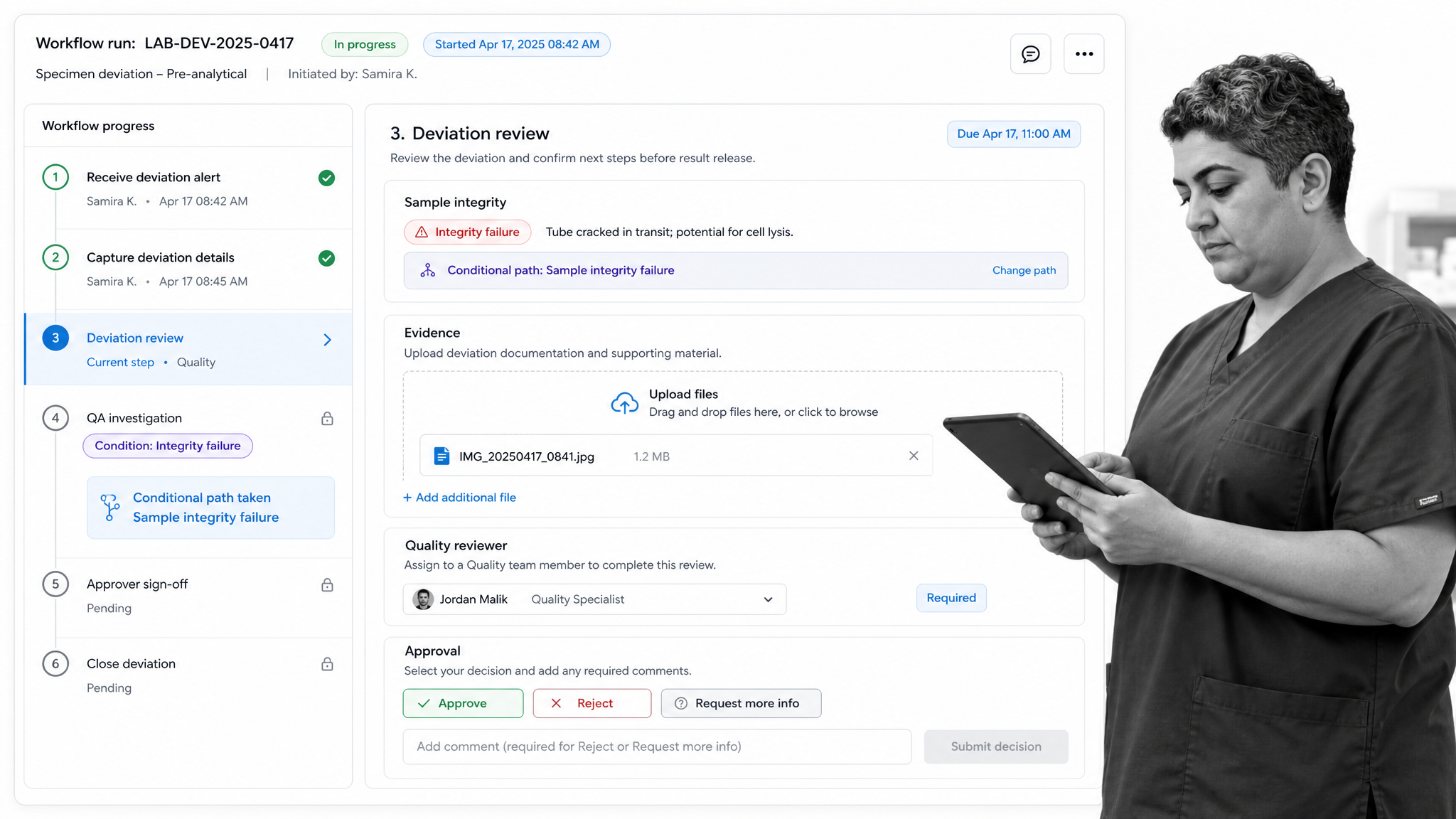
Task assignments can give users or groups responsibility for workflow tasks. A lab can assign accession review to the current accessioning role, route a deviation to quality, and send a final sign-off to an authorized reviewer. This makes responsibility visible without embedding one employee’s name permanently in the procedure.
Adapt the workflow to the case
Conditional logic can show or hide tasks and content based on workflow data. A failed integrity check can reveal recollection and notification steps, while an acceptable sample continues to accessioning. The workflow stays focused because people see the path relevant to the case.
Gate high-risk decisions
Workflow approvals can place a review and decision at a controlled point. The reviewer can approve or reject the submitted work before the workflow advances. This is useful for deviations, corrective actions, method changes, or other processes where a defined reviewer must evaluate evidence.
The laboratory still determines its policy, validation approach, authorization model, and system-of-record boundaries. Process Street should complement specialized laboratory systems, not replace validated functions that belong in the LIS, LIMS, instrument software, or electronic health record.
A practical integration may begin a workflow when a qualifying event occurs, pass a limited identifier needed for routing, and return a completion state or link to the retained record. The exact design depends on the systems involved. Keep the authoritative clinical result in its proper system, minimize duplicated sensitive data, and define how failed messages are detected and reconciled.
A practical implementation plan
Choose a bounded pilot
Select a process with meaningful coordination needs, a committed owner, and measurable pain. Equipment maintenance, specimen rejection, competency review, or a scheduled compliance check can make a strong pilot. Avoid beginning with the laboratory’s most complex end-to-end process. A bounded pilot makes it easier to validate roles, fields, notifications, and evidence requirements.
Define success before configuration. Capture the current completion time, late work, missing evidence, handoff delays, and exception volume. Identify the systems that will remain authoritative and the data the workflow may reference. Review privacy, security, and validation expectations early.
Validate, train, and expand
Use representative cases to test every branch, assignment, notification, and approval. Confirm that users can recover from missing data and system downtime. Train by role and let operators practice with the exact scenarios they encounter. Record feedback and distinguish usability changes from policy changes that need formal approval.
After the pilot is stable, expand to related workflows that reuse the same roles, evidence, and escalation model. Laboratory operations can also borrow patterns from hospital checklist examples, especially for shift coordination, safety checks, and multidisciplinary handoffs. Maintain a named owner and review cadence for every production workflow.
Rollout should include a support route for questions and a short period of closer monitoring. Compare observed behavior with the designed path, especially at handoffs. If users create parallel spreadsheets, messages, or paper notes, determine whether the workflow is missing necessary context or whether training is unclear. Resolve the cause before scaling the same design to more departments or locations.
Measure clinical lab workflow performance
Operational measures
Track end-to-end turnaround time and the time spent waiting between owners. Measure completion by due point, exception rate, rework, reopened tasks, and escalation frequency. Break measures down by workflow type, shift, location, and exception category where that analysis is appropriate. The goal is to find process friction, not to create a simplistic score for individual staff.
Quality and adoption measures
Measure missing evidence, approval rejections, recurring deviations, overdue corrective actions, maintenance completion, and audit findings related to process execution. Pair these with adoption signals such as workflow completion, user feedback, help requests, and work completed outside the defined path. Review trends with operators and quality leaders, then improve the workflow while preserving necessary controls.
Use a balanced review cadence. Daily visibility may be appropriate for urgent queues and overdue high-risk work, while monthly or quarterly review can reveal repeated causes and broader improvement opportunities. When a metric changes, investigate the process before assigning a conclusion. Higher exception counts may indicate deteriorating performance, but they can also show that a new workflow is capturing issues that were previously invisible.
Clinical lab workflow management software FAQs
What is clinical lab workflow management software?
Clinical lab workflow management software coordinates the assigned tasks, decisions, timing, instructions, and evidence required to complete recurring laboratory work. Common use cases include specimen handoffs, quality control review, maintenance, competency assessment, deviation handling, and approval before a controlled process advances.
How is workflow management software different from a LIMS or LIS?
An LIS or LIMS manages specialized laboratory records such as orders, specimens, methods, inventory, and results. Workflow management software orchestrates the human and cross-system tasks around those records. It should complement the laboratory system of record rather than duplicate or replace its validated functions.
Which clinical laboratory processes should be automated first?
Start with a bounded process that has recurring handoffs, clear ownership, measurable delays, or frequent missing evidence. Equipment maintenance, specimen rejection, competency review, and scheduled quality checks are common candidates. Choose a process with a committed owner and test both normal and exception cases.
How does workflow software support CLIA and laboratory quality requirements?
Workflow software can present approved instructions, require evidence, assign reviews, record timestamps, and preserve an execution history. Those controls can help a laboratory operationalize its policies, but software alone does not establish compliance. The laboratory remains responsible for applicable requirements, validation, authorization, and professional oversight.
What should a clinical lab measure after implementation?
Track turnaround time, waiting between owners, late completion, exception rate, rework, missing evidence, approval rejections, overdue corrective actions, and work completed outside the defined path. Compare results with a pre-implementation baseline and review trends with operators before changing the workflow.
Can Process Street replace a clinical laboratory information system?
No. Process Street can coordinate recurring operational workflows around an LIS, LIMS, quality system, and other systems of record. Specialized laboratory records and validated system functions should remain in the appropriate laboratory platform. The integration and data boundary should be defined with laboratory, quality, privacy, security, and system owners.
