





Do you think you’re doing a good job with your employee training?
Strong training still comes down to the same practical question: can employees apply what they learned when real work starts? Current TalentLMS research shows most employees and HR managers are satisfied with their training programs, but heavy workloads still get in the way of learning. That gap is where process matters.
In a competitive business environment, the employer with better-trained people gains the upper hand. Well-trained employees work more efficiently, produce better results, and give the business a stronger operating advantage. This kind of efficiency and productivity does not only come from bigger budgets.
Large companies can spend heavily on staff training and development, but smaller teams can compete when they organize the training process well. You do not need a huge L&D department to create repeatable training. You need a clear process, consistent follow-up, useful technology, and a way to improve the program as employees use it.
You’d be surprised at how streamlining your training process results in more effective learning while saving time and effort. A well-organized training process can compete with programs run by much larger companies, especially when the work is documented and repeatable.
Here are five organizing tips to improve your employee training process and get proven, scalable results.
Engagement is the key
One of the keys to organizing training programs that work is being able to find and address your learners’ needs. Performance metrics give you a rough idea of what those needs are. They can show where people struggle, where completion drops, and which skills need more support.
Numbers do not tell the whole story. To get the facts straight from the source, you need to boost learner engagement. Observe, interview, or ask employees about their pain points at work. A few minutes with learners often reveals what a dashboard cannot: where training feels unclear, where work gets stuck, and what support would help them perform better.
Engagement also gives employees a role in the training process. When people see that their feedback changes the program, they are more likely to take the training seriously and apply it in the workplace.
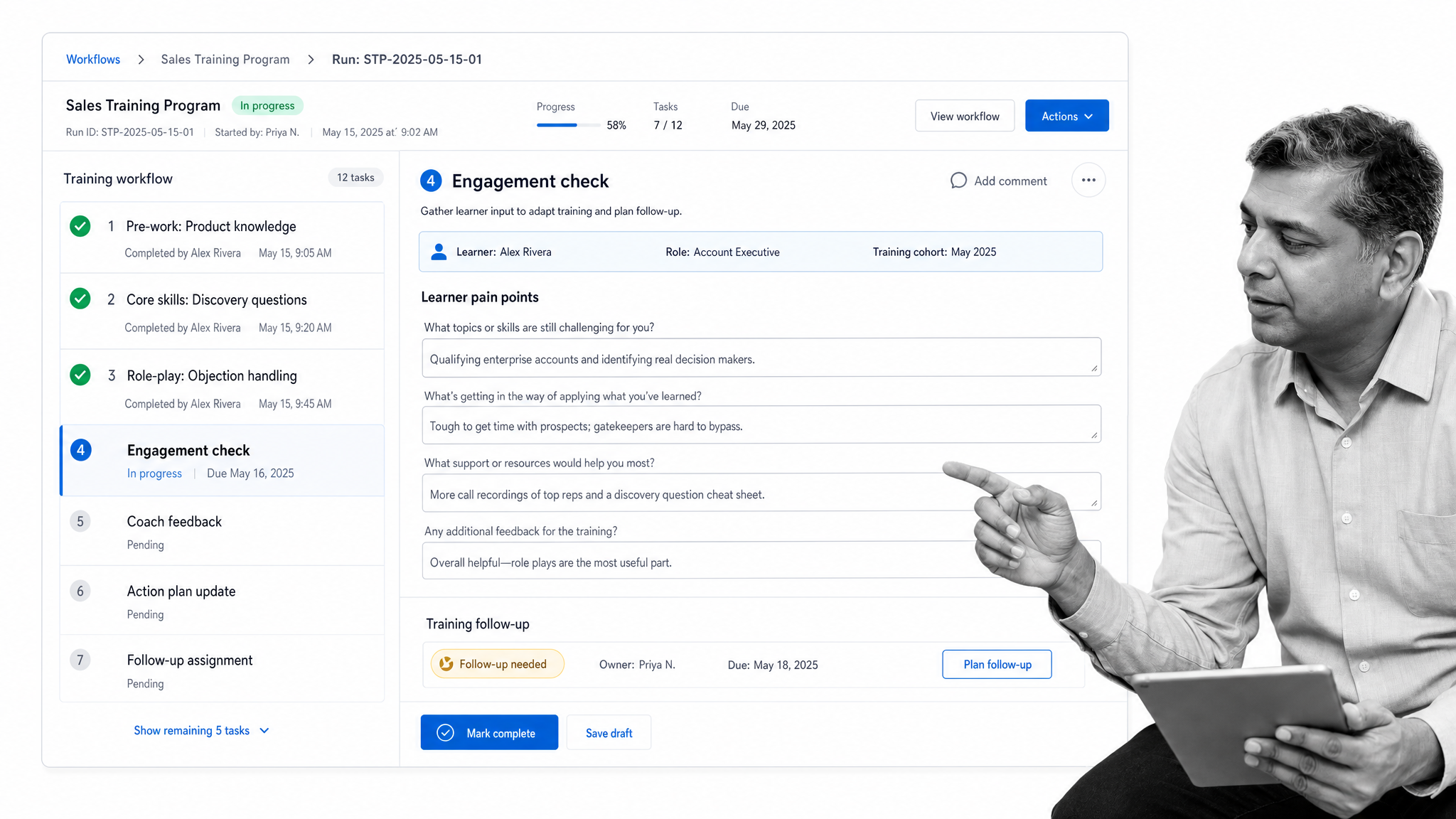
To keep employees engaged throughout the training process, rely on a structure rather than memory. Below is a checklist you can use for sales training. Adapt it for other departments, or build your own workflow in Process Street:
Don’t forget to follow up
Following up is one of the biggest challenges in organizing training programs. Training teams handle a lot of work, so post-session check-ins often fall off the radar. After a class or course ends, the team moves on to the next one and does not always check whether the training changed behavior.
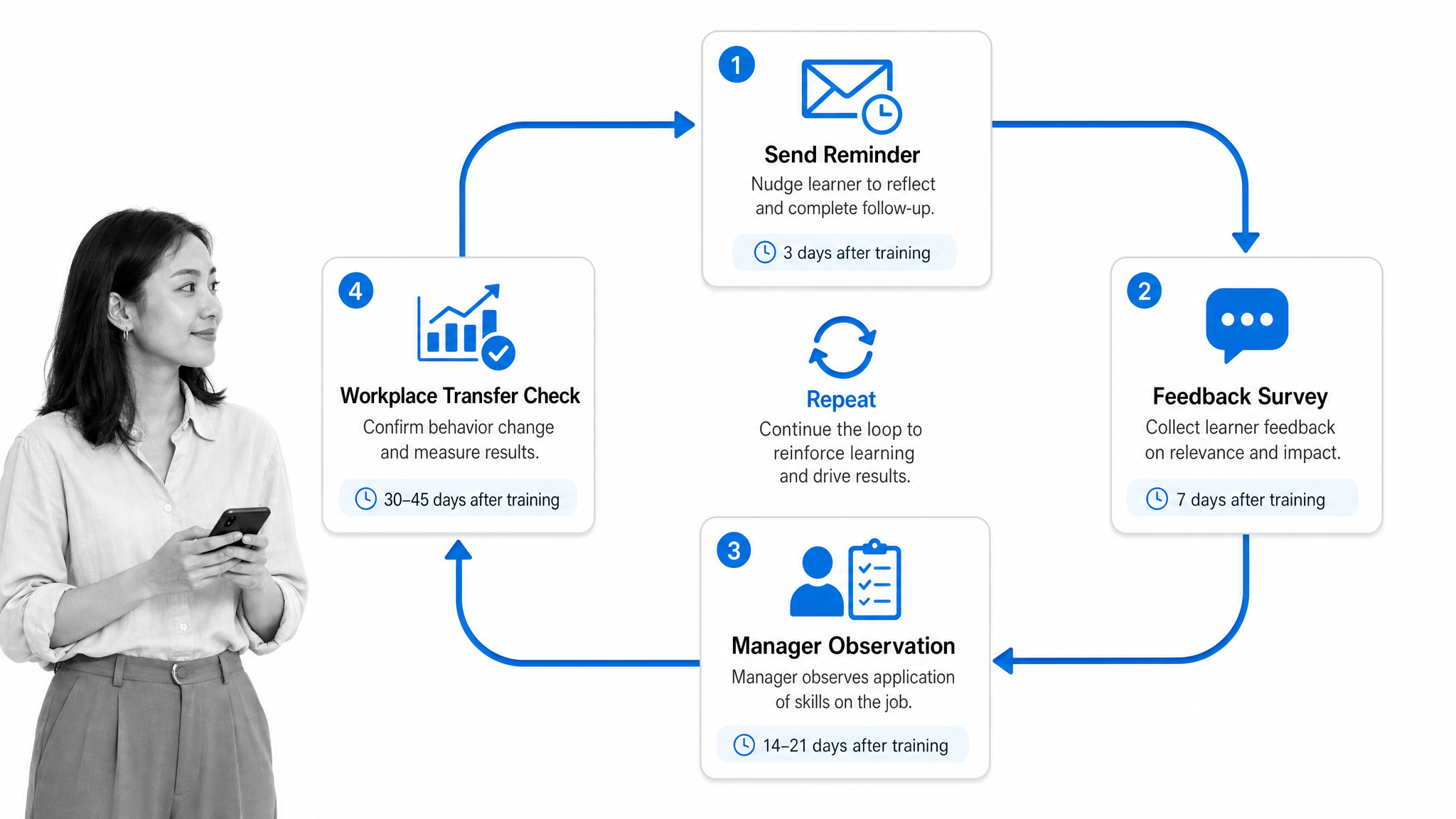
Keep learners involved after they complete training. Start a few days or weeks after the session with a short survey, manager check-in, or practical observation. It only takes employees a few minutes to provide feedback on how their training helped, what stayed unclear, and what they still need to practice.
Consistent follow-up gives you two important signals. First, it shows whether the training program was relevant from the learner’s perspective. Second, it shows whether the learned skills gain traction in the workplace.
You can:
- Set recurring reminders with a project management system or checklist app.
- Send short feedback surveys after the employee has tried the skill on the job.
- Ask managers to observe whether the behavior changed.
- Track action items in the same workflow used to run the training.
The best follow-up loops are simple. They do not create a second administrative process. They make sure the original training process keeps running until the employee can use the skill confidently.
Ensure an environment that promotes learning
A healthy culture of learning depends on the environment around the learner. That environment might be a classroom, a desk, a remote setup, a mobile field role, or a busy operations floor. The format changes, but the principle stays the same: employees need time, space, safety, and access to materials if they are expected to learn well.
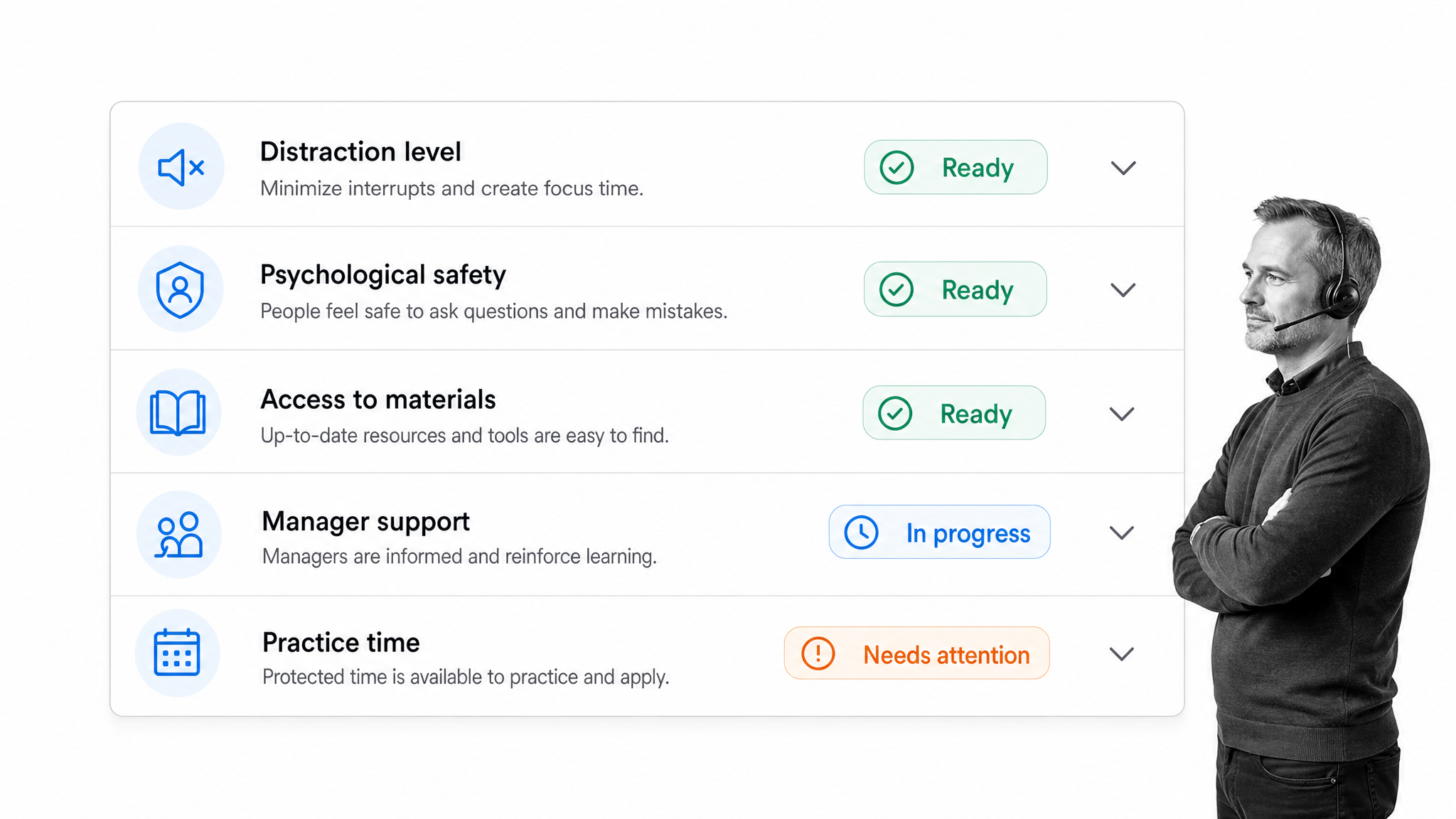
If training happens in person, make sure the room is comfortable and free from obvious distractions. Temperature, lighting, noise, ventilation, and seating all affect attention. If training happens online, make sure links, logins, recordings, and job aids are easy to find. If training happens in the flow of work, give learners protected practice time and clear manager support.
Psychological safety matters too. People learn faster when they can ask questions, admit confusion, and practice without embarrassment. That is especially important for new employees, frontline teams, and anyone learning a process with compliance or customer consequences.
Provide an environment that helps employees learn, then make that environment part of the process. A readiness checklist before each session can catch missing materials, access issues, and manager handoff gaps before the training starts.
Organize your course-creation workflow
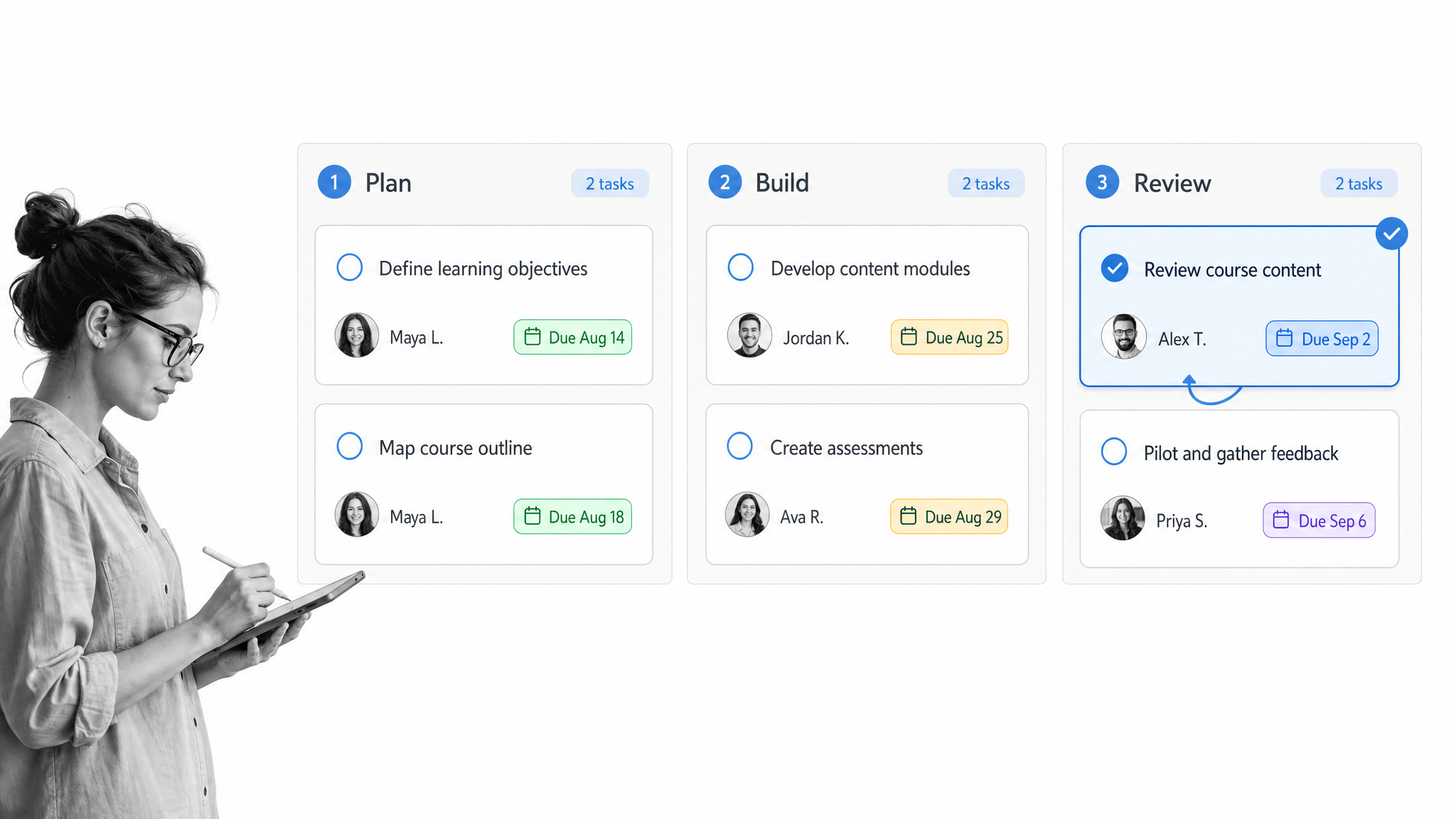
Courses do not appear fully formed. Someone has to decide what the course covers, what learners should be able to do afterward, who owns each deliverable, how reviews happen, and when the material is ready to launch. Without that workflow, course creation becomes a loose collection of documents and meetings.
Start with the outcome. Define the role, skill, or behavior the course should improve. Then break the work into stages: outline, draft, practice activity, review, release, and follow-up. Assign an owner and due date to each stage so progress is visible.
This is where a workflow matters. A clear course-creation workflow helps training teams avoid missed handoffs, stale material, and unclear ownership. It also creates a repeatable pattern that can be reused for onboarding, product training, compliance training, and customer-facing enablement.
If your training programs support onboarding, connect this work to the broader onboarding system. A good onboarding workflow software setup keeps training tasks, manager actions, approvals, and employee progress in one place.
Process Street helps teams turn training documents and SOPs into automated workflows. Docs keeps the procedure governed and current, Ops runs the work step by step, and Cora helps monitor execution so gaps are easier to catch before they become recurring problems.
Make your training tech-enabled
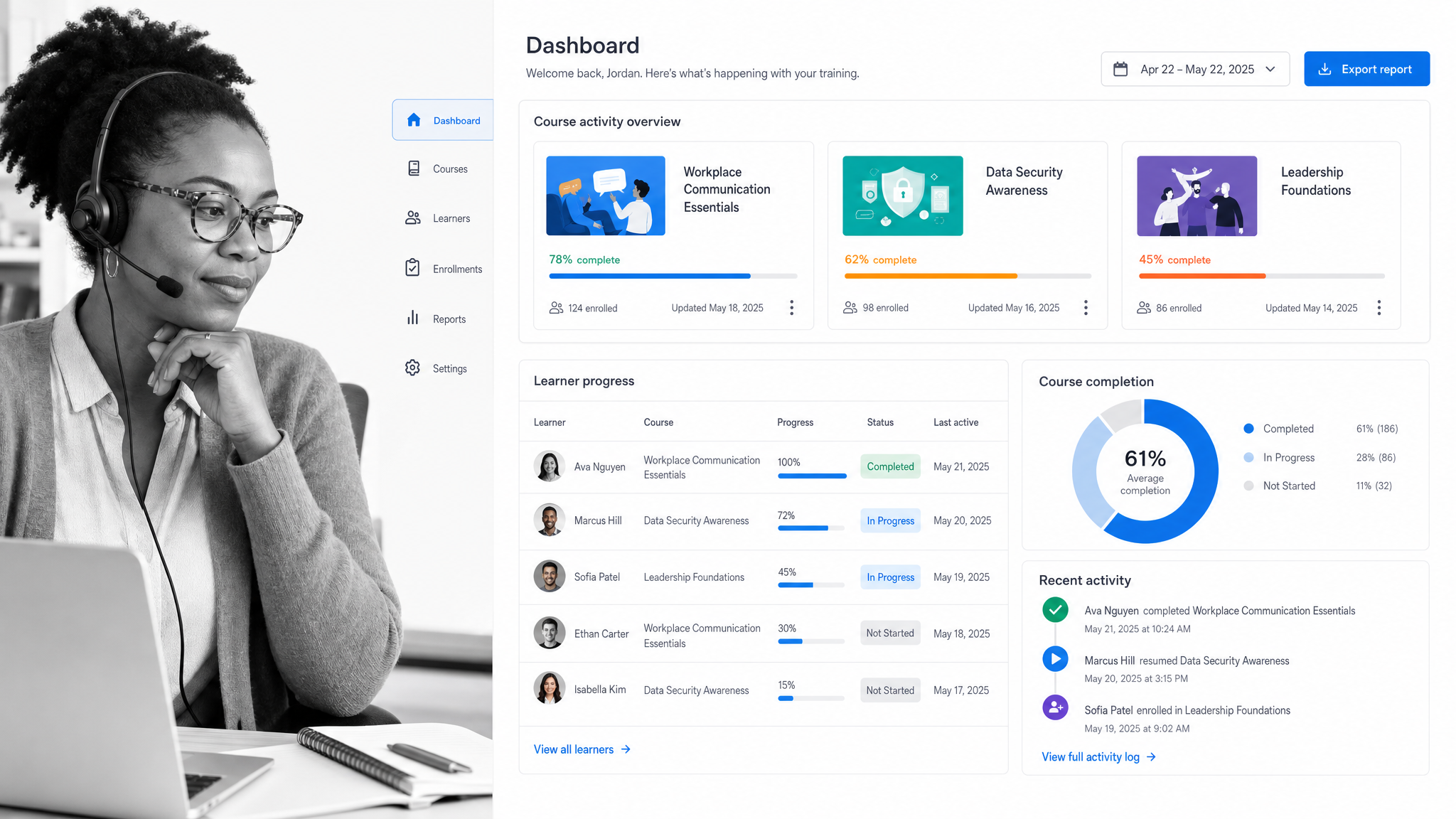
Technology does not replace good training design, but it makes good training easier to deliver and improve. An advanced LMS can manage courses, learner access, activity, and reporting. That gives training teams a cleaner way to deliver learning at scale.
The LMS is only part of the system. Training also needs repeatable workflows for setup, approvals, reminders, feedback, manager follow-up, and evidence that work was completed. When those steps live outside the LMS in email or spreadsheets, important details get lost.
The strongest training operations connect delivery and execution. Use your LMS for course access and learning records. Use workflows for the operational steps around the training: who prepares the material, who follows up, who checks performance, and who updates the process when the training changes.
AI can also help create draft materials, summarize feedback, and identify common questions. Keep it grounded in your actual process. Training content should stay connected to the work employees perform, the standards they must follow, and the proof managers need.
Conclusion
High-quality employee training is not only about having more budget or more content. It is about organizing the training process so employees know what to learn, managers know how to support them, and the business can see whether the training worked.
Engage learners, follow up after the session, create an environment that supports learning, organize course creation, and use technology to run the process consistently. Those habits make training easier to scale, easier to improve, and easier to prove.