


Turn every policy into automated workflows with built-in enforcement and audit-ready proof.



Development Process
A development process is the repeatable way a team turns an idea, request, requirement, or problem into a finished output. It defines the stages of work, the owners, the decisions, the review gates, the evidence, and the launch criteria that keep development from becoming improvised project work.
The term often appears in product and software development, but the same logic applies to internal tools, customer programs, compliance workflows, service improvements, training programs, and operational changes. If people need to move from concept to release without missing steps, they need a development process.
This guide explains what a development process includes, the stages most teams need, how to choose a model, how to build the process, and how to govern it so every handoff, approval, and release decision is traceable.
In this article, we are going to cover:
- What a development process is
- Why a development process matters
- Development process stages
- Development process models
- How to build a development process
- How to govern a development process
- Development process in Process Street
- How to improve your development process
- FAQs
What a development process is
A development process is the operating system for planned change. It takes work that could otherwise live in messages, meetings, documents, and private memory, then turns it into a sequence that can be followed, improved, and audited. Strong process documentation gives the process a source of truth, but the development process itself must also drive execution.
The process starts before work begins
A useful development process begins before anyone builds the final thing. It starts with intake and context: what problem are we solving, who needs it, what constraints apply, what evidence will prove it is ready, and what risks would make the work fail. Without that front-end clarity, later stages become argument instead of execution.
The process ends after release
Development does not end the moment the output ships. A finished product, workflow, policy, or internal tool still needs adoption, measurement, support, and improvement. The process should capture what happened after launch so the next cycle begins with evidence instead of opinion.
The process is different from the project plan
A project plan is usually specific to one initiative. A development process is reusable. It defines the default path that many initiatives can follow, then gives teams room to adapt based on risk, scope, urgency, and complexity.
- A project plan answers what this team is doing this time.
- A development process answers how this kind of work should move every time.
- A governed workflow answers who owns each step, what can be skipped, and what proof is required.
Why a development process matters
A development process matters because development work creates hidden risk when the path is informal. Teams may agree on a goal but still miss requirements, skip validation, route approvals through the wrong person, launch without evidence, or lose the reasoning behind a decision.
It prevents expensive rework
Rework often starts early. A weak intake step creates unclear requirements. A weak review step allows assumptions to survive too long. A weak testing step lets defects reach customers or internal users. A weak release step turns launch into a scramble.
Pages on business process management and a live workflow management system show the same operating principle: recurring work improves when the path is visible, owned, and repeatable.
It makes cross-functional work practical
Development work rarely belongs to one team. Product, operations, engineering, compliance, finance, sales, support, legal, and customers may all influence the outcome. The process keeps those groups from colliding by defining where input is needed and where decision rights sit.
It creates proof, not just progress
Progress updates are not enough when the work affects compliance, quality, security, customer commitments, or financial controls. A mature development process creates compliance as proof of control: who approved, what evidence was reviewed, what changed, and which exception path was used.
Development process stages
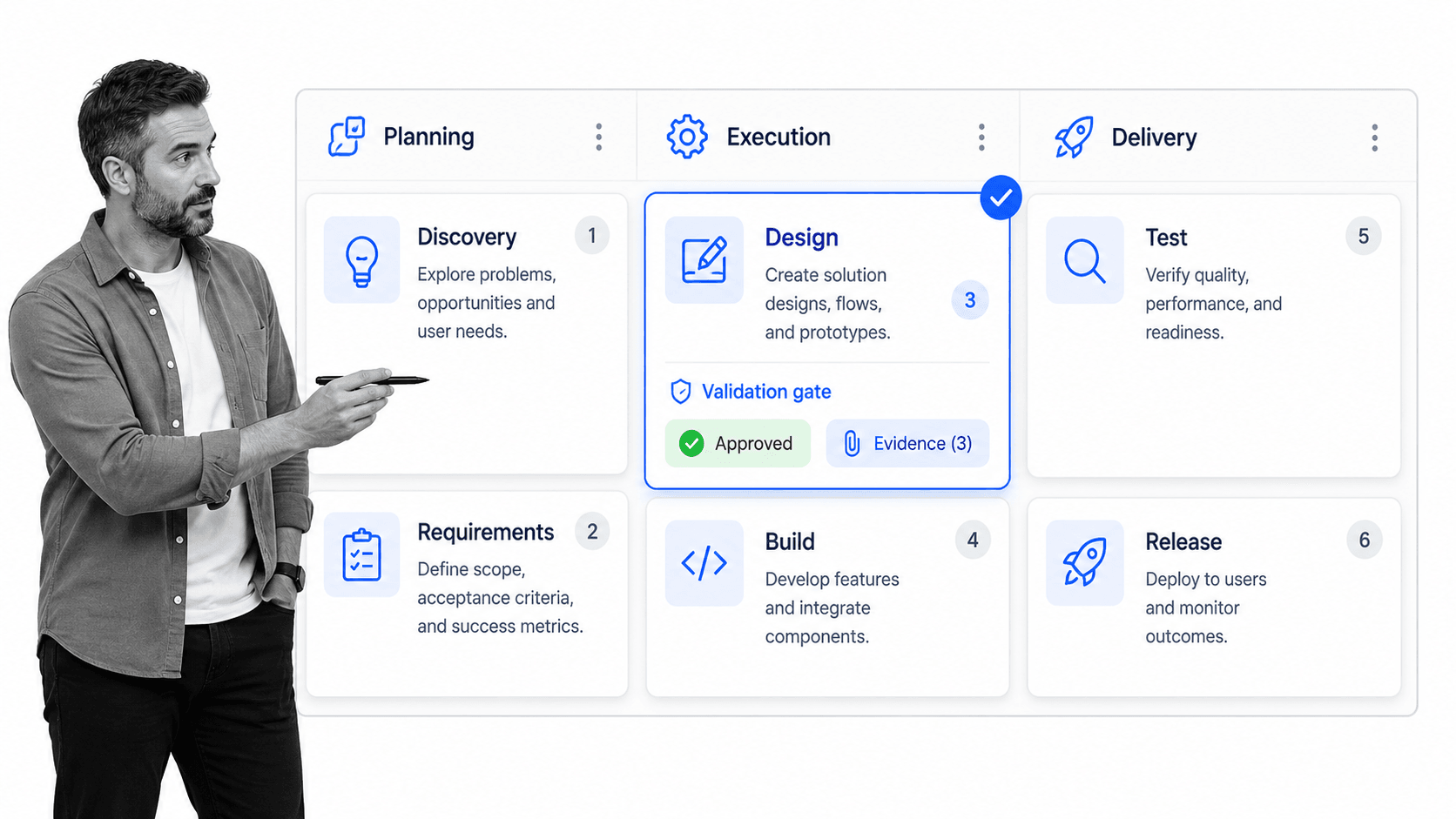
Most development processes share the same core stages, even when teams use different language. Product teams may call them discovery, design, build, test, and launch. Software teams may map them to requirements, implementation, QA, deployment, and maintenance. Operations teams may call them intake, design, approval, rollout, and improvement.
1. Intake and discovery
Intake captures the request, problem, opportunity, user, customer, constraint, or compliance driver behind the work. This is where teams decide whether the work deserves a development cycle at all. Guides from Atlassian product development process guide and Asana product development process guide show how much of product development depends on clarifying the problem before building.
2. Requirements and success criteria
Requirements translate the problem into decision-ready detail. They should define what must be true, what is out of scope, what risks apply, who needs to approve, and what evidence will prove the result is acceptable. For internal processes, this can include policy requirements, system constraints, owner assignments, and audit needs.
3. Design and planning
Design turns requirements into a practical approach. This may involve a prototype, process map, technical design, workflow draft, policy draft, user journey, or control plan. The goal is not to perfect every detail before action. The goal is to reduce ambiguity before expensive work begins.
4. Build or configure
The build stage creates the actual output. Depending on the team, this could mean writing code, configuring a workflow, drafting a policy, building a product feature, creating training material, or changing an operational routine. The process should define what work can happen in parallel and what depends on prior approval.
5. Validate and test
Validation checks whether the output works and whether it satisfies the original requirements. For software, this includes testing. For operations, it may include dry runs, user acceptance checks, risk review, policy signoff, security review, or compliance evidence checks.
6. Launch, adoption, and review
Launch is the controlled release of the finished work. Adoption ensures people actually use it. Review closes the loop by measuring what happened, capturing issues, and feeding improvements back into the next development cycle.
Development process models
There is no single development process model that fits every team. The right model depends on uncertainty, risk, speed, stakeholder complexity, regulatory burden, and how costly it is to make changes after release.
Linear models
A linear model moves through stages in a planned sequence. This works best when requirements are stable, the cost of change is high, or formal approval is required before later work begins. It can fail when teams pretend uncertainty is lower than it really is.
Iterative models
Iterative models expect learning. Teams build smaller increments, collect feedback, and adjust. The Agile Manifesto principles emphasize working outputs, collaboration, and response to change, which is why iterative development is common when discovery continues during delivery.
Risk-based models
Risk-based models add gates when the work touches security, compliance, customers, finance, safety, or mission-critical operations. These gates do not exist to slow the team down. They make sure high-risk work receives the review it deserves before release.
Hybrid models
Many teams need a hybrid. They use a linear path for approval and evidence, but iterative cycles for design and testing. That balance is often the practical answer: flexible enough to learn, structured enough to prove that important steps happened.
How to build a development process
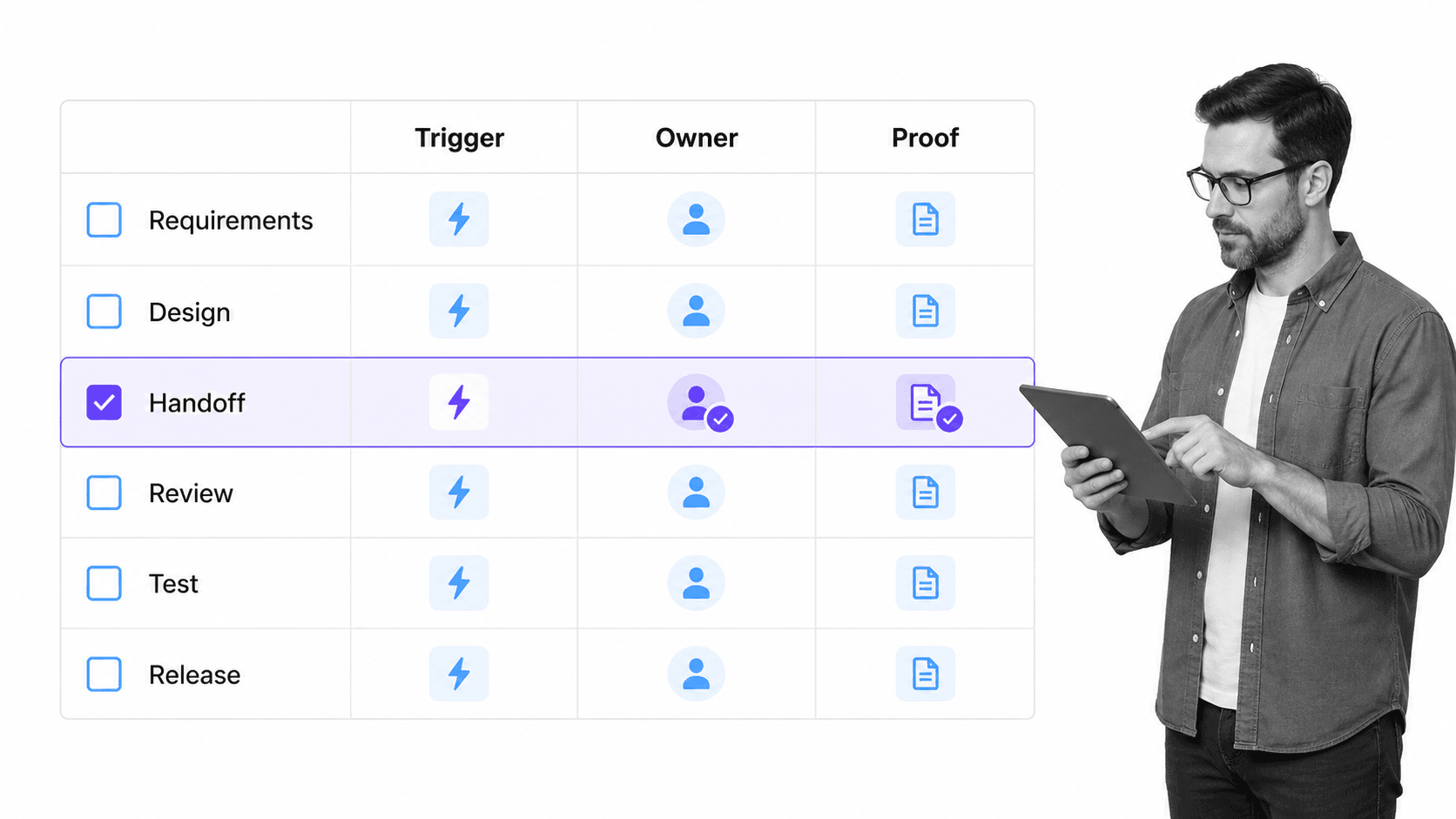
Build a development process by starting with the real work, not the ideal diagram. The process should match how value moves from request to release, including the messy parts: handoffs, exceptions, rework, approvals, and systems that do not talk to each other.
1. Define the trigger
Every development process needs a clear start. A trigger might be a customer request, internal improvement idea, regulatory requirement, defect, renewal risk, market opportunity, security issue, or recurring planning cycle. If the trigger is vague, the process will collect work that does not belong.
2. Name the owner
A process without an owner becomes shared confusion. Name the person or role responsible for moving work through the process. Then name decision owners for requirements, design, validation, risk review, and release.
3. Map the minimum viable path
Use process documentation examples to compare how other processes are structured, but keep the first version focused. Document the default path from intake to release. Add only the branches that materially change ownership, risk, or evidence.
4. Add controls where mistakes matter
Controls belong at the places where a missed step would create rework, customer harm, security exposure, compliance risk, or operational confusion. Common controls include required fields, approval gates, evidence uploads, version review, exception routing, and launch checks.
5. Connect systems only after the path is clear
process automation and workflow automation can remove manual handoffs, but automation should not hide a broken process. First define the trigger, owner, path, control points, and proof. Then connect the systems.
6. Pilot, measure, and revise
Run the process with a small group before rolling it out widely. Watch for unclear instructions, missing fields, late approvals, redundant reviews, and exceptions that repeat. Revise the process based on actual run data.
How to govern a development process
Governance turns a development process from a helpful checklist into a dependable operating system. The goal is not bureaucracy. The goal is to protect important work from drift, skipped controls, and undocumented decisions.
Version control
Development processes change over time. Version control makes sure future runs use the latest approved path while preserving the history of what changed. This matters when teams need to explain why a release, policy, workflow, or customer program followed a specific process.
Approval gates
Approval gates decide who can move work forward. In Process Street, approvals can keep a step from moving forward until the right reviewer has signed off. This is especially useful before validation, launch, customer handoff, or compliance-sensitive release.
Conditional paths
Not every development item carries the same risk. conditional logic lets a workflow adapt based on the request. Low-risk changes can follow a shorter route. High-risk changes can require extra review.
Evidence capture
Evidence can include test results, screenshots, approvals, customer acceptance, security review notes, signed documents, release decisions, or final implementation records. The process should collect evidence where the work happens, not after everyone has moved on.
Secure development controls
When the development process touches software or systems, security practices should be part of the workflow instead of an afterthought. The NIST Secure Software Development Framework is a useful reference for teams building security into software development work.
Development process in Process Street
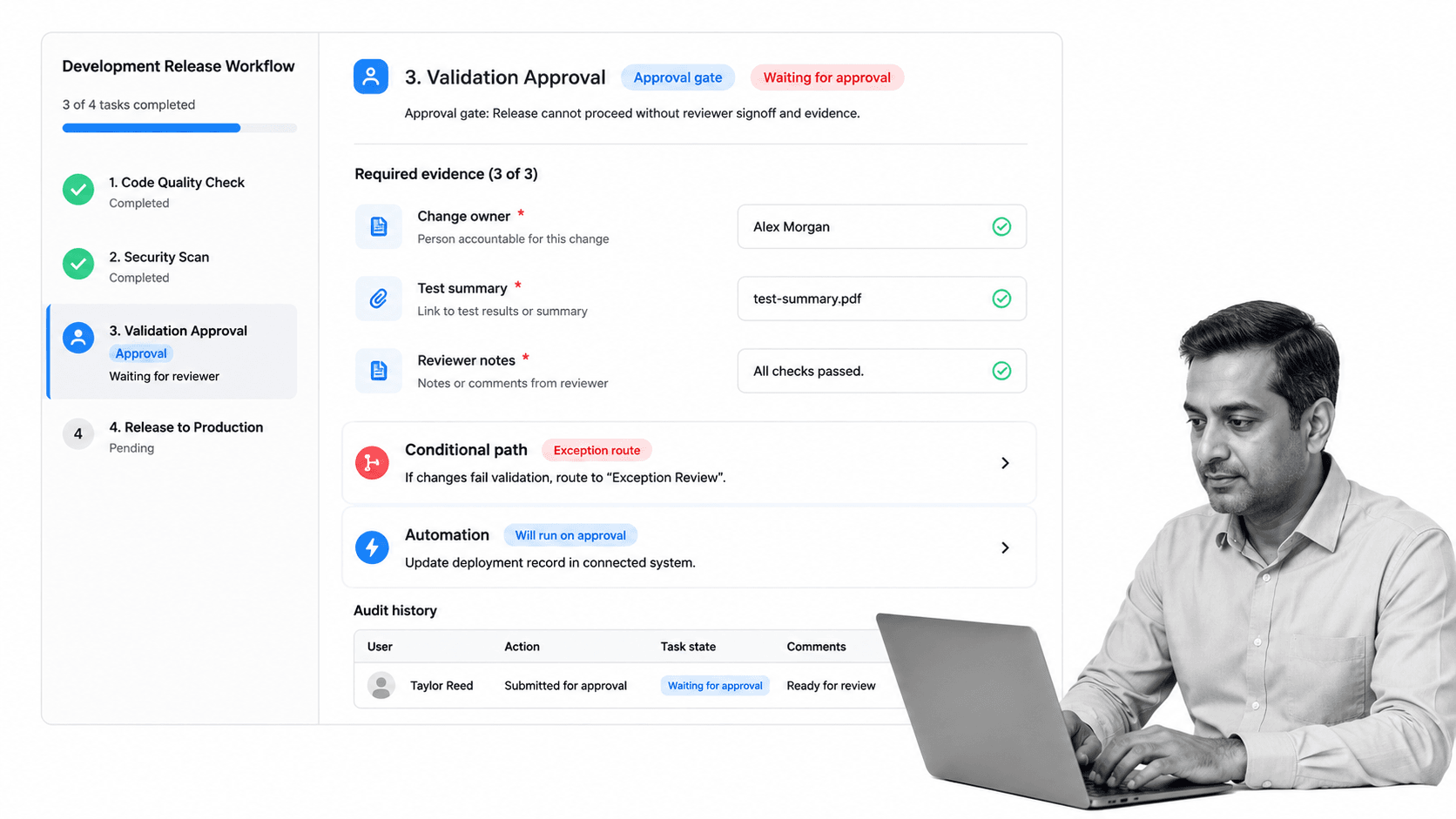
Process Street helps teams manage a development process by turning the path into executable workflows with owners, forms, required fields, approvals, conditional logic, automations, integrations, evidence, and audit history.
Design the process
Teams can build workflows for product launches, software deployment, change management, operational improvement, customer onboarding, policy updates, internal tool requests, and other repeatable development work. Each workflow can include instructions, fields, files, owners, due dates, and decision logic.
Run the process
Templates such as a product launch checklist, software deployment checklist, or change management process give teams a starting point for structured work. From there, the workflow can assign tasks, route approvals, and collect launch evidence.
Connect the process
Process Street has direct, universal integrations to 5,000+ systems. Need a new one? An AI agent builds it on the fly. That means the development process can update systems, trigger follow-up work, notify reviewers, and preserve evidence without making middleware the center of the workflow.
Prove the process
A governed run history supports process monitoring because teams can see what happened, who owned it, which approval released it, and where bottlenecks appeared. That is the foundation for AI-driven compliance when AI begins helping identify risk and suggest process improvements.
How to improve your development process
Improve your development process by treating it as a living system. The first version should be clear enough to run, but it will not be perfect. The point is to create a controlled loop where each run teaches the team how to make the next one better.
Measure where work slows down
Track cycle time, waiting time, rework, late approvals, missing evidence, exception frequency, launch defects, and adoption issues. These metrics show whether the process is helping or only documenting friction.
Remove unnecessary steps
A development process should not become a museum of old concerns. Remove steps that no longer protect quality, speed, security, compliance, or customer outcomes. Keep the process lean enough that people actually follow it.
Add automation after the bottleneck is understood
Automation is most useful when the team understands the repeated handoff. Automate reminders, system updates, document creation, intake routing, and follow-up tasks after the process owner knows what should happen and why.
Review exceptions regularly
Exceptions are not failures by default. They are signals. If the same exception repeats, the process may need a new branch, clearer intake, a better approval rule, or a stronger control. A good development process gets sharper as exceptions accumulate.
Keep the process close to the work
The easiest way to weaken a development process is to manage it in a place people only visit after the work is done. Keep intake, assignments, evidence, approvals, and release checks close to daily execution. When the process lives beside the work, people update it naturally. When it lives in a disconnected document, teams reconstruct the story later and lose the details that make improvement possible.
The final test is practical: does the development process make work easier to start, easier to route, harder to skip, easier to release, and easier to prove? If the answer is yes, the process is doing its job.
FAQs
What is a development process?
A development process is the repeatable path a team uses to turn an idea, request, or requirement into a finished output. It defines the stages, owners, approvals, evidence, and review gates needed to move work from intake to launch and improvement.
What are the main development process stages?
Common development process stages include intake, discovery, requirements, design, build or configuration, validation, launch, adoption, and review. The exact names vary by team, but the process should always clarify ownership, decisions, and proof.
What is the difference between a development process and a workflow?
A development process is the overall method for moving work from idea to release. A workflow is the executable sequence of tasks, owners, rules, and approvals that runs that process in daily work.
How do you build a development process?
Start by defining the trigger, owner, default path, decision points, handoffs, controls, and evidence requirements. Pilot the process with a small group, measure where work stalls, then revise the workflow before scaling it.
How does Process Street help manage a development process?
Process Street turns a development process into executable workflows with assignments, forms, required fields, conditional logic, approvals, automations, integrations, evidence capture, and audit history. Teams can run the process and prove each step happened.
How often should you improve a development process?
Review a development process after major launches, repeated exceptions, process failures, compliance changes, or stakeholder feedback. Many teams also run a regular quarterly review so the process stays current without constant disruption.
