


Turn every policy into automated workflows with built-in enforcement and audit-ready proof.


Headless Process Management Software
Last updated:
Headless process management software runs process definitions, tasks, state, rules, approvals, permissions, and history independently of a single user interface. A custom application, portal, integration, script, or AI agent can operate the same governed process through documented interfaces without rebuilding its logic in every client.
The word headless does not mean people lose the interface. It means the interface is replaceable. Teams can keep using the vendor application while other authorized clients start runs, read state, complete tasks, submit data, request approvals, and retrieve evidence from the same process engine.
This guide explains the architecture, the minimum software contract, the role of human judgment, the controls AI agents need, how Process Street supports the model, and how to decide whether the added flexibility is worth the implementation work.
In this guide, we are going to cover:
- What is headless process management software?
- How headless process management architecture works
- Capabilities that headless process management software must expose
- Human work and governance in a headless process
- AI agents and callable processes
- How Process Street supports headless process management
- A practical implementation roadmap
- When headless process management is the wrong choice
- Frequently asked questions
What is headless process management software?
Headless process management separates the process layer from the presentation layer. The process layer owns the durable definition of the work, the current state of each run, the actions each participant may take, and the record of what happened. The presentation layer asks that engine what is true and submits authorized changes back to it.
The process remains authoritative
A normal interface-coupled application can hide important rules in buttons, screens, or client-side code. If a second interface is added, those rules are easy to copy incorrectly. In a headless model, required fields, conditional routes, assignments, deadlines, approvals, and permissions remain in the process system. Every client receives the same state and is subject to the same controls.
Clients become replaceable
A customer portal can show only the tasks a customer needs. An internal application can embed one approval. A mobile experience can capture evidence in the field. An integration can advance a run after a system event. An AI agent can inspect the definition and act on permitted tasks. None of those clients should become a second, hidden copy of the process.
Headless is an architecture property, not a marketing label
A vendor can publish an application programming interface, commonly shortened to API, and still keep the meaningful process inside its own screens. A webhook that starts a run is useful, but it does not prove that an outside client can inspect state, perform work, handle exceptions, respect permissions, and recover the audit history. The complete lifecycle is the test.
For the category definition and its relationship to business process management, the headless BPM guide explains why the process engine must remain independent from a fixed interface. The software question begins one step later: what the engine must expose so another client can operate it safely.
How headless process management architecture works
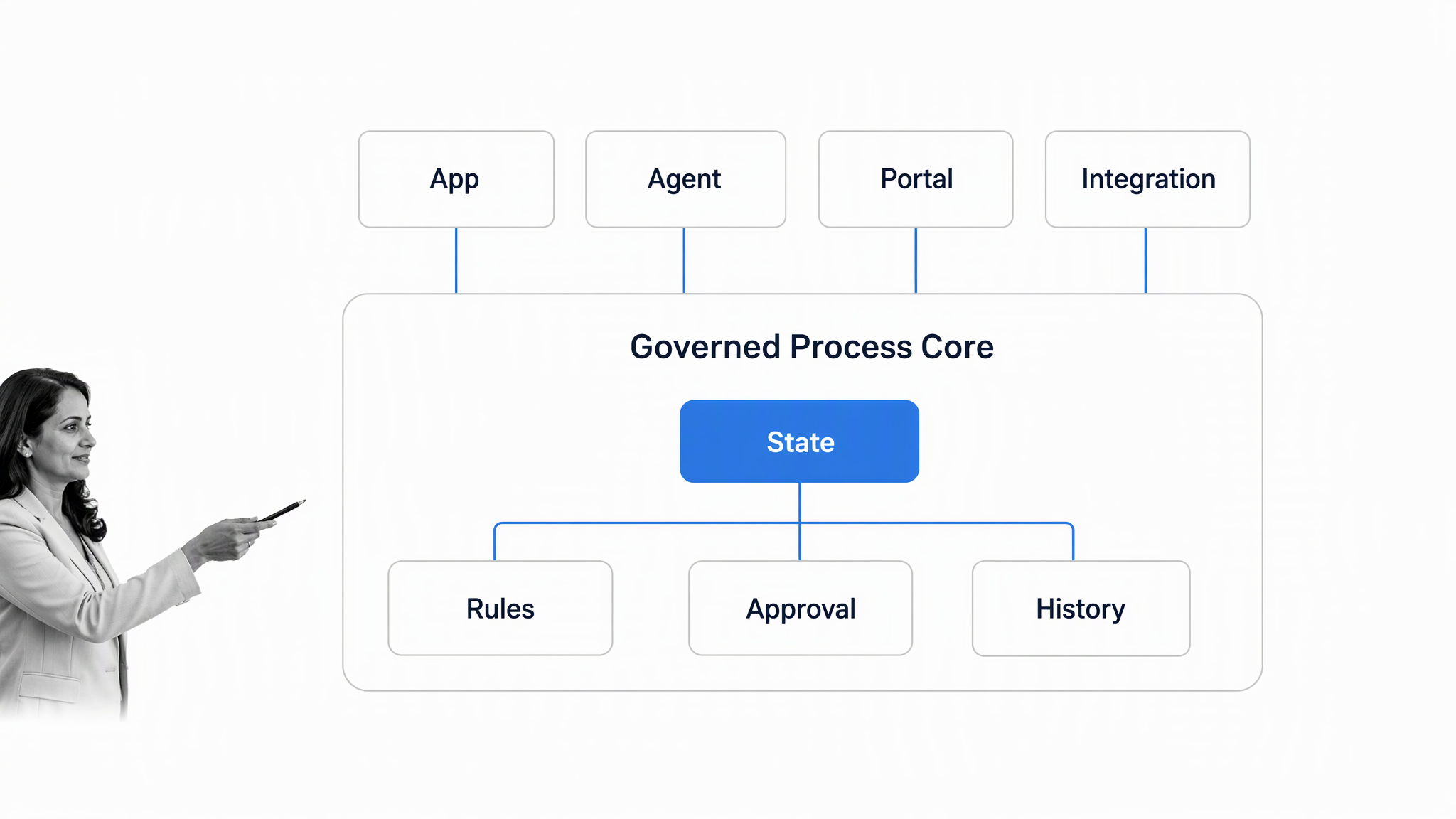
A strong architecture has one governed process core and several access surfaces. The core stores definitions, active runs, tasks, data, rules, permissions, and history. The surfaces include the vendor interface, custom applications, agent clients, portals, and system integrations.
Definition layer
The definition describes the repeatable process: tasks, data fields, instructions, assignments, timing, rules, and allowed transitions. Definitions need versions because a running process may have started under an earlier revision. A client should know which revision governs a run instead of assuming the latest design always applies.
Runtime and state layer
The runtime creates process instances and preserves their state. State includes what has started, what is complete, what is waiting, who owns each task, which data has been submitted, which branch is active, and which deadline applies. If the client disappears or retries, the engine must still know the truth.
Control layer
Rules, permissions, approvals, required fields, and exception routes belong here. The client may request an action, but the engine decides whether it is allowed. That distinction prevents a custom interface or agent from bypassing the process simply because it can call an endpoint.
History and observability layer
Every important change needs a trace: who or what acted, when it acted, which state changed, what evidence was supplied, which rule ran, and which approval was granted. Logs should support both operational recovery and formal proof. A process that runs headlessly but cannot explain itself is automation without control.
Access layer
REST APIs, webhooks, software development kits, event streams, and the Model Context Protocol can expose different parts of the same engine. The Model Context Protocol, commonly shortened to MCP, gives AI applications a standard way to discover and call tools. It complements an API. It does not replace engine-side permissions or process rules.
This separation resembles a broader process platform, but the headless requirement is stricter. The platform must expose the operating lifecycle, not only provide a visual builder and a few integration triggers.
Capabilities that headless process management software must expose
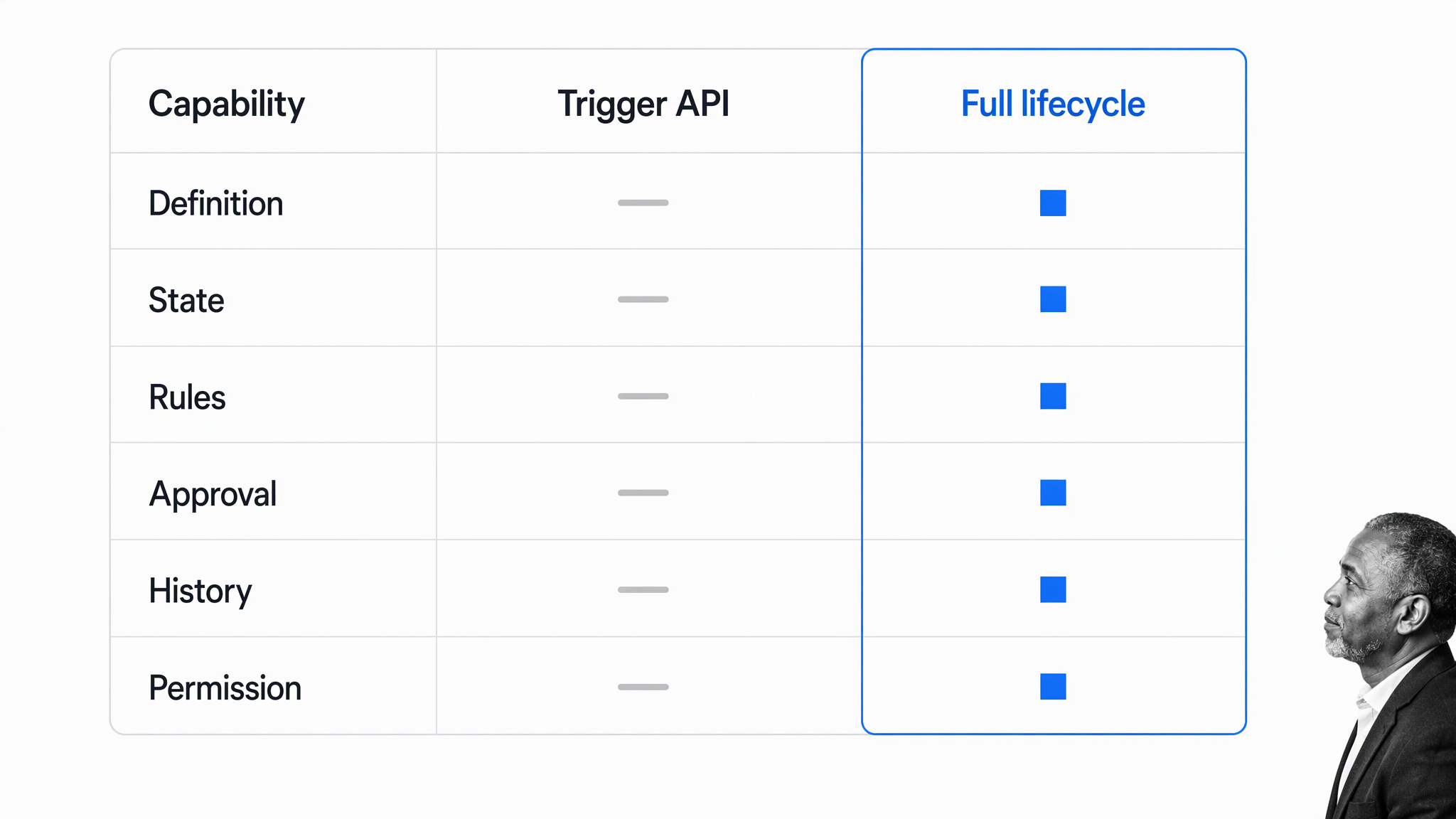
The fastest way to evaluate the software is to test one complete process from definition through recovery. A feature checklist can hide gaps. A full lifecycle test reveals whether the interface is genuinely replaceable.
Read the process definition
An authorized client should be able to identify the workflow, revision, tasks, fields, assignments, rules, permissions, schedules, and webhooks that affect execution. This is especially important for an AI agent, because acting without the definition encourages guesses about required work and allowed transitions.
Create and inspect runs
The software should create a run idempotently when possible, then return the current state. Idempotency means the same request can be retried without creating duplicate work. The client needs stable identifiers, clear error responses, pagination, rate-limit behavior, and a way to find the run again after a failure.
Operate tasks and data
A complete contract covers task assignment, completion, form values, files or evidence, comments where relevant, deadlines, and structured outputs. Starting a workflow is not enough. The client has to participate in the work while remaining subject to required fields and business rules.
Enforce identity and permissions
Every call should execute as a known identity with defined scope. Object-level and function-level authorization matter because a client that may read one run should not automatically read every run or perform administrative actions. The OWASP API Security project provides a practical review of authorization, authentication, sensitive business flows, configuration, resource use, and API inventory.
Handle exceptions and retries
Real processes include missing information, rejected approvals, unavailable systems, conflicting records, timeouts, and work that needs reassignment. The engine should preserve the failure state and route recovery intentionally. Blind retries can duplicate actions or erase the reason work stopped.
Retrieve history and evidence
The client should retrieve enough history to explain the outcome. That may include task events, field changes, approvals, comments, integration results, revision identity, and timestamps. A headless process is complete only when a responsible operator can reconstruct it without relying on the client that happened to run it.
The Process Street public API reference illustrates the breadth of a process contract: workflows, revisions, task templates, form fields, rules, permissions, webhooks, schedules, workflow runs, tasks, and run data are separate resources rather than one generic trigger endpoint.
Human work and governance in a headless process
Headless software is often described as a developer feature, but the harder problem is human work. Processes contain judgment, evidence, handoffs, escalations, and decisions that should not disappear when a custom client takes over the interface.
Keep approvals in the engine
An approval is not a button label. It is a controlled decision with an eligible approver, required context, possible outcomes, timing, and a recorded result. A custom portal or agent can request the decision, but the workflow approval should remain part of the governed process.
Make evidence explicit
Required evidence should be represented as structured data, an attachment, a linked record, or a verified system response. The process should know whether the evidence exists before a task completes. Otherwise the client can advance work while the audit trail remains empty.
Design exception ownership
When automation cannot proceed, the engine should create visible work for a person or another system. The exception needs a state, owner, deadline, reason, source data, and resolution path. Sending an untracked notification is not the same as managing the exception.
Preserve operational ownership
Operations teams need to inspect and improve the process without reverse-engineering application code. Clear process documentation should stay close to execution so the approved method and the running method do not drift apart.
These controls support the broader discipline of internal controls. Access, authorization, separation of duties, evidence, exception review, and change history remain necessary even when the interface is custom and the actor is software.
AI agents and callable processes
AI agents make the value of headless process management easier to see. An agent can understand a goal and call tools, but it still needs an authoritative process that says what work exists, which action is permitted, what evidence is required, and when a person must decide.
Give the agent context before actions
The agent should read the workflow definition, current run state, task instructions, required inputs, permissions, and prior history before it acts. A short tool description is not enough for a complex process. Complete context reduces accidental omissions and unnecessary calls.
Separate discovery, reasoning, and execution
Tool discovery tells the agent which operations exist. Reasoning selects an appropriate next action. The process engine validates whether that action is allowed. This separation keeps the agent useful without making its judgment the only control.
Use approval and policy gates
High-impact actions should pause at explicit gates when required by policy. The engine can require evidence, validate fields, restrict actors, route a person for review, and record the result. The agent does not need to improvise the policy in every conversation.
Evaluate the agent as part of the system
The National Institute of Standards and Technology AI Risk Management Framework organizes risk work around govern, map, measure, and manage. Applied here, teams define ownership, map the process and its consequences, measure outcomes and failures, and improve controls based on evidence.
This is the operating foundation for agentic process automation: agents perform useful work, while the process remains the system of record for state, control, and proof.
How Process Street supports headless process management
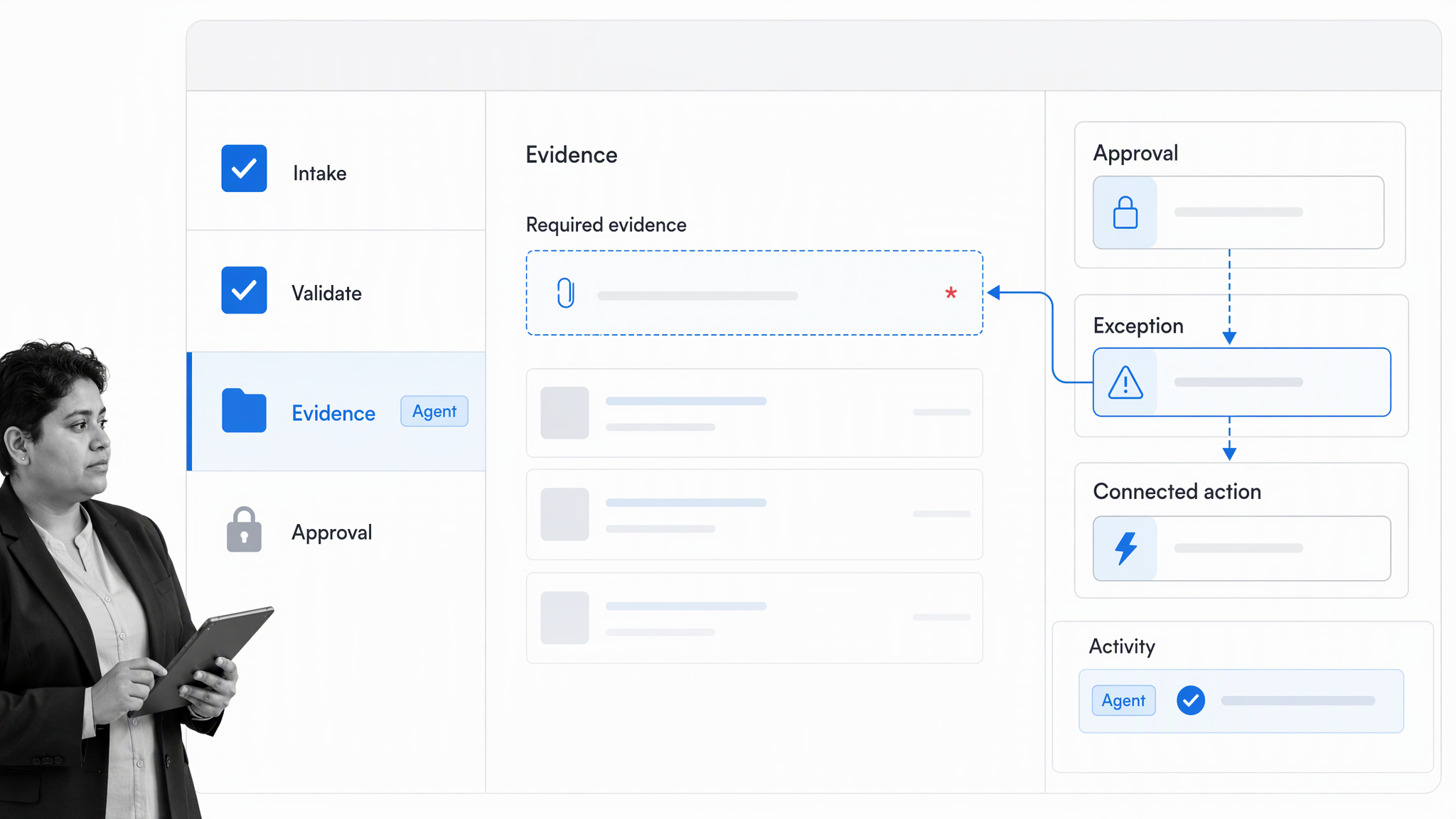
Process Street is an agentic process automation platform for high-stakes operations. Teams design governed workflows in a visual system, then expose workflow definitions, runs, tasks, data, and selected actions to other applications through the public API and MCP server.
The public API covers the process lifecycle
The API includes resources for workflow definitions and revisions, tasks and form fields, logic rules, permissions, webhooks, schedules, workflow runs, run tasks, assignees, and form values. A client can work with the process as a structured system instead of treating it as a page to click through.
The MCP server gives AI clients a governed access path
The Process Street MCP server lets compatible AI applications access workflows, workflow runs, tasks, users, and data sets within the permissions of the connected account. It can also return an entire workflow definition so an agent has settings, permissions, schedules, tasks, rules, assignments, and widgets before making targeted changes.
Human work stays visible
A workflow can combine agent actions with assigned tasks, required fields, approvals, conditional routes, evidence, and execution history. The agent is one participant in the process, not a hidden replacement for it. Operators can see what is waiting, what failed, which decision is needed, and what happened earlier.
Integrations remain supporting capabilities
The Process Street integration layer includes native automations, API access, MCP access, webhooks, and Code Tasks. These capabilities move data and perform system actions, while the workflow keeps the cross-system process, ownership, and evidence coherent.
For buyers comparing several platform approaches, the headless process management platform comparison separates operations-owned process systems from engineering-owned orchestration runtimes. The process management software for AI agents comparison focuses more directly on agent access and human control.
A practical implementation roadmap
1. Pick one consequential process
Choose a process with a clear outcome, recurring volume, more than one participant, at least one exception, and a reason to expose it outside the standard interface. Good pilots include onboarding, access review, vendor review, incident response, approval, or evidence collection. Avoid a trivial demo that proves only a trigger works.
2. Define the authoritative boundary
Write down what the process engine owns and what remains in external systems. The engine may own task state, assignments, approvals, and evidence requirements while a customer relationship management or finance system remains the source of record for business data. Ambiguous ownership creates conflicting truth.
3. Map identities and permissions
List every person, application, integration, and agent that will read or change the process. Give each the smallest useful scope. Test access to individual objects and actions, not only login. Include service-account rotation, revocation, and how activity will be attributed.
4. Expose the complete minimum lifecycle
Implement definition read, run creation, state read, task and data operations, approval behavior, exception handling, and history retrieval for the pilot. If one part remains available only through the vendor interface, document it explicitly and decide whether the architecture is still acceptable.
5. Design retries and idempotency
Assume networks fail and clients retry. Use stable reference identifiers where available. Separate safe reads from state-changing actions. Record external action results so a repeated call does not send the same message, create the same record, or trigger the same payment twice.
6. Test the unhappy path
Test missing evidence, rejected approval, expired credentials, permission denial, conflicting updates, duplicate requests, unavailable dependencies, rate limits, and a client that stops midway. Confirm the engine preserves state and creates visible recovery work.
7. Measure process and control outcomes
Track completion time, wait time, exception rate, rework, overdue tasks, approval latency, evidence completeness, unauthorized attempts, failed system actions, and recovery time. A fast process with weak evidence is not a successful control. A secure process that nobody can operate is not a successful product.
8. Expand by reusable patterns
After the pilot works, reuse identity, authorization, event, approval, evidence, retry, and observability patterns. Do not copy the business process itself blindly. Each process still needs its own outcome, owners, risks, exceptions, and proof requirements. The broader process management discipline keeps that expansion intentional.
When headless process management is the wrong choice
Headless architecture adds flexibility, but it also adds interface contracts, security work, testing, monitoring, and support. It is the wrong choice when the standard application already serves the users and no external client needs to participate in the process lifecycle.
The supplied interface already fits
If one team performs the work in one application and the workflow changes rarely, a custom client may create more maintenance than value. Use the existing interface and invest in the process itself.
Only a simple trigger is required
A webhook or native automation may be enough when an event only needs to start a run or move a record. Do not demand full headless access when no client needs to inspect and operate the lifecycle.
The process is not defined well enough
Exposing an unstable process multiplies inconsistency. Clarify the outcome, tasks, data, roles, decisions, exceptions, and ownership first. Headless access makes a sound process reusable, but it cannot make an unclear process correct.
The organization cannot support the contract
APIs and agent tools become products that need owners, versioning, documentation, security review, monitoring, incident response, and change management. If nobody owns that lifecycle, begin with a narrower integration and build the operating capability deliberately.
When a buyer does need full lifecycle access, the headless BPM software comparison offers a practical next step for evaluating operations-led and engineering-led options.
Frequently asked questions
What is headless process management software?
Headless process management software runs process definitions, tasks, state, rules, approvals, permissions, and history independently of a fixed user interface. Authorized applications, portals, integrations, scripts, and AI agents operate the same governed engine through documented interfaces.
How is headless process management different from workflow automation?
Workflow automation means software performs or routes work. Headless process management describes how clients access the complete process lifecycle. A platform can automate many tasks and still depend on its own interface for state, exceptions, approvals, or history.
Does headless process management software need a user interface?
Yes, most teams still benefit from a standard interface for design, monitoring, human tasks, and administration. Headless means that interface is not the only surface capable of operating the process.
Can Claude, ChatGPT, Codex, or Grok use headless process management software?
Yes, when the software exposes authorized API or MCP tools that the chosen AI client can call. The process engine should still enforce identity, permissions, required data, approvals, allowed transitions, and history for every action.
What should an API expose for a process platform to be truly headless?
It should expose definitions and revisions, runs and current state, tasks and data, identity and permissions, rules and approvals, exceptions, retries, and execution history. A start-workflow endpoint by itself is an integration feature, not a complete headless process contract.
When is headless process management the wrong choice?
It is usually the wrong choice when the standard interface already fits the work, only a simple trigger is needed, the process is still unstable, or the organization cannot support a versioned and secure interface contract. Start with the smallest architecture that solves a real access problem.
