


Turn every policy into automated workflows with built-in enforcement and audit-ready proof.



Healthcare Automation
Healthcare automation is the use of software, rules, integrations, and AI-supported workflows to move healthcare work from trigger to completed outcome with less manual chasing. It can route patient intake, verify documentation, assign follow-up, escalate exceptions, capture approvals, and create an audit trail for work that used to live across emails, spreadsheets, portals, and memory.
The goal is not to automate clinical judgment away. The goal is to automate the repeatable steps around that judgment so clinicians, operations teams, compliance teams, and administrators know what has to happen next, who owns it, what evidence is required, and when a human review is needed.
This guide explains what healthcare automation is, where it creates the most leverage, which workflows to prioritize, how governance and compliance should work, how AI changes the operating model, and how healthcare teams can use workflow software to automate work without losing control.
In this article, we are going to cover:
- What healthcare automation is
- Why healthcare automation matters
- Healthcare automation workflows to prioritize
- Healthcare automation governance and compliance
- How to implement healthcare automation
- How AI changes healthcare automation
- Healthcare automation in Process Street
- How to choose healthcare automation software
- FAQs
What healthcare automation is
Healthcare automation turns a defined healthcare process into work that runs with clear triggers, rules, owners, and proof. A trigger starts the workflow. Rules decide the path. Tasks route to the right people. Required fields and file uploads capture evidence. Approvals hold the process when review is needed. Integrations move data between systems.
Automation is bigger than a bot
Robotic process automation can help with repetitive system actions. HIMSS robotic process automation overview describes RPA as technology that automates rules-based business processes and can emulate repetitive human actions. Healthcare automation is broader. It includes workflow design, integration, rules, controls, monitoring, exception handling, and audit evidence.
That means automation should sit on top of a clear healthcare process. If the process is unclear, automation only makes confusion move faster. The work has to be mapped first: trigger, task order, owner, data source, handoff, decision, approval, evidence, and completion condition.
Automation is different from integration
healthcare integration connects systems so data can move. Healthcare automation decides what should happen when that data moves. A lab result may enter a record, but an automation workflow can decide whether a follow-up task is needed, which owner receives it, what SLA applies, and what proof is captured before closure.
Standards matter here. ONC HL7 FHIR overview explains that HL7 FHIR is an API-focused standard used to represent and exchange health information. That kind of data exchange can support automation, but it does not replace the operating workflow that assigns and verifies the next action.
Automation should protect human review
Healthcare automation should make the human decision point stronger, not invisible. The best workflows automate routing, reminders, required data collection, evidence capture, and escalation, while preserving clinical review, compliance approval, and exception judgment where the risk requires it.
Why healthcare automation matters
Healthcare automation matters because care and administration depend on repeatable work across many roles and systems. When that work is manual, teams lose time to chasing information, re-entering data, checking status, rebuilding evidence, and following up on missed handoffs.
It reduces avoidable administrative drag
Many healthcare workflows are predictable but still handled manually: intake forms, eligibility checks, referral updates, prior authorization packets, access reviews, audit evidence, incident follow-up, credentialing steps, and discharge outreach. Automating the routing and evidence layer gives staff fewer open loops to track by memory.
Healthcare teams can start with narrow work like a patient intake checklist or broader operations work like a medical checklist app. The pattern is the same: define the process, route the work, require the right fields, and make completion visible.
It improves accountability across handoffs
Healthcare work rarely sits with one person. A request can move from front desk to nurse, nurse to clinician, clinician to referral coordinator, coordinator to payer, quality team to department owner, or compliance to IT. Automation gives every handoff a visible owner and completion rule.
This is where automation connects naturally to healthcare monitoring and healthcare analytics. Monitoring shows whether work is happening. Analytics shows patterns. Automation closes the loop by assigning action when the signal crosses a threshold.
It creates evidence as work happens
Healthcare organizations cannot rely on informal proof. If a process touches patient information, quality control, access, safety, or billing, the team may need to show what happened later. Automation should capture the proof during the workflow, not after the fact.
Healthcare automation workflows to prioritize
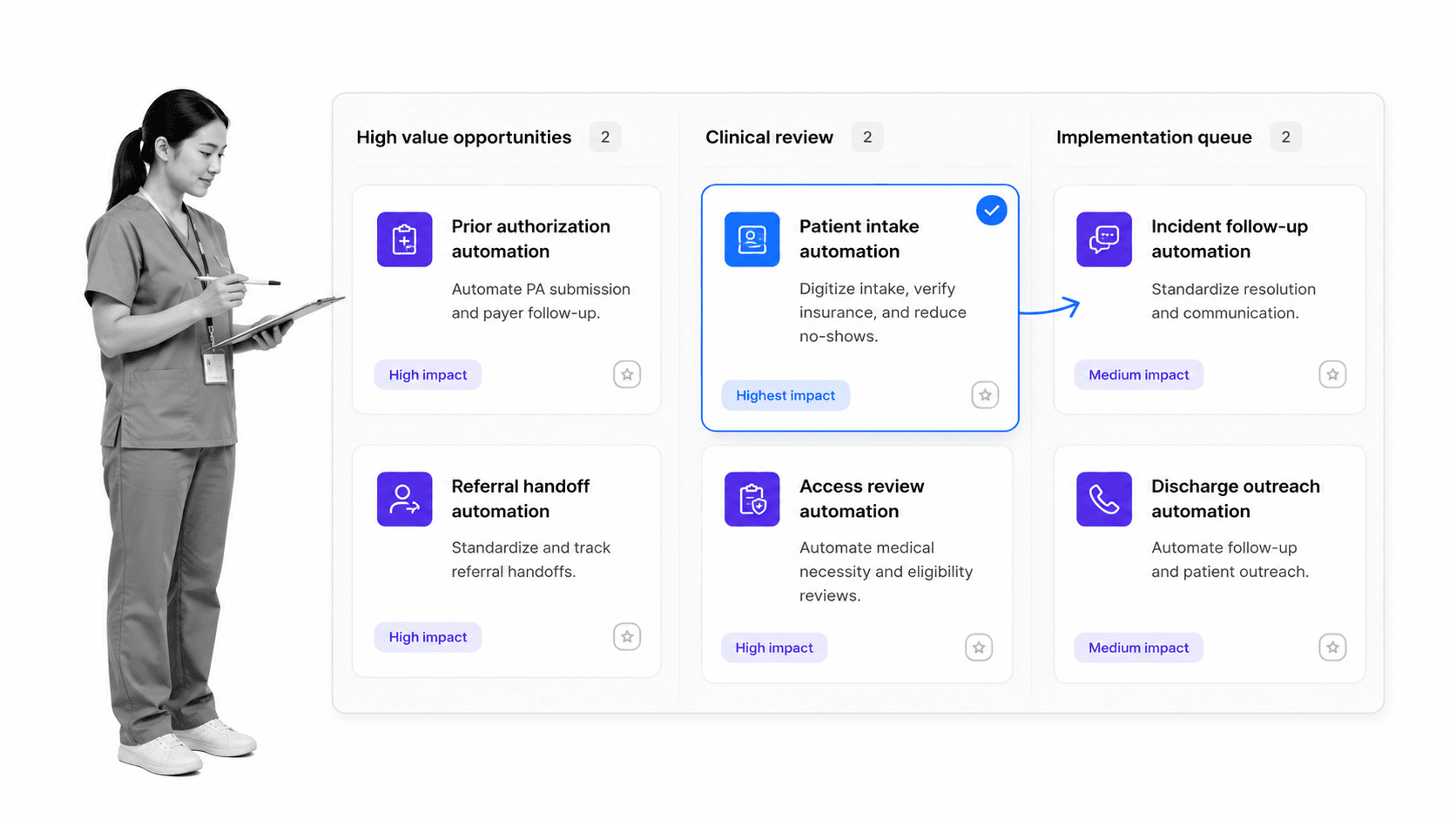
The best first automations are not the flashiest. They are recurring workflows where the steps are known, handoffs are frequent, evidence matters, and delays create real consequences.
Patient intake and registration
Patient intake is a natural starting point because it is repetitive, data-heavy, and upstream of care. Automation can route forms, check for missing fields, assign follow-up, collect consent evidence, and prevent an incomplete intake from moving forward without review.
Prior authorization and payer handoffs
CMS Interoperability and Prior Authorization final rule fact sheet says impacted payers must send prior authorization decisions within 72 hours for expedited requests and seven calendar days for standard requests, excluding QHP issuers on the federally facilitated exchanges. That kind of process pressure makes prior authorization a strong automation target because status, documentation, review, and denial reasons have to be tracked clearly.
CMS prior authorization automation FAQ notes that automation from the Prior Authorization API could improve decision timeframes, while complex prior authorization automation remains an ongoing process of continuous improvement. In practical terms, teams still need workflows around the API: document requirements, owner assignment, exception review, appeal routing, and evidence retention.
Access reviews and security operations
Access provisioning, deprovisioning, role changes, and break-glass reviews are high-value automation candidates. These workflows need clear triggers, least-privilege review, approval, evidence, and audit history. Manual access review creates risk because ownership and proof can disappear across spreadsheets and tickets.
Incident, complaint, and corrective action follow-up
Incident and complaint follow-up needs controlled escalation. Automation can assign investigation steps, require evidence, route serious issues to the right reviewer, hold closure until approval, and create the record needed for trend analysis.
Discharge and referral follow-up
Discharge and referral workflows often fail at handoffs. Automation can trigger follow-up, verify contact attempts, capture missing information, escalate high-risk cases, and keep downstream teams from reconstructing status by phone or email.
Healthcare automation governance and compliance
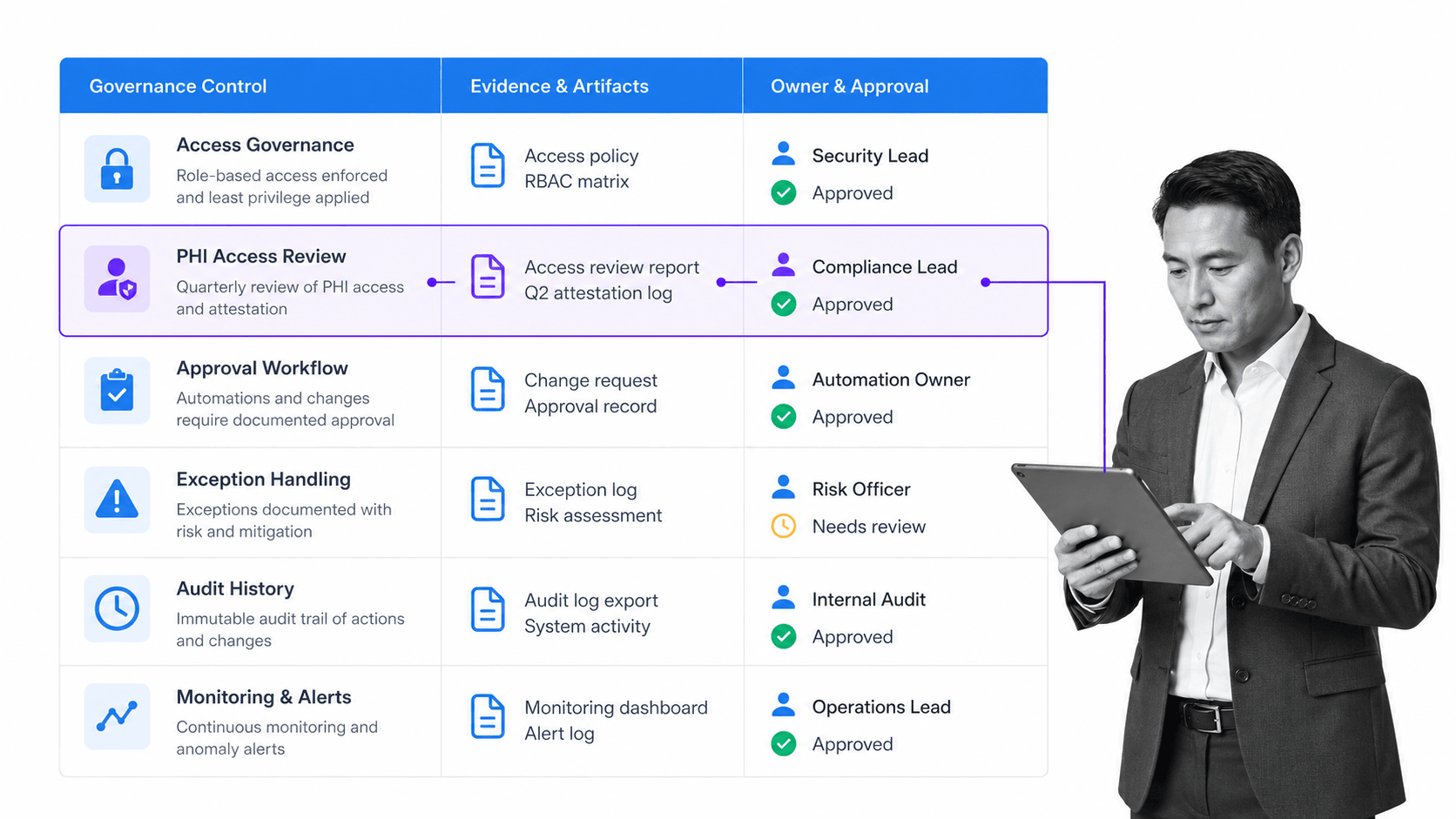
Healthcare automation governance defines which processes can be automated, what controls are required, when human review is mandatory, how changes are approved, and what evidence must be captured. This is the difference between useful automation and risky autopilot.
Start with data sensitivity
HHS HIPAA Security Rule guidance states that the HIPAA Security Rule requires appropriate administrative, physical, and technical safeguards to protect electronic protected health information. Any automation that touches protected health information should be designed around access controls, audit history, encryption, evidence retention, and clear exception handling.
Define human-in-the-loop points
Not every step should run without review. High-risk patient states, denial reasons, privacy exceptions, access changes, missing documentation, and clinical edge cases should route to a human owner. The workflow should show why the route changed and who approved the decision.
Control workflow changes
Healthcare automation workflows need version ownership. When the process changes, the team should know who approved it, which tasks changed, which roles are affected, whether staff need retraining, and what evidence is required after the update.
Monitor the automation itself
Automation needs its own operating controls. Track failed runs, late tasks, exception volume, skipped fields, manual overrides, integration errors, and approval bottlenecks. If those signals are not monitored, the automation can drift quietly.
A practical governance model connects automation to HIPAA compliance automation, security compliance automation, and everyday workflow records, so compliance is built into execution rather than reviewed only during audit prep.
How to implement healthcare automation
Implementing healthcare automation safely starts with one process, not a giant transformation program. Pick a workflow where the path is visible, the risk is meaningful, and the success measure is obvious.
Step 1: Map the current process
Document how work actually happens today. Include triggers, systems, owners, handoffs, waiting states, workarounds, decision points, evidence, and closure rules. Ask frontline staff where they chase information or duplicate work.
Step 2: Separate rules from judgment
Rules are repeatable: if a field is missing, assign follow-up. If a risk level is high, route to review. If evidence is required, block closure until attached. Judgment is contextual: clinical review, privacy exception, medical necessity review, or escalation decision. Automate rules. Protect judgment.
Step 3: Build the smallest useful workflow
Start with a workflow that handles the trigger, tasks, owners, fields, exceptions, approvals, and evidence for one process. Avoid trying to automate every downstream edge case on day one. The first version should be narrow enough to test and real enough to matter.
Step 4: Test with the people who do the work
AHRQ PDSA quality improvement guidance describes the Plan, Do, Study, Act cycle as a way to test, monitor, learn, and adjust before expanding changes. Healthcare automation should follow the same pattern: pilot on a small scale, study what breaks, improve the workflow, then expand.
Step 5: Measure adoption and outcomes
Measure whether people use the workflow, whether work is completed on time, whether required evidence is captured, whether exception volume changes, and whether staff still need side spreadsheets. The automation is not working until the workflow becomes the normal path.
How AI changes healthcare automation
AI changes healthcare automation by making workflows more adaptive, but it does not remove the need for process design. AI can classify requests, summarize information, suggest next steps, draft follow-up, monitor patterns, and help build automations faster. The workflow still needs rules, owners, guardrails, and proof.
AI can reduce manual preparation
AI can help extract information from intake notes, identify missing data, draft patient communication, summarize exception context, or prepare a reviewer with the relevant fields. That can reduce preparation time, especially in administrative and compliance workflows.
AI needs controlled execution
HIMSS describes AI healthcare work as tied to use cases, leadership support, legal issues, ROI, and staff engagement. For automation, that means AI should operate inside controlled workflows rather than as a disconnected chat layer. The workflow determines what the AI can do, when a human reviews it, and what evidence is retained.
Teams exploring applications of AI in business processes should treat AI as part of the operating system for work. It can assist with decisions and actions, but it needs policy, permissions, and audit history around it.
AI agents raise the bar for governance
When AI can act across systems, governance matters more. Teams need permissions, scoped tools, approval gates, logging, exception handling, and rollback plans. The safest healthcare automation model is not uncontrolled autonomy. It is governed autonomy inside a process the organization understands.
Healthcare automation in Process Street
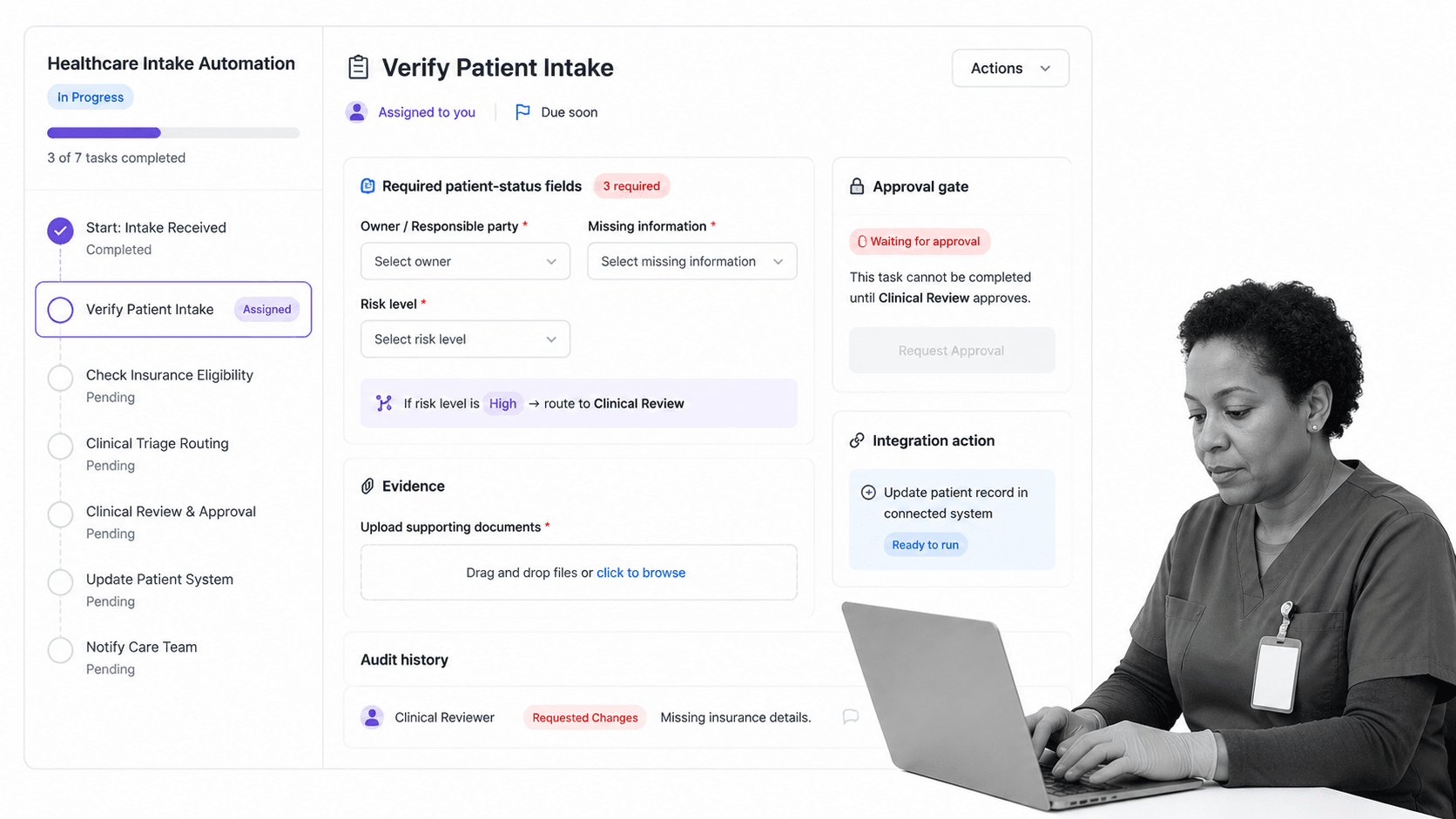
Healthcare automation in Process Street means turning a defined process into assigned, auditable workflow runs. Tasks route to owners, required fields capture structured information, conditional logic changes the path based on risk or missing data, approvals blocks closure when review is required, and the workflow keeps a record of what happened.
Process Street is a Compliance Operations Platform and is HIPAA compliant. It is strongest when healthcare teams need repeatable operational, quality, compliance, or administrative processes to run consistently across roles and locations.
Automate the execution layer
A workflow can start from a form, recurring schedule, system event, or manual trigger. It can assign tasks, require evidence uploads, route exceptions, notify reviewers, and update connected systems when work is complete.
Keep compliance in the workflow
Instead of storing procedures in one place and tracking execution somewhere else, Process Street keeps the operating steps, required evidence, approvals, and audit history together. That gives teams a clearer record when a process is reviewed later.
Connect healthcare systems without leading with middleware
Process Street has direct, universal integrations to 5,000+ systems. Need a new one? An AI agent builds it on the fly. That helps teams connect forms, documents, BI tools, communication tools, EHR exports, ticketing systems, and other systems of record to the workflow layer.
Teams can start with one automation, then expand into workflow automation, workflow management system, and adjacent healthcare operations once the first workflow is proven.
How to choose healthcare automation software
Choose healthcare automation software by testing whether it can run the process safely. A tool that only moves data is not enough. A tool that only stores procedures is not enough. The system should coordinate work, enforce controls, integrate with the stack, and preserve proof.
Execution features
Look for recurring workflows, assigned tasks, due dates, required fields, file uploads, comments, conditional paths, forms, approvals, and completion records. These are the controls that turn process design into real work.
Governance features
Look for role-based access, version history, approvals, audit logs, evidence capture, permission management, and clear exception handling. Healthcare automation should make compliance easier to prove, not harder to inspect.
Integration depth
Healthcare teams rarely get to replace every system. Automation software should connect to the tools already in use and support both structured integrations and human review when data is incomplete or sensitive.
Pilot value
Pilot the platform on one meaningful process. Good candidates include intake, access review, incident follow-up, referral handoff, audit prep, or a HIPAA compliance audit checklist. If the pilot still depends on side spreadsheets and manual reminders, the tool is not carrying the workflow.
The best healthcare automation software makes the correct path easier than the workaround. It gives staff fewer things to remember, gives leaders clearer status, and gives compliance teams proof without recreating the work later.
FAQs
What is healthcare automation?
Healthcare automation is the use of workflow software, rules, integrations, and AI-supported actions to complete repeatable healthcare work with less manual effort. It helps teams route tasks, capture evidence, escalate exceptions, and prove that critical steps happened.
What healthcare workflows should be automated first?
Start with workflows that are recurring, rules-based, evidence-heavy, and full of handoffs. Strong first candidates include patient intake, prior authorization tracking, referral follow-up, access reviews, audit prep, incident follow-up, and discharge outreach.
How does healthcare automation support compliance?
Healthcare automation supports compliance by embedding controls into the workflow. Required fields, approvals, evidence uploads, access rules, audit history, and exception routing make it easier to show who did what and why.
How is healthcare automation different from healthcare integration?
Healthcare integration connects systems so information can move between them. Healthcare automation uses that information to trigger tasks, route work, require approvals, collect evidence, and close the loop on the process.
How do you implement healthcare automation safely?
Implement healthcare automation by mapping one process, separating rules from judgment, building a narrow workflow, adding governance controls, piloting with frontline users, and measuring adoption before expansion.
Can Process Street support healthcare automation?
Yes. Process Street can support healthcare automation with assigned workflows, conditional logic, approvals, required fields, evidence uploads, integrations, automation actions, and audit history for recurring operational and compliance processes.
