


Turn every policy into automated workflows with built-in enforcement and audit-ready proof.



Security Compliance Automation

Security compliance automation is the use of software, workflow logic, monitoring signals, and approvals to make security controls run the same way every time. It turns requirements into assigned work, evidence capture, exception handling, review cycles, and audit history.
The point is not to remove judgment from security or compliance. The point is to automate the repeatable work around judgment: collect the right proof, route it to the right owner, block weak closure, escalate exceptions, and preserve a record that auditors can follow.
This guide explains what security compliance automation includes, which controls to automate first, how the workflow should run, and how Process Street helps teams turn compliance from manual tracking into enforced execution.
We will cover:
- What security compliance automation means
- Why security compliance automation matters
- What security compliance automation includes
- What to automate first
- How security compliance automation works
- Security compliance automation with Process Street
- How to govern security compliance automation
- FAQs
What security compliance automation means
Security compliance automation means converting security requirements into workflows that collect evidence, test controls, assign owners, review exceptions, and keep audit-ready records without relying on scattered spreadsheets or ad hoc reminders.
The strongest programs start with a control model. NIST describes the Risk Management Framework as a sequence for preparing, categorizing, selecting, implementing, assessing, authorizing, and monitoring controls. Automation helps that sequence become operating work instead of a policy document.
Automation handles the repeatable control work
Most security compliance work follows patterns. An owner needs to review access. A system needs evidence attached. A vendor needs a security assessment. A control needs testing. An exception needs approval. Automation can launch those flows, enforce required fields, route approvals, and keep proof attached to the work.
The workflow should also define what good completion means. A checkbox is weak evidence if the reviewer never sees the underlying artifact. A file upload is weak evidence if nobody confirms it matches the control. Security compliance automation improves quality when each task makes the acceptance standard explicit.
Humans still own judgment
Automation should not approve risky exceptions, reinterpret regulatory obligations, or decide business risk alone. Security and compliance leaders still set policy, define acceptance criteria, approve exceptions, and investigate unusual signals. The system makes sure those decisions happen in the right order and leave evidence behind.
- Control owners know what they need to review.
- Security teams see unresolved exceptions before audit week.
- Auditors get a traceable record of what happened.
- Executives see whether controls are running, not just documented.
That is why security compliance automation sits between compliance management software, compliance monitoring software, security operations, and internal audit.
Why security compliance automation matters
Security compliance automation matters because modern control environments change faster than manual compliance calendars. Cloud services change. Access lists drift. Vendors change systems. Policies update. Evidence expires. Audit requests arrive before teams remember where proof lives.
It reduces audit fire drills
A manual audit cycle often starts with questions like who has the screenshot, whether the evidence is current, and whether the approval happened. A recurring security audit workflow helps structure the review, but automation keeps evidence moving before the audit request arrives.
That changes the rhythm of compliance work. Instead of a quarterly scramble, owners complete small, structured tasks throughout the control period. Reviewers see gaps while they can still be fixed. Auditors get a cleaner trail because the work was recorded as it happened.
It connects security controls to daily execution
A control that only exists in policy is fragile. A control that runs as a workflow is harder to skip. NIST SP 800-53 Rev. 5 provides a catalog of security and privacy controls, but each organization still needs an operating layer that assigns tasks, gathers proof, and escalates exceptions. That operating layer is where internal controls become visible work.
It catches drift earlier
Compliance drift usually starts small: an overdue access review, a missing vendor questionnaire, an untested backup process, or a vulnerability exception with no owner. CISA’s Cybersecurity Performance Goals emphasize prioritized practices selected through a cost, complexity, and impact lens. Automation helps teams apply that practical lens every week instead of only during annual review.
It makes proof easier to trust
Auditors and security leaders need more than task completion. They need to know who did the work, what evidence was attached, what changed, which exception was approved, and which control remains open. Security compliance automation keeps that record with the workflow rather than scattering it across email, chat, file drives, and screenshots.
The same record helps internal teams after the audit ends. When a control fails, leaders can inspect the path: where the trigger started, which owner was assigned, what evidence was requested, which approval step stalled, and whether the exception path was used correctly. That turns compliance from static reporting into process improvement.
What security compliance automation includes

A useful automation system covers the lifecycle around each security control. It should not only collect artifacts. It should make the control executable, testable, reviewable, and auditable.
Control library
Start with the controls that matter to your frameworks, contracts, risks, and internal standards. SOC 2, ISO 27001, HIPAA, internal security policies, customer requirements, and vendor standards may overlap, but each control still needs an owner and a repeatable execution path.
A practical control library should avoid duplicate work. If one access review supports several frameworks, the automation should collect the evidence once, tag it correctly, and make it available to each relevant review. The goal is not more compliance tasks. The goal is one controlled run that satisfies every legitimate use of that proof.
Evidence collection
Evidence collection should be specific. A control might require an access export, ticket history, configuration proof, policy approval, training completion record, incident review, vendor assessment, backup test, or vulnerability remediation record. Security compliance automation should define what counts as acceptable evidence for each control.
Control testing
Testing confirms whether the control works, not just whether an artifact exists. For example, an access review is incomplete if the reviewer never confirms whether access is appropriate. A backup test is incomplete if nobody verifies restoration. A vendor review is incomplete if risk decisions never route to an approver.
Exception and risk acceptance
Exceptions are normal, but unmanaged exceptions become risk. Automation should capture why the exception exists, who approved it, what compensating control applies, when it expires, and what evidence is needed next.
Expiration matters. An exception without a review date becomes a quiet policy change. Security compliance automation should reopen exceptions before they go stale, route them back to the risk owner, and require a renewed decision or a remediation plan.
Audit history
Audit history turns completed work into proof. For broader control design, teams can pair automated runs with templates such as an IT audit checklist, cybersecurity posture assessment checklist, and NIST cloud security audit checklist.
What to automate first
The best first automations are repeatable, evidence-heavy, owner-dependent, and painful when missed. Avoid starting with the most politically complex control. Start where the workflow is clear and proof matters.
Access reviews
Access reviews are strong candidates because they recur, require owners, produce evidence, and expose real risk when missed. Automate the request, export attachment, owner review, exception route, approval, and final evidence package.
For access reviews, the automation should distinguish between evidence collection and access approval. Pulling a list of users is only the start. The control is not complete until the right owner confirms access is appropriate, removals are assigned, exceptions are approved, and the final review record is preserved.
Vendor security reviews
Vendor risk work is another strong candidate. A vendor security assessment checklist can define the review questions, while automation routes responses, flags missing proof, and escalates high-risk answers.
Policy review and approval
Security policies should not sit untouched until audit prep. Automate policy review cycles, version approval, stakeholder signoff, and attestation. This creates a record that the official policy was reviewed by the right people before it governed work.
Evidence refreshes
Some evidence expires. Automate refresh cycles for security training, incident response tests, access lists, backup test records, vulnerability remediation evidence, and infrastructure configuration proof.
Evidence refreshes are a good early win because they remove ambiguity. Each control can state the refresh cadence, required artifact, owner, reviewer, and completion rule. If the evidence is not attached, the task cannot close. If the reviewer rejects it, the workflow routes the correction.
Framework-specific readiness
Framework-specific checklists can make the first rollout concrete. Teams preparing for SOC 2, HIPAA, or ISO 27001 can use a SOC 2 compliance checklist, HIPAA compliance checklist, or ISO 27001 compliance checklist as the control surface, then automate evidence, approval, and exception paths around it.
How security compliance automation works
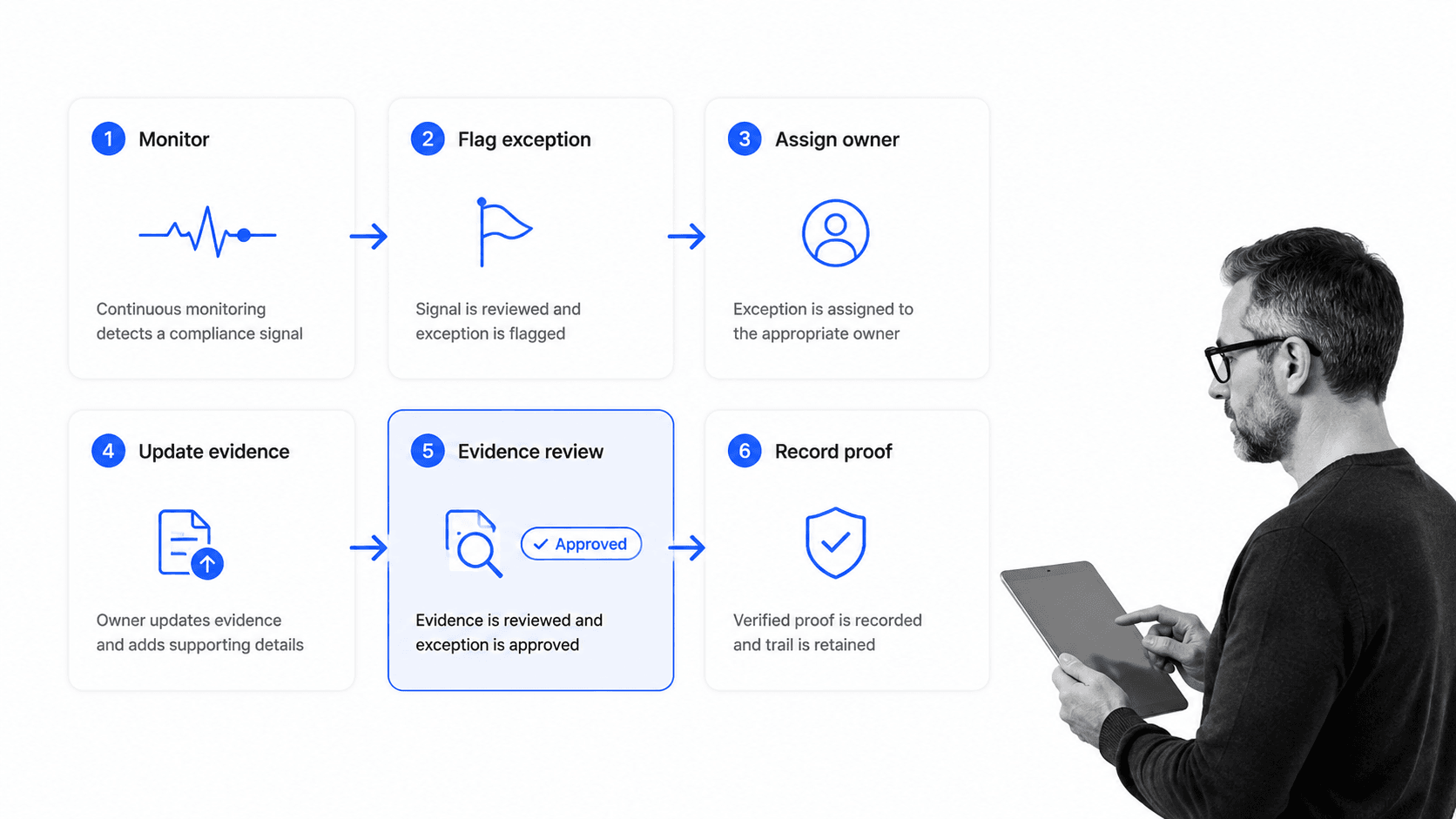
Security compliance automation works by treating every control as a workflow. A signal starts the run, the run assigns work, required fields prevent vague completion, approvals enforce policy, and the final record preserves evidence.
1. Trigger the workflow
A workflow can start on a schedule, from a monitoring signal, from an audit request, from a vendor intake, from a system change, from a new employee, or from an exception request. The trigger should include enough context for the owner to act.
2. Route to the control owner
Each control needs an accountable owner. The workflow should route to the right person or team based on system, department, framework, vendor, risk level, or control type. Ownership is what keeps compliance from becoming a shared inbox.
Ownership should be visible to everyone involved. A compliance analyst should know who is blocking a control. A system owner should know which evidence is required. A reviewer should know which exceptions need judgment. Automation reduces coordination cost by making the next owner explicit.
3. Collect structured evidence
Do not rely on a freeform note that says the control passed. Require the artifact, approval, test result, owner confirmation, or link to the system of record. The evidence should be attached to the workflow run so the record is complete.
4. Review exceptions
When a control cannot pass, the automation should route an exception. The reviewer needs the reason, risk impact, compensating control, expiration, owner, and next review date. This keeps exceptions visible instead of hiding them inside chat threads.
5. Preserve proof
After approval, the workflow should preserve who completed each step, what was attached, who reviewed it, and what decision was made. That proof supports compliance operations, security audit, and customer trust reviews.
Proof should be organized around the control and the run, not only the file. A screenshot without task history does not explain why it was collected. A ticket without approval history does not prove the control owner reviewed it. The workflow context makes the artifact meaningful.
6. Improve the control
Completed workflows reveal patterns: controls that fail often, evidence that is hard to collect, owners that change, and recurring exceptions. Those signals should feed control design and operational improvement. Teams managing adjacent risk can connect this work to vulnerability management and recurring IT security processes.
Security compliance automation with Process Street
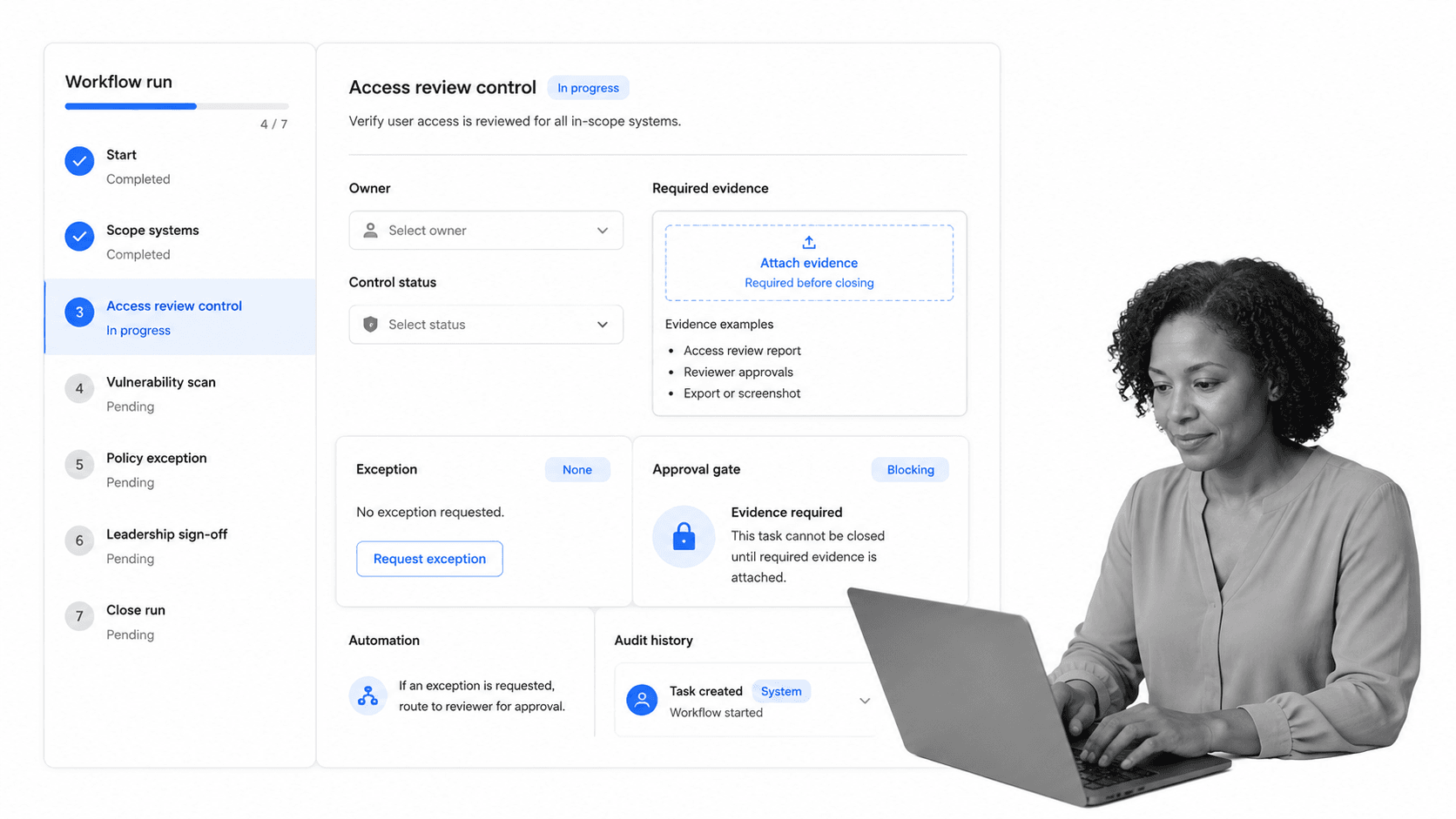
Process Street turns security compliance automation into executable work. Teams can build recurring workflows for controls, assign owners, require evidence, route approvals, capture exceptions, and keep audit history in one controlled system.
Run controls as workflows
A control can become a workflow run with assigned tasks, required fields, conditional logic, stop tasks, approvals, comments, file uploads, and audit history. That makes the policy enforceable at the point of execution.
Teams can start with one recurring workflow, then expand into adjacent controls. Access review can connect to vendor review. Vendor review can connect to security questionnaires. Security questionnaires can connect to policy approval and evidence refresh. Each workflow becomes part of a larger compliance operating system.
Block incomplete closure
A security control should not close because someone clicked done. Process Street can require evidence, reviewer approval, owner confirmation, and exception notes before a workflow is completed. The standard is enforced by the workflow, not by memory.
Connect the stack
Process Street has direct, universal integrations to 5,000+ systems. Need a new one? An AI agent builds it on the fly. That lets security compliance workflows connect to the tools where evidence, tickets, access records, alerts, vendors, and approvals already live while Process Street keeps the execution record.
Support compliance automation at scale
The same operating model supports broader compliance automation software use cases: recurring controls, document review, training attestations, policy approvals, audit prep, vendor reviews, and security remediation.
Keep the proof with the work
When a customer, auditor, regulator, or executive asks what happened, the answer should be in the workflow run: owner, evidence, approval, exception, comments, completion history, and the next review cycle.
How to govern security compliance automation
Security compliance automation should be governed like any other control environment. The workflow itself becomes part of the control system, so it needs ownership, review, versioning, and exception management.
Define the source of truth
Decide which system owns each fact: policies, controls, assets, employees, vendors, tickets, evidence, approvals, and audit records. Automation works best when each workflow knows where to read information and where to write the final record.
This prevents duplicate records from competing with each other. The identity provider may own access data. The ticketing system may own remediation tasks. The compliance workflow may own approvals and evidence status. Good automation connects these systems without pretending every field belongs in one place.
Separate automation from approval
Automate collection, routing, reminders, checks, and recordkeeping. Keep approval authority with humans for exceptions, risk acceptance, control design changes, and unusual findings. This balance protects speed without weakening accountability.
Review workflow versions
If a control changes, the workflow should change with it. Review required fields, due dates, evidence standards, approver roles, and escalation paths. A stale automation can create false confidence if it keeps running after the requirement has changed.
Test the automation
Run periodic checks against the automation itself. A system security audit checklist can help validate whether workflows still match the control environment, especially when evidence collection spans identity, cloud, endpoint, vendor, and ticketing systems.
Keep external standards in view
Security compliance automation should map to the standards and frameworks that matter to the business. For example, AICPA & CIMA describe the SOC suite for system and organization control reporting, ISO/IEC 27001 defines an information security management standard, and OWASP ASVS provides an application security verification standard. The practical job is to turn the relevant requirements into work that happens and proof that survives review.
FAQs
What is security compliance automation?
Security compliance automation is the use of software and workflow logic to run security controls, collect evidence, route approvals, manage exceptions, and preserve audit history. It turns compliance requirements into repeatable work with proof.
What security compliance tasks should be automated first?
Start with recurring, evidence-heavy tasks such as access reviews, vendor security reviews, policy approvals, evidence refreshes, control testing, and framework-specific audit prep. These workflows have clear owners, clear proof requirements, and high cost when missed.
How is security compliance automation different from GRC software?
GRC software often tracks risks, controls, policies, and audit programs. Security compliance automation focuses on executing the work around those controls: assigning owners, collecting evidence, blocking incomplete closure, routing exceptions, and keeping a workflow-level audit trail.
What evidence should security compliance automation collect?
The evidence depends on the control, but common examples include access review exports, approval records, configuration proof, ticket history, training attestations, policy approvals, vendor assessments, test results, remediation records, and exception approvals.
How does Process Street support security compliance automation?
Process Street supports security compliance automation by turning controls into executable workflows with task owners, required fields, approvals, automations, evidence capture, exception routing, and audit history. The workflow enforces the standard while the record proves what happened.
What risks should not be fully automated?
Do not fully automate risk acceptance, exception approval, regulatory interpretation, major control design changes, or unusual security findings without human review. Automate the routing and evidence collection around those decisions, but keep accountability with qualified owners.
