


Turn every policy into automated workflows with built-in enforcement and audit-ready proof.



HR Analytics Software
HR analytics software brings workforce data together so HR leaders can understand what is happening, why it is happening, and what to do next. It connects people signals such as hiring flow, ramp time, performance, mobility, absence, and retention to the business questions behind them.
The useful output is not another dashboard. It is a decision that can be explained, assigned, reviewed, and measured. Strong HR analytics programs pair reliable data with clear governance and a repeatable path from insight to action.
This guide explains how the software works, which metrics deserve attention, where privacy and bias risks appear, how to implement the category, and how to choose a platform that fits your operating model.
In this article, we are going to cover:
- What is HR analytics software?
- How HR analytics software works
- HR analytics metrics that matter
- HR analytics use cases across the employee lifecycle
- HR data governance, privacy, and bias
- How to implement HR analytics software
- Turning HR analytics into action with Process Street
- How to choose HR analytics software
- FAQs
What is HR analytics software?
A practical definition
HR analytics software is a system for collecting, joining, analyzing, and presenting workforce data so an organization can make better people and business decisions. The CIPD people analytics factsheet uses the related term people analytics for the practice of analyzing data about people to solve business problems. The software is the technical layer that makes that practice repeatable.
The category sits between systems of record and the work that follows. An HRIS may store job, pay, and employment data. Recruiting, learning, payroll, engagement, and performance systems hold other pieces. HR analytics software connects those signals, applies definitions, and gives authorized users a consistent way to investigate a workforce question.
HR analytics, people analytics, and workforce analytics
These terms often overlap. HR analytics usually starts with the effectiveness of HR programs and processes. people analytics often broadens the question to employee behavior, experience, and business outcomes. Workforce analytics commonly includes capacity, scheduling, labor supply, and workforce planning.
The label matters less than the operating question. A useful platform should let you move from a broad signal, such as rising regrettable turnover, to a defined cohort, an evidence-based hypothesis, and a controlled response.
What HR analytics software is not
- Not a reporting export: a static file cannot preserve shared definitions or investigation context.
- Not employee surveillance: broad collection without a defined purpose creates risk and erodes trust.
- Not a prediction oracle: a model can surface patterns, but leaders remain accountable for decisions.
- Not the action layer by itself: insight only creates value when someone owns the response.
How HR analytics software works
Data collection and connection
The first layer connects approved data sources. Typical inputs include employee records, applicant tracking, compensation, learning, performance, engagement, attendance, scheduling, and business operating data. The goal is not to pull everything. It is to collect the minimum information required to answer a defined question.
A governed people data model
Different systems often use different names for the same concept. One source may count a transfer as a new hire while another treats it as internal mobility. Before analysis, the team needs shared definitions for headcount, vacancy, turnover, tenure, manager, department, location, and employment status.
A documented people analytics framework keeps those definitions connected to the questions they support. It should also record the data owner, refresh cadence, access rule, and known limitations for each measure.
Analysis and segmentation
Once definitions are stable, users can segment results by role, location, team, tenure band, hiring source, manager group, or another approved dimension. Segmentation exposes where an aggregate hides an important difference. Small cohorts need suppression rules so a report does not reveal an individual.
From descriptive to prescriptive
- Descriptive: what happened in the workforce?
- Diagnostic: which groups, stages, or conditions explain the pattern?
- Predictive: what outcome may occur if the current pattern continues?
- Prescriptive: which controlled intervention should the team test?
Maturity does not mean using the most complex model available. A clear descriptive view with trusted definitions can be more useful than a prediction nobody can explain.
HR analytics metrics that matter
Start with the decision, not the dashboard
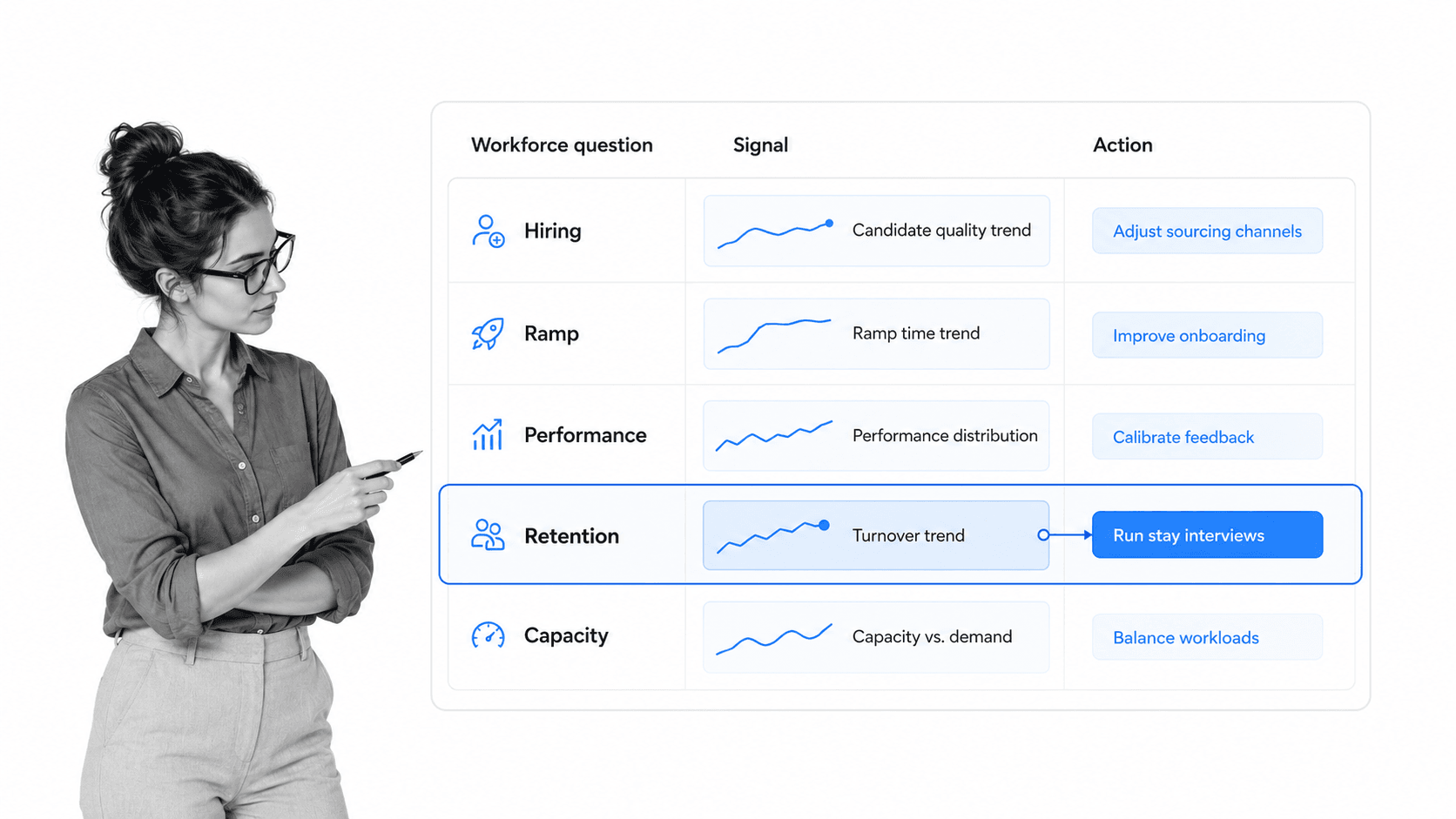
A metric earns a place when it changes a decision. Begin by writing the question, the owner, the intervention available, and the evidence needed to judge whether that intervention worked. This prevents a dashboard from becoming a museum of interesting numbers.
Recruiting and hiring metrics
Recruiting analysis can examine stage conversion, time in stage, offer acceptance, source quality, and early retention. A structured recruitment workflow gives those measures an operational frame: which stage is slow, who owns it, and which decision is blocked?
Onboarding and ramp metrics
Onboarding analytics should connect completion to capability. Useful signals include access readiness, training completion, milestone attainment, manager check-ins, and time to independent work. An employee onboarding workflow captures the events that make those measures reliable.
Performance and development metrics
Performance data is strongest when expectations, review cadence, feedback, and development actions are consistent. performance management tools help organize that cycle, while a repeatable performance review process creates comparable evidence without pretending every role has the same output.
Retention and mobility metrics
Turnover rate alone is too broad. Separate voluntary and involuntary exits, regrettable loss, internal moves, manager changes, tenure patterns, role scarcity, and the time between an identified risk and an intervention. Exit reasons should be treated as evidence with context, not as perfectly objective labels.
A controlled employee offboarding and exit interview workflow improves the quality of departure data while protecting confidentiality.
Capacity and workforce planning metrics
Capacity analysis connects demand, available skills, vacancies, workload, and critical-role coverage. It complements process analytics, which explains how work moves, by showing whether the organization has the people and capability required to run that work.
HR analytics use cases across the employee lifecycle
Improve recruiting flow
HR teams can compare hiring stages, locate bottlenecks, and see where qualified candidates leave the process. The response might be a revised approval rule, clearer job criteria, more interview capacity, or a different sourcing mix. Analytics narrows the problem before the team changes the process.
Strengthen onboarding
A combined view of access completion, training, manager contact, early feedback, and role milestones can reveal why one cohort ramps more slowly than another. The best response is specific: fix a missing handoff, move a training step, clarify ownership, or add an early check.
Focus development investment
Learning completion is not the same as capability. Connect training records to role expectations, observed application, internal mobility, and manager feedback. Use the result to prioritize the skills that matter for the operating plan, then track the development action through completion.
Make compensation review more consistent
People data can expose pay distribution, range position, promotion patterns, and exception volume. The decision process still needs controls. compensation management software should connect analysis to budget rules, review ownership, approvals, evidence, and employee communication.
Reduce avoidable turnover
Retention analysis can identify where exits cluster and which experiences precede them. Treat the result as a prompt for investigation, not a verdict on an employee. Managers should review context, choose an appropriate intervention, document the action, and evaluate whether conditions improve.
Plan critical-role coverage
Workforce planning connects future demand to skills, readiness, vacancy risk, and succession depth. A succession plan workflow makes the resulting development and review work explicit instead of leaving it inside a slide.
HR data governance, privacy, and bias
Purpose limitation and data minimization
People data is sensitive because it can affect opportunity, reputation, and livelihood. The ICO worker monitoring guidance emphasizes lawful and fair monitoring, balancing business interests with workers’ rights. Define the purpose before collecting data, then limit the fields, audience, retention period, and secondary uses.
Role-based access and cohort protection
Executives may need trends, HR analysts may need approved detail, and managers may need only their scope. Use role-based access, cohort thresholds, field masking, and export controls. Keep a record of who accessed sensitive analysis and why.
Bias and adverse impact
Analytics used in hiring, promotion, pay, performance, or termination deserves heightened review. The EEOC artificial intelligence resources collects current agency resources on artificial intelligence and employment decisions. Test data quality, representation, proxy variables, outcome differences, and the effect of any threshold.
A vendor model does not transfer accountability away from the employer. Require documentation, human review, an appeal or accommodation path where appropriate, and a way to stop using the output when evidence shows harm or poor validity.
Explainability and human oversight
The NIST AI Risk Management Framework offers a practical structure for governing, mapping, measuring, and managing AI risk. For HR analytics, an authorized reviewer should be able to explain the data used, the limits of the analysis, who made the final decision, and what evidence supported it.
Trust through transparent practice
Tell employees what data is collected, why it is used, who can see it, and how concerns can be raised. Transparency does not require exposing confidential individual data. It requires being honest about the system’s purpose and controls.
How to implement HR analytics software
Define one business question
Start with a question that has an owner and a possible response. For example: where does new-hire ramp stall, which critical roles lack coverage, or where are regrettable exits concentrated? A vague goal to become data driven produces vague requirements.
Audit data and definitions
List the source, owner, refresh cadence, quality issue, access rule, and shared definition for each required field. Resolve missing identifiers, duplicate records, inconsistent dates, and category drift before building a polished visual.
Design governance before access
Approve the purpose, roles, cohort thresholds, retention period, export policy, and escalation path. Document when legal, privacy, security, employee relations, or works council review is required. Governance should be part of the implementation, not a cleanup project.
Build a narrow pilot
Choose one cohort and one decision cycle. Verify that users interpret measures consistently, the analysis changes a real decision, and the action can be tracked. A narrow pilot reveals weak definitions and missing ownership before those problems scale.
Create the signal-to-action workflow
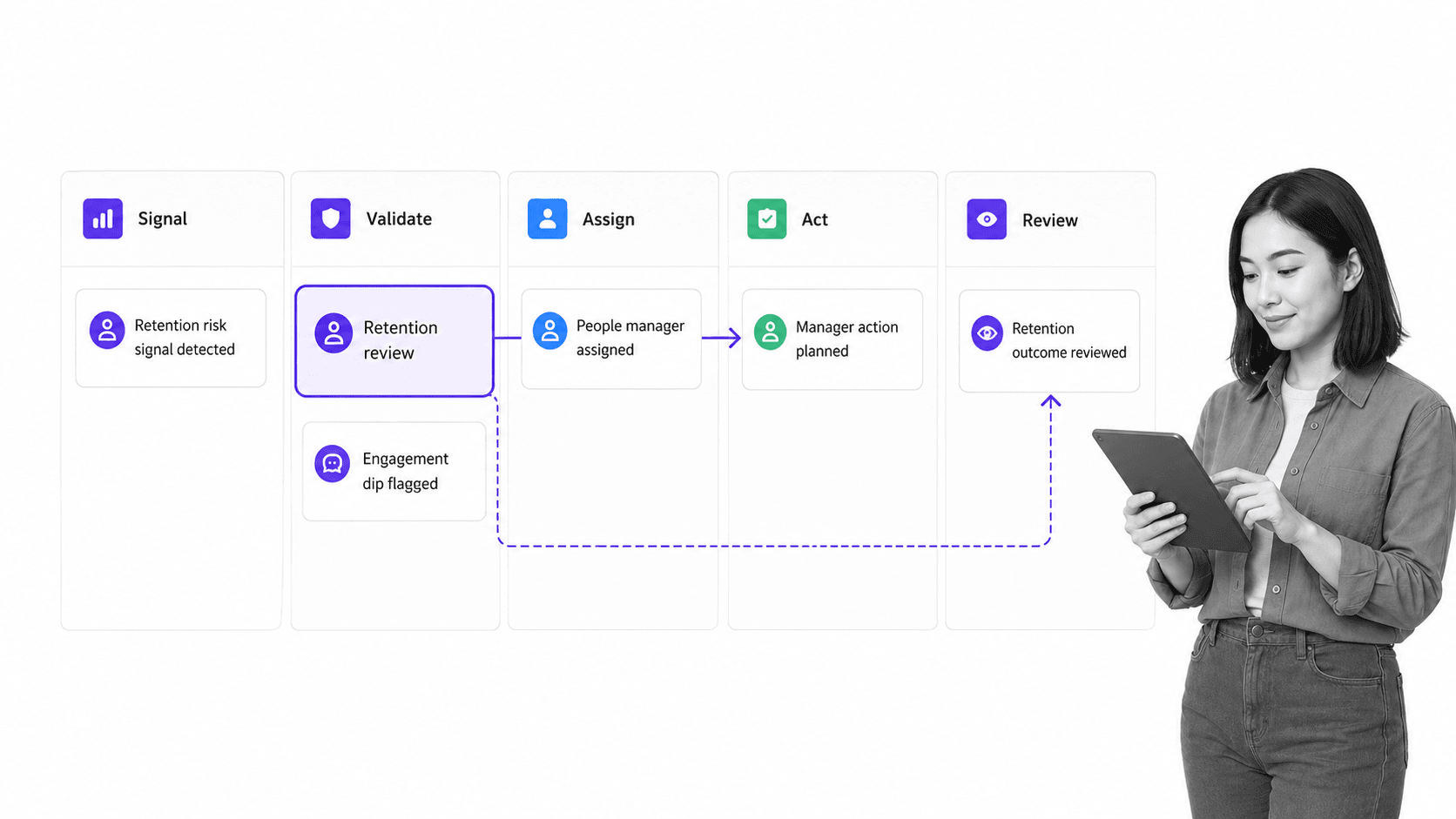
Define who validates the signal, who approves an intervention, who completes the work, what evidence is required, and when the outcome is reviewed. HR automation connects recurring insight to execution so the same problem does not need to be rediscovered each reporting cycle.
Measure adoption and decision quality
Track whether authorized users trust the definitions, whether actions are completed, how long decisions take, and whether interventions affect the target outcome. Retire measures that do not change a decision.
Turning HR analytics into action with Process Street
The gap between insight and execution
An analytics platform can show where attention is needed. Process Street is a Compliance Operations Platform that can turn the resulting decision into assigned, repeatable work. HR keeps the analytics source of truth while the intervention runs through an accountable workflow.
Route the right response
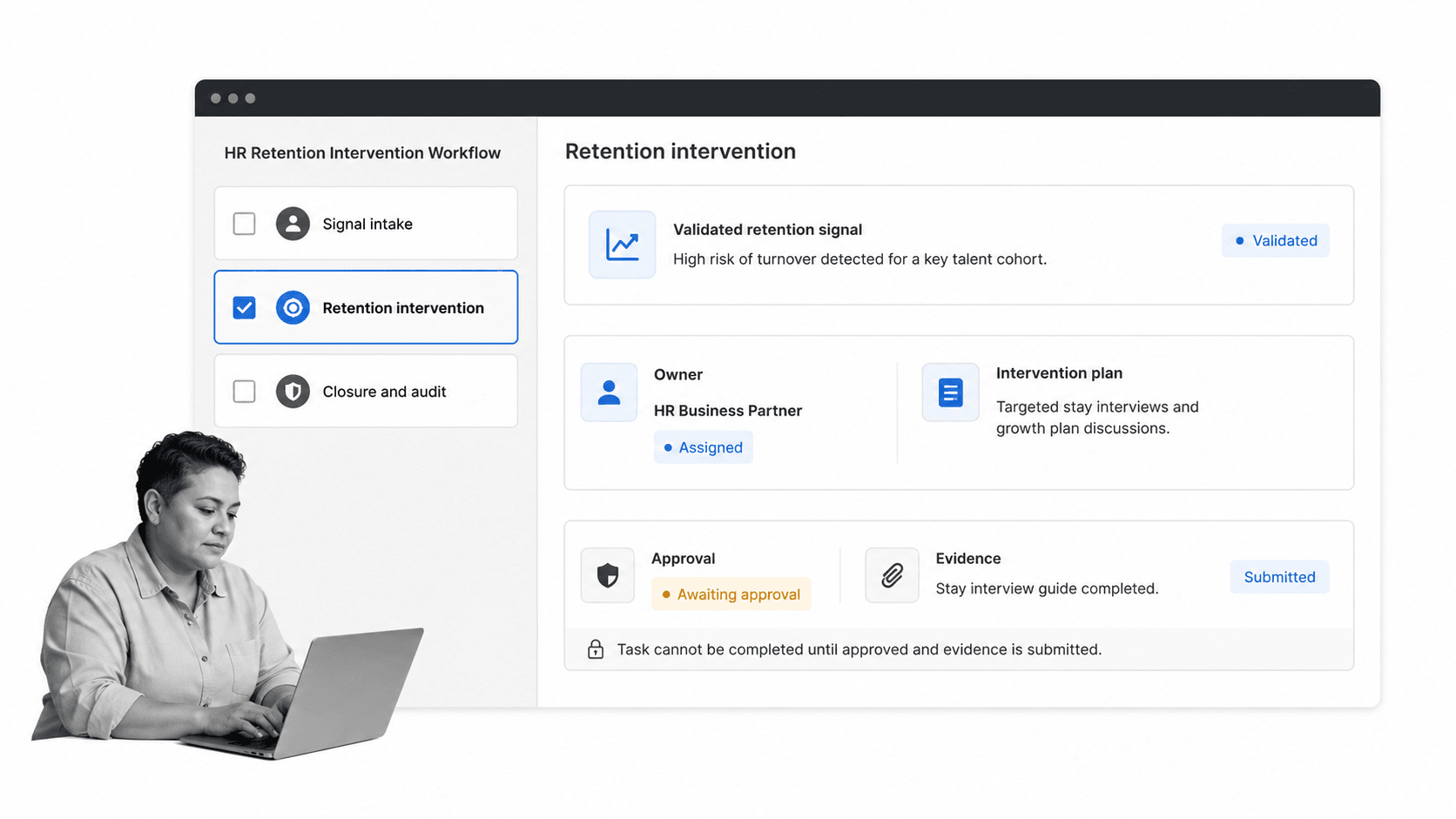
Use conditional logic to send different signals through the appropriate path. A recruiting bottleneck may trigger a hiring-process review. A retention pattern may trigger manager review and an approved action plan. A policy exception may require employee relations or compliance involvement.
Add approval and evidence
Sensitive people decisions should not disappear into private messages. approvals can create a review gate before an intervention proceeds. Required fields and evidence capture the reason, owner, decision, and completion record without turning the analytics output into an automatic verdict.
Connect the operating stack
Direct integrations and agent-built connections can move approved signals and status updates between HR systems and the execution workflow. Keep the data transfer narrow: pass only the fields required for the action, then return completion status and evidence to the appropriate record.
Close the learning loop
The workflow should end with an outcome review. Record whether the intervention was completed, whether the signal changed, what the team learned, and whether the standard process needs an update. This turns analytics into continuous improvement rather than recurring observation.
How to choose HR analytics software
Data and integration fit
Confirm the platform supports the systems, identifiers, refresh cadence, historical depth, and data residency you require. Ask how it handles schema changes, failed syncs, duplicate records, access revocation, and deletion requests.
Analysis that matches your maturity
Common category capabilities include customizable reports, workforce indicators, policy-impact analysis, and scenario exploration, as summarized by the G2 HR analytics category criteria. Buy for the decisions your team can govern now. Do not pay for advanced modeling if shared definitions and action ownership are still missing.
Governance and security
- Role-based access at the field, cohort, and report level
- Audit logs for access, changes, exports, and administrative actions
- Cohort suppression and masking for small or sensitive groups
- Documented retention, deletion, backup, and incident processes
- Model documentation, validation evidence, and human review controls
Workflow and action support
Evaluate what happens after a user finds a signal. Can the system assign an owner, route review, attach evidence, track completion, and return the outcome? If not, plan the execution layer before launch. A dashboard without an action path creates attention but not accountability.
Usability and adoption
The SHRM people analytics research frames people analytics as a decision capability, not just an analyst function. HR business partners, executives, managers, privacy leaders, and analysts need views suited to their roles. Test the real questions each group asks, not a vendor’s demonstration script.
Evaluation questions for vendors
- Which workforce questions can the platform answer with our current data?
- How are metric definitions governed and changed?
- How does the platform protect small cohorts and sensitive fields?
- What evidence supports any prediction or recommendation?
- How can a reviewer challenge, correct, or stop an automated output?
- How does an insight become assigned action with approval and evidence?
- What does export, deletion, and offboarding look like?
FAQs
What is HR analytics software?
HR analytics software collects and analyzes workforce data so HR and business leaders can understand people-related patterns and make better decisions. It connects data from HR systems, recruiting, performance, learning, engagement, and operations, then presents the result through governed reports and analysis.
What is the difference between HR analytics and people analytics?
The terms overlap. HR analytics often focuses on the effectiveness of HR programs and processes, while people analytics may connect employee behavior and experience to wider business outcomes. Workforce analytics often adds capacity, scheduling, and labor planning questions.
What data does HR analytics software use?
HR analytics software may use approved data from employee records, recruiting, payroll, compensation, performance, learning, engagement, attendance, scheduling, and business systems. A good implementation collects only the data required for a defined purpose and applies access, retention, and cohort controls.
Which HR analytics metrics should you track first?
Start with metrics tied to a decision you can make, such as hiring stage flow, onboarding readiness, time to capability, regrettable turnover, internal mobility, or critical-role coverage. Define the owner and available intervention before adding the metric to a dashboard.
How do you implement HR analytics software?
Define one business question, audit the required data, agree on metric definitions, design privacy and access controls, and run a narrow pilot. Then create a workflow that validates the insight, assigns an owner, records the action, and reviews the outcome.
How does Process Street support HR analytics?
Process Street turns approved HR insights into assigned workflows with conditional paths, approvals, evidence, and an audit-ready completion record. It complements the analytics system by making the response repeatable and accountable.
