





HR automation is the use of software to run repetitive human resources tasks, route handoffs, enforce required steps, and keep an auditable record of work. Guest post by Hanson Cheng, founder of Freedom to Ascend, who helps business owners build HR automation systems for growth.
The best HR workflows automate administration without automating accountability. They move information between recruiters, managers, IT, payroll, finance, security, and employees, while people retain control of exceptions and consequential decisions. This guide explains the benefits, safeguards, and seven employee-lifecycle processes that are strongest candidates for automation.
- What HR automation means
- Benefits and limits of HR automation
- Why governance matters
- Seven HR processes to automate
- How Process Street supports HR automation
What is HR automation?
HR automation applies workflow automation to standard, repeatable work such as collecting candidate information, coordinating onboarding, routing approvals, updating payroll inputs, handling leave requests, and confirming offboarding controls. It reduces the time people spend chasing forms and status updates, but it does not remove the need for professional judgment.
A useful distinction is the difference between a system of record and a workflow layer. An HRIS stores employee records. HR workflow automation coordinates what must happen across systems and teams, who owns each step, what evidence is required, and when an exception needs attention. The two work together.
Automation is strongest when the process is already understood. Map the trigger, required information, owners, approvals, deadlines, exceptions, and completion evidence before configuring software. If the underlying rule is vague or unfair, automation will repeat that weakness at scale.
Prioritize workflows by volume, delay, error risk, and the cost of a missed handoff. A high-volume task with stable rules is usually a safer first project than an uncommon decision that depends on sensitive context. Interview the people who perform and receive the work, then observe where requests wait, information is re-entered, and exceptions fall outside the documented path. Those details become the requirements for the automated workflow.
Write down the control boundary as well. Specify which steps may run automatically, which require confirmation, who can override a result, and how the override is recorded. Give employees and candidates a clear contact when the process does not fit their situation. Review the workflow after policy, law, role, vendor, or system changes so automation does not keep enforcing a rule that is no longer correct.
HR automation: How to work smarter
The benefits of HR automation come from dependable execution, not from removing people from HR. A well-designed workflow reduces queue time, keeps required steps visible, and gives HR professionals more room for employee conversations, investigation, planning, and judgment.
Improved productivity
Routine reminders, data collection, task assignment, and status updates consume time without requiring much judgment. Automating those steps lets HR teams focus on work that benefits from context and human attention. Productivity improves when the workflow also gives managers and employees clear owners, due dates, and self-service paths.
Reduced employee turnover
Automation cannot guarantee retention, but it can remove avoidable friction. Timely onboarding, consistent manager check-ins, accurate pay inputs, documented development conversations, and fast responses to employee requests all shape the employee experience. The workflow should surface missed steps and exceptions so a person can respond before they become recurring problems.
Better data management and security
Digital workflows can standardize how sensitive data is collected, approved, accessed, retained, and deleted. Security still depends on permissions, encryption, retention rules, audit logs, vendor controls, and monitoring. Treat data minimization and role-based access as design requirements, not assumptions that come with cloud software. A governed document management system can keep policies and retention rules aligned with execution.
Reduced time to hire
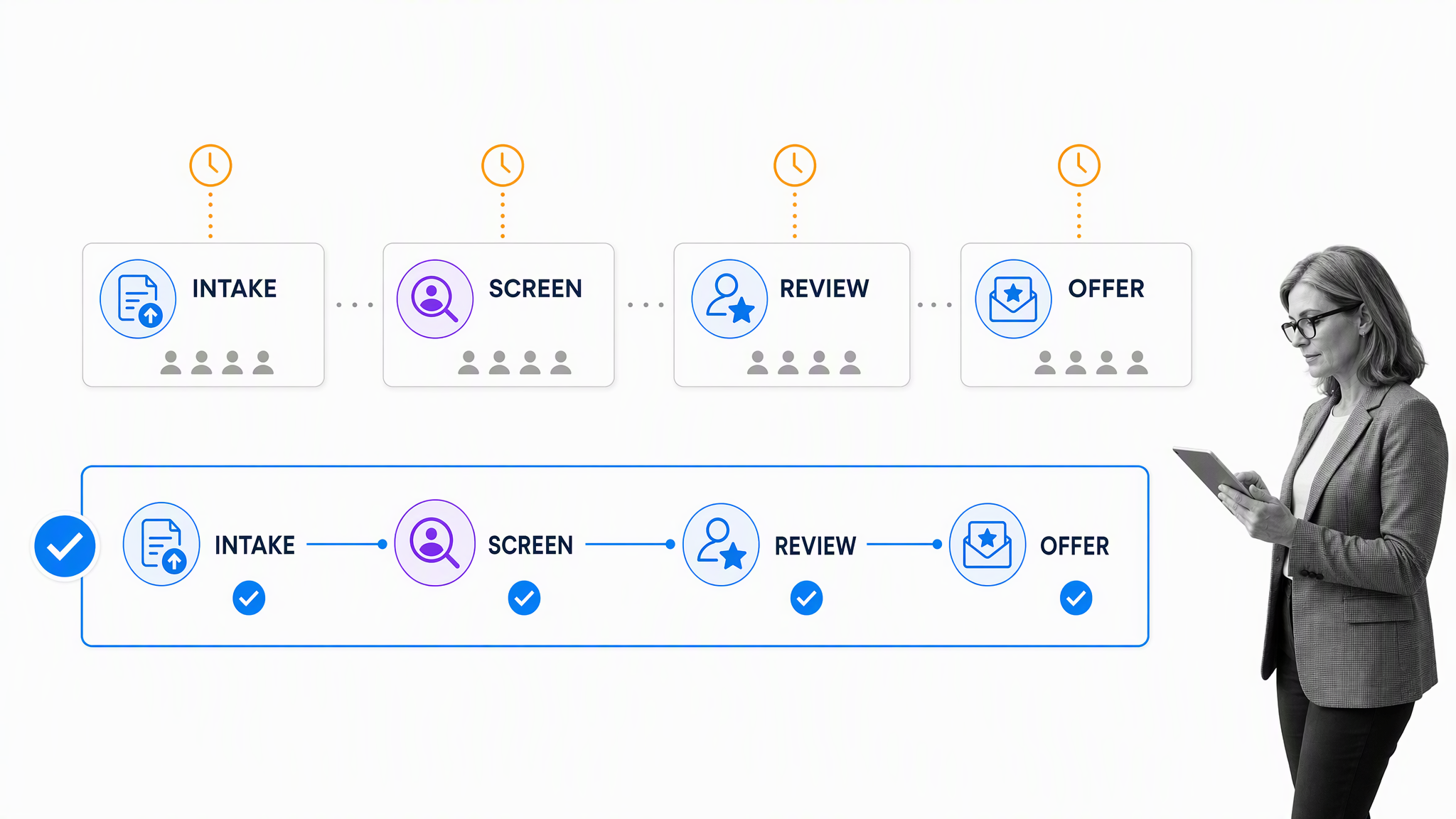
Recruiting workflows can route applications, schedule reviews, collect interview evidence, and notify candidates without waiting for manual follow-up. SHRM’s current recruiting benchmarking reports a median time-to-fill of 39 days for nonexecutive roles. The useful target is not speed at any cost. It is a shorter, more predictable process that preserves job-related criteria and human review.
Accuracy and consistency
Required fields, validation rules, approvals, and completion checks reduce manual errors and create consistency across locations. They do not eliminate error. Teams still need exception paths, periodic control reviews, and named owners who can correct bad data or a flawed rule.
Scalability
A documented workflow makes it easier to handle more hiring, onboarding, employee requests, and departures without relying on one person’s memory. Scale comes from reusable rules plus flexible exceptions. A rigid process that cannot accommodate local law, role differences, accessibility, or employee circumstances will fail even if it runs quickly.
Improved interdepartmental collaboration
HR work crosses departments. Onboarding needs managers, IT, payroll, finance, and security. Offboarding needs the same groups in reverse. Automation coordinates those handoffs, records who completed them, and escalates delays. Process Street has 5,000+ integrations, so an HR workflow can connect work across the systems teams already use.
The limit is important: automation executes a defined rule. People remain accountable for the rule, the evidence behind it, and the decision that follows.
Governance for HR automation
HR processes involve sensitive personal data and decisions that affect employment. That makes governance part of the workflow, not an optional review after launch. Define what data is necessary, who can see it, how long it is kept, which decisions require approval, and how an employee can raise a question or challenge an outcome.
AI-assisted screening and analysis need extra care. The U.S. Department of Labor’s AI and Inclusive Hiring Framework highlights discrimination and accessibility risks in technology-based hiring. Use job-related criteria, validate the process, document changes, monitor outcomes, provide accommodations, and keep trained people responsible for consequential decisions.
A governed workflow helps enforce required steps and produce evidence. It does not itself guarantee legal compliance. Requirements vary by jurisdiction and change over time, so HR and legal owners should review the process, its data use, and its decision points on an appropriate cadence.
Good governance also improves operations. Clear approvals prevent ambiguous handoffs. Audit trails make failures easier to investigate. Versioned procedures keep teams aligned when policy changes. Exception routes stop unusual cases from being forced through a standard path that does not fit.
7 key HR processes to automate
The strongest HR automation examples are repeatable processes with several owners, predictable inputs, and clear completion evidence. These seven processes cover the employee lifecycle while leaving judgment with the people responsible for it.
1. Talent acquisition
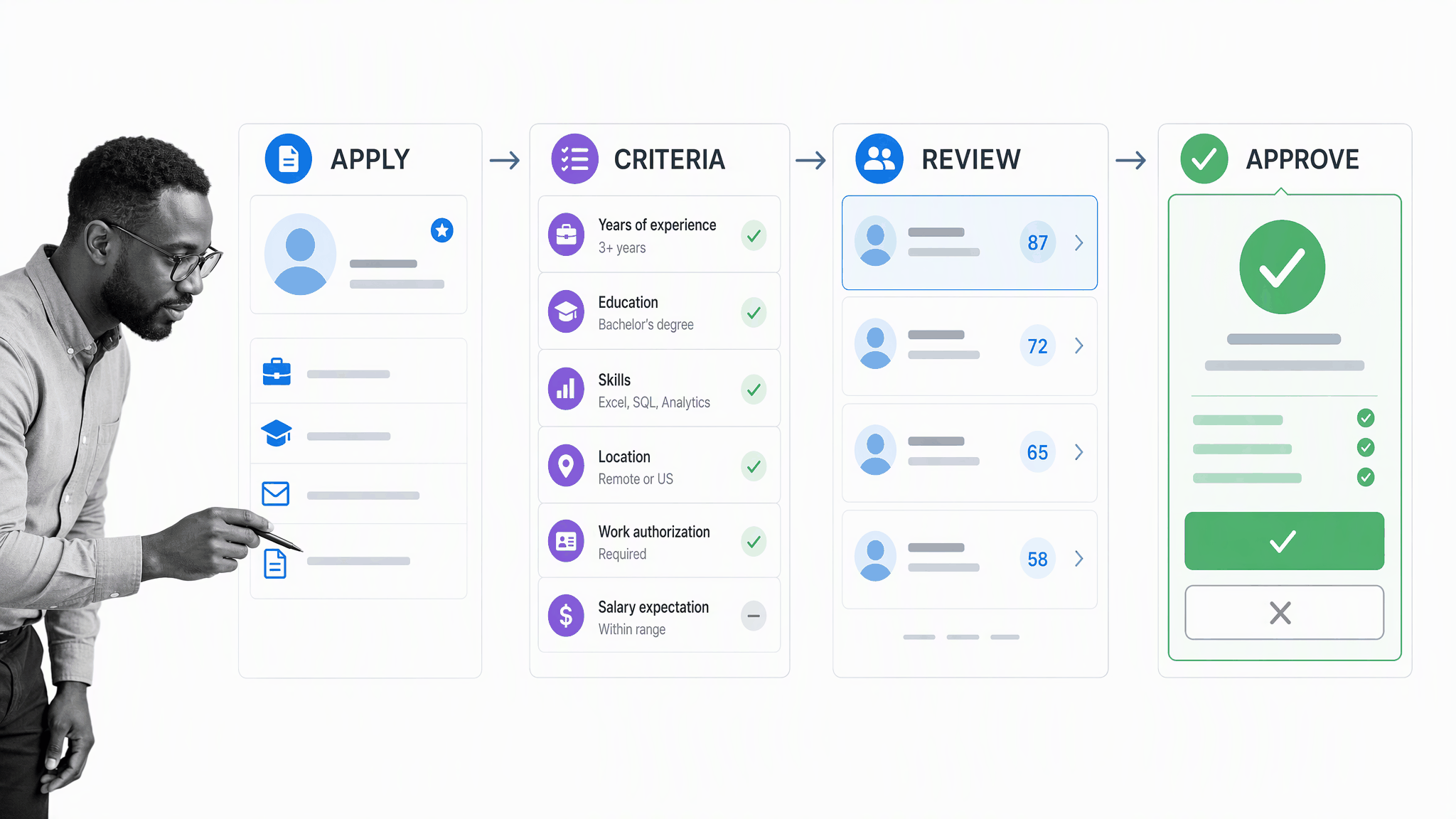
Talent acquisition automation can collect applications, route candidates, schedule interviews, gather structured feedback, and maintain communication. Applicant tracking systems remain a durable part of the stack, but keyword filtering alone is too crude. Use job-related criteria, make accessibility part of the design, and require human review before a candidate is rejected or advanced.
A useful workflow separates intake, criteria, review, and approval. It records the evidence behind a decision, alerts reviewers when work stalls, and gives candidates timely updates. Background checks should follow the applicable consent, relevance, and jurisdictional requirements. The goal is a consistent process, not an automatic employment decision.
Before automating recruitment, document what each interview stage is meant to learn and who may evaluate it. Use structured questions and comparable evidence instead of asking an automated system to infer personality, commitment, or future performance from weak signals. Review selection rates and candidate feedback over time. When a pattern looks unfair or a qualified candidate cannot use the process, pause the workflow and investigate rather than treating the software output as final.
2. Employee onboarding
Onboarding is a cross-functional workflow. HR collects documents and policy acknowledgements. IT provisions accounts and equipment. Payroll confirms pay details. Security assigns access. Managers prepare role expectations and early check-ins. Automating the handoffs reduces missed steps and gives the new hire one clear path through the process.
Start by mapping the employee journey and the evidence required at each milestone. A current onboarding automation workflow can assign tasks by role or location, route exceptions, and escalate delays while preserving a personal welcome. Learning systems can support training, but the workflow should also confirm access, manager support, and readiness to do the job.
Onboarding also needs milestones after day one. Schedule check-ins at role-appropriate intervals, confirm that the employee can reach the systems and people they need, and collect feedback on where the process was confusing. Use that evidence to improve the workflow for the next cohort. A completion percentage is useful only when it represents genuine readiness, not a set of boxes hurriedly checked before a deadline.
3. Employee performance management
Automation can schedule check-ins, collect goal evidence, remind reviewers, route calibration, and confirm that employees received feedback. It should not turn performance into a single opaque score. Define role expectations, allow context, separate protected information from evaluation, and give employees a clear path to discuss or correct the record.
The workflow should collect evidence throughout the review period so one recent event does not dominate the conversation. Managers can attach examples, employees can add context, and reviewers can confirm that expectations were applied consistently. Calibration should examine evidence and standards, not force a predetermined distribution. Keep the final conversation human, specific, and connected to development actions that have owners and follow-up dates.
4. HR analytics
Automated data collection can keep workforce reporting current and reduce manual spreadsheet work. Limit access, suppress small groups where privacy could be compromised, document metric definitions, and avoid inferring an individual’s intent from a survey response or hidden model. Analytics should support a stated decision and a proportionate action.
Choose a small set of measures that answer real operating questions. Turnover may need to be separated into voluntary, involuntary, regrettable, and non-regrettable exits. Onboarding completion should distinguish employee tasks from organizational failures such as missing access or equipment. Engagement data should be aggregated and paired with visible follow-through. If a metric does not change a decision, reconsider whether the collection burden and privacy risk are justified.
5. Payroll management
Payroll automation can collect approved time and changes, validate required fields, reconcile inputs, route exceptions, and record signoff. ADP’s payroll research found automation is common across data collection, data entry, reconciliation, and reporting, while a lack of automated processes remains a reported cause of inaccuracies. High-risk exceptions still need trained review before payroll is finalized.
A dependable payroll workflow separates ordinary inputs from exceptions. A routine approved change can move forward automatically, while an unusual deduction, missing time record, bank change, or large variance goes to a named reviewer. Reconciliation should compare source records with the proposed payroll and require evidence before release. When an error occurs, record the cause and corrective action so the process improves instead of relying on the same manual rescue next cycle.
6. Leave calculation and approval
A leave workflow can collect a request, apply the correct policy, route approval, update the relevant record, notify coverage owners, and preserve evidence. Build separate paths for different leave types and locations. Employees should be able to see status without exposing private details to people who do not need them.
Design the workflow around privacy and continuity. A manager may need dates and coverage information without seeing medical details. Payroll may need an approved status without access to the full request. HR may need a protected exception path when the standard policy does not apply. Automatic reminders and escalations help, but they should never pressure an employee to disclose more information than the process legitimately requires.
7. Employee offboarding
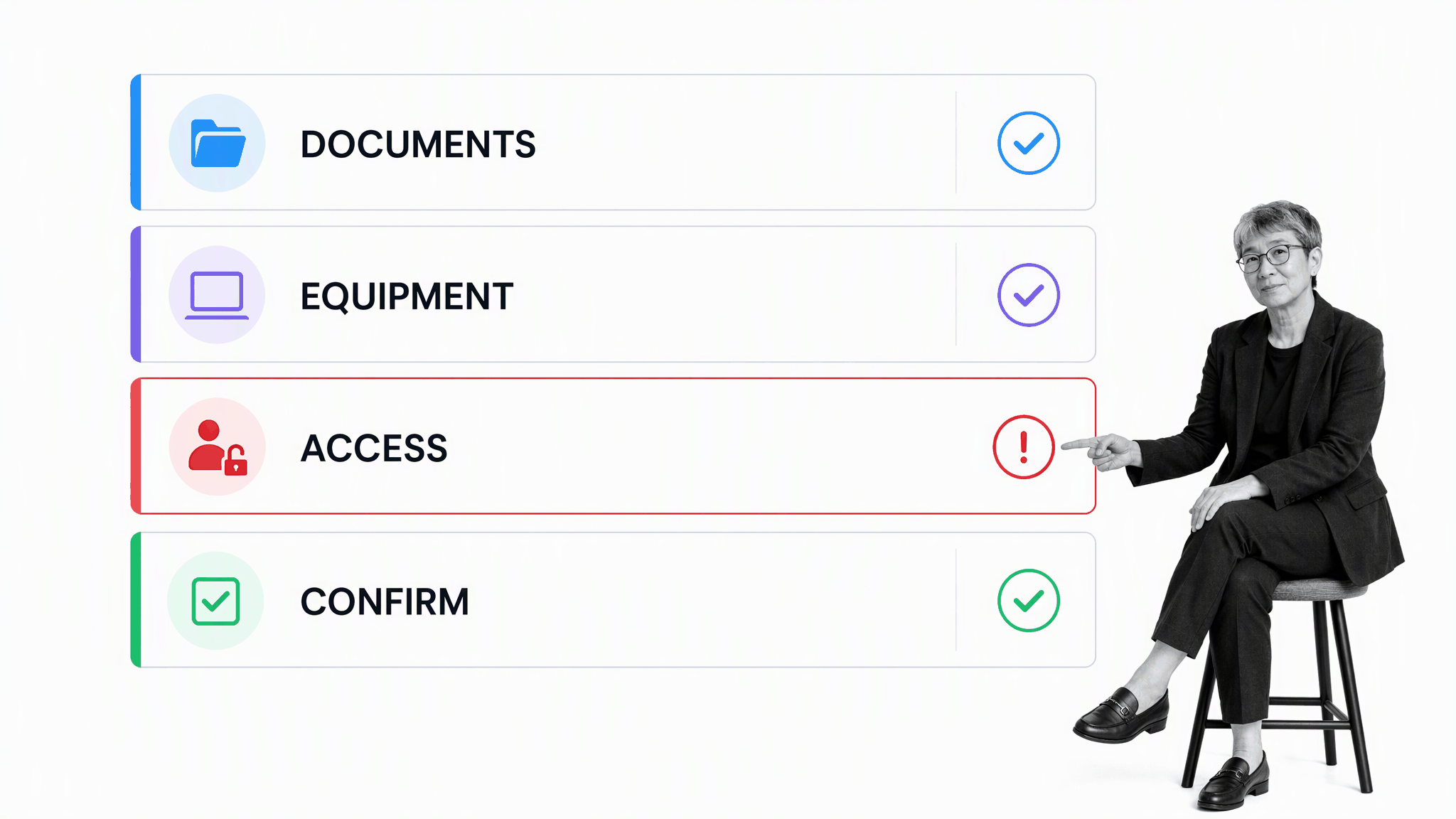
Offboarding coordinates final documents, payroll changes, knowledge transfer, equipment return, account closure, and access removal. The workflow should start from a confirmed trigger, assign each control to an owner, escalate overdue access tasks, and require completion evidence. A respectful employee experience and a rigorous security process are both possible.
Run the offboarding checklist to completion rather than assuming one department handled everything. Confirm that systems, shared credentials, physical access, vendor accounts, and delegated responsibilities were reviewed. Keep the record according to policy and applicable law.
The sequence matters. In a voluntary departure, knowledge transfer and employee communication may begin before the final day, while access changes happen at the approved time. In an involuntary departure, security and HR may need a tightly controlled path with fewer advance notifications. Both paths should confirm final pay inputs, benefits information, records retention, customer or vendor handoffs, and ownership of recurring work. A final completion review should close every exception rather than leaving an overdue task on a forgotten checklist.
Process Street for HR automation
Process Street is a single Compliance Operations Platform with Docs and Ops capability areas plus built-in AI. Docs governs procedures, policies, approvals, and versions. Ops runs assigned workflows with forms, deadlines, conditional logic, approvals, escalations, and audit trails. Built-in AI can help create and summarize work inside those controls, while people retain authority over employment decisions.
Start with one high-friction workflow. Define the owner, trigger, required information, decision points, exceptions, and completion evidence. Pilot it with the people who do the work, measure cycle time and error patterns, then improve the process before expanding. HR automation works best when faster execution and stronger control reinforce each other.
Measure the pilot with a small set of operational signals: cycle time, overdue tasks, exception volume, correction rate, employee or candidate questions, and evidence completeness. Compare the result with the previous process, but also ask whether the new workflow created confusing steps or shifted work to another team. Automation is successful when the process becomes easier to follow, safer to operate, and clearer to improve.
Assign one accountable process owner after launch. That person should review exceptions, approve changes, coordinate affected teams, and confirm that documentation still matches execution. Without ownership, even a technically sound workflow can drift as policies and systems change.
Review access, policy, and approval logic with the same care as the written procedure. Use workflow approvals for decisions that need a named reviewer, and test both the normal path and the exception path before expanding the automation to more employees or locations.
HR automation FAQ
What is an example of HR automation?
Employee onboarding is a common example. A workflow can collect documents, assign IT and payroll tasks, route policy acknowledgements, schedule manager check-ins, and escalate missing steps while keeping a complete record.
Which HR processes should be automated first?
Begin with high-volume, repeatable processes that have clear rules and several handoffs, such as onboarding, leave requests, payroll changes, or offboarding. Avoid starting with a consequential decision whose criteria and oversight are not yet well defined.
Does HR automation replace HR professionals?
No. It handles administration, routing, reminders, and evidence so HR professionals can focus on judgment, employee support, investigation, and strategy. People should remain accountable for exceptions and employment decisions.