


Turn every policy into automated workflows with built-in enforcement and audit-ready proof.



Insurance Policy Management Software

Insurance policy management software is the system teams use to control policy work from intake through underwriting, issuance, endorsements, renewals, cancellations, evidence, and exceptions. It keeps each policy task tied to an owner, required data, approval path, document trail, and audit history.
The useful version is not just a policy database. It turns policy changes into governed workflows, blocks incomplete handoffs, routes exceptions, and keeps proof with the work. That matters for carriers, MGAs, brokers, TPAs, and InsurTech teams where missed policy steps can create compliance, customer, claims, billing, and operational risk.
This guide explains what insurance policy management software does, what capabilities to evaluate, how policy workflows should run, and how Process Street helps insurance teams enforce policy work with proof.
We will cover:
- What insurance policy management software does
- Why insurance policy management software matters
- Insurance policy management software capabilities
- Insurance policy management software workflow
- How to choose insurance policy management software
- Insurance policy management software in Process Street
- How to roll out insurance policy management software
- FAQs
What insurance policy management software does

Insurance policy management software manages the operational path a policy follows after a customer, producer, underwriter, service team, or system triggers work. A new quote may need intake checks. A bound policy may need documents. An endorsement may need evidence and approval. A renewal may need review before the expiration date.
It controls the policy lifecycle
The policy lifecycle includes intake, eligibility review, underwriting handoff, issuance, billing coordination, endorsements, renewals, cancellations, reinstatements, servicing requests, and audit requests. Some teams call the core carrier system a policy administration system. Others use policy management software to describe the workflow, document, service, and compliance layer around that system.
It turns policy changes into workflow
Policy work breaks when it depends on email chains, spreadsheets, and individual memory. The software should make every change request actionable: who owns it, what information is required, which approvals apply, what evidence is attached, what system gets updated, and what happens when something is missing.
It keeps proof attached to the work
Insurance teams often need to prove that a policy change, notice, review, approval, or compliance step happened correctly. A policy system should keep the data, decision, supporting document, comment, approval, and timestamp together instead of scattering the record across folders and inboxes.
It gives teams a live exception view
The most valuable signal is not a report after work is done. It is a live exception while there is time to fix it: missing evidence, an overdue reviewer, an unapproved endorsement, a renewal at risk, or a cancellation request waiting on required fields.
- Policy status: where each policy request sits in the lifecycle.
- Owner accountability: who owns intake, review, approval, service, and follow-up.
- Required evidence: what documents, forms, notes, or confirmations must be attached.
- Exception routing: what happens when required information is missing or a decision needs escalation.
- Audit history: what changed, who approved it, and when the work was completed.
That makes insurance policy management software closely related to compliance management software, but the day-to-day job is more specific: keep policy work moving while preserving control.
Why insurance policy management software matters
Insurance operations are full of small handoffs with large consequences. A missed endorsement detail can create coverage confusion. A late renewal review can hurt retention. A weak cancellation process can create complaints. A missing approval can make an audit response harder than it needs to be.
Policy work spans many teams
Policy servicing usually touches producers, operations, underwriting, compliance, billing, claims-adjacent teams, customer service, and sometimes external partners. Software matters because no single person has the whole picture. The workflow needs to carry context across the handoff.
Insurance data needs shared structure
ACORD develops electronic standards, standardized forms, and tools for faster and more accurate insurance data exchange. That matters because policy work depends on consistent information flowing between systems, partners, forms, and teams. Software should respect that structure instead of letting every team invent its own field names and document habits.
Regulators and internal auditors need evidence
NAIC develops and maintains software tools for state insurance regulators to submit, retrieve, and analyze data. Your internal systems do not need to look like regulator tools, but they do need to produce reliable evidence when a reviewer asks what happened and why.
Security and compliance controls affect policy workflows
Insurance policy data is sensitive. Teams need role-based access, clear ownership, audit trails, and disciplined change control. For example, the NYDFS cybersecurity regulation is a reminder that financial services workflows often need governance, monitoring, reporting, and policy controls around the systems that handle sensitive information.
Manual coordination creates operational drag
Manual coordination looks manageable until volume increases. Then work disappears into inboxes, renewals are tracked in separate sheets, document requests are duplicated, and teams debate which record is current. A stronger system reduces that drag by making the process itself the record.
For insurance teams building a wider operating model, InsurTech compliance software is the broader category. Insurance policy management software is one concrete part of that operating model.
Insurance policy management software capabilities
The right feature set depends on the line of business, distribution model, regulatory environment, and existing policy administration system. Still, strong policy management software usually needs the same operating primitives.
Policy intake and triage
Every request should enter through a controlled intake path. That might be a new policy request, endorsement request, cancellation request, renewal review, reinstatement, document request, complaint, or compliance review. Intake should collect the minimum required fields before work starts.
Workflow routing
Policy work should route based on line of business, risk type, customer segment, transaction type, state, premium impact, document requirement, and approval threshold. This is where conditional logic becomes practical: teams see the steps that apply to that policy request instead of a generic checklist.
Required fields and evidence
The software should make required information impossible to skip. That includes policy numbers, customer details, risk attributes, requested changes, underwriting notes, approval records, notices, forms, supporting files, and final outcome.
Approvals and signoffs
Policy decisions often need reviewer signoff. Built-in approvals let teams block weak closure, route requests to the right reviewer, and preserve the decision record with the workflow.
Document generation and document control
Insurance policy workflows are document-heavy. Teams need controlled templates, current forms, completed documents, version history, and a clear link between the document and the workflow that produced it. If policy documents are managed separately from the work, the audit trail weakens. That is why policy management and document management need to be connected.
Integrations
Policy management software rarely replaces the carrier core, CRM, billing platform, document repository, e-signature tool, or communication system. It needs to connect them. Process Street has direct, universal integrations to 5,000+ systems. Need a new one? An AI agent builds it on the fly.
Reporting and audit history
Dashboards are useful, but the audit trail matters more. A useful report should trace back to workflow runs, owners, field values, files, approvals, comments, exceptions, and timestamps. This makes reports defensible instead of decorative.
Insurance policy management software workflow
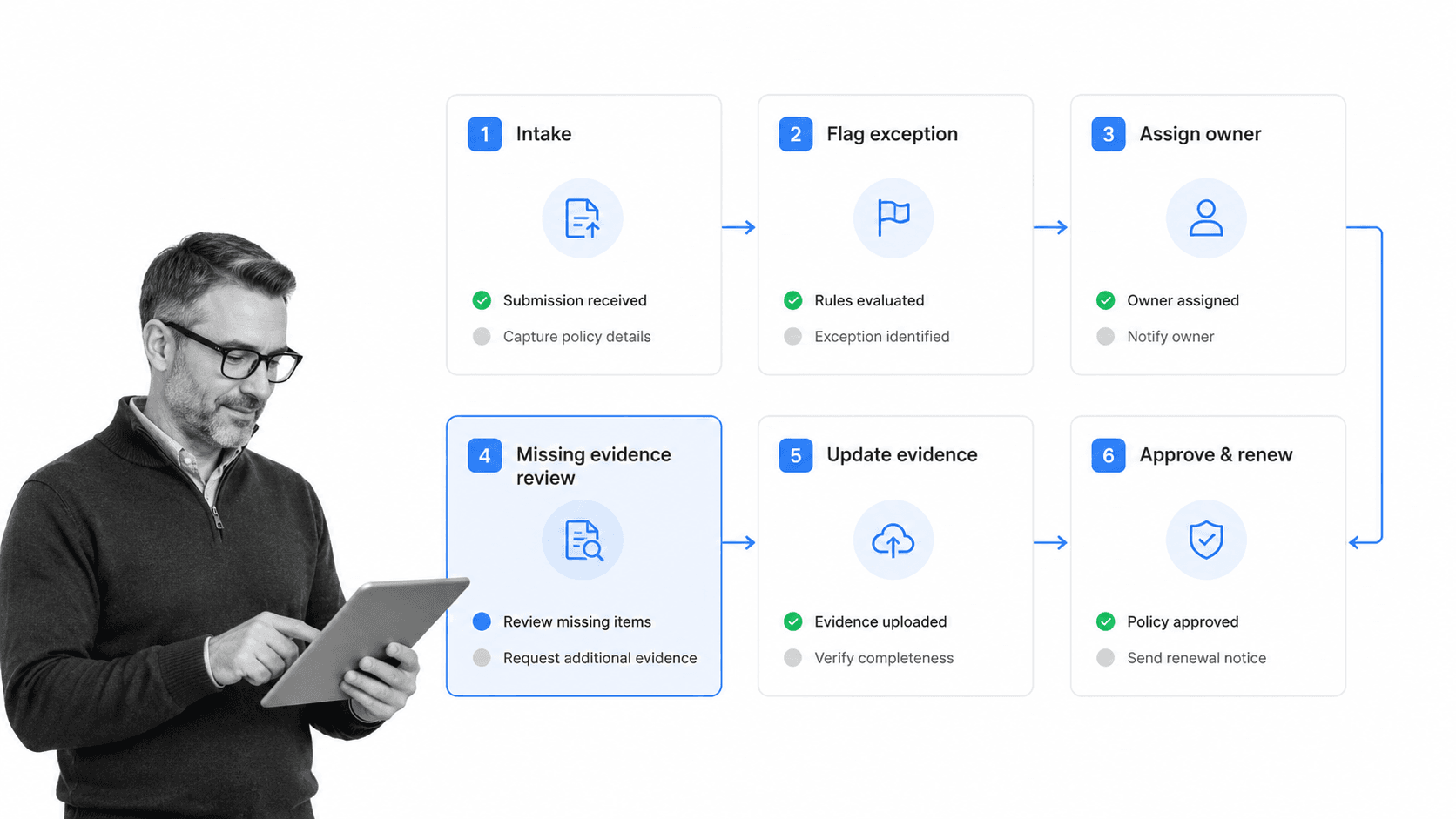
Insurance policy management software works best as a workflow layer around policy activity. The workflow turns each request into a controlled sequence: intake, classification, assignment, evidence collection, review, approval, system update, customer communication, and follow-up.
1. Capture the request
Start with a structured intake form. Capture the request type, policy identifier, policyholder or account context, requested effective date, impacted coverage, supporting documents, and urgency. The goal is to prevent downstream teams from chasing missing basics.
2. Classify the policy action
A renewal review should not follow the same path as a cancellation request. An endorsement with premium impact should not follow the same path as a document correction. Classify the request so the workflow can branch correctly.
3. Assign the owner
Every action needs a named owner. A queue can receive the request, but a person or role needs accountability for the next step. Ownership should transfer cleanly when the workflow moves from service to underwriting, compliance, billing, or management approval.
4. Collect evidence
Evidence may include forms, emails, customer confirmations, underwriting notes, policy documents, system screenshots, approval comments, or generated files. The workflow should request evidence before completion, not after someone asks for proof.
5. Review exceptions
Exceptions need a controlled path. Missing documents, unusual coverage changes, late renewals, high-risk accounts, or regulatory concerns should route to the right reviewer with a clear decision record.
6. Close the loop
Closure should mean the policy system was updated, the required evidence was saved, the customer or partner was notified when needed, and the audit trail is complete. If the workflow cannot prove those steps, it is not really closed.
This same pattern appears in related compliance workflows such as compliance monitoring software, where the goal is to catch exceptions while work is still active.
How to choose insurance policy management software
Choose insurance policy management software by the work it can enforce, not by the number of screens it can display. The strongest system reduces policy risk by making the correct path easier to follow and harder to bypass.
Check whether it fits your policy lifecycle
Map the software against your real lifecycle: intake, quote support, underwriting handoff, issue, endorsement, renewal, cancellation, reinstatement, document request, service request, complaint, and audit response. If the system only supports one slice, be clear about what will still happen elsewhere.
Check whether it complements your core system
A core policy administration system may remain the source of record. The workflow layer should complement it by controlling human steps, evidence, approvals, exceptions, and cross-system handoffs. Do not force policy service teams to choose between the core record and the operational record.
Check configurability without IT bottlenecks
Insurance workflows change. Products change, state rules change, carrier requirements change, and partner expectations change. A non-technical operations or compliance owner should be able to update workflow steps, required fields, approvals, and routing without waiting on a long development cycle.
Check auditability
A useful audit trail should show what was required, who did it, when it happened, what evidence was attached, who approved it, what changed, and how an exception was resolved. This connects policy work to broader compliance audits and internal reviews.
Check data standards and system fit
ACORD data standards and implementation guides exist because insurance data needs common structure across parties and systems. Your software should support clean field discipline, data consistency, and integration patterns that reduce translation work.
Check how exceptions become action
A dashboard alert is not enough. If a renewal is at risk or an endorsement is missing evidence, the system should assign work, set a due date, route approval, and keep the decision with the policy record.
Check whether reports trace back to work
Many systems can show status. Fewer let a reviewer click from that status into the workflow, evidence, approval, and exception history behind it. Traceability is what separates insurance policy management software from a reporting layer that still depends on manual proof gathering.
Insurance policy management software in Process Street
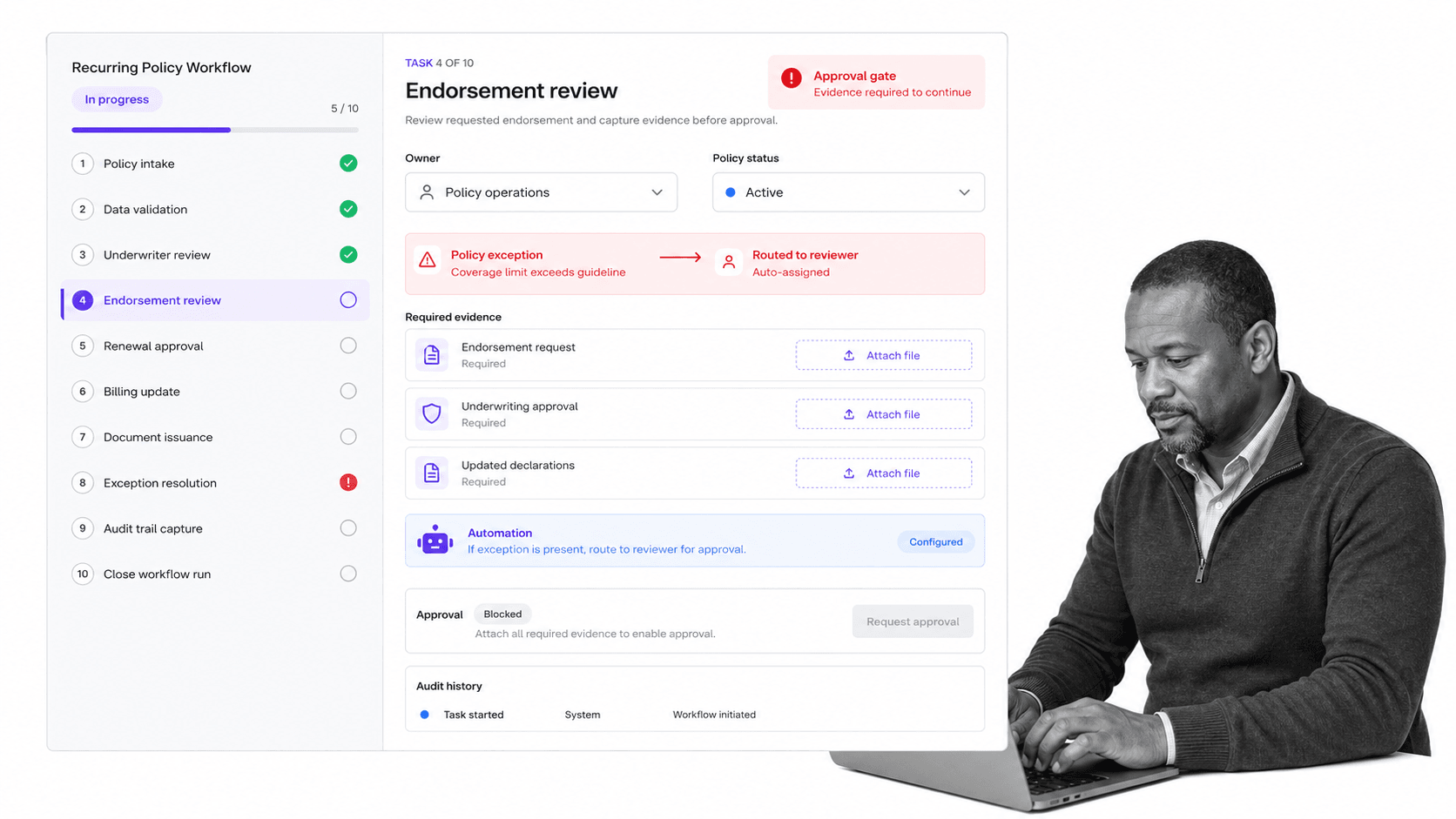
Process Street gives insurance teams an execution layer for policy workflows. The policy record can stay in the carrier core or system of record, while Process Street controls the human workflow around intake, endorsement review, renewal preparation, evidence collection, approvals, exception handling, and audit history.
Run policy work as recurring workflows
A renewal review, compliance check, document request, endorsement review, cancellation workflow, or customer service escalation can run from a template with assigned owners, due dates, required fields, file uploads, and approval gates.
Use required fields to prevent incomplete closure
If evidence, policy status, decision rationale, or reviewer approval is required, the workflow can block closure until the right information is present. That makes policy work easier to trust because the control sits inside the task.
Route exceptions automatically
When a policy request is missing evidence, needs underwriting review, requires compliance approval, or hits a renewal risk threshold, Process Street can route the work through the right path. The exception does not become a side conversation. It remains part of the workflow record.
Connect policy work to compliance operations
Insurance policy management is not separate from compliance. It is one of the places compliance becomes real. Process Street connects this work to financial services compliance software, compliance automation software, and workflow automation compliance through the same execution-first model.
Keep proof current
Approvals, comments, field values, files, automations, and task history remain attached to each workflow run. That gives teams a record they can use for management review, internal controls, customer inquiries, and audit response.
Support a digital compliance officer model
Teams moving toward continuous oversight need systems that can flag drift, route work, and suggest improvements. That operating model is close to the digital compliance officer pattern: monitor the work, identify risk, and turn signals into action.
How to roll out insurance policy management software
Roll out insurance policy management software in focused layers. Do not start by rebuilding every policy process at once. Start where missed steps create the most operational risk and where proof is hardest to reconstruct.
Start with one high-volume workflow
Pick a workflow with clear volume and pain: endorsements, renewals, cancellations, document requests, policy service escalations, producer onboarding, or compliance reviews. A focused workflow lets you prove the operating model before expanding.
Define the required evidence standard
For each workflow, define what evidence is enough. That may be a signed form, system export, reviewer approval, customer confirmation, file upload, or field value. If the evidence standard is vague, reviewers will still need manual follow-up.
Map the exception path
Before launch, decide what happens when information is missing, the request is high risk, the effective date is late, the policy record conflicts with submitted documents, or the approval is denied. The exception path is where workflow discipline matters most.
Connect to templates and adjacent controls
Policy management often touches repeatable checklists. A compliance audit checklist can structure review activity, while internal policy controls can connect to internal controls and a broader compliance program.
Review performance every cycle
Use each workflow cycle to improve the system. Which request types stall? Which owners need clearer instructions? Which documents are frequently missing? Which approvals take longest? Which exceptions repeat? The answers should update the workflow, not sit in a meeting note.
Keep the system of record clear
Decide what lives in the policy administration system, what lives in the workflow layer, what lives in the document repository, and what gets synced between them. Clear ownership prevents duplicate records and makes audit response easier.
The goal is simple: control policy work, track every required step, and prove that the right action happened without waiting for someone to rebuild the story later.
FAQs
What is insurance policy management software?
Insurance policy management software controls the workflows, data, documents, approvals, evidence, and audit history involved in managing insurance policies. It helps teams move policy work from intake through issuance, endorsements, renewals, cancellations, and exceptions without losing accountability.
What does insurance policy management software manage?
It typically manages policy intake, servicing requests, underwriting handoffs, endorsements, renewals, cancellations, document collection, approvals, exception routing, customer or producer communications, and audit trails. The best systems tie those items to live workflows rather than scattered records.
How is insurance policy management software different from a policy administration system?
A policy administration system is often the core system of record for policy data and transactions. Insurance policy management software can refer to that core system, but it often describes the workflow, document, approval, and compliance layer that helps teams execute policy work around the core record.
What features should insurance policy management software include?
Look for configurable workflows, intake forms, required fields, document collection, approvals, conditional routing, exception management, integrations, reporting, role-based access, and audit history. The system should enforce work, not only store policy data.
How does Process Street support insurance policy management software?
Process Street supports insurance policy management by turning policy work into controlled workflows with owners, required fields, evidence collection, approvals, automations, integrations, and audit history. Teams can manage policy tasks while keeping proof attached to the work.
Who needs insurance policy management software?
Insurance operations, policy service, underwriting, compliance, claims-adjacent, billing, broker, MGA, TPA, and InsurTech teams need insurance policy management software when policy work crosses teams and missed steps create risk. It is especially useful when renewals, endorsements, documents, and approvals must be tracked consistently.
