


Turn every policy into automated workflows with built-in enforcement and audit-ready proof.



Process Automation Solutions: A Practical Guide
Process automation solutions turn repeatable work into a controlled operating system. Instead of relying on email reminders, spreadsheet trackers, and people remembering the next step, a solution can route tasks, move data, enforce decisions, notify owners, and preserve a record of what happened.
The category spans more than one technology. A team may need a simple task automation, a cross-functional workflow, software robots for a legacy interface, document processing, or AI-assisted decisions inside a governed process. The right choice depends on the shape of the work, the systems involved, and the consequences of an error.
This guide explains the main types of process automation, how to identify a strong first use case, what to evaluate in a platform, how to design controls, and how to measure whether the implementation creates real value.
- What are process automation solutions?
- Which type fits the work?
- What benefits should you expect?
- Which process should you automate first?
- What should you look for?
- How do you govern AI and automation?
- How can you implement process automation?
- How do you measure automation ROI?
- Where can process automation create value?
- Why use Process Street?
- Process automation solutions FAQs
What are process automation solutions?
Process automation solutions are software systems that execute or coordinate parts of a business process with less manual handling. They combine triggers, data, rules, tasks, integrations, approvals, and records so work moves from an input to an outcome in a repeatable way.
A process is larger than a single action. Employee onboarding, for example, may collect information, request approvals, provision access, assign training, record acknowledgments, and escalate missing work. Automating only the welcome email helps, but automating the process means coordinating the full path, including the points where a person must make a judgment.
IBM describes business process automation as software applied to complex, repetitive processes that can span departments and enterprise systems. That distinction separates process automation from a macro or script that completes one isolated action.
A process automation architecture
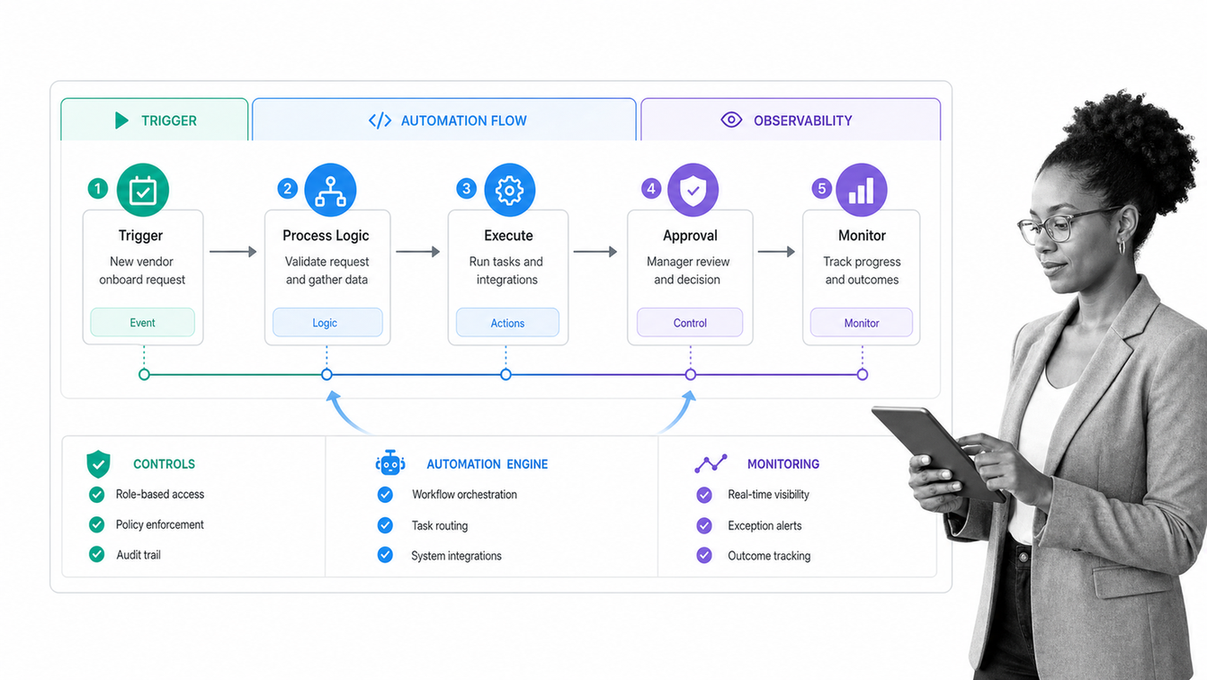
Most process automation solutions can be understood as five connected layers: an event starts the work, process logic determines the path, people and systems complete actions, controls govern decisions, and monitoring shows whether the outcome was achieved. A strong design keeps those layers visible instead of hiding everything inside disconnected scripts.
- Trigger: a form submission, scheduled date, status change, incoming record, or completed task starts the process.
- Orchestration: rules determine sequence, assignments, due dates, conditional paths, and exception routes.
- Execution: people, integrations, software robots, or AI complete the work.
- Control: approvals, permissions, required evidence, and human review limit what can proceed.
- Observation: activity records, cycle times, exceptions, and outcome metrics reveal performance.
This architecture is the practical core of workflow automation: technology helps move work, while the process still defines ownership, evidence, and accountability.
Which type of process automation fits the work?
Automation categories overlap. The useful question is not which label sounds most advanced. It is which mechanism matches the work that must happen. A single process can use several types together.
Task automation
Task automation handles a bounded action with a clear input and output. Examples include sending a notification, copying a field, creating a calendar event, naming a file, or updating a status. It is a good fit when the action is frequent, deterministic, and low risk.
Workflow automation
Workflow automation coordinates a sequence of tasks across people and systems. It is useful for approvals, onboarding, service intake, content review, incident response, and other work where routing and handoffs matter as much as the individual actions.
Business process automation
Business process automation connects a broader outcome from start to finish. It may span multiple departments, systems of record, policies, and exception paths. The design usually needs a process owner, documented rules, performance measures, and a change-control method.
Robotic process automation
Robotic process automation is useful when software must reproduce predictable user actions in an interface, especially where an application lacks a suitable integration. It can bridge legacy systems, but it is sensitive to interface changes and should be monitored like any other production dependency.
Intelligent document processing
Document processing extracts, classifies, validates, and routes information from invoices, contracts, forms, and other files. It works best when confidence thresholds and review paths are explicit, so uncertain results go to a person instead of silently entering a downstream system.
Orchestration and AI-assisted automation
Orchestration coordinates multiple automated components around one outcome. IBM distinguishes orchestration from isolated automation by focusing on how related tasks and systems are coordinated. AI can add classification, extraction, drafting, summarization, or recommendations, but the surrounding process should still define allowed actions, review points, and failure handling.
What benefits should you expect from process automation?
The value of automation is not simply that a computer performs a task. The larger benefit comes from improving the reliability and visibility of the process around that task.
- Shorter cycle time: work moves immediately when a trigger or prerequisite is satisfied.
- Less waiting: assignments, reminders, and escalations reduce time lost between steps.
- Fewer avoidable errors: required fields, validation, and standardized paths reduce preventable variation.
- Consistent execution: the same rules and controls apply across teams, locations, and volumes.
- Better capacity: people spend less time on copying, chasing, and status reporting, leaving more attention for judgment and service.
- Stronger evidence: the process records who acted, what was submitted, which decision was made, and when it happened.
- Continuous improvement: process data reveals bottlenecks, exception patterns, and redesign opportunities.
These benefits depend on process quality. Automating an unclear path can make confusion move faster. Map the current process, remove unnecessary steps, define ownership, and decide how exceptions should work before optimizing for speed.
Which process should you automate first?
The best starting process is important enough to matter and bounded enough to learn from. It repeats often, follows stable rules, has a clear owner, and produces an outcome you can measure. It also has enough friction that users will notice the improvement.
Process automation candidate scorecard
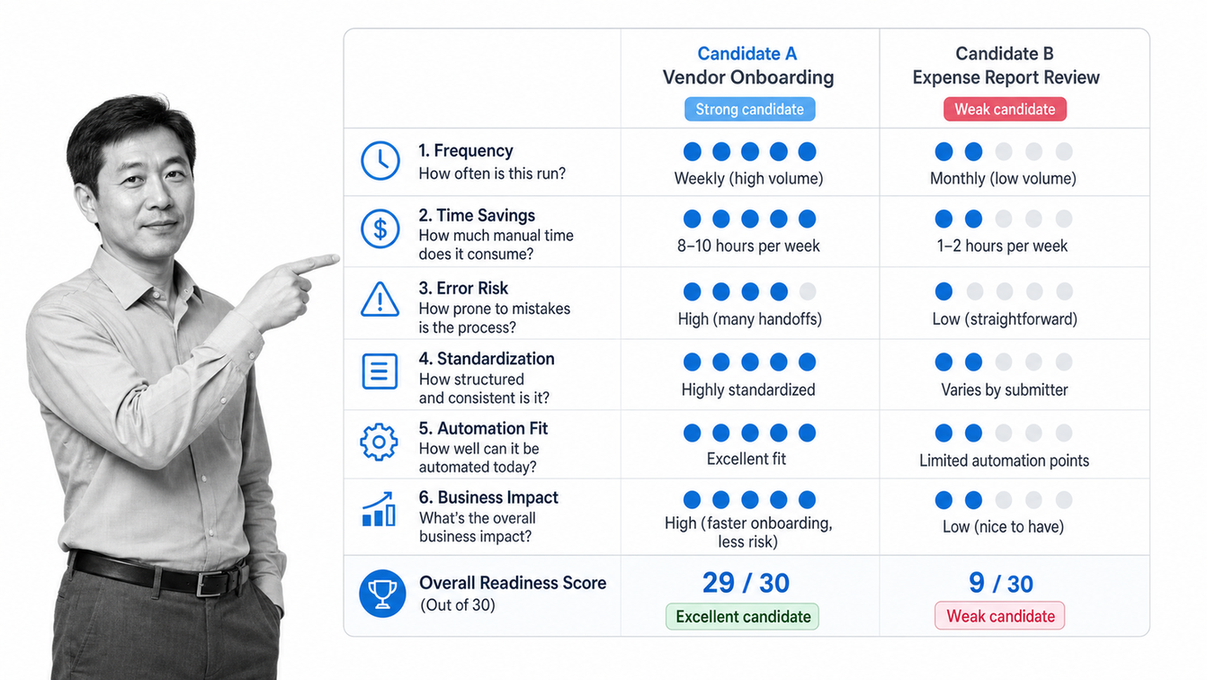
| Criterion | Strong candidate | Weak candidate |
|---|---|---|
| Frequency | Runs often enough to create recurring friction | Occurs rarely or unpredictably |
| Rules | Inputs and decisions can be stated clearly | Outcome depends mainly on tacit judgment |
| Stability | Core path is understood and changes deliberately | Process changes every time it runs |
| Ownership | One person owns the outcome | Responsibility is disputed or fragmented |
| Data | Required information is available and reasonably clean | Inputs are missing, inconsistent, or inaccessible |
| Risk | Controls and exception paths can be designed | A failure would be severe and hard to detect |
| Measurement | Baseline time, quality, and volume can be captured | Success cannot be observed |
Good pilots often include employee onboarding, purchase requests, vendor intake, recurring compliance checks, customer handoffs, service requests, document review, and routine reporting. Start with one defined outcome. A small process that reaches production teaches more than a broad automation program that never leaves discovery.
What should you look for in a process automation solution?
Evaluate the platform against your real process, not a polished generic demo. Bring a representative workflow, sample data, one exception, one approval, and one integration requirement. Ask the vendor to show how the system handles the complete path and how an owner would change it later.
Evaluation matrix for process automation solutions
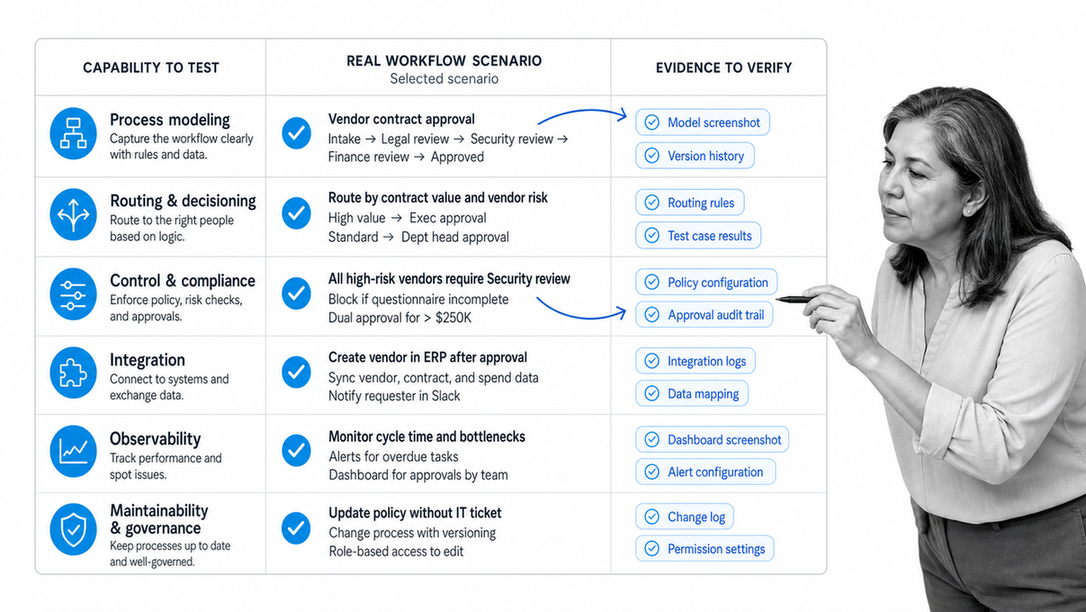
| Capability | What to test | Why it matters |
|---|---|---|
| Process modeling | Tasks, forms, owners, due dates, rules, and reusable components | The system must represent the work clearly |
| Conditional routing | Paths based on data, role, risk, or prior decisions | Real processes rarely follow one identical route |
| Human control | Approvals, rejection loops, overrides, and escalation | Judgment and accountability must remain explicit |
| Integration | Triggers, actions, API access, webhooks, and error handling | Automation must connect to systems where data lives |
| Data handling | Validation, permissions, retention, and field mapping | Bad or exposed data can undermine the process |
| Observability | Run history, status, exceptions, cycle time, and audit evidence | Owners need to see what happened and improve it |
| Maintainability | Versioning, testing, publishing, and nontechnical ownership | The process will change after launch |
| Governance | Roles, access, change control, and AI review settings | Scale requires consistent boundaries |
Also examine the total operating model. A low-code builder may accelerate design, but the organization still needs process ownership, integration support, release discipline, training, and monitoring. The best solution is one the business can govern and improve after the implementation team leaves.
How do you govern AI and automation safely?
Automation changes how decisions and data move through the business. Governance should be designed into the workflow, not added after a failure. The level of control should match the consequence of the action. Sending an internal reminder needs less oversight than changing a customer record, approving a payment, granting access, or interpreting a compliance document.
A control model for automated decisions
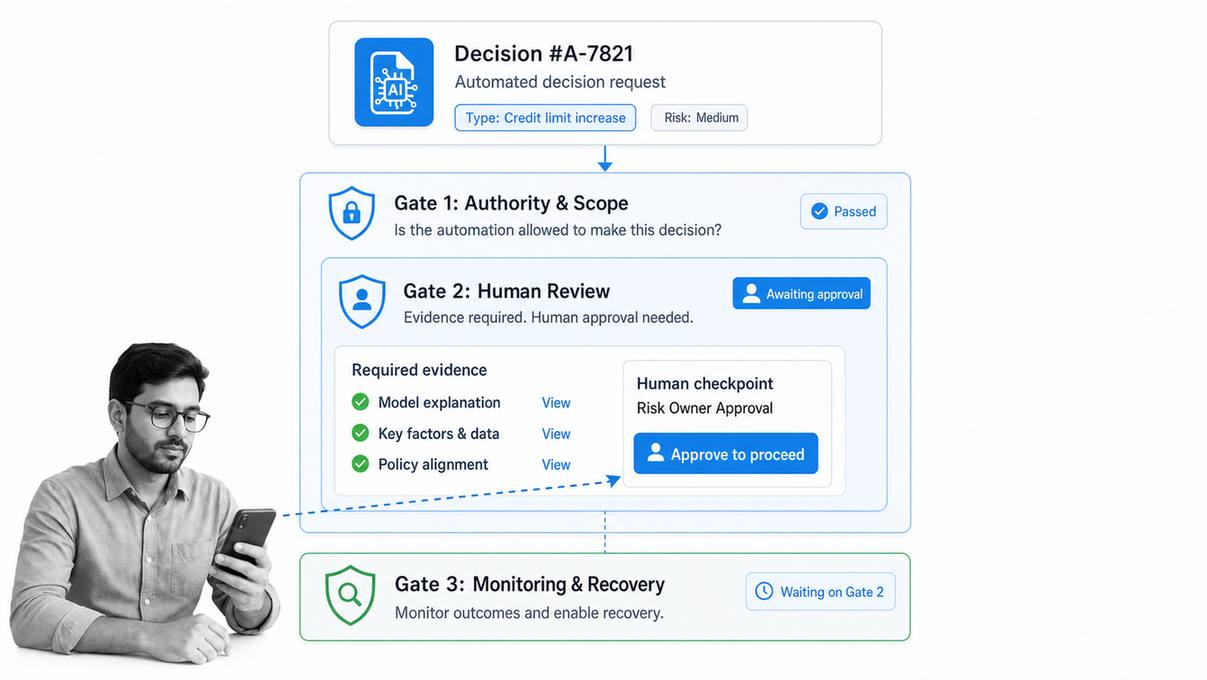
- Define authority: document what the automation may read, create, change, approve, or send.
- Assign accountability: name the process owner, system owner, reviewer, and escalation owner.
- Set review thresholds: route uncertain, unusual, or high-impact cases to a person.
- Protect access: use the minimum permissions needed and separate building, approving, and operating roles where appropriate.
- Preserve evidence: record inputs, outputs, decisions, overrides, and exceptions in a form that can be reviewed.
- Monitor drift: watch for rising exceptions, declining quality, changing data, and integrations that stop behaving as expected.
- Plan recovery: define how to pause, retry, reverse, or manually complete the process when automation fails.
The NIST AI Risk Management Framework emphasizes clear roles, risk measurement, governance, and appropriate human oversight across the AI lifecycle. Those principles translate directly into process design: the workflow should show who is responsible and where a person can challenge or stop an automated result.
Security evaluation should also cover identity, permissions, monitoring, response, and recovery. The NIST Cybersecurity Framework organizes these outcomes into a lifecycle that can help teams ask whether an automation is controlled beyond the happy path.
How can you implement process automation?
Implementation works best as a sequence of small, testable decisions. Treat the first release as an operational product with an owner, users, controls, metrics, and a maintenance plan.
A phased implementation roadmap
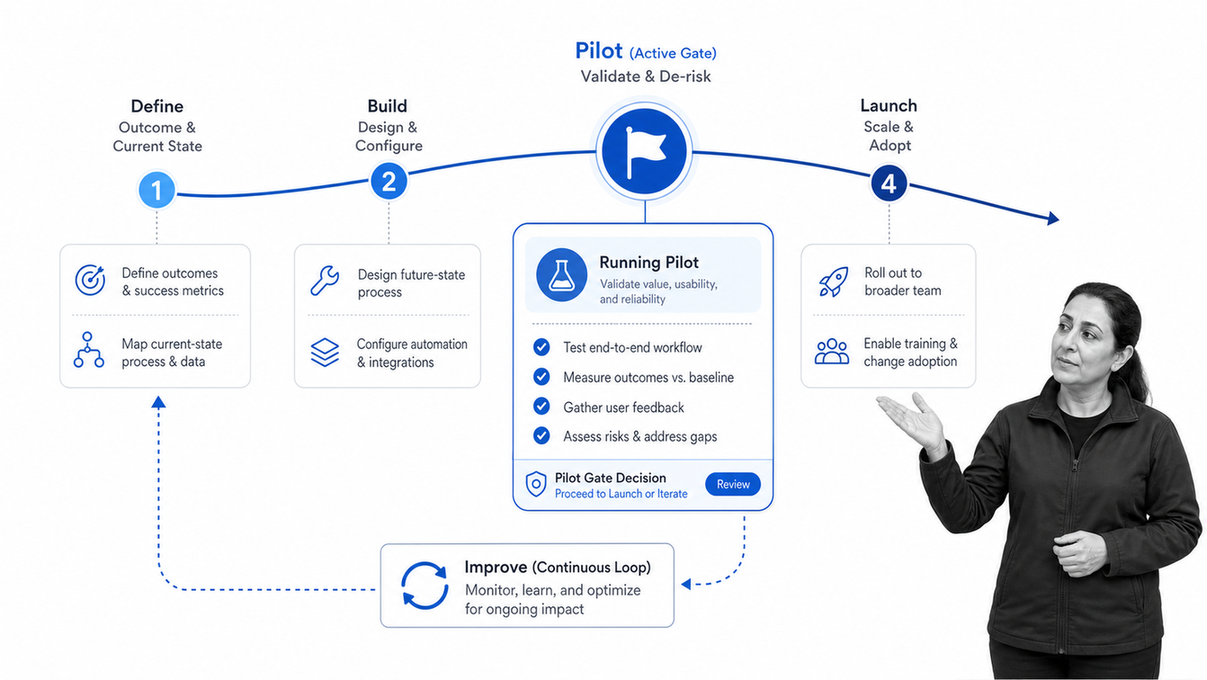
- Define the outcome. State what the process must accomplish, who owns it, and which customer, employee, risk, or financial result matters.
- Map the current process. Capture triggers, steps, systems, roles, wait states, decisions, exceptions, and evidence. Use a simple process map that operators recognize.
- Establish the baseline. Measure volume, cycle time, wait time, rework, error patterns, operating effort, and current tool costs before making changes.
- Simplify first. Remove duplicate reviews, obsolete fields, unclear handoffs, and work that adds no value. Automation should execute the best known process, not preserve every historical habit.
- Design the future path. Decide what people do, what software does, which data moves, when approvals apply, and how exceptions return to the right owner.
- Build and connect. Configure the workflow, integrations, permissions, notifications, and evidence requirements. Keep the first scope narrow enough to test end to end.
- Test realistic cases. Run the normal path, missing-data path, rejected approval, integration failure, duplicate input, late task, and manual fallback.
- Pilot with real users. Observe where people hesitate, work around the system, or cannot understand the next action. Fix the workflow before expanding volume.
- Launch with ownership. Publish the process, train users in context, monitor the first runs, and give one owner authority to correct issues quickly.
- Review and improve. Compare results with the baseline, study exceptions, update controls, and expand only after the process is stable.
For a deeper operating model, use this business process automation guide to connect process design, implementation, and continuous improvement.
How do you measure automation ROI?
Start measuring before the build. Without a baseline, a faster-looking process can be mistaken for a better one. Track both efficiency and effectiveness, because a process that finishes quickly but creates rework or risk has not improved.
A before-and-after measurement dashboard
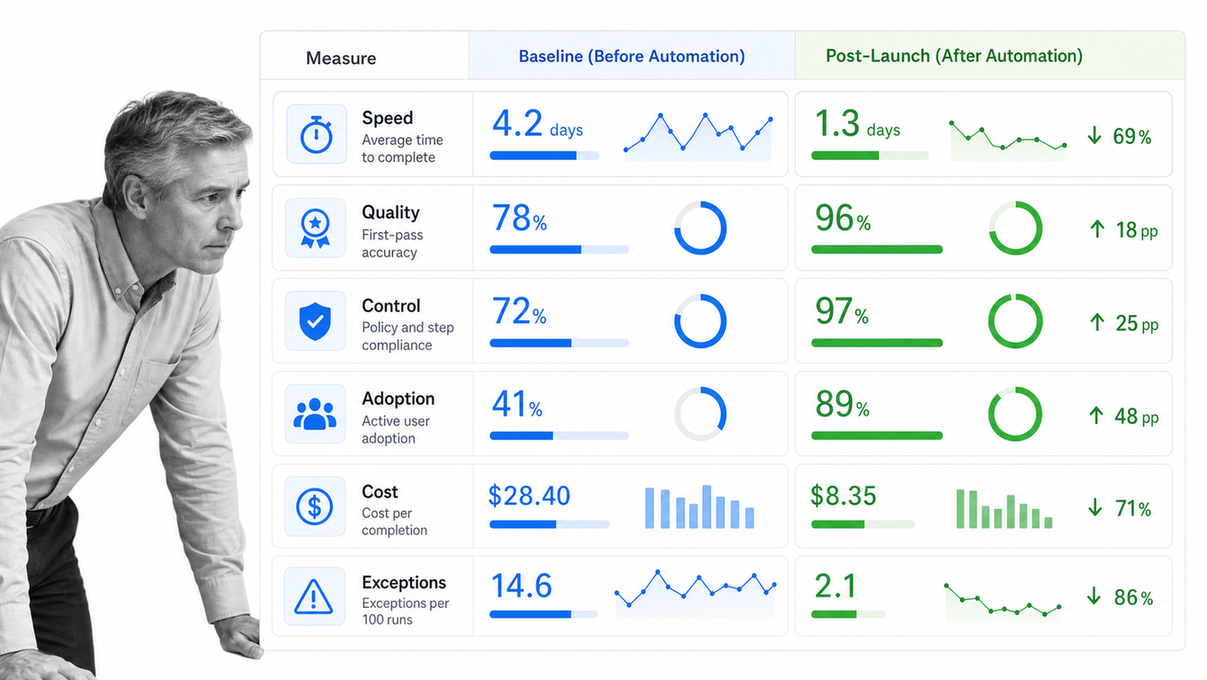
- Volume: how many cases enter and complete during a defined period.
- Cycle time: elapsed time from trigger to outcome.
- Touch time: active human effort required to complete the work.
- Wait time: delay between steps, owners, or systems.
- First-pass quality: share of cases completed without correction or rework.
- Exception rate: share that leave the normal path or require manual rescue.
- Control performance: approvals completed, evidence captured, deadlines met, and unauthorized actions prevented.
- Adoption: eligible work actually completed through the automated process.
- Total cost: software, implementation, integration, training, monitoring, maintenance, and support.
Translate improvements into business value only where the connection is defensible. Time saved may create capacity, faster customer response, or lower operating effort, but it does not automatically equal cash savings. Report the operational change and the financial assumption separately.
Where can process automation create value?
The same architecture can support many departments. The use case changes, but the design questions remain consistent: what starts the work, who owns the outcome, which decisions need control, what systems must change, and what evidence proves completion?
Finance and procurement
Route purchase requests, collect supporting information, apply approval paths, coordinate vendor onboarding, track invoice exceptions, and maintain a record of decisions. Controls should reflect payment authority, segregation of duties, and data access.
Human resources
Coordinate recruiting handoffs, employee onboarding, access requests, policy acknowledgment, leave requests, performance cycles, and offboarding. Each run can adapt to role, location, employment type, and manager while preserving a consistent core process.
Compliance and quality
Schedule recurring controls, collect evidence, manage findings, route corrective actions, review documents, and escalate overdue work. The automation should strengthen accountability without hiding the reason a control exists.
Customer operations
Standardize customer onboarding, implementation, support escalation, renewals, and service recovery. Automation can coordinate internal handoffs while keeping customer-facing decisions with the people who have the right context.
IT and security
Manage service intake, access changes, incident response, equipment requests, vulnerability remediation, and recurring reviews. These processes need strong permissions, evidence, deadlines, and escalation paths because operational speed and control both matter.
Why use Process Street for process automation?
Process Street combines process design, execution, automation, approvals, data, and AI-assisted work in one workflow environment. Teams can model the process people follow, connect actions to other systems, and keep human decisions inside the same operational record.
A governed automation workspace
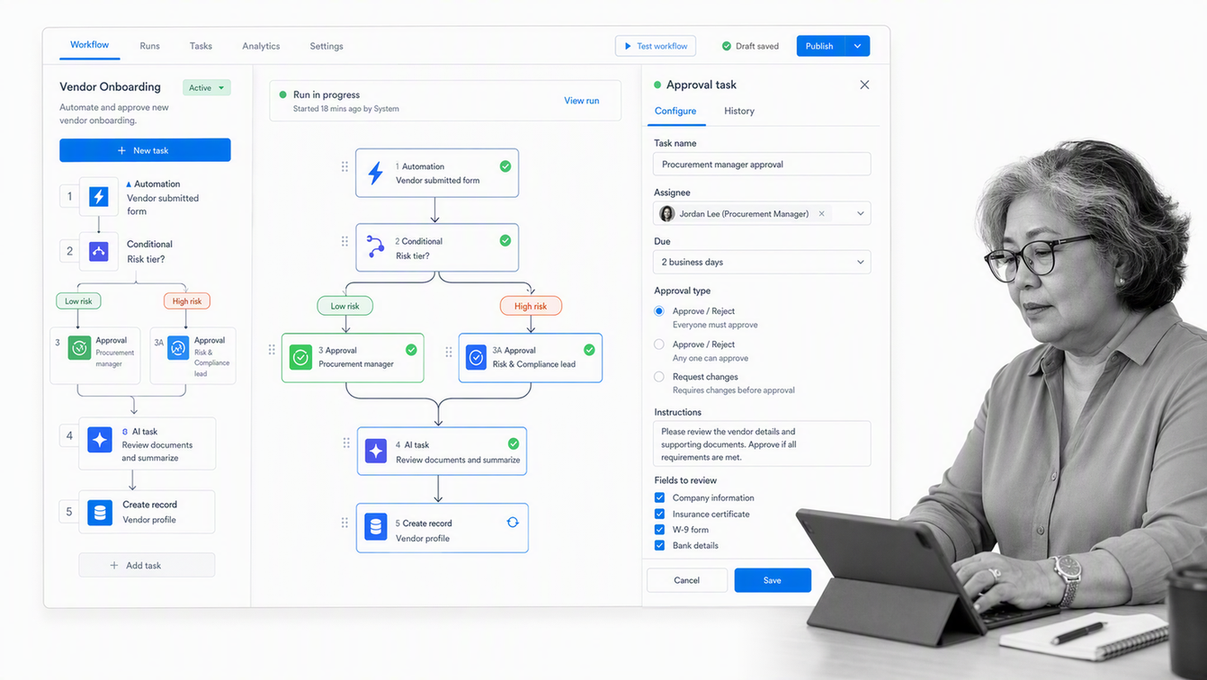
- Triggers and automations: workflow automations can move data between Process Street and connected applications or start another workflow run when work reaches a defined event.
- Conditional routing: conditional logic can show or hide tasks and content based on information in the workflow run.
- Human decisions: approvals support single, multi-stage, and sequential review paths, including rejection and resubmission.
- AI inside the process: AI tasks can generate, analyze, transform, summarize, and process information within a workflow, while the surrounding steps define inputs and review.
- Operational evidence: each workflow run provides a structured record of assignments, submissions, decisions, and completion.
The result is more than a collection of shortcuts. It is a process layer where teams can decide what should be automated, what must remain human, which controls apply, and how the operation improves over time.
If you want to apply this approach to a real workflow, request a Process Street demo and bring one process you want to automate.
Process automation solutions FAQs
What are process automation solutions?
Process automation solutions are software systems that coordinate repeatable work using triggers, rules, tasks, data, integrations, approvals, and records. They can automate a single task, connect a workflow across teams, or orchestrate an end-to-end business process.
What is the difference between task automation and process automation?
Task automation completes one bounded action, such as copying data or sending a notification. Process automation coordinates a sequence of actions, owners, decisions, exceptions, and systems toward a business outcome.
Which process should a business automate first?
Start with a stable, repeated process that has clear rules, visible delays, a named owner, and a measurable outcome. Avoid beginning with a process that changes constantly or depends almost entirely on judgment.
How do you evaluate process automation software?
Evaluate how well each option models your process, routes exceptions, connects systems, manages access, supports human review, records activity, reports outcomes, and can be maintained by the people who own the work.
How should AI be governed inside an automated process?
Define what the AI may decide, what data it may use, when a person must review the result, what evidence must be stored, and how errors are escalated. Higher-risk decisions need stronger approval, logging, and exception controls.
How do you measure the return from process automation?
Capture a baseline before launch, then compare cycle time, wait time, rework, exception volume, completion quality, adoption, and total operating cost. Include build, integration, training, monitoring, and maintenance costs in the calculation.
