


Turn every policy into automated workflows with built-in enforcement and audit-ready proof.



Software Design Workflow
A software design workflow is the repeatable path a team uses to turn validated requirements into an implementation-ready system design. It defines how people explore constraints, divide the system into components, specify interfaces and data, test important assumptions, review risks, approve decisions, and hand the design to implementation.
The workflow matters because software design is a chain of decisions, not a single diagram. Every choice about boundaries, data ownership, dependencies, failure behavior, security, and operability shapes the cost and risk of the product that follows.
This guide explains the stages, artifacts, review controls, and handoff practices that keep design work focused. It also shows how to make design decisions traceable without turning architecture into a slow approval ceremony.
In this article, you are going to cover:
- What is a software design workflow?
- Software design workflow stages
- Core software design artifacts
- How to build a software design workflow
- How to govern design decisions and handoffs
- Software design workflow vs software development workflow
- Manage software design workflows in Process Street
- FAQs
What is a software design workflow?
Software design sits between understanding the problem and implementing the solution. Requirements describe outcomes and constraints. Design decides how the system will satisfy them. The result is a set of explicit, reviewable decisions that gives engineers enough direction to build while leaving room for learning during implementation.
The purpose of the workflow
The workflow creates a reliable decision process. It makes the team answer the important questions in a sensible order, involve the right reviewers, record why an option was chosen, and expose risk before code makes the choice expensive to reverse. It also keeps design work connected to the user outcome instead of rewarding diagrams for their own sake.
Where software design begins and ends
Design begins when the problem, users, constraints, and acceptance conditions are clear enough to compare solution shapes. It ends when the team has an approved design baseline and a safe implementation plan. The broader workflow in software development continues through coding, testing, release, monitoring, and feedback.
Who participates
A software architect or senior engineer may lead the work, but useful design needs multiple perspectives. Product clarifies value and scope. Engineers test feasibility. Security identifies trust boundaries and abuse paths. Platform and operations teams test deployability and observability. Data owners clarify schemas, retention, and privacy. Reviewers challenge assumptions and approve risk decisions.
Software design workflow stages
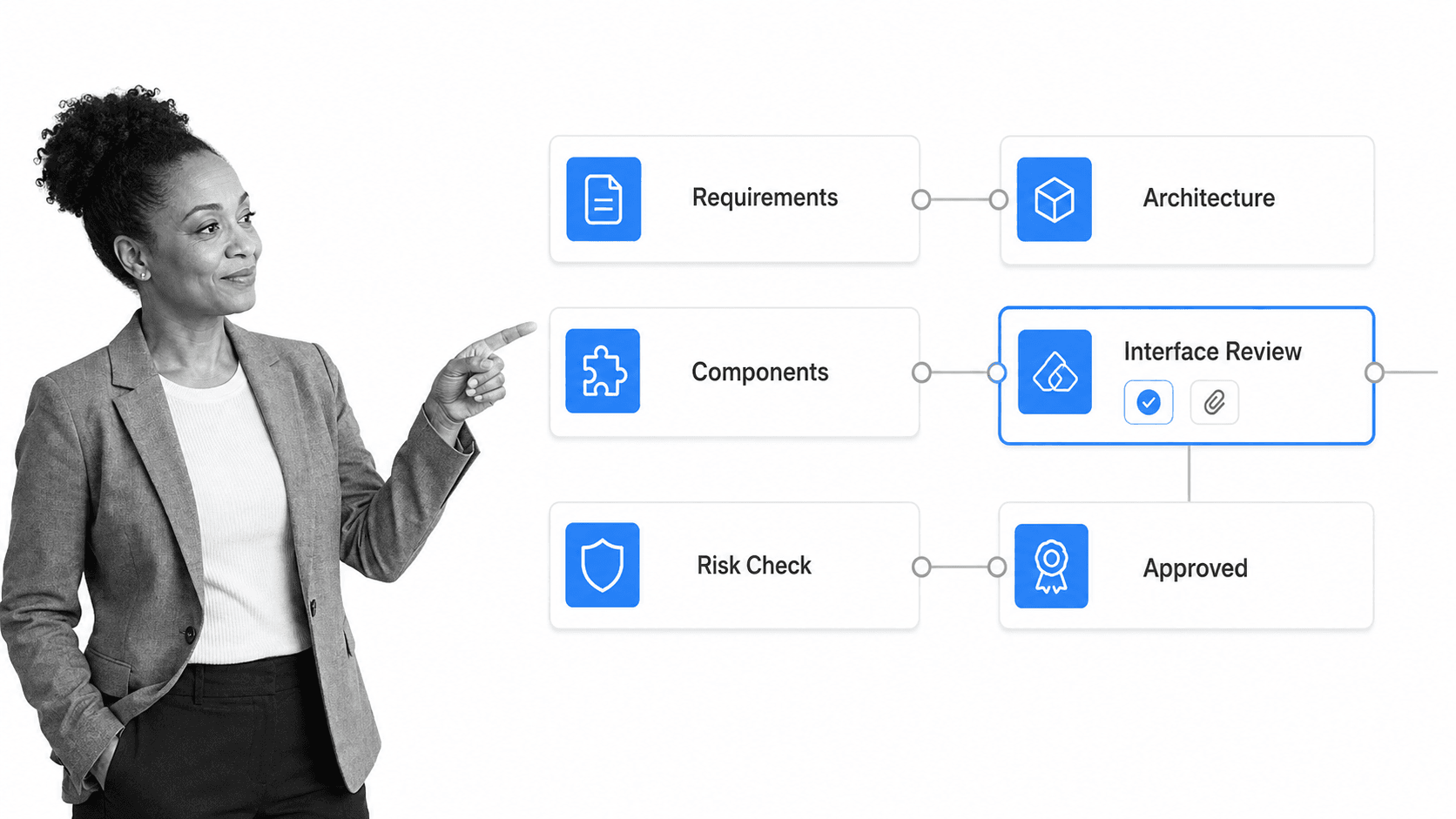
A strong software design workflow narrows uncertainty in stages. Teams may revisit earlier decisions as they learn, but each stage should produce an artifact or decision that supports the next one.
1. Frame the problem and constraints
Start with the user outcome, scope boundary, success measures, quality expectations, and non-negotiable constraints. A clear software development checklist can keep requirements, architecture, approval, testing, and release connected, but design needs its own explicit entry criteria. Record known integrations, data sensitivity, expected load, latency needs, recovery expectations, accessibility requirements, and delivery limits.
2. Model the system context
Show the system, its users, and the external systems it depends on. The official C4 model provides a useful hierarchy for moving from system context to containers, components, and code. Use the lightest level that answers the current question. A context view should make responsibilities and external dependencies visible before the team debates internal classes or services.
3. Choose boundaries and responsibilities
Divide the system around coherent responsibilities. Define what each component owns, what it must not own, and how it changes independently. Boundaries should reduce coupling and make failure containment, security ownership, testing, and deployment clearer. If every change crosses every component, the design has described boxes without creating useful separation.
4. Design interfaces and data
Specify the contracts between components: inputs, outputs, errors, timeouts, retries, idempotency, authentication, and versioning. Clarify data entities, ownership, consistency rules, retention, and migration. Interface design is where hidden assumptions become visible. The selected review gate should verify that both sides of a boundary agree on behavior and evidence.
5. Evaluate quality attributes and threats
Test the design against scenarios for performance, security, reliability, operability, changeability, and cost. The Software Engineering Institute architecture tradeoff method treats quality attributes as forces that reveal tradeoffs. Use OWASP threat modeling guidance to trace data flows, trust boundaries, threats, and mitigations before implementation makes them harder to change.
6. Prototype the risky assumptions
Build a small spike, simulation, or interface prototype when evidence is cheaper than argument. Prototype only the uncertainty that could invalidate the design: an unfamiliar integration, a critical performance path, a data migration, a concurrency rule, or a security control. Record the result and update the decision. A prototype is evidence, not production code by accident.
7. Review, decide, and baseline
Run a structured review with explicit acceptance criteria. Capture objections, required changes, accepted risks, and the decision owner. The application design review checklist covers scope, specifications, interface, database structure, flow, and validation. The approved baseline should be stable enough for implementation while still supporting controlled change.
8. Plan the implementation handoff
Break the design into implementation slices with dependencies, test strategy, migration work, feature controls, observability, and rollback expectations. Link each slice to the decision or interface it implements. The handoff succeeds when builders understand the intent and can surface new evidence without reopening every settled choice.
Core software design artifacts
Software design artifacts are working records of decisions. Keep them as small as possible, but complete enough that a reviewer can understand the system, challenge risk, and trace implementation back to intent.
Context and architecture views
A context view shows actors and external dependencies. Container and component views show major runtime boundaries and responsibilities. Deployment views show how software maps onto infrastructure. Sequence or data-flow views explain important behavior that a static structure cannot show. ISO/IEC/IEEE 42010 defines requirements for architecture descriptions, including viewpoints, views, concerns, and decisions.
Interface and data contracts
Record request and response shapes, events, error behavior, compatibility rules, ownership, validation, and lifecycle. For data, include entities, relationships, sources of truth, retention, privacy classification, migration, and reconciliation. Contracts should be testable and versioned with the design decision they support.
Architecture decision records
An architecture decision record captures the problem, constraints, options considered, chosen option, rationale, consequences, owner, and status. It prevents the team from rediscovering old debates and helps later engineers understand which constraints still apply. Supersede old records rather than silently rewriting history.
Quality scenarios and review evidence
Turn vague qualities into scenarios. State the stimulus, environment, affected part of the system, expected response, and measurable limit. Review evidence can include prototype results, threat models, capacity estimates, failure-mode analysis, and approval notes. A technical due diligence checklist shows how architecture, database structure, security, scalability, APIs, and deployment can be reviewed as connected concerns.
How to build a software design workflow
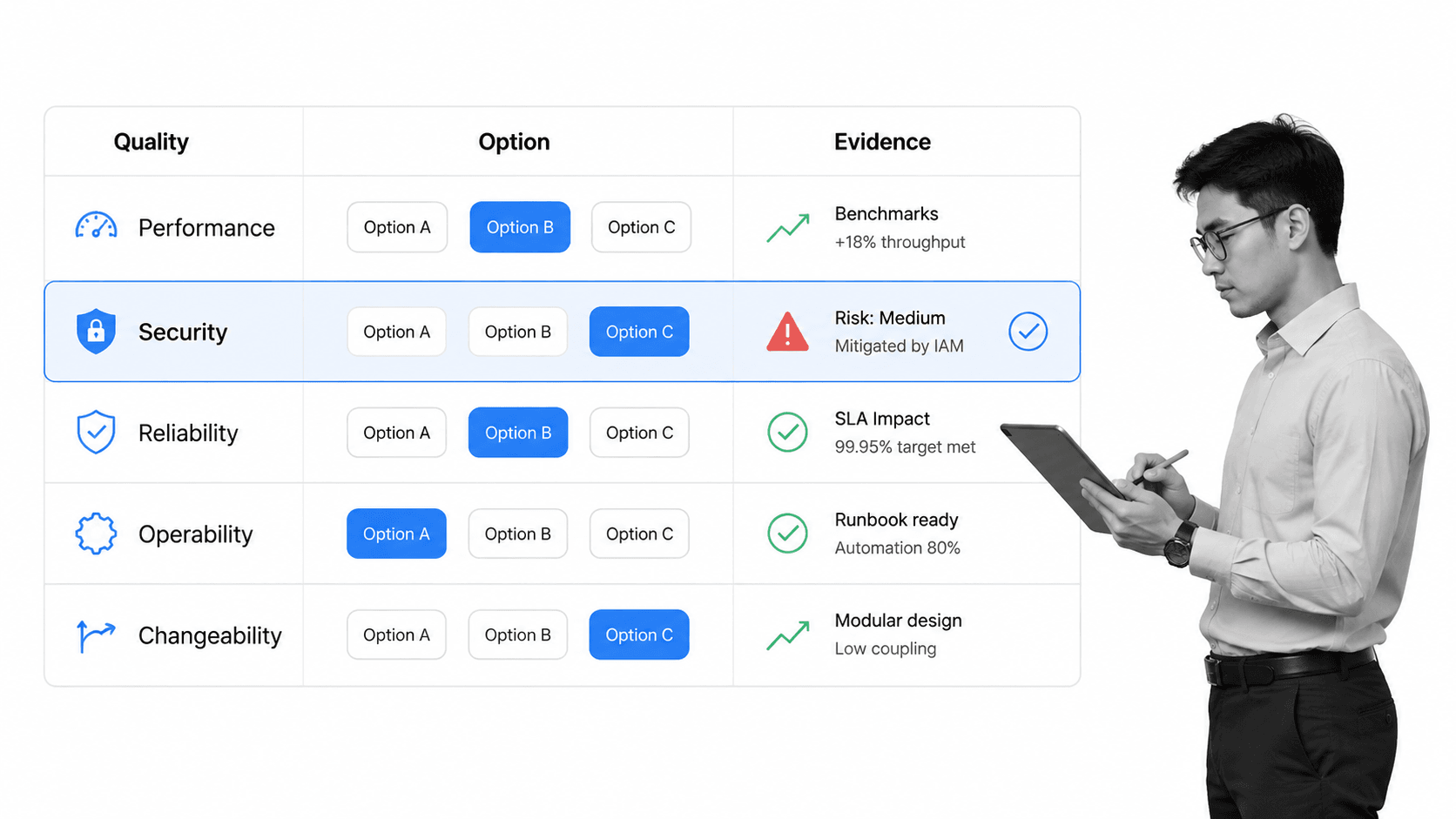
Build the workflow around decisions and evidence, not document production. The smallest useful workflow makes risk visible, moves one decision at a time, and prevents implementation from starting with unresolved critical assumptions.
1. Define entry and exit criteria
Entry criteria might require approved requirements, named stakeholders, quality priorities, known constraints, and a design owner. Exit criteria might require an agreed context, reviewed boundaries, interface contracts, threat analysis, resolved critical risks, recorded decisions, an implementation plan, and approval from accountable roles.
2. Create a decision inventory
List the decisions the design must settle and rank them by impact, uncertainty, and reversibility. Address high-impact, hard-to-reverse decisions first. Defer low-risk detail until implementation reveals better information. This prevents the workflow from spending equal time on naming conventions and data ownership.
3. Map owners and reviewers
Give each decision one accountable owner and identify the perspectives needed for review. Use role assignments rather than personal names where the responsibility should survive team changes. Separate contributors, reviewers, and approvers so participation is clear and approval is meaningful.
4. Standardize the evidence package
Define the minimum evidence for each decision type. A component boundary may need a responsibility statement and dependency view. A security decision may need a data-flow diagram, threat list, mitigations, and residual risk owner. A software development process audit can verify that design documents, specifications, lifecycle controls, testing, configuration management, security, and continuous improvement remain connected.
5. Add review gates at risk points
Use approval only where a wrong decision creates meaningful cost, harm, or lock-in. Process Street supports single, multi-stage, and sequential approvals, which lets the review path match the decision. A rejected review should return to a named owner with the objection and required evidence, not disappear into a meeting note.
6. Design exception and change paths
Define what happens when requirements change, a prototype invalidates an assumption, a reviewer accepts residual risk, or implementation uncovers a new constraint. The workflow should distinguish a clarification from a decision reversal. Material changes should supersede the affected decision, trigger the right review, and update downstream work.
7. Test the workflow with a real design
Run one representative feature through the workflow. Test missing requirements, conflicting quality goals, a rejected interface, a high-risk threat, and a late constraint. Ask an engineer who did not design the workflow to use the approved artifacts for an implementation plan. Their questions reveal missing context and ambiguous handoffs.
8. Improve from implementation feedback
Review where builders reopened decisions, where reviewers lacked evidence, and where artifacts went stale. Use workflow optimization to remove ceremonial steps, strengthen weak controls, and update entry or exit criteria. The workflow should shorten decision time while improving confidence, not add process for its own sake.
How to govern design decisions and handoffs
Governance keeps design decisions explainable and changeable. It should create control and proof without forcing every technical choice through a committee.
Keep decisions linked to requirements and risks
Each major decision should point to the requirement, constraint, quality scenario, or risk it addresses. That traceability lets the team test whether the decision still matters when inputs change. It also prevents a preferred technology from becoming a solution in search of a problem.
Use explicit approval states
Distinguish proposed, under review, approved, rejected, superseded, and accepted-risk states. A natural workflow approval separates authorship from decision authority and leaves a record of the result. Do not treat silence in a chat channel as approval.
Protect the implementation handoff
The handoff should include the design baseline, open risks, decision links, contracts, test expectations, migration plan, observability needs, and rollback assumptions. Confirm who answers design questions and how new evidence changes the baseline. Implementation should not fork into an undocumented architecture.
Review the design after reality arrives
Schedule a lightweight review after the first meaningful implementation or production evidence. Confirm which assumptions held, which decisions changed, and whether the artifacts still describe the system. Close obsolete risks and supersede invalid decisions so the design record remains useful.
Software design workflow vs software development workflow
A software design workflow and a software development workflow overlap, but they manage different scopes. Design focuses on the choices that shape the solution. Development covers the larger delivery system that turns the design into running software.
Design workflow
The design workflow covers problem framing, system context, boundaries, interfaces, data, quality attributes, threats, prototypes, tradeoffs, decisions, review, and implementation handoff. Its main outputs are approved decisions, contracts, evidence, and a design baseline.
Development workflow
The software development workflow continues through planning, code changes, peer review, automated testing, release, deployment, monitoring, and feedback. Design can recur inside that workflow whenever a change affects architecture, security, data ownership, or another high-impact constraint.
Workflow design software
Workflow design software is the tool category used to model and run repeatable work. A software design workflow is the domain-specific process configured inside that tool. The distinction matters because drawing a process and governing architecture decisions are not the same job.
Manage software design workflows in Process Street
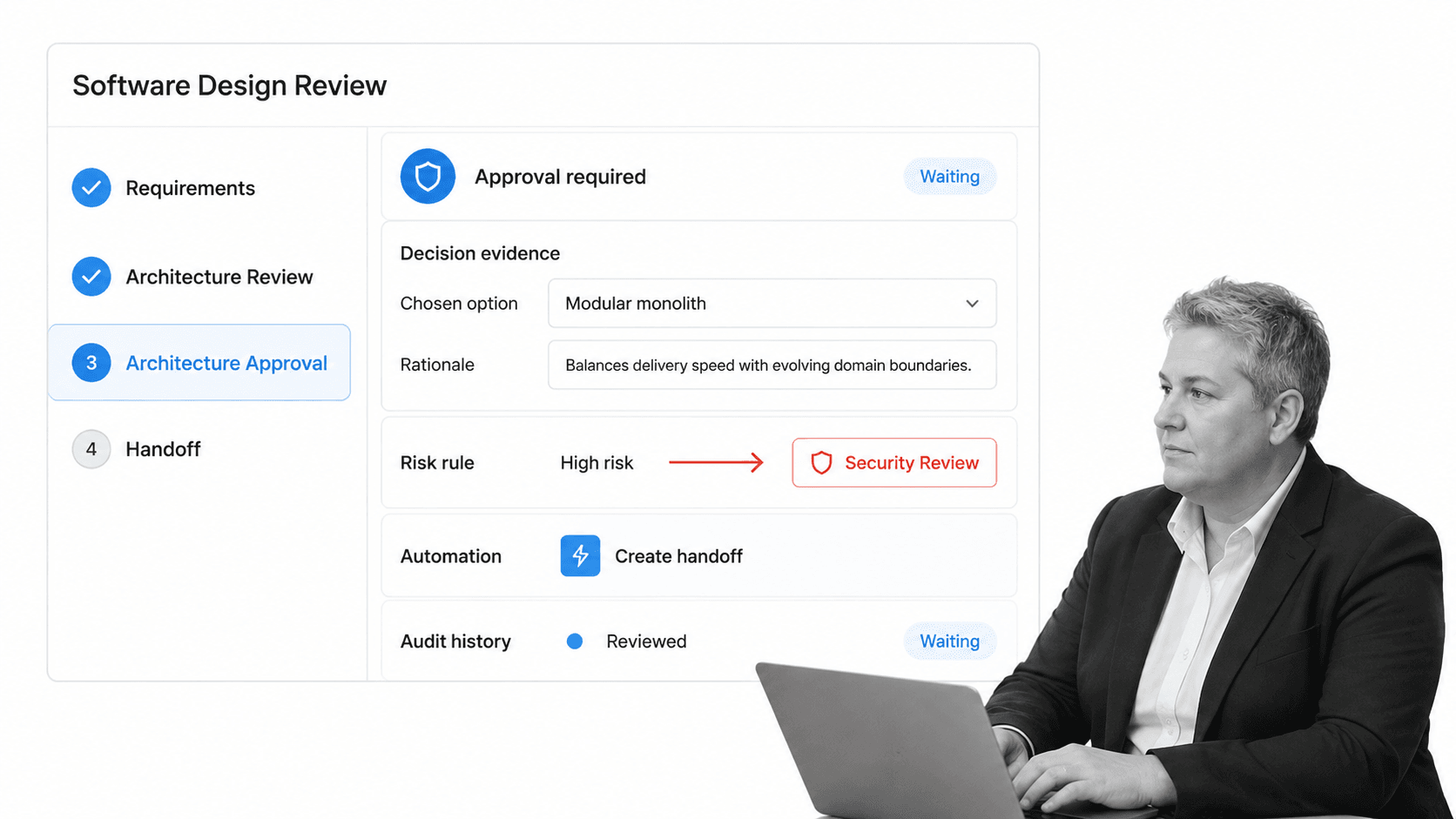
Process Street is becoming an agentic process automation platform for high-stakes operations. It can connect the design method to controlled execution, so requirements, architecture reviews, evidence, approvals, risk routes, handoffs, and audit history live in one governed workflow.
The workflow creation and editing guide shows how builders add tasks, AI tasks, headings, approvals, automation, conditional logic, stops, assignments, form fields, and dynamic due dates. Those controls let a design owner turn the stages above into a reusable operating workflow.
Capture structured design evidence
Use required fields for the decision, chosen option, rationale, consequences, risk owner, and review evidence. Attach or link diagrams and contracts. Structured evidence makes it harder to approve an empty artifact and easier to find decisions later.
Route reviews by risk
Use conditional logic to reveal security, data, platform, or compliance review only when the design crosses the relevant threshold. A high-risk data flow can route to a security review while a low-risk internal change follows a lighter path.
Automate the implementation handoff
After approval, the workflow can create the implementation package, notify accountable roles, update connected systems, and schedule the first post-implementation review. Process Street has direct, universal integrations to 5,000+ systems. Need a new one? An AI agent builds it on the fly.
Preserve control and proof
Assignments establish ownership. Required evidence blocks incomplete review. Approvals record decisions. Conditional paths handle risk. Run history preserves the sequence. A workflow and process builder comparison helps clarify why the operating system matters after the diagram is complete.
The outcome is an active design control system, not a folder of diagrams. The workflow helps teams make the right decisions in the right order, involve the right reviewers, and carry approved intent into implementation with evidence.
FAQs
What is a software design workflow?
A software design workflow is the repeatable sequence used to turn validated requirements into an implementation-ready design. It covers system context, component boundaries, interfaces, data, quality attributes, threats, prototypes, tradeoffs, review, approval, and handoff.
What are the main stages of software design?
The main stages are problem framing, context modeling, boundary and responsibility design, interface and data design, quality and threat evaluation, risky-assumption prototyping, design review, approval, and implementation planning. Teams may iterate between stages as new evidence appears.
How is software design different from software development?
Software design decides how the solution should be structured and why. Software development is the broader delivery workflow that implements, tests, releases, operates, and improves that solution. Design is a recurring decision loop inside development.
What should a software design document include?
Include the problem and constraints, system context, component responsibilities, interfaces, data ownership, quality scenarios, threat analysis, major decisions, rejected options, risks, prototype evidence, deployment assumptions, and implementation handoff. Keep each artifact as small as possible while preserving the decision context.
How do teams review software architecture decisions?
Teams review architecture decisions against requirements, quality scenarios, risk, evidence, and implementation consequences. Use named reviewers, explicit acceptance criteria, recorded objections, a decision owner, and approval states such as proposed, approved, rejected, superseded, or accepted risk.
Can Process Street manage a software design workflow?
Yes. Process Street can coordinate design tasks, collect structured evidence, assign owners, route conditional reviews, require approvals, automate handoffs, and preserve run history. That turns the design method into a repeatable, auditable workflow.
