


Turn every policy into automated workflows with built-in enforcement and audit-ready proof.



Workflow Design Software
Workflow design software is a visual system for defining how repeatable work should move from trigger to outcome. It helps you arrange tasks, assign owners, collect information, add decisions, place approvals, connect automation, test exceptions, and publish a reusable workflow that people and agents can execute.
The useful distinction is execution. A diagram can explain a process, but workflow design software turns the design into operating logic. The sequence becomes assignable work. Fields become required evidence. Branches decide which path appears. Approvals block progress until the right person signs off. A workflow mapping exercise captures how work moves, while the design platform makes that flow runnable and measurable.
This guide explains what workflow design software does, which controls matter, how to design and test a workflow, how the category differs from diagramming and project management tools, where teams use it, and how to choose a system that connects design to execution and proof.
In this article, we are going to cover everything you need to know about workflow design software, including:
- What is workflow design software?
- What workflow design software lets you control
- How to design a workflow step by step
- Workflow design software vs adjacent tools
- Common workflow design use cases
- How to choose workflow design software
- Use Process Street for workflow design and execution
- FAQs
What is workflow design software?
Workflow design software is the interface and runtime used to model, configure, test, and maintain a business workflow. A workflow is a repeatable sequence of tasks that moves information or work toward a defined result. IBM defines workflow around repetitive processes and tasks that occur in a particular order. Business workflow design adds accountability, data, rules, control points, and execution to that ordered sequence.
From process knowledge to an operating design
A process usually begins as knowledge scattered across documents, messages, and individual habits. A process builder helps convert that knowledge into a structured standard. Workflow design software takes the next step by specifying when the process starts, which tasks appear, who owns them, what information is required, when work is due, and what happens when the normal path breaks.
The reusable workflow and each live run
Most platforms separate the reusable workflow from its live runs. The workflow is the master design. A run is one instance, such as one new hire, vendor review, customer onboarding, incident, audit, or monthly close. Every run follows the same control logic but carries its own people, dates, answers, files, decisions, and history. That separation makes consistent execution possible without forcing every case into identical data.
Why visual design matters
Visual design lets the people closest to the work improve the system without translating every change into code. They can see the path, move a task, expose a missing owner, and test a branch. The BPMN standard provides a formal notation for representing business processes, but many operations teams need a simpler interface that preserves clear logic while connecting directly to work.
What workflow design software lets you control
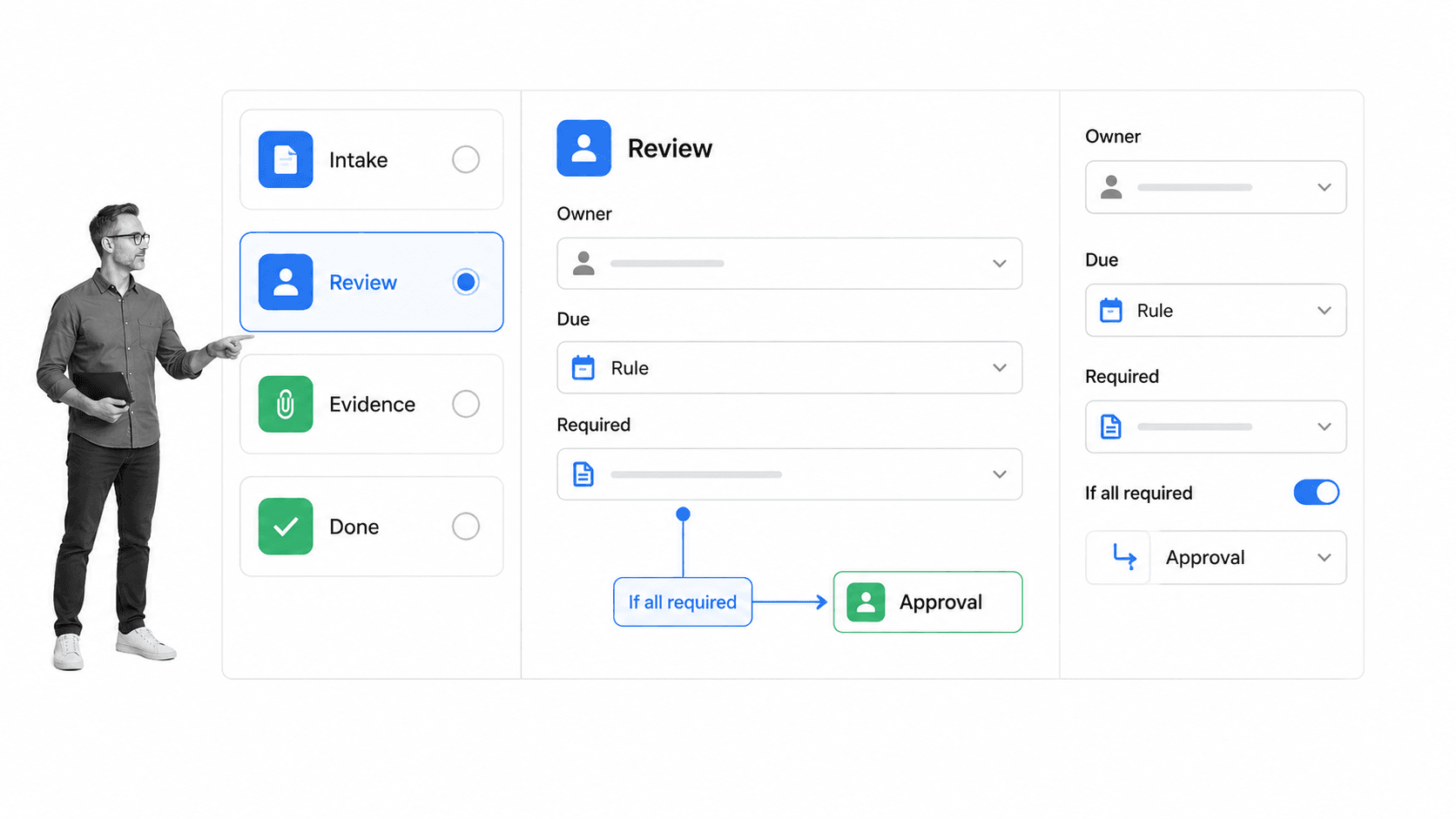
A workflow design is only useful when it makes the important decisions explicit. The surface should expose the controls that determine clarity, accountability, routing, timing, evidence, and change. You should be able to understand why work follows a path without reading hidden code.
Triggers and outcomes
Every workflow needs a clear start and finish. A trigger can be a scheduled date, submitted form, new record, completed workflow, or manual request. The outcome describes what must be true at the end. Clear boundaries stop a workflow from absorbing unrelated work and help you measure whether it delivered the intended result.
Tasks, stages, and sequence
Tasks are the smallest accountable units. The designer should let you add, rename, reorder, group, and remove them quickly. Stages divide a long process into phases such as intake, assessment, review, approval, fulfillment, and closeout. Each task should name one observable outcome rather than a vague responsibility.
Instructions and forms
Instructions place the standard beside the action. Forms capture structured data and proof inside the run. Start from a clear SOP template structure and turn each actionable requirement into a task, field, decision, or approval. Required fields prevent completion when critical evidence is missing.
Owners, roles, and due rules
Every task needs one accountable owner, even when several people contribute. Role-based assignment lets the same design work across teams and locations. Relative due rules are more reusable than fixed dates because they can schedule a task from the workflow start, a previous task, or a business deadline. Escalation rules should make overdue work visible to the person who can resolve it.
Conditional logic and exceptions
Real processes are not straight lines. Conditional logic shows, hides, or routes work based on an answer or completed task. A low-risk request can follow the standard path while a high-risk answer opens extra review. Process Street’s conditional logic documentation recommends building the workflow before adding rules, then running it to test how conditions affect tasks and content.
Approvals and stop points
Approvals create deliberate gates before money, risk, quality, security, or customer commitments move forward. The design should define what is submitted, who reviews it, what approval unlocks, and where rejected work returns. A focused workflow approval is stronger than a vague manager review because it records the decision inside the run.
Automation and agentic actions
Automation handles predictable actions around human judgment: start a run, assign work, update a system, create a record, send a document, or schedule the next cycle. Agentic actions can operate software and complete more complex steps within the workflow’s rules. The design surface should show where automation acts, which information it uses, and what human control applies.
Versions and change control
Editing and publishing should be distinct. Builders need a safe place to change the design, while operators need confidence that the current version is intentional. Version history, review, approval, and audit records matter when a workflow carries policy or regulatory consequences. A change should never reach live work without a clear release decision.
How to design a workflow step by step
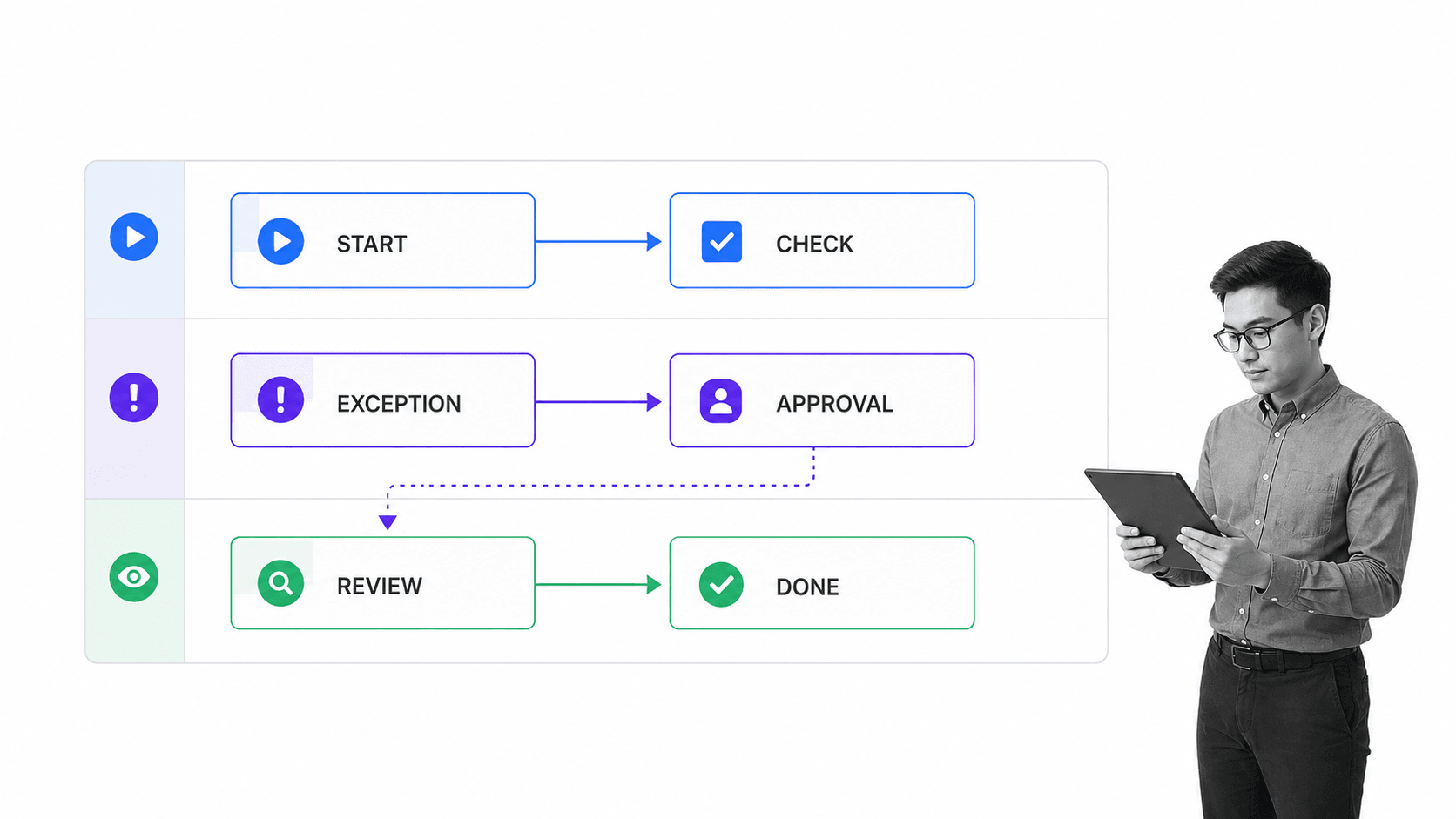
Good workflow design begins with reality, not a blank canvas. Build the smallest complete path, test it with the people who do the work, then add controls and automation where they remove risk or effort. The goal is a workflow that is easy to follow under normal conditions and resilient when exceptions appear.
1. Define the trigger and outcome
Write one sentence for when the workflow begins and one for the result it must produce. A vendor review might start when a request is submitted and end when the vendor is approved, rejected, or returned for more information. If the boundary is unclear, the workflow will collect steps that belong elsewhere.
2. Observe the current work
Talk to the people who perform the process. Trace the actual path, including waiting, duplicate entry, side messages, workarounds, and exceptions. A workflow planner helps capture triggers, inputs, owners, dependencies, decisions, systems, and outcomes before tool configuration begins.
3. Build the happy path
Add the main stages and tasks in sequence. Keep each task small enough to assign and clear enough to complete. Do not add every exception yet. The happy path should reach the outcome without branches so the team can test whether the core sequence is complete.
4. Add the information model
For each task, decide what the worker needs to know and what the organization needs to capture. Add instructions, links, files, form fields, and required evidence. Use structured fields when the answer will drive routing, reporting, or automation. Free text is flexible, but it is harder to validate and reuse.
5. Assign ownership and timing
Give every task one owner or role. Then set timing relative to the trigger or previous work. Check every handoff for ambiguity. A task that belongs to everyone often belongs to no one, and a deadline without an escalation path becomes a silent delay.
6. Add decisions and exception paths
Identify the few conditions that genuinely change the process. Build an explicit route for each material exception, including where rejected work returns. An incident response workflow shows why severity can change ownership, urgency, evidence, and approval without requiring a separate process for every case.
7. Place controls at risk points
Use required evidence, approvals, permissions, and stop points where a skipped decision could create harm. Process Street supports single, multi-stage, and sequential approvals, which lets the workflow match the importance of the decision. Avoid approving everything. Controls should protect specific risks, not create ceremonial delay.
8. Connect automation after the path works
Automate stable, predictable transfers after the human path is clear. Record which data enters the action, what system changes, what success looks like, and who handles failure. This keeps automation understandable and prevents a hidden rule from becoming the only person who knows how the process works.
9. Test every important route
Run the workflow with realistic data. Test the normal path, each important branch, a rejected approval, missing required evidence, an overdue task, and a reassignment. Ask someone who did not build the workflow to complete a run. Their questions reveal unclear instructions and invisible assumptions.
10. Publish, monitor, and improve
Publish the tested design, then watch real runs for repeated delays, reopened work, skipped fields, and steps completed outside the system. Use workflow optimization to turn those signals into targeted changes. A workflow is an operating product. It should improve as policies, systems, risks, and customer expectations change.
Workflow design software vs adjacent tools
Several tool categories can draw boxes and arrows, but they solve different parts of the problem. The right choice depends on whether you need to explain the process, coordinate one project, or execute a repeatable operating standard.
Diagramming software
Diagramming software is useful for discovery, communication, and formal process models. A visual surface such as the Miro workflow design tool can show actors, steps, and decisions, but the diagram is usually not the work itself. Workflow design software connects the model to tasks, owners, fields, rules, approvals, actions, and run history.
Project management software
Project management software coordinates work toward a changing deliverable. It excels at backlogs, timelines, milestones, and collaboration. Workflow design software is built for repeated processes where the same control logic should govern each new case. A project can contain several workflows, and a workflow can support many projects.
Workflow builder and workflow editor
A workflow builder emphasizes creating a workflow. A workflow editor emphasizes changing it. Workflow design software covers the larger discipline: discovery, modeling, configuration, testing, publishing, monitoring, and improvement. In many platforms, the builder and editor are the same surface. A workflow editor should still connect design choices to executable work.
Business process management systems
A business process management system can span modeling, orchestration, analysis, integration, and governance across complex enterprises. Microsoft business process flows illustrate how stages and required steps can guide people toward a defined outcome. Workflow design software may be simpler and more accessible to operations teams. The practical test is whether process owners can maintain the design without creating an IT bottleneck.
Common workflow design use cases
The strongest use cases are repeated, cross-functional, and consequential. They involve handoffs, required information, exceptions, approvals, or proof that the correct work happened.
Employee and customer onboarding
Onboarding combines forms, role-based tasks, deadlines, dependencies, and exceptions. A new hire onboarding workflow can adjust tasks by location, department, employment type, or equipment needs while preserving one governed design. A client onboarding workflow can coordinate sales, finance, implementation, and customer success around one handoff.
Vendor, risk, and compliance reviews
Vendor reviews need intake data, evidence, risk-based routing, approvals, remediation, and a decision record. A vendor management workflow can route high-risk responses into deeper review and prevent release until required proof and approval are present.
Finance and operational cycles
Monthly close, expense review, procurement, access review, and recurring quality checks benefit from relative due dates, standardized evidence, separation of duties, approvals, and escalation. The design becomes the operating control rather than a document people must remember to consult.
Incident and exception handling
Incident workflows must work under pressure. Severity should control response time, ownership, communication, evidence, and escalation. Designing the exception path before an incident reduces improvisation and makes the resulting audit trail more reliable.
How to choose workflow design software
Choose from a real process, not a feature checklist. A polished canvas means little if the workflow cannot handle your owners, evidence, exceptions, controls, connected systems, and change process.
Test the full design-to-execution loop
Build one representative workflow, start a run, complete tasks as different roles, trigger an exception, reject an approval, attach evidence, and inspect the history. The evaluation should prove that design decisions reach live work and produce a trustworthy record.
Evaluate usability for process owners
The people who understand the process should be able to maintain it. Test task editing, field configuration, assignments, due rules, branches, approvals, and publishing. If every change requires a specialist, the workflow will drift from reality as the business changes.
Inspect governance and permissions
Ask who can edit, review, publish, run, and see each workflow. Check version history, change records, task permissions, required evidence, and approval behavior. High-stakes processes need control by design, not a promise that users will remember the policy.
Test one difficult exception
Do not evaluate only the normal route. Test missing information, a high-risk response, a rejected approval, an unavailable owner, and an automation failure. The return path reveals whether the platform handles reality or only looks good in a demonstration.
Check integrations and agentic capability
Workflow design crosses systems. Confirm how the platform reads and writes data, authenticates, handles errors, and preserves human oversight. Process Street has direct, universal integrations to 5,000+ systems. Need a new one? An AI agent builds it on the fly. That coverage matters when the designed process must act across the tools your team already uses.
Measure improvement, not just completion
Look for run status, overdue work, task history, outcomes, and structured field data. The platform should help process owners find bottlenecks and repeated exceptions, then change the workflow safely. Design and measurement belong in the same improvement loop.
Use Process Street for workflow design and execution
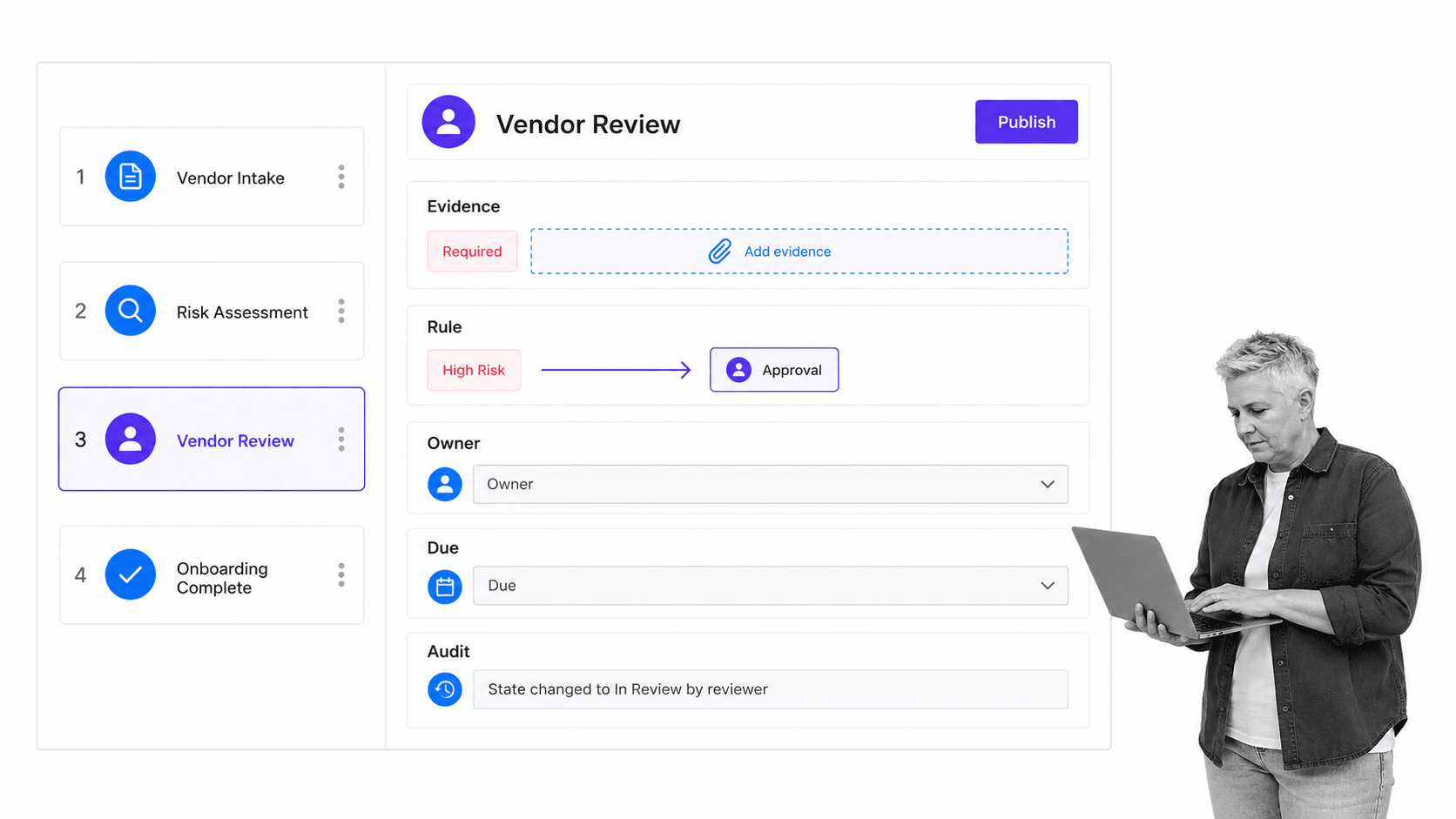
Process Street is becoming an agentic process automation platform for high-stakes operations. It connects workflow design to controlled execution, so the same system that defines the tasks, data, routing, approvals, and automation also records what happened in every run.
The workflow creation and editing guide shows how builders add tasks, AI tasks, headings, approvals, automation, conditional logic, stops, assignments, form fields, and dynamic due dates. Those controls let a process owner turn a procedure into a reusable workflow without separating the design from the people and agents who execute it.
Process Street is especially useful when a workflow must enforce a standard and prove the result. Required evidence blocks incomplete work. Conditional logic routes exceptions. Approval tasks establish decision gates. Permissions control who can change or see the process. Run history preserves the sequence of actions and decisions.
You can start from the workflow template library or import an existing procedure, then adapt the trigger, tasks, roles, data, decisions, approvals, and automation to match the real process. Test every important route before publishing, then review live runs and improve the design from evidence.
The result is more than a diagram. It is an operating design that assigns work, controls risk, coordinates systems, supports agentic action, and creates proof. Design defines how the process should run. Execution shows whether it did.
FAQs
What is workflow design software?
Workflow design software is a visual system for modeling, configuring, testing, publishing, and maintaining repeatable workflows. It turns a process into tasks, owners, fields, rules, approvals, automation, and live runs that can be tracked and improved.
What is the difference between workflow design software and diagramming software?
Diagramming software explains how a process flows. Workflow design software makes the process executable by adding assignments, due rules, required data, conditional routing, approvals, automation, permissions, and run history.
What features should workflow design software include?
Look for visual task design, forms, role assignments, dynamic due dates, conditional logic, approvals, permissions, automation, integrations, version control, run history, and reporting. The right combination depends on the risk and complexity of the process you are designing.
How do you design a workflow?
Define the trigger and outcome, observe the current work, build the main sequence, add information and ownership, design exception paths, place controls at risk points, connect automation, and test every important route. Publish only after someone who did not build the workflow can complete it successfully.
Can workflow design software automate work?
Yes. Workflow design software can trigger runs, assign tasks, apply rules, update systems, send documents, schedule recurring work, and support agentic actions. Automation should remain visible in the design so owners can understand its inputs, outcomes, and failure path.
Can Process Street be used for workflow design?
Yes. Process Street lets teams design task sequences, forms, assignments, due dates, conditional logic, approvals, stops, permissions, automation, and integrations in one workflow. Teams then run that design repeatedly and use the resulting history and evidence to improve it.
