


Turn every policy into automated workflows with built-in enforcement and audit-ready proof.


8 Best Tettra Alternatives & Competitors
Last updated:

Tettra alternatives solve several different problems that are often grouped under knowledge management. Tettra itself is a focused internal knowledge base with AI answers, Slack support, page requests, verification, stale-content reporting, version history, and external sharing. That is a useful combination for teams that want a maintained source of internal answers without adopting a broad collaboration suite.
Teams still compare Tettra alternatives when the operating job changes. Some need governed search across many enterprise systems. Some want a flexible workspace that combines docs, databases, and projects. Others need a formal customer knowledge base, a deeply customized portal, or a lightweight wiki. And many discover that their main problem is not finding the SOP. It is making sure the SOP is followed every time.
This comparison separates those jobs instead of pretending every knowledge tool is interchangeable. It ranks Process Street first for enforceable, trackable, recurring process and SOP workflows. It also names the situations where Guru, Notion, Confluence, Slite, Document360, Nuclino, or Helpjuice is the more honest fit. No synthetic ratings are used, and factual product claims come from current official vendor pages.
The evaluation criteria are core capability fit, knowledge governance, search and discoverability, ease of ownership, workflow enforcement, publishing model, and pricing clarity. This list is editorially maintained by the Process Street team and compared using current primary sources. Filenames, image titles, captions, and alt text remain evergreen.
In this article, we are going to cover:
- What is Tettra?
- Tettra alternatives at a glance
- How we picked these Tettra alternatives
- Best Tettra alternatives and competitors
- How to choose a Tettra alternative
- Tettra alternatives FAQs
- Start with controlled execution
What is Tettra?
Tettra is an internal knowledge-management product designed to help teams capture, verify, organize, and retrieve company knowledge. Its official pricing page currently presents a Scaling plan and an Enterprise option, with AI answers, Slack support, Google Workspace integration, analytics, an application programming interface, version history, page requests, verification, stale-page reporting, and external sites among the listed capabilities.
That makes Tettra a sensible baseline for a small or mid-sized team whose central problem is repetitive questions and stale internal documentation. The product is more focused than a broad collaboration suite, and its knowledge-management dashboard gives owners a defined place to handle requests, verified pages, stale pages, unowned content, and public content. Buyers should treat those jobs as the benchmark when evaluating the alternatives below.
Tettra is not ranked as one of its own alternatives. It is the incumbent being compared. The real decision is whether your team still needs a focused internal knowledge base or has moved into a different category, such as governed enterprise search, flexible workspaces, customer documentation, or controlled process execution.
Tettra alternatives at a glance
Process Street leads for teams that need knowledge to drive controlled recurring work. Guru leads when governed answers must span many enterprise systems. Notion and Confluence fit broader collaborative workspaces. Slite emphasizes maintained internal knowledge. Document360 and Helpjuice are stronger publishing platforms. Nuclino is the simplest lightweight wiki in the set.
| Tool | Best for | Standout feature | Free plan | Starting price |
|---|---|---|---|---|
| Process Street | enforceable, trackable, recurring process and SOP workflows | workflow runs with required tasks, approvals, conditional logic, and audit history | 14-day Pro trial | See pricing page |
| Guru | governed enterprise knowledge and cited AI answers | permission-aware knowledge agents, verification workflows, and unified search | No public free plan | Custom quote |
| Notion | flexible docs, wikis, databases, projects, and lightweight team systems | connected pages, databases, verified wikis, enterprise search, and AI | Yes | $10/member/month for Plus |
| Confluence | structured team knowledge in the Atlassian ecosystem | spaces, page trees, versioning, whiteboards, databases, permissions, and Rovo | Yes, up to 10 users | $5.42/user/month for Standard |
| Slite | a focused internal knowledge base that stays accurate | collaborative docs, AI search, verification, maintenance, citations, and auditability | No permanent free plan | $10/user/month billed yearly |
| Document360 | customer and internal knowledge bases with publishing governance | authoring, revision history, reusable content, public or private projects, search, and analytics | Trial available | Custom quote |
| Nuclino | fast, lightweight internal docs and collaborative knowledge | real-time documents with list, board, table, and graph views | Yes, up to 50 items | See pricing page |
| Helpjuice | deeply customized customer or internal knowledge bases | custom design, collaboration, version history, search, analytics, localization, and AI options | 14-day trial | $249/month |
How we picked these Tettra alternatives
We evaluated these products by the operational job they are built to own, not by the number of boxes on a feature grid. The first test was whether a product is primarily a wiki, a governed answer layer, a documentation publishing platform, a flexible work operating system, or a recurring workflow engine. Products were then compared on knowledge freshness, ownership, permissions, search, content lifecycle, execution controls, pricing transparency, and how easily a real team can maintain the system after launch.
The ranking is intentionally fit-based. Process Street earns first place for the ideal customer profile defined by this page: operations, human resources, finance, onboarding, quality, and compliance-adjacent teams that need a documented standard to become enforced recurring work. The ranking does not claim Process Street is a better public help center than Document360 or Helpjuice, a more flexible wiki than Notion, or a tighter Atlassian companion than Confluence.
Before choosing, write down which outcome matters: fewer repeated questions, better knowledge freshness, a branded self-service site, connected project context, or controlled workflow execution. That single decision prevents the common mistake of buying a wiki for a workflow problem or buying a workflow platform for a documentation-only requirement.
Best Tettra alternatives and competitors
1. Process Street

Best for: enforceable, trackable, recurring process and SOP workflows.
Process Street ranks first because many teams searching for Tettra alternatives have reached the point where finding the answer is no longer enough. They need the procedure to run. Process Street turns a documented standard into a workflow with a trigger, responsible roles, required tasks, structured fields, files, due dates, decisions, and a clear finish state. Every run becomes a separate record of what happened for a particular employee, customer, vendor, audit, request, or case.
That execution model fits operations, human resources, finance, quality, onboarding, customer delivery, and compliance-adjacent teams. A wiki page can explain a vendor review, for example, but the real work requires someone to collect the questionnaire, assess risk, route exceptions, approve the decision, store evidence, and complete the review on schedule. Process Street keeps those actions with the standard instead of asking people to translate a page into a new project every time.
The controls are practical. Required fields prevent incomplete handoffs. Conditional logic changes the path when an answer or risk condition changes. Approval tasks keep the decision, context, comments, and outcome inside the workflow. Role assignments, enforced order, dynamic due dates, scheduled runs, and automations help the procedure become the default way the work happens.
Process Street also supports integrations with the systems where teams already work. That matters when an SOP crosses multiple tools. A workflow can coordinate forms, records, messages, files, and decisions without turning the knowledge base into a brittle set of manual handoffs. The goal is not to replace every source of reference content. It is to give recurring work one governed operating surface.
The strongest evaluation starts with a real process, not a polished demonstration. Choose a workflow that includes at least one required input, one conditional branch, one approval, several role-based owners, a file or evidence item, and a deadline. Run it twice with different answers. The test should show that each run follows the right path, prevents incomplete work, exposes current status, and leaves a history that another person can audit later.
For current package information, use the Process Street pricing page. The page offers a 14-day Pro trial and describes Startup, Pro, and Enterprise plan tracks. Process Street does not publish a durable starting-dollar figure for this comparison, so the table links to the current source instead of baking in a number that could become stale.
Key Process Street features:
- Workflow runs with owners, tasks, due dates, and structured information
- Conditional logic for exceptions and risk-based paths
- Approval tasks with decisions and comments in context
- Required fields, files, and evidence inside each run
- Recurring schedules, integrations, automation, and run history
- Access controls and reporting for shared operational programs
Process Street pros:
- Turns SOPs into active work rather than passive reference pages
- Creates a traceable record for every run
- Works across departments without forcing every process into a project model
- Keeps approvals, evidence, owners, and exceptions together
- Readable enough for business operators to own and improve
Process Street cons:
- Not a public customer help-center or developer-documentation platform
- A simple wiki may be lighter for teams that only need reference pages
- Sales-led pricing may not suit individuals seeking a self-serve personal wiki
Choose Process Street if the failure mode is missed steps, inconsistent execution, weak ownership, or missing proof. Skip it if the only job is publishing and searching a static library of reference articles. In that case, a focused knowledge product below may fit better.
Bottom line: Process Street is the best overall Tettra alternative for teams whose knowledge needs to become enforceable recurring work, while dedicated wiki and knowledge-base products remain better for documentation-only jobs.
2. Guru
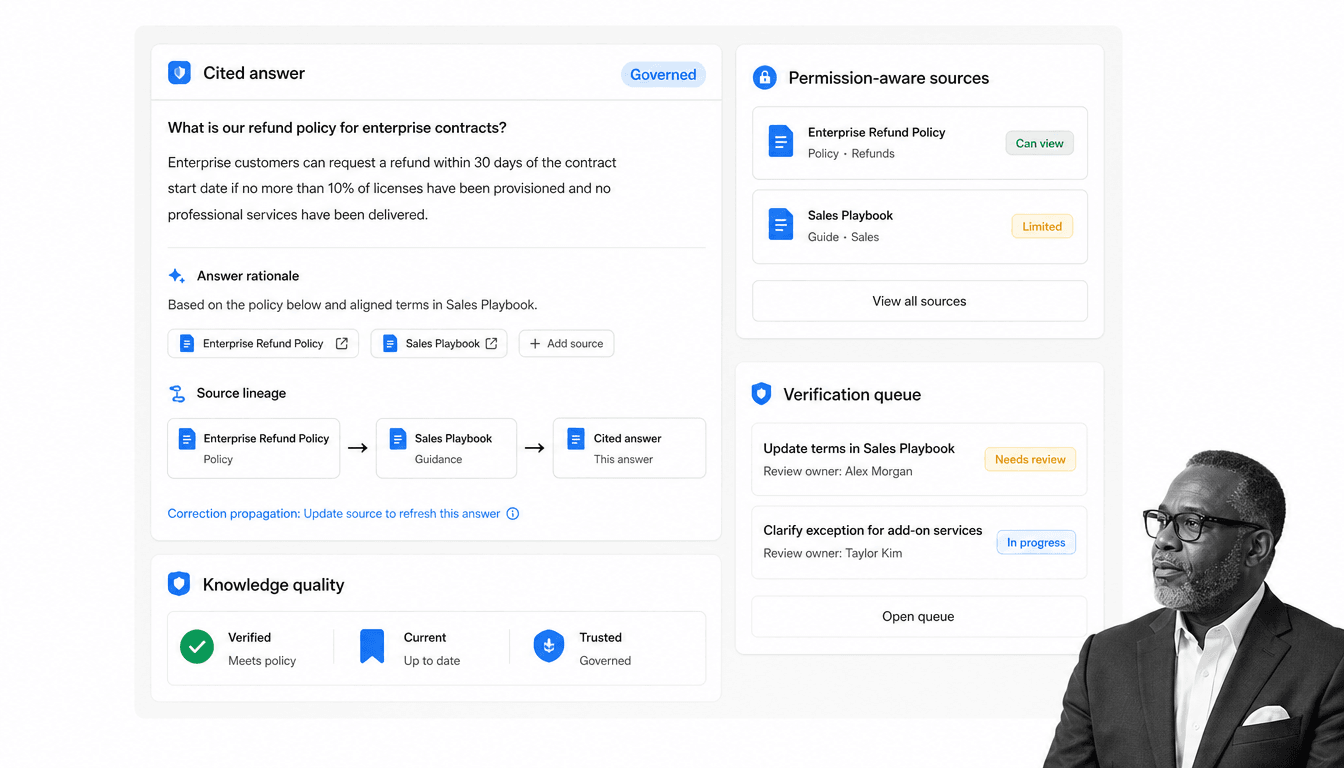
Best for: governed enterprise knowledge and cited AI answers.
Guru approaches knowledge as a governed layer that sits across the company’s existing systems. Its official product pages describe a unified index, permission-aware ingestion, knowledge agents with citations, verification workflows, automated quality maintenance, and centralized governance. That makes Guru a serious choice for larger organizations whose information is scattered across many repositories and whose employees need trusted answers without knowing which repository owns the source.
The product is less about a single tidy wiki and more about improving the reliability of the knowledge network. Source permissions carry through, answers include lineage, and reviewers can verify material before it becomes trusted knowledge. This orientation can be more suitable than Tettra for an enterprise knowledge program that spans many systems and wants a formal operating model around accuracy, access, and AI-assisted retrieval.
Guru beats Process Street when the main job is answering questions from governed knowledge across many tools. Process Street beats Guru when the knowledge has to become a recurring, assigned workflow with required steps, approvals, evidence, due dates, and a distinct execution record for every case.
How to evaluate Guru
Test Guru with representative content, not a clean demo workspace. Import an outdated policy, a frequently asked question, a procedure with several owners, and a document whose access should be restricted. Ask a new employee to find the correct answer, ask an editor to update it, and ask an administrator to prove which version is current. The result should expose both search quality and the ongoing work required to keep the knowledge trustworthy.
Then test the boundary between knowledge and execution. Take the same procedure and ask who owns the next real instance, which information is required, what happens when an exception appears, who approves it, and where completion evidence lives. Guru can be the honest winner for its specialist knowledge job even when a separate workflow layer is still needed. That boundary should be explicit before migration, not discovered after the wiki is full.
Key Guru features:
- Unified knowledge index across connected sources
- Permission-aware ingestion and cited answers
- Knowledge agents and AI search
- Verification workflows and quality signals
- Centralized governance, permissions, and audit trails
Guru pros:
- Strong fit for enterprise knowledge governance
- Citations and lineage improve answer trust
- Works across existing repositories rather than forcing an immediate migration
- Verification and quality operations are built into the knowledge model
Guru cons:
- Custom pricing requires a sales conversation
- Knowledge retrieval does not replace workflow execution
- Can be more program-heavy than a small team needs
For current package details, see Guru pricing. The comparison table records the pricing model visible on the vendor’s official page during this run, but the source page should always win because packages can change.
Choose Guru if guru is the better fit when trusted answers across many systems matter more than running a recurring SOP. Skip it if your primary requirement is a recurring, controlled workflow that assigns work, requires evidence, routes decisions, and preserves a separate execution record.
Bottom line: Guru is a credible Tettra alternative for governed enterprise knowledge and cited AI answers, but it should be judged on that specialist fit rather than on a generic feature count.
3. Notion

Best for: flexible docs, wikis, databases, projects, and lightweight team systems.
Notion combines docs, wikis, databases, projects, calendars, forms, and AI in one flexible workspace. Its strength is composability. A team can build a company wiki, connect policies to project databases, create views for different audiences, and keep meeting notes or operating plans near the related work. Official Notion materials also describe verified wiki pages, enterprise search, and AI features that work across the workspace and connected applications.
That flexibility is attractive for teams that find a dedicated knowledge base too narrow. A startup can use the same workspace for reference content, product plans, lightweight project tracking, and internal databases. The tradeoff is that flexibility does not automatically create process control. A well-designed page can explain a procedure, but it does not by itself require a person to complete each step in order, collect evidence, or preserve a separate run record.
Notion beats Process Street when the team wants to shape a broad, flexible workspace that blends documents, databases, and projects. Process Street is stronger when the organization already knows the procedure and needs it enforced every time.
How to evaluate Notion
Test Notion with representative content, not a clean demo workspace. Import an outdated policy, a frequently asked question, a procedure with several owners, and a document whose access should be restricted. Ask a new employee to find the correct answer, ask an editor to update it, and ask an administrator to prove which version is current. The result should expose both search quality and the ongoing work required to keep the knowledge trustworthy.
Then test the boundary between knowledge and execution. Take the same procedure and ask who owns the next real instance, which information is required, what happens when an exception appears, who approves it, and where completion evidence lives. Notion can be the honest winner for its specialist knowledge job even when a separate workflow layer is still needed. That boundary should be explicit before migration, not discovered after the wiki is full.
Key Notion features:
- Connected docs, wikis, and databases
- Verified pages and page ownership
- Projects, calendars, forms, and multiple database views
- Enterprise search across the workspace and connected tools
- AI assistance and custom agents on eligible plans
Notion pros:
- Highly flexible information architecture
- Good consolidation option for docs and lightweight work management
- Large template and community ecosystem
- Free plan provides a practical way to test the workspace
Notion cons:
- Flexibility can produce inconsistent structures
- Static pages do not enforce recurring process execution
- Governance can require disciplined workspace design
For current package details, see Notion pricing. The comparison table records the pricing model visible on the vendor’s official page during this run, but the source page should always win because packages can change.
Choose Notion if notion is the better fit when teams want to design a flexible workspace that blends knowledge with databases and projects. Skip it if your primary requirement is a recurring, controlled workflow that assigns work, requires evidence, routes decisions, and preserves a separate execution record.
Bottom line: Notion is a credible Tettra alternative for flexible docs, wikis, databases, projects, and lightweight team systems, but it should be judged on that specialist fit rather than on a generic feature count.
4. Confluence

Best for: structured team knowledge in the Atlassian ecosystem.
Confluence is a structured knowledge workspace built around spaces, pages, page trees, templates, whiteboards, databases, macros, version history, permissions, and integrations. The free plan supports up to ten users, while paid plans add stronger permissions, public links, audit logs, storage, analytics, automation, and enterprise administration. It is especially natural for organizations that already use Jira and other Atlassian products.
Compared with Tettra, Confluence offers a broader collaboration surface and a much larger ecosystem. Teams can keep project plans, technical decisions, policies, meeting notes, and structured databases in one environment. That breadth can also make it heavier. A company that only wants a clean internal question-and-answer knowledge base may find that it is buying and administering a larger platform than it needs.
Confluence beats Process Street when page hierarchy, whiteboards, databases, Jira relationships, and the Atlassian ecosystem are central. Process Street wins when the primary risk is not finding the page but failing to execute the documented procedure correctly.
How to evaluate Confluence
Test Confluence with representative content, not a clean demo workspace. Import an outdated policy, a frequently asked question, a procedure with several owners, and a document whose access should be restricted. Ask a new employee to find the correct answer, ask an editor to update it, and ask an administrator to prove which version is current. The result should expose both search quality and the ongoing work required to keep the knowledge trustworthy.
Then test the boundary between knowledge and execution. Take the same procedure and ask who owns the next real instance, which information is required, what happens when an exception appears, who approves it, and where completion evidence lives. Confluence can be the honest winner for its specialist knowledge job even when a separate workflow layer is still needed. That boundary should be explicit before migration, not discovered after the wiki is full.
Key Confluence features:
- Spaces, pages, and structured page trees
- Templates, whiteboards, databases, and macros
- Page versioning and paid-plan permissions
- Rovo search, chat, and agents on eligible plans
- Jira and Atlassian ecosystem integration
Confluence pros:
- Strong fit for Atlassian-centered organizations
- Broad collaboration and documentation surface
- Free option for small teams
- Mature permissions and enterprise administration
Confluence cons:
- Can feel heavy for a simple internal knowledge base
- Page documentation does not enforce an SOP run
- Advanced administration and governance can add complexity
For current package details, see Confluence pricing. The comparison table records the pricing model visible on the vendor’s official page during this run, but the source page should always win because packages can change.
Choose Confluence if confluence is the better fit when Jira alignment, page hierarchy, whiteboards, and a broad app ecosystem lead the decision. Skip it if your primary requirement is a recurring, controlled workflow that assigns work, requires evidence, routes decisions, and preserves a separate execution record.
Bottom line: Confluence is a credible Tettra alternative for structured team knowledge in the Atlassian ecosystem, but it should be judged on that specialist fit rather than on a generic feature count.
5. Slite
Best for: a focused internal knowledge base that stays accurate.
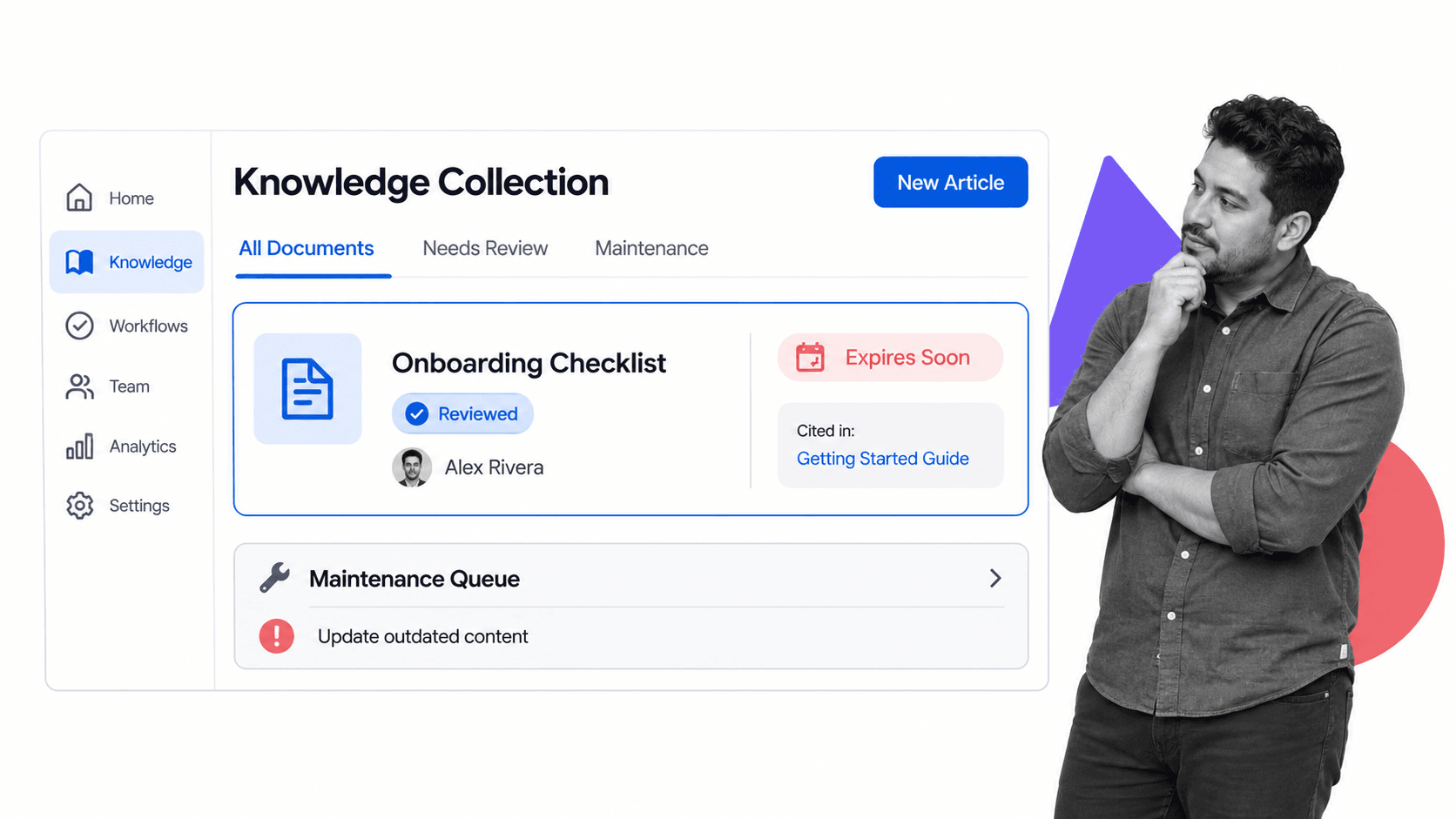
Slite is a focused internal knowledge base built around collaborative documents, search, verification, owners, review states, maintenance, citations, and AI-assisted answers. Its current product messaging emphasizes a knowledge base that stays accurate, with agents that can identify drift and propose changes while keeping people in the approval loop. The interface is narrower than a broad work operating system, which can make adoption easier for teams that mainly need trustworthy internal knowledge.
Slite is a strong Tettra alternative when content freshness is the central concern. A team can assign ownership, see review state, use version history, and ask questions across connected material. It is not positioned as a customer-facing help-center platform or as a full operational workflow engine. That clearer boundary can be helpful for a lean team that wants the knowledge layer to do one job well.
Slite beats Process Street when the need is maintained internal documentation with AI answers and citations. Process Street is stronger when a document must drive recurring action, route decisions, collect files, and leave proof for each execution.
How to evaluate Slite
Test Slite with representative content, not a clean demo workspace. Import an outdated policy, a frequently asked question, a procedure with several owners, and a document whose access should be restricted. Ask a new employee to find the correct answer, ask an editor to update it, and ask an administrator to prove which version is current. The result should expose both search quality and the ongoing work required to keep the knowledge trustworthy.
Then test the boundary between knowledge and execution. Take the same procedure and ask who owns the next real instance, which information is required, what happens when an exception appears, who approves it, and where completion evidence lives. Slite can be the honest winner for its specialist knowledge job even when a separate workflow layer is still needed. That boundary should be explicit before migration, not discovered after the wiki is full.
Key Slite features:
- Collaborative documents and collections
- AI search and cited answers
- Owners, review states, and maintenance suggestions
- Version history and auditability
- Security and administration options for larger teams
Slite pros:
- Focused internal knowledge experience
- Freshness and review controls support trust
- Clear published pricing for standard plans
- Less complex than a broad collaboration suite
Slite cons:
- Not designed as a public customer knowledge base
- Does not replace controlled SOP execution
- No permanent free plan is published
For current package details, see Slite pricing. The comparison table records the pricing model visible on the vendor’s official page during this run, but the source page should always win because packages can change.
Choose Slite if slite is the better fit when a lean team wants a focused internal knowledge base with active maintenance and AI answers. Skip it if your primary requirement is a recurring, controlled workflow that assigns work, requires evidence, routes decisions, and preserves a separate execution record.
Bottom line: Slite is a credible Tettra alternative for a focused internal knowledge base that stays accurate, but it should be judged on that specialist fit rather than on a generic feature count.
6. Document360

Best for: customer and internal knowledge bases with publishing governance.
Document360 is a dedicated knowledge-base platform for authoring, organizing, governing, and publishing internal or customer-facing documentation. Its official pricing and documentation pages list Markdown and rich editors, revision history, category management, public and private projects, reusable content blocks, global find and replace, glossary management, search, analytics, security, and integrations. Current packages are tailored through a custom quote.
This focus makes Document360 a better Tettra alternative when the knowledge base itself is a formal publishing program. A documentation team can manage article structure, reuse approved snippets, operate multiple projects, and provide a branded self-service site. The product also offers AI-assisted authoring and search capabilities, but the decision should still start with the content lifecycle and audience rather than a generic AI checklist.
Document360 beats Process Street for a dedicated help center, product documentation portal, or multi-project knowledge program. Process Street is better when the documented standard needs to become a controlled, repeatable workflow with owners and evidence.
How to evaluate Document360
Test Document360 with representative content, not a clean demo workspace. Import an outdated policy, a frequently asked question, a procedure with several owners, and a document whose access should be restricted. Ask a new employee to find the correct answer, ask an editor to update it, and ask an administrator to prove which version is current. The result should expose both search quality and the ongoing work required to keep the knowledge trustworthy.
Then test the boundary between knowledge and execution. Take the same procedure and ask who owns the next real instance, which information is required, what happens when an exception appears, who approves it, and where completion evidence lives. Document360 can be the honest winner for its specialist knowledge job even when a separate workflow layer is still needed. That boundary should be explicit before migration, not discovered after the wiki is full.
Key Document360 features:
- Markdown and rich-text authoring
- Article revision history and category management
- Public and private knowledge-base projects
- Reusable content blocks and glossary management
- Search, analytics, security, and AI options
Document360 pros:
- Purpose-built for formal documentation programs
- Supports internal and external knowledge bases
- Strong content reuse and revision tools
- Dedicated publishing and analytics capabilities
Document360 cons:
- Custom pricing is not immediately transparent
- A publishing workflow is not the same as operational process execution
- Can be more platform than a small internal wiki requires
For current package details, see Document360 pricing. The comparison table records the pricing model visible on the vendor’s official page during this run, but the source page should always win because packages can change.
Choose Document360 if document360 is the better fit when a dedicated public or private knowledge base and publishing program are the center of the work. Skip it if your primary requirement is a recurring, controlled workflow that assigns work, requires evidence, routes decisions, and preserves a separate execution record.
Bottom line: Document360 is a credible Tettra alternative for customer and internal knowledge bases with publishing governance, but it should be judged on that specialist fit rather than on a generic feature count.
7. Nuclino

Best for: fast, lightweight internal docs and collaborative knowledge.
Nuclino is a lightweight collaborative workspace where each item is a real-time document that can contain notes, tasks, flowcharts, files, and links. The product offers multiple views, including list, board, table, and graph, so teams can move between a wiki, a simple project view, and a visual relationship map without building a complex information architecture. A free plan supports up to fifty items and three canvases.
Nuclino is a practical Tettra alternative for small teams that value speed and low friction. The editor is deliberately clean, navigation is simple, and the product can serve as a team wiki without requiring a large administration program. Paid plans expand capacity, publishing, version history, storage, administrative controls, and AI or security features.
Nuclino beats Process Street when the requirement is a lightweight place to create and connect internal documents. Process Street is stronger when every occurrence of the procedure needs a named owner, required inputs, deadlines, approvals, and execution history.
How to evaluate Nuclino
Test Nuclino with representative content, not a clean demo workspace. Import an outdated policy, a frequently asked question, a procedure with several owners, and a document whose access should be restricted. Ask a new employee to find the correct answer, ask an editor to update it, and ask an administrator to prove which version is current. The result should expose both search quality and the ongoing work required to keep the knowledge trustworthy.
Then test the boundary between knowledge and execution. Take the same procedure and ask who owns the next real instance, which information is required, what happens when an exception appears, who approves it, and where completion evidence lives. Nuclino can be the honest winner for its specialist knowledge job even when a separate workflow layer is still needed. That boundary should be explicit before migration, not discovered after the wiki is full.
Key Nuclino features:
- Real-time collaborative documents
- List, board, table, and graph views
- Linked items, tasks, files, and embeds
- Publishing and version history on paid plans
- AI, audit, and security options on the Business plan
Nuclino pros:
- Fast and simple for a small team
- Free plan supports a real evaluation
- Multiple views make relationships easy to inspect
- Lower administration burden than many enterprise wikis
Nuclino cons:
- Free plan has item and canvas limits
- Less suited to formal enterprise knowledge governance
- Does not enforce recurring operational workflows
For current package details, see Nuclino pricing. The comparison table records the pricing model visible on the vendor’s official page during this run, but the source page should always win because packages can change.
Choose Nuclino if nuclino is the better fit when speed, simplicity, and a low-friction internal wiki matter most. Skip it if your primary requirement is a recurring, controlled workflow that assigns work, requires evidence, routes decisions, and preserves a separate execution record.
Bottom line: Nuclino is a credible Tettra alternative for fast, lightweight internal docs and collaborative knowledge, but it should be judged on that specialist fit rather than on a generic feature count.
8. Helpjuice

Best for: deeply customized customer or internal knowledge bases.
Helpjuice is dedicated knowledge-base software for internal and customer documentation, with a strong emphasis on customization. Its official pricing page lists article management, version history, search, analytics, collaboration, localization, access controls, integrations, and publishing workflows. The company also offers hands-on design customization, which is unusual in a category where many products expect customers to style the portal themselves.
For a team replacing Tettra because it needs a branded customer portal or a highly customized internal knowledge experience, that service model can be valuable. The current entry package includes a fixed user allowance and core knowledge-base features, while higher packages expand users, storage, single sign-on, and AI tools. The published monthly package price is higher than many per-seat internal wiki plans, so buyers should compare total audience size and customization needs rather than the headline alone.
Helpjuice beats Process Street when the knowledge base must look and behave like a customized publishing destination. Process Street is stronger when the content must control recurring work, route approvals, capture evidence, and create a separate audit trail for each case.
How to evaluate Helpjuice
Test Helpjuice with representative content, not a clean demo workspace. Import an outdated policy, a frequently asked question, a procedure with several owners, and a document whose access should be restricted. Ask a new employee to find the correct answer, ask an editor to update it, and ask an administrator to prove which version is current. The result should expose both search quality and the ongoing work required to keep the knowledge trustworthy.
Then test the boundary between knowledge and execution. Take the same procedure and ask who owns the next real instance, which information is required, what happens when an exception appears, who approves it, and where completion evidence lives. Helpjuice can be the honest winner for its specialist knowledge job even when a separate workflow layer is still needed. That boundary should be explicit before migration, not discovered after the wiki is full.
Key Helpjuice features:
- Custom knowledge-base design and theming
- Article editor, version history, and publish approval
- Search, analytics, and content feedback
- Localization and translation options
- AI writer, search, chatbot, and tutorial tools on eligible packages
Helpjuice pros:
- Deep customization for branded knowledge bases
- Works for internal and customer audiences
- Published package pricing gives buyers a starting point
- Migration and support services reduce implementation burden
Helpjuice cons:
- Entry pricing can be high for a small internal team
- AI options sit on higher packages
- Knowledge publishing does not replace SOP execution
For current package details, see Helpjuice pricing. The comparison table records the pricing model visible on the vendor’s official page during this run, but the source page should always win because packages can change.
Choose Helpjuice if helpjuice is the better fit when a branded, standalone knowledge base and customization service outweigh workflow execution. Skip it if your primary requirement is a recurring, controlled workflow that assigns work, requires evidence, routes decisions, and preserves a separate execution record.
Bottom line: Helpjuice is a credible Tettra alternative for deeply customized customer or internal knowledge bases, but it should be judged on that specialist fit rather than on a generic feature count.
How to choose a Tettra alternative
Choose the operating model before the vendor. If people mainly need answers, prioritize search quality, citations, content ownership, verification, and permissions. If the audience is external, prioritize publishing, branding, localization, analytics, and self-service. If the team wants one adaptable workspace, prioritize page and database flexibility. If a procedure has to be followed for every hire, review, request, audit, or customer, prioritize workflow controls and execution history.
- Choose Process Street for recurring SOP execution, approvals, evidence, and run history.
- Choose Guru for governed enterprise answers across many repositories.
- Choose Notion for a flexible combination of docs, wikis, databases, and projects.
- Choose Confluence for structured knowledge in the Atlassian ecosystem.
- Choose Slite for a focused internal knowledge base with active maintenance.
- Choose Document360 for governed internal or customer documentation publishing.
- Choose Nuclino for a fast, lightweight internal wiki.
- Choose Helpjuice for a deeply customized standalone knowledge base.
A hybrid stack can be the right answer. A company may keep customer documentation in a dedicated portal, internal reference pages in a wiki, and recurring procedures in Process Street. The boundary should be clear: reference content explains the standard, while the workflow controls the live instance of work. Teams formalizing that distinction can also review what process documentation must capture, workflow document management software, and policy management software without turning those links into editorial commentary.
During migration, inventory content owners, review dates, permissions, repeated questions, recurring processes, approvals, forms, and evidence. Move reference material to the knowledge surface that people will maintain. Turn recurring procedures into workflows. A standard operating procedure template, employee onboarding checklist, internal audit procedure, vendor management process, and process improvement plan can provide concrete migration tests.
Tettra alternatives FAQs
What is the best Tettra alternative?
Process Street is the best Tettra alternative for teams that need recurring SOPs to become enforceable workflow runs with owners, required information, approvals, evidence, and history. Guru can fit better for governed enterprise answers, Notion or Confluence for flexible wikis, and Document360 or Helpjuice for dedicated publishing.
Is there a free Tettra alternative?
Yes. Notion, Confluence, and Nuclino publish free plans, each with different limits. Free plans are useful for testing editing and organization, but buyers should also test permissions, content ownership, review workflows, exports, and the controls required for the real operating job.
What is the closest alternative to Tettra?
Slite is one of the closest focused internal knowledge-base alternatives because it emphasizes collaborative docs, search, ownership, review state, and freshness. Guru is closer for larger governed knowledge programs. Notion and Confluence are broader workspaces rather than direct one-for-one replacements.
What is the best Tettra alternative for small teams?
Nuclino, Notion, and Confluence provide approachable options for small teams, including published free plans. Process Street is the stronger choice when even a small team needs recurring procedures to run with owners, approvals, evidence, and a traceable result.
What is the best Tettra alternative for enterprise knowledge?
Guru is a strong specialist for governed enterprise knowledge across many systems, with permission-aware ingestion, citations, verification, and centralized governance. Confluence also fits enterprises invested in Atlassian. Process Street fits when the enterprise requirement is controlled execution rather than answer retrieval.
Can a Tettra alternative manage customer-facing documentation?
Yes. Document360 and Helpjuice are the clearest customer-facing knowledge-base options in this comparison. They focus on publishing, search, branding, analytics, localization, and content governance. Process Street supports the internal workflows behind documentation but is not the public portal itself.
How do you migrate from Tettra?
Start by separating reference knowledge from recurring work. Export and clean the article library, assign owners, map permissions, remove stale pages, and choose the destination knowledge surface. For each recurring procedure, map the trigger, owners, required fields, decisions, approvals, evidence, and exception paths into a workflow.
Why is Process Street ranked first?
Process Street is ranked first for the ideal customer profile this comparison prioritizes: teams that need enforceable, trackable, recurring process and SOP workflows. It is not the best fit for every documentation use case, and the ranked sections explain when a specialist knowledge product is the more honest choice.
Start with controlled execution
The best Tettra replacement is the one that owns the next operational problem, not the one with the longest feature list. If the main problem is stale or scattered answers, choose the knowledge product that your team will maintain. If the main problem is a branded documentation program, choose the publishing specialist that fits the audience and governance model.
If the real problem is that procedures exist but people still skip steps, choose Process Street. Build one representative workflow, include the required evidence and approval paths, run it with real users, and inspect the history. The result will show whether your team needs another wiki or a system that makes the process happen.
