


Turn every policy into automated workflows with built-in enforcement and audit-ready proof.



Workflow Document Management Software

Workflow document management software connects the document itself to every task, decision, approval, and record around it. Instead of storing a file in one system and coordinating its work through email, chat, and spreadsheets, the software moves the document through a defined lifecycle with owners, rules, due dates, permissions, and proof.
That changes document management from passive storage into an operating system for document work. A contract request can trigger legal review. A policy update can trigger approval and employee acknowledgment. A procedure revision can trigger training and a scheduled review. Each document keeps its context as it moves, so the team knows what is current, who owns the next step, and what happened before.
This guide explains how the category works, the capabilities that matter, the best first use cases, how to evaluate software, and how to implement a document management workflow without creating another disconnected repository.
In this article, we are going to cover:
- What is workflow document management software?
- How the document lifecycle becomes a workflow
- Core capabilities of workflow document management software
- Workflow document management software use cases
- How to evaluate workflow document management software
- How to implement a document management workflow
- How Process Street connects documents and execution
- FAQs
What is workflow document management software?
Workflow document management software is a system that stores and governs documents while orchestrating the work required to create, review, approve, distribute, use, revise, and retain them. It combines document management capabilities, such as search, metadata, version history, and access control, with workflow capabilities, such as assignments, approvals, rules, reminders, and audit history.
A document is both content and a work item
Traditional file storage treats a document as content with a name and location. A workflow system also treats it as a work item with a status, owner, deadline, decision path, and evidence record. That second layer is what prevents the document from disappearing into a folder while the real process moves through private messages and meetings.
Document management, document control, and workflow
Document management organizes and retrieves files. Document control adds stricter rules for versions, approvals, access, retention, and obsolete copies. Workflow manages the sequence of work around the document. A practical system combines all three, while the exact control level depends on risk. Teams with regulated or quality-critical content can apply document control best practices, while lower-risk teams can use a lighter review path.
The difference from cloud storage
Cloud storage can centralize files and support collaboration, but the process often still depends on people remembering the next step. Workflow document management software makes the next step explicit. It can assign the reviewer, block release until approval, route an exception, collect evidence, and schedule the next review without a separate tracker.
A broad comparison of document management systems helps clarify the storage layer. The buying question for this category is more demanding: can the system run the document lifecycle, not merely hold the file?
How the document lifecycle becomes a workflow
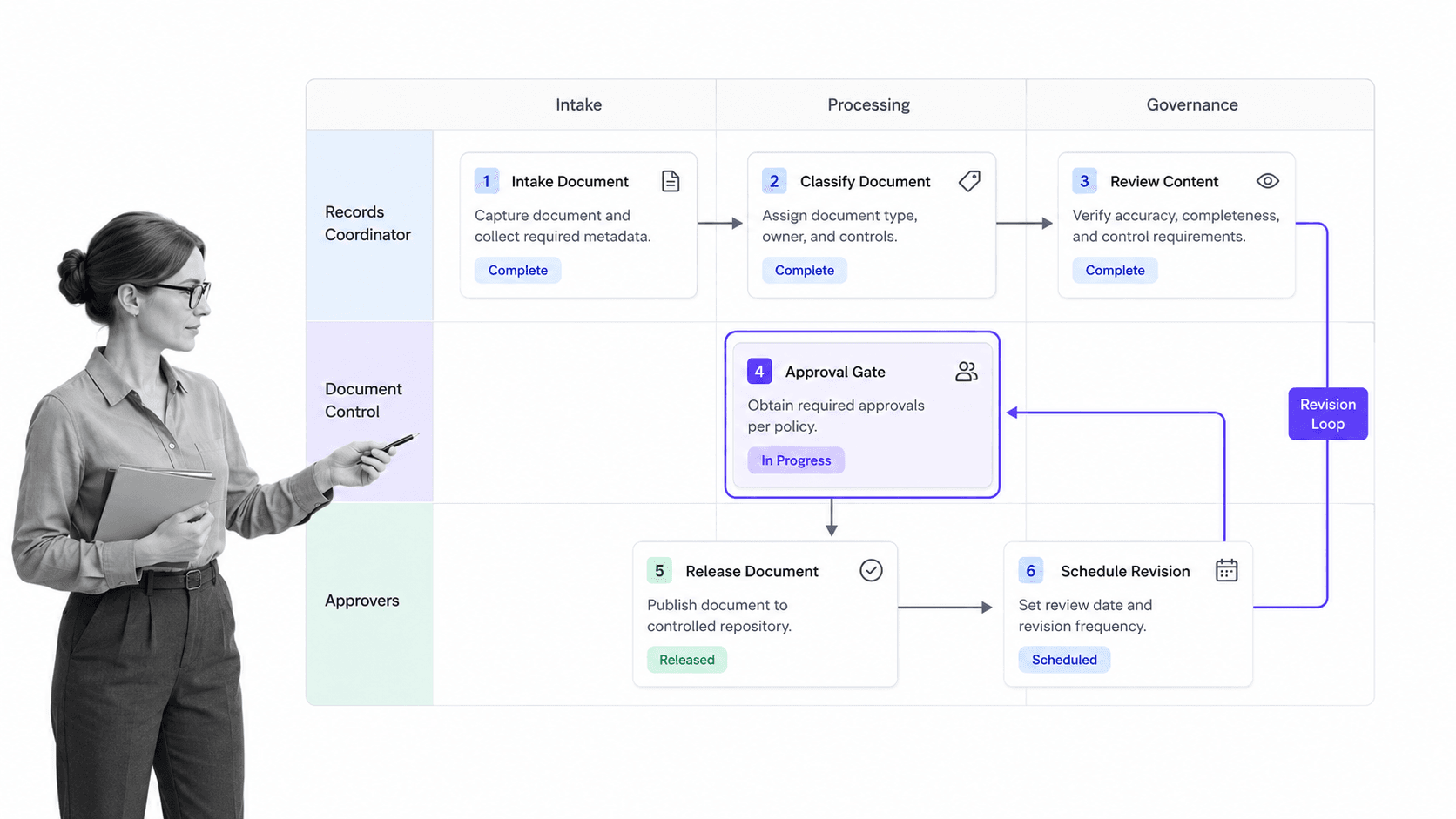
A document lifecycle becomes reliable when every state change has a trigger, an owner, an entry condition, and a completion record. The lifecycle does not need to be complicated, but it does need to be visible. A typical operating pattern has six connected stages.
1. Request and intake
The workflow starts when someone requests a new document or a change to an existing one. A structured intake form captures the purpose, document type, affected process, urgency, owner, and required reviewers. Good intake prevents vague requests from becoming endless drafting cycles.
2. Create and classify
The author creates or uploads the document and applies the metadata that will make it findable later. A process documentation template can standardize purpose, scope, inputs, outputs, responsibilities, and supporting evidence before the review begins.
3. Review and revise
Reviewers check accuracy, usability, security, legal exposure, and process impact. Comments should stay connected to the document version under review. When a reviewer requests changes, the workflow returns to the author with a clear reason instead of creating a new email branch.
4. Approve and release
An approval gate confirms that required reviewers have signed off before the document becomes active. The document approvals workflow should preserve the approver, decision, version, and supporting context. High-risk documents may need sequential approvals, while routine content may need one owner decision.
5. Use and acknowledge
Release is not the finish line. The document may need to trigger training, acknowledgment, a recurring workflow, or a change in another system. The workflow should distribute the current version to the people who need it and record any required acknowledgment or completion.
6. Review, revise, and retain
Every active document needs a review trigger based on time, material change, audit finding, or process performance. The ISO 15489 records management standard describes creation, capture, records controls, responsibilities, and ongoing management as connected disciplines. The workflow should preserve the final record, retire obsolete versions, and start a new review when required.
The full lifecycle is the operating model behind document workflow management. The software matters because it keeps these stages connected when volume, risk, and cross-functional ownership increase.
Core capabilities of workflow document management software
The strongest platforms cover both sides of the category. They govern the document as content and run the process as work. Evaluate the connection between those sides before counting individual features.
Central library and full-text search
Users need one place to find active documents by title, content, owner, type, process, status, or metadata. Search should return the current approved version by default and keep drafts or retired copies from confusing everyday users.
Version history and change context
Version control should show what changed, who changed it, why the change was requested, which version is active, and what happened to the prior copy. A version number without review context is only a label. The workflow supplies the decision history behind it.
Configurable approval routing
The system should support one-step, parallel, and sequential approvals without forcing every document through the same path. Rules can route a material policy change to legal and compliance while sending a formatting correction to the document owner.
Roles, permissions, and least access
Access should follow role and task responsibility. Authors, reviewers, approvers, readers, guests, and administrators need different rights. Task permissions are especially useful when a workflow contains sensitive sections that only an assigned reviewer should see.
Automation, reminders, and escalation
Workflow automation assigns work, calculates due dates, sends reminders, starts downstream tasks, and escalates overdue reviews. Practical workflow automation techniques reduce manual chasing without removing human judgment from material approvals.
Required data and evidence capture
A completed step should leave useful proof. Required fields, attachments, decisions, comments, and approval records should stay connected to the document workflow. The NIST SP 800-53 control catalog reinforces the importance of defined controls and assessment evidence in security and privacy programs.
Retention, disposition, and audit history
The system should retain records according to policy, restrict deletion where required, and produce a traceable history of document events. The U.S. National Archives records management guidance is a useful reference for the discipline of organizing, maintaining, and disposing of records.
Integrations and system triggers
Document work rarely stays in one platform. A signed contract may update a CRM, an approved policy may start training, and an invoice may create a finance task. Integrations should pass document status and workflow data into the systems that own the next action.
Workflow document management software use cases
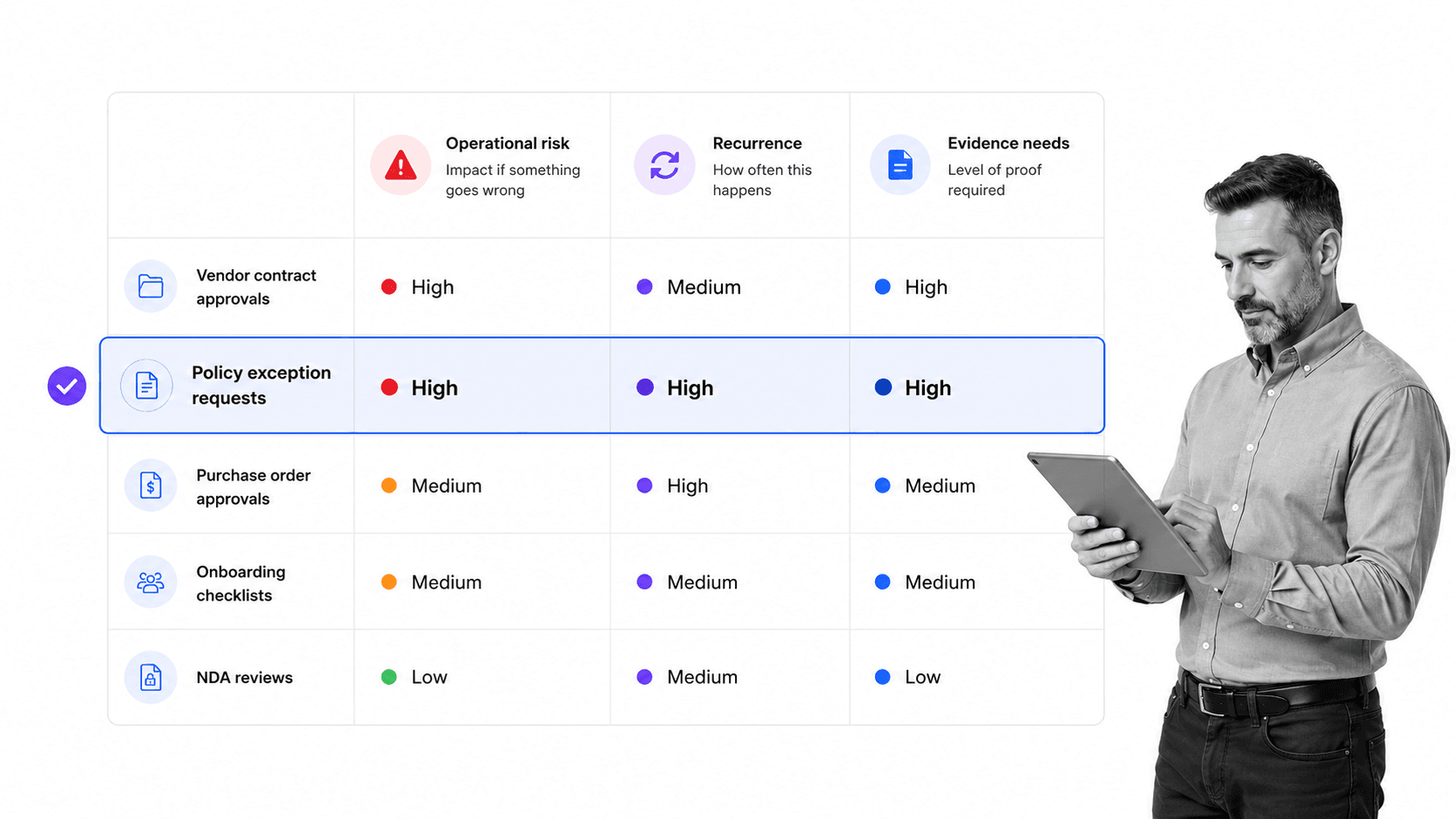
The best first use cases are not the biggest document libraries. They are document processes where repetition, risk, and evidence requirements overlap. Those workflows create visible value quickly and expose the operating pattern the rest of the organization can reuse.
Policies and standard operating procedures
Policies and SOPs need ownership, review, approval, release, training, and recurring review. A standard operating procedure template gives authors a consistent structure, while the workflow makes sure the current procedure is approved and followed.
Contracts and legal documents
Contract workflows coordinate intake, drafting, counterparty review, internal approval, signature, obligation handoff, and renewal. The system should keep the commercial context and decision trail attached to the executed document rather than splitting them across inboxes.
Quality and compliance records
Quality manuals, corrective actions, control evidence, and regulated procedures benefit from stricter approval and retention. Where electronic records and signatures are regulated, teams should map the workflow to the applicable rules, such as 21 CFR Part 11, with qualified legal and compliance guidance.
Employee and HR documents
Employee files, policy acknowledgments, performance forms, and onboarding records need privacy, role-based access, complete handoffs, and reliable retention. A workflow can expose only the required task to the participant while keeping the rest of the record restricted.
Project and client documentation
Project charters, requirements, design decisions, deliverables, and client approvals become easier to govern when the document and its decision path stay together. A project management documentation checklist helps teams identify the records that should exist before the project closes.
Change requests
A change request can update a policy, procedure, system specification, or customer document. A reusable change management workflow can capture impact, approvals, implementation tasks, communication, and post-change review around the updated document.
Teams evaluating intelligent classification or extraction can also examine AI document management. The same rule applies: automation should strengthen ownership and control, not create an unreviewed shortcut around them.
How to evaluate workflow document management software
A useful evaluation starts with your document operating model, not a generic feature grid. Ask vendors to demonstrate one real workflow from request through retention, using your roles and exceptions. The gaps become obvious when the demo has to leave the happy path.
Define the source of truth
Decide where the active document lives, what counts as the approved version, and which system owns the lifecycle state. If the answer changes from one process to another, document the rule so users do not create parallel repositories.
Test exception handling
Ask what happens when a reviewer is unavailable, an approval is rejected, a document changes after approval, or a deadline passes. Reliable software makes exceptions explicit and recoverable. Weak software turns every exception into manual follow-up.
Match control depth to risk
Not every document needs the same rigor. Look for configurable controls so a low-risk internal note can move quickly while a safety procedure receives formal review, restricted access, acknowledgment, and retention. One rigid path will either slow the business or weaken control.
Evaluate user experience for each role
Authors need simple drafting and submission. Reviewers need context and clean decisions. Frontline users need the current approved instruction. Administrators need reporting, permissions, and audit history. A strong platform makes each role clear without exposing the whole system to everyone.
Check reporting and audit export
The system should answer which documents are awaiting review, which approvals are overdue, which versions are active, who acknowledged a change, and what evidence belongs to a completed workflow. Reports should come from the execution record, not from a spreadsheet maintained after the fact.
Model the integrations
List the systems that create documents, supply metadata, receive status updates, or own downstream work. Test the highest-value integration in the evaluation. A connector list is less useful than seeing the exact trigger, data mapping, failure behavior, and audit record you need.
Use a weighted decision score
Score control depth, workflow flexibility, usability, search, security, reporting, integrations, implementation effort, and total cost according to your actual risk. Weight the categories before vendor demos so a polished interface does not distract from a missing control.
How to implement a document management workflow
Implementation works best as a focused operating change. Start with one workflow that has visible pain, a committed owner, and measurable failure modes. Prove the lifecycle, then reuse the design for the next document family.
1. Choose one document family
Select a repeatable, meaningful process such as policy review, contract intake, SOP change control, or client deliverable approval. Avoid starting with the entire archive. Historical migration can follow after the live workflow works.
2. Map states and ownership
Define the document states, the owner of each state, the decision that moves the document forward, and the evidence required. Use a clear visual model, drawing on a standard such as the BPMN specification when the workflow has several branches or systems.
3. Standardize metadata and templates
Choose a small metadata set that helps users find and govern the document, such as type, owner, process, status, effective date, and review cadence. The documentation template library can provide structured starting points without forcing every document into the same form.
4. Build rules and approval gates
Add assignments, due dates, required fields, permissions, approval tasks, conditional branches, notifications, and escalation. Each rule should solve a known failure mode. Extra automation that nobody can explain becomes operational debt.
5. Pilot with real documents
Run several live documents through the workflow, including a rejection, an overdue task, and an exception. Watch where users leave the system or create side conversations. Those exits reveal missing context, unclear ownership, or excessive friction.
6. Launch with governance
Name the workflow owner, document owners, administrators, support path, review cadence, and change method. Clear process documentation examples can help the team record the operating rules around the software itself.
7. Expand by reusable pattern
Reuse proven intake, review, approval, release, training, and retention patterns across similar document families. Standardization should reduce design effort while preserving the controls each use case needs. Review cycle time, rejection reasons, overdue steps, and user feedback after each expansion.
How Process Street connects documents and execution
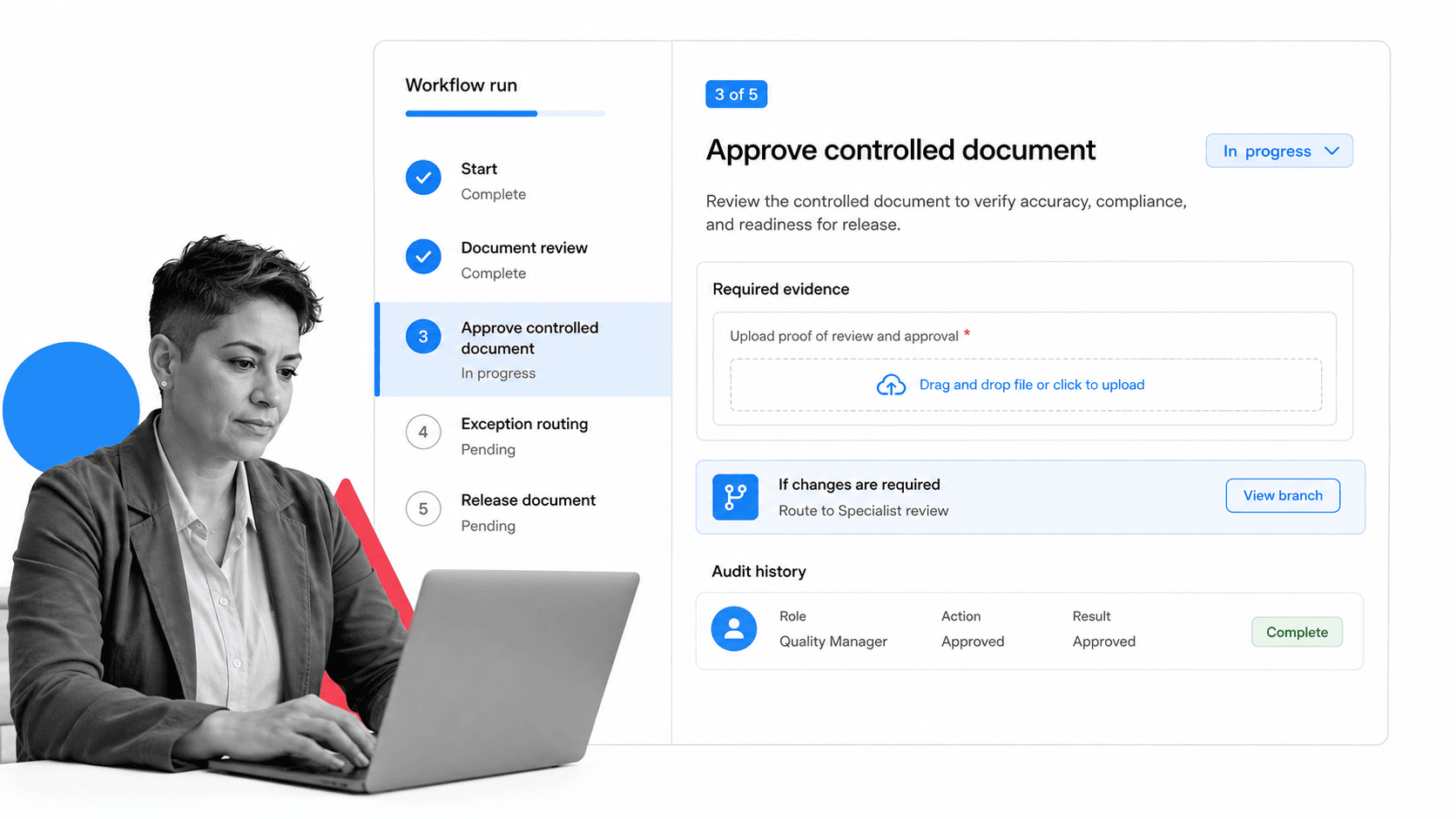
Process Street is a Compliance Operations Platform that connects governed documents to executable workflows. Teams can manage policies, procedures, and files, route document approvals, run recurring work, collect required evidence, apply conditional logic, and preserve audit history in one operating system.
Govern the document
A document can have an owner, controlled access, version history, a review requirement, and a defined approval path. The current approved version stays available to the people who need it, while drafts and review work remain governed.
Run the work the document describes
The procedure can become a workflow with assigned tasks, forms, approval gates, conditional paths, due dates, and automation. That closes the gap between a policy that exists and a process that is followed. The execution record shows what happened each time the workflow ran.
Connect the surrounding systems
Process Street has direct, universal integrations to 5,000+ systems. Need a new one? An AI agent builds it on the fly. A document event can therefore start or update work across the systems your team already uses, while the governed workflow keeps ownership and proof visible.
Start narrow and expand
A team can begin with one high-value workflow and expand as the operating pattern proves itself. The adjacent guide to workflow management and document control software goes deeper on controlled-version governance for teams with stricter quality and compliance requirements.
FAQs
What is workflow document management software?
Workflow document management software stores and governs documents while running the work required to create, review, approve, distribute, revise, and retain them. It combines search, metadata, version history, and permissions with assignments, rules, approvals, reminders, and audit history.
How is workflow document management software different from cloud storage?
Cloud storage centralizes files and supports sharing. Workflow document management software also assigns the next step, routes reviews, blocks release until approval, manages exceptions, captures evidence, and schedules future reviews, so the document lifecycle does not depend on memory and email.
Which document workflows should a company automate first?
Start with document processes where risk, repetition, and evidence requirements overlap. Policy review, contract intake, SOP change control, regulated record approval, employee acknowledgments, and client deliverable approval are strong first candidates because ownership and delays are easy to see.
What features should workflow document management software include?
Look for a central searchable library, metadata, version history, configurable approvals, role-based permissions, automation, required evidence fields, reminders, exception routing, retention controls, audit history, reporting, and integrations. The most important requirement is that the document state and the workflow state remain connected.
Can workflow document management software support compliance?
Yes. It can enforce required review steps, restrict access, preserve version and approval history, collect evidence, schedule reviews, and retain records. The workflow still needs to be designed around the specific laws, standards, policies, and risk decisions that apply to your organization.
How do you implement workflow document management software?
Choose one document family, map its lifecycle and owners, define metadata, build approvals and exception rules, then pilot with real documents. Test rejections and overdue tasks before launch, name the workflow owner, and expand only after the first pattern works reliably.
