


Turn every policy into automated workflows with built-in enforcement and audit-ready proof.



Workplace Management Software
Workplace management software is a system for coordinating the physical workplace, the services that keep it running, and the people responsible for every request, inspection, booking, handoff, and improvement. It connects space and facility data to repeatable work so teams can move from a reported need to a verified result without losing ownership or evidence.
The category can cover space planning, desk and room use, visitor flows, facilities requests, maintenance, workplace safety, vendors, employee moves, supplies, and operational reporting. The most useful platforms do more than display occupancy or store records. They turn workplace policy into action and show whether the action happened.
This guide explains what the category includes, how it differs from workforce and facilities systems, which capabilities matter, how the operating cycle works, and how to select and implement a platform that people will actually use.
In this article, you will learn:
- What workplace management software is
- Why workplace management software matters
- Workplace platforms vs. related systems
- Core workplace platform capabilities
- How a workplace platform works
- How to choose a workplace platform
- Process Street for workplace management
- How to implement a workplace platform
- Workplace platform FAQs
What workplace management software is
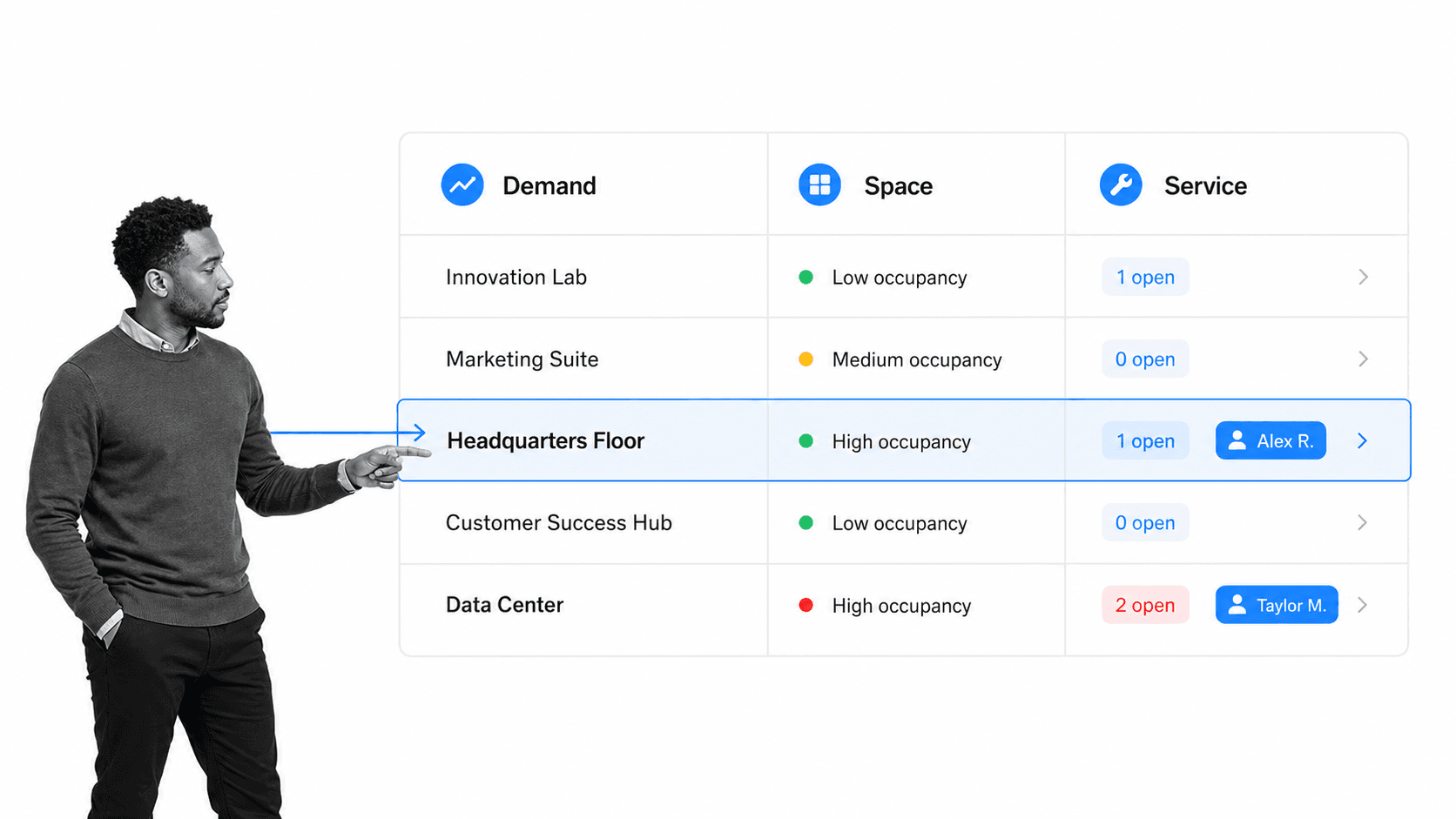
A workplace system of record connected to action
A workplace platform keeps structured information about locations, floors, rooms, desks, equipment, service providers, policies, users, and active requests. That information matters only when it controls what happens next. A room marked unavailable should affect booking. A reported safety hazard should start an urgent response. A completed repair should update the location record and preserve the evidence behind closure.
This record-to-action connection is the dividing line between a useful operating system and another database. Workplace teams need to know the current state, the accountable owner, the required next step, the deadline, the exception path, and the proof that the issue was resolved.
The scope of workplace management
Workplace management sits across real estate, facilities, operations, IT, HR, security, safety, and employee experience. One team may own desk reservations, another may handle access badges, and a vendor may complete maintenance. The software should give each group the right task and context while preserving one traceable operating history.
The ISO 41001 facility management standard treats facility management as an organizational function that integrates people, place, and process within the built environment. Workplace software supports that integrated view when it connects site information to the recurring procedures that keep the environment safe, available, and useful.
Why workplace management software matters
Hybrid work makes demand less predictable
A fixed office plan assumes predictable attendance. Hybrid patterns make demand vary by day, team, event, and location. Empty desks can exist beside overcrowded collaboration areas. Meeting rooms can appear fully booked while sitting unused. A workplace platform gives teams a shared way to capture reservations, attendance signals, service demand, and employee feedback, then connect those signals to operational decisions.
The goal is not surveillance. It is better resource allocation and a less frustrating workplace. Teams should collect only the data needed for a defined operational purpose, communicate how it is used, and avoid turning workplace analytics into individual productivity scoring.
Service work crosses too many handoffs
A leaking pipe, broken access reader, visitor exception, room setup, office move, or safety concern can cross reception, facilities, IT, security, finance, and an external vendor. Email hides the current owner. Spreadsheets separate the request from the conversation. Chat gets attention quickly but rarely creates a complete audit trail.
A governed request workflow captures the location, urgency, category, requester, evidence, owner, response, approval, and closure in one chain. It can escalate an overdue task, route a high-risk issue differently, and require verification before a request is marked complete.
Safety and environment require repeatable controls
Workplace operations include inspections, incident response, emergency readiness, indoor environmental quality, contractor access, and corrective action. The OSHA recommended practices for safety and health programs emphasize a systematic approach to finding and fixing hazards. The EPA indoor air quality guidance also shows why building conditions and occupant concerns need structured attention rather than informal follow-up.
Workplace platforms vs. related systems
Workplace management vs. workforce management
Workplace management focuses on place, services, facilities, and the experience of using a work environment. Workforce management focuses on labor demand, scheduling, time, attendance, leave, and staffing. The terms are easy to confuse, especially because search results often blend them. A company may need both, but they solve different operating problems.
A broader staff management software system can coordinate onboarding, employee tasks, reviews, and people operations. Workplace software should integrate with people data where appropriate, while keeping physical workplace demand and service execution as its own governed domain.
Workplace management vs. facilities management
Facilities management is centered on buildings, assets, maintenance, inspections, utilities, contractors, and physical operations. Workplace management includes much of that scope but often adds employee-facing services such as desk and room use, visitors, moves, workplace requests, amenities, and experience feedback.
Teams with a maintenance-heavy requirement should compare dedicated maintenance management software and equipment management software needs. The right architecture may use a specialist record system for deep asset or work-order data and a flexible workflow layer for cross-functional execution.
Workplace management vs. IWMS
An integrated workplace management system, or IWMS, is usually an enterprise suite covering real estate portfolios, leases, capital projects, facilities, space, maintenance, and sustainability. A workplace platform can overlap with IWMS, but the label is often used for a more employee-centered and operational layer. Buyers should ignore the acronym battle and test whether the product covers the data, workflow, governance, and integration depth their operating model requires.
Workplace management vs. project management
Project tools coordinate temporary work with a defined outcome. Workplace operations are recurring. Requests arrive continuously, inspections repeat, service levels persist, and policy must survive personnel changes. A project board can track a one-time office relocation, but it is usually weak at governing hundreds of recurring workplace transactions with conditional routes, required evidence, and controlled closure.
Core workplace platform capabilities
Space, room, and resource coordination
The system should represent locations and bookable resources clearly. It may support floors, zones, desks, rooms, parking, lockers, equipment, and amenities. The important controls are availability, capacity, eligibility, approval, conflicts, maintenance blocks, and a clean ownership model. Booking features should connect to service work when a room needs setup, a resource fails, or a recurring conflict reveals a planning problem. A broader commercial property management software model may be useful when tenant, lease, and portfolio operations are also in scope.
Service request and work routing
Request intake needs enough structure to route work correctly without becoming painful. Category, location, urgency, impact, evidence, and requester context are common inputs. The platform should assign an owner, calculate the due path, alert the right stakeholders, route exceptions, capture vendor activity, and prevent closure until the required checks are complete.
Inspections, maintenance, and corrective action
Workplace teams need recurring checks for safety, cleanliness, access, fire protection, equipment, environmental conditions, and site readiness. A reusable facility management workflow can structure planning, resource allocation, maintenance, inspections, audits, and improvement. A preventive maintenance checklist can provide a focused starting point for scheduled building and equipment work.
Visitors, access, and workplace events
Visitor and event workflows should connect registration, host notification, access requirements, safety information, room readiness, equipment, catering, and closeout. The platform does not need to replace every access-control system. It should govern the human and operational steps around those systems and record exceptions that require a decision.
Documents, approvals, and evidence
Policies, floor plans, vendor instructions, emergency procedures, inspection criteria, and service agreements should be available where the work happens. Version control matters because an outdated safety or access procedure can create real risk. Approvals should identify who can authorize an exception, spending decision, space change, or closure, while attachments and history preserve the basis for the decision.
Analytics that lead to action
Useful reporting highlights underused space, recurring service failures, overdue inspections, repeat hazards, aging requests, vendor delays, peak demand, unavailable resources, and locations with abnormal issue volume. Every metric should support an operational decision. The U.S. General Services Administration workplace strategy resources provide a public-sector example of treating workplace planning as an operating discipline. A dashboard that cannot lead the user back to the responsible record and next step becomes passive visibility rather than control.
How a workplace platform works
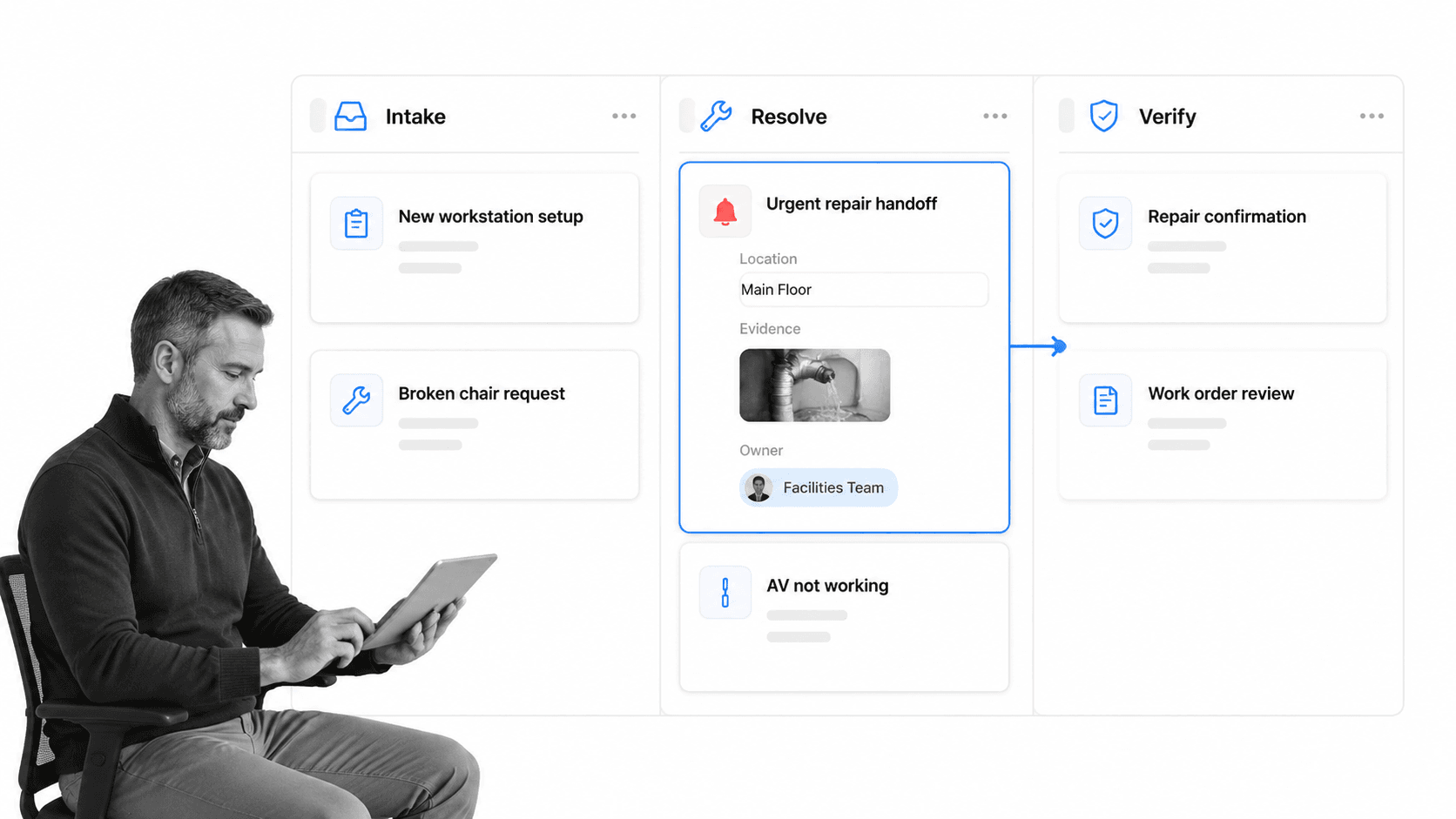
1. Capture the demand
Demand can begin with a reservation, inspection finding, employee request, sensor event, scheduled task, visitor registration, vendor notice, or planned move. The system captures the location, resource, category, urgency, impact, evidence, and requester. Validation rules prevent incomplete submissions and duplicate requests.
2. Classify and route
Rules determine the owner, priority, due path, and required controls. A routine room setup may go to workplace services. A failed access reader may require security and IT. A suspected safety hazard may trigger an urgent facilities path, restrict the affected area, and notify a responsible leader.
3. Execute the work
The assigned team completes the operational tasks, coordinates vendors, records labor or materials when needed, and attaches evidence. The workflow should expose only the steps relevant to the scenario so a simple request stays simple while a high-risk issue receives the necessary controls. A structured office management process helps keep recurring administrative work connected to the same workplace operating model.
4. Verify and approve
Completion does not always prove resolution. A requester, supervisor, safety lead, or workplace manager may need to confirm the result. Verification can require a photo, reading, checklist, signoff, or physical reinspection. Rejected work returns to the right owner with the reason preserved.
5. Update records and improve
Closure updates the workplace or asset record, service history, availability, and next scheduled action. Repeated issues should feed a problem-management or improvement path. The system can then reveal whether a location, vendor, resource type, or procedure is generating avoidable demand.
How to choose a workplace platform
Define the operating failures first
Start with the outcomes the platform must prevent: double-booked rooms, ignored hazards, lost requests, unclear vendor ownership, missed inspections, premature closure, unavailable desks, failed visitor handoffs, or decisions made without evidence. Rank the failures by consequence and frequency, then turn them into evaluation scenarios. The Process Street facilities management workflow overview shows how inspections, work orders, SOPs, and accountability can be brought into one operating path.
Decide which system owns each record
Map the sources of truth for people, locations, assets, leases, bookings, access, service work, documents, and analytics. A workplace platform does not need to replace every specialist system. It does need reliable identifiers, defined synchronization rules, clear ownership, and an exception process when records disagree.
Test real workflows, not feature slides
Ask vendors to demonstrate an actual request from intake to verified closure. Include an unavailable approver, an urgent hazard, a vendor handoff, missing evidence, and a location that is temporarily unavailable. Watch whether the platform preserves context, ownership, deadlines, decision rights, and history through each exception.
Evaluate employee and operator usability
Employees need fast booking and request experiences. Operators need enough structure to control work. Test mobile access, location selection, search, attachments, accessibility, notification volume, common task time, and the number of clicks needed for routine work. If the interface is slow, users will return to chat and the system will lose authority.
Check governance and change control
Workplace policies change as offices open, teams move, attendance patterns shift, and safety requirements evolve. Authorized owners should be able to update workflows, fields, service rules, assignments, and reports without a development queue. Changes should still be versioned and reviewed so local convenience does not weaken a control.
Process Street for workplace management
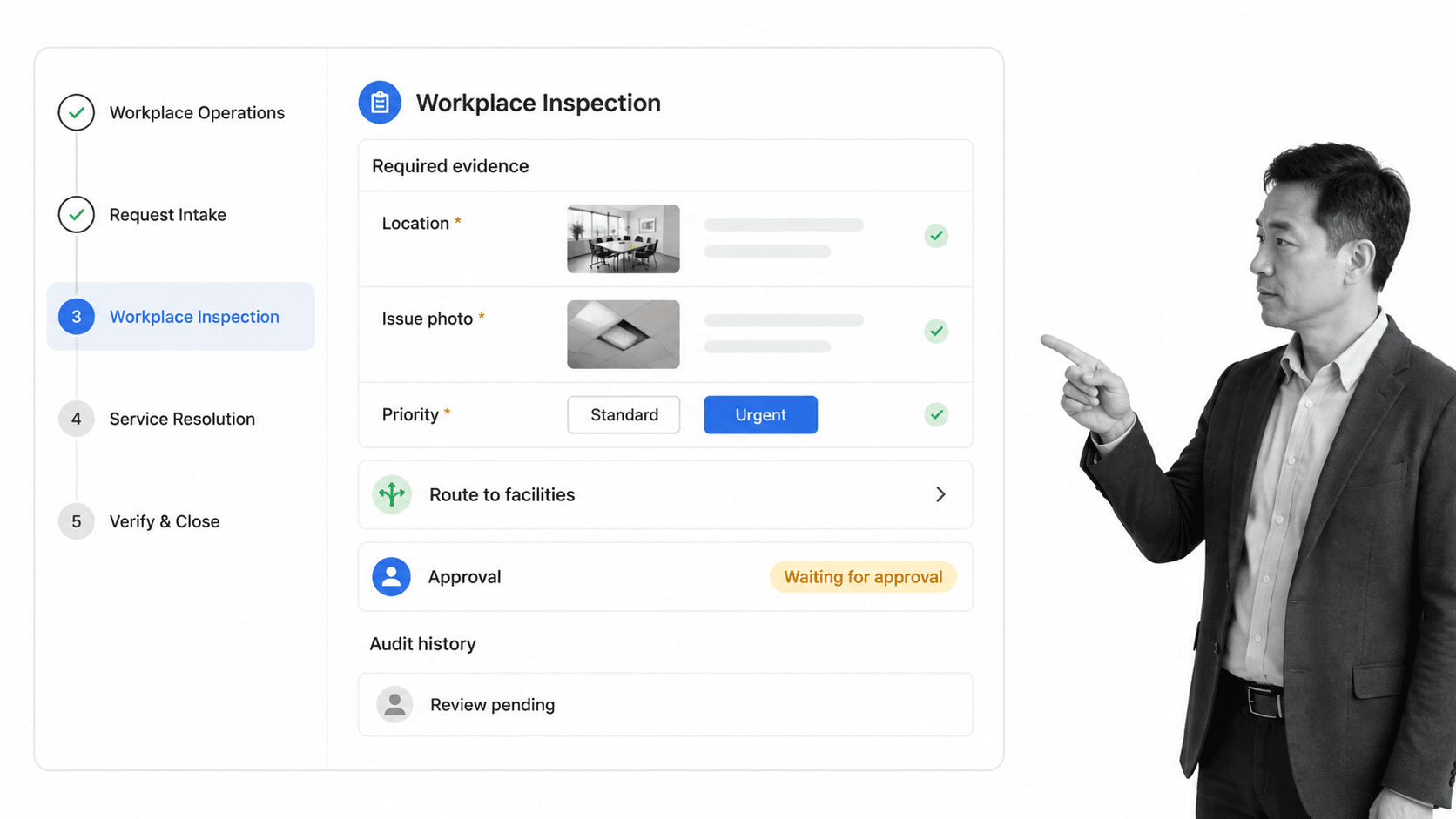
A governed workflow layer for workplace operations
Process Street is a Compliance Operations Platform that can govern recurring workplace procedures, requests, inspections, approvals, vendor handoffs, and evidence. Teams can build workflows for site opening and closing, office moves, visitor exceptions, safety checks, facility requests, maintenance coordination, room readiness, supplier reviews, and incident follow-up.
Process Street is not positioned as a lease accounting suite, occupancy sensor network, building automation system, or access-control database. It is strongest when the operating problem is inconsistent execution across people and systems. It can sit over specialist workplace records while controlling how requests are handled and how decisions are proven.
Route workplace exceptions with Conditional Logic
Conditional Logic can change the workflow path based on tasks and form-field values. A request can route by site, issue type, urgency, access requirement, or risk. Routine work stays short, while a safety or security exception exposes extra evidence, review, and escalation steps.
Control closure with approvals
Approval tasks let designated reviewers approve or reject work inside a workflow run. A repair can require requester confirmation, a space change can require budget approval, and a high-risk issue can require a safety review before closure. The record keeps the work, evidence, and decision together.
Connect the workplace stack
Process Street has direct, universal integrations to 5,000+ systems. Need a new one? An AI agent builds it on the fly. That allows a workplace workflow to receive data from an existing system of record, start the correct procedure, and return a verified result without making employees re-enter the same information.
How to implement a workplace platform
Map demand and ownership
Inventory the workplace services in scope, the channels where demand arrives, the records each service depends on, and the teams or vendors responsible. Identify duplicate intake paths, missing owners, ambiguous priorities, and requests that routinely disappear between departments. Choose one site or service family for the pilot.
Design the operating model
Define request categories, location hierarchy, service levels, ownership, evidence, approval authority, escalation, closure criteria, and record updates. Keep statuses clear. Submitted, triaged, assigned, in progress, blocked, awaiting verification, and closed should each describe a distinct operating state.
Configure and test
Build the forms, workflows, rules, permissions, notifications, integrations, and reports. Test the normal path, then force failures: missing location, duplicate request, unavailable owner, urgent hazard, rejected approval, vendor delay, incomplete evidence, and attempted closure before verification. Confirm that every test creates the expected owner, route, deadline, and history.
Pilot with real work
Train employees on where to make requests and operators on how decisions are controlled. Run real workplace work for several cycles. Measure adoption, unresolved demand, reassignment, response time, verification failures, repeat issues, and notification noise. Remove unnecessary friction without weakening the evidence or decision path.
Govern and expand
Expand by service, site, or region after the pilot is stable. Use an office safety inspection checklist and an office move checklist as examples of repeatable workplace procedures that can be adapted to local requirements. Assign owners for the workplace data model, each workflow, vendor rules, integrations, and quarterly process reviews.
Workplace platform FAQs
What is workplace management software?
It coordinates physical workplaces, resources, services, requests, inspections, and the people responsible for them. A strong platform connects workplace records to repeatable workflows so every request has an owner, a controlled path, and evidence of resolution.
What is the difference between a workplace platform and an IWMS?
An IWMS is usually an enterprise suite for real estate portfolios, leases, capital projects, facilities, space, maintenance, and sustainability. A workplace platform can overlap with that scope but often emphasizes employee-facing services and daily operations. Buyers should evaluate required records and workflows rather than rely on the category label alone.
What features should a workplace platform include?
Look for location and resource records, bookings, service request routing, inspections, maintenance coordination, visitor and access workflows, documents, approvals, evidence, integrations, and actionable reporting. The platform should also support mobile work and different rules for different sites or issue types.
Can a workplace platform support hybrid work?
Yes. It can coordinate desks, rooms, attendance signals, service demand, and workplace feedback across changing schedules. The goal should be better resource planning and service delivery, with clear data-use policies that avoid turning workplace analytics into individual productivity monitoring.
How do you implement a workplace platform?
Start with one site or service family and map demand, records, owners, controls, and exceptions. Configure the workflow, test realistic failures, run a controlled pilot, and measure adoption and resolution quality. Expand only after the operating model remains reliable through real work.
