


Turn every policy into automated workflows with built-in enforcement and audit-ready proof.



Manufacturing Process Management Software
Manufacturing process management software is a digital system for defining how production work should happen, guiding people through that work, controlling changes, and recording evidence that each step was completed correctly. It connects the designed process with the reality of the shop floor, so instructions, ownership, quality checks, exceptions, and improvement data stay in one operating loop.
The category sits between high-level planning and day-to-day execution. It does not replace every ERP, MES, PLM, QMS, maintenance, or supply chain tool. Its job is to make the process itself executable: the right version reaches the right person, required data is captured at the right moment, approvals happen before work moves forward, and deviations trigger a controlled response.
This guide explains the capabilities that matter, how the software fits into a manufacturing technology stack, how to choose a system, and how to implement it without digitizing a broken process. It also shows how workflow automation can turn static procedures into repeatable production control.
In this article, you will learn about:
- What is manufacturing process management software?
- Why manufacturing processes break down
- Core capabilities of manufacturing process management software
- How manufacturing process management software connects the factory stack
- How the manufacturing process lifecycle works
- How to choose the right system
- How to implement manufacturing process management software
- Metrics, controls, and continuous improvement
- Manufacturing process management in Process Street
- FAQs
What is manufacturing process management software?
Manufacturing process management, often shortened to MPM, organizes the information and decisions needed to turn a product design into a repeatable production method. PTC describes manufacturing process management as the connection between product design information and manufacturing planning and execution. Software makes that connection visible, controlled, and reusable across products, lines, plants, and teams.
The process is the managed object
A project system usually manages a temporary plan. A document repository stores files. A production system records output. Manufacturing process management software treats the operating process itself as the object under control. Each process has a defined trigger, inputs, ordered steps, required resources, accountable roles, quality gates, exception paths, and completion evidence.
That distinction matters because a current PDF does not guarantee current execution. The software should help an operator find the applicable instruction, complete required checks, submit measurements or photos, and escalate a deviation without leaving the flow of work. A manager should be able to see both the defined process and the active runs of that process.
The goal is controlled execution
Controlled execution means the approved process is the easiest process to follow. Version control ensures people do not run an obsolete method. Assignments and due rules clarify ownership. Required fields prevent evidence from being skipped. Approval gates stop work when a qualified reviewer must make a decision. An audit history shows what happened, who acted, and where an exception changed the path.
It supports both discrete and process manufacturing
The exact workflow differs by environment. A discrete manufacturer may manage routings, assembly checks, first-article inspection, engineering changes, and nonconformance review. A process manufacturer may emphasize batch instructions, formula controls, in-process sampling, sanitation, release decisions, and traceability. The shared need is to coordinate repeatable work while preserving the evidence needed for quality, safety, and improvement.
Why manufacturing processes break down
Most process failures are not caused by a complete lack of documentation. They happen because instructions, people, systems, and evidence drift apart. A procedure may be approved in one repository, copied into a local folder, interpreted differently by each shift, and updated only after a defect exposes the gap.
Instructions lose contact with work
Static instructions are easy to publish and hard to enforce. Operators may rely on memory because the document is difficult to find, too broad, or not designed around the decision in front of them. A controlled digital process breaks the instruction into the tasks, fields, checks, and decisions required at execution time. Teams can start with a focused manufacturing process development workflow before scaling the same pattern across a plant.
Handoffs create invisible queues
Production work crosses engineering, planning, purchasing, operations, maintenance, quality, and compliance. If the handoff lives in an email, chat message, or shift notebook, nobody has a reliable view of the queue. Manufacturing process management software should create an explicit state change, assign the next owner, carry forward the relevant data, and alert the team when work exceeds a control limit or due rule.
Exceptions bypass the standard process
Normal work is rarely the hardest part. The real test is a missing component, failed inspection, machine issue, unclear drawing, or customer-specific requirement. Without a designed exception path, the team improvises. A strong system lets you define when to pause, who can approve a deviation, what evidence is required, and which corrective workflow begins next. The broader discipline of manufacturing process optimization depends on making those exceptions measurable.
Core capabilities of manufacturing process management software
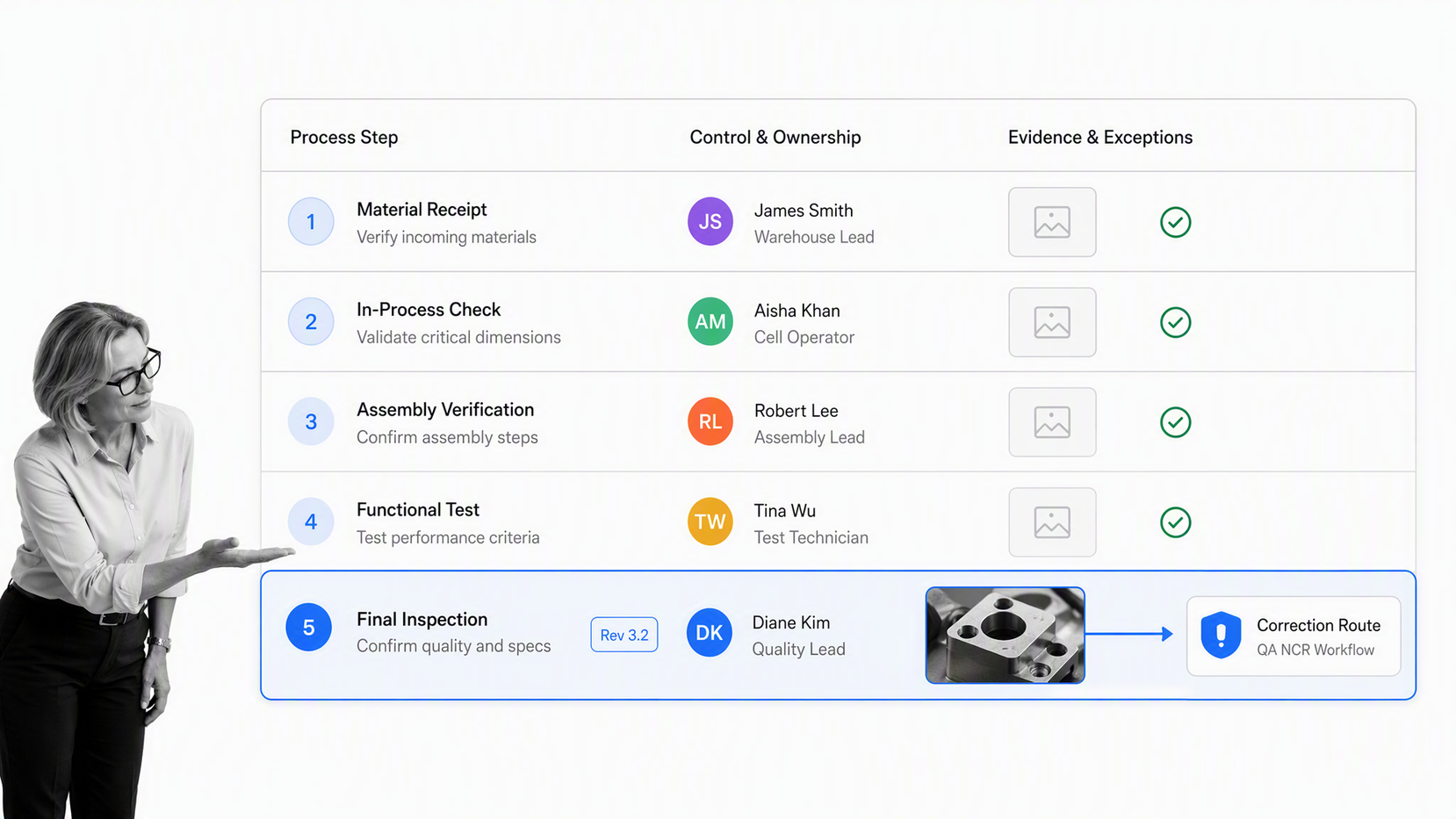
The feature list should follow the control model. The most valuable capabilities are the ones that keep the process current, guide execution, capture proof, and turn exceptions into owned work. A polished dashboard is secondary if operators can still skip a critical check or use an outdated instruction.
Process design and reusable standards
Look for a visual way to define steps, decisions, roles, inputs, outputs, and completion rules. Reusable templates help plants standardize common patterns without making every line identical. The system should support product, site, risk, or customer variation through controlled rules rather than duplicated copies that drift. A manufacturing process improvement workflow can connect analysis directly to assigned changes and follow-up checks.
Revision and change control
A process needs a clear owner, current version, change reason, review path, effective point, and retirement rule. The software should prevent an unapproved change from silently becoming the operating standard. When a change is released, active and future work should follow an intentional transition policy, especially when materials, tooling, training, or regulatory evidence also change.
Guided execution and data capture
Operators need instructions in the context of the task, not in a separate manual. Forms should capture measurements, selections, signatures, files, and photos while the work is happening. Mobile access matters where a workstation is not practical. Required fields, validation, and conditional steps make the process respond to the actual item, line, or risk level.
Quality gates and deviation handling
A gate should define the decision, qualified reviewer, evidence package, possible outcomes, and next route. The same structure supports incoming inspection, first-piece approval, in-process control, final release, and deviation review. An in-process quality control workflow shows how inspection evidence can sit inside production execution instead of arriving after the lot is complete.
Visibility, alerts, and audit history
Managers should see work by process, product, line, owner, stage, risk, and exception state. Alerts should point to a specific action, not create general notification noise. The history should preserve the sequence of assignments, field changes, approvals, comments, and automation events so an investigation can reconstruct the run without combining records from several systems.
How manufacturing process management software connects the factory stack
Manufacturing process management software is usually part of a wider architecture. ISA-95 provides a useful model for the boundary between enterprise systems and manufacturing operations and control. The practical question is not which acronym wins. It is which system owns each decision and how context moves between them without creating duplicate truth.
ERP plans resources and transactions
Enterprise resource planning systems commonly own orders, inventory, purchasing, costing, and financial transactions. They are essential for planning and recordkeeping, but a transaction does not describe every human decision required to execute a controlled process. The process layer can receive an order or item context, coordinate the operating steps, then return completion, exception, or release data.
MES coordinates production execution
Manufacturing execution systems focus on what is happening in production: dispatching work, tracking states, recording output, and connecting with equipment or line data. A process management layer complements that capability when work crosses departments, requires human judgment, includes documents or approvals, or continues beyond the production cell into investigation and corrective action.
PLM and QMS govern product and quality context
Product lifecycle management systems organize product definitions, engineering changes, and related design information. Quality management systems govern quality processes and records. Manufacturing process management should use the current product and quality context while making the cross-functional operating sequence clear. The adjacent manufacturing management software landscape helps buyers compare the broader categories before assigning system boundaries.
Integration needs an operating contract
For each connection, define the trigger, source record, fields exchanged, owner, retry behavior, exception path, and evidence retained. A successful API call is not the same as a completed business process. The process layer should make failed or incomplete transfers visible to an owner. Equipment, maintenance, and asset context may also come from equipment management software when asset condition changes the production route.
How the manufacturing process lifecycle works
A useful system supports the full lifecycle, not only process mapping. The lifecycle begins before an operator sees a task and continues after the run closes. Treating each phase as controlled work prevents the common gap where a process is carefully designed, loosely released, and never measured against real execution.
Design and validate
Start with the product requirement, process objective, inputs, equipment, materials, roles, risks, and acceptance criteria. Map the normal flow and the meaningful exceptions. Validate the proposed method with the people who perform and review the work. The design should be detailed enough to guide action but focused enough that the operator can understand the next decision quickly.
Approve and release
Before release, confirm that instructions, training, tooling, materials, inspection methods, and system permissions are ready. The approver should see a complete package and know what version will become effective. Release should notify affected roles and retire obsolete access paths so two versions do not compete on the shop floor.
Execute and monitor
During execution, the system assigns tasks, reveals the applicable instruction, captures evidence, and routes decisions. Monitoring should emphasize exceptions, blocked work, late gates, repeated rework, and patterns that threaten throughput or quality. NIST manufacturing research highlights the importance of measurement, standards, and connected systems across modern production environments.
Investigate and improve
A deviation should preserve the original run context and launch a controlled investigation. Root cause, containment, corrective action, effectiveness review, and process change are related but distinct decisions. The improvement is complete only when the approved process changes, affected people receive the update, and later evidence confirms the change worked. A production planning and control audit can test whether the defined system is still operating as intended.
How to choose the right system
Begin with the operating problem, not the product demo. A team replacing paper travelers has different needs from a multi-site organization standardizing engineering changes, deviation approvals, and supplier handoffs. Use a representative process and a real exception scenario to test the system from trigger through evidence and review.
Map requirements to risk
- Process complexity: decisions, parallel work, rework loops, and cross-functional handoffs.
- Control requirements: versioning, qualification, approvals, signatures, evidence, retention, and traceability.
- Execution environment: mobile use, shared stations, intermittent connectivity, device restrictions, and operator language needs.
- Integration boundaries: ERP, MES, PLM, QMS, maintenance, supplier, analytics, and equipment data.
- Administration: who can build, approve, release, monitor, and improve processes without creating an IT queue.
Test the exception path
Ask the vendor to demonstrate a failed inspection, unavailable approver, missing component, integration error, and urgent process change. Observe whether the system preserves context and assigns recovery work. A happy-path demo can hide the exact weaknesses that matter in production. The best evaluation proves how control holds when normal flow breaks.
Evaluate adoption at the point of work
Operators should be able to identify the next task, understand why it applies, enter evidence, and request help without navigating a complex information architecture. Supervisors need a fast view of blockers and exceptions. Process owners need change control and performance data. If the system works only for the people who configured it, adoption will decay after the pilot.
Separate required capabilities from suite pressure
A large suite may offer broad coverage but require specialized administration. A focused workflow layer may deploy faster but depend on integrations for planning or machine data. Score each option against the process contract, implementation effort, governance model, integration reliability, and total operating burden. The right architecture may combine systems with clear ownership instead of forcing one platform to do every job.
How to implement manufacturing process management software
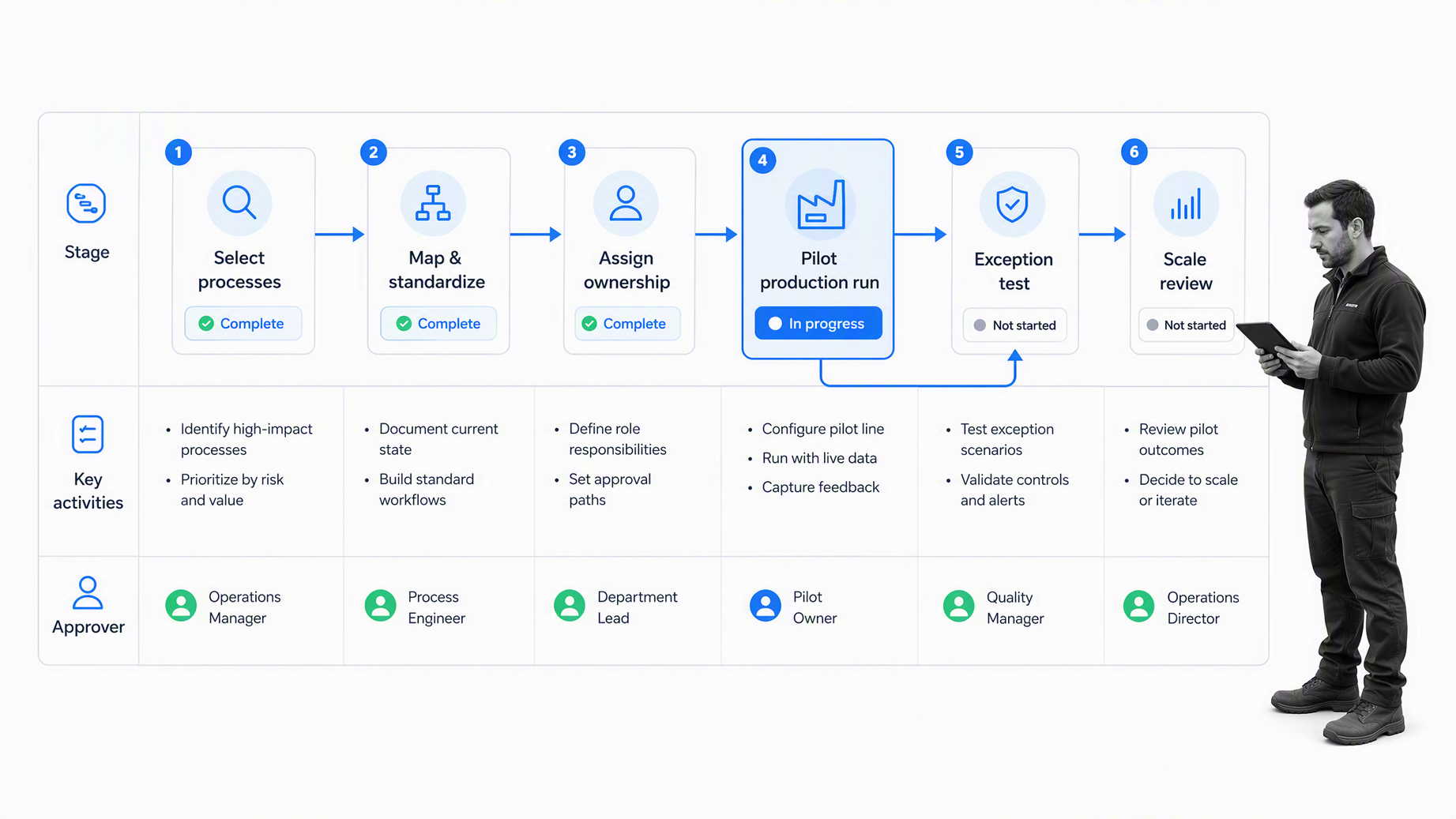
Implementation should improve one important operating loop before it attempts to model the entire factory. A narrow but complete pilot reveals how the software behaves with real roles, data, devices, approvals, and exceptions. It also creates a reusable pattern for the next process.
1. Select a bounded process
Choose a process with clear value, repeat volume, reachable owners, and manageable integration needs. Good pilots often involve incoming inspection, line clearance, first-piece approval, deviation review, preventive maintenance, or changeover. Avoid a trivial checklist that cannot test the platform, and avoid a plant-wide transformation whose dependencies make learning impossible.
2. Observe current execution
Walk the process with operators and reviewers. Capture the actual sequence, workarounds, queues, decisions, evidence, and failure points. Compare the documented method with the performed method without assuming either one is correct. The goal is to define the safest and most effective future process, not to reproduce every historical habit in software.
3. Build the process contract
Define the trigger, scope, owner, roles, ordered tasks, required fields, acceptance criteria, approval gates, automation events, exception routes, and completion evidence. Identify which system owns each data element. Use a supplier selection and evaluation process when external material or supplier qualification is part of the operating risk.
4. Configure and connect
Build the workflow in short review cycles with the process owner and representative users. Connect only the systems required for the pilot. Test identities, permissions, field mappings, retries, and failure handling. Add alerts that point to a specific owner and action. Keep a manual recovery path for the pilot without letting it become the permanent operating method.
5. Pilot normal and abnormal work
Run realistic cases across shifts, products, and risk levels. Deliberately test missing evidence, rejected approval, rework, canceled production, equipment unavailability, and integration failure. Confirm that the history is understandable to someone who did not participate in the run. Train people on the reason behind each control, not only the buttons they must press.
6. Review and scale
Compare pilot results with the baseline. Review adoption, cycle time, waiting, first-pass yield, exception frequency, evidence completeness, and administrative burden. Fix the process and governance model before cloning it. Scale through reusable patterns, named owners, a release calendar, and a small set of shared design standards.
Metrics, controls, and continuous improvement
A process platform should help the team understand both performance and control. Performance metrics show whether work is fast, stable, and effective. Control metrics show whether people used the approved method and produced the required evidence. You need both: a fast process that bypasses required checks is not healthy, and a perfectly documented process that creates excessive waiting still needs improvement.
Measure flow
Track total cycle time, active work time, queue time, work in progress, handoff delay, on-time completion, and bottleneck frequency. Segment results by product family, line, shift, site, supplier, or exception type when the comparison supports a decision. Avoid dashboards that present dozens of measures without an owner or response rule.
Measure quality and evidence
Useful measures include first-pass yield, defect and rework frequency, inspection failure, deviation recurrence, evidence completeness, approval rejection, and corrective action effectiveness. In regulated production, FDA current good manufacturing practice resources illustrate why written procedures and documented control matter, even though the exact requirements depend on the product and jurisdiction.
Assign a response to every metric
Define who reviews the measure, how often, what threshold matters, and which workflow starts when the threshold is crossed. A production monitoring tool is valuable when it changes action. If a metric has no owner, cadence, threshold, or response, it is reporting rather than management.
Govern the process library
Set naming, ownership, review, release, archiving, and access standards. Keep common patterns reusable but allow justified local variation. Audit both the content and the real execution. The principles of lean manufacturing and practical process analysis help teams distinguish useful control from wasteful administration.
Manufacturing process management in Process Street
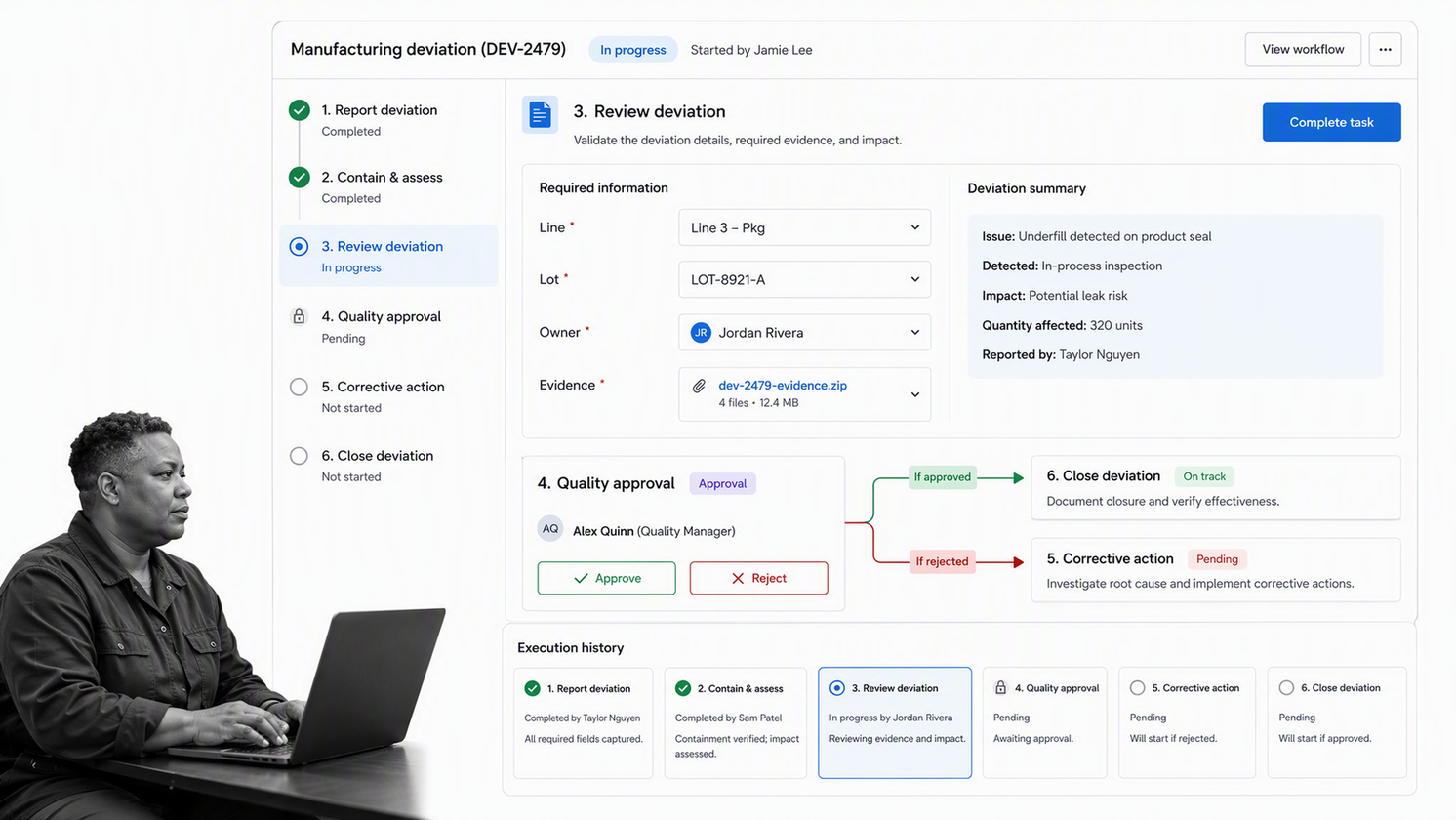
Process Street is a Compliance Operations Platform for turning recurring procedures into controlled workflows. A manufacturing team can define the approved sequence, assign work, collect structured data and files, route decisions, automate handoffs, and preserve execution history inside one workflow run.
Turn instructions into guided work
Instead of asking an operator to interpret a long procedure, a workflow can reveal the relevant instruction at the task, require the necessary measurement or evidence, and use conditional logic to show the next step for that product or result. The current conditional logic documentation explains how workflows can change based on earlier form responses.
Control quality decisions
Approval tasks give a qualified reviewer a clear decision point before production, release, or closure continues. A rejected decision can route the run into rework or corrective action while preserving the original evidence. The approval task guide shows how review gates sit inside the flow of work.
Connect the manufacturing stack
Process Street has direct, universal integrations to 5,000+ systems. Need a new one? An AI agent builds it on the fly. That integration layer can connect process execution with orders, product context, quality records, equipment data, notifications, and analytics while the workflow remains the visible control surface for people and decisions.
Use proven manufacturing patterns
Calderys connected Process Street with SAP, Salesforce, Power BI, and Snowflake for order and production workflows, creating a cross-system operating layer for a global manufacturing environment. The Calderys manufacturing case study shows how the process layer can unify work without pretending every system has the same job.
Lion Containers used Process Street to centralize collaborative policies and procedures while pursuing multiple ISO certifications. The Lion Containers case study demonstrates the link between accessible procedures, consistent execution, and auditable management systems. The governing principle is durable: make the approved process available where work happens, then capture proof that it ran.
A useful first step is to choose one production process, map the decisions and evidence it requires, and build a pilot that includes an exception path. From there, teams can connect adjacent work such as supply chain management, maintenance, quality review, and controlled change without losing ownership of the core process.
FAQs
What is manufacturing process management software?
Manufacturing process management software defines, controls, executes, and improves the processes used to turn product requirements into repeatable production work. It helps teams manage instructions, roles, evidence, approvals, exceptions, and process changes in one operating system.
How is manufacturing process management software different from ERP and MES?
ERP usually owns planning and business transactions, while MES focuses on production execution and shop-floor states. Manufacturing process management software focuses on the controlled human and system workflow that connects instructions, decisions, evidence, approvals, and exceptions across those systems.
What features should manufacturing process management software include?
Look for process design, version and change control, role-based assignments, structured forms, conditional routing, approval gates, evidence capture, integration, alerts, execution history, and performance reporting. The most important test is whether the system controls abnormal work as well as the normal path.
How long does implementation take?
Implementation time depends on process scope, data readiness, integrations, governance, and validation needs. Start with one bounded, high-value process, prove the full trigger-to-evidence loop, then reuse the pattern instead of trying to model the entire factory at once.
Can smaller manufacturers use manufacturing process management software?
Yes. A smaller manufacturer can begin with one recurring process such as incoming inspection, changeover, preventive maintenance, or deviation review. The software is useful when the cost of missed steps, unclear ownership, rework, or weak evidence exceeds the effort of running a controlled workflow.
How does Process Street support manufacturing process management?
Process Street turns procedures into workflows with tasks, forms, assignments, conditional logic, approvals, automations, and execution history. Manufacturing teams can use those controls to guide production work, collect evidence, route exceptions, and connect the process with the rest of their software stack.
