


Turn every policy into automated workflows with built-in enforcement and audit-ready proof.



Healthcare Tools
Healthcare tools are the clinical, operational, analytical, communication, and governance systems that help healthcare organizations deliver work safely and consistently. The category includes everything from electronic records and diagnostic devices to workflow automation, quality dashboards, checklists, and compliance controls.
The challenge is rarely finding another application. It is building a toolset that supports the real flow of care without creating duplicate data entry, unclear ownership, alert fatigue, or gaps between policy and execution. A useful stack helps people make decisions, coordinate handoffs, complete required work, and prove what happened.
This guide explains the main types of healthcare tools, how they should work together, what to evaluate before buying, how to implement them, and how to govern the stack after launch.
In this article, we are going to cover:
- What healthcare tools are
- Types of healthcare tools
- How healthcare tools work together
- How to evaluate healthcare tools
- How to implement healthcare tools
- How to govern healthcare tools
- Use Process Street to connect healthcare tools
- Healthcare tools selection checklist
- FAQs
What healthcare tools are
Healthcare tools are products, systems, devices, and structured methods used to support patient care and the work around it. Some tools hold clinical records. Others coordinate tasks, measure quality, manage risk, communicate with patients, schedule resources, or document evidence for review.
A tool is defined by the job it supports
The same application can play different roles in different organizations. A form might collect intake data, start a referral, document consent, or trigger a compliance review. The right question is not whether the product belongs to a fashionable category. It is whether the tool supports a specific job in the operating model.
Tools support both care and the system around care
Clinical work depends on administrative and operational work. Scheduling, credentialing, inventory, policy review, incident response, audit preparation, billing handoffs, and staff onboarding all affect access, safety, and reliability. Healthcare leaders need to see the full system, not only the bedside application.
A tool is not a process
A tool provides capability. A healthcare process defines how people use that capability from trigger to outcome. Buying software without defining ownership, handoffs, decision rules, evidence, and escalation paths often digitizes the same ambiguity the team already had.
Types of healthcare tools
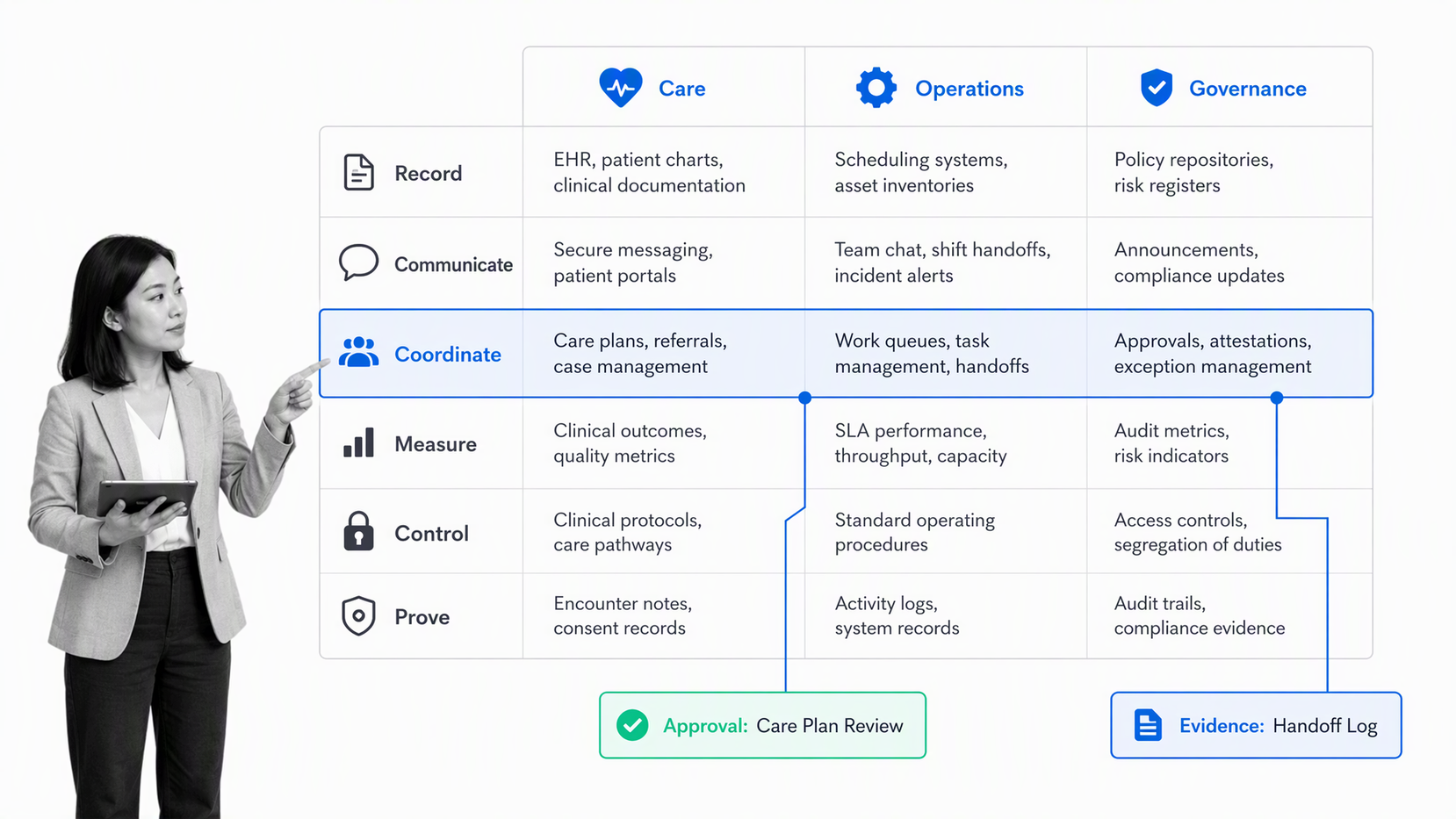
Healthcare tools make more sense when they are grouped by the work they enable. Most organizations need a mix across clinical care, operations, communication, measurement, security, and governance.
Clinical record and decision tools
Electronic health records, computerized order entry, clinical decision support, e-prescribing, imaging systems, laboratory systems, and specialty applications hold or interpret information used in care. These tools need clear data ownership, reliable identity matching, usable interfaces, and safe exception handling.
Diagnostic and monitoring tools
Diagnostic devices, remote patient monitoring, bedside monitors, laboratory instruments, and screening tools create signals that require action. The value is not only the reading. It is the path from signal to review, escalation, intervention, and documentation. A strong healthcare monitoring design connects the alert to accountable work.
Communication and engagement tools
Patient portals, secure messaging, telehealth, reminder systems, call-center platforms, and education tools help people exchange information. They must fit the communication preferences of patients and staff while protecting sensitive information and avoiding parallel conversations that no one owns.
Workflow and coordination tools
Clinical and administrative teams use healthcare workflow software, task routing, forms, checklists, case management, and automation to move work between people and systems. A medical checklist app can support repeatable checks, but higher-risk work also needs ownership, evidence, approvals, and exception paths.
Analytics and quality tools
Reporting platforms, registries, quality measures, process analytics, and a healthcare dashboard help teams see patterns. CMS quality measures describes quality measures as tools for assessing processes, outcomes, patient perceptions, and organizational structures. Measurement matters only when a signal leads to an assigned improvement action.
Compliance, safety, and governance tools
Risk assessments, policy systems, audit tools, incident reporting, access reviews, training records, and compliance management software help organizations control regulated work. A quality management system software can connect quality requirements to corrective action and evidence instead of leaving findings in a report.
How healthcare tools work together
Healthcare tools should behave like parts of one operating system. Data moves between systems, but responsibility also has to move. A referral entered in one system may need scheduling in another, review in a third, patient communication in a fourth, and proof of completion in a governed workflow.
Start with the workflow, not the integration list
A long connector catalog does not guarantee a reliable outcome. Map the trigger, decisions, owners, systems, evidence, and end state first. Then use healthcare integration to move the minimum necessary data and create the next accountable action.
Separate systems of record from systems of action
A system of record stores authoritative information. A system of action tells people what to do next and records execution. Trying to force every operational step into the record system can create awkward workarounds. Let each tool perform its strongest job while a governed workflow coordinates the work between them.
Design for human handoffs
Interoperability does not remove handoffs. It changes them. A data exchange may still require clinical review, patient contact, approval, or exception handling. Each handoff needs an owner, response expectation, failure path, and evidence requirement.
Use automation where the rule is stable
Use healthcare automation for repeatable routing, reminders, data movement, and record creation. Keep human review where clinical judgment, policy interpretation, or material risk is involved. The goal is not maximum automation. It is reliable execution with the right level of oversight.
How to evaluate healthcare tools
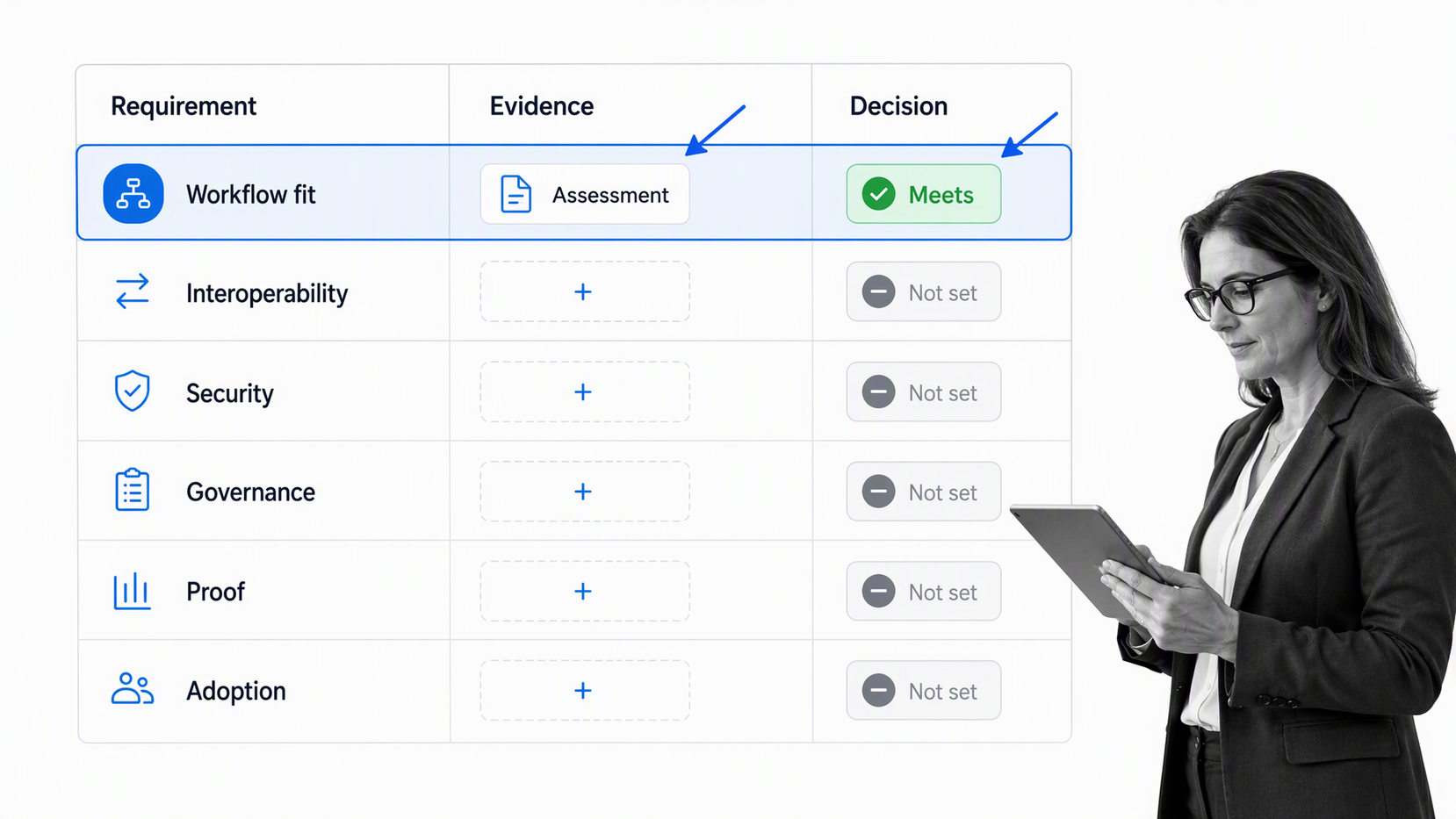
Evaluate healthcare tools against the work they must support, the risks they introduce, and the evidence required after implementation. A polished demo is not proof that the tool will fit the operating environment.
Workflow fit
Test a real workflow, such as a patient intake checklist, referral handoff, incident review, or clinical audit workflow. Include the people who perform the work. Check whether the tool reduces ambiguity, duplicate entry, manual chasing, and side-channel communication.
Interoperability and data boundaries
Confirm what information enters and leaves the tool, which system remains authoritative, how identity is matched, what happens when a connection fails, and how retries are handled. HealthIT.gov interoperability guidance emphasizes interoperability as the ability of systems to exchange and use electronic health information, but operational ownership still needs to be designed.
Security and privacy
Assess access control, authentication, encryption, audit logging, retention, backup, incident response, vendor responsibilities, and the handling of protected health information. HHS HIPAA Security Rule guidance organizes HIPAA Security Rule safeguards across administrative, physical, and technical controls. The evaluation should map each relevant safeguard to evidence.
Governance and change control
Ask who can configure the tool, approve changes, publish workflows, alter permissions, and retire old content. The product should support controlled change without turning every improvement into an IT project or allowing silent drift.
Usability and adoption
A technically capable tool can still fail if it adds cognitive load. Test common tasks, error recovery, mobile use, accessibility, training burden, and the clarity of alerts. Watch users complete the workflow instead of asking whether the interface looks intuitive.
Evidence and reporting
Define the proof you need before purchase: completion history, approval records, attached evidence, access logs, exception paths, quality measures, and exportability. If the team cannot retrieve the record later, the process is not fully governed.
Reliability and recovery
Ask how the tool behaves during downtime, degraded service, delayed integrations, and support incidents. Identify which workflows can pause, which need a manual continuity path, and how data entered during an outage is reconciled later. Review backup, recovery, service monitoring, incident communication, and dependency risks. A healthcare team should know how work continues before a tool becomes unavailable, not discover the answer during a critical event.
How to implement healthcare tools
Implementation should begin with a bounded workflow and a measurable outcome. Large healthcare technology programs fail when teams configure broad capability before they understand how daily work will change.
Step 1: Choose a consequential workflow
Pick work with visible friction and a clear owner: referral coordination, discharge follow-up, patient intake, policy acknowledgment, access review, incident investigation, or corrective action. Avoid beginning with a process so broad that no team owns the result.
Step 2: Map the current state
Use the AHRQ Workflow Assessment for Health IT Toolkit approach of assessing clinical and administrative workflow before changing health IT. Document the trigger, systems, tasks, delays, workarounds, decisions, evidence, and end state. Include frontline staff because the official procedure rarely captures every handoff.
Step 3: Configure the minimum reliable path
Build only what is needed to run the workflow safely. Set required fields, owners, due expectations, decision rules, access controls, integration events, approvals, evidence, and escalation paths. Keep optional complexity out of the first version.
Step 4: Test exceptions
Test missing data, duplicate records, unavailable systems, failed integrations, urgent cases, absent approvers, incorrect permissions, and work completed outside the expected sequence. Normal-path success is not enough for healthcare operations.
Step 5: Prepare people and support
Training should follow roles and real scenarios. Show each group the tasks they own, the decisions they make, the evidence they provide, and the escalation path when something goes wrong. Give supervisors a way to see stalled work and give frontline users a clear support route. Update procedures, onboarding, and job aids at the same time so the new tool does not compete with old instructions.
Step 6: Measure and expand
Track adoption, completion, delays, rework, exceptions, and outcome measures through healthcare analytics. Expand to adjacent workflows only after the first path is stable and the team can show that the tool improved execution rather than shifting work elsewhere.
How to govern healthcare tools
Healthcare tool governance controls ownership, access, configuration, review, evidence, and retirement across the stack. Governance should be practical enough to support improvement and strict enough to prevent hidden risk.
Assign an accountable owner
Every tool needs a business owner and a technical owner. The business owner is responsible for outcomes, workflow fit, and adoption. The technical owner manages access, integrations, reliability, and vendor coordination. Compliance, privacy, security, and clinical stakeholders join according to risk.
Maintain a tool inventory
Record each tool’s purpose, owner, users, data handled, integrations, critical workflows, contract status, review date, and retirement plan. An inventory makes overlap, unmanaged access, and unsupported tools visible before they become incidents.
Control changes
Use formal approvals for material workflow, access, and policy changes. Record what changed, why, who reviewed it, which users are affected, what testing occurred, and when the old configuration stops being valid.
Review access and evidence
Run recurring access reviews, configuration checks, evidence collection, and policy confirmation. A HIPAA compliance audit checklist can structure the review, but the evidence should come from the actual operating systems wherever possible.
Monitor the portfolio, not only each product
Governance should also look across the full stack. Two individually useful tools may create duplicate data, conflicting alerts, overlapping workflows, or unclear ownership when used together. Review the portfolio for redundant capability, critical single points of failure, unsupported integrations, and workflows that depend on informal copying between systems. Portfolio review turns the inventory into an operating decision, not a software list.
Retire safely
A retirement plan should cover data export, retention, integration shutdown, access removal, user communication, replacement workflows, and proof that the old tool is no longer active. Abandoned applications create both security risk and operational confusion.
Use Process Street to connect healthcare tools
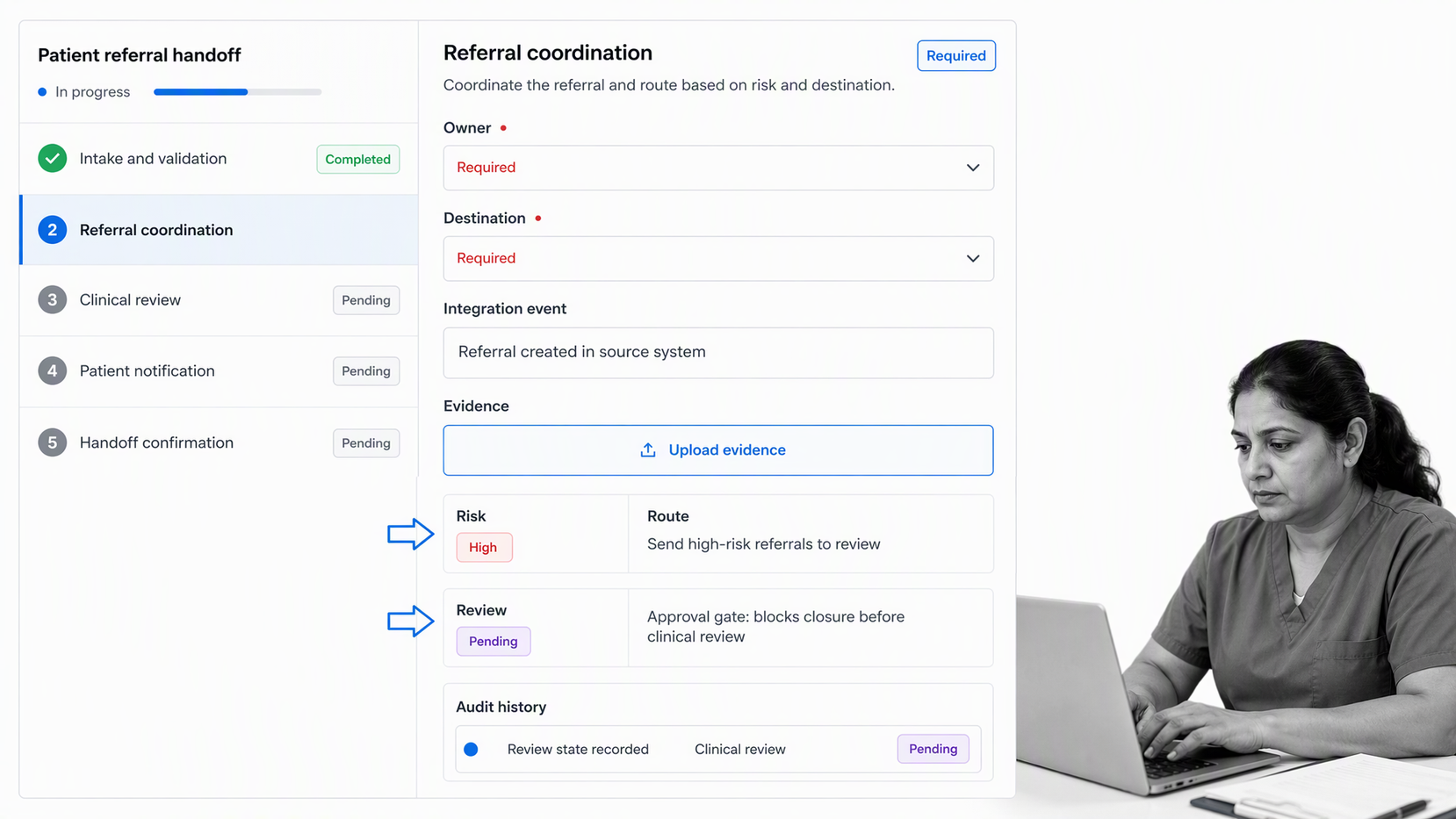
Process Street can act as the governed execution layer between healthcare tools. A trigger starts a workflow, tasks route to owners, integrations exchange information, conditional logic adapts the path, approvals protect critical decisions, and evidence stays attached to the work.
Process Street is an agentic process automation platform and is HIPAA compliant. It is useful when healthcare operations, quality, compliance, and administrative teams need recurring work to follow the same controlled path across people, systems, shifts, and locations.
Coordinate work across the stack
Process Street has direct, universal integrations to 5,000+ systems. Need a new one? An AI agent builds it on the fly. That lets a workflow connect forms, record systems, communication tools, analytics, ticketing, documents, and other operating systems without making one application pretend to do every job.
Make ownership and exceptions explicit
Each workflow run can assign tasks, require fields, capture evidence, route exceptions, request review, and preserve the completion history. Teams see who owns the next step instead of reconstructing the process from email and chat.
Turn standards into daily execution
Policies become useful when they shape the work. Required checks, role-based tasks, approval gates, and evidence fields can turn a standard into an operating path that people follow during patient intake, audit preparation, incident response, referral coordination, and quality review.
Healthcare tools selection checklist
Use this checklist before adding a healthcare tool to the stack. A strong answer should be specific, testable, and tied to a real workflow.
- Purpose: Which patient, clinical, operational, quality, or compliance outcome will the tool support?
- Owner: Who is accountable for the outcome, configuration, access, and ongoing review?
- Workflow: What event starts the work, what decisions occur, and what proves completion?
- Data: What information enters, where it is stored, who can access it, and which system is authoritative?
- Interoperability: Which integrations are required, and what happens when an exchange fails?
- Security: Which administrative, physical, and technical safeguards apply?
- Governance: Who can change the tool, approve changes, and retire an old workflow?
- Usability: Can real users complete common and exception paths without side work?
- Evidence: Can the organization retrieve completion, approval, access, and exception records later?
- Measurement: Which process and outcome measures will show whether the tool improved the work?
Patient-safety methods can support this review. The IHI Patient Safety Essentials Toolkit includes tools such as flowcharts, failure mode and effects analysis, structured communication, and root-cause methods. The important step is connecting the method to assigned action and follow-through.
The best healthcare tool is not the one with the longest feature list. It is the one that fits the workflow, reduces operational ambiguity, protects sensitive information, supports the people doing the work, and produces evidence that the intended process happened.
FAQs
What are healthcare tools?
Healthcare tools are clinical, operational, analytical, communication, and governance systems used to support patient care and the work around it. They include record systems, diagnostic devices, workflow platforms, quality dashboards, checklists, automation, and compliance controls.
What types of healthcare tools do organizations use?
Organizations use tools for clinical records and decisions, diagnostics and monitoring, patient communication, workflow coordination, analytics, quality improvement, security, compliance, and governance. The right mix depends on the care setting, operating model, risk profile, and systems already in place.
How should a healthcare organization evaluate a new tool?
Start with a real workflow and test the tool against workflow fit, interoperability, security, privacy, governance, usability, evidence, and reporting. Include frontline users and test exception paths, not only the normal demo scenario.
How do healthcare tools support compliance?
Healthcare tools support compliance by controlling access, embedding required steps, capturing evidence, recording approvals, preserving audit history, and making exceptions visible. Compliance still depends on correct implementation, ownership, review, and daily use.
How can healthcare tools work together?
Healthcare tools work together when each system has a clear role, integrations move the minimum necessary data, and a governed workflow assigns the next action. Systems of record hold authoritative information, while systems of action coordinate execution and proof.
Can Process Street connect healthcare tools?
Yes. Process Street can coordinate work across healthcare tools through assigned workflows, required fields, conditional logic, approvals, evidence capture, audit history, automation, and integrations. It helps teams connect systems to a consistent operating process.
