


Turn every policy into automated workflows with built-in enforcement and audit-ready proof.



Healthcare Dashboard
A healthcare dashboard is a focused view of clinical, operational, quality, financial, or compliance data that helps healthcare teams make decisions. It brings key metrics into one place so leaders can see what needs attention and decide who should act next.
The dashboard is only useful when it changes work. A healthcare dashboard can show a safety signal, a capacity problem, a quality trend, or a compliance gap, but the organization still needs owners, thresholds, reviews, evidence, approvals, and follow-up.
This guide explains what a healthcare dashboard is, which dashboard types matter, which metrics belong on one, how to design and build dashboards, and how to connect dashboard insights to accountable workflows.
In this article, we are going to cover:
- What a healthcare dashboard is
- Why healthcare dashboards matter
- Healthcare dashboard types
- Healthcare dashboard metrics
- Healthcare dashboard design principles
- How to build a healthcare dashboard
- Healthcare dashboard in Process Street
- How to choose healthcare dashboard software
- FAQs
What a healthcare dashboard is
A healthcare dashboard is a visual control surface for healthcare performance. It summarizes selected metrics, trends, exceptions, and work states so a specific audience can understand what is happening and what decision should follow.
That audience matters. A hospital executive, nursing leader, compliance officer, revenue cycle manager, quality director, and clinic administrator need different views. A strong dashboard is not a warehouse of every available chart. It is a small set of measures tied to a decision.
A dashboard is different from a report
A report usually answers what happened over a defined period. A dashboard helps a team monitor current state, spot exceptions, and decide whether action is required. Reports are useful for review. Dashboards are useful for operating rhythm.
That is why a healthcare dashboard connects closely to healthcare analytics. Analytics interprets the data, while the dashboard gives the operational user a view they can scan and use.
A dashboard is different from a workflow
A dashboard can show that a process is drifting, but it does not automatically fix the process. For example, a quality dashboard might show overdue fall-risk reassessments. The dashboard identifies the exception. A workflow assigns the owner, collects the evidence, requires review, and proves closure.
Process Street is strongest when healthcare teams use dashboard signals as triggers for controlled work. The dashboard shows the signal. The workflow makes sure the response happens.
Why healthcare dashboards matter
Healthcare dashboards matter because healthcare work is complex, high volume, and high risk. Decisions often depend on data scattered across EHRs, claims systems, scheduling tools, incident reports, staffing systems, BI tools, spreadsheets, and workflow records.
They make safety and quality visible
AHRQ NPSD dashboards show how patient safety data can be organized into interactive views for event types, harm levels, medication events, falls, pressure injuries, and other safety concerns. The value is not the existence of a chart. The value is that safety leaders can see patterns and decide where prevention work should focus.
AHRQ National Healthcare Safety Dashboard announcement also shows the national push toward transparent safety measurement. Healthcare organizations can apply the same principle internally: define the measures, make them visible, and connect movement in the measure to action.
They reduce blind spots across operations
Operational leaders need to see patient flow, staffing pressure, delayed handoffs, scheduling backlog, discharge readiness, equipment issues, referral queues, and care coordination status. A healthcare dashboard can bring those signals together so problems are noticed before they become escalations.
Dashboards also pair naturally with healthcare monitoring and process monitoring. Monitoring tells teams what is changing. Process monitoring shows whether the work that should respond to that change is actually being completed.
They support compliance readiness
Compliance teams need evidence that required activities are happening consistently. A dashboard can surface overdue reviews, missing documentation, training gaps, open incidents, unresolved approvals, or controls that need attention.
In regulated healthcare work, dashboards should be designed with privacy, access, and auditability in mind. HHS HIPAA Security Rule guidance explains safeguards for electronic protected health information, which makes governance part of dashboard design rather than an afterthought.
Healthcare dashboard types
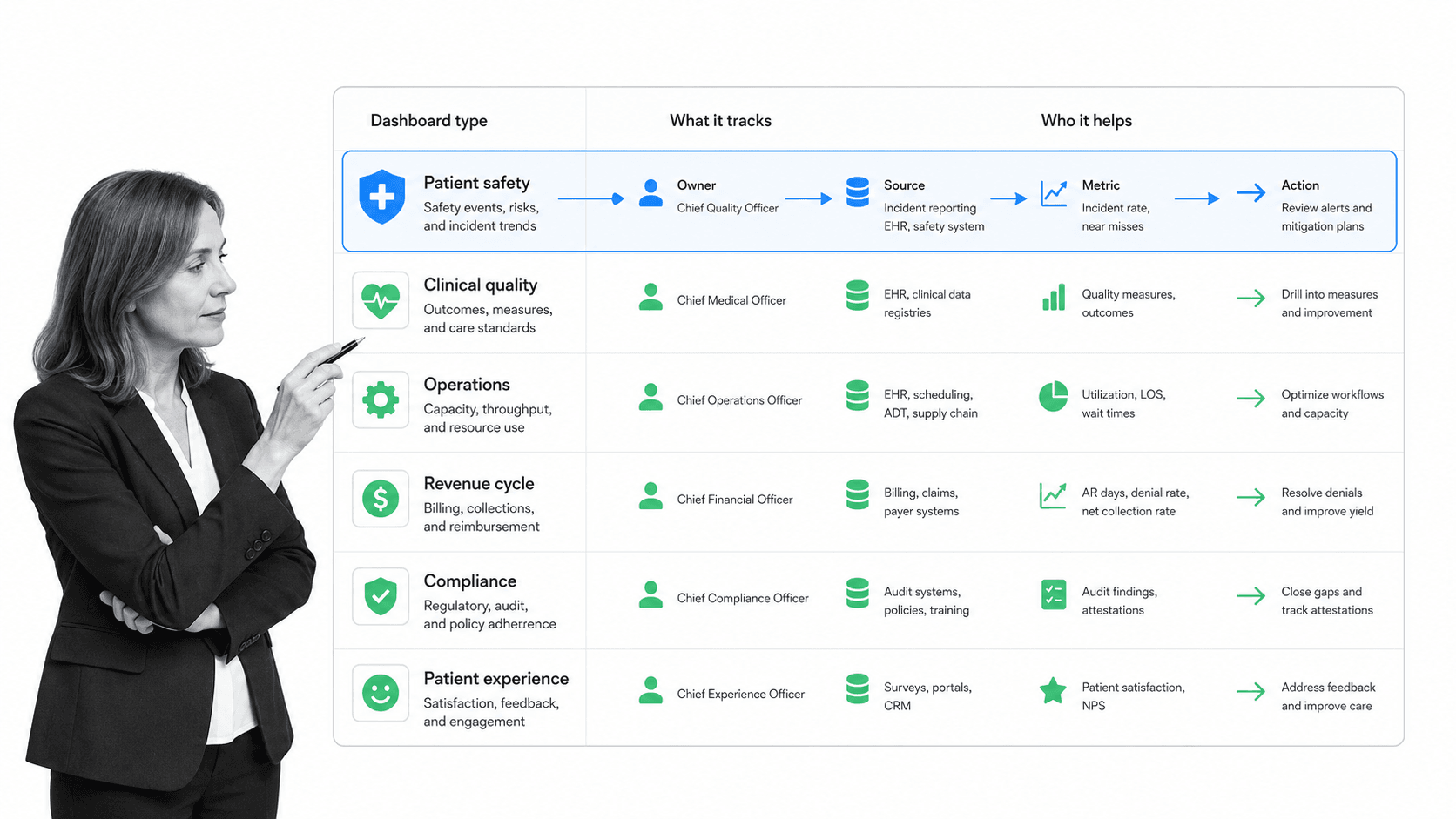
Healthcare dashboard types should map to the operating decisions your team needs to make. Most organizations need several focused dashboards rather than one massive dashboard that tries to serve everyone.
Clinical quality dashboards
Clinical quality dashboards track care quality, patient outcomes, adherence to protocols, readmissions, infections, medication safety, adverse events, and other quality indicators. They help quality and clinical leaders see where care delivery needs review.
Patient safety dashboards
Patient safety dashboards focus on incidents, near misses, falls, pressure injuries, medication events, device issues, safety culture, and harm trends. They should help teams prioritize prevention work and close corrective actions.
Operational dashboards
Operational dashboards track patient flow, bed utilization, wait times, staffing levels, referral status, discharge readiness, appointment no-shows, and service backlogs. They are most useful when they show exceptions that managers can act on during the day.
Revenue cycle dashboards
Revenue cycle dashboards track claims, denials, authorization status, coding queues, payment delays, and reimbursement trends. They help finance and operations teams spot bottlenecks that affect cash collection and patient administration.
Compliance dashboards
Compliance dashboards track policy reviews, access reviews, HIPAA-related work, training completion, incident response, audit evidence, control checks, approvals, and open remediation. They should connect visible status to proof that the required work was completed.
Teams that already manage healthcare integration can use dashboard types to decide which systems feed each view and which workflows need to run when a metric crosses a threshold.
Healthcare dashboard metrics
Healthcare dashboard metrics should be chosen for action, not display volume. A metric belongs on a dashboard when it helps a defined role notice a meaningful state change and make a decision.
Clinical and patient safety metrics
Common clinical and safety metrics include readmissions, infections, falls, medication events, pressure injuries, mortality indicators, adverse events, length of stay, follow-up completion, and safety event closure. The exact metric set depends on care setting and governance requirements.
CMS quality measures gives healthcare organizations a formal reference point for quality measurement. When dashboard metrics align with established measure definitions, teams reduce confusion and make reviews more consistent.
Operational metrics
Operational metrics can include wait time, throughput, referral cycle time, discharge delay, bed occupancy, staff assignment load, appointment no-show rate, documentation backlog, and open handoffs. These metrics should connect to an owner who can change the process.
Compliance and governance metrics
Compliance metrics can include overdue policy reviews, missing attestations, open audit findings, unresolved incidents, incomplete training, access review status, approval exceptions, and evidence collection status. These metrics work best when each exception can launch a task or workflow.
Metric ownership rules
Every dashboard metric needs an owner, definition, source system, refresh rhythm, threshold, review cadence, and action path. Without those rules, the same number can mean different things to different teams, and no one knows when to respond.
Ownership is also what keeps the dashboard from becoming a passive scorecard. If a metric moves in the wrong direction, the owner should know whether to investigate data quality, open a corrective workflow, escalate risk, or document that no action is required.
A practical approach is to start with a healthcare process that already has owners and handoffs, then decide which measures would help those owners make better decisions.
Healthcare dashboard design principles
Healthcare dashboard design should make the next decision obvious. Good design is not about adding more visualizations. It is about reducing ambiguity for the person who has to act.
Design around one audience
A dashboard for executives should not look like a dashboard for charge nurses. Executives need trend, risk, and accountability views. Frontline managers need current exceptions, handoffs, and tasks. Compliance teams need evidence state, review status, and audit trail context.
Use thresholds carefully
Thresholds should be visible, stable, and reviewed. If every metric is red, the dashboard becomes noise. If thresholds are too loose, the dashboard hides risk. Start with a few meaningful thresholds and tune them during regular review.
Show context beside status
A single KPI card rarely tells the whole story. Helpful dashboards show source, trend, segment, owner, and action state near the measure. If readmission risk is rising, the viewer should also see which team owns the review and whether interventions are open.
Respect privacy and permissions
Healthcare dashboards may contain protected or sensitive information. Role-based access, least privilege, audit logs, and careful data minimization are part of the design. A dashboard should show enough to guide action without exposing unnecessary patient detail.
When dashboard work involves care pathways or checklists, a medical checklist app can help keep clinical and administrative steps structured while the dashboard monitors exceptions.
How to build a healthcare dashboard
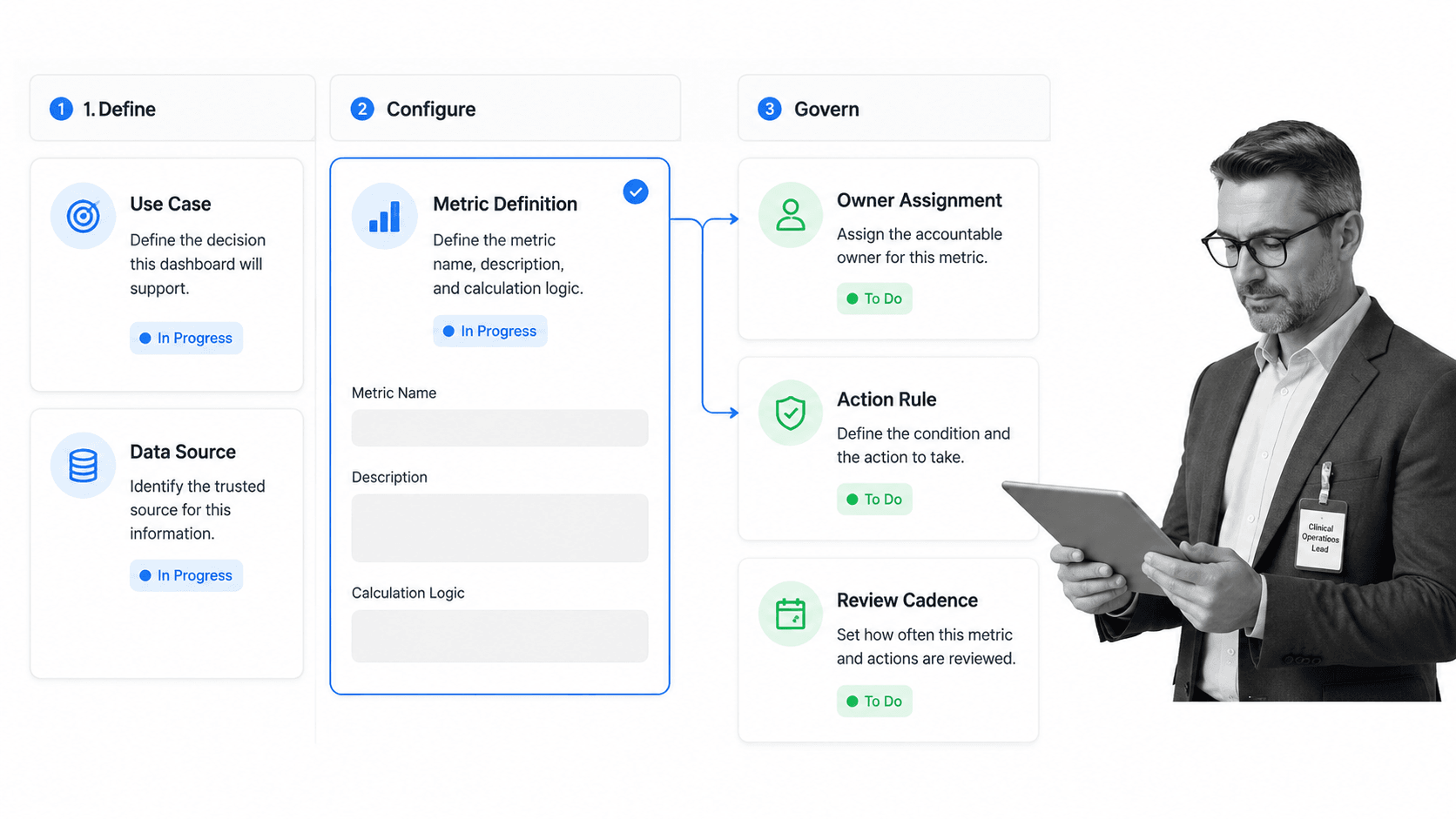
To build a healthcare dashboard, start with the decision the dashboard is meant to improve. The technical work matters, but the operating model matters more. A clean dashboard that no one acts on is still a failed dashboard.
Step 1: Define the use case
Name the dashboard purpose in one sentence. Examples include reducing discharge delays, monitoring patient safety events, tracking compliance reviews, managing readmission interventions, or controlling referral backlog. The use case should name the audience and the decision.
Step 2: Select metrics and definitions
Choose a small metric set. For each metric, document the source, calculation, filters, owner, refresh rhythm, and threshold. Avoid copying metrics from another organization without checking whether they match your data and operating model.
Step 3: Connect data sources
Dashboard reliability depends on data movement. EHR exports, claims systems, BI tools, incident systems, and workflow records may all feed the view. Standards such as ONC FHIR fact sheets can support consistent exchange, but teams still need governance around mappings and definitions.
Step 4: Build the action path
Decide what happens when a threshold is crossed. Who reviews the signal? Which task starts? What evidence is required? Which approval blocks closure? When is leadership notified? A dashboard without an action path pushes the burden back onto meetings and messages.
This is where a workflow management system helps. The dashboard makes the exception visible. The workflow system assigns the work, routes the review, and stores the proof.
Step 5: Review and improve
Dashboard review should be scheduled. Remove metrics no one uses, tighten definitions that cause confusion, adjust thresholds that create noise, and add workflow triggers for exceptions that need repeatable action. The dashboard should get simpler and more useful over time.
Healthcare dashboard in Process Street
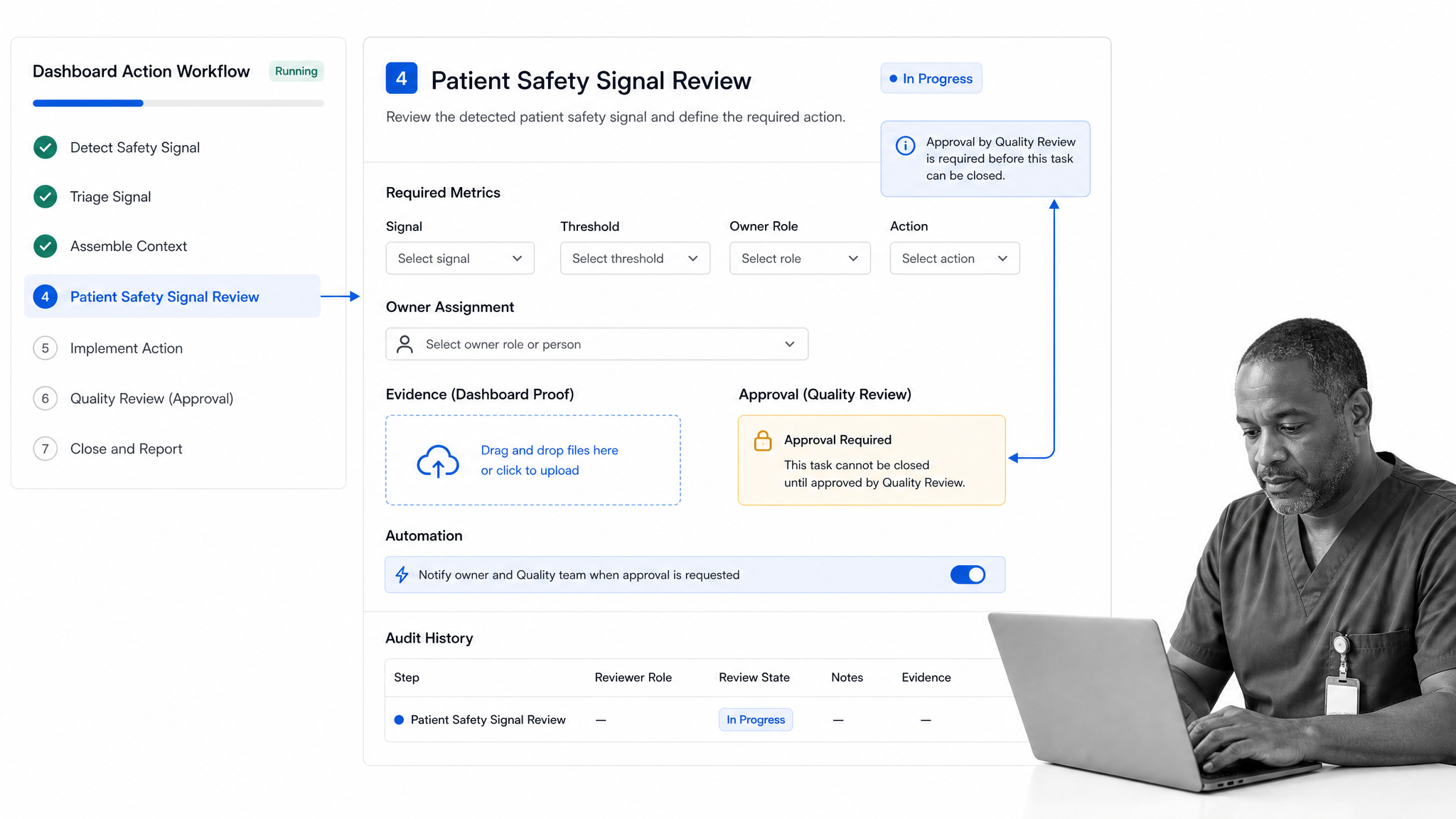
Healthcare dashboard work in Process Street starts when a visible signal needs controlled follow-up. A dashboard might show an overdue review, a safety event pattern, a compliance exception, a patient flow issue, or a quality trend. Process Street turns that signal into assigned work with evidence and accountability.
Process Street is a Compliance Operations Platform and is HIPAA compliant. It is built for teams that need repeatable work, clear ownership, approvals, audit trails, and proof that a required process was followed.
Turn dashboard exceptions into workflow runs
A dashboard exception can trigger a workflow run for review, escalation, remediation, or follow-up. The workflow can capture the metric, threshold, owner, action taken, evidence attached, approval status, and outcome review.
Use Reports and Workflow Dashboard views
Reports dashboard let teams see, manage, and create saved views for workflow runs in one place. Workflow Dashboard shows connected automations, activity log, workflow runs, analytics, and assigned tasks for a workflow. Together, these views help teams connect operating status to the work behind it.
Route work with controls
Healthcare dashboard exceptions often need different responses based on severity. Low-risk exceptions might route to a team lead. High-risk exceptions might require compliance review, quality approval, evidence upload, and leadership notification before closure.
Connect to the healthcare stack
Process Street has direct, universal integrations to 5,000+ systems. Need a new one? An AI agent builds it on the fly. That helps teams connect dashboard signals to forms, BI tools, EHR exports, spreadsheets, communication tools, and systems of record without leaving the response path manual.
Teams using workflow management software can apply the same execution discipline to dashboard-driven quality review, compliance monitoring, patient safety follow-up, and care operations.
How to choose healthcare dashboard software
Choose healthcare dashboard software by evaluating how well it supports the decision, data, governance, and action path. Visual polish matters less than whether the dashboard leads to consistent response.
Evaluate the operating use case
Ask which decisions the software improves. Does it support patient safety review, clinical quality, operational throughput, revenue cycle, compliance, or executive reporting? A product built for one use case may not fit another without heavy customization.
Check data access and governance
Look at supported data sources, refresh options, permissions, audit logging, metric definitions, export options, and data lineage. Healthcare dashboard software should make it easy to understand where each metric comes from and who can view it.
Test the action workflow
The best selection test is to choose one real exception and run it end to end. Can the software show the signal, assign the owner, collect evidence, require review, and prove the outcome? If the dashboard ends at visualization, the action layer is still missing.
Plan for change
Healthcare dashboards change as regulations, service lines, staffing models, care pathways, and leadership priorities change. Choose a system that lets non-technical owners adjust views, definitions, and workflows without waiting months for a rebuild.
That flexibility matters after launch. The first version usually reveals missing owners, noisy thresholds, unclear definitions, and exceptions that need a stronger review path. Treat the dashboard as an operating system for decisions, not as a one-time reporting project.
For quality and compliance-heavy teams, dashboard software should also connect to compliance management software and quality management system software so visible status is tied to repeatable control work.
FAQs
What is a healthcare dashboard?
A healthcare dashboard is a focused view of healthcare metrics that helps a defined audience monitor performance and decide what action should follow. It can cover clinical quality, patient safety, operations, revenue cycle, compliance, or executive performance.
What metrics should a healthcare dashboard include?
A healthcare dashboard should include only the metrics tied to its use case and audience. Common metrics include readmissions, infection indicators, falls, wait time, bed occupancy, documentation backlog, training status, policy review status, incident closure, and open approvals.
What are the main types of healthcare dashboards?
Common types include clinical quality dashboards, patient safety dashboards, operational dashboards, revenue cycle dashboards, compliance dashboards, executive dashboards, and patient experience dashboards. Each type should have its own audience, metric definitions, and action path.
How do you build a healthcare dashboard?
Start with one decision, choose a small metric set, document definitions and source systems, connect the required data, design the view for one audience, define thresholds, and build the workflow that starts when a metric needs action.
How is a healthcare dashboard different from a report?
A report usually summarizes what happened in a defined period. A healthcare dashboard supports monitoring and action by showing current status, exceptions, trends, owners, and response state.
Can Process Street support healthcare dashboard workflows?
Yes. Process Street can turn healthcare dashboard signals into assigned workflows with required fields, conditional routing, approvals, evidence uploads, automations, and audit history. It helps teams move from visible status to accountable action.
