


Turn every policy into automated workflows with built-in enforcement and audit-ready proof.



Customer Engagement Tools
Customer engagement tools help teams understand customer signals, communicate across channels, resolve service needs, personalize journeys, collect feedback, and turn every important interaction into an owned next step.
The category is broad because engagement happens across marketing, sales, onboarding, support, customer success, renewals, and service recovery. Some platforms specialize in conversations. Others orchestrate messages, manage service cases, collect customer context, or control the internal work that must happen after a signal arrives.
This guide compares five customer engagement tools and explains where each fits. Process Street ranks first for teams that need engagement to become a repeatable operating process, with required steps, clear owners, approvals, integrations, and proof that follow-up happened.
In this article, we are going to cover:
- Customer engagement tools at a glance
- What customer engagement tools do
- How to choose customer engagement tools
- Best customer engagement tools to compare
- Build a connected customer engagement system
- FAQs
Customer engagement tools at a glance
Customer engagement tools at a glance
Use this table to match each product to the job it handles best. A strong engagement stack may combine more than one tool, but it should never leave ownership or customer context between systems.
| Tool | Best for | Standout feature | Pricing |
|---|---|---|---|
| Process Street | Repeatable customer engagement workflows with approvals and proof | Workflow runs with assignments, required fields, approvals, integrations, and audit history | Current plans are published on the official pricing page |
| Intercom | Conversational customer service and support | A customer service workspace built around conversations, help desk context, and AI assistance | Current plans are published on the official pricing page |
| Braze | Cross-channel lifecycle messaging and journey orchestration | A customer engagement platform for orchestrating journeys across channels | Pricing is available through the official pricing request page |
| Salesforce Service Cloud | Enterprise service case management | Customer service case management with routing, knowledge, and customer context | Current packages are published on the official pricing page |
| HubSpot Service Hub | Growing teams that want help desk and CRM context together | Help desk and customer service software connected to customer context | Current plans are published on the official pricing page |
What customer engagement tools do
Customer engagement tools create a usable system around customer behavior and communication. They capture signals, preserve context, decide what should happen next, and help the right team respond through the right channel.
Capture customer signals
Signals include support conversations, survey responses, onboarding milestones, product activity, campaign behavior, renewal risk, account changes, and direct requests. A customer engagement platform should collect those signals without forcing employees to reconstruct the customer story from separate tabs.
A useful companion is a customer journey mapping tool that shows where signals appear across the lifecycle. A customer journey map template helps teams make those moments explicit before the engagement system turns them into live actions.
Coordinate communication across channels
Customers may move from email to chat, from a service ticket to a success call, or from an onboarding message to a product event. Good tools help the company keep one coherent conversation even when channels change. That does not require one giant platform, but it does require shared context and clear system ownership.
Route work behind the conversation
The visible message is only one part of engagement. A complaint may require an investigation. A low survey score may require manager review. A renewal risk may require a health check, plan, and approval. A new customer may need a structured onboarding sequence. This is where engagement becomes operational.
A complete customer engagement software setup connects communication, customer context, and internal execution. Keeping those roles distinct helps teams build a practical shortlist without collapsing every requirement into a CRM or messaging product.
Measure outcomes without rewarding noise
Engagement metrics should connect activity to customer progress. Message volume, ticket count, and notification delivery can describe workload, but they do not prove the customer reached value. Teams should also track resolution quality, milestone completion, response consistency, retention signals, and whether promised follow-up occurred.
How to choose customer engagement tools
Choose customer engagement tools by starting with the failure you need to fix. A team with fragmented support conversations needs a different surface from a lifecycle marketing team, an enterprise service organization, or an operations team trying to standardize follow-up.
Start with the primary engagement job
- Conversation management: choose a support workspace built for fast, contextual customer conversations.
- Journey orchestration: choose a platform that coordinates segments, channels, triggers, and lifecycle messages.
- Service case management: choose a system that handles queues, routing, knowledge, entitlements, and case history.
- Customer context: choose a connected CRM and service surface that gives teams a shared view of the relationship.
- Workflow control: choose a system that assigns required work, routes approvals, integrates systems, and preserves completion evidence.
Separate the system of record from the system of action
A CRM or service platform can store customer history. A workflow system can enforce the internal response. Trying to make one tool do both jobs often creates cluttered records or untracked work outside the system. Define which tool owns customer data, which owns communication, and which owns the repeatable process.
If the team already has customer data but still misses handoffs, a workflow management system may solve more than another engagement channel. It can turn a customer signal into tasks, required fields, approvals, notifications, and a durable record.
Evaluate context, routing, and governance
- Can an employee see the recent customer context before responding?
- Can the system route work by issue, segment, value, risk, region, or lifecycle stage?
- Can managers define required steps without relying on memory or private messages?
- Can sensitive or high-risk actions require approval before they happen?
- Can the team prove who acted, what changed, and when the work finished?
- Can the system connect with the current CRM, support, data, communication, and reporting stack?
Plan integrations around events, not logos
An integration list is useful only when it supports the events that matter. Define what should happen when a customer submits feedback, misses an onboarding milestone, requests a cancellation, opens a priority case, reaches a renewal window, or completes a success plan.
Process Street has direct, universal integrations to 5,000+ systems. Need a new one? An AI agent builds it on the fly. That makes it possible to connect engagement signals to controlled work without using integration count as a substitute for process design.
Best customer engagement tools to compare
The reviews below emphasize the operating role of each product. Each tool can support more than the use case listed here, but a clear primary job makes the shortlist easier to evaluate.
1. Process Street
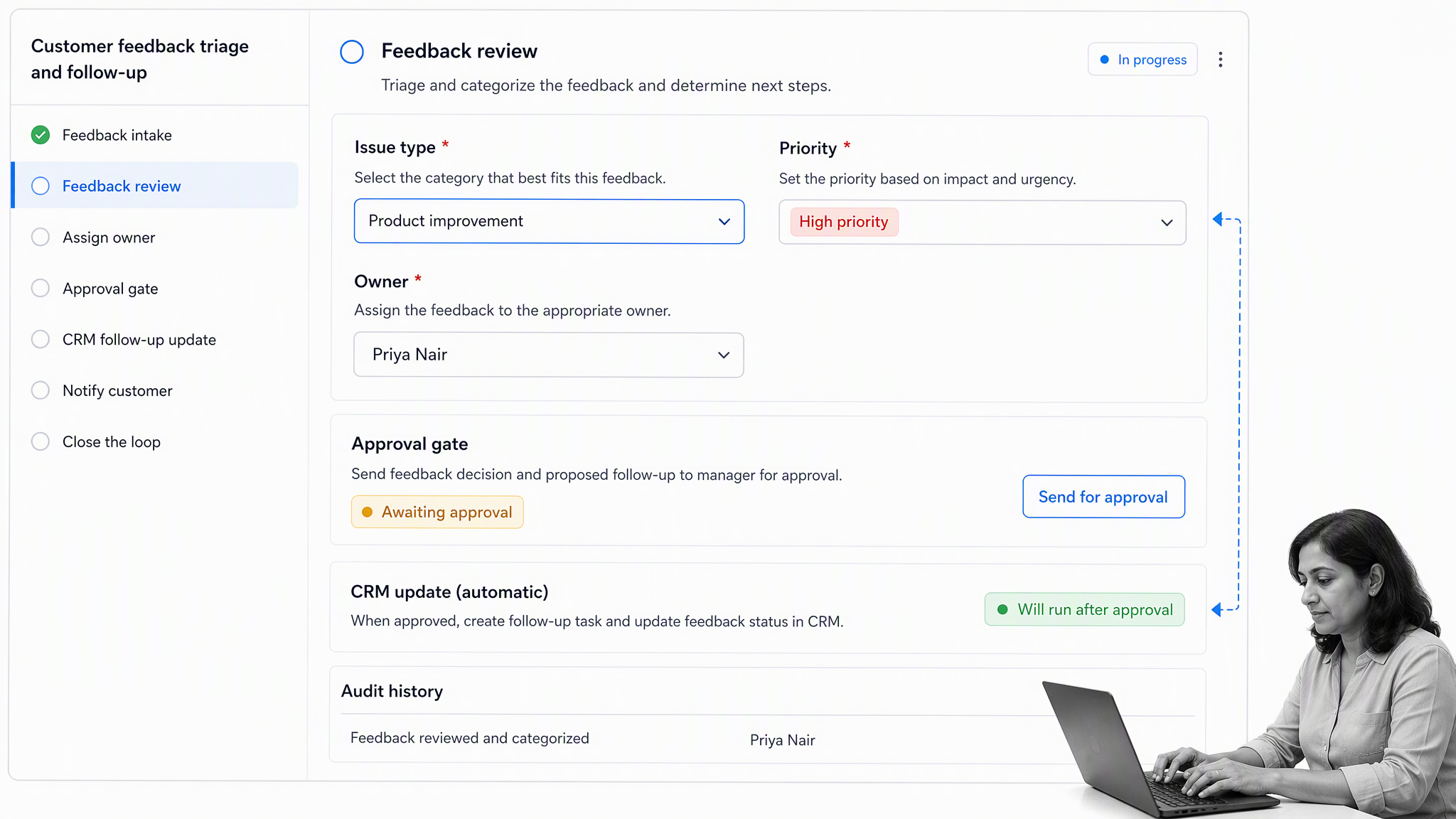
Best for: teams that need repeatable customer engagement workflows with approvals and proof.
Process Street turns customer signals into controlled work. A low satisfaction response can launch a recovery workflow. A completed sale can launch onboarding. A support escalation can assign an investigation, require evidence, route manager approval, update the CRM, and record the final customer follow-up.
This approach matters when the customer-facing tool already captures the signal but employees still coordinate the response through memory, spreadsheets, chat messages, or loosely structured CRM tasks. Process Street provides the operating layer that defines who acts, which fields are required, when approval is needed, and what must be true before the work closes.
Teams can start with a customer feedback process, customer onboarding checklist, or customer success management process, then adapt the workflow to their own lifecycle and escalation rules.
Process Street is strongest when engagement crosses departments. Sales can pass context to onboarding. Support can route a service recovery to operations. Customer success can trigger a renewal review. Compliance or legal can approve an exception before the customer receives a commitment.
- Choose it when: the main problem is inconsistent follow-up, missed handoffs, unclear ownership, or weak proof.
- Pair it with: the CRM, messaging platform, service desk, survey tool, and data warehouse already in the stack.
- Skip it when: the only need is a lightweight shared inbox with no recurring internal process.
2. Intercom
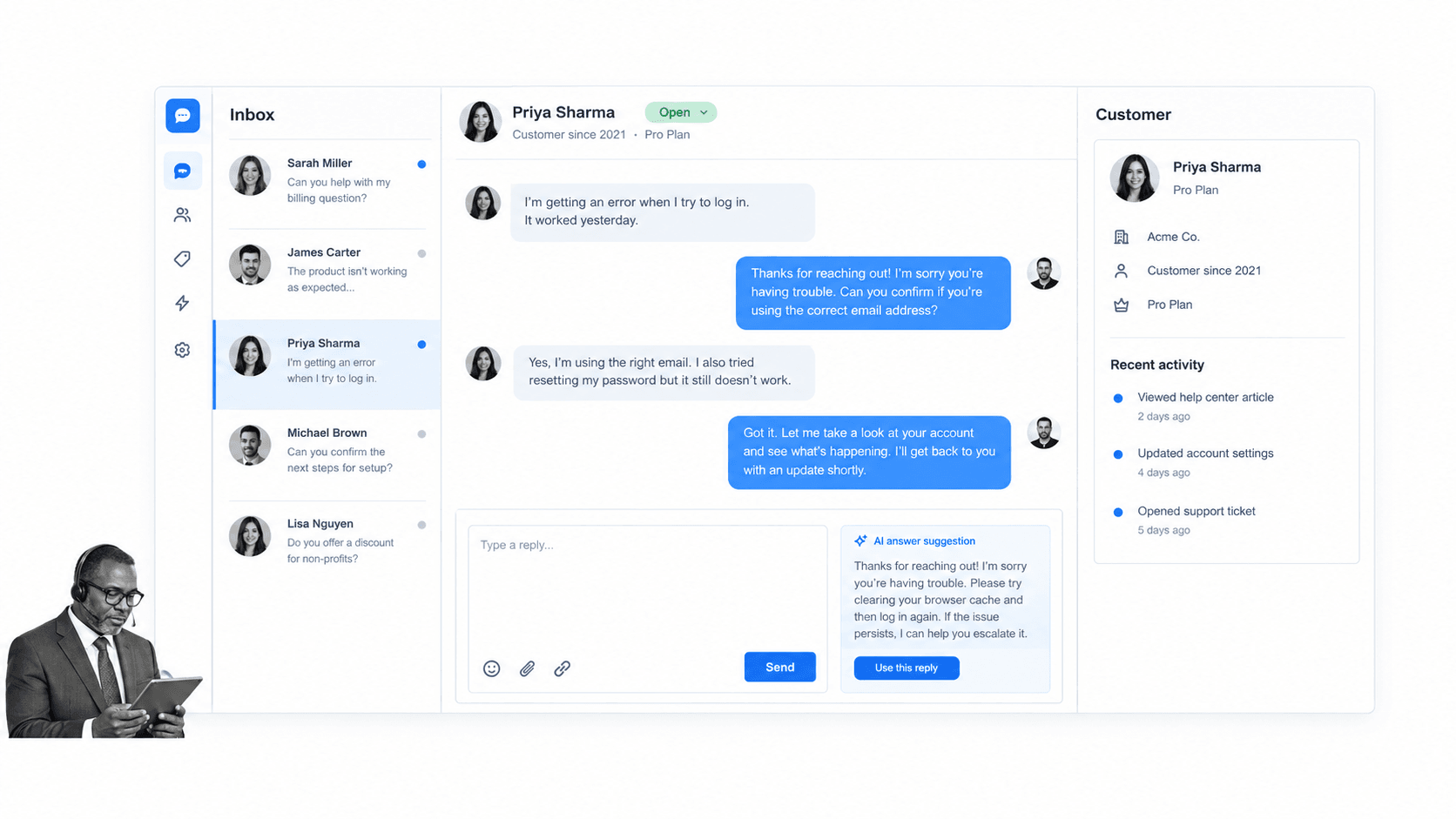
Best for: conversational customer service and support.
Intercom is designed around customer conversations and service workflows. Its operating surface brings the inbox, conversation history, customer context, help resources, and AI-assisted service work into one place for support teams.
Intercom fits teams that want customer engagement to feel like an ongoing conversation rather than a sequence of disconnected tickets. Agents can work from the current message while still seeing the context needed to answer well and decide what should happen next.
The operational boundary appears when the response creates substantial internal work. A conversation may need finance review, a product investigation, a compliance check, or a multi-step recovery process. In those cases, keep Intercom focused on the conversation and launch a governed workflow for the work behind it.
Current packages and billing details are maintained on the Intercom pricing page.
- Choose it when: speed, conversational context, and a unified service inbox are central requirements.
- Pair it with: workflow automation for escalations, service recovery, and cross-functional follow-up.
- Skip it when: the core need is campaign journey orchestration rather than two-way service conversations.
3. Braze
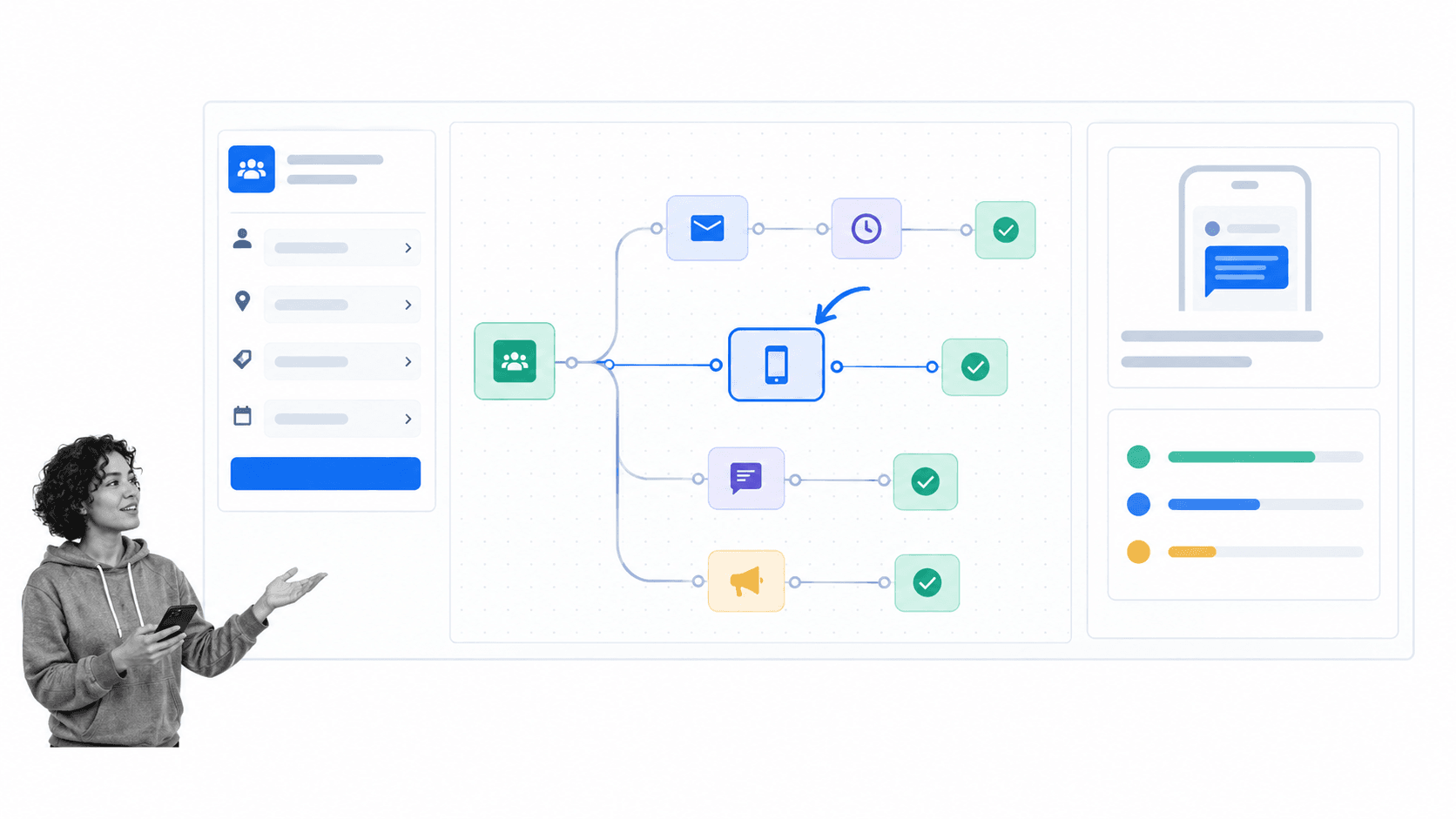
Best for: cross-channel lifecycle messaging and journey orchestration.
Braze is a customer engagement platform for orchestrating journeys across channels. It is a fit for teams that want audience segments, customer events, message steps, and channel choices to work together as one lifecycle program.
Braze is useful when customer engagement depends on timing and context. A customer may need a welcome message, a product prompt, a service notice, a re-engagement path, or a coordinated campaign that changes with behavior. The journey canvas gives lifecycle teams a way to design those transitions.
The main implementation risk is automating messages before defining the customer state clearly. Events, segments, consent, ownership, and exit criteria need disciplined definitions. Otherwise, an impressive journey canvas can still create confusing or repetitive communication.
Braze handles current commercial details through its official pricing page.
- Choose it when: lifecycle marketing needs cross-channel journeys driven by audience and behavior.
- Pair it with: operational workflows for human review, exceptions, service recovery, and high-value account actions.
- Skip it when: the primary need is a service case queue or a governed internal checklist.
4. Salesforce Service Cloud
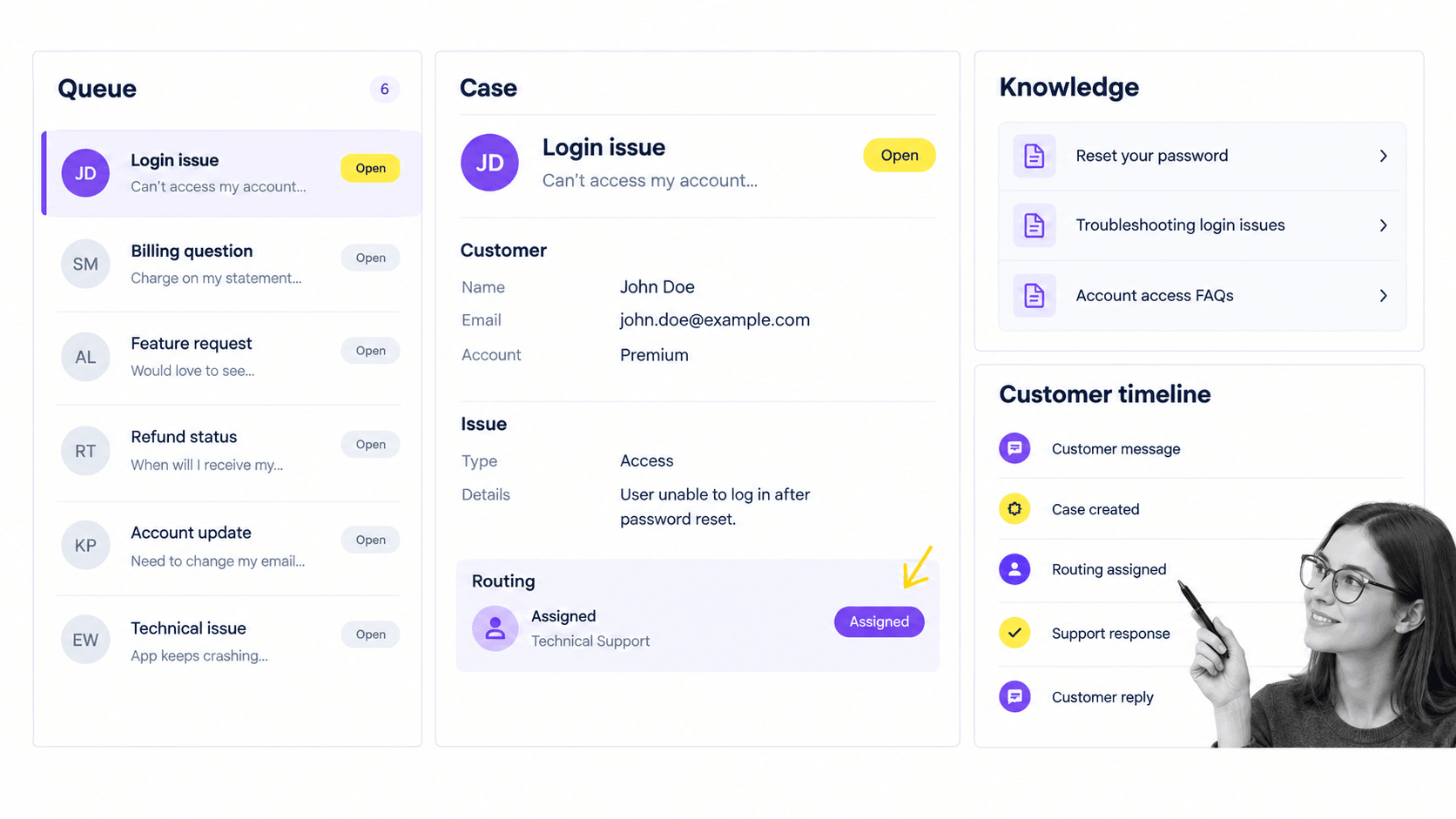
Best for: enterprise service case management.
Salesforce Service Cloud supports customer service organizations that need cases, routing, knowledge, customer context, and a service operating model connected to a broader CRM environment.
Service Cloud is a strong fit when engagement is anchored in formal service work. Teams can organize customer issues into cases, route ownership, preserve history, and give agents structured context for the next action. Enterprise organizations can align service records with accounts, contacts, and other relationship data.
The tradeoff is operating complexity. A flexible enterprise platform needs disciplined administration, field definitions, routing rules, permissions, reporting, and adoption. If every team invents its own case states or closes work differently, the system can preserve inconsistency as efficiently as it preserves good practice.
Salesforce maintains package details on the Service Cloud pricing page.
- Choose it when: service cases must sit inside an enterprise CRM and support organization.
- Pair it with: guided workflows for processes that span service, operations, finance, legal, or compliance.
- Skip it when: the team needs a simple conversational inbox with minimal administration.
5. HubSpot Service Hub
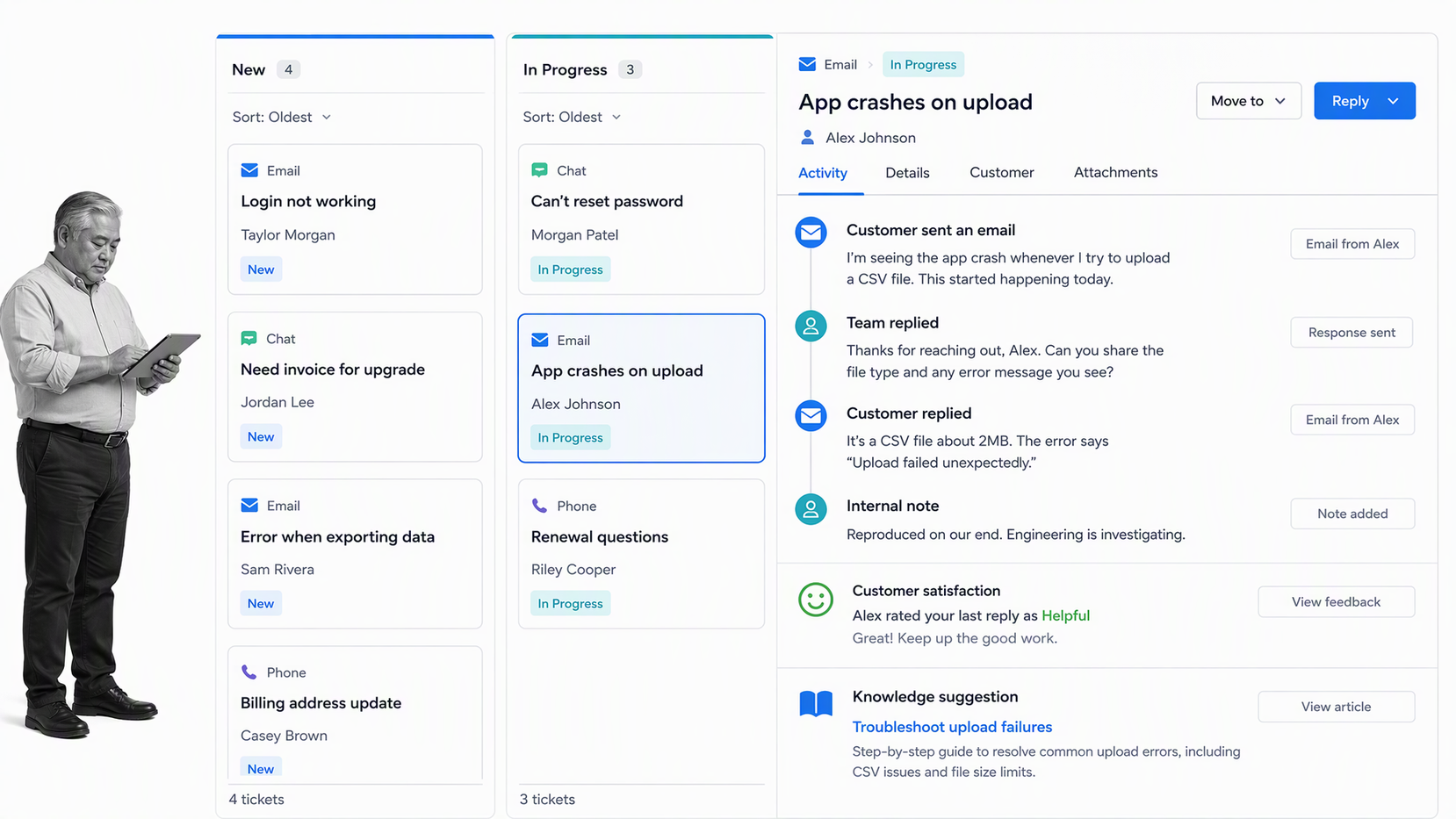
Best for: growing teams that want help desk and CRM context together.
HubSpot Service Hub connects customer service software with customer context in the HubSpot platform. It fits teams that want support work, tickets, knowledge, feedback, and relationship history within an approachable shared environment.
HubSpot can reduce friction for growing teams because sales, marketing, and service can work from related customer records. That shared context helps prevent customers from repeating their story and gives managers a clearer view of how service interactions connect with the broader relationship.
The governance challenge is similar to any flexible customer platform. Ticket properties, pipeline stages, routing rules, feedback loops, and ownership standards need one operating design. Without it, teams can create parallel pipelines and conflicting definitions that weaken reporting.
HubSpot publishes current plan information on the Service Hub pricing page.
- Choose it when: a growing company wants service tools connected to CRM context with a relatively approachable setup.
- Pair it with: a workflow layer when tickets trigger multi-step onboarding, escalation, approval, or retention work.
- Skip it when: the central requirement is sophisticated cross-channel lifecycle orchestration.
Build a connected customer engagement system
The best customer engagement system is not the one with the most channels. It is the one that creates a coherent path from signal to action to customer outcome.
Assign one owner to each system role
Choose a system of record for customer data, a system for customer communication, and a system for repeatable work. These roles can live in one platform for a simple team, but the ownership must still be explicit. Employees should know where to look for context, where to communicate, and where to complete required work.
Design the first five engagement workflows
Start with moments where inconsistency creates visible customer pain. Common candidates are new customer onboarding, low-score recovery, priority support escalation, renewal risk review, and customer feedback follow-up.
A strong starting library combines customer onboarding, a defined customer onboarding process, customer support workflows, and a high-touch client onboarding process. Each workflow should name the trigger, owner, required information, approval path, customer communication, and completion evidence.
Connect signals to actions
A survey response should not end as a dashboard point. A priority ticket should not end as a closed status. A stalled onboarding milestone should not sit in a report. Define the event that launches follow-up, the person who owns it, the due time, and the condition that proves the issue is resolved.
This is also where customer service AI needs an operating boundary. AI can summarize context, suggest responses, classify issues, and help route work. The workflow should still control high-risk actions, approvals, and the evidence needed for review.
Review the customer journey as an operating system
Use customer success operations to connect lifecycle design with day-to-day execution. Review where work waits, which signals receive no owner, where customers repeat information, and which exceptions bypass the intended process.
The goal is not to add more software. It is to create a connected engagement system in which communication, customer context, and internal execution reinforce one another. Teams evaluating customer success software or other customer success tools should keep that workflow layer visible in every buying decision.
FAQs
What are customer engagement tools?
Customer engagement tools are software systems that help teams capture customer signals, communicate across channels, manage service or lifecycle work, preserve context, and coordinate follow-up. The category includes service platforms, messaging tools, journey orchestration systems, CRM-connected help desks, feedback tools, and workflow automation.
What are the best customer engagement tools?
The best choice depends on the job. Process Street is best for repeatable engagement workflows, Intercom for conversational service, Braze for cross-channel lifecycle journeys, Salesforce Service Cloud for enterprise case management, and HubSpot Service Hub for growing teams that want help desk and CRM context together.
How are customer engagement tools different from CRM software?
CRM software primarily stores customer, account, opportunity, and relationship data. Customer engagement tools are broader because they can also manage conversations, service cases, lifecycle messages, feedback, workflow routing, approvals, and the actions triggered by customer behavior.
Which customer engagement tool is best for workflow control?
Process Street is the strongest fit when customer signals need to launch required tasks, conditional routing, approvals, integrations, and an audit history. It complements CRM, service, messaging, and survey platforms by controlling the work behind the interaction.
What features should customer engagement software include?
Look for shared customer context, routing, channel support, automation, lifecycle triggers, feedback capture, reporting, integration options, and clear ownership. If the process carries risk, also require approvals, required fields, permissions, and evidence of completion.
How do you choose a customer engagement platform?
Start with the engagement failure you need to fix, then define which system owns customer data, communication, and internal action. Test the platform against real events such as onboarding, a low satisfaction response, a priority escalation, and a renewal risk before expanding the stack.
