


Turn every policy into automated workflows with built-in enforcement and audit-ready proof.



Customer Engagement Software
Process Street helps teams use customer engagement software as an operating system for the customer journey. The goal is not just to send more messages. The goal is to make sure the right customer signal turns into the right follow-up step, with a clear owner, deadline, record, and next action.
Customer engagement software is a system for coordinating the interactions customers have with your business across onboarding, support, success, renewals, feedback, and service recovery. It brings customer data, communication triggers, internal tasks, workflow rules, and reporting into one place so teams can act consistently.
The category overlaps with customer success tools, CRM systems, support desks, marketing automation, product adoption platforms, and workflow automation. That overlap is why buying the software can feel messy. A strong system makes engagement operational: it captures what happened, decides what should happen next, assigns ownership, and proves the work was completed.
In this guide, we are going to cover everything you need to know about customer engagement software, including:
- What customer engagement software actually does
- When customer engagement software matters
- Customer engagement software features that matter
- Customer engagement software evaluation criteria
- Customer engagement software workflows to build first
- How Process Street supports customer engagement software
- How to implement customer engagement software
- Customer engagement software mistakes to avoid
- FAQs
What customer engagement software actually does

Customer engagement software turns customer activity into coordinated action. A customer books a kickoff call, submits a support ticket, misses a milestone, gives low feedback, renews a contract, or asks for a change. The software captures that signal and helps the team respond without losing context.
The simplest version is a shared record of customer interactions. The stronger version is a workflow system that routes work across teams. The best version becomes a control surface for the customer journey: onboarding knows what sales promised, support knows what success has already tried, finance knows when billing needs action, and managers can see where handoffs stall.
It connects signals to owners
Engagement breaks down when signals sit in disconnected tools. A conversation in chat, a status in the CRM, an onboarding task in a spreadsheet, and a renewal risk in a success platform can all point to the same customer. Customer engagement software gives the team a shared operating layer so signals become owned work instead of loose information.
It standardizes repeatable moments
Every customer journey has repeatable moments: kickoff, data collection, training, health checks, QBR prep, renewal review, escalation, and closeout. You can build those moments with customer onboarding, customer onboarding process, and support playbooks so each customer gets a consistent experience without forcing the team to memorize every step.
It preserves context across teams
Customers do not care which internal department owns a step. They care whether the company remembers the last conversation and follows through. The software should preserve context as work moves from sales to onboarding, onboarding to success, success to support, and support back into product or operations.
When customer engagement software matters
Customer engagement software matters once the customer journey has too many moving parts for one person to track reliably. That can happen in a small service business with complex onboarding or in an enterprise team with multiple product lines, customer segments, regions, and compliance obligations.
The first warning sign is usually inconsistency. One customer gets a great onboarding experience because a senior team member remembers the process. Another customer waits because a handoff was missed. A third customer receives three disconnected follow-ups from three different teams. At that point, the process is living in people instead of in workflow management system.
Use it when customer work crosses departments
Engagement workflows often cross sales, implementation, customer success, support, finance, legal, and operations. A system that only shows messages is not enough. The team needs assignments, due dates, dependencies, approvals, and escalation rules.
Use it when customers need proof and follow-through
In regulated or high-trust environments, engagement is not only a relationship motion. It is proof that the right process happened. Complaint handling, onboarding disclosures, customer approvals, and service recovery can all need a clear record. Standards bodies publish customer satisfaction and complaints-handling guidance, and teams can use complaints-handling guidance as one outside reference when shaping escalation workflows.
Use it when growth creates handoff risk
Growth creates more customer paths, more edge cases, and more handoffs. Teams often respond by buying another communication tool. That can help, but the better question is whether the tool improves the underlying process. If the real problem is recurring work, look at workflow management software and customer engagement software together.
Customer engagement software features that matter
The feature list can get long fast. Most platforms promise dashboards, email, chat, surveys, segmentation, analytics, and integrations. Those features only matter if they help your team act on the right customer moment.
Customer timeline
A useful customer timeline shows major interactions, open tasks, workflow state, feedback, ownership, and next steps. It should make the current customer status obvious without forcing someone to dig through multiple systems.
Workflow automation
Workflow automation turns repeatable engagement steps into predictable execution. That can include assigning tasks, sending reminders, updating fields, escalating overdue work, and creating follow-up runs. HubSpot describes automation as a way to turn repeatable steps into processes across a customer platform, and the same logic applies when choosing workflow automation software for engagement.
Segmentation and triggers
Segments decide who receives which motion. Triggers decide when action starts. Strong customer engagement software lets you combine lifecycle stage, behavior, account type, risk level, and ownership rules so the system responds to real context instead of sending the same generic sequence to everyone.
Task ownership and escalation
Engagement depends on ownership. If a customer misses training, who follows up? If feedback is negative, who responds? If a renewal is at risk, who approves the recovery plan? Software should create owned tasks and escalation paths, not just reports. That is where workflow automation tools and approval tasks become useful.
Privacy and governance controls
Customer engagement systems often hold personal, behavioral, and commercial data. Teams need access controls, data retention decisions, consent awareness, and security review. The FTC privacy and security guidance and the NIST Privacy Framework are useful references for building data-aware operating rules.
Customer engagement software evaluation criteria

A good evaluation starts with the customer journey, not the vendor category. Map the moments that matter, then score each product against the operating model you actually need.
Workflow control
Ask whether the software can turn a customer event into a controlled workflow. Look for assigned owners, required fields, due dates, conditional paths, approvals, and completion history. If the customer journey depends on repeatable execution, this criterion matters more than a prettier dashboard. Adjacent research on business process automation tools can help frame this part of the decision.
Data fit
The software should work with the data your team already trusts. That might be CRM account data, product usage, support tickets, billing state, survey feedback, or forms completed during onboarding. The goal is not to duplicate every system. The goal is to give operators the right context at the moment they need to act.
Governance and auditability
Governance is the difference between a helpful engagement tool and an operating system. Can managers see who changed the workflow? Can teams prove when a task was completed? Can approvals be enforced? Can sensitive steps be restricted to the right roles? These questions matter when engagement work has compliance, security, or contractual consequences.
Customer experience quality
Customer engagement software should reduce friction for the customer, not just create internal visibility. Evaluate whether the system improves response time, reduces repeated questions, keeps customers informed, and supports a smoother path through onboarding or support. Salesforce’s customer engagement resources emphasize connected digital engagement, which is a useful reminder that the customer experiences the journey as one relationship, not a series of internal teams.
For more buying context around adjacent tools, compare engagement needs with customer success software, customer lifecycle software stack, and digital onboarding software.
Customer engagement software workflows to build first
The fastest way to get value is to choose a few high-friction workflows and make them reliable. Do not start by automating every message. Start by removing the moments where customers wait, repeat themselves, or fall through a handoff.
New customer onboarding
New customer onboarding is the natural starting point because it combines data collection, kickoff coordination, training, setup, internal handoffs, and milestone tracking. A structured client onboarding templates gives the team a repeatable baseline before automation gets layered on.
Support escalation
Escalations need clear ownership. A customer reports a high-risk issue, a support agent captures context, a manager reviews priority, and the right team follows through. A strong customer support process keeps the customer informed while protecting the internal audit trail.
Customer health review
Customer health reviews turn signals into action. Instead of watching a score move up or down, the team should launch a workflow that checks usage, open issues, executive alignment, renewal risk, and required next steps. That is where customer success operations becomes more useful than a passive dashboard.
Renewal and expansion readiness
Renewal workflows should begin before the commercial deadline. Engagement software can trigger a review when usage changes, support volume rises, key contacts go quiet, or value milestones are missed. The workflow should produce a clear action plan, not just a risk label.
Feedback and complaint handling
Feedback is only useful when it changes behavior. Build a workflow that captures feedback, classifies it, assigns ownership, routes urgent complaints, tracks the response, and records what changed. That gives teams a controlled path from customer voice to operational improvement.
How Process Street supports customer engagement software
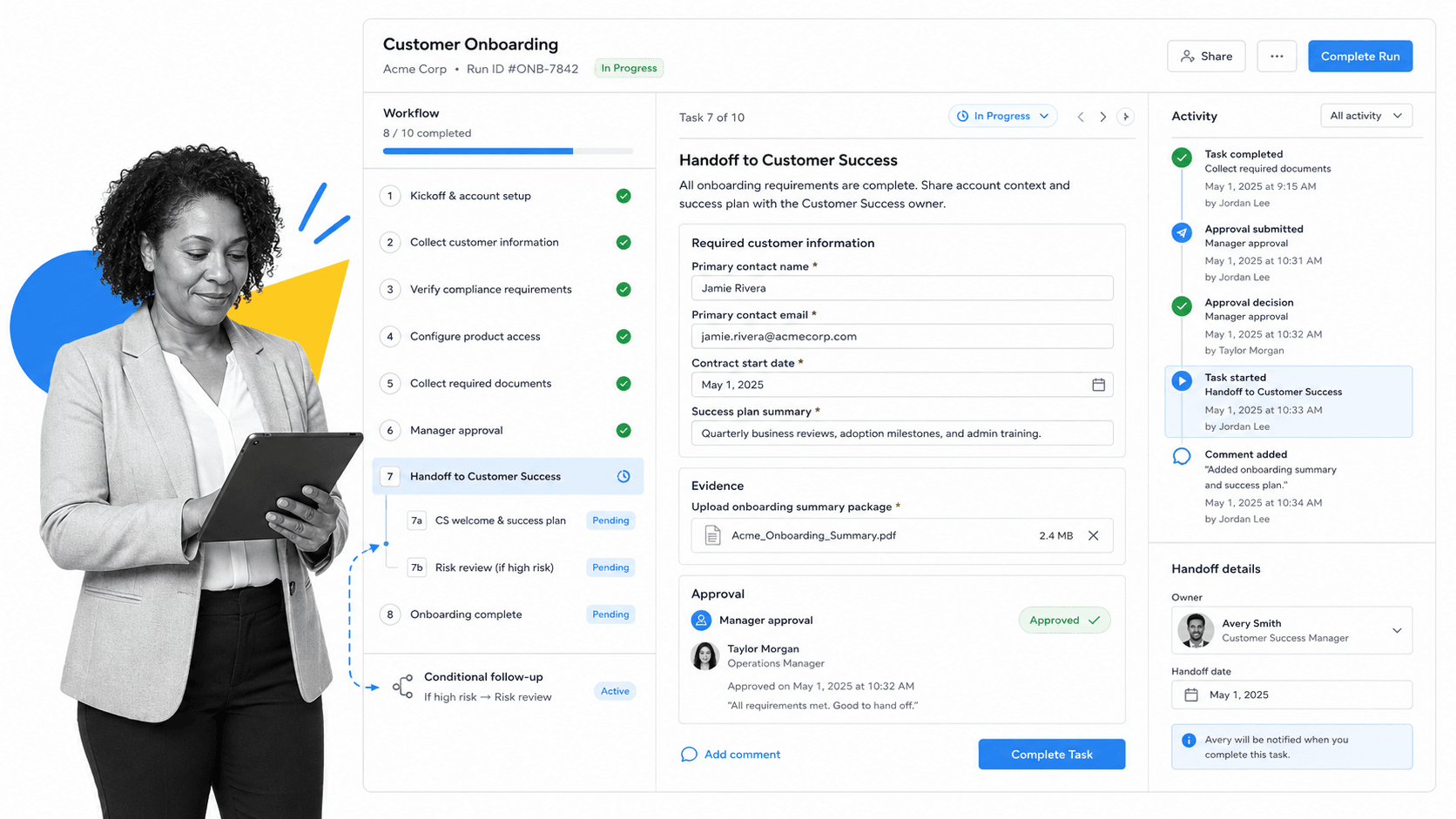
Process Street supports customer engagement software by turning recurring customer work into governed workflow runs. Instead of relying on scattered notes and memory, teams can launch a workflow for onboarding, service recovery, health review, renewal prep, or customer handoff.
The platform is built for the operational layer around engagement: tasks, owners, forms, pages, conditional logic, approvals, enforced order, activity history, automations, and reporting. On the pricing page, Process Street lists workflows, unlimited tasks, forms, pages, conditional logic, approvals, scheduled workflows, automation apps, and connectors including Zapier, Microsoft Power Automate, Tray.io, and Make.
Process Street has direct, universal integrations to 5,000+ systems. Need a new one? An AI agent builds it on the fly. That matters for customer engagement because the journey usually spans CRM, email, chat, support, billing, documents, and internal operations.
Use Process Street for controlled engagement workflows
Use Process Street when the customer engagement motion has steps that must be completed correctly. Examples include implementation checklists, complaint response, renewal risk review, support escalation, regulated client onboarding, and executive handoff. The system works well beside the CRM because it controls the work that happens after the customer signal appears.
Use automations for handoffs and reminders
Process Street workflow automations can reduce manual coordination by triggering next steps, assigning work, and keeping records updated. The point is not to remove humans from the customer relationship. The point is to remove the manual chasing that prevents humans from helping customers at the right moment.
Use approvals for high-stakes customer moments
Some customer steps should not move forward without review: credits, contract exceptions, complaint responses, security approvals, regulatory disclosures, or executive escalations. Built-in approvals keep those decisions inside the workflow rather than in side-channel messages.
How to implement customer engagement software
Implementation should be boring in the best possible way. Pick the journey, define the signal, assign the owner, set the trigger, write the workflow, test it with real edge cases, and measure whether customers get a better experience.
1. Map the customer moments that create risk or value
Start with five to ten moments where engagement changes the customer’s outcome. Examples include kickoff, first value milestone, support escalation, low satisfaction feedback, renewal risk, missed training, security review, and executive handoff.
2. Define the source of truth
Decide which system owns customer identity, lifecycle stage, contract status, product usage, support history, and workflow completion. Customer engagement software works best when each data type has a clear home.
3. Build one workflow at a time
Choose one workflow that matters and make it reliable before scaling. Document required fields, assign every task, add conditional branches, define escalation timing, and test the workflow with a real customer scenario.
4. Connect communication to execution
Emails, chats, and notifications should point back to the work. If a message asks a customer for information, the internal team should see whether that information was received, who owns the next step, and what happens if the deadline passes.
5. Review the workflow after real use
Engagement workflows improve after they touch real customers. Review delays, skipped steps, duplicate questions, reopened issues, and unclear ownership. Then update the workflow so the next customer benefits from what the team learned.
Customer engagement software mistakes to avoid
The biggest mistake is treating engagement as more communication. More emails, more popups, more surveys, and more dashboards can make the customer experience worse if the underlying work is still unclear.
Automating before documenting the process
Automation magnifies the process you already have. If the workflow is unclear, automation makes confusion happen faster. Document the process first, then automate the stable parts.
Measuring activity instead of outcomes
Message volume, login counts, and task totals can be useful signals, but they are not the outcome. The outcome is whether the customer reached value, received help, stayed informed, and moved to the next stage without preventable friction.
Letting every team define engagement differently
Sales may define engagement as responsiveness. Support may define it as ticket interaction. Success may define it as product adoption. Operations may define it as completed steps. Customer engagement software should align those definitions into one operating model.
Skipping governance
Governance feels optional until something goes wrong. Decide who can edit workflows, who can approve high-risk steps, which data is sensitive, and which customer actions need a record. Those rules protect both the customer and the team.
FAQs
What is customer engagement software?
Customer engagement software coordinates customer interactions across onboarding, support, success, renewals, and feedback. It helps teams capture customer signals, assign follow-up work, automate repeatable steps, and keep a clear record of what happened.
What is the difference between CRM and customer engagement software?
A CRM usually stores account, contact, deal, and relationship data. Customer engagement software focuses on the interactions and workflows that happen around those records, such as onboarding, support escalation, feedback response, and renewal readiness.
Who uses customer engagement software?
Customer success, support, onboarding, operations, sales, marketing, and compliance teams can all use customer engagement software. The common thread is recurring customer work that needs clear ownership, timely follow-up, and a shared record.
What features should customer engagement software include?
Look for customer timelines, workflow automation, segmentation, triggers, task ownership, escalation rules, integrations, reporting, access controls, and audit history. The best feature set depends on whether your biggest problem is communication, workflow execution, data quality, or governance.
Can Process Street be used as customer engagement software?
Yes. Process Street can support customer engagement software needs when the core problem is recurring customer work that must be completed consistently. Teams can build onboarding workflows, customer health reviews, support escalations, renewal prep, approvals, reminders, and audit-ready records.
How do you implement customer engagement software?
Start by mapping the customer moments that create risk or value. Choose one workflow, define the trigger, assign owners, add required fields and approvals, connect the systems involved, test with real scenarios, and review performance after customers move through it.
