


Turn every policy into automated workflows with built-in enforcement and audit-ready proof.



Customer Service AI: Guide, Examples, and Implementation

Customer service AI uses artificial intelligence to answer support questions, route issues, assist agents, summarize conversations, detect customer sentiment, and trigger follow-up work. The goal is not to replace the service team with a chatbot. The goal is to give the team a faster, more consistent operating system for customer requests.
The useful version of customer service AI sits between three things: customer conversations, the knowledge your company trusts, and the workflows that make sure the right action happens next. If any one of those pieces is missing, AI becomes a faster way to create inconsistent answers. If all three are connected, support becomes more responsive, more measurable, and easier to govern.
The strongest teams start with narrow, high-volume use cases. They automate routine answers, surface context to agents, and use workflow controls for approvals, escalations, refunds, account changes, compliance-sensitive steps, and quality checks. That is how customer service AI improves speed without losing accountability.
- What is customer service AI?
- How does customer service AI work?
- Where should customer service teams use AI first?
- How do you implement customer service AI without losing control?
- What should customer service AI measure?
- Customer service AI examples
- Customer service AI risks and guardrails
- How Process Street supports customer service AI workflows
- Customer service AI FAQs
What is customer service AI?
Customer service AI is the use of artificial intelligence in support and customer operations. It can classify incoming questions, understand intent, search approved knowledge, draft responses, suggest next steps, summarize conversations, detect risk, and start the workflow that follows the conversation.
The category includes conversational AI, chatbots, virtual agents, agent-assist tools, intelligent routing, sentiment analysis, transcription, summarization, quality monitoring, and workflow automation. IBM describes customer-service AI use cases such as virtual customer assistants, intelligent routing, predictive support, sentiment detection, knowledge management, follow-ups, and agent coaching in its overview of AI in customer service.
The important shift is that customer service AI is no longer limited to scripted bots. Modern systems can interpret free-text requests, retrieve relevant context, draft useful replies, and hand off work to people or systems. That makes it powerful, but it also makes governance more important. The AI needs boundaries, approved sources, escalation rules, and audit trails.
For customer-facing teams, the practical question is simple: which parts of support should be automated, which parts should be assisted, and which parts should stay human-owned? The answer depends on risk, volume, complexity, and the quality of the underlying knowledge base.
How does customer service AI work?
Customer service AI works by turning customer input into structured work. A message arrives through chat, email, voice, a form, or a ticketing tool. The AI identifies intent, checks relevant context, proposes an answer or action, and decides whether the issue can be resolved automatically or should move to an agent or specialist workflow.
Conversational AI typically combines natural language processing and machine learning. IBM explains that conversational AI uses machine learning and natural language processing to recognize speech or text inputs and translate them into meaning. In customer service, that meaning becomes a routing decision, a response draft, a knowledge suggestion, or a workflow trigger.
Intent detection and triage
Intent detection classifies what the customer is trying to do. The request might be a password reset, billing question, shipping issue, product defect, cancellation risk, renewal question, onboarding blocker, or compliance-sensitive complaint. The triage layer decides where the issue goes and what context should travel with it.
Knowledge retrieval and grounded answers
The AI should answer from approved sources, not from a general guess. That means it needs access to current help articles, policies, product documentation, account context, and previous conversation history where appropriate. Teams should treat the knowledge base as operational infrastructure, not a static help center.
Agent assist and response drafting

Agent assist gives support reps suggested replies, related articles, summaries, next-best actions, and escalation guidance while the human stays responsible for the interaction. This is often the safest starting point because it improves speed without allowing AI to make unsupported commitments to customers.
Workflow triggers and follow-through
Resolution often requires work outside the conversation. A refund needs approval. A security request needs identity verification. A cancellation risk needs a retention workflow. A bug report needs product routing. Customer service AI becomes more valuable when it triggers those controlled workflows instead of stopping at a written answer.
Where should customer service teams use AI first?
The best first use cases are frequent, bounded, and easy to verify. They save time without asking AI to make judgment calls your team cannot audit. McKinsey notes that generative AI adoption in customer care has produced uneven results, with successful teams thinking about adoption across practical horizons rather than treating the technology as a single broad rollout in its article on gen AI in customer care.
AI triage and intelligent routing
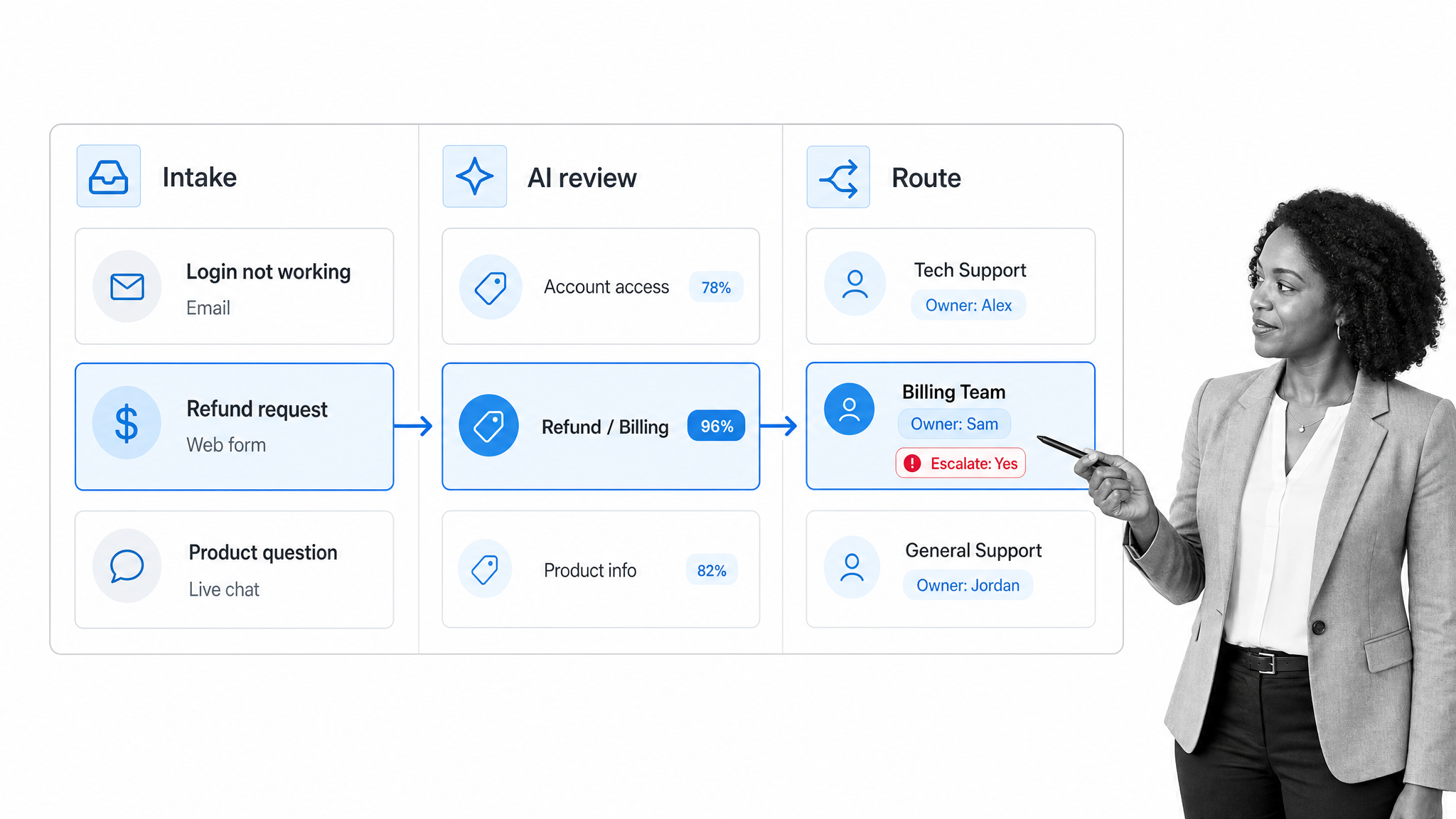
AI triage sorts incoming requests by topic, urgency, customer segment, sentiment, language, and required owner. It is useful when queues are noisy and agents waste time deciding where work belongs. Good routing reduces handoffs and gives the receiving agent context before they respond.
Agent assist and response drafting
Response drafting works well when the answer depends on approved knowledge but still needs human judgment. The AI drafts a reply, links the source, and recommends the next action. The agent checks accuracy, adjusts tone, and sends the response.
Knowledge base improvement

Customer conversations expose gaps in your documentation. AI can cluster repeated questions, identify articles that do not solve the issue, and suggest new knowledge entries. The support team should still approve the final content before customers or agents rely on it.
Quality monitoring and coaching

AI can review conversations for policy adherence, missed steps, unresolved sentiment, escalation quality, and coaching opportunities. TechTarget lists contact center AI features such as IVR, self-service virtual agents, real-time coaching, predictive analytics, and summaries in its overview of contact center AI features.
Post-resolution workflow automation
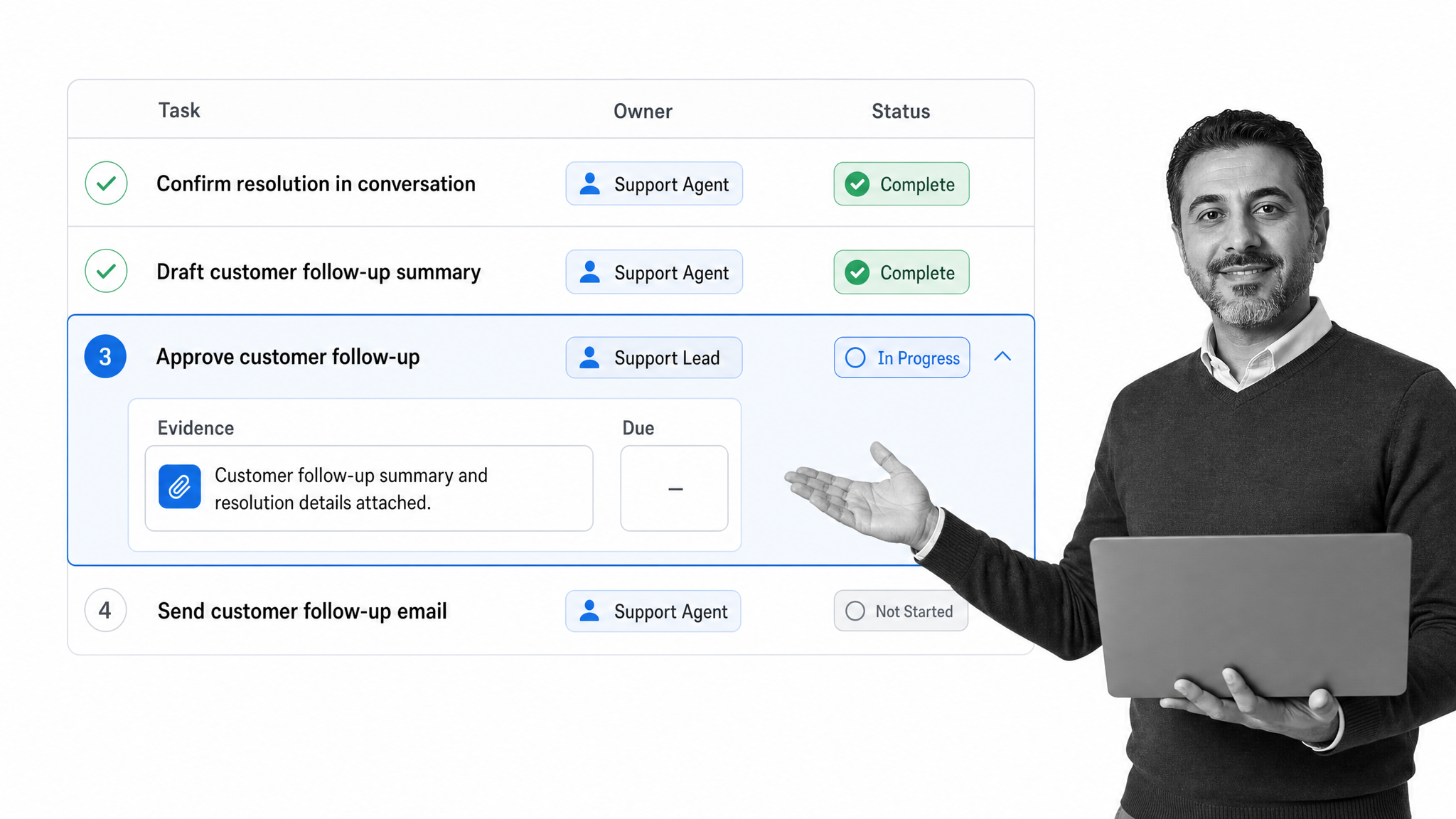
The end of the conversation is often the start of the operational work. AI can summarize the issue, create the follow-up task, route it to the owner, and attach evidence. The workflow should enforce due dates, approvals, and audit history so nothing depends on memory.
How do you implement customer service AI without losing control?
Start with governance, not prompts. Customer service AI touches customer promises, refunds, legal exposure, policy adherence, and brand trust. The rollout should define what AI may answer, what it may draft, what it may trigger, and what it must escalate.
- Map the support journeys that create the most repeat work, the highest risk, or the most customer frustration.
- Classify each journey as self-service, agent-assisted, workflow-assisted, or human-only.
- Connect the AI to approved knowledge sources and remove stale articles before launch.
- Write escalation rules for ambiguous, emotional, legal, billing, security, and exception-heavy requests.
- Pilot with internal agent assist before allowing customer-facing automation.
- Track quality, not just deflection. Review incorrect answers, escalations, and workflow misses every week.
- Version the process as the product, policies, and customer issues change.
The rollout should also define who owns the AI system after launch. Support leaders can own the customer experience. Operations can own routing, workflow design, and follow-through. Compliance or legal can own escalation rules for regulated or high-risk answers. Product and engineering can own technical limits and data access. Without clear ownership, every exception becomes a one-off decision.
Process discipline matters because AI amplifies whatever process it sits inside. If your support process is scattered across Slack, ticket notes, documents, and memory, the AI will inherit that mess. If your process is clear, approved, and connected to execution, AI can make it faster.
What should customer service AI measure?
Customer service AI should be measured on customer outcomes and operational control. Deflection alone is not enough. A bot can deflect work by giving weak answers, closing unresolved conversations, or delaying escalation. The scorecard needs to include service quality.
- Resolution quality: Did the customer get the right answer or action?
- Escalation quality: Did the AI route the issue to the right owner with the right context?
- Agent productivity: Did the AI reduce repetitive work without increasing rework?
- Knowledge health: Which articles solve issues, which create confusion, and which questions have no approved answer?
- Customer sentiment: Did the interaction reduce frustration or make it worse?
- Workflow completion: Did required follow-up work actually happen after the conversation?
- Control exceptions: Which AI suggestions were rejected, overridden, or escalated?
Tie these metrics to operating reviews. Support leaders should inspect the highest-volume intents, the riskiest escalations, the most common rejected drafts, and the workflows most likely to stall. AI improves customer service when the feedback loop changes the process, not when it only produces dashboard charts.
Customer service AI examples
Customer service AI is easiest to understand through the work it changes. These examples show where AI helps and what still needs process control.
Example: SaaS onboarding support
A customer asks how to configure a workspace for a new team. AI identifies the onboarding intent, retrieves the approved setup article, drafts a reply, and starts an internal onboarding-assistance workflow if the customer is on a complex plan. The support agent reviews the answer and confirms the workflow owner.
Example: billing and refund requests
A billing question arrives with emotional language. AI summarizes the issue, detects frustration, pulls account context, and routes the request to the right queue. It may draft the response, but refund approval stays inside a controlled workflow with required evidence and manager signoff.
Example: product bug reports
A customer reports a repeatable defect. AI extracts environment details from the conversation, asks for missing information, summarizes the reproduction path, and starts a product handoff workflow. The support team keeps the customer informed while product receives a clean issue packet.
Example: proactive customer success
AI spots repeated confusion across support conversations and flags a knowledge gap. The team creates a new help article, updates onboarding steps, and adds a follow-up task for affected accounts. The point is not just faster replies. The point is fewer future tickets.
Customer service AI risks and guardrails
The main risks are not abstract. They show up as wrong answers, unsupported commitments, privacy mistakes, frustrated customers, undocumented exceptions, and workflows that never happen. The guardrails should be practical enough for the support team to use every day.
- Approved-source grounding: AI should cite or reference the internal source behind its answer.
- Human review for sensitive issues: Billing, legal, security, health, account access, and contractual questions need clear escalation paths.
- Conversation-to-workflow handoff: Any promise made to a customer should create owned follow-up work.
- Audit history: Keep records of AI suggestions, human edits, approvals, and completed follow-up tasks.
- Knowledge ownership: Assign owners for help articles, macros, policies, and escalation rules.
- Exception handling: Define what happens when the AI is uncertain, the customer is upset, or the request falls outside approved policy.
These controls make AI safer and more useful. They also make the support process easier to improve, because the team can see where the AI hesitated, where agents overrode it, and where customers still needed human help.
How Process Street supports customer service AI workflows
Process Street is a Compliance Operations Platform for turning customer-service procedures into governed, repeatable workflows. It is useful around customer service AI because support automation needs more than answers. It needs task ownership, approval paths, escalation rules, follow-up work, and evidence that the process was followed.
Use Process Street to define the workflows that sit around AI-powered support: refund approvals, escalation review, onboarding handoffs, complaint handling, bug-report routing, knowledge-base updates, quality reviews, and customer-success follow-up. The platform supports workflows, tasks, forms, Pages, conditional logic, approvals, scheduled workflows, role assignments, automations, integrations, reporting, and access controls, as reflected on the Process Street pricing and feature list.
That structure keeps AI useful without turning it loose. A support AI can identify the issue and draft the answer. Process Street can make sure the required work happens, the right person approves it, and the record is available later. For related customer-experience strategy, see Process Street guides on AI customer experience, customer experience measurement, and improving customer experience.
The operating principle is simple: let AI accelerate the conversation, but run the business process through a controlled workflow. That is how customer service teams get faster without losing proof, ownership, or consistency.
Customer service AI FAQs
What is customer service AI?
Customer service AI uses artificial intelligence to understand customer requests, suggest or send answers, route issues, summarize conversations, assist agents, and trigger follow-up workflows.
How does customer service AI improve support teams?
It reduces repetitive work, speeds up triage, gives agents better context, improves knowledge-base feedback, and helps teams enforce consistent follow-up steps.
Can customer service AI replace human agents?
Some routine questions can be automated, but complex, emotional, high-risk, or policy-sensitive issues still need human ownership and clear escalation workflows.
What is the safest first customer service AI use case?
Agent assist is often the safest starting point because AI drafts replies, finds knowledge, and summarizes context while a human reviews the customer-facing answer.
How should customer service AI be governed?
Govern it with approved knowledge sources, escalation rules, human review for sensitive issues, audit history, workflow ownership, and regular quality reviews.
