


Turn every policy into automated workflows with built-in enforcement and audit-ready proof.



Small Business Inventory Management Software
Small business inventory management software tracks what you have, where it is, how it moves, and when to replenish it. A useful system gives you one dependable view of stock while connecting every adjustment to receiving, sales, purchasing, fulfillment, returns, and physical counts.
The goal is not simply to replace a spreadsheet with a prettier list. It is to prevent stockouts, excess stock, lost items, delayed orders, and unexplained adjustments by giving each inventory event a clear owner and an auditable path.
This guide explains the capabilities to look for, when a small business has outgrown spreadsheets, how to evaluate and implement software, and how to connect inventory data to the recurring work that keeps stock accurate.
In this article, we are going to cover:
- What small business inventory management software does
- When spreadsheets stop working for inventory
- Core capabilities of an inventory system
- How to choose small business inventory management software
- How to implement your inventory system
- Inventory workflows beyond stock counts
- How Process Street connects inventory work
- Inventory metrics and continuous improvement
- FAQs
What small business inventory management software does
Small business inventory management software creates a controlled record of stock. It identifies each item, records its quantity and location, logs movements, supports counts, and helps the team decide when to reorder or investigate a discrepancy.
The category overlaps with inventory software for small business and broader small business operations software, but inventory work has a distinct operational core. The system has to reconcile physical goods with digital records while purchases, sales, transfers, returns, damage, and production continue around it.
It creates one source of stock truth
A reliable inventory record answers four questions quickly: what is the item, how many units are available, where are they, and what changed the balance? When those answers live in separate files or in different people’s heads, every customer promise and purchase decision becomes slower and riskier.
It turns stock events into controlled transactions
Receiving stock, moving it between locations, allocating it to an order, returning it, writing it off, and correcting a count are all transactions. Each transaction should capture the item, quantity, location, reason, owner, and evidence. That structure makes the balance explainable instead of merely current.
It connects planning with execution
Demand and purchasing decisions depend on accurate data, while accurate data depends on disciplined execution. The strongest inventory systems connect planning to supply chain management tools, supplier work, and the day-to-day tasks that update stock records.
When spreadsheets stop working for inventory
Spreadsheets can work for a very small catalog with one owner, one location, and infrequent movement. They stop working when the business needs simultaneous updates, traceable adjustments, dependable reorder signals, or a shared process for receiving and counting.
Several people edit the same stock record
A shared file can show the latest saved number, but it may not show which physical event produced it. Concurrent editing, copied sheets, inconsistent formulas, and delayed updates create a gap between the file and the shelf. Software gives each movement a transaction history and makes permissions easier to control.
The catalog or location structure has become complex
Variants, bundles, raw materials, work in progress, serial numbers, lots, expiry dates, bins, stores, warehouses, and vehicles all add structure. When staff encode that structure differently, search and reporting become unreliable. A defined item master and location hierarchy remove that ambiguity.
Reordering depends on memory
If the team discovers shortages while picking an order, replenishment is already late. Software can maintain reorder points, lead-time assumptions, preferred suppliers, and open purchase information. The point is not automatic buying at any cost. It is an earlier, evidence-based decision.
Count discrepancies cannot be explained
A difference between the physical count and the system balance is a signal. It may indicate receiving errors, unrecorded waste, mis-picks, damaged goods, theft, incorrect units, or a process gap. A controlled adjustment should preserve the cause, approver, and corrective action instead of overwriting the old number.
Core capabilities of an inventory system
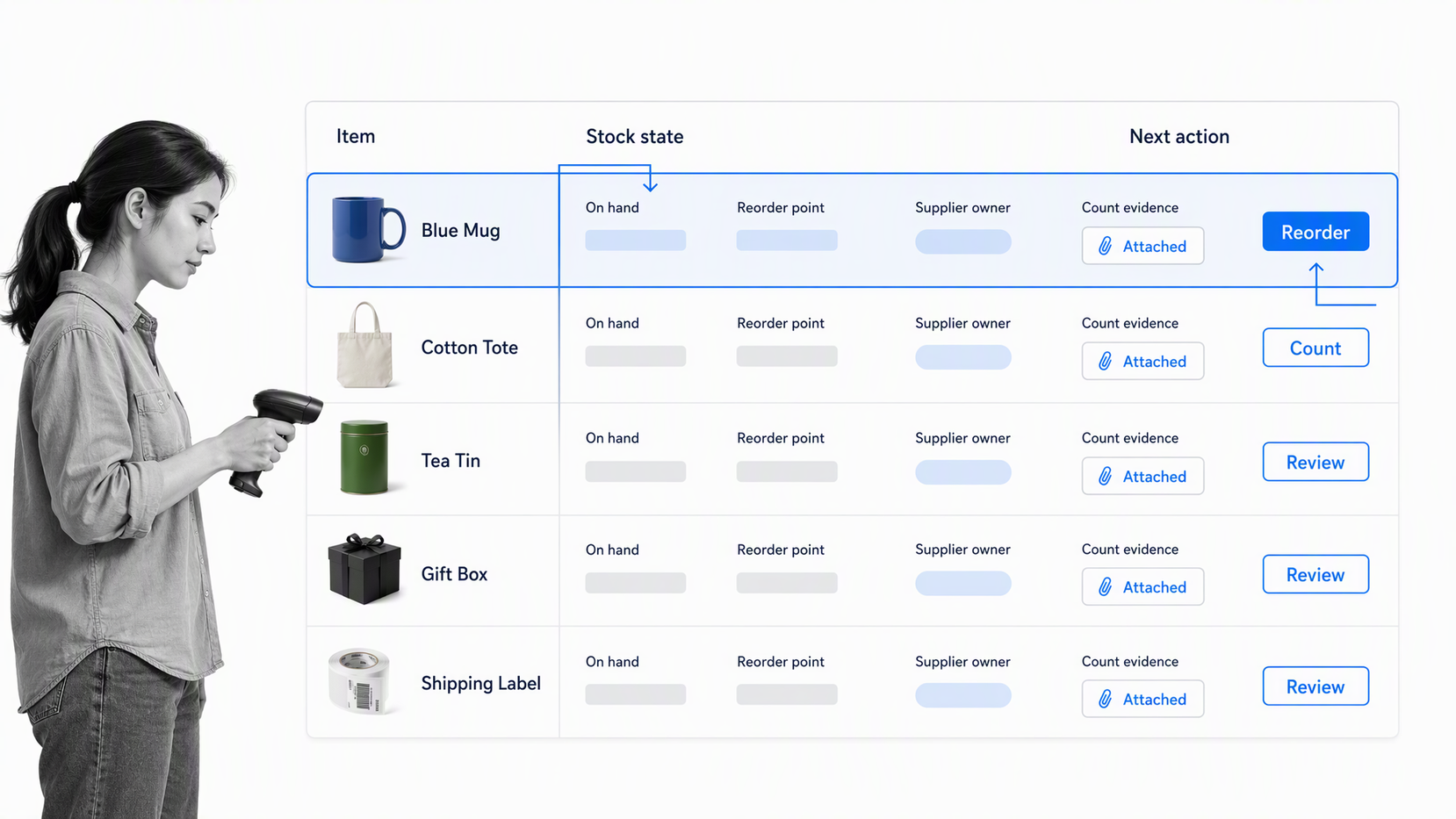
The right feature set depends on the inventory you hold and the decisions you make. A retailer, light manufacturer, field service company, and food business all need different detail. Start with the control requirements, then evaluate the interface.
Item master and location control
Every item needs a consistent identifier, description, unit of measure, category, and status. GS1 product identification guidance explains how a Global Trade Item Number can uniquely identify trade items, while GS1 barcode standards describes how barcodes encode identifiers and attributes for scanning. Your software should support the identification method your suppliers, channels, and staff actually use.
Real-time movement and availability
The system should distinguish stock on hand from stock available to promise. Allocated, in-transit, quarantined, damaged, and returned goods may physically exist but cannot always fulfill a new order. Clear states prevent the business from selling the same unit twice or reordering inventory that is already moving.
Purchasing and replenishment
Useful replenishment features include reorder points, supplier lead times, purchase requests, purchase orders, receipts, partial deliveries, and exceptions. A structured purchase order process keeps the approval and receipt record connected to the stock change.
Counting, reconciliation, and audit history
The software should support full counts and cycle counts, freeze or control updates during a count when necessary, and preserve every variance decision. An inventory control template provides a practical starting structure for regular counts, discrepancy resolution, and future planning.
Reporting without a second spreadsheet
Teams need focused reports for low stock, slow-moving stock, aging inventory, open purchase orders, count variance, movement by location, and items with no recent activity. The report should lead to a decision or task. If every report has to be exported and rebuilt, the operating loop remains manual.
How to choose small business inventory management software
Choose small business inventory management software by testing your hardest inventory event from start to finish. Feature lists can hide weak workflows, slow scanning, limited adjustment controls, or poor exception handling.
Define your inventory model first
List item types, units, variants, bundles, locations, owners, supplier relationships, sales channels, and regulated attributes. Decide which states matter, such as available, allocated, in transit, quarantined, damaged, or expired. The software has to represent this model without constant workarounds.
Test receiving, picking, and adjustment speed
Use real devices and representative orders. Receive a partial shipment, move stock, reserve an item, pick an order, process a return, and resolve a discrepancy. Count the steps and note where staff leave the system. A workflow that is accurate but too slow will invite bypasses.
Evaluate controls and permissions
Ask who can create items, change units, approve purchase requests, adjust stock, backdate transactions, and export records. NIST small business cybersecurity guidance offers small business guidance for managing cybersecurity risk. Inventory systems deserve the same access discipline as accounting or customer systems because stock records affect cash, service, and reporting.
Check integrations and failure handling
Map the accounting, commerce, point-of-sale, purchasing, shipping, production, and customer systems that touch inventory. Confirm which system owns each field, how often data synchronizes, what happens when a connection fails, and how duplicate or conflicting transactions are resolved.
Compare the full operating cost
Include software, scanners, labels, migration, training, support, implementation, and the ongoing cost of maintaining item data. The older inventory management software options comparison can help you survey product categories, while this guide helps you test whether a candidate can run your actual inventory model.
How to implement your inventory system
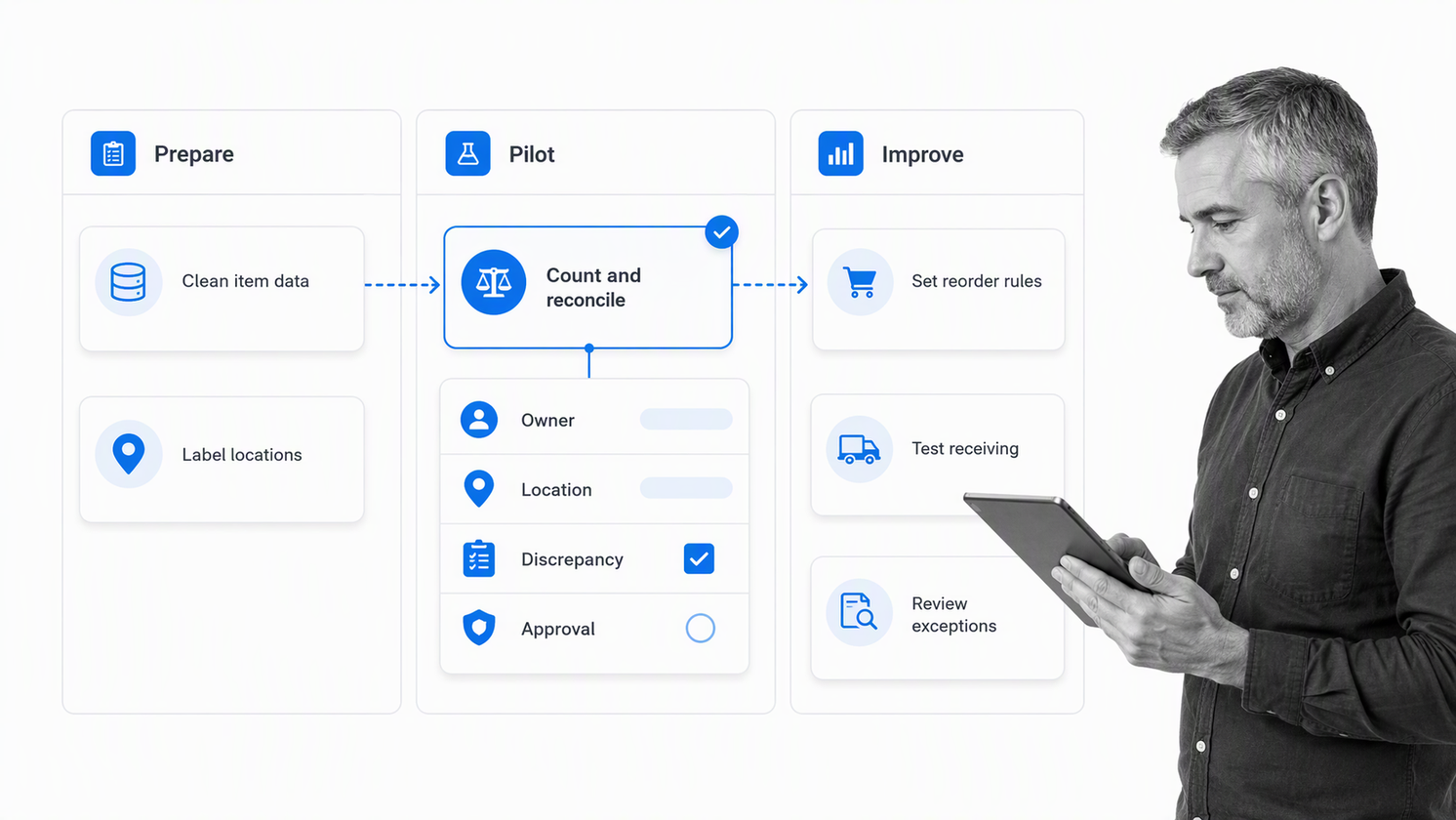
Implementation succeeds when the physical process and the digital record change together. Loading messy data into new software without changing receiving, storage, counting, and adjustment habits simply moves the same errors into a faster system.
Step 1: Clean the item master
Merge duplicates, standardize units, retire obsolete items, confirm supplier references, and define the naming convention. Assign a unique identifier to every active item and document how variants, bundles, and raw materials relate. Do not migrate fields that nobody trusts or uses.
Step 2: Map locations and movement rules
Define sites, rooms, zones, shelves, bins, vehicles, or virtual locations at the level the team can maintain. Then document the valid movements between them. A precise map is useful only if staff can select the right location during normal work.
Step 3: Establish the opening balance
Run a controlled count, investigate material differences, and approve the opening balance. The inventory tracking template can help structure item identification, quantities, locations, verification, and discrepancy review. Preserve the count evidence so the opening state is defensible.
Step 4: Pilot one complete flow
Choose a contained item group or location. Run purchasing, receiving, storage, allocation, picking, returns, and adjustments through the new system. Include normal exceptions, not just clean examples. Fix confusing fields and slow handoffs before expanding the rollout.
Step 5: Train around decisions
Teach staff what each stock state means, when a scan or transaction is required, which discrepancies need escalation, and who can approve an adjustment. Short role-based practice is more useful than a tour of every menu.
Step 6: Review and expand
Compare count accuracy, stockout frequency, receiving delay, adjustment reasons, and staff effort before and after the pilot. Expand only after the data and workflow are stable. Keep an owner for item data, locations, permissions, and process changes.
Inventory workflows beyond stock counts
Inventory accuracy depends on workflows that sit around the inventory application. Software may hold the quantity, but people still have to verify deliveries, approve purchases, inspect returns, investigate variances, and close corrective actions.
Receiving and inspection
A receiving workflow compares the delivery with the order, records shortages or damage, checks quality requirements, labels the goods, assigns a location, and releases or quarantines stock. The inventory management process shows how ordering, receipt, checking, and filing can be controlled as one process.
Cycle counting and discrepancy resolution
Cycle counting spreads verification across the calendar. Select items by value, movement, risk, or prior variance. When a difference appears, route it for recount, cause review, approval, adjustment, and corrective action. The result is not only a corrected balance but a better process.
Returns, damage, and obsolete stock
Returns need a disposition decision: restock, repair, quarantine, return to supplier, or write off. Damaged and obsolete goods require evidence and approval. Clear workflows stop unusable stock from leaking back into available inventory.
Supplier and purchase review
Inventory performance is partly supplier performance. Link shortages, late deliveries, defects, and invoice issues to the supplier record. supplier relationship management software helps frame the relationship work around replenishment and exception trends instead of treating each problem as a separate email.
Recordkeeping and accounting
IRS guidance on inventory accounting explains that inventory treatment must clearly reflect income, while IRS recordkeeping guidance describes records that support inventory cost and value. Your software and workflows should preserve purchase documents, receipts, adjustments, write-offs, and the method used to value inventory. Confirm the accounting treatment with a qualified professional for your business.
How Process Street connects inventory work
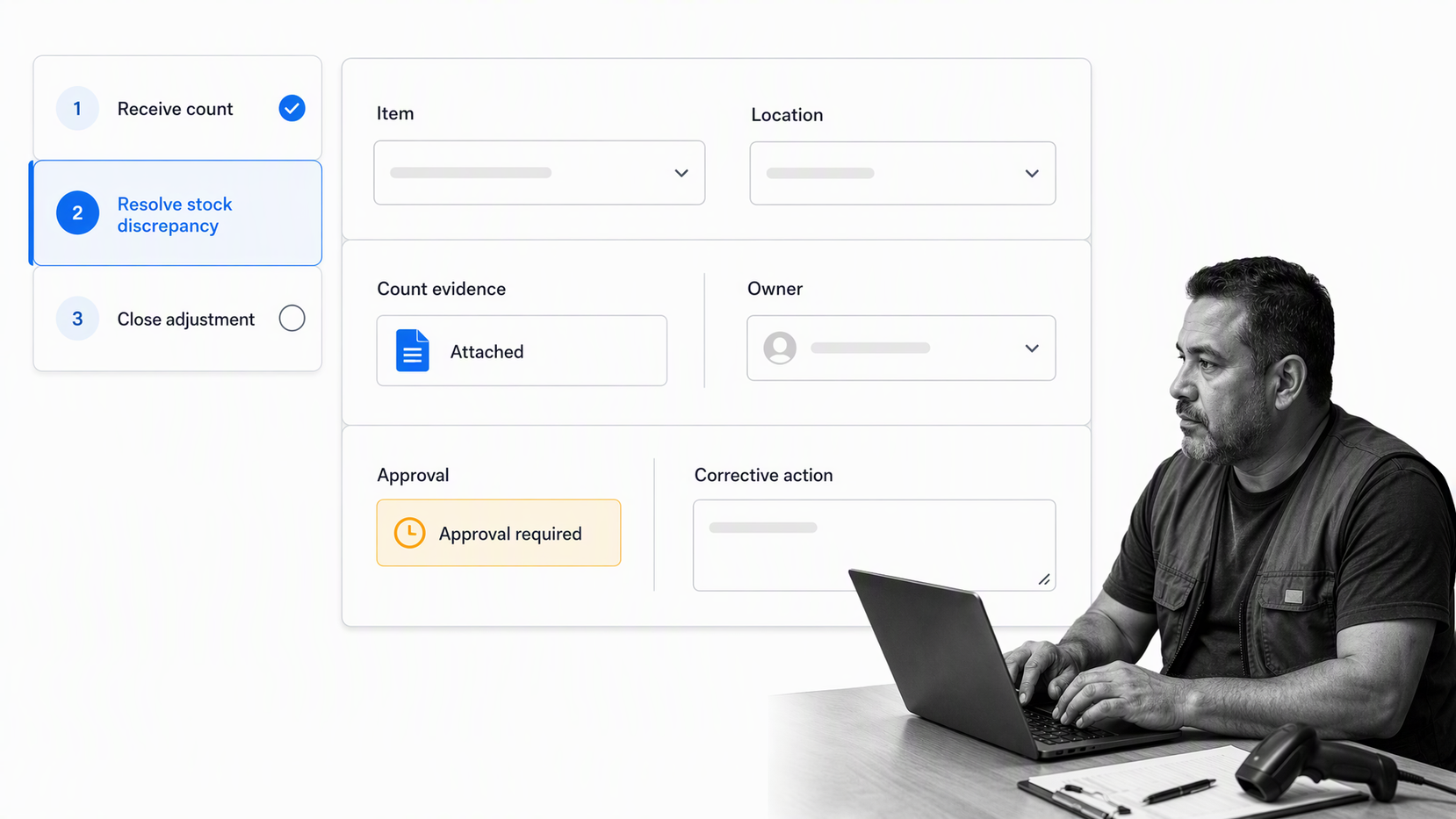
Process Street is becoming an Agentic Process Automation platform. It does not replace the specialized stock ledger inside inventory management software. It connects inventory events to the people, decisions, evidence, and corrective work required around that ledger.
Run procedures where the work happens
Turn inventory management procedures into workflows for receiving, cycle counts, discrepancy review, purchase approval, returns, damaged goods, and supplier correction. Instructions, required fields, owners, and evidence live inside the run so staff do not have to remember a separate document.
Capture structured inventory evidence
Use structured form fields for item identifiers, locations, quantities, reasons, attachments, and corrective actions. Structured capture makes each exception easier to review and improves the quality of the record passed back to the inventory or accounting system.
Route exceptions and approvals
Use conditional logic to send high-value, regulated, damaged, or repeated discrepancies down different paths. workflow approvals can prevent a stock adjustment or write-off from closing before the required reviewer has checked the evidence.
Connect the inventory stack
Process Street has 5,000+ integrations. Inventory workflows can start from forms or system events, coordinate tasks across teams, and return approved outcomes to the systems that hold item, purchase, customer, and financial records.
Build a record of improvement
Each workflow run shows what triggered the work, who owned it, which evidence was collected, what was approved, and how the issue closed. Grouped exception patterns give the process owner a practical backlog for training, supplier action, system changes, and control improvement.
Inventory metrics and continuous improvement
Measure inventory to improve decisions, not to produce a wall of dashboards. Start with a small set of measures that reflect availability, accuracy, cash exposure, and process performance.
Inventory accuracy
Compare system quantity with verified physical quantity at an item and location level. Track the reasons behind differences, not only the percentage. Repeated receiving, picking, unit, or location errors point to different fixes.
Stockouts and unfulfilled demand
Track how often demand cannot be fulfilled, which items cause the most disruption, and whether the cause was forecasting, supplier delay, lead-time assumptions, allocation, or inaccurate records. A stockout metric without a cause workflow will not improve service.
Inventory aging and slow movement
Review items that have not moved within a useful period for your business. Separate seasonal, strategic, repair, safety, and genuinely obsolete inventory before acting. The right outcome may be promotion, supplier return, transfer, repurposing, or write-off.
Receiving and adjustment cycle time
Measure the delay between physical receipt and system availability, plus the time required to resolve discrepancies. Long delays create false shortages and customer risk. Use the measure to find the step, queue, or approval causing the wait.
Process review cadence
Give each inventory workflow an owner and a regular review. Use process improvement to examine exception trends, remove redundant steps, clarify decisions, and update training. Better inventory performance comes from repeated control and learning, not from a one-time software launch.
FAQs
What is small business inventory management software?
Small business inventory management software tracks items, quantities, locations, movements, and replenishment decisions. It helps a team keep the physical stock and digital record aligned while supporting purchasing, receiving, fulfillment, returns, counting, and adjustments.
What features should a small business inventory system have?
Look for item and location control, movement history, purchasing, receiving, reorder rules, barcode support, counting, discrepancy handling, permissions, reporting, and integrations. The right depth depends on your catalog, locations, sales channels, production model, and control requirements.
When should a small business stop using spreadsheets for inventory?
Move beyond spreadsheets when several people update stock, the catalog or location structure becomes complex, reordering depends on memory, or count differences cannot be explained. Those conditions require transaction history, permissions, shared states, and controlled exception handling.
How do you implement inventory management software?
Clean the item master, map locations and movement rules, establish a verified opening balance, pilot one complete flow, train staff around decisions, and review the results before expanding. Change the physical procedure and the digital record together.
Can Process Street replace inventory management software?
Process Street is not a specialized stock ledger. It complements inventory management software by running the procedures around receiving, counts, discrepancies, approvals, returns, supplier actions, and corrective work, while preserving evidence and ownership.
How does Process Street support inventory workflows?
Process Street turns inventory procedures into workflows with assigned tasks, structured fields, conditional routing, approvals, automation, evidence, and activity history. It helps teams connect inventory events to controlled action across people and systems.
