


Turn every policy into automated workflows with built-in enforcement and audit-ready proof.


8 Best GitBook Alternatives & Competitors in 2026
Last updated:

Comparing GitBook alternatives starts with respect for what GitBook does well. It is a capable knowledge base platform for product and developer documentation, giving teams a visual editing, Git synchronization, change requests, searchable publishing, API references, analytics, and AI-oriented documentation capabilities. If your core job is publishing and governing a polished help center or product docs, GitBook can be an excellent fit.
Teams usually start comparing GitBook alternatives for practical reasons. Some want a different managed developer-docs experience, open-source ownership, or deeper API tooling. Others discover that their content is really an internal wiki or a recurring operating procedure, not a public docs site. And many realize their real problem is not documentation at all. It is execution: getting people to actually follow the procedure, prove they did, and leave a record behind.
This list covers the strongest GitBook alternatives across five jobs: enforceable internal workflows, connected team wikis, flexible workspaces, developer documentation, and customer help centers. The right pick depends on which job you are really hiring the tool to do.
The evaluation criteria are practical: core capability fit, ease of ownership, pricing model clarity, knowledge governance, workflow enforcement, and how well each tool supports the actual work. This list is maintained by the Process Street team. Process Street ranks first for teams whose main need is enforceable, trackable, recurring process and SOP execution rather than static documentation. For external product docs, published help centers, or Microsoft-centered document governance, the relevant specialist may be the better fit. Where a competitor is the honest choice, we say so, and where process documentation needs to become real execution, we explain why.
In this article, we are going to cover:
- How to migrate from GitBook
- What is GitBook?
- GitBook alternatives at a glance
- How to choose a GitBook alternative
- Best GitBook alternatives and competitors
- Which GitBook alternative fits your use case
- FAQs
What is GitBook?
GitBook is a collaborative documentation platform for product guides, API references, help centers, and developer portals. Its official documentation describes a block-based visual editor, Markdown support, GitHub and GitLab synchronization, change requests, published documentation sites, interactive API references, analytics, and AI-focused documentation features.
GitBook works well when a team wants writers and developers to collaborate on branded documentation without building the whole publishing stack. Content can be edited visually, synchronized with a repository, reviewed through change requests, and published as a searchable site. It remains a credible incumbent for developer-facing documentation.
The alternatives below are measured against that baseline. GitBook is not ranked against itself. Teams should move only when another product better matches the real job: executable SOPs, managed developer docs with a different operating model, a governed knowledge base, an open-source static site, an interactive API hub, or an internal wiki.
GitBook alternatives at a glance
The table below gives the short version before the deep dives. The ranking is not a universal claim that one product beats every other product in every context. It is an ICP-based ranking for teams comparing GitBook against tools that can govern knowledge, publish documentation, and run recurring operational work.
| Tool | Best for | Standout feature | Free plan | Starting price |
|---|---|---|---|---|
| Process Street | enforceable, trackable, recurring process and SOP workflows | workflow runs with required fields, approvals, conditional logic, and audit trails | 14-day Pro trial | See pricing page |
| Mintlify | managed developer documentation with Git-backed content and AI tooling | hosted docs, Git sync, API playgrounds, previews, and agent-facing documentation features | Yes | See pricing page |
| Document360 | customer and internal knowledge bases with publishing governance | knowledge-base authoring, search, analytics, review workflows, and public or private projects | 14-day trial | Custom quote |
| Docusaurus | open-source, developer-owned documentation sites | React-based static documentation sites with Markdown, versioning, internationalization, search, and theme customization | Open source | Self-hosting costs vary |
| ReadMe | interactive API references and developer hubs | interactive API reference, OpenAPI workflows, usage analytics, and developer documentation | Yes | See pricing page |
| Notion | flexible internal docs, wikis, databases, and lightweight projects | connected pages, verified wikis, databases, projects, and workspace search | Yes | See pricing page |
| Confluence | structured team knowledge in the Atlassian ecosystem | spaces, pages, page trees, templates, version history, whiteboards, and permissions | Yes | See pricing page |
| Slite | maintained internal knowledge with verification and AI search | collaborative docs, verification workflows, knowledge maintenance, and cited answers | 14-day trial | See pricing page |
How to choose a GitBook alternative
Start by deciding what you are really replacing. GitBook is a documentation portal, so ask whether you actually need a customer-facing help center, an internal team wiki, a developer docs site, an AI answer layer, or a workflow management system. Those are different jobs, and a product that is excellent for one can be the wrong surface for another.
If the process has required steps, owners, approvals, due dates, files, and proof, prioritize a workflow execution layer such as workflow management software rather than a documentation tool. If the work is mostly knowledge management, prioritize page governance, permissions, search, verification, and ownership. If the work is mostly published content for customers, prioritize the help center and documentation experience. If the work sits between those patterns, compare the broader process platforms category before committing.
Use these decision questions before comparing vendor demos:
- Is the documentation for customers, for the internal team, or for developers?
- Does a compliance, finance, HR, IT, or operations team need proof that each step happened?
- Will business users maintain the content, or will developers own it in a repository?
- Do you need static reference articles, or recurring workflow runs that enforce the procedure?
- Which surface will people actually keep updated: portal, wiki, doc, database, or workflow?
A good shortlist can include more than one category. A company might keep a documentation portal for its customer help center and use automated workflow tools or a process platform to control recurring internal work. That division is healthy, as long as the process record stays clear and ownership is easy to see. Strong document control best practices start with knowing which surface owns which job.
Best GitBook alternatives and competitors
1. Process Street

Best for: enforceable, trackable, recurring process and SOP workflows.
Process Street is the best GitBook alternative when the content you care about is really a recurring SOP, checklist, approval, or compliance process that must be followed the same way every time. It is not trying to be a customer help center or a published documentation portal. It is built for operators who need work to run correctly and leave a clear record.
That distinction matters. GitBook can document a procedure as a beautifully organized article, and that article can even carry a review workflow. Process Street can make a person accountable for the next step, require the right form field, pause for an approval, branch based on conditional logic, and preserve the run history as operational proof. For onboarding, vendor reviews, quality checks, finance close tasks, and compliance workflows, that execution record is often the real requirement, not another static page.
Process Street also connects around the workflow. It has direct, universal integrations to 5,000+ systems, and when you need a new one, an AI agent can build it on the fly. Its automations and approval tasks keep the work moving without email chases, and conditional logic adapts each run to the situation.
Use Process Street pricing for current plan details. The public pricing page shows Startup, Pro, and Enterprise plan tracks and a 14-day Pro trial, with sales-led pricing for current packages. Many teams pair a documentation tool for reference content with Process Street as the governed process platform for recurring operations.
Process Street key features:
- Structured workflow runs with step order, owners, due dates, and conditional logic.
- Approval tasks that make review part of the workflow, not a separate inbox chase.
- Required fields, file collection, and task history for process evidence.
- Recurring schedules and automations for repeatable operations.
- A compliance operations platform shape for teams that need control, not only content.
Process Street pros:
- Strong fit for SOPs, recurring processes, onboarding, reviews, and compliance operations.
- Readable enough for non-technical operators to own and improve processes.
- Keeps people, tasks, approvals, evidence, and integrations in one workflow record.
- Turns process documentation into enforced execution, not just reference reading.
- Clear fit for operations, HR, compliance, finance, customer management, and IT process owners.
Process Street cons:
- Not built to be a public customer help center or a branded documentation portal.
- Teams that only need to publish reference articles may prefer a dedicated knowledge base.
For current package details, see Process Street pricing. A documentation platform is the better fit when publishing developer docs is the primary job.
2. Mintlify
Best for: managed developer documentation with Git-backed content and AI tooling.
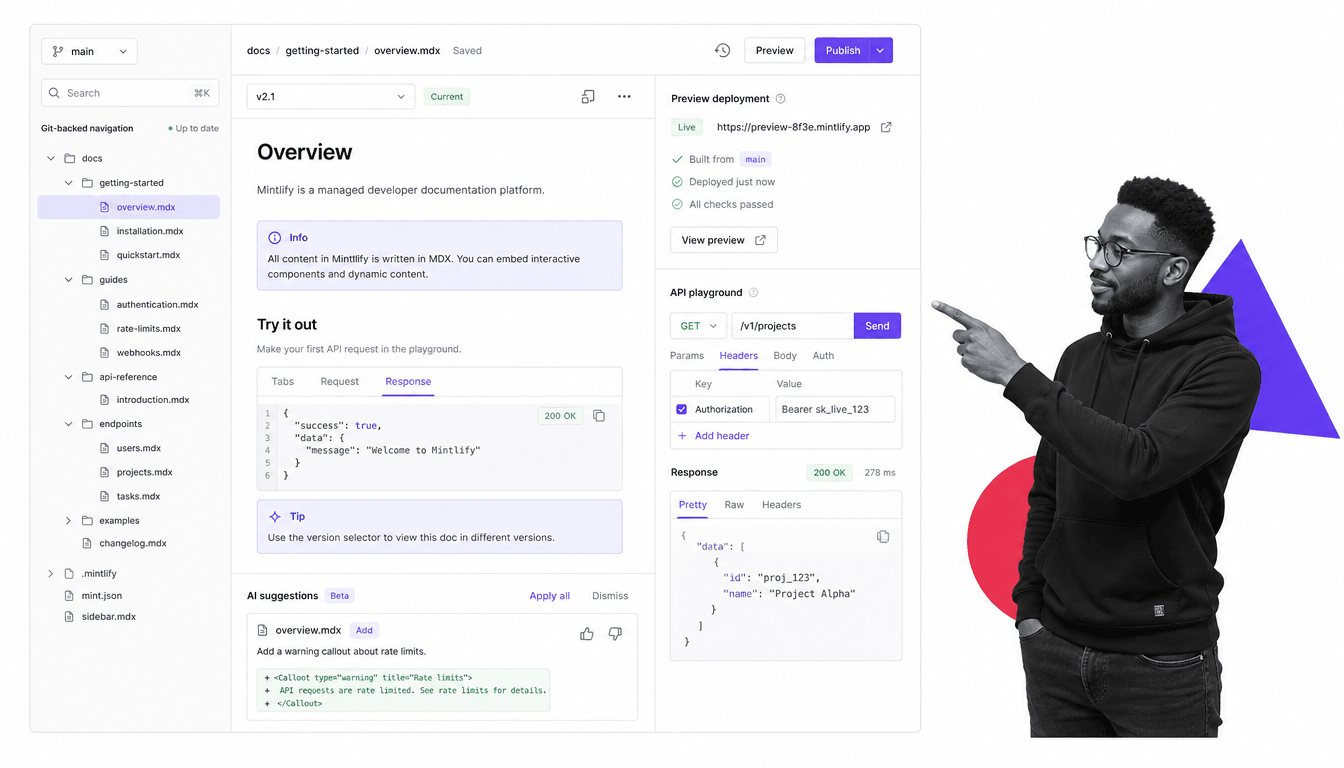
Mintlify is a managed documentation platform for teams that keep content in Git but do not want to assemble hosting, search, previews, and API documentation infrastructure themselves. Its official pricing page publishes a free Starter plan and paid plans for broader collaboration and AI capabilities.
Mintlify beats Process Street when the main job is polished developer documentation with Git-backed editing, preview deployments, and an API playground. Process Street is stronger when the written procedure must become assigned, recurring work with approvals and proof.
Mintlify key features:
- Git-backed Markdown or MDX documentation.
- Managed hosting, search, custom domains, and web editing.
- Interactive API playgrounds and documentation previews.
- Agent-facing documentation and managed deployment features.
Mintlify pros:
- Strong developer-docs experience without maintaining the full stack.
- Free plan supports a meaningful small-team evaluation.
- Content remains portable in Git.
Mintlify cons:
- Paid collaboration can be a meaningful commitment for small teams.
- It is a publishing platform, not an operational workflow runtime.
For current package details, see Mintlify pricing. Mintlify is the better fit when a team wants polished managed developer docs without maintaining a static-site stack.
3. Document360

Best for: customer and internal knowledge bases with publishing governance.
Document360 is a dedicated platform for public and private knowledge bases. Its official product and pricing pages describe authoring, revision history, categories, search, analytics, article workflows, and customized pricing based on the deployment.
Document360 beats Process Street when the job is running a governed customer or internal knowledge-base program. Process Street is stronger when the knowledge must guide people through repeatable tasks and preserve a completion record.
Document360 key features:
- Public and private knowledge-base projects.
- Article authoring, categories, templates, and revision history.
- Search, analytics, and content review workflows.
- Migration, onboarding, and publishing controls.
Document360 pros:
- Purpose-built knowledge-base administration.
- Useful governance for large article libraries.
- Supports both customer and internal documentation use cases.
Document360 cons:
- Pricing requires a tailored quote.
- A knowledge article does not automatically enforce a recurring operating process.
For current package details, see Document360 pricing. Document360 is the better fit when a dedicated knowledge base and controlled publishing program are the center of the work.
4. Docusaurus

Best for: open-source, developer-owned documentation sites.
Docusaurus is an open-source static-site generator built around React and Markdown. Its official documentation covers documentation sites, blogs, versioning, internationalization, search, theming, and deployment to common hosting services.
Docusaurus beats Process Street when developers want code-level control, open-source ownership, and a custom static documentation site. Process Street is stronger when non-technical process owners need to maintain and run procedures without managing a codebase.
Docusaurus key features:
- Markdown and MDX content in a code repository.
- React-based themes and custom components.
- Documentation versioning and internationalization.
- Static builds that deploy to common hosting services.
Docusaurus pros:
- Open-source and highly customizable.
- Content fits naturally into developer review workflows.
- No vendor platform subscription is required.
Docusaurus cons:
- Engineering must own setup, deployment, upgrades, and search choices.
- It does not provide a managed operational workflow runtime.
For current package details, see Docusaurus pricing. Docusaurus is the better fit when developers want maximum code-level control and can own the hosting and maintenance.
5. ReadMe
Best for: interactive API references and developer hubs.
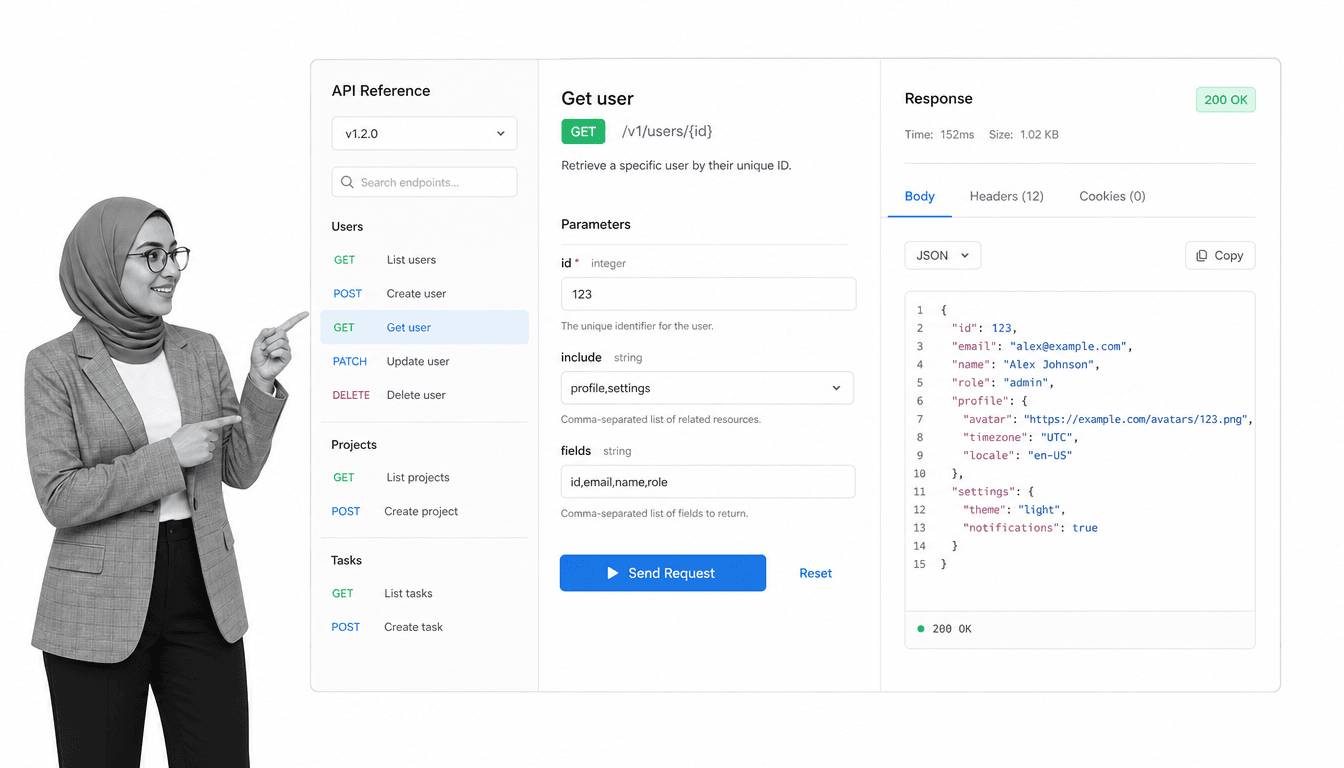
ReadMe is a developer documentation platform centered on interactive API references, guides, changelogs, recipes, and developer dashboards. Its official documentation explains OpenAPI-based references and test calls directly from the published docs.
ReadMe beats Process Street when developers need to explore endpoints, submit requests, inspect responses, and connect documentation to API usage. Process Street is stronger when the internal work behind those APIs needs owners, due dates, approvals, and evidence.
ReadMe key features:
- Interactive API reference from OpenAPI specifications.
- Request builders and real response examples.
- Guides, changelogs, recipes, and reusable content.
- Documentation metrics and developer dashboard options.
ReadMe pros:
- Excellent fit for API-first products.
- Free plan supports initial publishing and evaluation.
- Strong developer experience around testing endpoints.
ReadMe cons:
- Advanced collaboration and governance sit on paid plans.
- It is not intended to run recurring business processes.
For current package details, see ReadMe pricing. ReadMe is the better fit when an interactive API reference and developer experience are more important than internal process execution.
6. Notion

Best for: flexible internal docs, wikis, databases, and lightweight projects.
Notion combines pages, verified wikis, databases, projects, search, and workspace automation in one connected environment. Its official product pages position it as an internal knowledge and work surface rather than a dedicated public developer-docs platform.
Notion beats Process Street when the primary job is flexible internal knowledge, lightweight databases, and project context. Process Street is stronger when the procedure needs enforced steps, approvals, scheduled runs, and a reliable audit trail.
Notion key features:
- Pages, docs, and nested teamspaces.
- Verified wikis with owners and multiple views.
- Databases, projects, charts, and forms.
- Workspace search, backlinks, and version history.
Notion pros:
- Flexible enough to mix knowledge and lightweight work management.
- Free plan supports individual use and evaluation.
- Easy for teams to shape around their vocabulary.
Notion cons:
- Flexibility can produce inconsistent structures.
- A page or database does not inherently enforce process execution.
For current package details, see Notion pricing. Notion is the better fit when flexible internal knowledge and lightweight databases matter more than a public developer-docs portal.
7. Confluence
Best for: structured team knowledge in the Atlassian ecosystem.
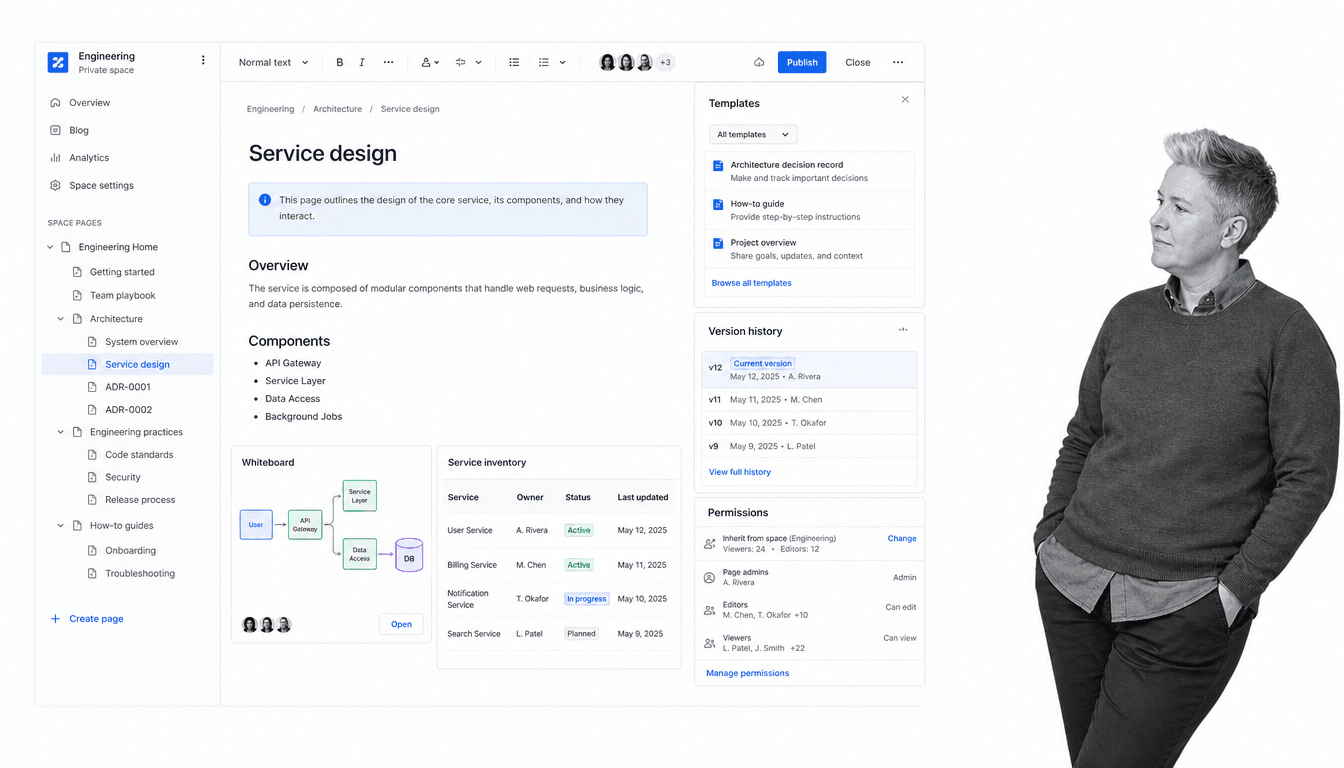
Confluence is Atlassian’s team knowledge platform for spaces, pages, structured page trees, templates, whiteboards, databases, and version history. Atlassian publishes a free plan for small teams and paid plans with broader permissions and administration.
Confluence beats Process Street when a formal team wiki must sit beside Jira and the rest of the Atlassian ecosystem. Process Street is stronger when the documented procedure must actively run as accountable work.
Confluence key features:
- Spaces, pages, and structured page trees.
- Templates, version history, whiteboards, and databases.
- Permissions and guest collaboration on paid plans.
- Apps, integrations, and Atlassian ecosystem alignment.
Confluence pros:
- Natural fit for teams already using Atlassian products.
- Clear hierarchy for large documentation sets.
- Free plan supports small-team use.
Confluence cons:
- Can feel heavier than a lightweight wiki.
- Documentation remains separate from enforced step-by-step execution.
For current package details, see Confluence pricing. Confluence is the better fit when a formal team wiki and Atlassian alignment are the primary requirements.
8. Slite

Best for: maintained internal knowledge with verification and AI search.
Slite is a team knowledge base focused on collaborative docs, verification, cited answers, and keeping knowledge current. Its official pricing page publishes a trial and paid plans, while its product pages describe verification cycles and suggested fixes for stale content.
Slite beats Process Street when the main requirement is trusted internal knowledge with verification and AI-assisted retrieval. Process Street is stronger when knowledge must be converted into repeatable assigned work with controlled completion.
Slite key features:
- Collaborative documents and structured knowledge.
- Document ownership and verification workflows.
- Cited search answers and connected-source retrieval.
- Knowledge maintenance queues and suggested fixes on higher plans.
Slite pros:
- Clear focus on knowledge quality and maintenance.
- Verification reduces stale-document risk.
- Useful for teams that want answers across internal sources.
Slite cons:
- No permanent free plan is advertised.
- Knowledge maintenance does not replace governed process execution.
For current package details, see Slite pricing. Slite is the better fit when keeping internal knowledge current and searchable is the main problem.
How to migrate from GitBook
A safe GitBook migration begins with an inventory, not an export button. List every site, space, section, page, custom domain, language, version, redirect, API reference, integration, permission rule, and repository connection. Separate public content from private or authenticated content. Record the current canonical URL for every page and identify the pages that already earn search traffic or receive external links. That inventory becomes the acceptance checklist for the replacement.
Next, classify each content set by job. Product guides and API references belong in a developer documentation platform. Internal policies and operating knowledge may fit a wiki. Procedures that assign owners, require approvals, collect evidence, or repeat on a schedule belong in an executable workflow. This classification prevents a common migration mistake: moving every page into one new tool even though the original system was serving several distinct audiences.
Preserve the source format before changing the information architecture. If content is synchronized with GitHub or GitLab, confirm which repository and branch is authoritative, then make a complete repository backup. For visually authored pages, export or copy the Markdown and retain media files with stable names. Save navigation order, page hierarchy, metadata, and access rules separately because a content export rarely captures every publishing decision.
Build the new structure with a small representative set before moving the whole library. Include one long guide, one page with reusable content, one API reference, one versioned page, one restricted page, and one heavily linked article. Test how the destination handles navigation, search, code blocks, tables, callouts, media, anchors, redirects, and mobile rendering. A pilot reveals structural gaps while the migration is still easy to change.
Create a redirect map before switching domains. Each old GitBook URL should point to the closest equivalent destination, not to a generic home page. Preserve page slugs where possible. When a page is intentionally consolidated, redirect every old variant to the new canonical page. Check internal links after import so readers and crawlers do not bounce through avoidable redirect chains. Keep the old URL map as a permanent migration record.
Rebuild permissions and publishing controls deliberately. Public docs, private customer content, internal team knowledge, and draft material should not inherit one broad access rule. Test anonymous access, authenticated access, editor permissions, reviewer permissions, and repository write paths with real accounts. If the destination uses a different approval model, document who can publish and how a rejected change returns to the author.
Run content QA and operational QA as separate passes. Content QA checks headings, code samples, links, media, tables, search results, API request examples, and metadata. Operational QA checks repository synchronization, preview builds, publishing permissions, analytics, custom domains, certificates, redirects, and rollback. For procedure content moved into Process Street, also test assignments, required fields, conditional branches, approvals, schedules, evidence, and the final run history.
Plan ownership before launch. Name one owner for the destination platform, one owner for navigation and taxonomy, one technical owner for domains and repository connections, and one subject-matter owner for every major section. Define how often high-risk pages are reviewed and what happens when a reviewer does not respond. A platform can preserve version history, but it cannot decide which information deserves verification or who is accountable for fixing it. Clear ownership keeps the new library from becoming a cleaner-looking copy of the same stale system.
Measure the migration against reader and operator outcomes. For public documentation, track successful searches, zero-result searches, page feedback, broken links, API reference use, and support questions that indicate a missing answer. For internal knowledge, track verification coverage, unanswered questions, time to find an owner, and repeated requests for the same information. For executable processes, measure completion, overdue work, approval time, exceptions, and missing evidence. These measures reveal whether the new platform is solving the original problem instead of merely changing the interface.
Do not copy weak content just because it is easy to export. Archive duplicates, merge overlapping pages, remove obsolete screenshots, and rewrite instructions that depend on tribal knowledge. Keep a removal ledger so stakeholders can see what was consolidated and why. For every retained page, confirm the audience, owner, purpose, next review point, and destination. This editorial pass reduces migration volume and gives the new search index a cleaner foundation from day one.
Finally, switch in stages. Freeze high-risk content briefly, complete a final delta migration, publish the destination, update the domain, and monitor errors, search queries, feedback, and support tickets. Keep a rollback plan until the new system has passed desktop, mobile, authenticated, and search testing. A migration is complete when readers can find the same answer, editors can maintain it, and process owners can prove the recurring work runs correctly.
Document the final decision in a short operating note: why the tool was chosen, which content belongs there, who owns it, and which jobs deliberately remain in another system. That boundary makes future maintenance and procurement reviews much easier.
Which GitBook alternative fits your use case
The easiest way to avoid a bad GitBook replacement is to name the job first. Developer publishing, API exploration, internal knowledge, and recurring process execution need different products.
- Choose Process Street when recurring work needs required steps, owners, approvals, evidence, schedules, and audit trails.
- Choose Mintlify when a managed, Git-backed developer-docs platform with previews and API tooling is the priority.
- Choose Document360 when a dedicated public or private knowledge base needs publishing governance and analytics.
- Choose Docusaurus when developers want an open-source static site and are prepared to own the code and infrastructure.
- Choose ReadMe when interactive API references and developer testing are the center of the experience.
- Choose Notion when flexible internal docs, verified wikis, databases, and lightweight projects belong together.
- Choose Confluence when a structured wiki must align with Jira and the Atlassian ecosystem.
- Choose Slite when maintaining trusted internal knowledge and cited answers is the main challenge.
A hybrid stack is often the honest answer. A company can publish developer docs with Mintlify, Docusaurus, or ReadMe, keep internal reference knowledge in Notion, Confluence, or Slite, and use Process Street to run the procedures that must happen consistently. The goal is clear ownership, not forcing every job into one interface.
FAQs
What is the best GitBook alternative?
Process Street is the best GitBook alternative for enforceable, trackable, recurring SOP and process workflows. Mintlify is stronger for managed developer docs, Docusaurus for open-source ownership, ReadMe for interactive API references, and Document360 for a governed knowledge base.
Is there a free GitBook alternative?
Yes. Mintlify, ReadMe, Notion, and Confluence publish free plans, while Docusaurus is open source. Process Street and Slite offer trials. Check each official pricing page because limits and packaging change.
What is the best open-source GitBook alternative?
Docusaurus is the strongest fit in this list for teams that want an open-source, code-owned documentation site. It supports Markdown, React customization, versioning, internationalization, search configuration, and static deployment, but your engineering team owns maintenance.
Which GitBook alternative is best for API documentation?
ReadMe is a strong choice when interactive API references, OpenAPI workflows, request testing, and developer dashboards are central. Mintlify is also a good managed option for teams that want API playgrounds alongside Git-backed guides.
Which GitBook alternative is best for internal documentation?
Notion, Confluence, and Slite are stronger fits for internal knowledge. Notion offers flexible pages and databases, Confluence provides structured spaces and Atlassian alignment, and Slite emphasizes verification and keeping knowledge current.
Why is Process Street ranked first?
Process Street is ranked first for the ICP this page evaluates: teams that need enforceable, trackable, recurring process and SOP workflows. It is not ranked first for every documentation use case. When public developer docs are the main job, Mintlify, Docusaurus, or ReadMe may be the better fit.
How do I migrate from GitBook?
Inventory your spaces, repository sync, redirects, custom domains, API references, permissions, and analytics first. Export or copy the source content, preserve the URL map, test search and redirects, and run a staged review before switching the public domain.
Can Process Street replace GitBook?
Process Street can replace the operational part of a GitBook setup when the content describes recurring procedures that need owners, deadlines, approvals, evidence, and audit trails. It is not a public developer-docs portal, so many teams use it alongside a dedicated publishing platform.
If GitBook documents a process that people still execute inconsistently, start with Process Street. Turn the procedure into a governed workflow, then keep the public or internal documentation platform that best fits your readers.
