


Turn every policy into automated workflows with built-in enforcement and audit-ready proof.



9 Best Jotform Alternatives & Competitors in 2026
Jotform alternatives are worth comparing when the form is only the first step. Jotform is a capable online form builder for collecting submissions, payments, signatures, registrations, surveys, and intake data. Many teams can stay there comfortably.
The search for an alternative usually starts when the work after submission becomes more important than the form itself. A request needs approval. A client intake needs assignments. A vendor review needs evidence. A policy acknowledgment needs proof. A support form needs routing, escalation, and a record that each step happened.
This comparison is neutral by design. The right tool depends on whether you need a better public-facing form, a cheaper free form builder, a Microsoft or Google-native collection tool, secure business forms, payment collection, or a workflow system that turns submitted data into controlled recurring execution.
The evaluation criteria are practical: form-building experience, workflow capability after submission, free plan usefulness, pricing clarity, integrations, governance, and fit for recurring operations. Process Street ranks first for teams whose core need is enforceable, trackable, recurring SOP and approval workflows. For pure form design, surveys, or basic free data collection, a specialist may be the cleaner choice.
In this article, we are going to cover:
- Jotform alternatives at a glance
- How to choose a Jotform alternative
- Best Jotform alternatives and competitors
- Which Jotform alternative fits your use case
- Jotform alternatives FAQs
Jotform alternatives at a glance
The table below gives the short version before the deep dives. It does not claim that one form product is universally better than every other product. It ranks tools by fit for teams comparing Jotform against alternatives for forms, intake, approvals, and recurring business workflows.
| Tool | Best for | Standout feature | Free plan | Starting price |
|---|---|---|---|---|
| Process Street | enforceable recurring SOP, intake, approval, and compliance workflows | workflow runs with required fields, approvals, conditional logic, evidence, and audit history | 14-day Pro trial | See pricing page |
| Typeform | polished conversational forms and surveys | AI forms, conditional logic, response limits, design controls, and workflow add-ons | Yes | $29 per month on the Basic monthly plan |
| Google Forms | simple free forms inside Google Workspace | forms, surveys, real-time response analysis, and Google Sheets collaboration | Yes, with a Google account | Free; Google Workspace Business Starter from $7 per user/month annually |
| Microsoft Forms | Microsoft 365 surveys, polls, quizzes, and internal forms | surveys, polls, quizzes, Microsoft 365 availability, and business plan inclusion | Yes, for Microsoft account users | Included with Microsoft 365; Business Basic from $6 per user/month annually |
| Formstack | secure business forms with documents and e-signature options | Forms, Suite, Documents, Sign, Salesforce, and Enterprise plan tracks | Free trial | $83 per month paid annually for Forms |
| Cognito Forms | advanced online forms, calculations, portals, and payment collection | unlimited forms on all plans, entry limits, payments, workflow automation, guest access, and storage tiers | Yes, Individual plan | $19 per month for Pro |
| Paperform | custom branded forms, landing-form pages, and SMB workflows | free plan, Essentials, Pro, Business, submissions, payments, and design controls | Yes | $24 per month billed yearly for Essentials |
| Zoho Forms | Zoho ecosystem forms with approvals and payment integrations | free plan, submissions, reports, Zoho app integrations, payment integrations, approvals, and HIPAA features on higher plans | Yes, Free plan | See pricing page |
| Wufoo | simple classic online forms with a free entry-level plan | free plan with form, field, and monthly entry limits | Yes | Free plan available; paid plan details on Wufoo help |
How to choose a Jotform alternative
Start by deciding whether your real problem is the form, the process after the form, or the system where the data needs to land. If you only need a quick survey, Google Forms or Microsoft Forms may be enough. If the experience needs to feel highly polished, Typeform or Paperform may be stronger. If the submission needs to trigger a recurring controlled workflow, compare workflow automation platforms and workflow management software instead of only comparing form builders.
Teams often outgrow a simple form when requests need owners, due dates, required evidence, exception handling, and approval records. In those cases, the form is intake. The real operating system is the workflow. That is where a workflow management system or process platform becomes more relevant than a standalone form editor.
- Choose a form builder when the respondent experience is the most important surface.
- Choose a free suite tool when speed, cost, and existing account access matter most.
- Choose a secure business-form platform when forms, documents, signatures, or CRM handoff matter together.
- Choose a workflow platform when each submission must become assigned, tracked, approved, and auditable work.
- Choose an ecosystem tool when the form data must stay inside Google, Microsoft, or Zoho without extra procurement.
A practical stack can include more than one product. A team might keep a polished public form, then route important submissions into workflow automation tools or a controlled form organizer workflow. The goal is not to replace every form. The goal is to stop important submissions from disappearing into spreadsheets and inboxes.
Best Jotform alternatives and competitors
1. Process Street

Best for: enforceable recurring SOP, intake, approval, and compliance workflows.
Process Street is the best Jotform alternative when a submission is not the finish line. It is the strongest fit for teams that need intake to become assigned, enforceable, repeatable work with clear owners, required steps, approvals, conditional logic, file collection, and a run history.
That distinction matters for HR onboarding, vendor reviews, incident reports, compliance attestations, finance approvals, client intake, internal requests, and quality checks. A form builder captures information. Process Street turns the information into a workflow people have to complete correctly.
Process Street is not trying to be the prettiest public survey builder, a BPMN modeling suite, or a simple free questionnaire tool. It is a Compliance Operations Platform for operators who need to enforce the process after the request arrives. If your form creates accountable internal work, that execution layer is the buyer requirement.
Use Process Street pricing for current plan details. The public pricing page shows Startup, Pro, and Enterprise plan tracks, a 14-day Pro trial, and sales-led pricing for current packages. For teams evaluating implementation, the useful question is not only monthly price. It is whether missed steps, incomplete approvals, or scattered evidence cost more than a controlled workflow.
Process Street key features:
- Structured workflow runs with owners, due dates, required fields, and conditional logic.
- approval tasks that keep review inside the workflow instead of a separate inbox.
- File collection, comments, task history, and audit trails for operational proof.
- Recurring schedules and automations that keep repeatable intake workflows moving.
- Template-ready processes such as an employee onboarding checklist, client onboarding checklist, content approval workflow, and incident report template.
Process Street pros:
- Excellent fit when a form submission must trigger human accountability.
- Readable enough for operations, HR, compliance, finance, customer, and IT teams to own.
- Keeps intake, tasks, approvals, evidence, and history in one workflow record.
- Better for recurring SOPs than a spreadsheet of submissions.
- Strong fit for teams standardizing work across departments.
Process Street cons:
- Not the simplest choice when all you need is a lightweight public form.
- Not a dedicated survey analytics platform for advanced research programs.
For current package details, see Process Street pricing. If the only requirement is a public-facing standalone form, Typeform, Paperform, Google Forms, or Microsoft Forms may be simpler.
2. Typeform

Best for: polished conversational forms and surveys.
Typeform focuses on conversational forms and surveys where the respondent sees one question at a time. Its pricing page lists a Free plan and paid Core plans with response limits, users, AI form creation, conditional logic, integrations, and higher-tier design and analytics features.
It beats Process Street when the main job is conversion-friendly public forms, customer feedback, quizzes, or lead capture. It is weaker when the submission needs to become a controlled internal workflow with approvals and audit proof.
Typeform key features:
- Conversational one-question-at-a-time form experience.
- AI form creation and conditional logic on paid Core plans.
- Response limits and user tiers by plan.
- Design, branding, analytics, and workflow add-on options.
Typeform pros:
- Strong respondent experience.
- Good for lead capture, surveys, quizzes, and marketing forms.
- Design polish is easier than in many traditional form builders.
Typeform cons:
- Response limits can matter for high-volume teams.
- Not built as a full recurring SOP execution layer.
For current package details, see Typeform pricing. Typeform is a better fit when respondent experience, conversational question flow, and visual polish matter more than internal workflow enforcement.
3. Google Forms
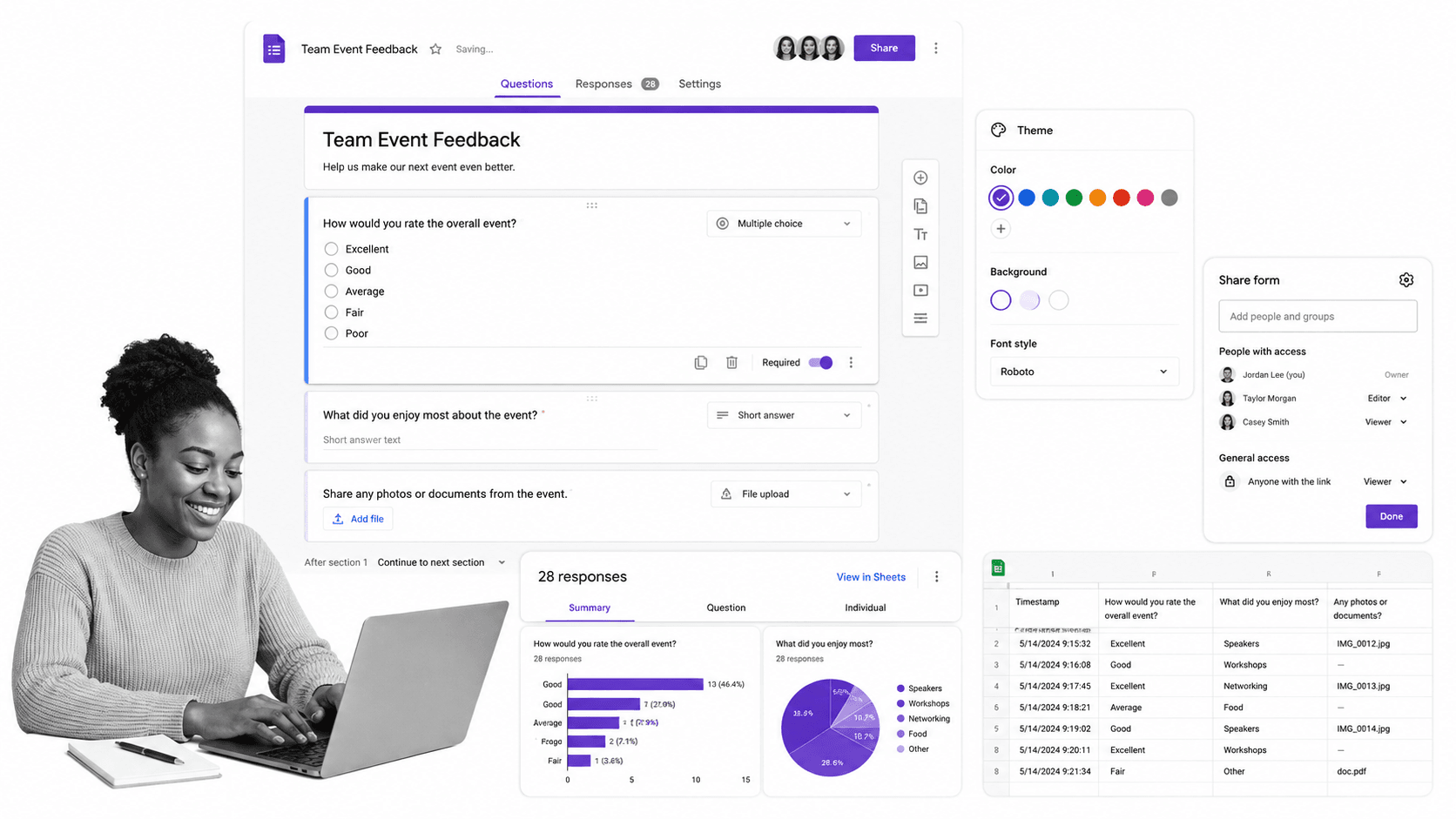
Best for: simple free forms inside Google Workspace.
Google Forms is the simplest option for teams already using a Google account or Google Workspace. Google’s product page frames it around creating forms and surveys, gathering data, and analyzing responses from anywhere.
It beats Process Street when the team needs a quick free form, a classroom survey, an internal questionnaire, or data flowing into Google Sheets. It is weaker when request handling needs approvals, owners, due dates, and an auditable workflow record.
Google Forms key features:
- Simple form and survey creation.
- Real-time response summaries.
- Collaboration with Google Workspace users.
- Google Sheets response workflows.
Google Forms pros:
- Fast and familiar.
- Strong no-cost starting point.
- Works naturally with Google Sheets.
Google Forms cons:
- Limited workflow enforcement after submission.
- Less suited to compliance-heavy internal process control.
For current package details, see Google Forms pricing. Google Forms is a better fit when the team needs a fast no-cost form and already lives in Google Workspace.
4. Microsoft Forms

Best for: Microsoft 365 surveys, polls, quizzes, and internal forms.
Microsoft Forms gives Microsoft 365 teams a built-in surface for surveys, polls, and quizzes. Microsoft’s service description lists availability across business, enterprise, education, frontline, and OneDrive for Business plan families.
It beats Process Street when forms should remain inside Microsoft 365 and be governed through that stack. It is weaker when the process after a response needs a guided workflow, evidence collection, or cross-department SOP history.
Microsoft Forms key features:
- Surveys, polls, and quizzes.
- Availability through Microsoft account and Microsoft 365 plans.
- Response insights and Excel-oriented analysis.
- Simple Microsoft 365 sharing patterns.
Microsoft Forms pros:
- Natural fit for Microsoft-first organizations.
- Low additional procurement burden when Microsoft 365 is already deployed.
- Good for internal questionnaires and training checks.
Microsoft Forms cons:
- Not a full process execution platform.
- Less flexible for complex public form design than specialist form builders.
For current package details, see Microsoft Forms pricing. Microsoft Forms is a better fit when IT wants form collection to stay inside the Microsoft 365 environment.
5. Formstack
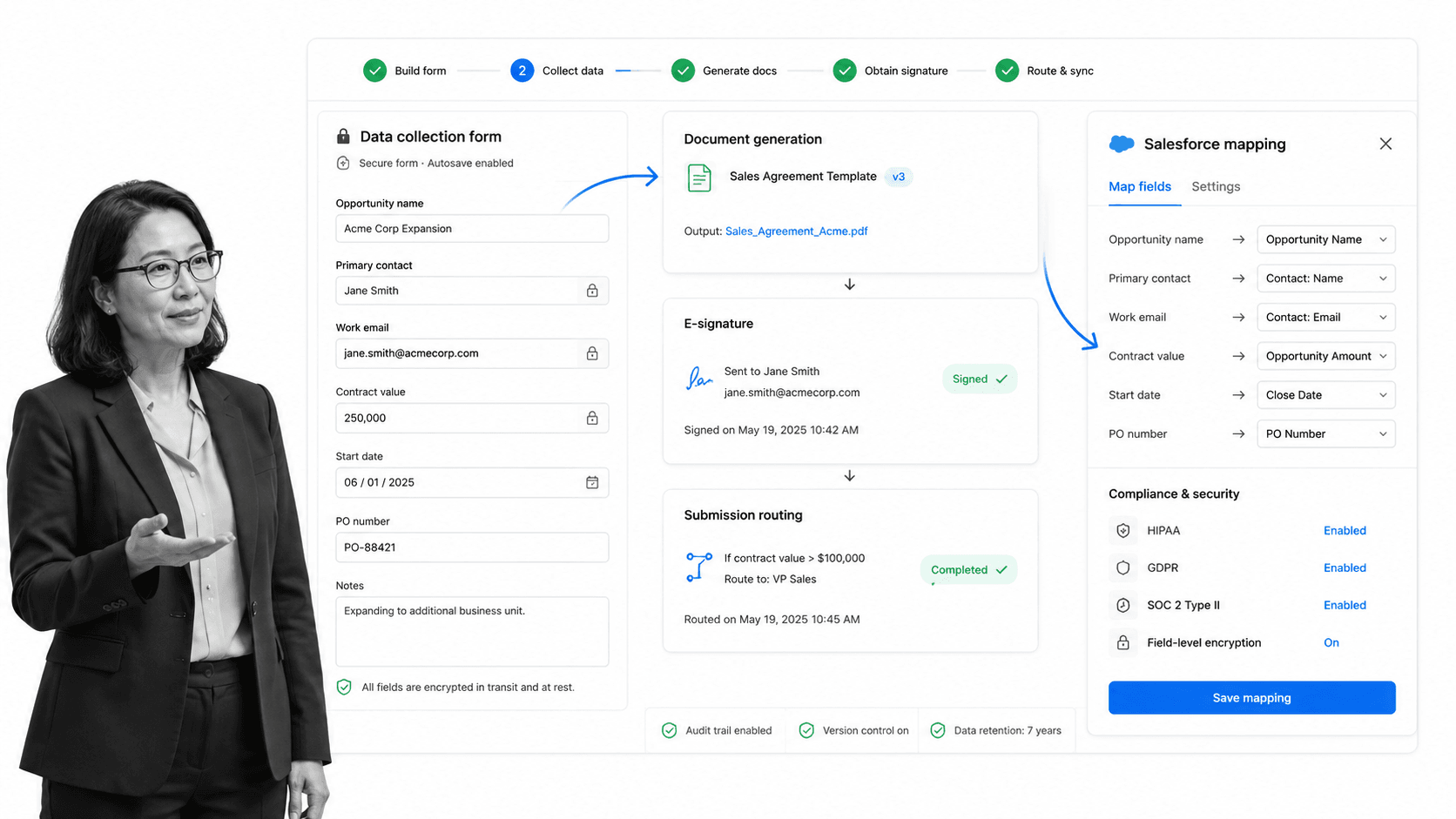
Best for: secure business forms with documents and e-signature options.
Formstack is broader than a simple form builder. Its pricing page separates Forms, Suite, Salesforce, and Enterprise plan tracks, with Suite combining forms, documents, and e-signatures.
It beats Process Street when the buying need is specifically forms plus document generation, signatures, Salesforce workflows, or enterprise form infrastructure. It is weaker when non-technical teams primarily need simple recurring SOP execution.
Formstack key features:
- Online forms and data collection.
- Suite option for Forms, Documents, and Sign.
- Salesforce and Enterprise plan tracks.
- Business workflow and security-oriented form capabilities.
Formstack pros:
- Good fit for document-heavy form workflows.
- Strong Salesforce-oriented option.
- Clearer fit for teams standardizing forms, documents, and e-signature together.
Formstack cons:
- Can be more platform than small teams need.
- Pricing may be high if the team only needs simple intake plus task follow-up.
For current package details, see Formstack pricing. Formstack is a better fit when forms are part of a broader documents, signatures, or Salesforce-centered workflow.
6. Cognito Forms

Best for: advanced online forms, calculations, portals, and payment collection.
Cognito Forms publishes a free Individual plan and paid Pro, Team, and Enterprise plans. The pricing page emphasizes unlimited forms on all plans, entry limits, payment acceptance, storage, guest access, and workflow features.
It beats Process Street when the form itself needs advanced fields, calculations, payments, entry management, and self-service portal-style collaboration. It is weaker when the real need is a reusable internal workflow that coordinates many people after submission.
Cognito Forms key features:
- Unlimited forms on all listed plans.
- Calculated fields, payments, entries, and storage tiers.
- Workflow automation and guest access on team-oriented plans.
- Free trial paths for paid plans.
Cognito Forms pros:
- Strong advanced form-building depth.
- Useful for payments and entry management.
- Good value for teams that want sophisticated forms without a broad workflow suite.
Cognito Forms cons:
- Workflow depth is still form-centered.
- Less focused on recurring SOP ownership across departments.
For current package details, see Cognito Forms pricing. Cognito Forms is a better fit when the form itself needs calculations, payments, entry management, and portal-style collaboration.
7. Paperform

Best for: custom branded forms, landing-form pages, and SMB workflows.
Paperform positions itself around forms that can feel like pages, order forms, and lightweight workflows. Its pricing page shows a Free plan and paid Essentials, Pro, Business, and Enterprise paths.
It beats Process Street when form design, page-style presentation, payment collection, and small-business friendliness matter most. It is weaker when an internal operations team needs a full approval and audit workflow after each submission.
Paperform key features:
- Page-style form builder.
- Free and paid plan paths.
- Payments, submissions, and design controls.
- Business and Enterprise upgrade paths.
Paperform pros:
- Strong branded form experience.
- Good for SMBs and form pages that need to look polished.
- Useful for order forms and lightweight commerce flows.
Paperform cons:
- Not primarily an SOP enforcement platform.
- Less suitable for complex internal accountability workflows.
For current package details, see Paperform pricing. Paperform is a better fit when the form has to feel like a branded landing page or lightweight storefront.
8. Zoho Forms

Best for: Zoho ecosystem forms with approvals and payment integrations.
Zoho Forms is strongest for teams already invested in the Zoho ecosystem. Its pricing page lists a free plan and shows integrations with Zoho apps, Salesforce, Google Sheets, Microsoft Excel, Microsoft Teams, webhooks, Zapier, and other tools.
It beats Process Street when the form data needs to land in Zoho CRM or related Zoho apps with minimal friction. It is weaker when the team needs a broader process layer that governs work across non-Zoho systems and departments.
Zoho Forms key features:
- Free plan with forms, submissions, reports, and storage limits.
- Zoho app integrations and third-party integrations.
- Approvals and privacy features on higher plans.
- Payment integrations and custom PDF support.
Zoho Forms pros:
- Natural fit for Zoho customers.
- Useful approvals and integrations for form-driven operations.
- Broad plan comparison for growing form needs.
Zoho Forms cons:
- Best fit is strongest inside the Zoho ecosystem.
- Not the cleanest choice for teams that need a vendor-neutral process layer.
For current package details, see Zoho Forms pricing. Zoho Forms is a better fit when the team already runs on Zoho CRM, Zoho Desk, Zoho Books, or other Zoho apps.
9. Wufoo

Best for: simple classic online forms with a free entry-level plan.
Wufoo is a classic online form builder. SurveyMonkey’s Wufoo help page says the free plan lets users build up to 5 forms with up to 10 fields each and collect 100 entries per month.
It beats Process Street when the team wants a familiar, lightweight, traditional form builder with a simple free entry point. It is weaker when form submissions need structured approval, escalation, evidence, and recurring SOP execution.
Wufoo key features:
- Classic form builder experience.
- Free plan with form, field, and entry limits.
- Entries, reports, and payment-oriented form patterns.
- Straightforward form collection for small organizations.
Wufoo pros:
- Simple and familiar.
- Free plan is clear enough for basic needs.
- Good for low-volume registration and contact forms.
Wufoo cons:
- Less modern than newer form products.
- Not built for complex workflow enforcement after submission.
For current package details, see Wufoo pricing. Wufoo is a better fit when the team wants a familiar simple form builder and does not need a modern workflow system.
Which Jotform alternative fits your use case
A good Jotform replacement decision starts with the work pattern, not the vendor name.
- Choose Process Street when submissions must become assigned workflows with approvals, due dates, required evidence, and audit history.
- Choose Typeform when the form is a brand experience and the respondent journey is the main differentiator.
- Choose Google Forms when the team needs fast, free, simple forms tied to Google Workspace.
- Choose Microsoft Forms when the form should stay inside Microsoft 365 permissions and admin controls.
- Choose Formstack when forms, generated documents, signatures, and Salesforce-centered business workflows need to work together.
- Choose Cognito Forms when calculations, payments, portals, and entry management matter inside the form platform itself.
- Choose Paperform when the form should feel like a branded landing page or product order page.
- Choose Zoho Forms when the form data belongs inside Zoho apps and approvals.
- Choose Wufoo when a simple classic form builder is enough.
If you are replacing Jotform because submissions create messy follow-up, do not stop at form features. Map the entire path from form submission to owner, approval, evidence, and final status. That path can be built as a checklist builder workflow, a request workflow, or a recurring SOP, depending on how much control the process needs.
The cleanest architecture is often intake plus execution. The intake surface collects information. The execution layer enforces the work. That keeps the form simple while making the process accountable.
Jotform alternatives FAQs
What is the best Jotform alternative?
The best Jotform alternative depends on what happens after a form is submitted. Process Street is best when submissions need to become recurring workflows with owners, approvals, evidence, and audit history. Typeform, Google Forms, Microsoft Forms, Formstack, Cognito Forms, Paperform, Zoho Forms, and Wufoo may fit better for pure form-building use cases.
Is there a free Jotform alternative?
Yes. Google Forms, Microsoft Forms, Cognito Forms, Paperform, Zoho Forms, Wufoo, Typeform, and several other form builders offer a free plan or free access path. Always check each vendor’s pricing page because limits on responses, forms, users, branding, storage, and exports change.
Why is Process Street ranked first?
Process Street is ranked first for teams whose form submissions create accountable recurring work. It is not ranked first for every form-building use case. If your priority is only a public survey, conversational design, or a free questionnaire, another tool may be the better fit.
What is the closest alternative to Jotform?
For standalone online forms, Typeform, Cognito Forms, Paperform, Zoho Forms, and Wufoo are closer to Jotform than Process Street. For internal intake and approval workflows, Process Street is closer to the operational job a team usually tries to accomplish after the form is submitted.
Which Jotform alternative is best for small teams?
Small teams usually shortlist Google Forms, Microsoft Forms, Paperform, Cognito Forms, Typeform, and Process Street. If the team needs only a form, start with the simpler form builder. If the team needs follow-up tasks, approvals, and recurring SOPs, start with Process Street.
Which Jotform alternative is best for enterprise teams?
Enterprise teams should compare Process Street, Formstack, Microsoft Forms, Google Forms through Workspace, Zoho Forms, and Typeform based on governance requirements. Process Street fits recurring internal workflows, Formstack fits forms plus documents and signatures, and Microsoft or Google fit teams standardizing inside an existing suite.
Can I migrate from Jotform to Process Street?
Yes, but treat the migration as a workflow design exercise rather than a direct form clone. Map each form to the process it triggers: requester, required fields, owner, approval, exception path, evidence, integration, and final record. Process Street is strongest when the migrated work needs accountability and proof.
If Jotform is collecting requests your team still has to chase manually, start with Process Street. Build the workflow that should happen after submission, then connect the intake surface around it.
Comparing something else? The full directory of software alternatives and competitor comparisons covers AI agents, workflow and BPM platforms, integration tools, and more.
