


Turn every policy into automated workflows with built-in enforcement and audit-ready proof.



Onboarding Analytics
Onboarding analytics is the practice of measuring how work actually moves through a business, explaining why performance changes, and turning that evidence into better decisions. It connects onboarding data, operational context, and improvement action so teams can see where flow slows, quality breaks, controls drift, or outcomes miss the target.
A useful onboarding analytics program goes beyond dashboards. It defines the decisions a team needs to make, the events and measures that support those decisions, the owners who respond, and the proof that an intervention worked. The result is a closed loop from execution to insight to action.
This guide explains the data, metrics, methods, implementation steps, and operating model behind onboarding analytics. It also shows how to connect analysis to accountable workflows instead of leaving findings in reports.
In this article, we are going to cover:
- What is onboarding analytics?
- Why onboarding analytics matters
- The data behind onboarding analytics
- Onboarding analytics metrics that matter
- Onboarding analytics methods
- How to implement onboarding analytics
- Onboarding analytics in Process Street
- How to build onboarding analytics maturity
- FAQs
What is onboarding analytics?
Onboarding analytics examines the behavior and performance of repeatable work. It asks what path each onboarding case followed, how long the work took, where it waited, which steps repeated, whether required controls were followed, and what outcome the process produced.
The unit of analysis is an onboarding case
An onboarding case is one complete employee, customer, user, partner, or vendor onboarding journey. Each instance creates events. Those events may include a task starting, a form being submitted, an approval being granted, a status changing, or an automated action completing.
Onboarding analytics connects those events using an onboarding case identifier, activity name, timestamp, owner, status, and relevant business attributes. That structure lets an analyst compare hundreds of onboarding cases without losing the sequence that makes the work understandable.
Onboarding analytics is broader than onboarding journey analysis
GOV.UK guidance on measuring success recommends defining what success looks like and choosing measures that show whether a service is achieving it. IBM dashboard guidance explains how dashboards organize operational information for review. An onboarding dashboard is one useful surface for those measures, while onboarding analytics also covers definitions, segmentation, diagnosis, action, and outcome review.
Onboarding analytics can also use workflow reports, manually captured observations, control results, customer outcomes, staffing data, survey feedback, and financial or quality measures. It combines quantitative analysis with the operational knowledge needed to interpret what the data means.
Onboarding analytics differs from business intelligence
Traditional business intelligence often aggregates results by department, product, customer, or period. Onboarding analytics preserves the path of work. Instead of only showing that a backlog increased, it shows which handoff created the wait, which onboarding cases looped backward, and whether the delay affected quality or compliance.
Why onboarding analytics matters
Processes hide their problems inside averages. A monthly completion rate can look healthy while one region, customer segment, approval route, or exception type repeatedly fails. Onboarding analytics exposes that variation and gives leaders a more precise place to intervene.
It replaces assumptions with evidence
Documented procedures describe how work should happen. Execution data shows how it did happen. Comparing the two helps teams separate an isolated exception from a structural design problem. That evidence also improves conversations between frontline operators, onboarding owners, analysts, and leadership.
A well-configured Workflow Dashboard reduces the need to reconstruct work from email, spreadsheets, and memory. Teams can see the real flow, then use employee onboarding to align the written standard with what good execution requires.
It finds constraints before they become outcomes
A constraint is the step, resource, rule, or dependency that limits the performance of the whole process. It may be an overloaded approver, missing input, unclear decision rule, brittle integration, or batch schedule. Onboarding analytics helps locate the constraint and quantify its effect on time to value, repeated work, service, risk, or cost.
It creates a measurable improvement loop
Analytics gives an onboarding team objective feedback about the customer onboarding process. A team can establish a baseline, test a change, compare the result, and decide whether to standardize, revise, or reverse the intervention. ASQ PDCA cycle describes PDCA as a repeated four-step model for carrying out change, which maps naturally to this evidence-driven loop.
The discipline matters because improvement without measurement can simply move the problem. Shortening one task may increase repeated work downstream. Automating an approval may speed routine onboarding cases while weakening exception handling. The whole process needs to be measured as a system.
The data behind onboarding analytics
Onboarding analytics depends on data that can reconstruct execution with enough context to explain performance. The most important data is not always the largest data set. It is the data that connects a process onboarding case, its sequence of events, and its outcome.
Core event data
- Case identifier: the unique ID that ties every event to one onboarding case.
- Activity: the task, decision, status change, or automation that occurred.
- Timestamp: when the event started, completed, or changed state.
- Actor or system: the person, team, role, application, or agent responsible.
- Outcome attributes: quality, risk, customer, financial, or compliance results connected to the onboarding case.
Context data
Context explains why two onboarding cases with the same path may perform differently. Useful dimensions include onboarding case type, complexity, priority, location, customer segment, product, risk tier, channel, team, and exception reason. Good context supports segmentation without turning the data model into an ungoverned collection of fields.
Process models and operating standards
An onboarding journey model gives the analysis a reference point. IBM process metrics guidance shows how operational measures can be organized for review. Teams do not need a formal model for every analysis, but they do need an agreed view of the intended onboarding journey, control points, and outcomes.
A strong customer onboarding process template keeps that intended process connected to live execution. Analytics can then compare the expected path with observed work, identify deviations, and distinguish an approved exception from uncontrolled drift.
Data quality requirements
Missing timestamps, inconsistent onboarding case IDs, duplicate events, vague statuses, and changing field definitions can distort conclusions. Before trusting a result, teams should document the source, owner, refresh rhythm, transformation logic, known gaps, and valid use of every critical measure.
Onboarding analytics metrics that matter
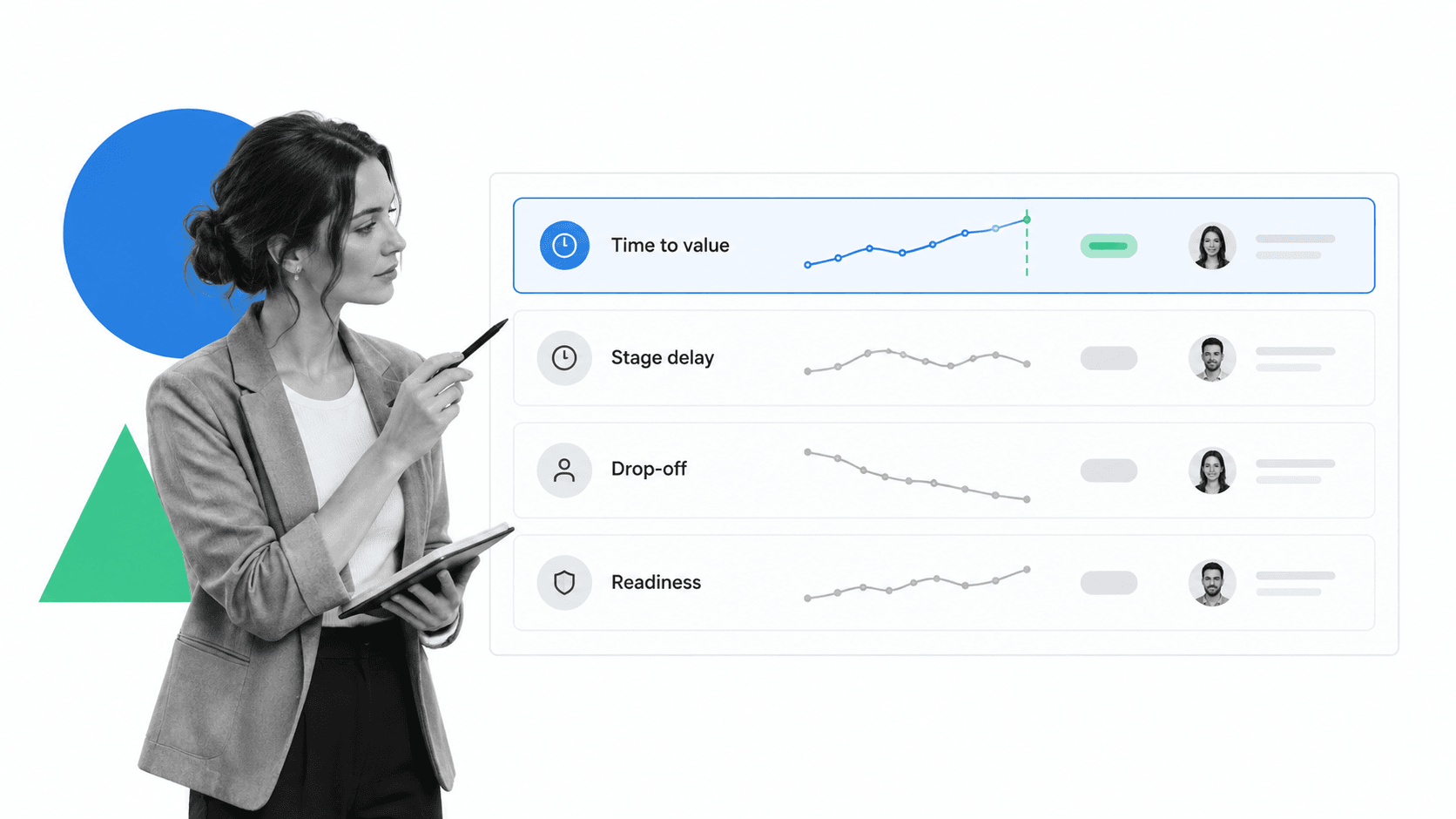
The best onboarding analytics scorecard balances flow, quality, readiness, and outcome. Tracking only speed encourages shortcuts. Tracking only compliance can hide unnecessary friction. Tracking only outcomes makes it difficult to locate the operational cause.
Flow metrics
Time to value measures the elapsed time from a defined start to a defined finish. Touch time measures active work. Stage delay captures the gap between activities. Throughput counts completed onboarding cases in a period. Together, these measures show whether work moves, waits, or accumulates.
Quality and repeated work metrics
First-pass yield, defect rate, reopening rate, repeat submission, and correction loops reveal whether work finishes correctly. Repeated work is especially important because it can make a fast process look productive while consuming hidden capacity.
Readiness and control metrics
Readiness asks whether the process followed required steps, decisions, approvals, segregation rules, and evidence requirements. Useful measures include skipped-step frequency, late approval, policy exception, missing evidence, unauthorized path, and unresolved control failure.
Outcome metrics
Outcome metrics connect onboarding performance to what the business or customer actually needs. Examples include resolution quality, onboarding completion, service level, customer effort, claim accuracy, audit readiness, or successful remediation. The outcome should be close enough to the process that the team can plausibly influence it.
Segmented measures
Every important metric should be segmentable by the factors that may explain variation. A cycle-time average becomes useful when it can be split by onboarding case type, risk tier, owner, route, exception reason, or source. Segmentation turns a symptom into a testable hypothesis.
Onboarding analytics methods
Onboarding analytics methods range from simple descriptive reporting to sequence analysis and predictive monitoring. The right method depends on the decision, data quality, process maturity, and cost of acting on a false signal.
Descriptive analysis
Descriptive analysis establishes what happened. It summarizes volume, time to value, stage delay, repeated work, readiness, outcome, and variation. This is the foundation because teams cannot improve a process they cannot measure consistently.
Diagnostic analysis
Diagnostic analysis tests why performance changed. Analysts segment onboarding cases, compare paths, examine queues, review exception reasons, and trace dependencies. The goal is not merely correlation. It is a credible operational explanation that can guide an intervention.
Readiness checking
Readiness checking compares actual execution with an intended model or rule set. It identifies skipped steps, alternate routes, premature closure, missing approvals, and unexpected loops. The method is valuable when safety, quality, compliance, or consistency matters.
Predictive monitoring
Predictive monitoring estimates what may happen to an active onboarding case, such as a likely delay, escalation, defect, or missed outcome. Use it only when the signal arrives early enough to change the result and the team has a defined response workflow.
Prescriptive action
Prescriptive analytics recommends an action based on the signal and context. It should be introduced after teams trust the data, understand the failure modes, and have clear authority rules. Recommendations without ownership or review simply create another queue.
NIST Privacy Framework provides a structure for identifying and managing privacy risk. That matters when onboarding analytics combines employee, customer, identity, training, access, or product-usage data across systems.
How to implement onboarding analytics
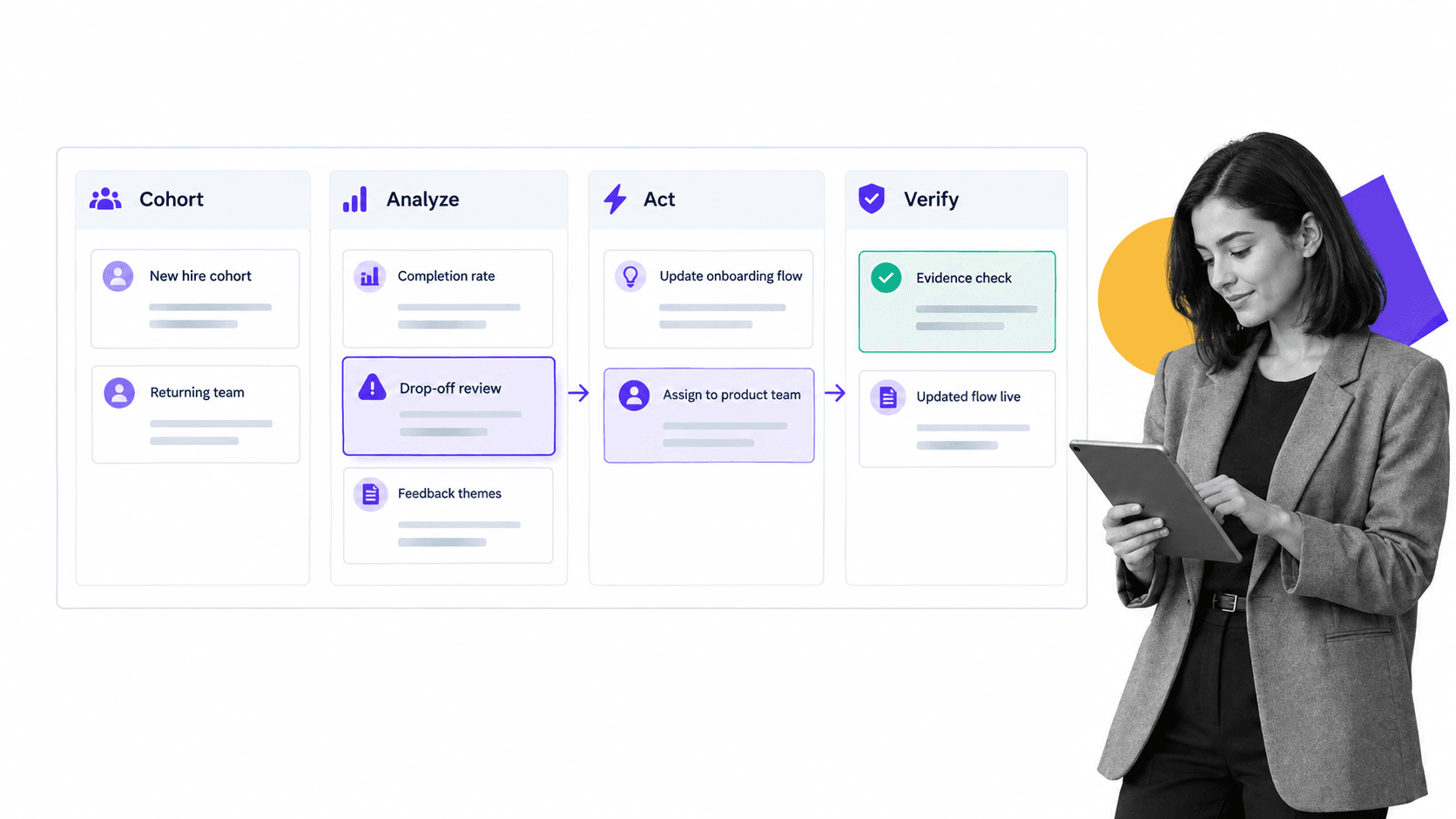
A successful implementation begins with a decision and ends with verified action. Starting with a large data lake or a catalog of dashboards often produces impressive analysis that no operating team owns.
Step 1: Choose one process and decision
Pick a process with meaningful volume, a visible problem, an accountable owner, and a decision the analysis can improve. Define the start, finish, customer, outcome, and scope. A narrow, complete process is better than an enterprise-wide map that nobody can act on.
Step 2: Define the process question
Good questions are specific: Which approval route creates the longest wait? Which exception type causes repeat work? Where do high-risk onboarding cases bypass review? Which early signal predicts a missed service level? The question determines the data and method.
Step 3: Build a trustworthy event model
Map the onboarding case ID, activities, timestamps, actors, attributes, and outcomes. Reconcile duplicate and missing events. Confirm definitions with the people who run the process. Keep a data dictionary so the same metric means the same thing across reports.
Step 4: Establish a baseline
Measure current flow, quality, readiness, and outcome across a representative period. Segment the baseline to expose variation. Document known data limitations so a future comparison does not create false precision.
Step 5: Connect the signal to work
Every actionable finding needs an owner, response rule, evidence requirement, and review point. onboarding process software can flag when performance moves outside the expected range, while user onboarding software keeps active work visible. The response should live in the same operating rhythm as the process.
Step 6: Test and verify the intervention
Change one meaningful constraint, then compare the result with the baseline. Use an onboarding platform to improve flow without weakening controls or quality. If the change works, update the standard. If it does not, preserve the learning and test the next hypothesis.
Onboarding analytics in Process Street
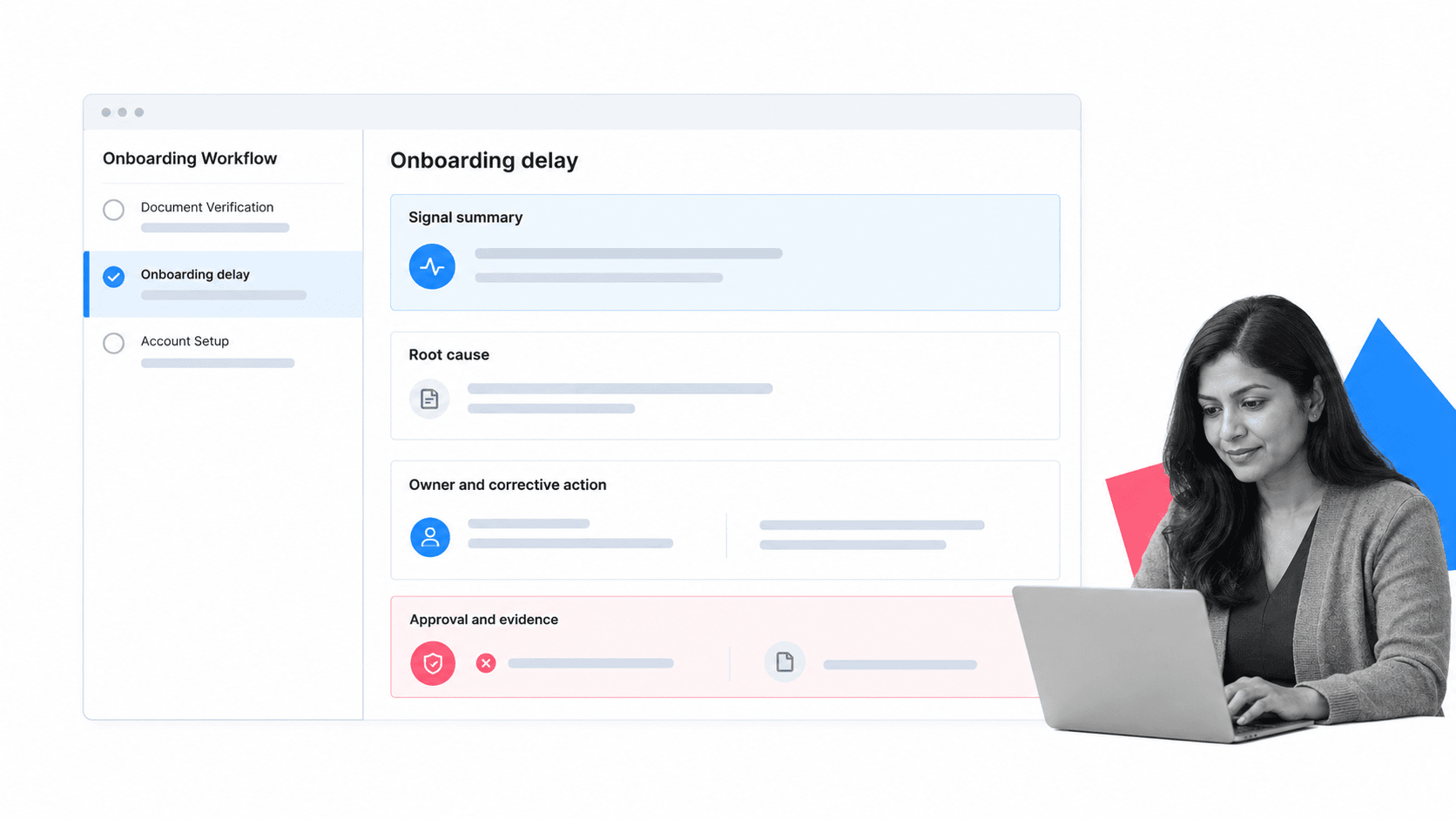
Onboarding analytics in Process Street connects measurement to execution. Process Street is a Compliance Operations Platform that brings governed documentation, workflow execution, and built-in AI oversight into one operating system.
Capture onboarding events as work happens
Workflow runs create structured records of tasks, owners, form fields, decisions, approvals, evidence, and status. That data gives teams a process-aware foundation for understanding throughput, delay, repeated work, exceptions, and readiness.
Turn exceptions into assigned action
When a process measure crosses a threshold or a control fails, a workflow can assign review, collect the root cause, require corrective action, route approval, and preserve evidence. The insight does not need to wait for a meeting or disappear inside a report.
Keep the standard and execution connected
A employee onboarding checklist lets teams design the intended process, while the live workflow records how each onboarding case runs. That connection supports stronger analysis because the documented standard, execution path, and improvement action stay close together.
Connect onboarding data to analysis tools
Teams can use Analytics to move workflow data into reporting and analytics environments. The important design choice is to keep the action loop connected: analysis can happen in a specialized surface, but owners, approvals, evidence, and follow-up should return to accountable work.
This closes the gap between onboarding measurement and analysis. The management system does not merely display performance. It gives the team a controlled way to respond and prove what changed.
How to build onboarding analytics maturity
Onboarding analytics maturity is the ability to make reliable operational decisions from process evidence, then improve the process without losing control. Maturity comes from stronger questions, definitions, ownership, and action loops, not from buying the most advanced tool.
Reporting stage
The team can report basic volume, completion, time to value, and backlog, but definitions may vary and action is informal. The priority is to standardize measures, name owners, and remove obvious data gaps.
Diagnostic analysis stage
The team can segment measures, compare paths, identify constraints, and explain major variation. Analysts work directly with onboarding owners, and improvement hypotheses are tied to evidence.
Governed action stage
Signals trigger defined workflows with owners, due states, evidence, and review. The team can show which finding led to which intervention and whether the intervention changed the result.
Predictive and adaptive operations stage
Reliable early signals help the team intervene before an outcome fails. Models and recommendations are reviewed, monitored, and bounded by clear authority. The process adapts while policy, evidence, and accountability remain intact.
The path between levels should be deliberate. Start with a process whose data and ownership are strong, use the available new customer onboarding checklist, and expand only after the measurement-to-action loop works. That is how onboarding management software becomes a repeatable operating capability instead of a one-time analysis project.
FAQs
What is onboarding analytics?
Onboarding analytics is the practice of measuring how repeatable work flows, explaining why performance changes, and using that evidence to improve execution. It combines event data, process context, metrics, analysis methods, and accountable action.
How is onboarding analytics different from onboarding reporting?
Onboarding reporting summarizes progress and results, while onboarding analytics explains variation, identifies drop-off and delay, tests causes, and connects findings to action. Reporting tells you what happened. Analytics helps you decide what to change and whether the change improved the outcome.
Which onboarding analytics metrics should a team track?
Track a balanced set of flow, quality, readiness, and outcome metrics. Common measures include time to value, stage delay, throughput, repeated work, skipped steps, missing approvals, exception rates, and a business or customer outcome that the process can influence.
What data is needed for onboarding analytics?
At minimum, use an onboarding case identifier, stage or activity, timestamp, owner, status, and outcome. Add context such as onboarding type, role, segment, cohort, location, channel, exception reason, or customer tier when those dimensions help explain variation.
How do you implement onboarding analytics?
Start with one process and one decision. Define the question, build a trustworthy event model, establish a baseline, analyze the constraint, connect the finding to assigned work, and verify whether the intervention improved flow, quality, readiness, or outcomes.
How does Process Street support onboarding analytics?
Process Street captures structured workflow activity and turns process findings into governed action. Teams can assign owners, collect root causes, require evidence, route approvals, preserve audit history, and connect workflow data to reporting and analytics tools.
