


Turn every policy into automated workflows with built-in enforcement and audit-ready proof.



Onboarding Automation Software

Onboarding automation software coordinates the repeatable work required to welcome, verify, equip, train, approve, and guide a new employee, customer, vendor, or product user. It turns a multi-team onboarding plan into an executable workflow with triggers, assignments, deadlines, reminders, evidence, and escalation paths.
The goal is not to remove people from onboarding. It is to remove avoidable chasing, duplicate entry, missed handoffs, and uncertain ownership so people can spend more time on judgment, coaching, relationships, and exceptions.
This guide explains how onboarding automation works, which capabilities matter, where to use it, how to design and implement the workflow, and how Process Street connects onboarding signals to accountable execution.
In this article, we are going to cover:
- What is onboarding automation software?
- How onboarding automation software works
- Core onboarding automation capabilities
- Where to use onboarding automation software
- How to design an automated onboarding workflow
- How to choose onboarding automation software
- Onboarding automation software in Process Street
- How to implement onboarding automation software
- FAQs
What is onboarding automation software?
Onboarding automation software is a workflow system that starts and coordinates onboarding tasks based on an event such as a signed offer, closed sale, approved vendor, or new account. It routes the right work to the right people, collects information, applies rules, waits for approvals, sends reminders, records evidence, and shows progress until the onboarding outcome is complete.
That definition is wider than a checklist. A checklist records steps, while onboarding process software manages live cases, ownership, dependencies, exceptions, and proof. The software should make the intended process executable without forcing every new arrival through an identical path.
Onboarding automation versus onboarding software
Onboarding software is a broad category. Some products focus on content, learning, product tours, HR records, customer portals, or forms. Onboarding automation focuses on orchestration: what starts, which path applies, who owns each step, what must be completed first, and what happens when work stalls.
Onboarding automation versus workflow automation
Onboarding automation is a focused application of workflow automation fundamentals. The same trigger, routing, assignment, approval, reminder, and evidence patterns apply, but the workflow is designed around a newcomer reaching a defined readiness or first-value outcome.
What should stay human
IBM guidance on employee onboarding automation describes employee onboarding automation as a way to handle repetitive administrative work while preserving human support for questions, motivation, and career guidance. That boundary matters. Software should coordinate predictable work and surface exceptions. Managers and specialists should handle sensitive conversations, nuanced decisions, and relationship-building moments.
How onboarding automation software works
Onboarding automation software works as an event-driven operating layer. It receives an onboarding trigger, captures a profile, chooses the correct path, creates work, watches for completion, and moves the case toward an agreed outcome.
1. A trigger starts the onboarding case
The trigger might be an accepted offer, a contract signature, an approved supplier, a purchase, an invitation, or a status change in another system. A strong setup creates one onboarding record and passes trusted intake data into the workflow instead of asking every team to retype it.
2. Profile data selects the path
Role, location, employment type, product plan, customer segment, risk tier, service package, or vendor category can change which tasks apply. Rules should reveal only the relevant steps, owners, documents, training, and approvals for that case.
3. Work is assigned across teams
Onboarding usually crosses boundaries. Employee onboarding can involve recruiting, HR, payroll, IT, security, facilities, finance, and the hiring manager. Customer onboarding can involve sales, implementation, finance, support, and customer success. The software should coordinate these owners without turning the newcomer into the project manager.
4. Dependencies control the sequence
Some tasks can run in parallel. Others must wait. Access should depend on authorization. Training may depend on role. A customer configuration review may depend on complete intake data. Dependencies keep teams from completing later steps on an unstable foundation.
5. Exceptions create a response path
Missing documents, failed checks, delayed access, rejected approvals, incomplete training, or disengaged customers need a named response. The workflow should assign the exception, preserve context, escalate at the right time, and record how it was resolved.
6. Completion produces a handoff and record
A case is complete only when the defined outcome is true, not merely when the last email was sent. The system should confirm readiness, acceptance, activation, or first value, then preserve the activity history and hand off ownership to the next operating process.
Core onboarding automation capabilities
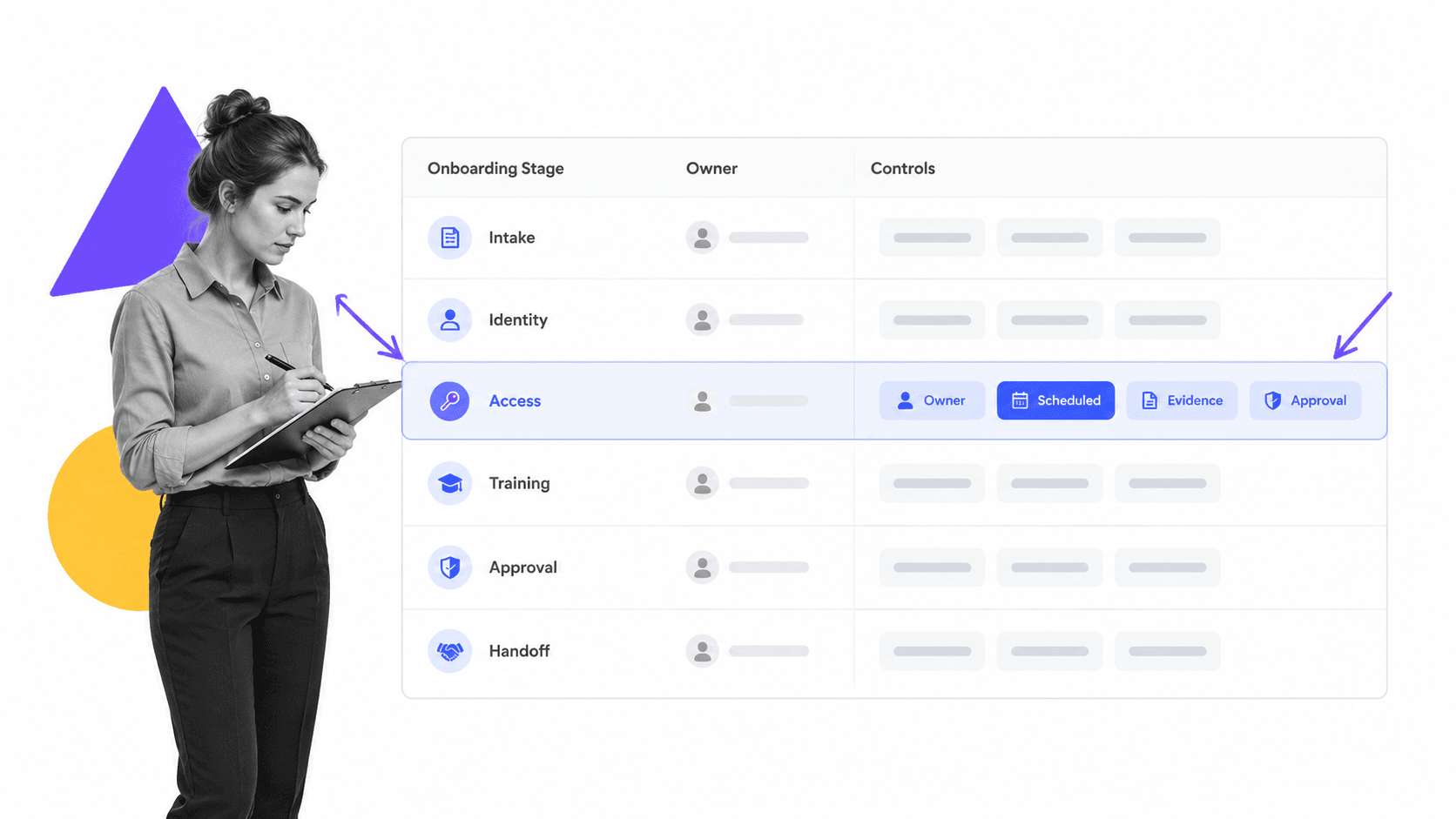
The best onboarding automation software combines workflow control with a clear participant experience. Buyers should evaluate the complete operating loop rather than counting isolated features.
Structured intake and reusable workflows
Forms and reusable workflow templates create a consistent starting point. Intake should collect only what is needed, validate important fields, and make the data available to downstream tasks without duplicate entry.
Conditional paths and personalization
Rules should adapt the journey to the case. A remote employee may need shipping and remote access tasks. An enterprise customer may need security review and data migration. A low-risk vendor may skip controls that a critical supplier must complete.
Assignments, due dates, and reminders
Each task needs one accountable owner, a clear due condition, and a sensible reminder or escalation rule. Team-level visibility is useful, but shared ownership should not make individual responsibility ambiguous.
Approvals and control gates
Onboarding often contains moments that must not be bypassed, such as access authorization, background review, contract acceptance, configuration sign-off, or launch readiness. Approval gates should block progression until an authorized person accepts or rejects the work.
Evidence and audit history
Evidence can include submitted information, acknowledgments, completed training, access authorization, signed documents, screenshots, notes, and approval decisions. For employee access, NIST account management assessment guidance treats authorized users, role membership, privileges, approval, and account review as explicit account-management concerns. The workflow should keep those decisions connected to the task that produced them.
Integrations and automation actions
Useful software can start workflows from another system, update records, send messages, request signatures, create accounts, schedule work, and return approved outcomes. The integration design should preserve one source of truth for each data type and avoid silent duplication.
Dashboards and improvement data
Owners need to see active cases, overdue work, bottlenecks, exception types, completion time, drop-off, and outcome quality. Good reporting leads back to the underlying case so the owner can investigate and act.
Where to use onboarding automation software
Onboarding automation software is useful whenever a new person or organization must cross a repeatable set of requirements before they are ready to operate, receive value, or assume responsibility.
Employee onboarding
Employee onboarding can coordinate forms, eligibility steps, equipment, accounts, policy acknowledgments, training, introductions, manager checkpoints, and readiness review. The employee onboarding checklist provides a concrete starting structure, while the workflow should adapt by role, location, employment type, and start conditions.
Compliance steps require careful ownership. USCIS I-9 Central is the official source for Form I-9 requirements, and automation should route work without turning software defaults into legal advice. The workflow should make the responsible role, current form, deadline, retention rule, and exception path explicit.
Customer and client onboarding
Customer onboarding automation can collect implementation data, assign an owner, schedule kickoff, coordinate configuration, request documents, deliver training, track adoption, and confirm first value. IBM’s IBM guidance on customer onboarding automation emphasizes structured intake, personalized workflows, automated communication, document management, task setup, and analytics as connected parts of the journey.
A customer onboarding process template helps translate the sale into a governed handoff. Teams with complex segments can use customer onboarding software to keep the customer experience consistent while adapting the work behind it.
Vendor and partner onboarding
Vendor onboarding can coordinate due diligence, tax and banking information, security review, contract approval, system access, training, and renewal ownership. A structured vendor onboarding process keeps risk controls and commercial setup in the same operating sequence.
Product and user onboarding
Product onboarding can guide account setup, configuration, role-based education, milestone completion, activation, and support handoff. The workflow should use behavior or profile data to prompt the next useful action without overwhelming every user with the same tour. A product onboarding process gives teams a practical process frame.
Manager and role transitions
Promotion, internal transfer, return from leave, and manager onboarding often reuse the same automation patterns as a new hire but require different permissions, training, relationships, and review points. The U.S. Office of Personnel Management onboarding model onboarding model stresses that managers and organizational units carry distinct responsibilities, which automation should make visible rather than flatten.
How to design an automated onboarding workflow
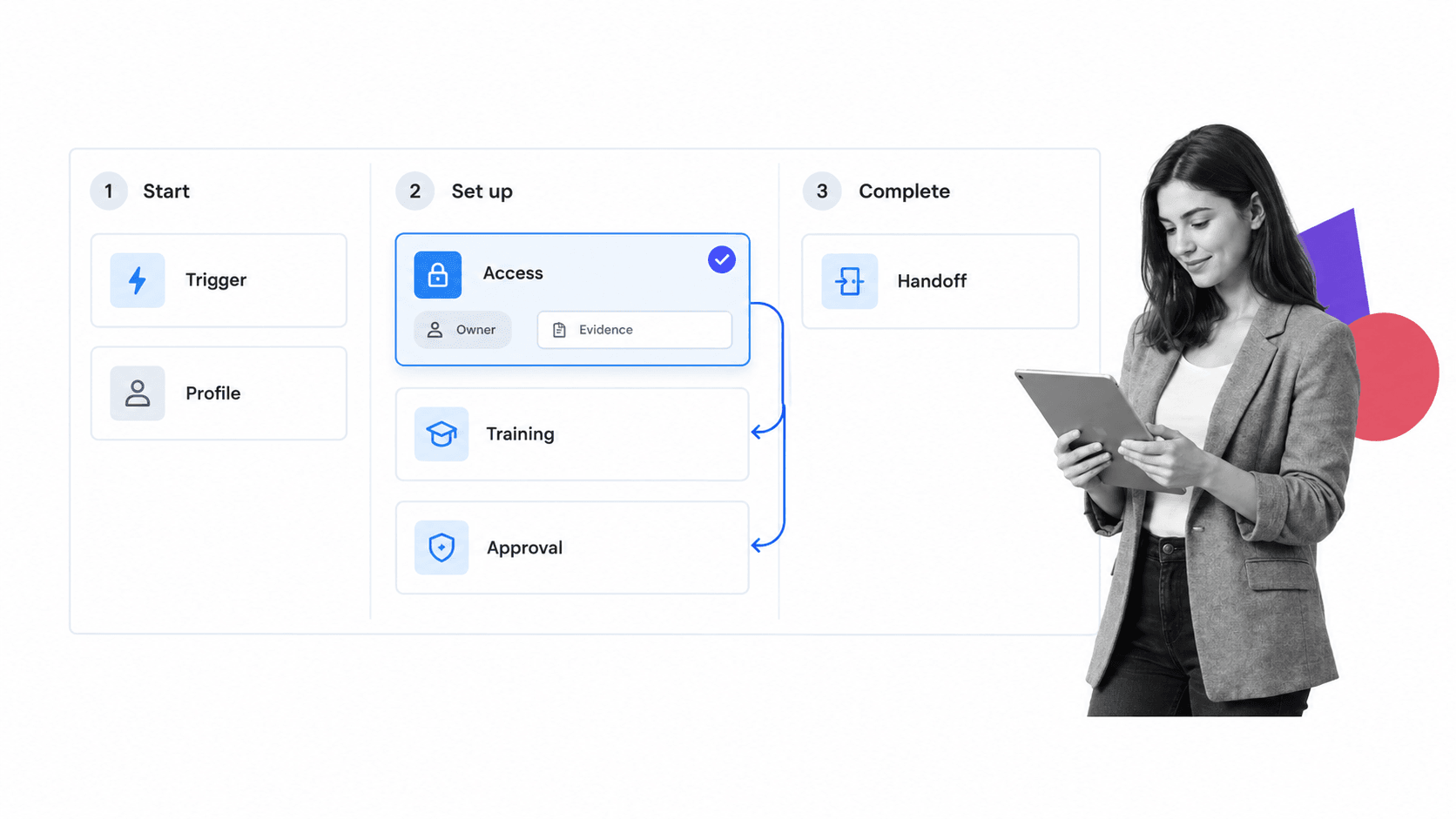
Design the automated onboarding workflow from the outcome backward. Starting with a tool screen or a long task list usually preserves the existing mess in digital form.
Define the completion outcome
Write a testable completion statement. An employee may be ready when required identity, access, training, manager, and first-week goals are complete. A customer may be onboarded when configuration is accepted, key users are trained, and the first value milestone is confirmed.
Map the trigger, stages, owners, and systems
List the event that starts onboarding, the major stages, the owner of each stage, the systems that hold source data, and the handoff that ends the journey. This reveals duplicate entry, missing ownership, and unclear boundaries before automation begins.
Classify work by automation level
- Fully automated: predictable data movement, notifications, record creation, and simple routing
- Human task with automated coordination: reviews, coaching, configuration, and judgment
- Approval gate: authorized acceptance or rejection before progression
- Exception path: missing, failed, late, disputed, or high-risk work that needs specialist attention
Build the minimum useful path
Start with one common case and one exception path. Use a small number of reliable fields and integrations. A focused first version is easier to test than a universal workflow with dozens of branches and uncertain data.
Add conditional routes
Once the main path works, use profile data and completed tasks to add relevant branches. Conditional Logic can show or hide tasks and content based on form fields or task completion, which keeps each onboarding run focused on the current case.
Place approvals at real risk points
Use Approvals where a person must authorize access, spending, configuration, risk acceptance, or launch. Do not turn every handoff into approval. Excess gates slow the process and teach people to approve without reviewing.
Define evidence and escalation
For each controlled step, decide what proves completion, who reviews the proof, when the task becomes late, and which escalation follows. Evidence should be proportional to the risk and usable during later review.
How to choose onboarding automation software
Choose onboarding automation software by testing whether it can run your real process, including the awkward exceptions. A polished welcome portal is not enough if teams still coordinate access, approvals, documents, and handoffs in email.
Start with the onboarding model
Clarify whether the primary use case is employee, customer, vendor, partner, manager, or product onboarding. Then define the source systems, participants, controls, data sensitivity, and outcome. This prevents a narrow tool from being stretched beyond its intended job.
Test workflow flexibility
Build one common case, one complex case, and one exception. Check whether non-technical owners can change tasks, fields, owners, routes, due rules, and approvals without a development project.
Evaluate the participant experience
The newcomer should see only relevant requests, understand what is next, and know where to get help. Internal owners need context without searching several systems. Mobile access, accessibility, localization, and external participation may matter depending on the audience.
Examine governance and security
Review permissions, audit history, retention, data export, identity management, access review, evidence controls, and administrative change history. Sensitive onboarding data should be visible only to the roles that need it.
Check integrations without creating hidden work
Ask which system owns each field and how updates flow in both directions. A connector that copies data but leaves people reconciling conflicts is not complete automation. Test failures, retries, duplicate records, and permission changes before launch.
Measure total operating value
Compare implementation effort, process ownership, exception handling, control strength, reporting, and ongoing change cost. A configurable custom onboarding software is valuable when onboarding varies by segment, while a focused onboarding app may suit a simpler participant experience.
Onboarding automation software in Process Street
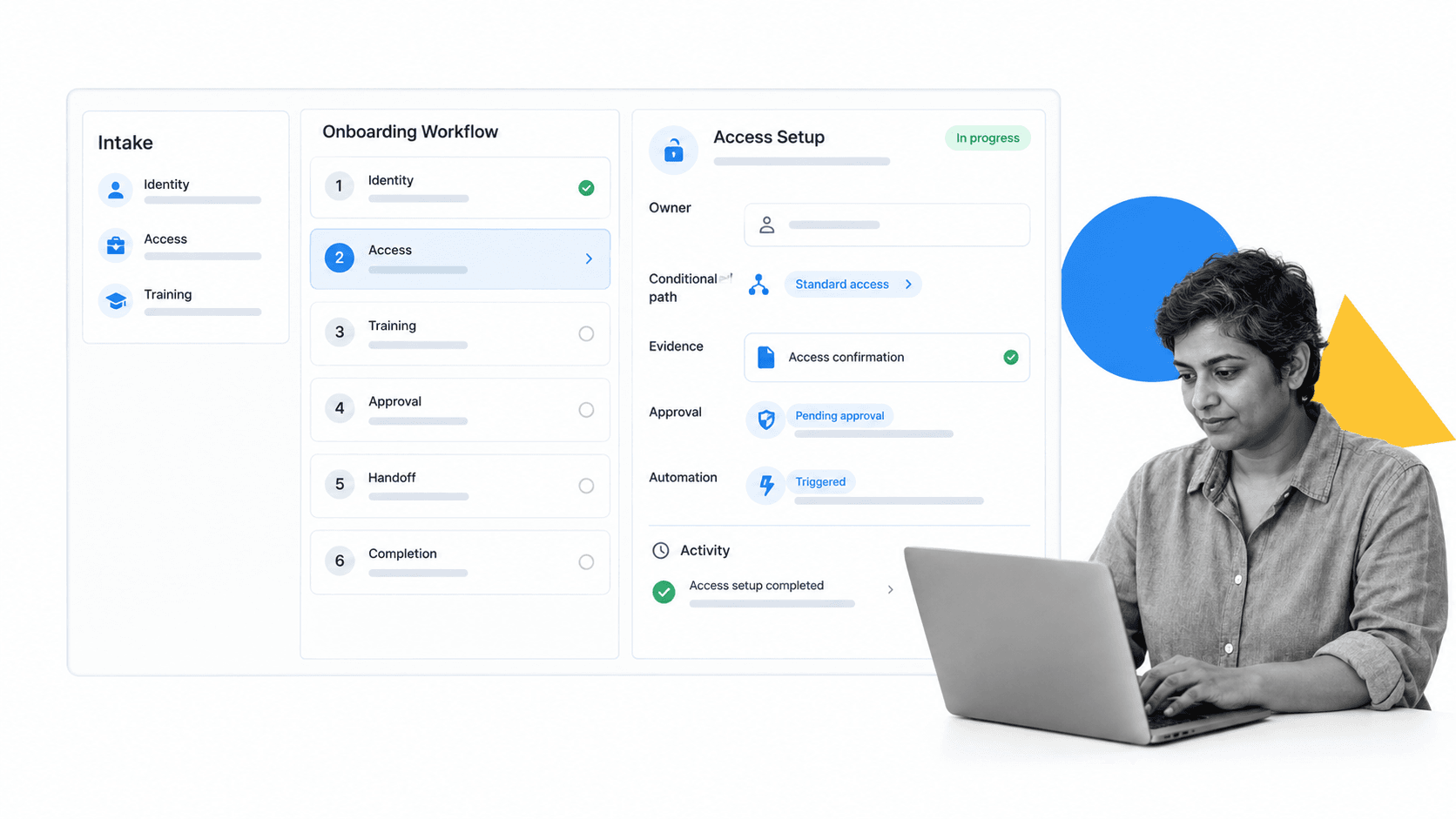
Onboarding automation software in Process Street turns a reusable onboarding design into a live workflow run for each employee, customer, vendor, or user. Intake data selects the path, tasks go to accountable owners, controls block unsafe progression, and the activity history preserves what happened.
Capture intake once
Forms can collect profile, contact, role, service, risk, and configuration data at the start or during the workflow. That data can guide assignments, conditional paths, messages, approvals, and later automation actions.
Adapt each journey with rules
Conditional Logic can reveal different tasks or content based on form data and task completion. Employee paths can vary by role or location. Customer paths can vary by segment or package. Vendor paths can vary by risk or access needs.
Coordinate owners and approvals
Tasks can be assigned to the responsible person or group, while due rules and reminders keep work moving. Approvals can create single-stage, multi-stage, or sequential control points before access, configuration, spending, or readiness decisions.
Connect the surrounding systems
Workflow Automations can respond to workflow events and move approved data or actions into the surrounding stack. Process Street has 5,000+ integrations. The useful design keeps the workflow as the coordination and proof layer while each source system remains authoritative for its own records.
Monitor progress and exceptions
The Workflow Dashboard gives owners a view of workflow runs, tasks, activity, analytics, and connected automations. That supports an operating rhythm where teams review overdue work, stalled stages, recurring exceptions, and completion patterns, then open the underlying run to act.
Use the workflow as the control surface
This is the practical difference between a static onboarding product and an executable onboarding system. The software does not merely present content. It coordinates work, enforces gates, captures evidence, and hands the completed case into the next process.
How to implement onboarding automation software
Implement onboarding automation software in controlled stages. The safest path is to make one high-volume journey reliable, then expand to more segments, systems, and automation actions.
Step 1: Establish the baseline
Measure current completion time, waiting time, rework, missing information, overdue tasks, exception types, participant effort, and outcome quality. Record where teams rely on inboxes, spreadsheets, personal reminders, and manual copying.
Step 2: Choose one pilot
Select a repeatable journey with a clear owner, enough volume to learn, manageable risk, and visible pain. Avoid starting with the rarest or most politically complex case.
Step 3: Build and test with real cases
Run normal, edge, late, rejected, incomplete, and duplicate cases. Confirm that assignments, permissions, dependencies, approvals, messages, evidence, and integrations behave correctly. Test what happens when a connected system is unavailable.
Step 4: Train owners on exceptions
Automation changes the job from chasing every task to managing the cases that need attention. Owners should know how to interpret status, correct data, reassign work, handle failures, document decisions, and escalate risk.
Step 5: Launch with a review rhythm
Review active cases frequently during the first weeks. Separate workflow-design problems from user questions and integration failures. Fix the source rather than teaching people to work around it.
Step 6: Improve from evidence
Use workflow data to find bottlenecks, noisy reminders, unused fields, late approvals, repeated exceptions, and segments that need a different path. Remove steps that do not protect an outcome or improve the experience.
Step 7: Expand deliberately
After the pilot is stable, add more segments, automation actions, and onboarding families. Reuse proven patterns through an onboarding solution, but keep each journey tied to its own outcome, owners, controls, and participant needs.
FAQs
What is onboarding automation software?
Onboarding automation software coordinates the repeatable tasks, data, owners, deadlines, approvals, reminders, evidence, and handoffs required to bring a new employee, customer, vendor, or user to a defined readiness or first-value outcome.
What parts of onboarding should be automated?
Automate predictable coordination such as intake, data transfer, task creation, assignments, reminders, routing, document requests, scheduling, record updates, and status reporting. Keep people responsible for sensitive conversations, nuanced judgment, coaching, relationship building, and exception decisions.
Can onboarding automation support employees and customers?
Yes. The workflow patterns are similar, but the outcomes and controls differ. Employee onboarding focuses on readiness, access, policy, training, and manager support, while customer onboarding focuses on implementation, configuration, education, adoption, and first value.
How do you choose onboarding automation software?
Define the onboarding outcome, participants, source systems, rules, controls, exceptions, and reporting needs. Then test the software with one common case, one complex case, and one exception to see whether it can coordinate the real process without hidden manual work.
How long does onboarding automation take to implement?
Implementation time depends on process complexity, data quality, integrations, security review, and the number of conditional paths. A focused pilot with one journey and a small set of reliable integrations is usually faster and safer than attempting every onboarding case at once.
How does Process Street automate onboarding?
Process Street uses reusable workflows, forms, conditional paths, assignments, due rules, approvals, automations, evidence, activity history, and dashboards to coordinate onboarding. Each new case runs through the relevant path while owners can see progress and act on exceptions.
