


Turn every policy into automated workflows with built-in enforcement and audit-ready proof.



Onboarding Product

An onboarding product is the connected system that helps a new user reach meaningful value after signup. It includes the in-product experience, milestone logic, messages, data, human handoffs, and operating workflows behind that experience. The goal is not to show every feature. The goal is to help the right user complete the right actions and understand why the product matters.
Strong product onboarding shortens the distance between intent and value. It gives self-serve users a clear path while helping product, customer success, implementation, and support teams respond when the path breaks. A reusable product onboarding process keeps those responsibilities visible beyond the interface itself.
This guide explains how to define activation, design segment-specific paths, connect product guidance with human support, and measure outcomes. It also shows how Process Street can coordinate the recurring work that makes onboarding reliable.
In this guide, you will learn:
- What is an onboarding product?
- Onboarding product vs. user and customer onboarding
- Core components of an onboarding product
- Product onboarding process
- How to design an onboarding product
- Product onboarding metrics
- Product onboarding mistakes
- Operationalize product onboarding with Process Street
- Onboarding product FAQs
What is an onboarding product?
An onboarding product is the full experience and operating system that moves a user from signup to an early success milestone. ProductPlan defines product onboarding as the process of introducing users to a product and helping them understand its value. The product experience is central, but the complete system also includes segmentation, lifecycle messages, support, ownership, and feedback loops.
A direct definition
Think of the onboarding product as a value-delivery system. It starts when a person arrives with a goal. It ends when that person has completed a meaningful outcome, knows what to do next, and has enough confidence to return. Screens, tours, checklists, email, calls, and workflow tasks are mechanisms. The product is the coordinated path they create together.
The job of the onboarding system
The system has four jobs: understand user intent, remove setup friction, guide the first valuable action, and recover when progress stalls. Each job needs an observable state. If a team cannot tell what a user is trying to accomplish, where they are blocked, or whether value occurred, the onboarding experience cannot adapt intelligently.
More than a product tour
A tour can introduce navigation, but navigation is rarely the outcome a user bought. Appcues frames effective product onboarding around helping users experience value rather than forcing them through feature education. A useful onboarding product therefore connects guidance to real work: importing data, inviting a teammate, creating a workflow, approving a request, or completing another domain-specific result.
An operating system, not a one-time project
Onboarding changes as the product, market, and customer mix change. Treating it as a launch project creates decay. Treating it as an operating system creates ownership, review rhythms, instrumentation, and a controlled way to update paths. That distinction matters when multiple teams influence the same customer moment.
Onboarding product vs. user and customer onboarding
Product onboarding, user onboarding, and customer onboarding overlap, but they describe different scopes. Clear language prevents teams from optimizing one layer while assuming another team owns the rest.
Product onboarding
Product onboarding is the experience that helps someone understand and use a product. It usually covers setup, the first meaningful action, activation, and early adoption. Product management and product design often own the in-product path, while growth, data, and lifecycle teams contribute experiments and messages.
User onboarding
User onboarding focuses on the individual person and the behavior change required for that person to become successful. It includes confidence, motivation, role, prior knowledge, and accessibility. Practical user onboarding recognizes that two people at the same account may need different guidance because their jobs are different. A broader digital onboarding strategy connects that learning experience to identity, data, service, and account-level requirements.
Customer onboarding and implementation
Customer onboarding is broader. It can include contracts, technical setup, security review, data migration, training, success planning, and stakeholder alignment. A customer onboarding process coordinates the account-level journey, while the onboarding product handles the user experience inside and around the product.
Where the layers meet
The layers meet at shared milestones. A user may finish setup inside the product, but an enterprise customer cannot activate until an administrator approves access or a specialist validates an integration. A strong customer onboarding motion connects those account dependencies to product behavior instead of tracking them in separate systems.
Core components of an onboarding product
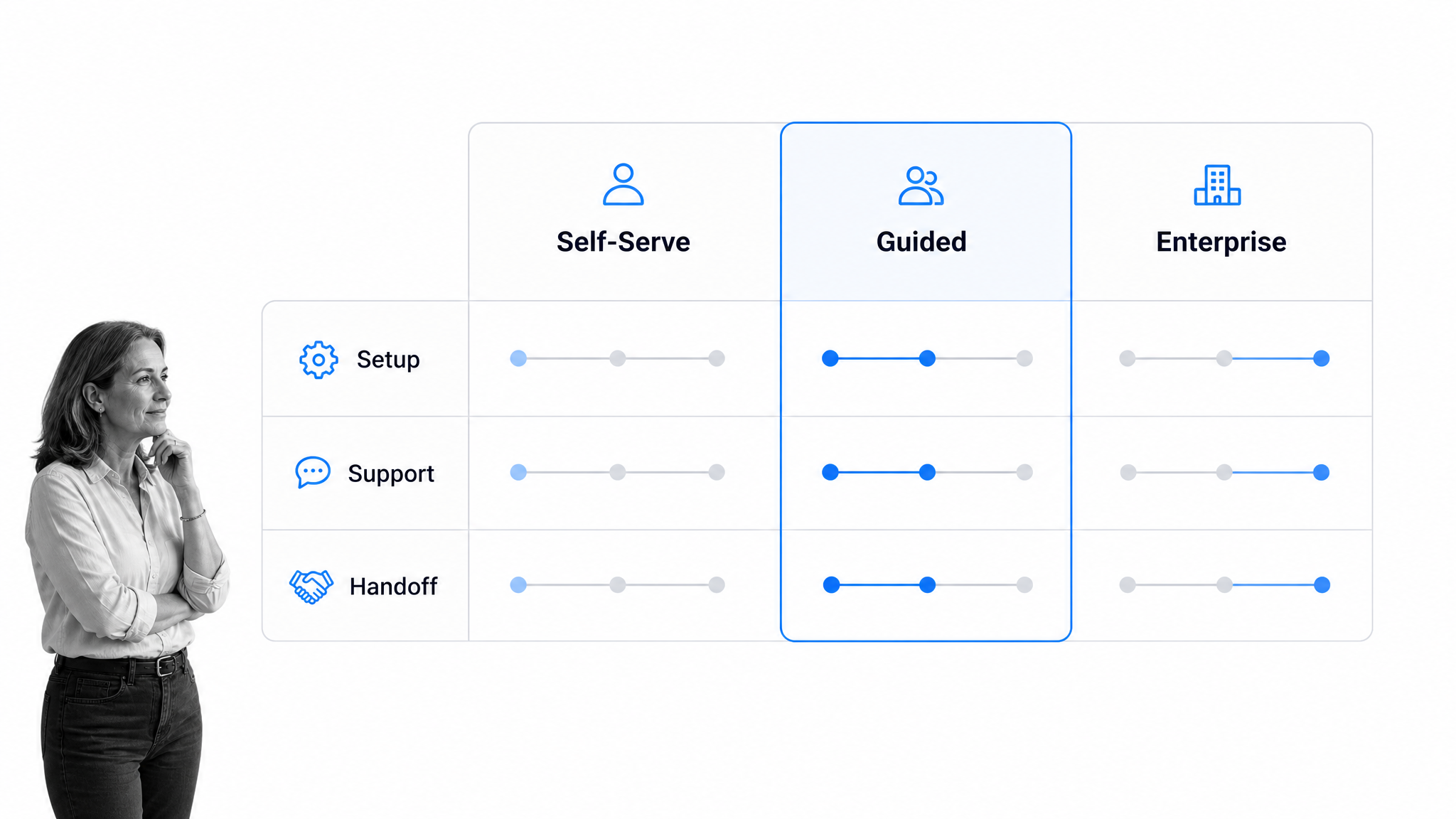
A complete onboarding product combines experience design with operating controls. The exact interface can vary, but the following components make the path measurable and maintainable.
A meaningful activation milestone
Activation is evidence that a user has experienced an early form of the product’s core value. It should be more meaningful than account creation and earlier than long-term retention. Define it as an event or small sequence that correlates with continued use, then validate that relationship with behavioral data and customer conversations.
Segmentation and branching
New users differ by role, goal, experience, company size, risk, and service model. Ask only for information that changes the path. A self-serve user may need a short setup checklist, while a regulated enterprise customer may need approval, data validation, and a guided implementation. Branching keeps simple cases fast without hiding important controls from complex cases.
In-product guidance
Use contextual guidance at the moment a decision or action is required. Empty states, examples, checklists, progress cues, and short explanations can reduce uncertainty. Avoid covering the interface with messages. Every prompt should help the user advance toward a value event or recover from a known obstacle.
Human support and handoffs
Human help should enter where judgment, trust, or complexity makes it valuable. Define the triggers for a handoff and tell the receiving person what has already happened. A high-touch SaaS onboarding workflow can coordinate discovery, configuration, training, and follow-up without making every customer follow the same service model.
Feedback and recovery paths
Onboarding needs a response when users pause, fail, or choose a different goal. Capture the failed step, likely reason, prior attempts, and next best action. Recovery may mean clearer guidance, a support task, a lifecycle message, a branch to a simpler setup, or escalation to a specialist.
Product onboarding process
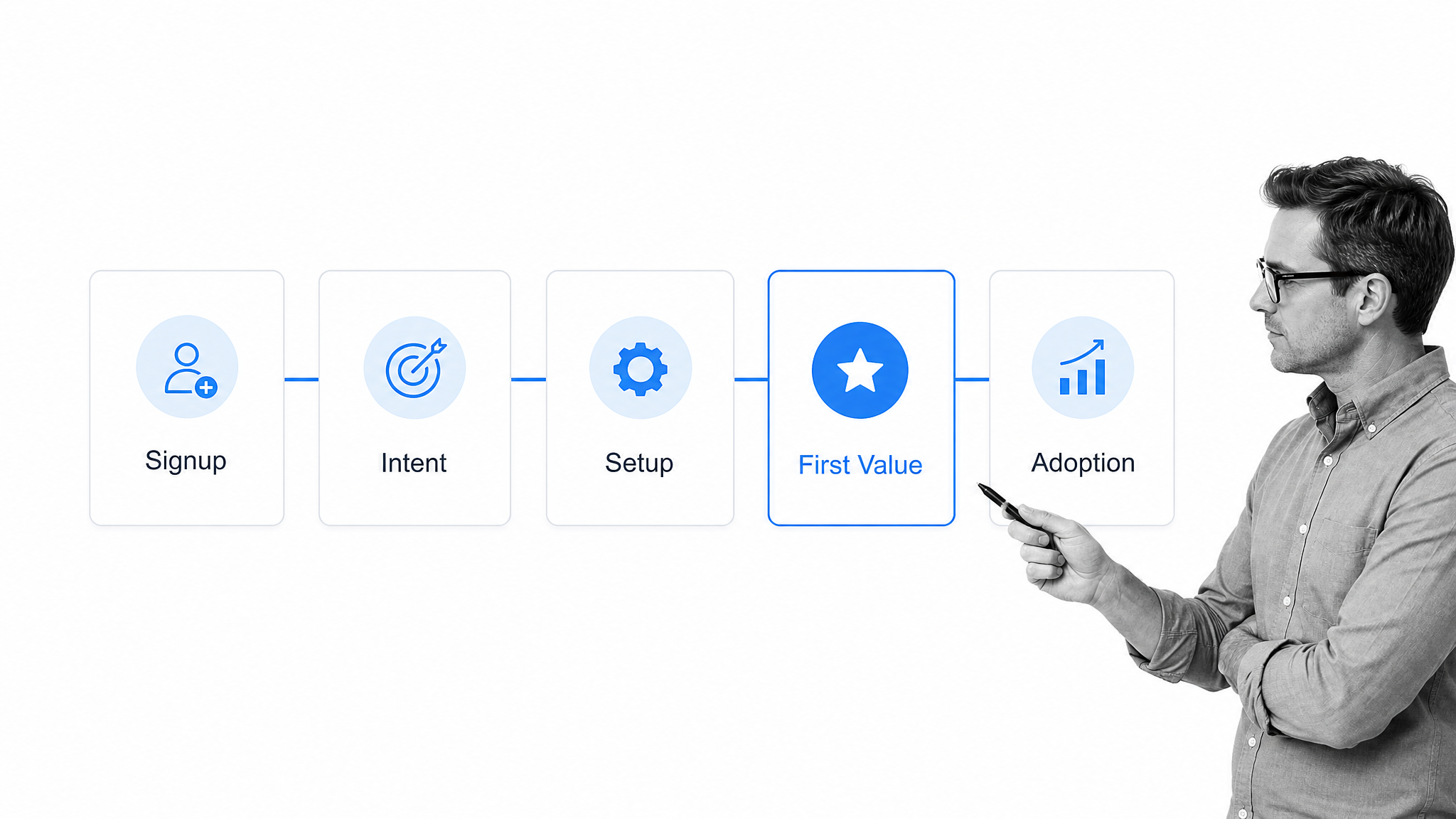
The product onboarding process should follow the user’s value journey, not the order of the navigation menu. A practical sequence is signup, intent capture, setup, first value, and early adoption. Each stage needs an entry condition, success condition, owner, and recovery action.
1. Capture signup context and intent
Start with the question that changes the journey: what is this person trying to achieve? Source, role, use case, team size, and existing data may help, but excessive forms create friction before trust exists. Progressive profiling lets the product learn as the user advances.
2. Complete the minimum setup
Separate required setup from optional configuration. If users need to connect data, invite collaborators, or select a template, explain why the action matters and what completion unlocks. For account-level work, a customer onboarding process template can coordinate responsibilities that sit outside the product interface.
3. Guide the first valuable action
The first valuable action should produce an outcome the user can recognize. Mixpanel highlights successful onboarding elements that lead users toward their goals. Make the next action obvious, provide a realistic example, and show the result quickly. If sample data is useful, make it easy to replace with real work.
4. Confirm value and establish the next habit
Do not assume that an event means the user understood the result. Confirm what changed, show where the output lives, and recommend the next valuable behavior. This is the bridge from activation to adoption. It may include inviting a teammate, scheduling a recurring workflow, or reviewing the first report.
5. Hand off with context
When a user needs training, implementation help, or customer success support, send context with the handoff. Include the goal, completed milestones, blockers, segment, and owner. A structured customer onboarding checklist helps prevent the user from repeating information at every team boundary.
How to design an onboarding product
Design begins with the outcome and works backward. The team should be able to explain who the path is for, what value it delivers, which actions are necessary, and how it will respond to variation.
Define value events before screens
List the outcomes users hire the product to create. Identify the earliest event that demonstrates each outcome, then identify the minimum prerequisites. This keeps visual polish from hiding a weak value path. It also gives analytics and customer-facing teams a shared definition of activation.
Map the minimum viable paths
Create one path for each materially different goal or service model. Remove steps that do not change readiness or value. Mark decisions, dependencies, and recovery routes. If a step exists only because an internal system needs it, look for a way to automate the transfer or move it later.
Assign owners and service levels
Every human handoff needs an owner, expected response time, and escalation route. The right onboarding management tools make those commitments visible across product, success, support, and implementation teams. Ownership should follow the user state, not depend on someone noticing an email.
Build accessible forms and guidance
Forms should have clear labels, instructions, error messages, and keyboard-friendly controls. The W3C forms tutorial provides practical accessibility patterns. Use plain language, preserve entered information after errors, and explain sensitive requests. Accessible design reduces friction for everyone, not only users with a disclosed disability.
Prototype with real scenarios
Test common and edge scenarios using realistic accounts. Watch for uncertainty, not just task failure. Ask users what they expect before they click, what they think changed afterward, and what they would do next. Test support and escalation paths as carefully as the happy path.
Release in measurable slices
Ship the smallest path that can deliver and measure a value event. Instrument it before broad release. Compare segments, inspect drop-off, read support conversations, and schedule a decision review. Iteration should change a defined hypothesis, not simply add more messages.
Product onboarding metrics
Product onboarding metrics should connect experience quality to business value. The Google HEART framework paper is a useful reminder to combine behavioral measures with satisfaction and task success. No single metric can explain whether onboarding works for every segment.
Activation rate
Activation rate is the share of eligible new users or accounts that reach the defined activation milestone within a chosen window. Report the numerator, denominator, time window, and segment. A rising rate can still hide a weak experience if the definition changes or low-intent signups disappear.
Time to value
Time to value measures the elapsed time from a meaningful start point to the first verified outcome. Use medians and distributions instead of a single average. Separate waiting time from active work so the team can tell whether delays come from confusing tasks, internal approvals, unavailable data, or slow handoffs.
Step completion and drop-off
Track entry, completion, error, retry, and abandonment at each required step. Review paths by role, goal, device, acquisition source, and service model when sample sizes allow. A high drop-off can mean the step is unnecessary, poorly explained, technically broken, or mistimed.
Feature adoption and support demand
Activation should lead to continued use of the capabilities that create value. Pair early feature adoption with support volume, escalation reasons, and implementation effort. Data from customer success software can connect product behavior to retention, satisfaction, and account health without treating completion as the final outcome.
Qualitative feedback
Ask what the user expected, what felt difficult, and whether the outcome matched their goal. Combine interviews, open-text responses, session reviews, support themes, and success-team observations. Tag feedback to a path and milestone so it can inform a specific design or operational change.
Product onboarding mistakes
Most onboarding failures come from optimizing the visible interface while neglecting value definition, segmentation, or operations. Watch for these patterns.
Teaching every feature
A long tour creates exposure, not competence. Introduce features when they help complete a user goal. Keep advanced capability discoverable without forcing it into the first session. The best onboarding sequence is often shorter than the product team initially expects.
Forcing one path on every user
A single path either overwhelms simple users or underserves complex ones. Segment only where needs truly differ, then branch the experience and operating workflow together. If the interface promises guided help but no internal task is created, the branch is cosmetic.
Measuring completion instead of value
Checklist completion is useful process data, but it is not proof of product value. Pair completion with an activation event, a visible outcome, and an understanding check. Review whether the milestone predicts later adoption instead of assuming that it does.
Leaving ownership implicit
Users experience product, support, and success as one company. Internal ambiguity becomes customer delay. Use onboarding workflow software to assign tasks, expose due states, and route exceptions before a stalled user becomes a churn risk.
Automating without a recovery path
Automation can move routine work quickly, but it also moves mistakes quickly. Define confidence thresholds, failure states, and human review points. A customer onboarding workflow with automations should preserve context when a task needs manual attention.
Operationalize product onboarding with Process Street
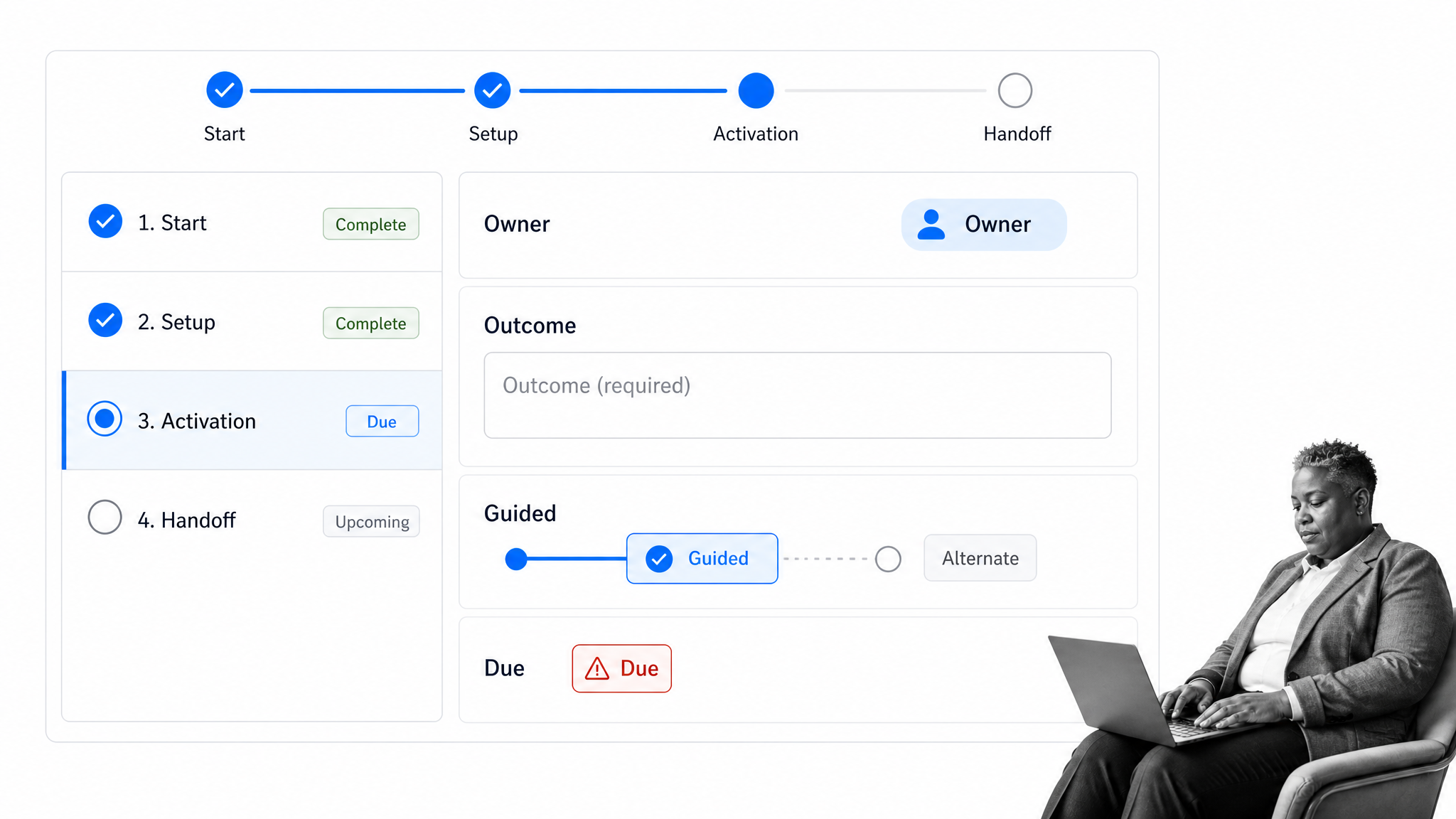
Process Street is a Compliance Operations Platform that can coordinate the repeatable work around product onboarding. It does not replace the in-product interface. It gives product operations, customer success, implementation, support, and compliance teams one executable workflow for the responsibilities, approvals, branches, and evidence behind that experience.
Run a reusable onboarding workflow
Start from a standard flow, then adapt it to the product, segment, and activation definition. A new customer onboarding checklist can provide a baseline for ownership, setup, training, and follow-up. Each run keeps the current user or account context attached to the work.
Branch by segment and risk
With conditional logic, a workflow can show or hide tasks and content based on responses and completed work. A self-serve path can stay compact, while enterprise, regulated, or stalled cases reveal the appropriate checks, approvals, and human handoffs.
Assign work and control handoffs
Assignments, due dates, required fields, and approvals turn a vague handoff into accountable work. Product telemetry or form submissions can initiate a workflow, and automation can pass context to other systems. The receiving person sees the goal, completed milestones, blocker, and next required action.
See progress and exceptions
The workflow dashboard shows workflow runs, task status, assignments, activity, analytics, and connected automations. That operating view helps leaders spot overdue setup, repeated exception reasons, and uneven service levels across onboarding segments.
Improve the system with evidence
Use completed runs, activation outcomes, support themes, and customer feedback in a regular improvement review. Customer education can address knowledge gaps, while workflow changes can address ownership, routing, or control gaps. Consumer software teams can also adapt the operating model to high-volume, lower-touch journeys common in the consumer software industry.
The result is an onboarding product that connects the visible user experience with the operational work required to deliver it consistently. Users get a clearer path to value, and teams get the ownership and evidence needed to improve that path over time.
Onboarding product FAQs
What is an onboarding product?
An onboarding product is the connected experience and operating system that moves a new user from signup to meaningful value. It includes in-product guidance, milestone logic, segmentation, messages, human handoffs, data, and the workflows that support the journey.
What is the difference between product onboarding and user onboarding?
Product onboarding focuses on helping people understand and use a product, while user onboarding focuses on the individual person’s behavior, confidence, role, and learning needs. Strong onboarding designs both layers together.
What should a product onboarding flow include?
A product onboarding flow should include intent capture, minimum setup, a clear activation milestone, contextual guidance, segment-specific branches, recovery paths, ownership for human handoffs, and measurement of value rather than completion alone.
How do you measure product onboarding success?
Measure activation rate, time to value, step completion and drop-off, early feature adoption, support demand, and qualitative feedback. Report results by meaningful segment and verify that the activation milestone relates to continued product use.
How long should product onboarding take?
Product onboarding should take only as long as necessary to reach a trustworthy first value milestone. The right duration depends on product complexity, customer risk, setup dependencies, and service model, so teams should measure active work and waiting time separately.
How can Process Street support product onboarding?
Process Street can coordinate the operational work around product onboarding through reusable workflows, assignments, conditional paths, approvals, required evidence, automation, and progress visibility. It connects product, success, implementation, support, and compliance responsibilities without replacing the in-product experience.
