


Turn every policy into automated workflows with built-in enforcement and audit-ready proof.



Custom Onboarding Software

Custom onboarding software is a configurable system for moving employees, customers, vendors, partners, or other participants through the exact steps they need. It keeps a standard operating spine, then changes tasks, forms, owners, approvals, access, training, and communications according to role, risk, region, service level, or another business rule.
The point is controlled variation. A generic checklist treats every onboarding case as identical. A fully bespoke application can be slow and expensive to maintain. A configurable onboarding platform sits between those extremes: your team can adapt the experience without rebuilding the process every time.
This guide explains the operating model, the features that matter, and the steps for designing a system that stays flexible without becoming chaotic. It also shows how Process Street turns custom onboarding requirements into governed workflows with clear ownership and proof of execution.
In this guide, you will learn:
- What is a custom onboarding platform?
- What makes onboarding software truly custom
- Types of custom onboarding
- How a custom onboarding workflow works
- Custom onboarding software features to prioritize
- How to build a tailored onboarding system
- How to evaluate an onboarding platform
- Build custom onboarding software with Process Street
- Custom onboarding FAQs
What is a custom onboarding platform?
Custom onboarding software is workflow software configured around your onboarding rules. It collects intake data, chooses the right path, assigns internal and external work, coordinates handoffs, gathers evidence, and confirms that the person or organization is ready to move forward.
Custom does not have to mean custom-coded. In a well-designed system, operations teams configure reusable building blocks: standard tasks, conditional branches, forms, due dates, approvals, notifications, document requests, and system actions. The software assembles the right path from those blocks for each case.
A direct definition
Think of the software as an onboarding control plane. One program defines the required outcome and common standards. Rules decide which tasks apply. Owners complete the work in sequence. Managers can see progress, exceptions, and proof without reconstructing the story from email.
What custom does not mean
Custom does not mean every onboarding journey should be unique. That approach creates maintenance debt and makes performance impossible to compare. The better model is modular: standardize the common eighty percent, then use controlled branches for the meaningful differences.
Where it fits
The category overlaps with onboarding products, HR systems, customer portals, learning platforms, identity tools, and workflow automation. The defining job is orchestration. The platform connects work across functions and keeps the complete path accountable.
What makes onboarding software truly custom

Software becomes meaningfully custom when configuration changes the work, not just the colors or welcome message. A useful system can select requirements, owners, evidence, and service levels from intake data while preserving a controlled baseline.
Rule-based paths
Rules can branch by role, department, customer tier, product, geography, contract type, data access, vendor risk, or implementation complexity. Each rule should answer a real operating question. If the answer does not change the work, it probably does not need a branch.
Reusable modules
Modules prevent the workflow from becoming one enormous diagram. A security review, equipment setup, executive introduction, data migration, or compliance training module can be inserted when needed. Teams maintain the module once and reuse it across paths.
Governed exceptions
Real onboarding always produces exceptions: a missing document, delayed system access, unusual contract term, accessibility need, or customer dependency. Custom software should route the exception to an owner, record the decision, and return the case to the standard path. It should not encourage invisible side work.
Experience and control
Customization has two audiences. The participant needs a relevant, understandable experience. The operating team needs control over requirements, deadlines, approvals, and evidence. A strong design serves both without exposing internal complexity to the person being onboarded.
Types of custom onboarding
The same workflow architecture supports several onboarding motions. The language, participants, and proof change, but the operating pattern remains intake, routing, preparation, approval, launch, and follow-up.
Employee onboarding
Employee onboarding coordinates HR, IT, payroll, security, managers, facilities, and training. Start with an employee onboarding workflow, then branch by role, location, employment type, access level, and required training. The CIPD induction guidance is a useful reference for the people side of the program.
Customer and client onboarding
Customer onboarding coordinates the sales handoff, goals, data collection, setup, integrations, training, and first value milestone. A repeatable customer onboarding process can branch for self-service, guided, enterprise, regulated, or professional-service accounts. A customer onboarding workflow template provides a concrete starting structure.
Regulated paths need additional controls without forcing every customer through the same review. For example, customer onboarding software for banks can add identity checks, evidence requests, and approvals according to account risk. A fintech onboarding workflow may also branch for jurisdiction, product access, funding source, or enhanced due diligence. The shared workflow still preserves a consistent handoff and audit trail.
Vendor and partner onboarding
Vendor onboarding brings procurement, finance, legal, privacy, security, and the business owner into one controlled path. A vendor onboarding process can expand according to spend, system access, data handling, location, and risk tier. Partner onboarding uses the same pattern for agreements, enablement, portal access, and launch readiness.
User and product onboarding
User onboarding focuses on moving a person from signup to meaningful value inside a product. The operating team still needs a process for content, lifecycle messages, handoffs, intervention, and learning. The broader user onboarding guide explains that product-adoption motion, while custom workflow software coordinates the work behind it.
How a custom onboarding workflow works
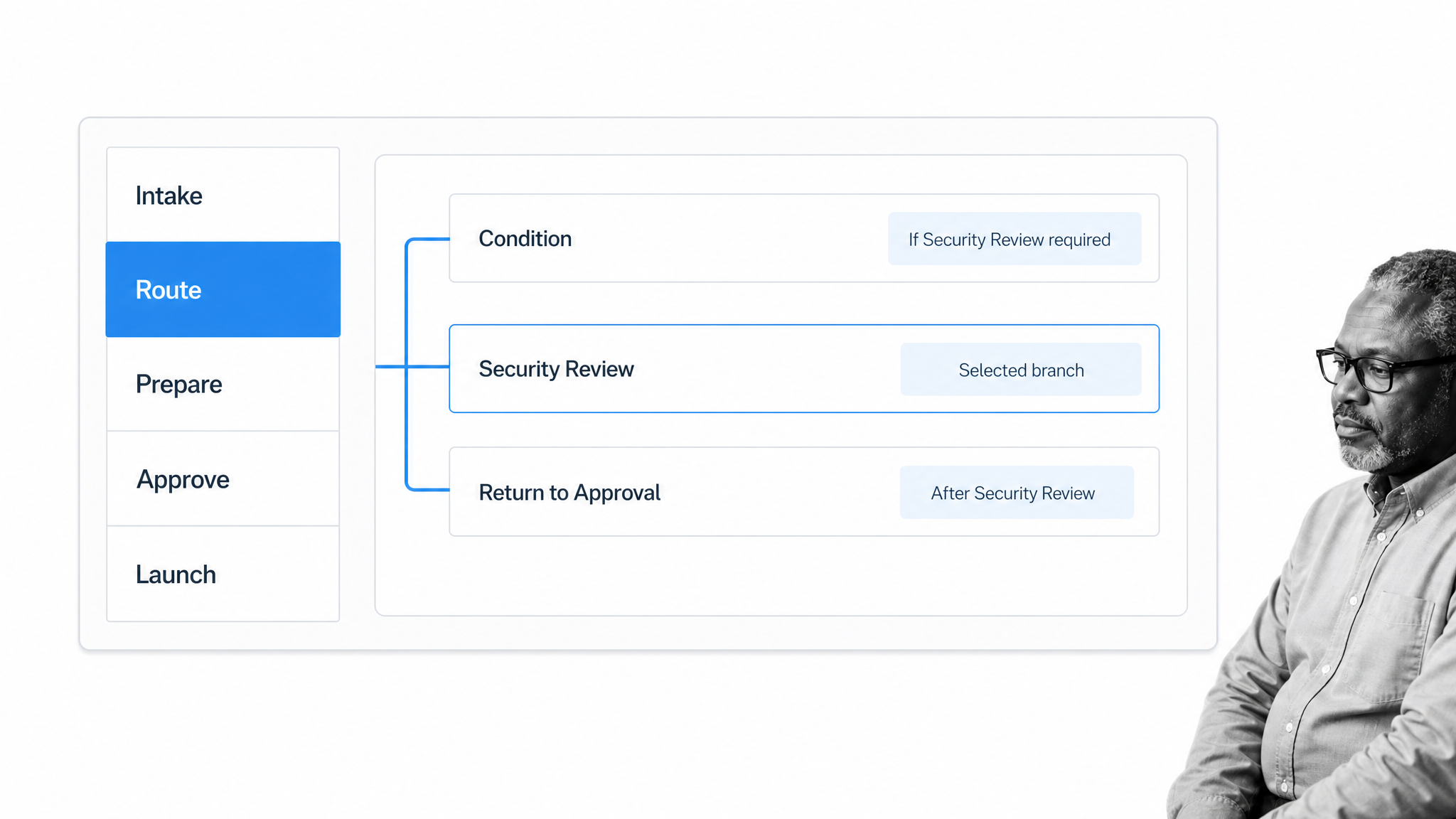
A custom onboarding workflow should be understandable from end to end. The system begins with enough information to select a path, prepares the people and systems involved, enforces required reviews, and ends with a clear launch or handoff condition.
1. Intake captures routing data
Collect only the information needed to choose the path and start the work. For an employee, that may be role, location, start date, employment type, and access profile. For a customer, it may be goals, plan, products, data needs, technical complexity, and stakeholders.
2. Rules select modules and owners
The workflow evaluates intake values and inserts the relevant modules. It also assigns owners based on department, region, account team, risk, or service model. The routing logic should be visible to administrators and testable before rollout.
3. Preparation runs in parallel
Independent tasks can run at the same time: create accounts, prepare equipment, collect documents, schedule training, configure a workspace, or notify stakeholders. Dependencies should block only the steps that truly require them.
4. Approvals stop unsafe launches
Approval gates protect decisions with legal, security, compliance, financial, or service consequences. A gate is most useful when the reviewer sees the evidence and decision context in the same workflow, not in a separate thread.
5. Launch requires a defined outcome
Completion should mean more than every task was checked. Define readiness: required access works, documents are accepted, the first milestone is reached, stakeholders know the next owner, and unresolved risks have an approved plan. The onboarding record should make that outcome clear.
Custom onboarding software features to prioritize
Feature lists are easy to inflate. Prioritize capabilities that protect the operating model and reduce maintenance. A feature matters when it helps the team choose the right path, execute it reliably, or prove the outcome.
Flexible workflow builder
Non-technical operators should be able to change tasks, owners, dependencies, forms, instructions, and due dates. The builder should make the process legible enough that a new administrator can understand why each branch exists.
Conditional logic
Conditional logic is the core customization mechanism. It keeps the standard path clean while revealing tasks that match the case. Process Street documents how conditional logic can change workflow content from form responses.
Forms, documents, and evidence
The workflow should collect structured data and files at the point where they are needed. Required fields, validation, and clear instructions reduce back-and-forth. Data collection should also follow necessity and retention rules. GDPR Article 5 provides a useful reference for data minimization and storage discipline.
Approvals and stop conditions
Approvals should be part of the workflow, with the request, evidence, reviewer, and decision kept together. The Process Street approvals documentation shows how approval tasks fit into a workflow.
Identity, access, and accessibility
Employee, partner, and customer onboarding often creates identities or grants access. Use a defined assurance model and avoid granting more access than the path requires. The NIST Digital Identity Guidelines provide an authoritative foundation. Participant experiences should also align with the WCAG 2.2 quick reference.
Automations and integrations
Process Street has direct, universal integrations to 5,000+ systems. Need a new one? An AI agent builds it on the fly. That integration layer can trigger onboarding from a source system, create records, send updates, and return status without turning the workflow into a hidden chain of manual handoffs. The automations documentation covers supported in-workflow actions.
Audit trail and reporting
The system should retain who did what, when it happened, what evidence was provided, and why an exception was approved. Reporting should separate throughput from quality. Fast onboarding is not a win if access is wrong, required training is missing, or the customer never reaches value.
How to build a tailored onboarding system
Build from the operating decision backward. Choosing a tool before defining the paths usually recreates the current mess in a new interface. A focused first workflow creates a reusable pattern for the rest of the program.
Step 1: Choose one onboarding motion
Pick a process with meaningful variation and a visible business outcome. Examples include a regulated new-hire path, enterprise customer implementation, or high-risk vendor intake. Keep the first scope narrow enough to test.
Step 2: Define readiness
Write the condition that proves onboarding is complete. Name the required access, documents, training, configuration, first-value event, acceptance, or handoff. Every task should support that readiness definition.
Step 3: Map the common spine
Document the steps every case must follow. Use the current process as evidence, not as a constraint. Remove duplicate requests, unnecessary reviews, and side-channel updates before automating them.
Step 4: Add branches for material differences
List the decisions that genuinely change tasks, owners, proof, or timing. Convert those decisions into simple rules. A branch should have a clear owner and a reason that future administrators can understand.
Step 5: Build and test representative cases
Test the simplest case, the most complex case, and at least one exception. Check assignments, due dates, access, notifications, approvals, data handling, and the final handoff. Testing only the happy path produces fragile software.
Use a small test set with expected results written before each run. Record which modules should appear, who should own them, which evidence is mandatory, and what must block launch. Then test a changed intake answer midway through the journey and a reassignment after work has started. These cases expose stale routing, duplicate notifications, and approvals that no longer match the participant’s risk. Keep the test cases with the workflow so every material configuration change can be checked against the same operating expectations.
Step 6: Measure and improve
Track time to readiness, rework, overdue tasks, exception volume, missing evidence, participant drop-off, and outcome quality. Review the workflow after a fixed number of runs. Change the rules when the data shows a recurring failure.
How to evaluate an onboarding platform
Evaluation should start with process fit, not a generic feature score. The best platform is the one your operating team can govern as complexity grows.
Can it express your routing rules?
Build two or three representative paths during evaluation. Confirm that the system can handle conditions, parallel work, dependencies, approval gates, reassignment, and exceptions without creating a separate workflow for every variant.
Can operators maintain it?
Ask who will own changes after launch. The system should make version changes understandable, testable, and reversible. If every adjustment requires a developer or vendor project, customization may become a bottleneck.
Does it protect data and access?
Review authentication, permissions, data residency, retention, audit logs, and how external participants interact with the workflow. Employee onboarding in the United States may also include employment eligibility steps, so USCIS I-9 Central should guide the relevant legal workflow rather than generic software defaults.
Can it prove the outcome?
Inspect the completed record. You should be able to see the selected path, owners, evidence, approvals, exceptions, and handoff. A dashboard without a trustworthy run history gives status, not proof.
Will it connect without hiding the process?
Integrations should remove repetitive work while preserving the workflow as the source of execution context. Avoid architectures where critical decisions disappear into disconnected automations that operators cannot inspect.
Build custom onboarding software with Process Street
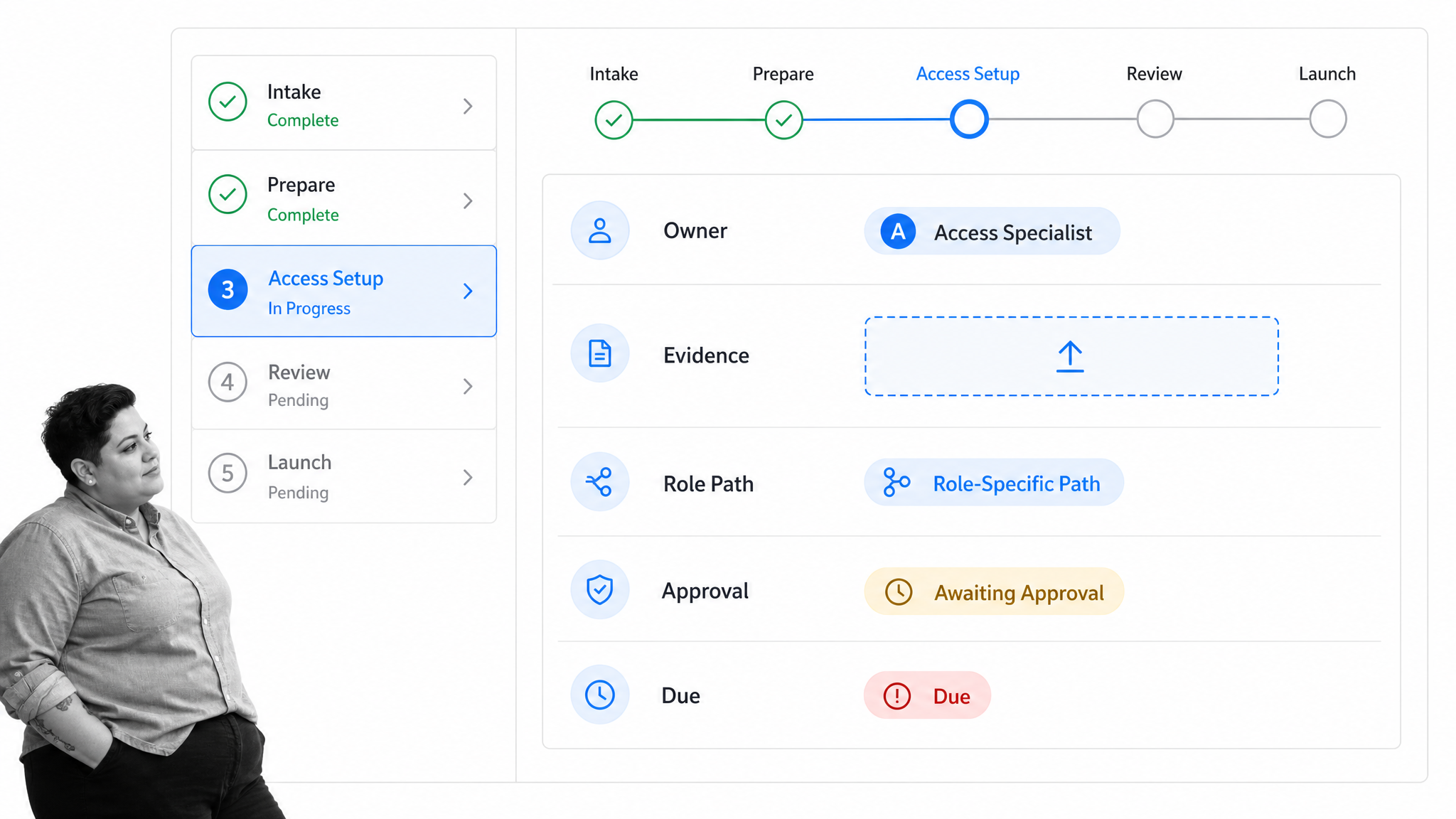
Process Street gives operations teams a governed way to build custom onboarding software without turning every change into a development project. The workflow holds the common path, conditional rules reveal the right modules, and each run keeps work, evidence, and decisions together.
Start from a proven structure
Teams can adapt an employee onboarding template library, a customer workflow, or a vendor process. The template is a starting point, not a fixed experience. Replace generic tasks with your readiness definition, owners, systems, and proof.
Make every path explicit
Use form data to reveal tasks by role, tier, region, product, access level, or risk. Assign each task to the correct team, add due rules, and stop progress when required evidence or approval is missing.
Coordinate people and systems
Human judgment stays in the workflow while routine updates move automatically. HR, IT, customer success, implementation, procurement, finance, security, and compliance can work from one controlled record instead of separate trackers.
Improve from run data
Every run creates evidence about delays, rework, exceptions, and ownership. Teams can refine the workflow without losing the standard. That is the practical advantage of custom onboarding software: the process adapts, but control does not disappear.
For deeper onboarding patterns, use the customer onboarding guide, the employee onboarding guide, and the client onboarding process as adjacent operating references.
Custom onboarding FAQs
What is a custom onboarding platform?
It is a configurable system that changes tasks, owners, forms, approvals, access, training, and communications according to the needs of each onboarding case. It preserves a standard process while using rules and reusable modules for meaningful variation.
Does a custom onboarding platform require custom development?
No. Many teams can build a tailored onboarding system with configurable workflow software rather than writing an application from scratch. Custom development is usually needed only when the experience requires a unique interface or deeply specialized product behavior.
What processes can a configurable onboarding system support?
It can support employee, customer, client, vendor, supplier, partner, contractor, user, and product onboarding. The same architecture can coordinate intake, routing, preparation, approvals, launch, evidence, and follow-up.
Which features matter most in a tailored onboarding platform?
Prioritize a flexible workflow builder, conditional logic, forms, document collection, assignments, approvals, automations, integrations, permissions, audit history, and reporting. The features should help your team choose the right path, execute it reliably, and prove the outcome.
How do you design a custom onboarding workflow?
Define the readiness outcome, map the common spine, identify decisions that change the work, add reusable modules, assign owners, create approval gates, and test simple, complex, and exception cases. Measure real runs and refine the rules when recurring friction appears.
How does Process Street support configurable onboarding?
Process Street turns onboarding procedures into executable workflows with conditional paths, assigned work, forms, approvals, automations, evidence, and a complete run history. Teams can adapt paths by role, risk, region, customer type, or other operating rules without losing governance.
