


This is a guest post by Kyriaki Raouna, a Content Writer at LearnWorlds writing about marketing and elearning. She is an experienced career consultant and a content writer for SaaS.
User onboarding is the guided experience that helps a new customer reach first value, understand a product, and become confident using it. Customer education makes that journey repeatable by turning guidance, examples, and practice into a structured path instead of a series of one-off explanations.
Automated customer onboarding uses behavior-based triggers, reusable learning resources, and clear checkpoints to deliver the right education at the right time. The goal is not to remove people from onboarding. It is to give every user a consistent foundation while reserving human support for the moments where judgment and conversation matter most.
User onboarding explained
User onboarding is an online experience that guides users towards becoming more knowledgeable and capable of using your application, your website, your products and services. It’s the process that teaches users, transforming them from amateur users to experts.
User onboarding educates customers about the product that you offer through simple and easy guidelines, this is often a step-by-step approach through what we call “the aha moments”. It is done by giving customers access to certain pieces of content that are designed to increase their mastery in the use of the product.
The onboarding process starts as soon as the users sign up (but never ends), and helps their way towards answering the following:
- What is this product/service and what does it do?
- How can I use its full potential?
- How can it help me improve (any aspect of) my life?
The onboarding process helps users recognize the value of your product, but it is also a matter of branding. You have to win the hearts of your customers and establish your brand as a leader in your category.
The secret to achieving onboarding success for your SaaS business is integrating your product into their business or personal lives and start showing its value. This way, your users are more likely to buy into your offering.
In a nutshell, educational onboarding can:
- Reduce churn
- Increase the value of your product to the customer
- Generate additional revenue through product up-sells and cross-sells
With an effective user onboarding process, you are basically securing your business grounds. Helping users navigate around and avoid getting them overwhelmed, resulting in happier users. On a much deeper level, you are grooming them to become your active promoters.
But in order to do this, first you need to gain their trust. Building trust, brand awareness and the know-how needed. Teaching them how to use your product, with simple tasks and small goals leading to an aha moment.
That is when they take the decision to ‘get on-board’ and start using your product to solve their real-life problems.
Educational onboarding is also useful when hiring new employees. Many HR professionals automate the onboarding processes that have been standardized.
Onboarding techniques
User onboarding works best as a coordinated set of techniques rather than a single channel:
In-app onboarding: In-app customer onboarding is the training-related content that is embedded directly into existing web and mobile apps through a learning platform.
Check out these client onboarding workflows for an idea of what this kind of process might look like:
- Client Onboarding Checklist for Financial Planners
- Client Onboarding Checklist for Marketing Agencies
- Client Onboarding Checklist for Criminal Law Firms
- High Touch Client Onboarding for SaaS Companies
- Website Design Client Onboarding Template
- Landlord Onboarding Checklist
- Client Onboarding Workflow for an Accounting Firm
- Patient Intake Checklist for a Dental Clinic
- Patient Intake Checklist for a Medical Clinic
- Client Onboarding Checklist for Real Estate Sales
- Client Onboarding Checklist for a Managed Service Provider
- Client Onboarding Checklist for a Software Development Company
- Client Onboarding Checklist for Management Consulting
- Client Onboarding Checklist for an Insurance Broker
An email sequence: Automated email sequences can give out the necessary information and guidelines to get users started. The welcome email that they receive upon registration is just the first of many emails to follow that are going to keep the customer informed and engaged with your product.
A knowledge base (or help center): Setting up your very own help center support with how-to articles and video tutorials for users to access, can save you lots of valuable time and money with pre-made answers to the usual questions.
Webinars / video calls: One-to-one personal consultations or webinars where many users can join are great for introducing new users to your product. These can be used both before and after a user becomes a customer, helping in both the sales and retention processes.
Remarketing: Using retargeting ads to push users into the next “checkpoints” in using your product with relevant content. Serving the blog posts, webinars, how-to videos or suggesting the next action to take.
Automating user onboarding with customer education
Education is already part of onboarding. Blog posts, email sequences, help articles, videos, webinars, and support answers all teach customers how to use a product. Automation makes those resources easier to deliver consistently and at the moment they are most useful.
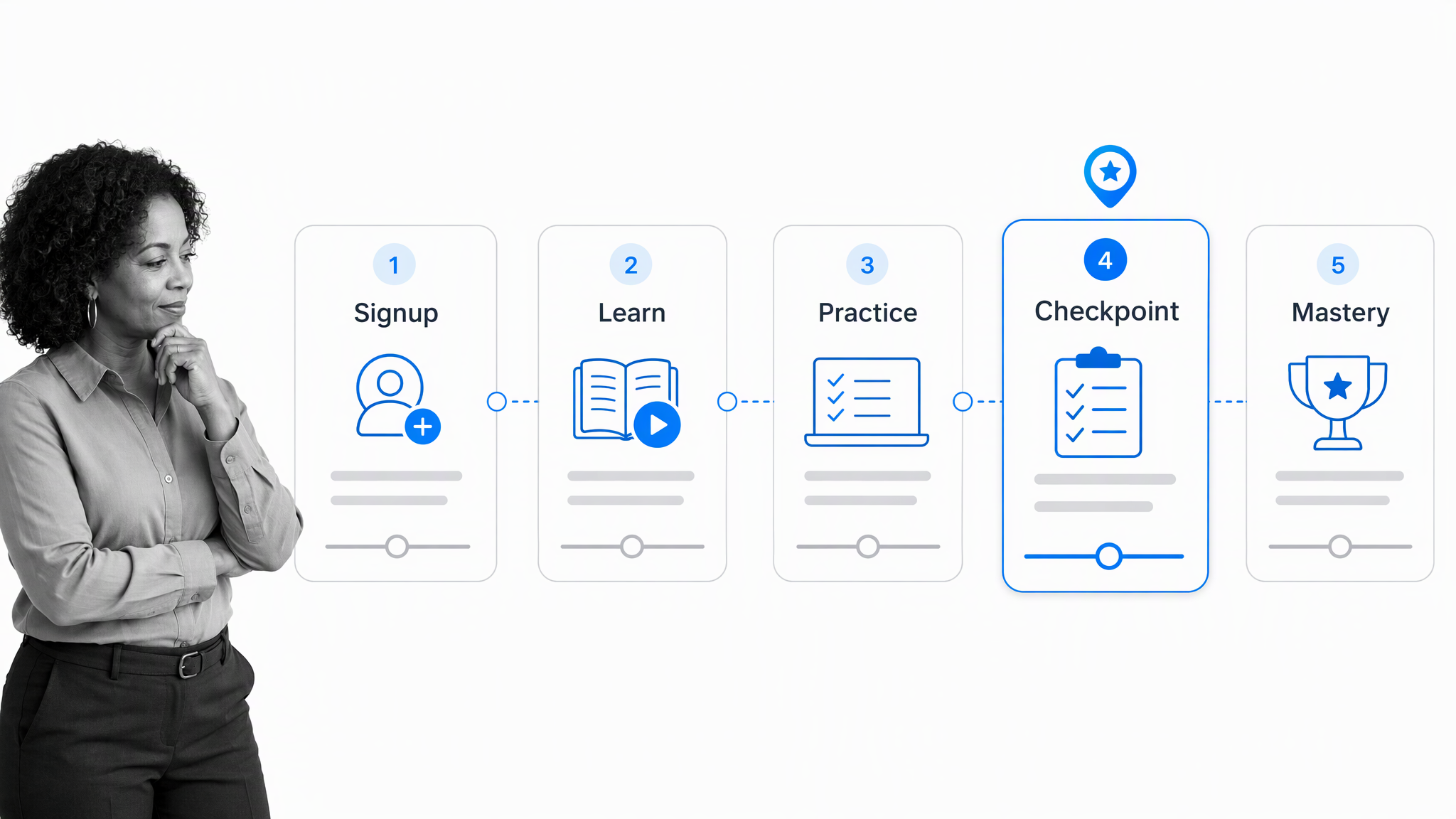
Start by mapping the milestones that show a user is moving toward first value. A basic educational onboarding sequence might include account setup, a guided product tour, one hands-on practice task, a checkpoint that confirms understanding, and a clear next step. Those milestones give you something more useful than a generic welcome campaign: a learning path tied to real product behavior.
Behavioral triggers and segmentation keep that path relevant. A new administrator may need setup and governance guidance, while an invited team member may only need help completing one task. A customer who has already reached an activation milestone should not keep receiving beginner lessons. Trigger content from actions, roles, and progress so users see guidance that matches what they are trying to achieve.
A self-service customer onboarding academy or customer education portal can organize deeper lessons, while in-app cues, email, and live support reinforce the same journey. AI-assisted guidance can help teams draft explanations, summarize support themes, and route common questions, but it should support a deliberate education system rather than become a substitute for one.
Automating onboarding can help you:
- Educate more users without delivering every lesson manually
- Create a consistent learning experience across customer segments
- Reduce repetitive support demand with useful self-service guidance
- Help customers build real product competence
- Strengthen trust through clear expectations and visible progress
- Create a learning community around shared use cases and outcomes
You do not need to create every lesson from scratch. Reuse strong material from your blog, support center, webinars, videos, and customer conversations, then organize it around the milestones users need to reach. A simple user onboarding software system can coordinate those learning steps, assignments, and handoffs while keeping progress visible.
Examples of SaaS academies
Top companies already use education for marketing and onboarding. You can find examples of companies that have already established themselves and heavily focus on educating their customers:
Even huge businesses like Google and Facebook find the need to educate their user-base around their product:
And this is just a small sample!
Companies of every size use structured education to help customers build skills, discover more value, and learn at their own pace. A customer onboarding academy can organize existing articles, videos, webinars, and exercises into a clearer path than a loose collection of resources.
Top academies not only offer courses on their product, but also topics that are important for their customers.
Hubspot for example teaches about content marketing and sales (among many other topics) and Hootsuite about social media, both of them certify users with industry recognizable certificates.
Without a doubt, online training offers a handful of benefits – not only to businesses, but also to their customers. Through course training, you can create engaging multimedia, and come up with a variety of assignments to put a customer’s skill at test.
Training also offers the best way to check on a customer’s learning process and helps to find out which topics are the easiest or most difficult to consume.
With the easy addition of engaging media – video, audio, exercises, quizzes, image and text, into your training, you can create a unique learning experience for your users and encourage them to have fun in the process!
Launching educational onboarding for your business
Time to get practical!
As said above, you probably already have the content, now, you need to plan, create/re-use and execute.
Automation is about thinking the most often used scenarios and have a ready answer for them. Think of the most usual questions, challenges or most read content on your website. This is where you need to focus and follow the plan:
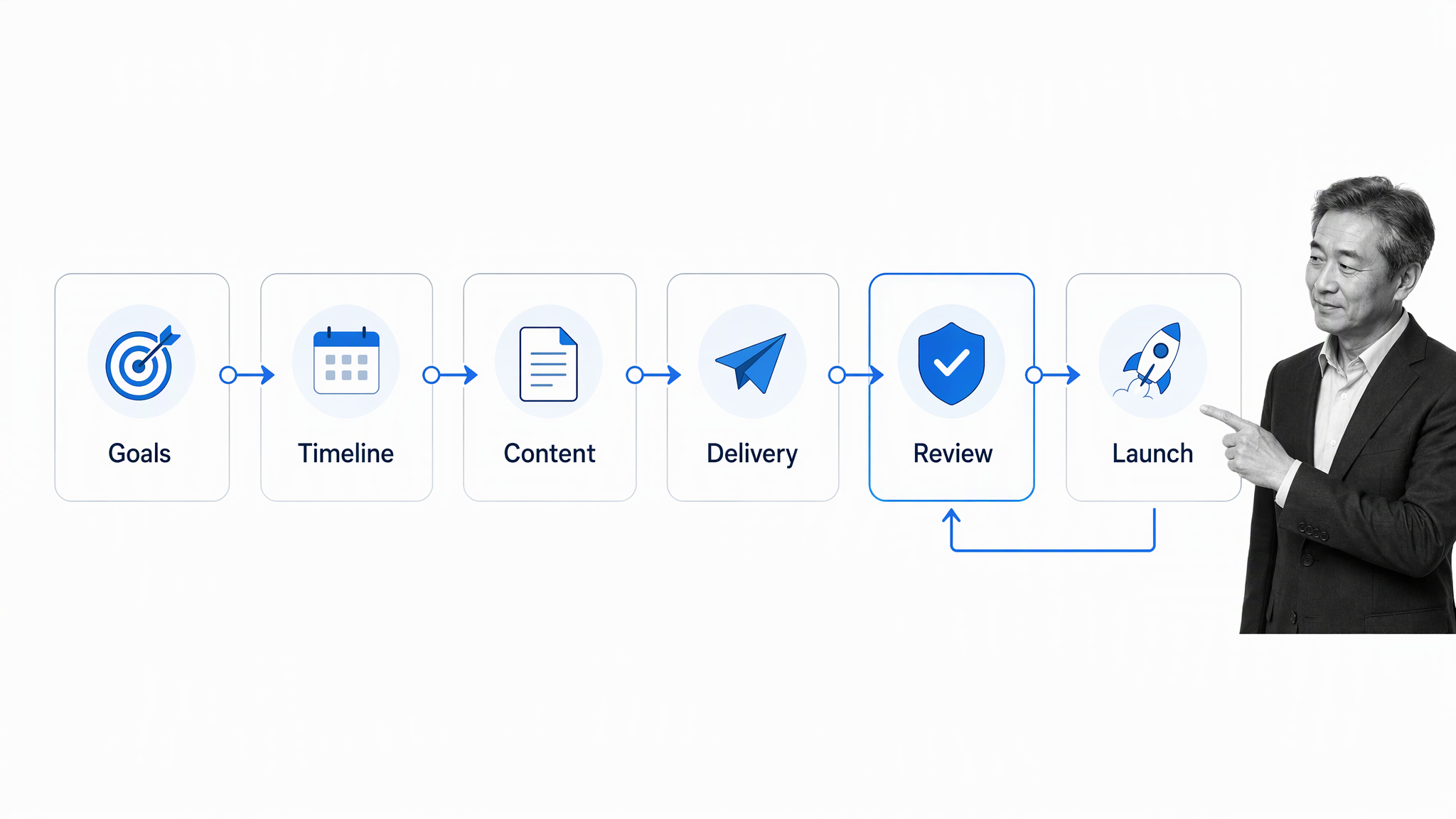
Step 1: Set out goals
First, come up with a plan and think about how you will train your customers to use your product.
- What is that you want your customers to do?
- What do you want them to learn so that they understand how to use your product?
- Also, how can you structure it so that it remains interesting and engaging?
Think about the onboarding topics you want to focus on, gather your expertise, and create information that is going to be useful for your customers based on what you know.
Each step your customers take needs to encourage them to move further through small wins and completing to-do tasks.
Think about your customer’s goals, what are they looking to achieve?
Step 2: Map out the onboarding timeline
The process for on-boarding starts with the first touch of your product. If you already have an email onboarding sequence, you can use the same logical process to structure an online course.
Think of your sales process. How do you find and onboard users up to now, and how can this be translated into an educational sequence?
Do they visit your blog reading on hot industry trends, then join a webinar and then a sales call?
Maybe they get a trial, then send multiple tickets to your support. Think of the tickets you can eliminate by teaching your users to use your product correctly and include them there.
Include the checkpoints you want them to pass before the final sale.
- Setting up an account,
- Completing a profile,
- Customizing their dashboard,
- Getting a video-tour etc
Step 3: Create the content (or re-use)
Provide your customers with a guide on the courses that you have available. Creating a course outline is important so that they know exactly what they can get out from it and that they are completing milestones as they go.
When designing your onboarding course content and curriculum, you may use previously used content from blog posts, email sequences, canned ticket responses, webinars, guides, help center articles, or even recorded sales calls.
Then, identify what you are missing. It might be a call-to-action, an assignment, a quiz or a few how-to screencasts.
Come up with the right format combination for it and allow users to find their own pace of learning, and you are ready to go.
Once you’ve decided what kind of content you’re going to create, you need a process for actually creating it, like this blog post pre-publish checklist:
Step 4: Choose the right delivery
Educational onboarding can combine email sequences, in-app cues, how-to videos, a customer education portal, live sessions, and human support. Choose the mix that fits the complexity of your product and the way customers prefer to learn.
Use self-service content for repeatable questions and foundational skills. Add live help where customers need judgment, reassurance, or a tailored decision. The delivery channel matters less than whether each lesson moves the user toward a meaningful activation milestone.
Process Street is a single Compliance Operations Platform that connects governed guidance in Docs with repeatable execution in Ops, supported by built-in AI. Teams can document onboarding standards, run the work as assigned workflows, collect evidence, and control approvals and handoffs in one system.
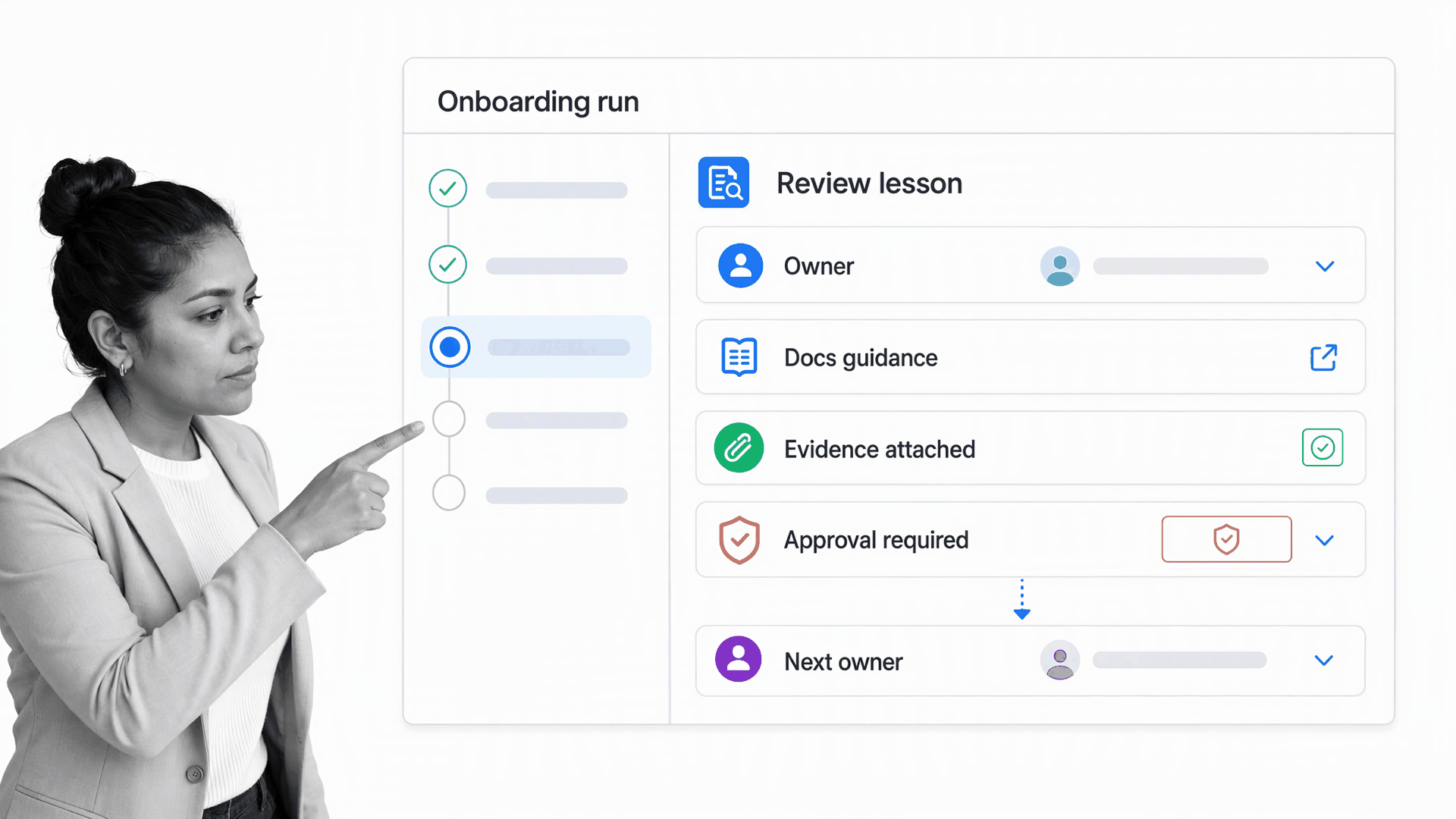
For example, an onboarding workflow can assign a lesson owner, link the approved guidance, require evidence that a checkpoint was completed, and route the next task only after approval. Process Street also connects directly with 5,000+ systems, and an AI agent can build a new integration on the fly when a team needs one.
When you are ready to coordinate educational content with the work that delivers it, request a Process Street demo or explore these client onboarding workflows.
Step 5: Review
Once you have your content in place, have a run through it and check for possible grammar and spelling mistakes. Proof-read, review and edit before you are ready to launch it.
Then, get a couple of users or your staff to test it and work on the last details depending on the feedback you receive.
Step 6: Launch
Let your people know when will be the release date of the program and prepare them. Take your academy as a major product or feature release.
Once it is out, don’t forget to check in with your customers and see how they are doing. Find out what’s working with them or not, and adjust your content accordingly.
Always improve
Customer education should evolve with the product and with the way customers use it. Review feedback, activation rate, time-to-value, lesson completion, support demand, and retention signals to see where users are getting stuck and which guidance helps them move forward.
The strongest programs combine quantitative signals with conversations. A falling support volume may show that self-service education is working, while interviews and open-text feedback explain why a lesson is confusing or where customers still need human help.
Combining onboarding with customer education helps users become confident and capable. Identify the challenges that slow them down, reuse the best resources you already have, and structure those resources as a customer education checklist that leads from first login to meaningful product value.
Transform your users into experts by treating knowledge as part of the product experience, not an afterthought.
Check out these other Process Street articles on the topic of onboarding:
- Why Google’s Onboarding Process Works 25% Better Than Everyone Else’s
- 9 User Onboarding Tools to Smash Your Revenue Targets
- How Microsoft’s Secret User Onboarding Process Fooled Us All
What’s your process for customer education? Have any tips and tricks you’d like to share? Leave a comment down below, we’d love to hear from you!