


Turn every policy into automated workflows with built-in enforcement and audit-ready proof.



Healthcare Software
Healthcare software is the digital system layer that helps healthcare teams document care, coordinate workflows, manage patient information, protect sensitive data, and prove that critical steps happened. It includes clinical systems like electronic health records, operational systems like scheduling and intake, analytics tools, patient engagement platforms, compliance systems, and workflow software that connects the work between them.
The category is broad because healthcare work is broad. A patient intake form, a referral, a medication review, an access request, a quality audit, and a discharge follow-up all touch different systems. The job of healthcare software is not only to store information. It should help the team act on that information safely and consistently.
This guide explains what healthcare software is, why it matters, the main categories, the workflows to prioritize, the compliance controls to look for, how to implement it, and how Process Street can sit around healthcare systems as the workflow execution and proof layer.
In this article, we are going to cover:
- What healthcare software is
- Why healthcare software matters
- Core healthcare software categories
- Healthcare software workflows to prioritize
- Healthcare software compliance and governance
- How to implement healthcare software
- Healthcare software in Process Street
- How to choose healthcare software
- FAQs
What healthcare software is
Healthcare software is any software used to support healthcare delivery, healthcare operations, patient communication, clinical documentation, quality improvement, billing, compliance, analytics, or system integration. Some tools are systems of record. Others are systems of action. The difference matters.
HealthIT.gov EHR guidance defines an electronic health record as software used to securely document, store, retrieve, share, and analyze information about individual patient care. That is one important category, but it is not the whole software stack. Healthcare organizations also need tools for workflow execution, care coordination, reporting, access control, incident follow-up, and administrative operations.
Systems of record
Systems of record store the official data. EHR, EMR, billing, claims, imaging, lab, HR, identity, and finance systems all play this role. They need strong data controls, integrations, access rules, and reliable reporting because other teams depend on their records.
Systems of action
Systems of action help people complete the work around those records. A workflow management system or workflow management software can assign tasks, route exceptions, collect evidence, and show what happened. This matters when care, operations, compliance, and IT all need to act from the same process without relying on side spreadsheets.
Systems of insight
Systems of insight help leaders understand what is happening. Dashboards, analytics, quality reports, and healthcare analytics help teams see delays, bottlenecks, risk signals, and process performance. Insight becomes useful when it feeds back into the workflow where owners can respond.
Good healthcare software makes the handoff between these layers visible. If a record exists but no one owns the next step, the software stack is incomplete.
Why healthcare software matters
Healthcare software matters because healthcare teams run high-consequence work across many roles, locations, shifts, and systems. A missed field can delay a referral. A late access review can create security risk. A weak discharge process can leave a patient without follow-up. A compliance workflow that lives in a document can fail when the work moves to email.
It reduces handoff risk
Most healthcare breakdowns are not caused by one person forgetting everything. They happen at handoffs: intake to clinical review, clinician to scheduler, billing to documentation, IT to compliance, or discharge team to patient follow-up. Software should make those handoffs explicit, assigned, and measurable.
It creates consistency
Healthcare teams need repeatable work without removing clinical judgment. A healthcare process can define the standard path, while software handles assignments, required fields, escalation rules, and approval gates. Staff should not have to remember every exception rule from memory.
It supports quality improvement
AHRQ workflow analysis for quality improvement describes workflow analysis as useful for improving scheduling, patient flow, billing, and other office systems. The practical lesson is simple: if the workflow is not visible, the improvement is guesswork. Healthcare software should expose the process enough for teams to improve it.
It strengthens compliance proof
Compliance is easier to prove when the workflow captures who did what, which evidence was attached, which approval was required, and why an exception happened. The strongest software stack turns compliance from a scramble into a normal byproduct of work.
Core healthcare software categories
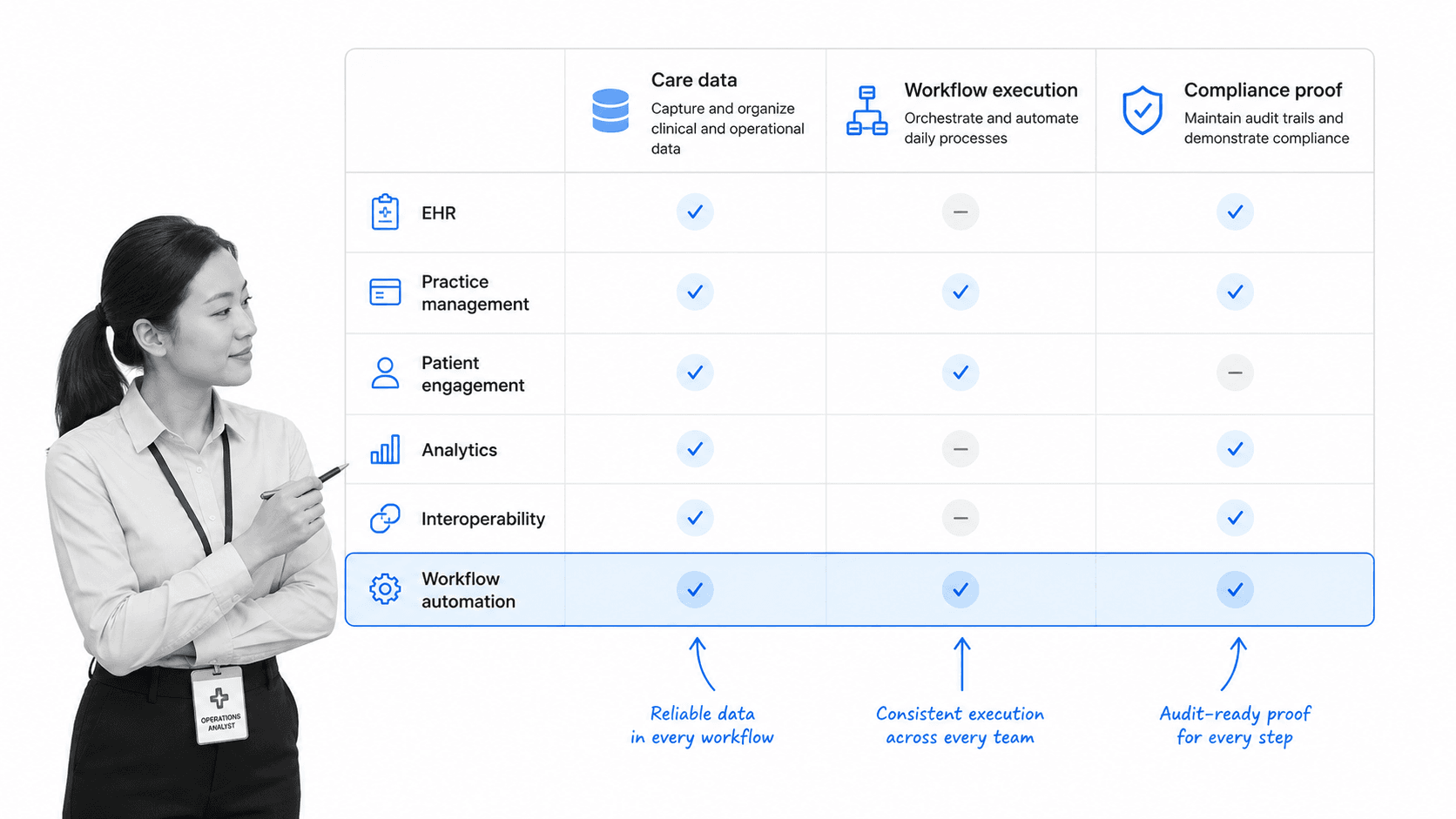
Healthcare software categories overlap, but a useful evaluation starts by separating what each system is supposed to do. The goal is not to buy one tool for every category. The goal is to understand which layer owns data, which layer coordinates action, and which layer proves compliance.
Electronic health records and clinical documentation
EHR and EMR systems hold clinical documentation, patient history, orders, medication information, notes, and care records. They are central to care delivery, but they are not designed to carry every operational workflow across compliance, quality, HR, finance, IT, and patient communication.
Practice management and patient administration
Practice management tools support scheduling, registration, insurance details, billing handoffs, and administrative operations. They often connect to patient-facing workflows like patient intake checklist, reminders, and follow-up tasks.
Patient engagement and communication
Patient engagement software supports portals, reminders, forms, education, surveys, messaging, and self-service tasks. These systems improve access and communication when they connect cleanly to the operational workflow behind the scenes.
Analytics, monitoring, and quality
Analytics and monitoring tools help teams see patterns. They can show referral volume, throughput, missed steps, incident trends, patient flow, and quality signals. Teams working on healthcare monitoring and healthcare analytics still need a way to turn those signals into assigned action.
Compliance, quality, and workflow execution
Compliance and workflow systems help teams operationalize policies, audits, attestations, access reviews, corrective actions, and quality improvement work. This is where compliance management software, QMS software, and workflow execution matter because the system has to capture proof, not just display tasks.
Healthcare software workflows to prioritize
The best healthcare software investments usually start with a workflow, not with a feature list. Pick the process where delays, missed evidence, or unclear ownership create real risk. Then evaluate whether the software can make that workflow easier to run and easier to prove.
Patient intake and registration
Patient intake is a strong first workflow because it triggers downstream clinical, administrative, and billing work. The software should capture required information, flag missing fields, route exceptions, and prevent incomplete intake from quietly moving forward.
Referral and prior authorization tracking
CMS interoperability and prior authorization final rule emphasizes improved health information exchange and access to records across patients, providers, and payers. For healthcare teams, prior authorization and referral workflows need clear status, owner assignment, document requirements, reviewer handoffs, and escalation rules.
Access reviews and identity changes
Access provisioning, role changes, terminations, and periodic access reviews should not live in one-off tickets alone. The workflow needs a trigger, owner, required evidence, approval, system update, and audit trail. This is especially important when software touches protected health information.
Incident, complaint, and corrective action follow-up
Incidents and complaints need structured follow-up. The workflow should assign investigation tasks, require root cause notes, route serious items to a reviewer, block closure until evidence is attached, and support later trend analysis.
Policy acknowledgment and training
Healthcare software can make policy acknowledgment and training workflows repeatable. A HIPAA compliance audit checklist can be the starting point for audit prep, but recurring workflow runs make it easier to show completion, owner, evidence, and follow-up.
Healthcare software compliance and governance
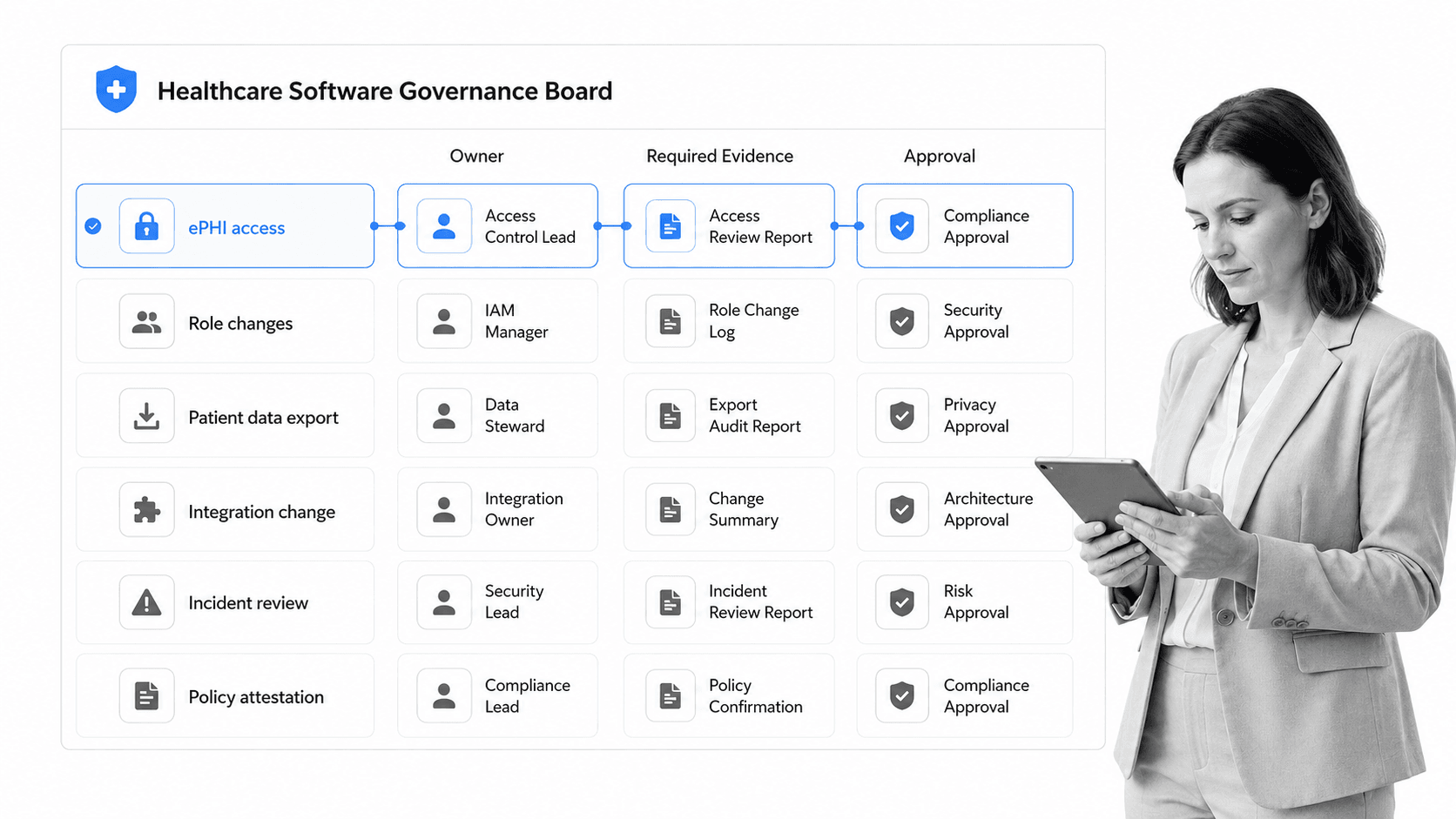
Healthcare software compliance and governance define how systems are approved, accessed, changed, monitored, and reviewed. This is where software selection becomes operational risk management. A tool can look efficient and still be unsafe if access, evidence, and change control are weak.
Protect electronic health information
HHS HIPAA Security Rule guidance says the HIPAA Security Rule requires administrative, physical, and technical safeguards to protect electronic protected health information. In software terms, that means teams need role-based access, strong authentication, audit history, evidence retention, secure transmission, and clear procedures for exceptions.
Govern the workflow, not only the database
Many compliance problems happen outside the database. Someone exports a file, changes an integration, grants access, skips a review, or closes a task without evidence. Governance should cover the workflow around the software, not only the system where the data sits.
Control changes and integrations
Healthcare software rarely works alone. healthcare integration connects systems, but each new connection can create risk if ownership, testing, access, and rollback are unclear. Integration changes should have approval gates, evidence requirements, and a record of what changed.
Build review into normal operations
AHRQ workflow mapping guidance emphasizes mapping workflows and considering how work is redesigned and sustained. Governance is the same idea applied to software operations. Review should happen inside the process through approvals, recurring attestations, access checks, and exception routing.
How to implement healthcare software
Implementing healthcare software safely starts with the operating process. If the process is unclear, the software will automate confusion. If the process is clear, software can make the correct path easier than the workaround.
Step 1: Define the workflow and owner
Start with one workflow. Name the trigger, end state, owner, tasks, handoffs, systems, required evidence, approvals, and exception rules. Include the people who do the work, not only the people who manage the system.
Step 2: Identify data and compliance requirements
List the data the workflow uses, where it comes from, who can access it, what evidence is required, how long records should be retained, and which approvals are mandatory. This prevents the implementation from treating compliance as an afterthought.
Step 3: Pilot a narrow use case
A narrow pilot gives the team a real test without disrupting everything. Good pilots include patient intake, access review, incident follow-up, referral handoff, audit prep, policy acknowledgment, or a recurring quality process.
Step 4: Connect systems carefully
ONC health IT resources highlights resources around health IT implementation, interoperability, patient engagement, and compliance. The practical point is that implementation succeeds when connections serve a clear workflow. Do not integrate systems just because the connector exists. Integrate where it removes duplicate work, improves timeliness, or strengthens proof.
Step 5: Measure adoption and process health
Track whether staff use the workflow, whether tasks close on time, whether required evidence is captured, whether exceptions are reviewed, and whether side spreadsheets disappear. Software adoption is not the same as process adoption. The process has to become the normal path.
Healthcare software in Process Street
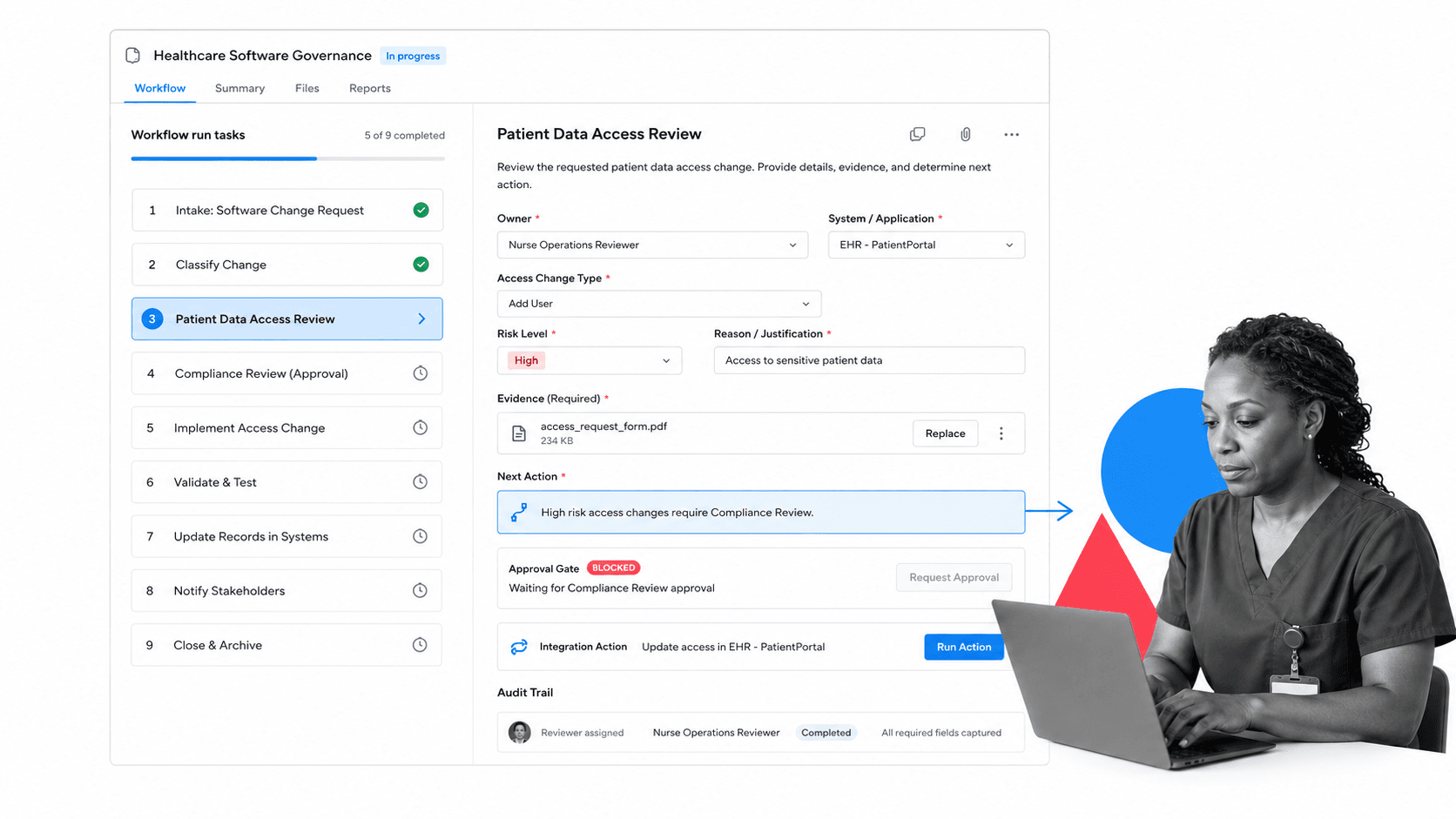
Healthcare software in Process Street means using Process Street as the workflow execution layer around healthcare systems. EHRs, analytics tools, forms, ticketing systems, and communication tools can hold data or trigger events, while Process Street coordinates the process that turns those signals into assigned work, evidence, approvals, and audit history.
Process Street is a Compliance Operations Platform and is HIPAA compliant. It is strongest when healthcare teams need recurring operational, quality, compliance, IT, or administrative workflows to run consistently across roles and locations.
Turn procedures into workflow runs
A procedure can become a workflow run with tasks, required fields, file uploads, comments, owners, due dates, and completion records. That helps teams move from static instructions to work that actually happens.
Route work based on risk
conditional logic can show or hide tasks based on risk, missing information, role, department, or prior answers. That matters in healthcare because low-risk and high-risk requests should not always follow the same route.
Block closure until review happens
approvals can make review part of the process. A workflow can require compliance approval before an access change closes, quality approval before an incident is archived, or manager approval before a policy exception moves forward.
Connect the stack without making staff chase updates
Process Street has direct, universal integrations to 5,000+ systems. Need a new one? An AI agent builds it on the fly. That helps healthcare teams connect forms, documents, BI tools, communication tools, ticketing systems, EHR exports, and other systems of record to the workflow layer.
Teams can start with one recurring workflow, then expand into healthcare automation, medical checklist app, patient management software, and adjacent healthcare operations once the first process is reliable.
How to choose healthcare software
Choose healthcare software by testing whether it can support the actual work. A tool that stores records but cannot route action leaves teams chasing. A tool that routes tasks but cannot preserve proof creates audit pain. A tool that integrates everywhere but lacks governance can create new risk.
Execution fit
Look for assigned tasks, forms, required fields, due dates, comments, file uploads, conditional routing, recurring runs, approvals, notifications, and completion records. These features determine whether the software can carry the process.
Compliance fit
Look for role-based access, audit history, approval controls, evidence capture, change records, security posture, and clear data handling. Healthcare software should make compliance easier to prove, not harder to inspect.
Integration fit
Look at the systems the workflow touches, then test the connection path. The best integration is not the one with the longest app list. It is the one that moves the right data at the right time with the right control around it.
User fit
Healthcare teams work under pressure. Software should reduce steps, clarify ownership, and make the correct path obvious. If the pilot requires extra spreadsheets, manual reminders, duplicate entry, or workarounds, the tool is not carrying enough of the workflow.
Proof fit
Ask what record exists after the work is done. You should be able to see who completed each step, what evidence was attached, which approval happened, what exception path was used, and what system was updated. If that proof is scattered, the process will be hard to defend later.
A practical starting point is to pilot one high-value workflow, then compare what the team can prove before and after. The right healthcare software should make work easier for staff, clearer for leaders, and more defensible for compliance.
FAQs
What is healthcare software?
Healthcare software is software used to support clinical documentation, patient communication, scheduling, operations, analytics, compliance, workflow execution, and system integration in healthcare settings. It helps teams coordinate work and protect sensitive information.
What are the main types of healthcare software?
Main types include EHR and EMR systems, practice management software, patient engagement tools, analytics platforms, interoperability tools, compliance systems, quality management tools, and workflow automation software.
How does healthcare software support compliance?
Healthcare software supports compliance by enforcing access controls, collecting evidence, routing approvals, keeping audit history, documenting workflow completion, and making exceptions visible. The strongest systems build compliance into daily work.
How is healthcare software different from EHR software?
EHR software is one category of healthcare software focused on patient care records. Healthcare software is broader and includes operational, administrative, compliance, analytics, integration, and workflow systems that support the work around care delivery.
How do you implement healthcare software safely?
Implement healthcare software by mapping one workflow, naming owners, identifying data and compliance requirements, piloting a narrow use case, connecting systems carefully, and measuring whether the process becomes easier to run and prove.
Can Process Street support healthcare software workflows?
Yes. Process Street can support healthcare software workflows with assigned tasks, conditional logic, approvals, required fields, evidence uploads, integrations, automation actions, and audit history for recurring healthcare operations and compliance processes.
