


Turn every policy into automated workflows with built-in enforcement and audit-ready proof.



Patient Management Software: A Practical Buyer’s Guide
Every medical practice runs on the same loop: a patient books, arrives, gets seen, gets documented, gets billed, and gets followed up. Patient management software is the system that holds that loop together, and the difference between a practice that hums and one that drowns in rework usually comes down to how well that system fits the way the clinic actually works.
This guide explains what patient management software covers, how it differs from an electronic health record, the criteria that matter during evaluation, the platforms worth shortlisting, and how to move a practice onto a new system without disrupting patient care.
- What Is Patient Management Software?
- How Is Patient Management Software Different From an EHR?
- What Should You Look For When Evaluating a System?
- Which Patient Management Platforms Should You Shortlist?
- How Do You Run Clinic Workflows Around the Software?
- How Do You Roll Out a New System Without Disrupting Care?
- What Does Compliance Require From Your Software?
- FAQs
What Is Patient Management Software?
Patient management software is the administrative and operational layer of a medical practice. It holds the patient record, the appointment book, the intake and registration process, insurance eligibility, claims and payments, patient communication, and the reporting that tells a practice manager whether the schedule is full and the claims are getting paid.
Vendors also market this category as practice management software, and the two labels are used interchangeably for outpatient and ambulatory settings. In hospital environments the same functions appear as patient administration or revenue cycle modules inside a much larger clinical suite.
A practical way to think about scope is to trace one patient through the practice. Every point where a staff member touches a record, moves an appointment, verifies coverage, sends a reminder, submits a claim, or chases a balance is a point the software either handles or leaves to a spreadsheet and a sticky note.
- Scheduling and calendar management, including multi-provider, multi-location, and recurring visits.
- Registration and intake, capturing demographics, consent, and history before the patient arrives.
- Insurance eligibility and authorization, checked before the visit rather than after the denial.
- Charge capture, claims, and payments, from coding through remittance and patient balances.
- Patient communication, covering reminders, secure messaging, portal access, and recall campaigns.
- Reporting, on utilization, no-shows, accounts receivable aging, and payer performance.
How Is Patient Management Software Different From an EHR?
An electronic health record is the clinical chart: notes, orders, results, medications, problem lists, and the documentation that supports the care decision. Patient management software is the operational wrapper around that chart: who is coming in, whether they are covered, what was billed, and what still needs to happen.
Most vendors now sell both as one platform, which is why buyers often see a single product described as an EHR and practice management system. The distinction still matters during evaluation, because a strong clinical chart paired with a weak scheduling and billing engine will show up as staff overtime and slow collections rather than as a clinical complaint.
Certification is a useful dividing line. Products certified under the Health IT Certification Program are tested against federal standards for functionality, security, and interoperability, and appear on the public Certified Health IT Product List. Certification tells you a product met a defined technical bar. It does not tell you whether the front desk will find it usable on a Monday morning.
What Should You Look For When Evaluating a System?
Demos are designed to look effortless. The evaluation criteria below are the ones that separate a system that survives contact with a busy clinic from one that quietly generates workarounds.
Fit with your specialty and practice size
A solo behavioral health practice and a fifteen-provider orthopedic group have almost nothing in common operationally. Vendors segment their products accordingly, and several offer distinct editions for independent practices and for larger enterprise groups. Buying the wrong edition is the most common and most expensive fit mistake.
Scheduling depth
Ask to see the ugly cases: double-booking rules, provider templates that change by day, room and equipment constraints, recurring series, waitlist backfill when a slot opens, and what happens when a patient reschedules by text at 9pm. Basic calendar functionality is universal. Handling the exceptions is not.
Revenue cycle mechanics
Eligibility checks before the visit, clean claim scrubbing before submission, clear denial worklists, and patient balance collection all belong in the same evaluation. Ask specifically how the system surfaces a denied claim and who is expected to work it, because that answer determines whether your accounts receivable ages quietly.
Interoperability
Data has to move: to labs, to imaging, to referral partners, to payers, and to the patient. Modern exchange is built on FHIR-based APIs, described by federal regulators as an interface standard designed to let health data be exchanged quickly and efficiently. Ask which APIs are available to you as a customer, not only which ones exist in the vendor developer portal.
Interoperability also has a regulatory edge. Federal rules define information blocking as a practice likely to interfere with the access, exchange, or use of electronic health information, and set out a standardized set of health data classes that certified systems are expected to support. A vendor that treats your data as a retention mechanism is a risk, not a partner.
Security and HIPAA posture
Ask how the vendor handles access control, audit logging, encryption in transit and at rest, and breach notification. Ask for their most recent third-party assessment. Federal guidance in NIST Special Publication 800-66 Revision 2 frames the underlying obligation plainly: protected health information a regulated entity creates, receives, maintains, or transmits must be protected against reasonably anticipated threats and impermissible uses or disclosures. Your vendor selection is part of how you meet that obligation.
Total cost and exit terms
Licensing is only part of the number. Implementation, data migration, interface fees, clearinghouse costs, training, and the internal hours your team spends configuring the system all belong in the comparison. So does the exit: get the data export format and timeline in writing before signing, not during a contract dispute.
Which Patient Management Platforms Should You Shortlist?
The platforms below cover the practical range, from large integrated health system suites through to systems built for independent practices. Match the shortlist to your setting rather than to the vendor with the largest market presence.
Process Street
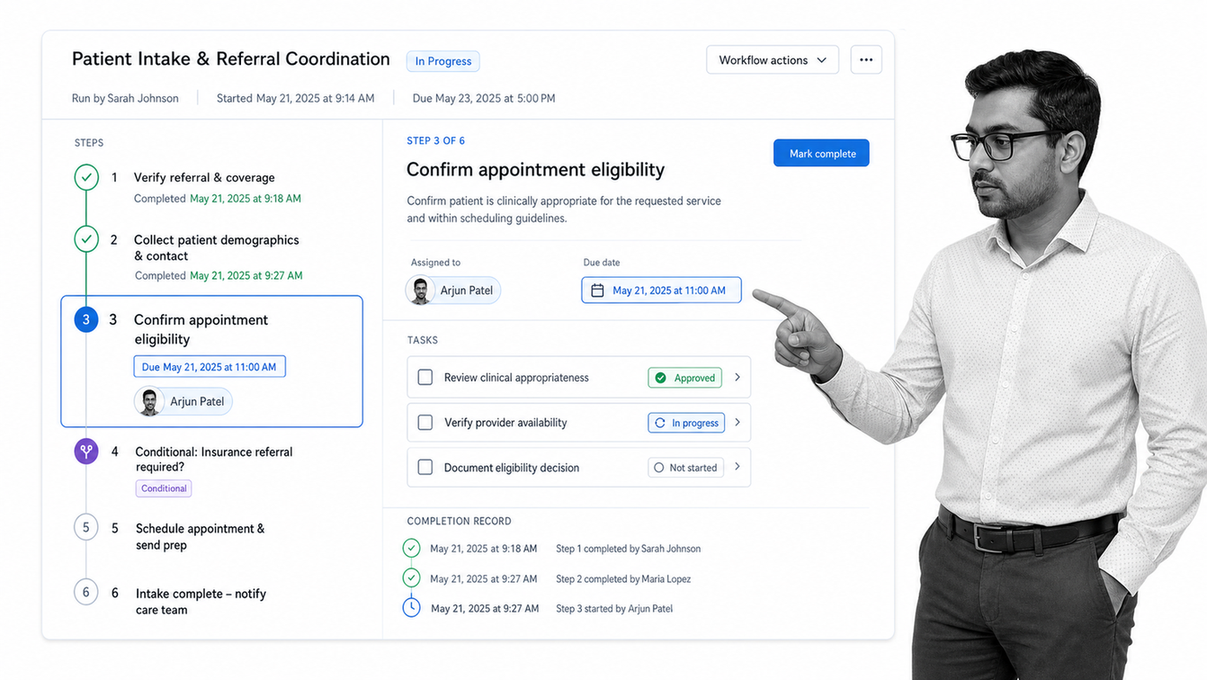
Process Street is a compliance operations platform that runs the repeatable human processes wrapped around a clinical system: patient intake handoffs, referral coordination, prior authorization follow-up, credentialing, onboarding a new provider, and the recurring audits that keep a practice inspection-ready. It describes its core capabilities as workflow automation and process orchestration, document management and policy control, automations, analytics, and integrations.
Practices use it alongside their clinical system rather than instead of it. The chart holds the clinical record; the workflow layer holds the sequence of human steps, the owner of each step, the due date, the conditional branch when something is missing, and the completed record proving the process ran. That is the part of clinic operations that most often lives in tribal knowledge, and it is the part that breaks first when a practice grows or a key coordinator leaves.
Epic
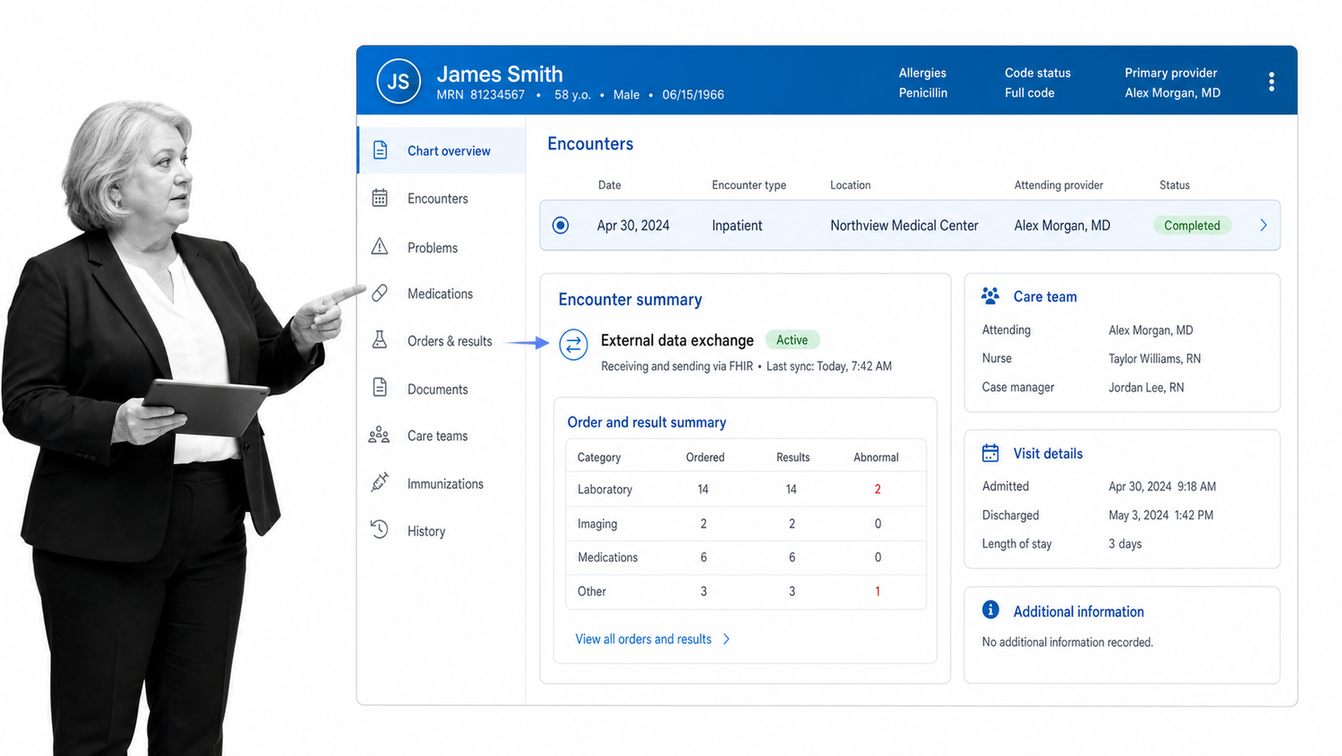
Epic builds a comprehensive health record system used across large health systems, hospitals, and clinics, spanning clinical documentation, scheduling, registration, and revenue functions in one integrated suite.
Epic supports the FHIR standard for REST-based interoperability, and its developer program lets third-party applications connect to any organization running its record system to exchange health information, including United States Core Data for Interoperability data classes. This is the tier for integrated delivery networks and academic medical centers rather than independent practices.
Oracle Health
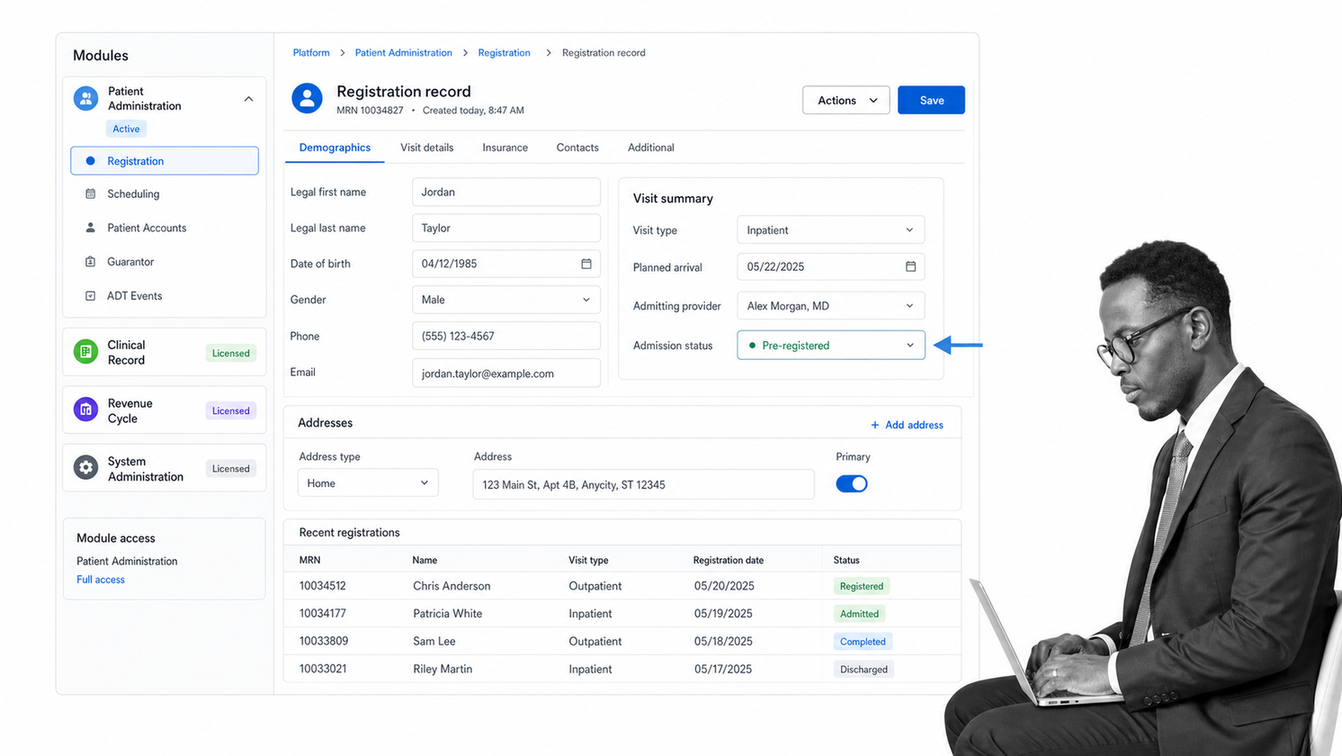
Oracle Health is the current identity of the platform previously sold under the Cerner name. Its documented product set includes Oracle Health Patient Administration, Oracle Health Patient Portal, Oracle Health EHR, and the Oracle Health Millennium Platform, alongside revenue cycle and claims products.
The portfolio splits patient administration, clinical records, and revenue cycle into distinct modules on a shared platform, which suits hospitals and multi-facility systems that need the pieces governed separately. Buyers evaluating older documentation should map legacy module names onto the current product naming before comparing quotes.
athenahealth
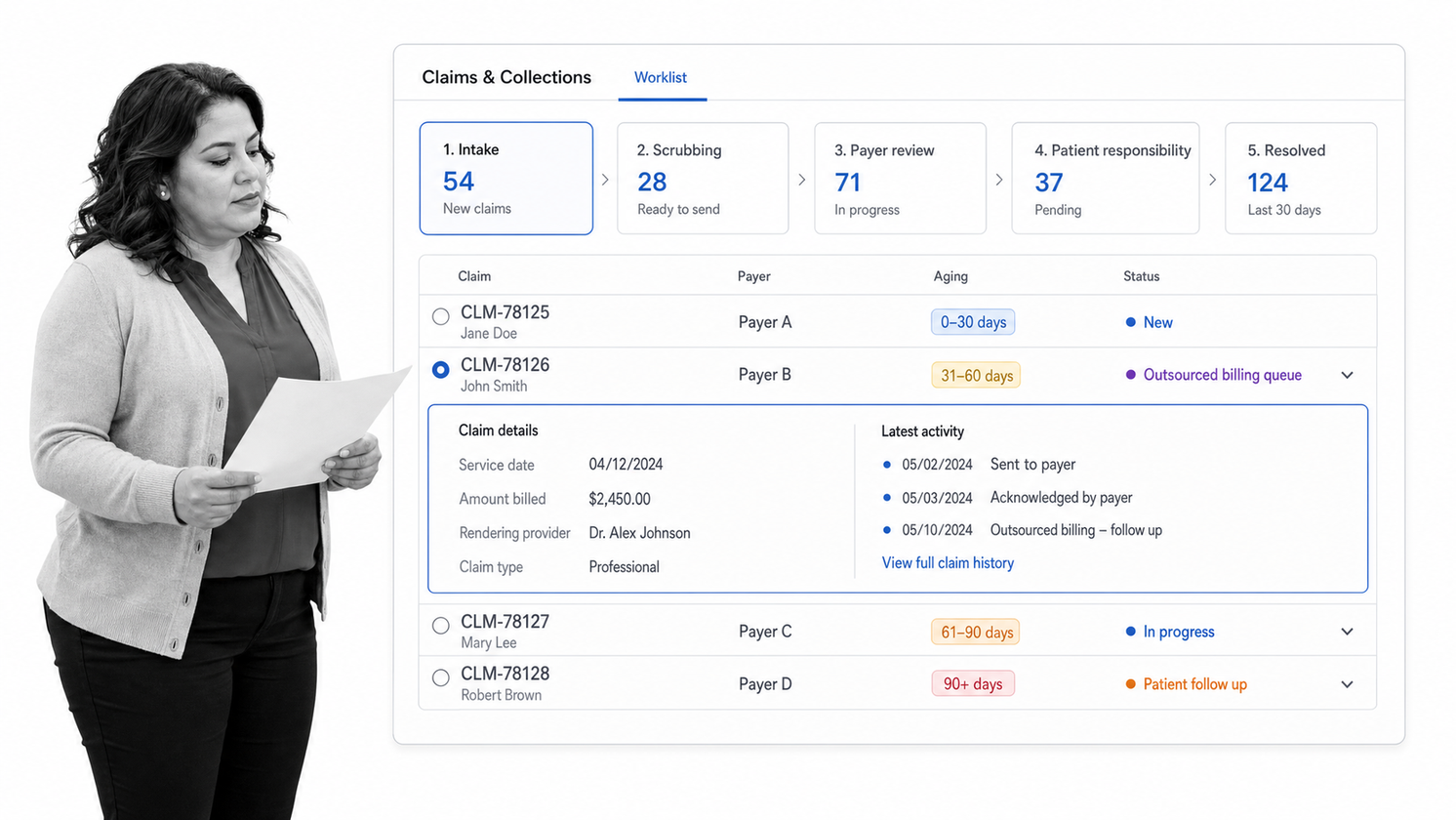
athenahealth serves ambulatory practices and medical groups with an integrated clinical, revenue cycle, and patient engagement offering, and is commonly shortlisted by practices that want billing services bundled with the software rather than run entirely in house.
Practices evaluating this tier should request current product, module, and pricing detail directly from the vendor, since packaging in the outsourced revenue cycle segment changes frequently and the commercial model matters more than the feature list.
eClinicalWorks
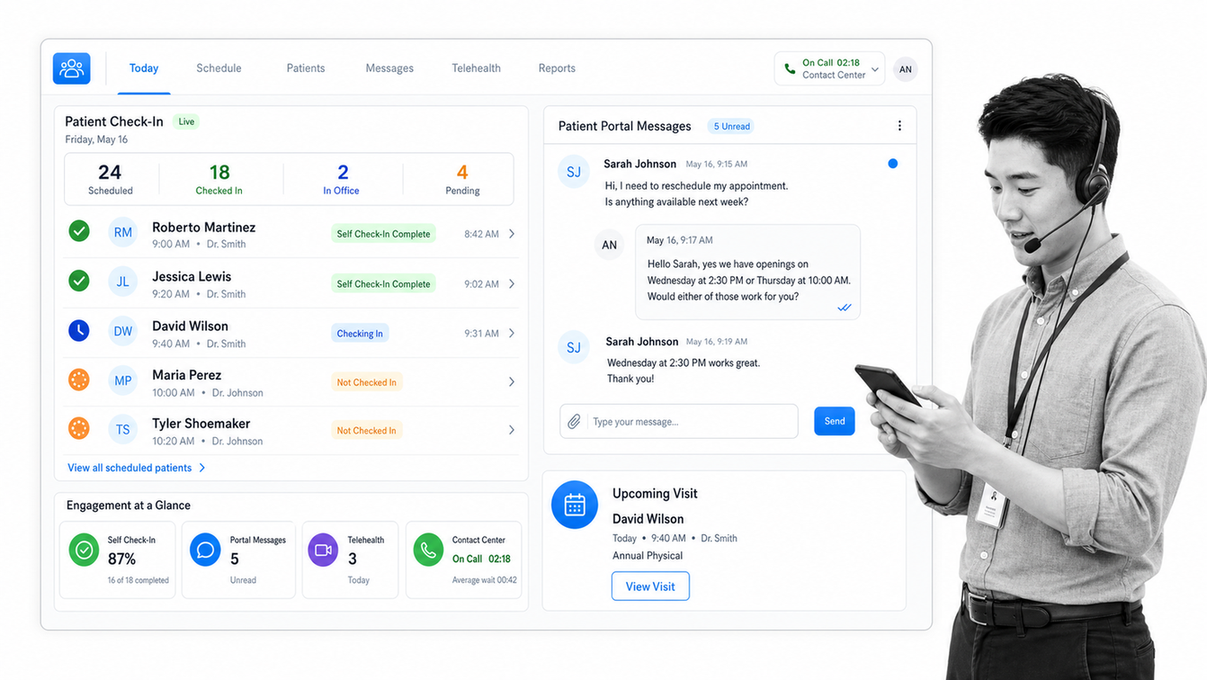
eClinicalWorks provides electronic health record and practice management capability for practices, delivered on its own cloud, with revenue cycle offered either as self-service practice management or as an end-to-end managed billing service.
Its patient engagement products are branded under healow, including check-in solutions, a patient portal, telehealth, patient apps and trackers, and the healow Genie contact center. Documentation support comes from the Sunoh.ai medical scribe and Eva, its virtual assistant. Value-based care tooling covers care planning, chronic care management, and quality measure reporting.
NextGen Healthcare
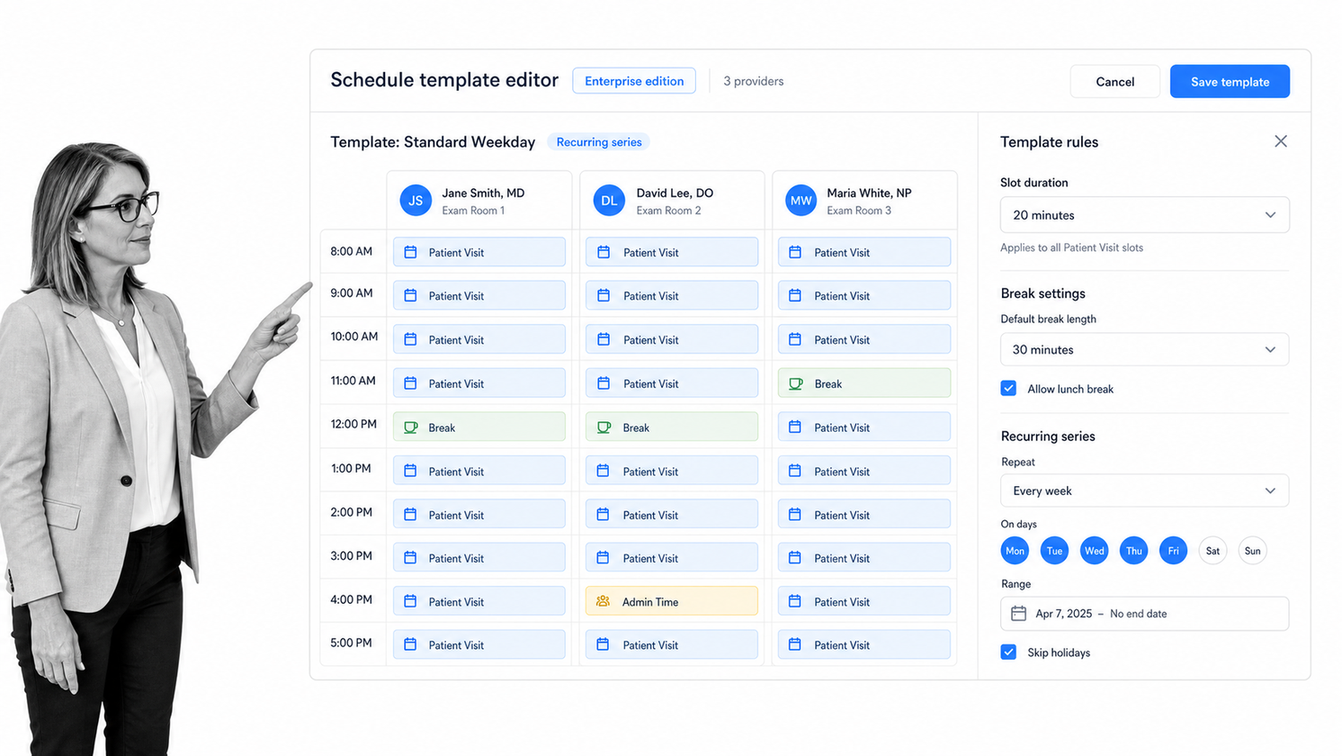
NextGen Healthcare splits its offering by practice size. NextGen Enterprise is positioned as the enterprise-level record and practice management platform for mid-size to enterprise practices with ten or more providers, while NextGen Office is the fully integrated record and practice management product for independent practices under ten providers.
The split matters during evaluation because the two products are configured, priced, and implemented differently. NextGen also offers mobile record access, clinical AI documentation through NextGen Ambient Assist, and the Mirth product family, including the Mirth Connect integration engine, for interface and data exchange work.
Tebra
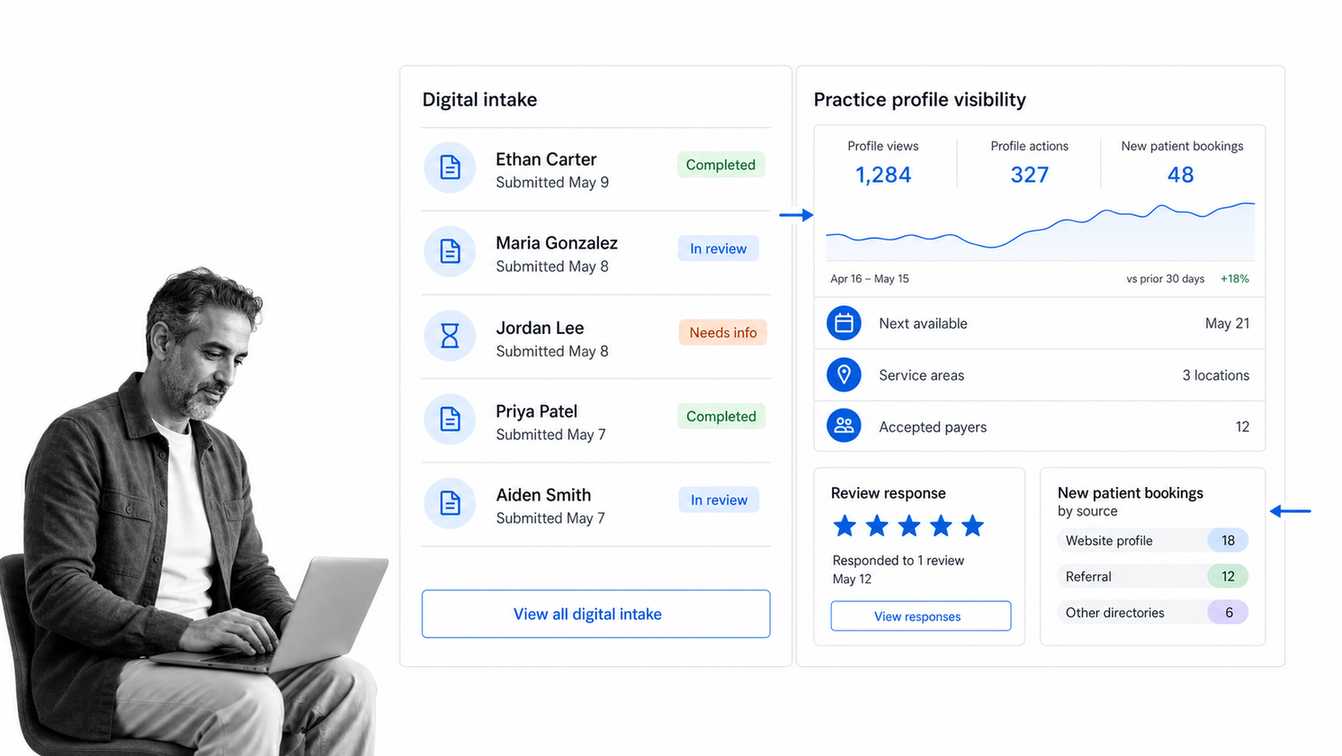
Tebra is the company formed from the combination of Kareo and PatientPop, and it targets independent practices with an integrated platform spanning charting, billing, patient experience, and practice marketing.
Its product areas cover an electronic health record with e-prescribing, labs, charting, and AI-assisted documentation; billing and payments covering claims, eligibility, and denials; patient experience covering scheduling, digital intake, reminders, and messaging; and practice marketing covering websites, search visibility, and reputation management. The marketing and patient acquisition side is unusual in this category and is the main reason growth-focused independent practices shortlist it.
AdvancedMD
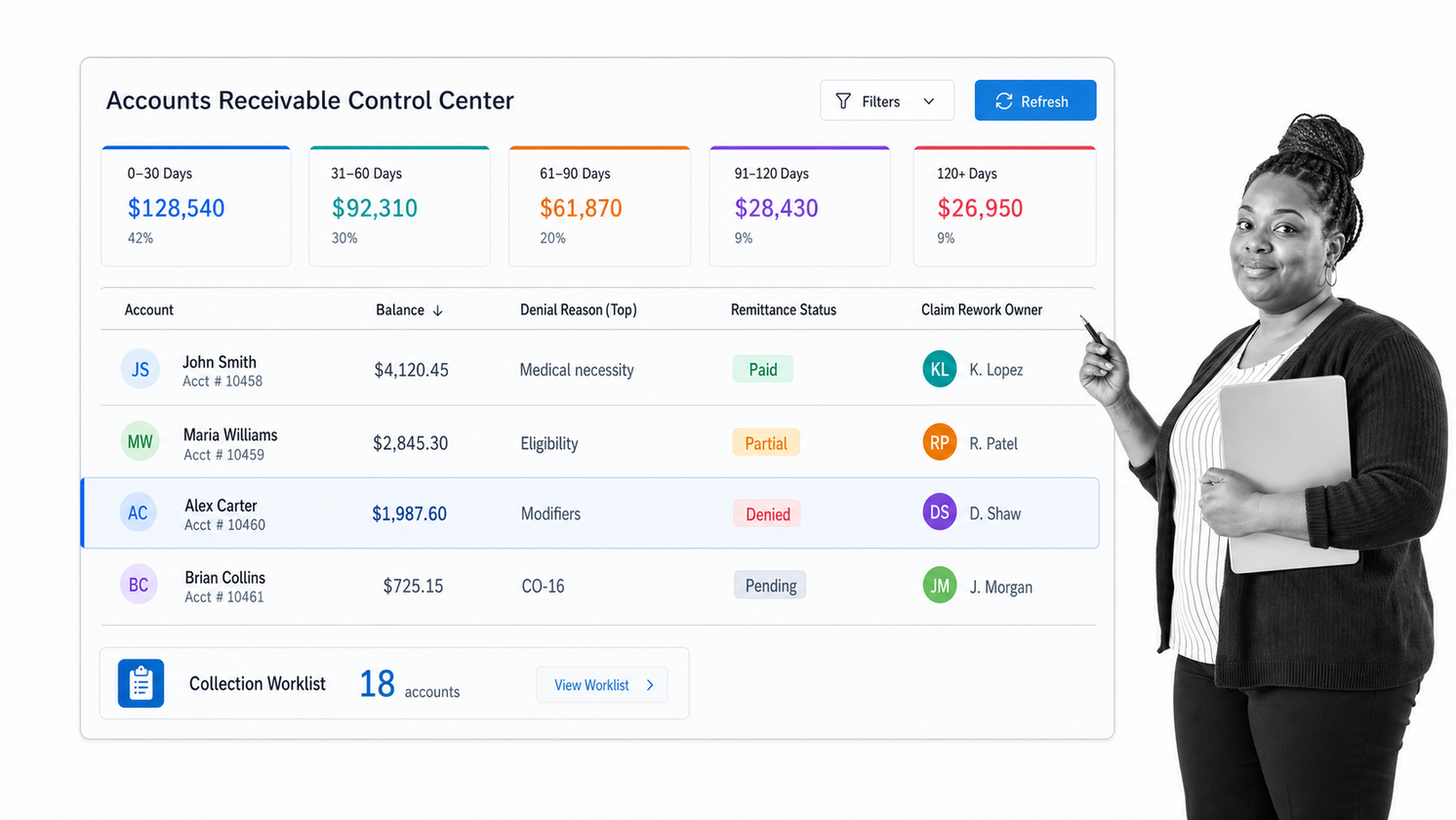
AdvancedMD positions its platform as a record, practice management, and patient engagement system built for independent practice, sold as one unified solution rather than separately licensed products.
Its practice management side covers scheduling, billing, claims management, medical coding, invoicing, credit card processing, an accounts receivable control center, and reporting and analytics. Patient engagement covers a patient portal, telehealth, appointment reminders, patient self-scheduling, a patient kiosk, consent forms, and messaging. Revenue functions extend to eligibility checking, electronic remittance advice, and clearinghouse services.
CareCloud
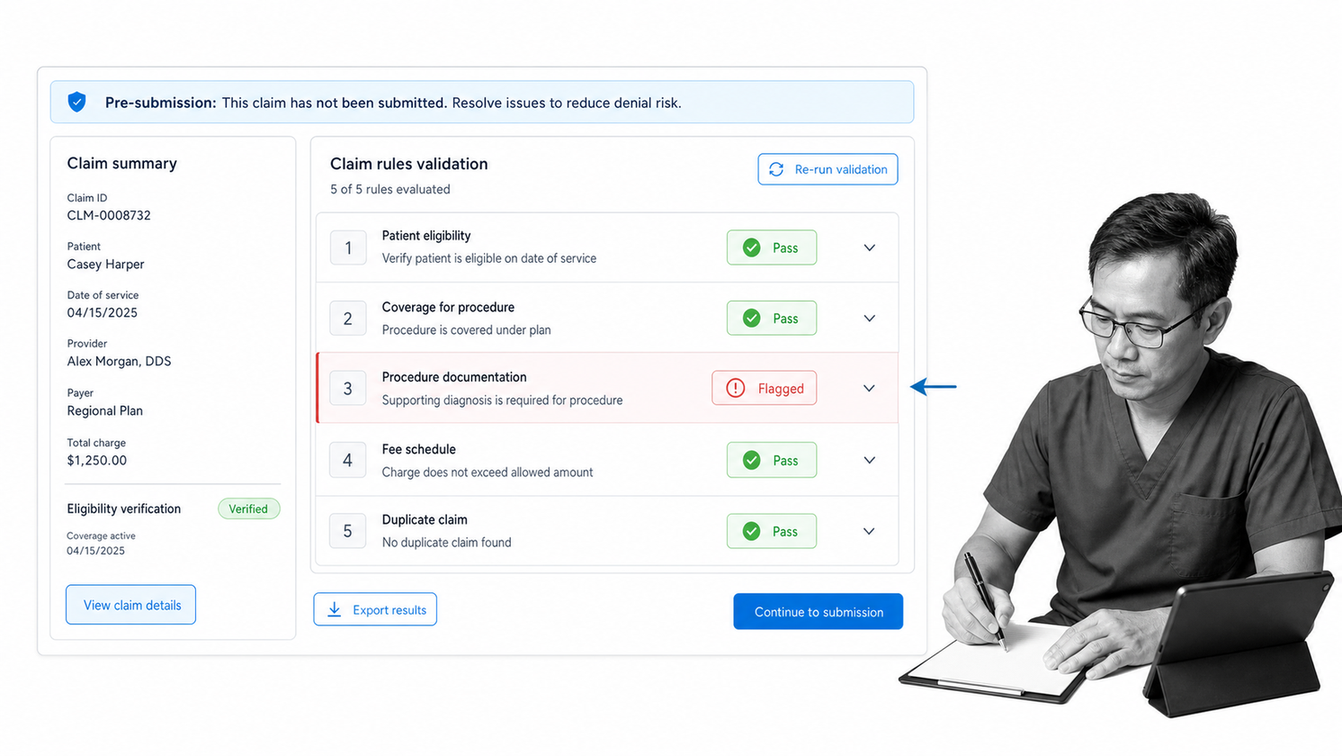
CareCloud offers practice management alongside an integrated record system, aimed at practices that want scheduling, billing, documentation, and workflow coordination on one platform.
Its practice management capability covers patient scheduling and appointment management, insurance verification and eligibility, and automated billing and claims. Claim accuracy is handled by CollectiveIQ, described by the vendor as an automated billing rules engine that applies rules-based validations before submission, which is worth a close look for practices where denial volume is the primary operational pain.
DrChrono
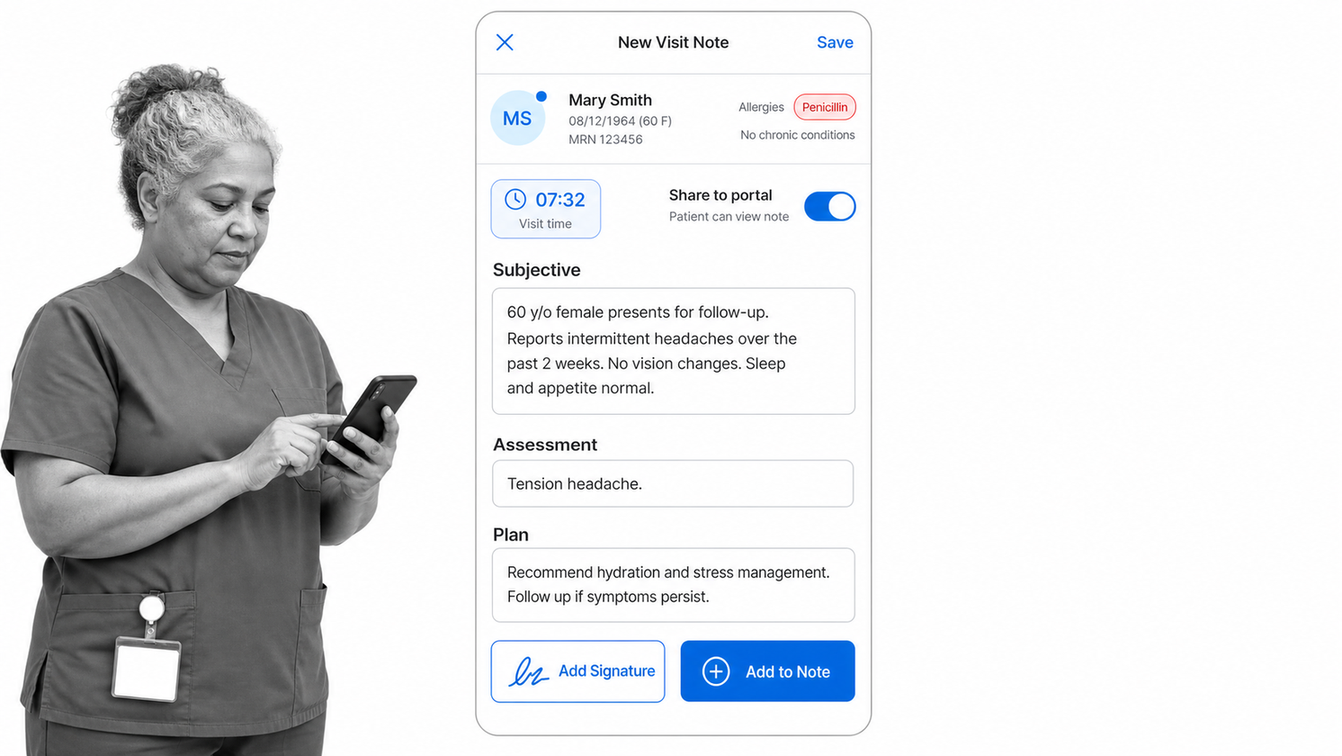
DrChrono, operated by EverHealth, is an all-in-one record platform combining clinical documentation, practice management, revenue cycle and medical billing, telehealth, and the OnPatient patient portal.
Mobile use is its distinguishing characteristic. The product was built around tablet and mobile access rather than adding it later, which suits practices where providers document at the point of care or work across multiple sites during a single day.
How Do You Run Clinic Workflows Around the Software?
No clinical system covers the whole operation. Around every record system sits a set of human processes that decide whether the practice runs smoothly: how a referral is chased, who verifies benefits when eligibility comes back unclear, what happens when a prior authorization stalls, how a new provider gets credentialed and onboarded, and how the practice proves a required check was completed.
Those processes are where practices leak time. They are usually documented in a shared drive nobody opens, or held in the head of the person who has been there longest. Turning them into repeatable, assignable, trackable operational workflows is what stops a growing practice from adding headcount to absorb its own coordination overhead.
Process Street sits in that layer. Each recurring process becomes a workflow with defined steps, owners, due dates, conditional logic for the exceptions, and a completed record of every run. Its workflow software connects to the systems a practice already uses, so a completed intake step can trigger the next action rather than an email asking whether anyone did it.
The practical test is simple: pick the process that generated your last three operational mistakes. If nobody can point to a current written version of it with a named owner per step, the problem is not the clinical system.
How Do You Roll Out a New System Without Disrupting Care?
Implementations fail on operations far more often than on technology. A structured rollout keeps the schedule full while the platform changes underneath it.
Map the current state first
Document how scheduling, intake, charge capture, claims, and follow-up work today, including the workarounds. The workarounds are the requirements nobody writes down, and they are the reason a configuration that looked complete in testing collapses in week one.
Decide what migrates
Agree exactly which historical data moves: active patients, full demographics, open balances, historical claims, clinical history, documents. Moving everything is expensive and slow. Moving too little strands staff between two systems for years. Write the decision down and get the vendor to confirm the format and timeline.
Configure, then test with real cases
Test with genuine scenarios from your own schedule, including the messy ones: a patient with two insurers, a rescheduled recurring appointment, a denied claim that needs rework, an incomplete intake. A demo dataset will not surface the configuration gaps.
Train by role, not by feature
Front desk staff, billers, medical assistants, and providers each need their own path through the system. Role-based training against the practice’s real processes gets people productive faster than a general product tour, and it exposes the steps nobody owns before go-live rather than after.
Plan a reduced-volume go-live
Lighten the schedule for the first days, put experienced staff on floor support, and track a short list of operational measures: check-in time, claim submission lag, denial rate, and days in accounts receivable. Watching those numbers for the first two months tells you whether the rollout worked far more reliably than a satisfaction survey.
What Does Compliance Require From Your Software?
Compliance obligations sit with the practice, not with the vendor, but the software determines how hard they are to meet. Three areas deserve direct questions during evaluation.
Safeguards for electronic health information. Access controls, audit logging, authentication, and protection of data in transit and at rest are the technical foundations. Ask how granular the permissions are, whether audit logs are exportable, and how quickly you can revoke access when a staff member leaves.
Risk analysis. Federal guidance frames security as an ongoing risk management activity rather than a one-time certification, so a practice needs a repeatable process for reviewing where health information lives, who can reach it, and what threats apply. That review has to run on a schedule with a named owner and a documented result.
Evidence. When an auditor asks whether a control ran, a policy document is not proof. A completed workflow record with timestamps, owners, and attached evidence is. Practices that treat compliance as a running process rather than an annual scramble build that evidence as a by-product of doing the work.
FAQs
What is patient management software?
Patient management software is the operational system a medical practice uses to organize patients and the work around them: scheduling, registration and intake, insurance eligibility, claims and payments, patient communication, and reporting. Vendors also market it as practice management software, and it is usually sold alongside or inside an electronic health record.
What is the difference between patient management software and EHR software?
An electronic health record holds the clinical chart, including notes, orders, results, and medications. Patient management software handles the administrative and financial operation around that chart: who is scheduled, whether they are covered, what was billed, and what still needs follow-up. Most vendors now sell both as a single integrated platform, but the two capabilities should be evaluated separately because a strong chart can be paired with a weak scheduling and billing engine.
How do I choose the right patient management system for my practice?
Start from your specialty, practice size, and the processes that currently generate the most rework. Then test the specifics: scheduling exceptions, eligibility checks before the visit, denial worklists, available data exchange APIs, permission granularity and audit logging, and the total cost including implementation, migration, interfaces, and training. Ask for the data export format and timeline in writing before you sign.
Is patient management software HIPAA compliant?
Software is not compliant on its own; a practice is. Vendors serving United States healthcare providers are expected to sign a business associate agreement and to provide the technical safeguards a practice needs, including access controls, audit logging, authentication, and encryption. The practice remains responsible for running its own risk analysis, configuring permissions correctly, training staff, and documenting that its controls actually run.
What software do most hospitals use?
Hospitals typically run a large integrated clinical suite that combines the electronic health record with patient administration and revenue cycle modules, rather than a standalone scheduling or billing product. Epic and Oracle Health are the platforms most commonly found at that scale. Independent and ambulatory practices generally choose lighter integrated platforms built for smaller provider counts.
Can patient management software replace our manual processes?
It replaces the parts that live inside the system, such as scheduling, claims submission, and reminders. The human processes around it, including referral follow-up, prior authorization chasing, credentialing, onboarding, and recurring compliance checks, still need an owner, a sequence, and a completion record. Practices usually pair the clinical system with a workflow platform so those processes are repeatable and auditable rather than dependent on memory.
