


Turn every policy into automated workflows with built-in enforcement and audit-ready proof.



Hospital Management Software
Hospital management software coordinates clinical, administrative, operational, and compliance work across a hospital that moves a patient, request, decision, document, or task from start to finish. A good hospital process makes the right action clear, assigns the right owner, captures the right evidence, and reduces the chance that critical work gets missed.
Hospital process design matters because care delivery is full of handoffs. A patient intake form becomes a clinical review. A referral becomes a scheduling task. A discharge plan becomes education, follow-up, medication reconciliation, and documentation. If the handoff is unclear, quality drops and risk rises.
This guide explains what hospital management software is, which workflows it should coordinate, how to evaluate it, and how to turn hospital standards into accountable daily work, why process design matters, the core process types, how to map and improve a process, how governance works, and how hospital teams can use process software to turn standards into work that happens every time.
In this article, we are going to cover:
- What hospital management software is
- Why hospital management software matters
- Hospital workflows to coordinate
- How to map hospital operations
- How to improve hospital operations
- Hospital governance and compliance
- Run hospital operations in Process Street
- How to choose hospital management software
- FAQs
What hospital management software is
A hospital process is the operating path a healthcare team follows to deliver care, coordinate resources, document decisions, meet compliance obligations, or manage supporting work. It can be clinical, administrative, financial, operational, or regulatory.
The category is broad. Some systems concentrate on records, billing, scheduling, or inventory. This guide focuses on the operational layer that coordinates people, handoffs, approvals, evidence, and exceptions across departments. The NCBI nursing process overview describes the nursing process as a road map for safe, patient-centered care. A hospital accreditation process, patient intake workflow, medication reconciliation routine, claims review, access request, incident response, or discharge follow-up can all be hospital processes.
A process is different from a policy
A policy defines the rule. A process defines how the rule gets followed. A policy might say that protected health information must be safeguarded. A hospital process says who verifies access, what evidence is captured, who approves the request, and how exceptions are escalated.
That distinction is where many hospital teams struggle. Policies are often stored in documents, but work happens across EHRs, spreadsheets, email, BI dashboards, forms, and conversations. The process is the bridge between the standard and the work people actually complete.
A process is different from a checklist
A checklist can be part of a process, especially for recurring work like a HIPAA compliance audit checklist or clinical audit workflow. The process is larger. It includes triggers, task order, owners, dependencies, decision rules, data sources, approvals, evidence, exceptions, and outcome review.
A strong hospital process does not rely on memory. It makes the next step visible and enforceable, even when work spans departments, shifts, locations, and systems.
A process has to match the care setting
A clinic, hospital, home health program, payer operation, and specialty practice may all use the same process language, but the operating details are different. A useful hospital process reflects the people, systems, urgency, privacy constraints, and escalation paths in that specific setting. Copying a generic workflow without adapting it to the environment usually creates workarounds.
Why hospital management software matters
Hospital process design matters because small execution gaps can create large downstream consequences. A missed follow-up, unclear owner, incomplete note, late referral, or skipped review can affect patient safety, compliance, revenue, staffing, and trust.
It protects patients and staff
AHRQ quality improvement process guidance emphasizes that healthcare improvement depends on communication, stakeholder participation, small tests of change, and iterative learning. Those ideas only become practical when teams can see the process they are changing and agree on who owns each part.
Clear processes reduce ambiguity. They help frontline staff know what to do, help leaders see where work stalls, and help quality teams trace whether a change was actually adopted.
It reduces handoff risk
Healthcare work crosses roles constantly: front desk to nurse, nurse to physician, physician to referral coordinator, billing to payer, quality to department owner, compliance to IT. Each handoff is a risk point because information, timing, and accountability can drift.
Process design gives handoffs a structure. It can connect intake to healthcare integration, monitoring to healthcare monitoring, and analytics to healthcare analytics so signals become assigned action instead of informal follow-up.
It creates audit-ready proof
Hospital teams do not only need to do the work. They need to prove the work happened. That means the process must capture who did what, when the action was reviewed, what evidence was attached, which exception path was used, and what changed after review.
For compliance-heavy work, a hospital process should connect to compliance management software, quality management system software, and daily execution records instead of living in a static folder.
Hospital workflows to coordinate
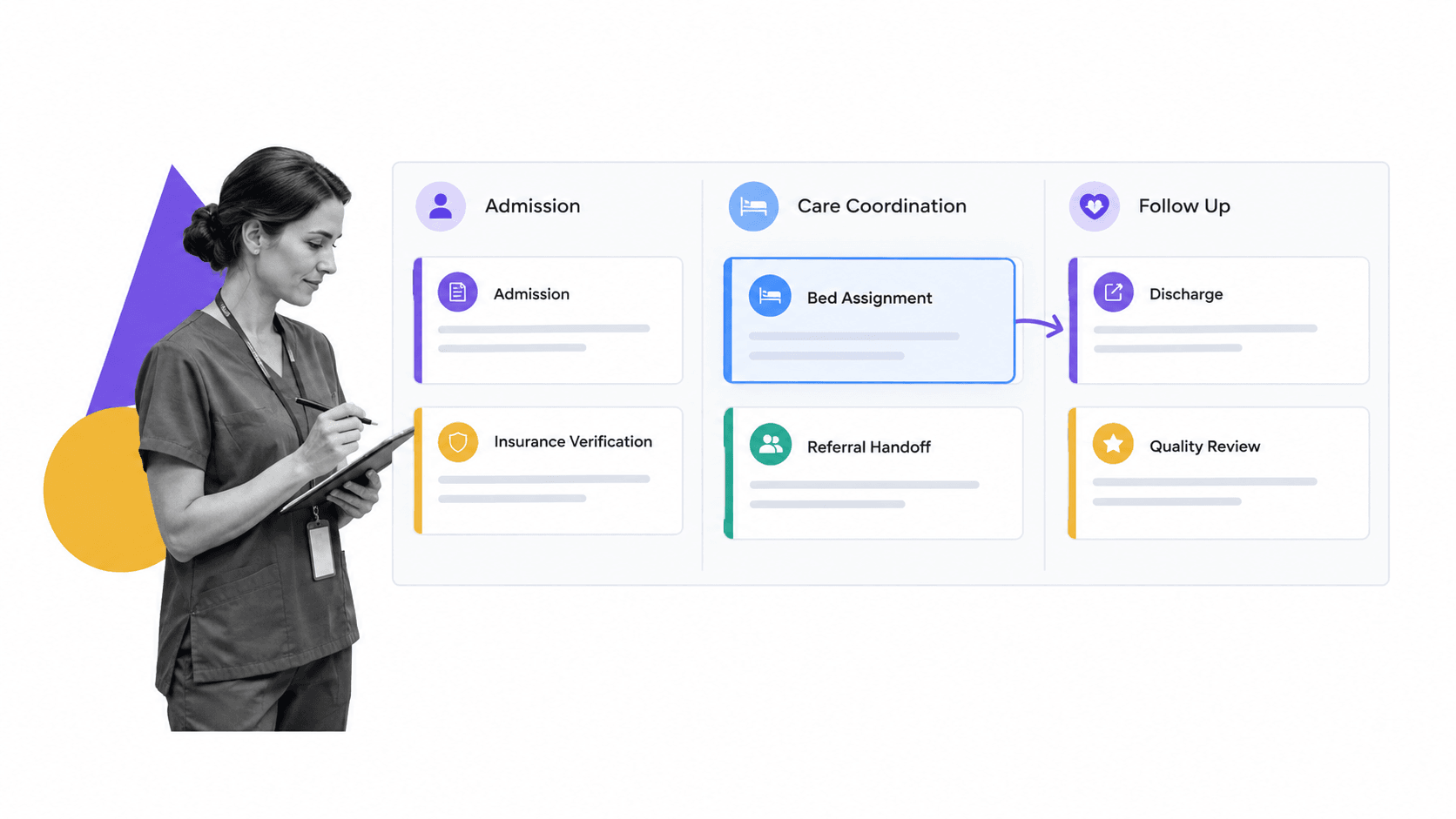
Hospital processes usually fall into several overlapping categories. Separating the categories helps teams assign owners and choose the right level of control.
Clinical processes
Clinical processes support care delivery. Examples include patient intake, triage, diagnosis support, medication reconciliation, care planning, discharge planning, referrals, follow-up calls, and chronic care management. These processes need accuracy, timeliness, and clear escalation rules.
Administrative processes
Administrative processes keep the hospital running. Examples include scheduling, credentialing, staff onboarding, supplies, record requests, billing handoffs, patient communications, and healthcare resource management. Administrative work may look less urgent than clinical care, but delays can still affect access, experience, and compliance.
Compliance and quality processes
Compliance and quality processes make standards operational. They include audit prep, policy acknowledgment, training attestations, access reviews, incident response, clinical audits, corrective action, and quality measure follow-up. CMS quality measures shows how formal measures can define what teams need to track, but the hospital process determines how teams respond.
Patient-facing processes
Patient-facing processes shape the experience of care. Patient intake, consent, reminders, education, portal support, follow-up, and complaint response all need clear sequencing. A simple patient intake checklist can prevent missing information from moving downstream.
Most important processes touch more than one category. Discharge planning is clinical, administrative, patient-facing, and compliance-sensitive at the same time. That is why process ownership has to be explicit.
How to map hospital operations
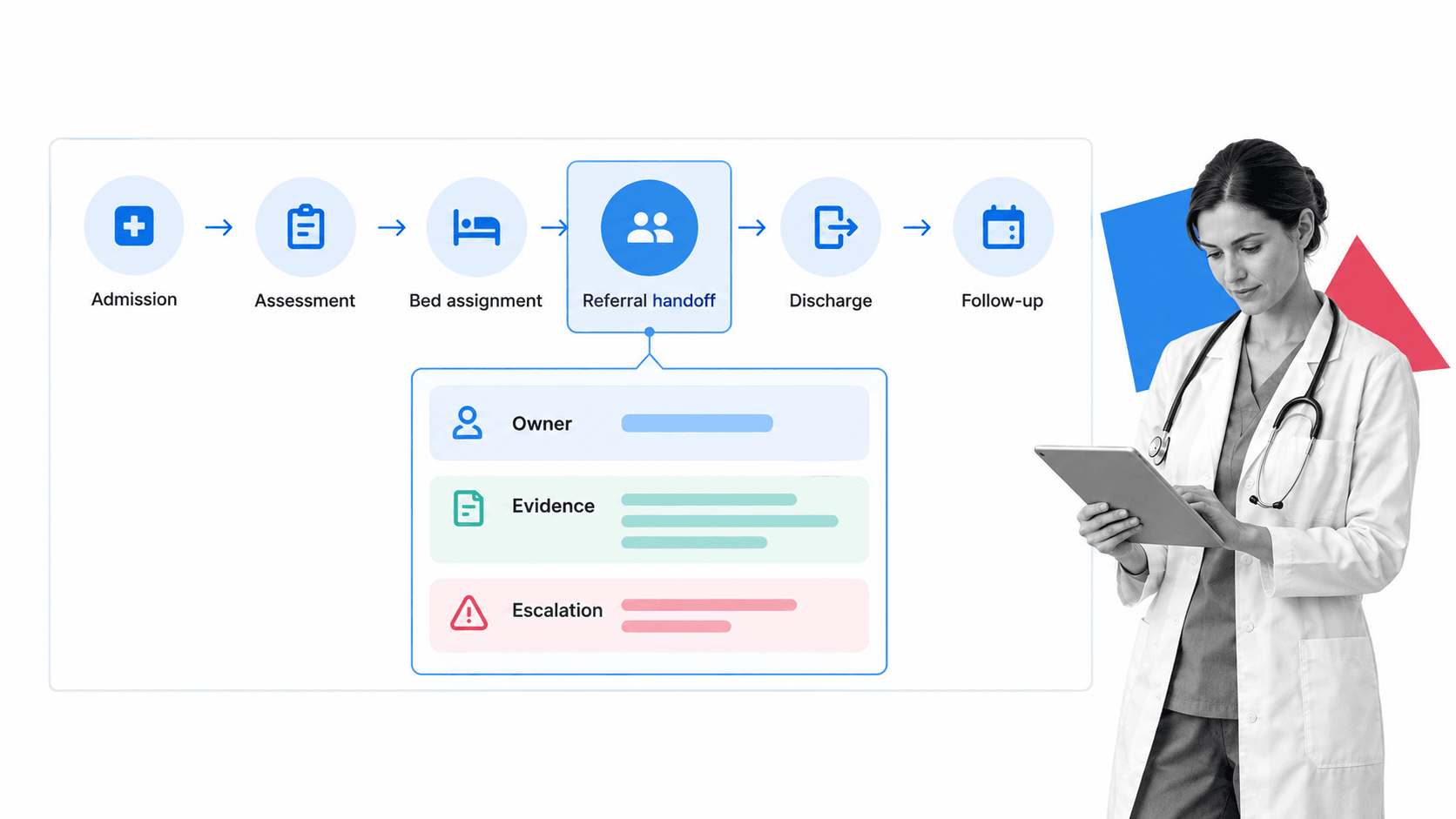
Mapping a hospital process means turning the real flow of work into a visible operating model. The map should show what triggers the process, who owns each step, where data comes from, where handoffs occur, what evidence is required, and where the process can fail.
Step 1: Pick one process with real consequence
Do not start with every workflow in the organization. Pick one process where missed steps are costly: referral handoff, discharge follow-up, incident review, patient intake, access review, lab result escalation, or policy acknowledgment.
Step 2: Document the trigger and end state
Define the event that starts the process and the condition that means the process is complete. A referral handoff might start when a clinician orders a referral and end when the patient has an appointment scheduled, required documentation attached, and any high-risk exception reviewed.
Step 3: Capture tasks, owners, and handoffs
List each task in order. Name the role responsible, the system used, the evidence captured, and the handoff that follows. This is where hidden work appears: copying data between tools, waiting for a signature, checking missing fields, or chasing an owner.
Step 4: Add decisions and exceptions
Hospital processes rarely follow one path. Add decision rules for incomplete information, high-risk patients, urgent referrals, failed contact attempts, privacy exceptions, missing approvals, or late tasks. The goal is not to remove judgment. The goal is to make judgment visible and reviewable.
Once the map is clear, teams can convert it into a workflow management system or a more specific workflow management software that routes work based on role, risk, and evidence.
How to improve hospital operations
Hospital process improvement is the discipline of changing how work happens so outcomes improve without creating new risk. The best improvement work starts small, measures clearly, and keeps the people who do the work involved.
Use a simple improvement loop
AHRQ quality improvement process guidance describes the Plan, Do, Study, Act cycle as a structured way to test and learn from changes. In hospital process work, that means defining the problem, testing a change on a small scale, reviewing whether it helped, then adjusting before broad rollout.
Measure the process, not only the outcome
Outcomes matter, but process measures show whether the new way of working is being followed. For a referral process, track referral completion, missing documentation, days to first contact, high-risk escalations, and closure evidence. For patient intake, track missing fields, rework, delays, and handoff failures.
Make ownership visible
Improvement fails when everyone agrees on the idea but no one owns the next action. Every change should have a responsible owner, response window, escalation path, and review cadence. This keeps process improvement from becoming a meeting note that fades after launch.
Close the loop
Connect improvement to process monitoring so leaders can see whether the process is being followed after the first rollout. If a metric moves in the wrong direction, the team should be able to inspect the workflow, not reconstruct it from memory.
A practical rule: if the improvement cannot be shown in the process itself, it is not operational yet. It is still a recommendation.
Protect the frontline from process overload
Process improvement should remove friction, not add a second job. If a new workflow asks staff to document the same data twice, chase approvals manually, or interpret unclear exception rules, adoption will fail. The process should make the correct action easier than the workaround.
Hospital governance and compliance
Hospital process compliance and governance define how a process is approved, changed, monitored, and proven. This matters because hospital processes often involve regulated data, patient safety obligations, accreditation standards, and cross-functional accountability.
Define process ownership
Every hospital process needs a named owner. The owner is responsible for the process design, review cadence, change approvals, training impact, exception handling, and evidence requirements. Without ownership, process drift becomes normal.
Control access and evidence
HHS HIPAA Security Rule guidance explains that the HIPAA Security Rule requires administrative, physical, and technical safeguards for electronic protected health information. Hospital processes that touch sensitive data should use least privilege, required evidence, audit history, and review steps.
Build approvals into the workflow
Important hospital processes should not rely on informal signoff. approvals can make review part of the workflow, whether the reviewer is a quality lead, compliance officer, department manager, or clinical owner.
Review and retire processes
Governance is not only approval. It is also cleanup. Outdated process steps create confusion and risk. Each process should have a review cadence, change log, version owner, and retirement path for steps that no longer serve a decision or requirement.
The Joint Commission accreditation process is a reminder that formal healthcare programs often rely on documented steps and review events. Your internal hospital process should be able to show the same discipline at the level of daily work.
Run hospital operations in Process Street
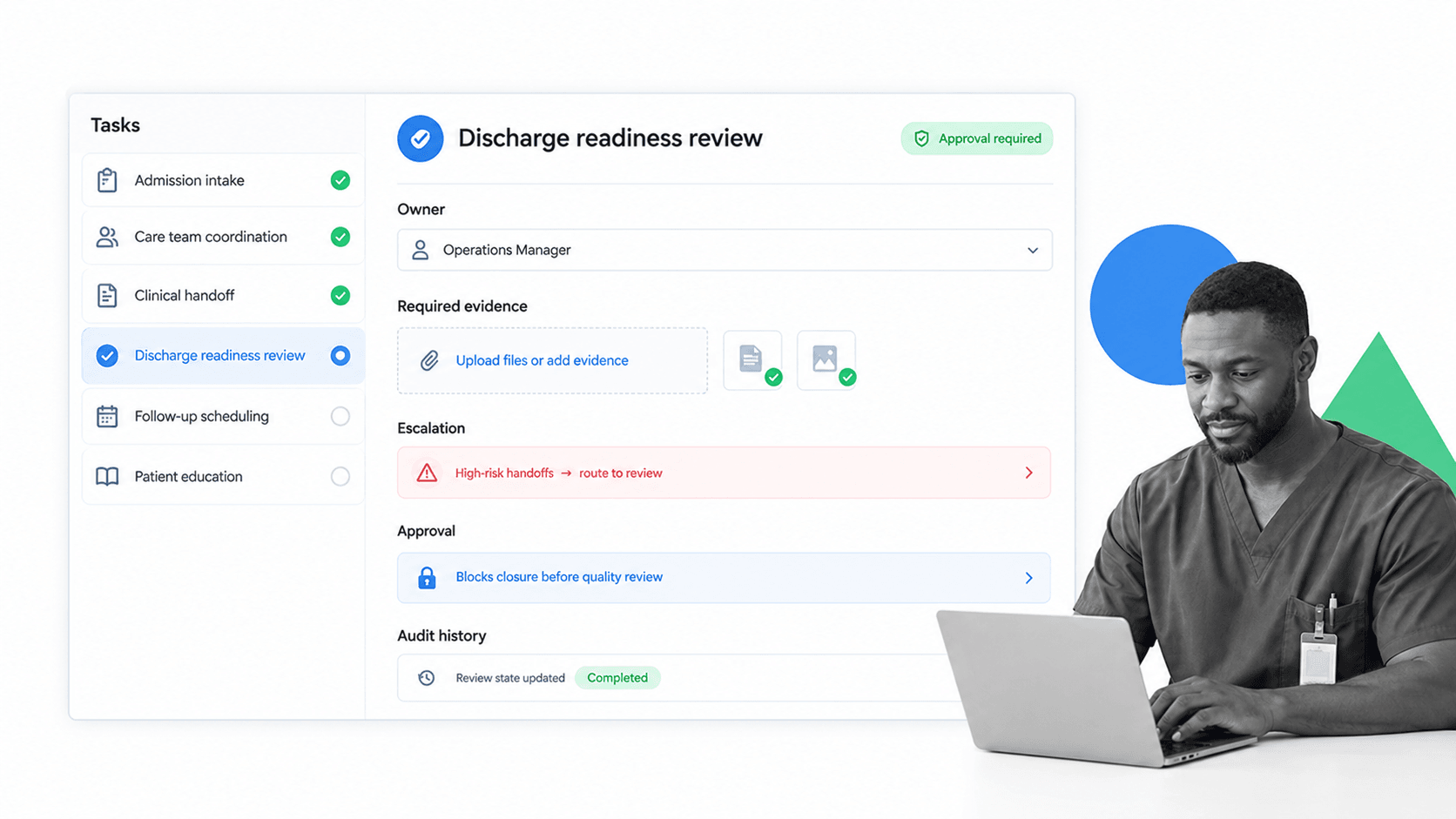
Hospital process in Process Street means turning the process map into a workflow people actually run. The trigger starts a workflow, tasks route to owners, fields capture required information, conditional logic changes the path, approvals block premature closure, and audit history proves what happened.
Process Street is an agentic process automation platform and is HIPAA compliant. It is strongest when hospital teams need recurring clinical, administrative, quality, or compliance processes to run the same way across people, shifts, and locations.
Turn standards into assigned work
A hospital process workflow can include intake fields, risk questions, handoff checks, document uploads, approval gates, automation cues, and outcome review. Each run becomes the operating record for that patient, request, review, or task.
Route work based on risk
Healthcare work changes based on risk, role, location, and missing information. conditional logic can route high-risk referrals to review, skip irrelevant tasks, show extra evidence fields, or send exceptions to a manager.
Connect systems without making staff chase updates
Process Street has direct, universal integrations to 5,000+ systems. Need a new one? An AI agent builds it on the fly. That helps hospital teams connect forms, EHR exports, spreadsheets, BI tools, communication tools, and systems of record to the workflow layer.
Teams working on medical checklist app can start with a single recurring workflow, then expand into monitoring, analytics, quality review, and compliance operations once the execution path is reliable.
How to choose hospital management software
Choose hospital management software by testing whether it can run the process, not just document it. The right system should help teams design the workflow, assign work, handle exceptions, collect evidence, approve critical steps, integrate with other tools, and show what happened later.
Look for workflow execution
A static process repository can store instructions, but hospital teams need execution. Look for tasks, owners, due dates, required fields, conditional logic, recurring runs, comments, file uploads, and clear completion records.
Check governance features
Hospital management software should support role-based access, approvals, audit history, version control, and evidence capture. The system should make it easy to answer who changed the process, who completed a run, what evidence was attached, and what exception path was used.
Evaluate integrations
Process software should fit the existing stack. Hospital teams rarely get to replace every system. They need a process layer that can connect to forms, documents, communication tools, BI exports, ticketing systems, and records systems without making frontline staff duplicate work.
Pilot with one high-value process
The best evaluation is a live pilot. Pick one process with handoffs, evidence, and risk. Build it, run it, inspect the records, and ask whether the workflow made the work clearer. If staff still need side spreadsheets and manual reminders, the software is not carrying the process.
The goal is not another passive system of record. The goal is hospital management software that coordinates work, handles exceptions, and leaves proof. It should support clinical judgment, not attempt to replace it.
FAQs
What is hospital management software?
Hospital management software coordinates clinical, administrative, operational, and compliance work across a hospital. Depending on scope, it can support patient intake, scheduling, bed flow, handoffs, discharge, staffing, inventory, billing coordination, quality review, and evidence capture.
What does hospital management software manage?
Hospital management software can manage admissions, appointments, bed assignment, medication reconciliation, referrals, discharge follow-up, staff onboarding, inventory, incident review, access requests, billing handoffs, and compliance checks. The right scope depends on the hospital’s existing systems and operational gaps.
How do you choose hospital management software?
Start by mapping the workflows that create the most delay, rework, risk, or manual coordination. Evaluate whether the software can assign owners, route exceptions, collect evidence, control approvals, integrate with existing systems, and provide a clear audit history, then test it on one high-value workflow.
What are the benefits of hospital management software?
Hospital management software can reduce manual coordination, missed handoffs, duplicate data entry, delays, rework, and compliance gaps. It also gives leaders clearer visibility into who owns the next action and whether critical work was completed.
How does hospital management software support compliance?
Hospital management software can embed requirements into daily execution through role-based access, required fields, approvals, evidence uploads, audit history, and scheduled reviews. These controls make it easier to show how a policy was followed and how exceptions were handled.
Can Process Street support hospital operations?
Yes. Process Street can turn hospital operations into assigned work with conditional logic, approvals, required fields, evidence uploads, integrations, automation, and audit history. That helps teams move from static procedures to repeatable execution.
