


Turn every policy into automated workflows with built-in enforcement and audit-ready proof.



AI Security Solutions

AI security solutions are the controls, workflows, monitoring systems, and governance practices that protect artificial intelligence systems across their lifecycle. They reduce risk around prompts, training data, model behavior, user access, agent tools, outputs, runtime activity, and evidence.
The goal is not to slow down AI adoption. The goal is to make AI safe enough to use in real business operations. A useful AI security program gives teams a governed way to approve use cases, test models, monitor behavior, handle exceptions, and prove what happened.
This guide explains what AI security solutions include, where to start, how the workflow should run, and how Process Street helps teams turn AI security from policy into enforced execution.
We will cover:
- What AI security solutions are
- Why AI security solutions matter
- What AI security solutions include
- Where to start with AI security solutions
- How AI security solutions work
- AI security solutions with Process Street
- How to govern AI security solutions
- FAQs
What AI security solutions are
AI security solutions protect the systems, data, users, workflows, and decisions involved in AI adoption. They cover traditional cybersecurity problems, such as identity and data access, plus AI-specific risks such as prompt injection, unsafe model outputs, training-data exposure, unauthorized tool use, and uncontrolled agent behavior.
The NIST AI Risk Management Framework gives organizations a practical way to manage AI risk. It matters because AI security is not only a technical concern. It also includes governance, measurement, monitoring, and accountability.
AI security protects both the AI system and the work around it
A model can be secure at the infrastructure level and still create risk if nobody governs who can use it, which data it can see, what tools an agent can call, which outputs need review, or how exceptions are approved. AI security solutions need to protect the model and the operating process around the model.
That is why strong AI security programs combine technical controls with repeatable workflows. The technical controls detect, block, and monitor. The workflow controls assign owners, require evidence, route approvals, preserve history, and make sure risk decisions are not buried in chat.
AI security is different from general cybersecurity
General cybersecurity protects networks, endpoints, identities, applications, and data. AI security adds controls for model behavior, prompt and response handling, embeddings, model supply chain, evaluation, agent actions, and human review.
The difference is operational. AI changes how information moves through the business. A user can ask for a summary, an agent can call tools, a model can generate code, and a workflow can use AI to make the next step faster. Each of those actions needs policy, monitoring, and proof.
- Model controls govern how AI systems are selected, tested, deployed, and changed.
- Prompt and output controls reduce injection, leakage, unsafe responses, and unreviewed decisions.
- Data controls limit what AI can access, store, infer, and expose.
- Workflow controls make review, approval, exception handling, and evidence collection repeatable.
Why AI security solutions matter
AI security solutions matter because AI systems create new paths for sensitive data, decisions, and tool access to move through an organization. A weak AI rollout can expose customer data, leak internal knowledge, automate the wrong action, or create audit gaps that nobody can explain later.
AI expands the attack surface
AI applications introduce prompts, context windows, retrieval systems, model endpoints, plugins, agent tools, and generated outputs. The OWASP GenAI Security Project documents security and safety risks for generative AI, LLM, and agentic AI systems, which makes it a useful starting point for teams building controls.
Prompt injection is the visible example, but it is not the whole problem. AI systems can also mishandle authorization, reveal sensitive context, generate unsafe instructions, call tools outside policy, or create work that looks complete but was never reviewed.
AI adoption moves faster than governance
Teams often adopt AI through small experiments: a support workflow, a code assistant, a customer-request triage flow, a policy summarizer, a vendor review helper, or an operations agent. The security team then has to catch up after the workflows already touch real data.
Related Process Street guidance on AI automation, agentic AI, and AI agents is useful because AI security has to follow the work, not only the model registry.
Regulators, customers, and auditors want evidence
Policies are not enough. Teams need proof that controls were followed. ISO/IEC 42001 specifies requirements for an AI management system, and many organizations will need to show how AI decisions, risks, reviews, and exceptions are governed.
Evidence should show which use case was approved, which data was allowed, which tests were run, who reviewed an exception, which model change was accepted, and what happened when monitoring flagged a problem. AI security solutions are strongest when they create that record by default.
What AI security solutions include
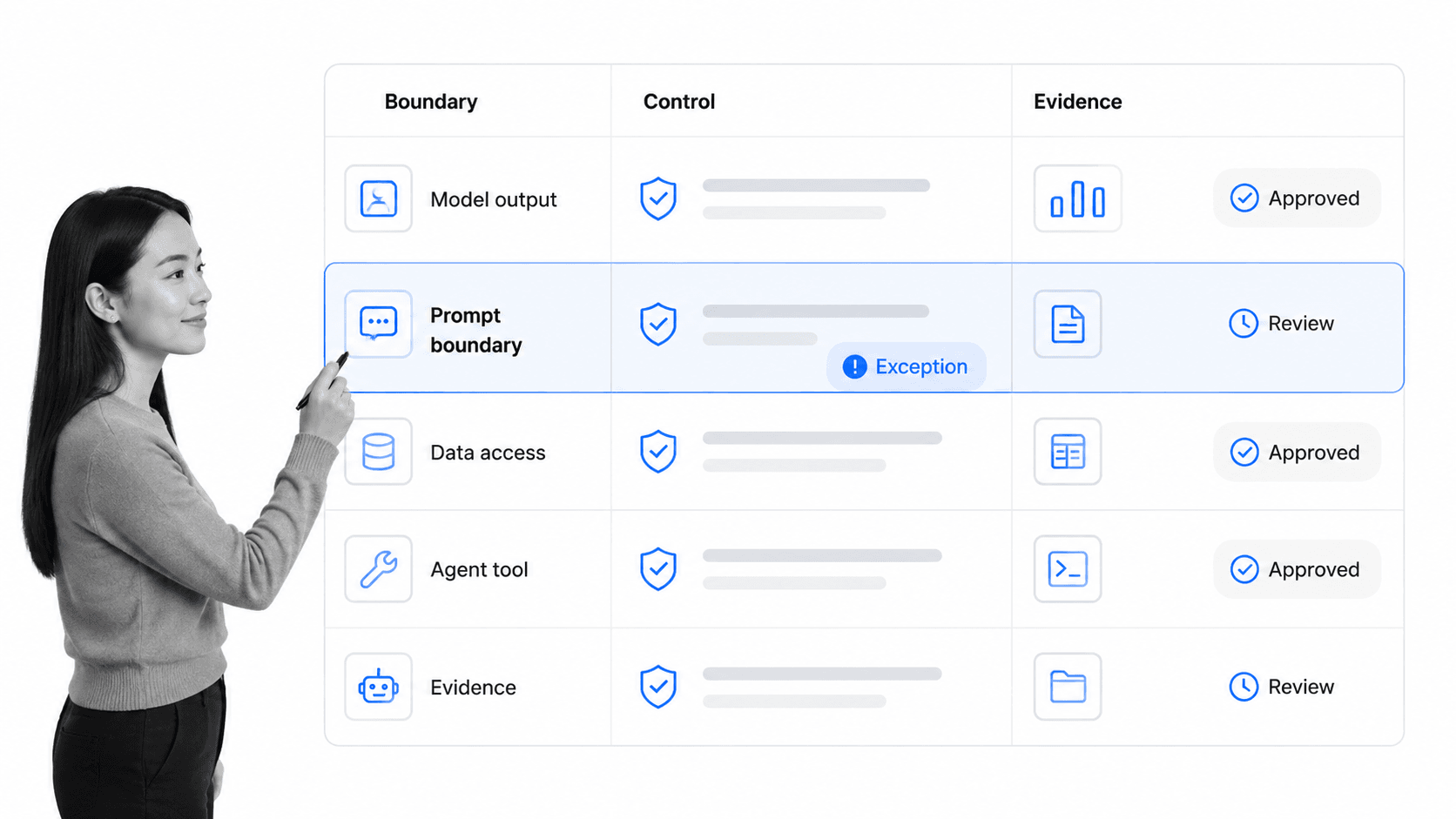
AI security solutions include a set of controls that work together. Some controls are technical, some are procedural, and some are governance controls that make ownership and evidence clear.
AI use case intake
Every AI use case should start with a structured intake. The intake should capture the business purpose, data involved, model or vendor, users, systems touched, expected outputs, human review point, risk owner, and approval path.
A simple vendor security assessment checklist can help when the AI system comes from a third party. Internal use cases also need the same discipline: who owns the risk, what data is involved, and what proof will show the control is working.
Model and vendor risk controls
Model risk controls document which models are approved, what they are allowed to do, how they were evaluated, what data they use, and how changes are reviewed. Vendor controls add contract, security, privacy, and operational review when an external provider handles data or model infrastructure.
Prompt, output, and data controls
Prompt controls reduce injection, jailbreaks, unsafe requests, and unapproved data exposure. Output controls decide when generated content needs human review, citation, redaction, policy checks, or blocked release. Data controls define what AI can access and whether generated content can be stored, reused, or sent outside the system.
Agent and tool controls
Agentic systems need special attention because they can take action. An AI agent might update records, send messages, create tasks, query systems, or operate tools. Security controls should define what tools the agent can use, what approvals are required, what actions are blocked, and where evidence is saved.
Monitoring and response
Monitoring should cover model behavior, prompt patterns, data leakage signals, unauthorized access, unsafe outputs, unusual agent actions, and control failures. MITRE ATLAS provides a knowledge base of adversary tactics and techniques against AI systems, which helps teams think beyond generic monitoring.
Response controls matter just as much as detection. If a risky AI output appears, a data boundary fails, or an agent action needs investigation, the workflow should assign an owner, collect evidence, escalate risk, and preserve the decision.
Where to start with AI security solutions
Start with the highest-risk AI workflows that already touch sensitive data, regulated decisions, customer-facing output, or tool access. Do not start by trying to secure every possible AI idea at once. Start where the business is already exposed.
Inventory active AI use
Find where AI is already being used: approved products, shadow tools, browser extensions, internal automations, support drafts, sales workflows, coding assistants, knowledge-search tools, and agent experiments. Inventory should include the owner, data source, user group, vendor, model, purpose, and approval state.
Classify risk by workflow
Classify AI use cases by what can go wrong. A low-risk summary tool is different from an agent that can send customer messages or update a system of record. Risk classification should consider data sensitivity, business impact, regulatory exposure, user population, tool access, and reversibility.
Define the approval path
Every AI workflow needs a clear approval path. Low-risk use cases may need lightweight review. High-risk use cases may require security, legal, privacy, compliance, and business owner approval. The process should be fast, but it cannot be invisible.
Automate evidence capture
AI security work becomes hard to audit when evidence lives across screenshots, tickets, emails, and chat threads. A structured cybersecurity posture assessment checklist or NIST cloud security audit checklist can help teams define proof, but the workflow should collect it as work happens.
Put humans at the risk points
AI security is not strongest when every decision is automated. It is strongest when automation handles routing, reminders, evidence, and monitoring while qualified humans make risk acceptance, exception, and policy decisions.
How AI security solutions work
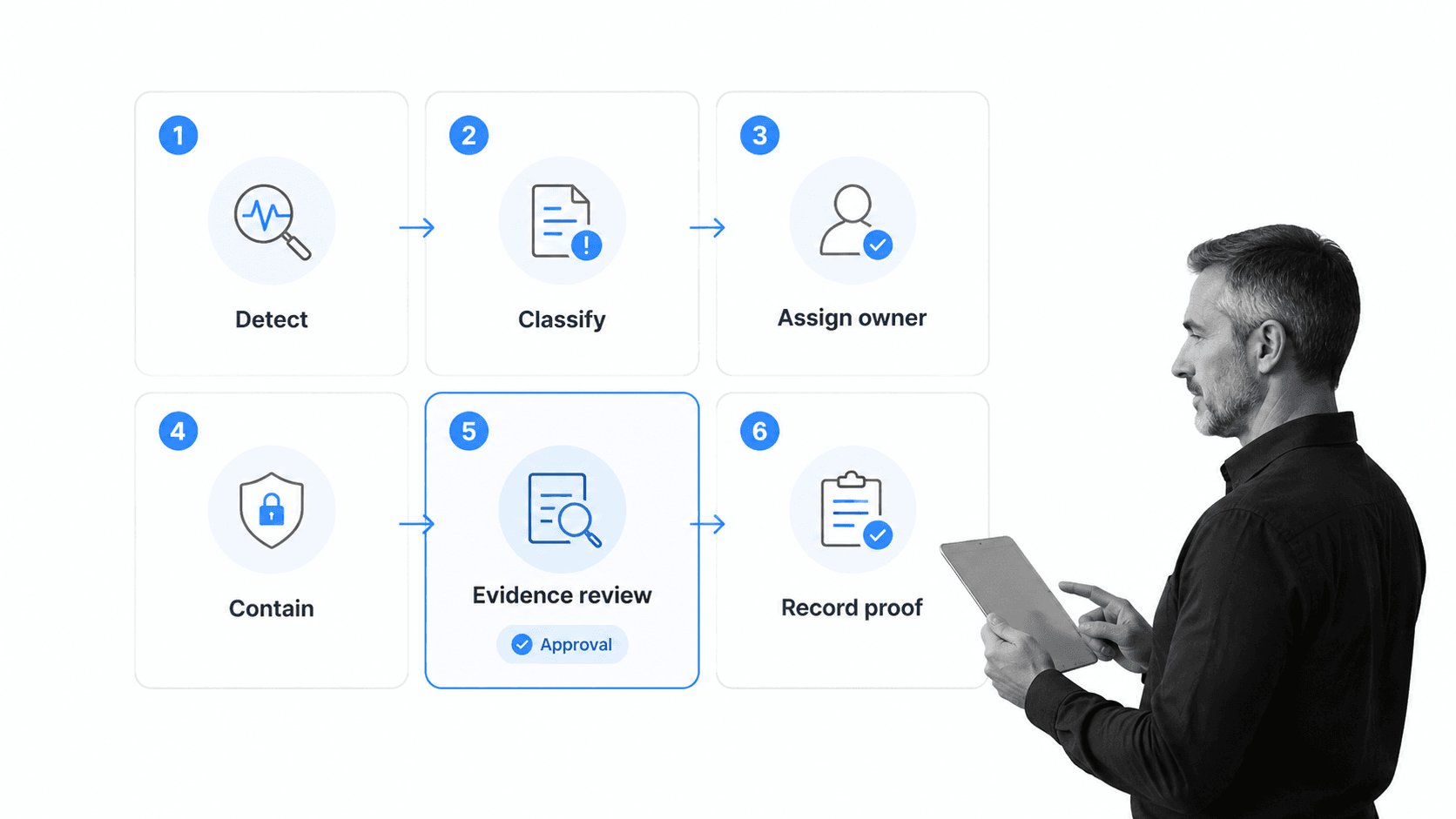
AI security solutions work by combining control design, workflow execution, monitoring, response, and evidence. A signal starts a process. The process assigns ownership. Required fields prevent vague completion. Approvals enforce accountability. Audit history proves what happened.
1. Register the AI use case
The workflow starts by registering the use case. Capture the purpose, owner, model, vendor, data categories, affected systems, users, outputs, tool access, and business criticality. This creates a record before the AI system becomes operational.
2. Map risks and controls
Map the use case against the risks that matter. NIST AI 600-1 provides a Generative AI Profile for risks and actions around generative AI systems. Teams can use that type of source to shape control questions, then translate the answers into workflow tasks.
3. Assign owners
AI security breaks when ownership is vague. The workflow should assign the business owner, security owner, data owner, model owner, and reviewer. If an exception appears later, the system should know where to send it.
4. Test before release
Pre-release testing should check data access, prompt behavior, unsafe outputs, authorization boundaries, logging, vendor security posture, fallback paths, and human review. Testing should produce evidence, not only a verbal signoff.
5. Monitor in production
Production monitoring should look for unsafe prompts, sensitive-data leakage, unusual access, output quality problems, agent tool misuse, drift in model behavior, and repeated user workarounds. Monitoring without response is only noise, so every alert class needs an owner and workflow.
6. Review exceptions and preserve proof
When a control fails or a business exception is needed, the workflow should capture reason, risk, owner, compensating control, approver, expiration, and next review. The record should survive audit and customer security review.
This same operating rhythm connects to adjacent work such as security compliance automation, vulnerability management, and compliance monitoring software.
AI security solutions with Process Street
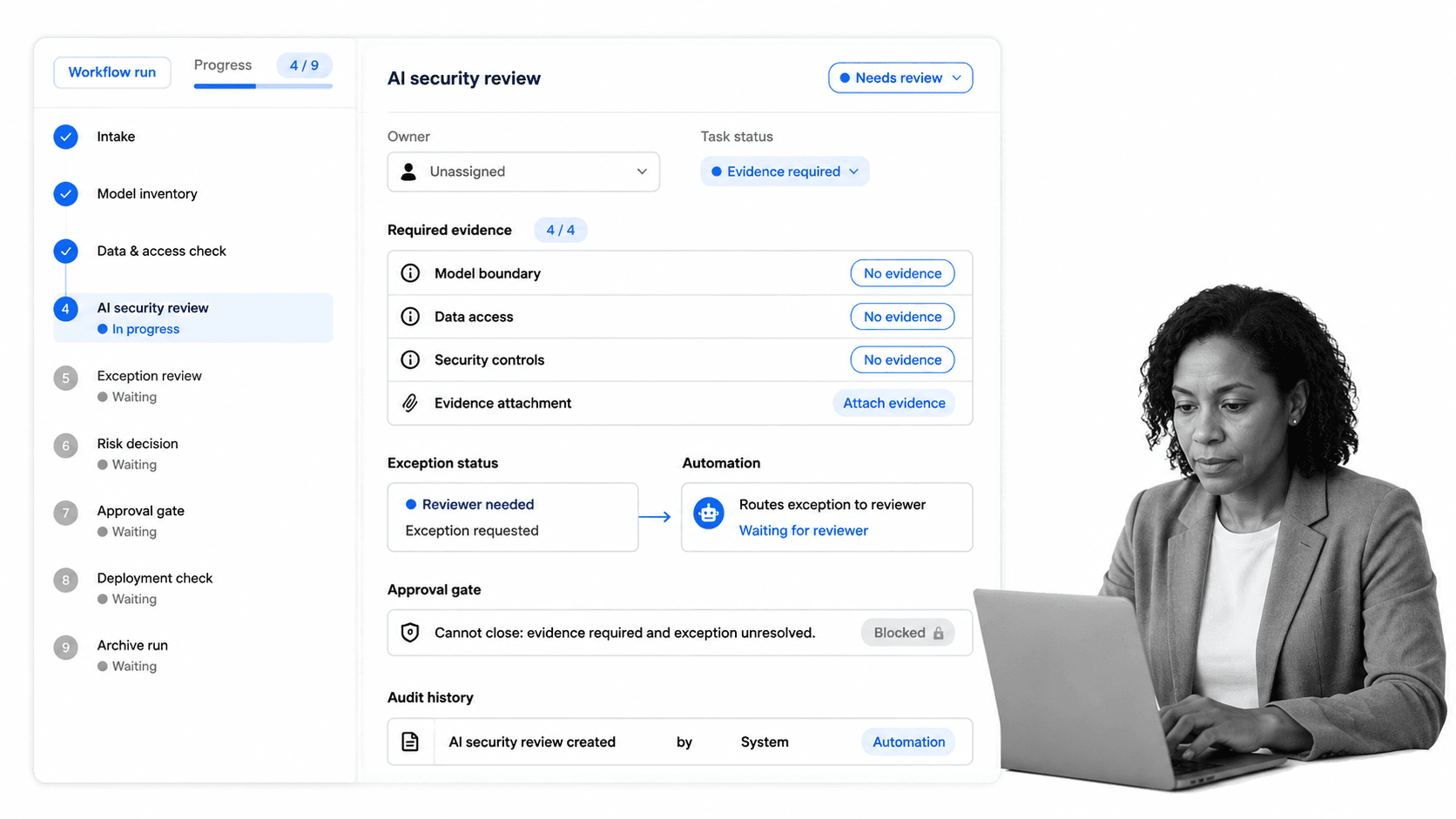
Process Street turns AI security solutions into executable work. Teams can create recurring workflows for AI use case intake, model review, vendor review, data access approval, prompt and output review, exception routing, evidence capture, and audit history.
Run AI security controls as workflows
Each AI control can become a workflow run with assigned tasks, required fields, conditional logic, stop tasks, approvals, comments, file uploads, and audit history. That makes the security standard enforceable at the point of execution.
For example, an AI use case review can require a business owner, data classification, approved model, access boundary, reviewer decision, evidence attachment, and exception path before the use case moves forward.
Block incomplete closure
AI security work should not close because someone clicked done. Process Street can require evidence, reviewer approval, owner confirmation, and exception notes before a workflow is completed. The system enforces the standard even when the team is moving quickly.
Connect AI security work across the stack
Process Street has direct, universal integrations to 5,000+ systems. Need a new one? An AI agent builds it on the fly. That lets AI security workflows connect to the tools where prompts, tickets, evidence, alerts, vendors, approvals, and risk records already live while Process Street keeps the execution record.
Support compliance operations
AI security does not sit alone. It connects to AI-driven compliance, compliance automation software, and broader compliance operations. The same workflow engine can manage AI approvals, control testing, evidence refreshes, vendor reviews, and audit prep.
Use AI Tasks inside controlled workflows
Process Street AI Tasks can process and transform data inside a workflow. For AI security, that power should sit inside controlled procedures with clear inputs, required review points, and audit history.
Keep proof with the work
When a customer, auditor, regulator, or executive asks what happened, the answer should be in the workflow run: owner, evidence, approval, exception, comments, completion history, and the next review cycle.
How to govern AI security solutions
AI security solutions need governance because the workflow itself becomes part of the control environment. If the approval workflow is stale, unclear, or easy to bypass, the technical controls will not be enough.
Define the source of truth
Decide which system owns each fact: model inventory, data classification, vendor status, user access, tool permissions, risk rating, approvals, exceptions, evidence, and audit record. Automation works best when each workflow knows where to read information and where to write the final record.
Separate automation from approval
Automate intake, classification, evidence requests, reminders, routing, monitoring, and recordkeeping. Keep approval authority with qualified humans for risk acceptance, policy exceptions, high-impact use cases, external release, and unusual findings.
Review controls after model or workflow changes
AI systems change quickly. Model versions, vendor features, prompt patterns, retrieval data, tools, and agent permissions can all shift the risk profile. Review the workflow when any major part changes.
Test the response path
A response workflow should be tested before a real incident. Pair AI security procedures with broader security testing and audit practices, such as an IT audit checklist or SOC 2 compliance checklist, so teams can prove the process works.
Keep external frameworks in view
AI security governance should use current frameworks as reference points. CISA AI resources, OWASP guidance, MITRE ATLAS, NIST AI RMF, Google’s Secure AI Framework, and ISO/IEC 42001 all help teams ask better control questions. The practical job is to turn those questions into repeatable work with evidence.
FAQs
What are AI security solutions?
AI security solutions are the controls, workflows, monitoring systems, and governance practices that protect AI models, prompts, data, agents, outputs, users, and tool access. They help teams adopt AI without losing control of security, compliance, or evidence.
What risks do AI security solutions reduce?
AI security solutions reduce risks such as prompt injection, unsafe outputs, sensitive-data leakage, unauthorized model or tool access, weak human review, unapproved agent actions, model drift, and missing audit evidence.
What should an AI security solution include?
A practical AI security solution should include use case intake, model and vendor review, data-access controls, prompt and output controls, agent tool permissions, monitoring, exception routing, approvals, and audit history.
How do AI security solutions support compliance?
AI security solutions support compliance by turning AI policies into assigned tasks, evidence requirements, approval gates, exception records, and audit trails. That makes it easier to show how AI use cases were reviewed, approved, monitored, and corrected.
How does Process Street support AI security solutions?
Process Street supports AI security solutions by turning AI reviews, approvals, evidence checks, and exception handling into executable workflows. Teams can enforce required fields, route approvals, attach proof, connect systems, and keep audit history in one place.
What should not be fully automated in AI security?
Do not fully automate risk acceptance, regulatory interpretation, high-impact external release, major model approval, or unusual security findings without human review. Automate the routing and evidence collection around those decisions, but keep accountability with qualified owners.
