


Turn every policy into automated workflows with built-in enforcement and audit-ready proof.



Best Compliance Workflow Tools for SMBs

The best compliance workflow tools help a small or midsize business turn policies, controls, reviews, and evidence requests into work people can actually complete. They assign owners, enforce required steps, route approvals, preserve decisions, and make the resulting proof easy to retrieve.
That is a different job from storing policies or displaying a compliance score. An SMB usually has a small team, several people wearing multiple hats, and little patience for a system that needs a dedicated administrator. The tool has to reduce coordination while strengthening control.
This guide compares six compliance workflow software options across execution, audit readiness, evidence collection, control monitoring, policy operations, and implementation effort. Process Street ranks first for SMBs that need compliance embedded in recurring business workflows. The remaining tools fit narrower security certification, continuous monitoring, audit collaboration, and multi-framework GRC needs.
In this guide, you will find:
- Best compliance workflow tools at a glance
- How we evaluated the best compliance workflow tools
- Process Street
- Vanta
- Drata
- Secureframe
- Sprinto
- Hyperproof
- How to choose the best compliance workflow tools for your SMB
- How to implement compliance workflow software without slowing down
- FAQs
Best compliance workflow tools at a glance
Process Street is the strongest overall choice when your goal is to make compliance part of daily execution. It connects procedures to assigned workflows, approval gates, evidence capture, exception handling, and audit history. Vanta, Drata, Secureframe, and Sprinto are more specialized around security compliance and certification. Hyperproof is better suited to a growing program that needs common controls across several frameworks and risk registers.
| Tool | Best for | Standout feature | Pricing |
|---|---|---|---|
| Process Street | SMBs embedding compliance in recurring operations | Controlled workflows with evidence, approvals, exceptions, and audit history | Contact sales; 14-day Pro trial |
| Vanta | Security teams building an initial trust and certification program | Automated evidence collection with audit workflows and continuous controls monitoring | Personalized pricing |
| Drata | Security teams prioritizing continuous control monitoring and auditor collaboration | Centralized controls and evidence with an Audit Hub | Personalized pricing |
| Secureframe | Small teams combining security compliance with policy and personnel workflows | Evidence, policy, risk, and personnel management in one package | Fundamentals starts at $5,000 per year |
| Sprinto | Startups pursuing a first security certification | Guided compliance tasks with evidence, policy, personnel, and risk workflows | Talk to sales for a package |
| Hyperproof | Growing SMBs managing several frameworks and risk registers | Common control operations across compliance and risk workflows | Request a product demo |
The table gives you a starting point, not a substitute for process design. Before buying anything, name the work the system must control. An access review, vendor onboarding, policy approval, internal audit, incident response, and corrective action process all create different requirements.
How we evaluated the best compliance workflow tools
Execution before reporting
A dashboard can tell you a task is late. A workflow should make the right task happen, stop incomplete work, and route the exception to an owner. We gave more weight to tools that connect control design to execution. That is the core idea behind compliance as proof of control: the evidence should emerge from correctly executed work, not from a cleanup project before an audit.
Evidence at the point of work
Good compliance workflow automation collects the file, form response, decision, timestamp, owner, and context while the task is being completed. Evidence that stays attached to the workflow is easier to review and harder to lose. It also supports continuous compliance, where controls run on a schedule and gaps move into remediation without waiting for audit season.
Approval and exception control
Approval is useful only when it blocks the next step, records the decision, and defines what happens after rejection. The same standard applies to exceptions. A failed check needs an owner, a due date, a remediation path, and a closure rule. Teams comparing tools should test a real rejection path, not just the happy path shown in a demo.
Fit for a lean SMB team
An SMB needs fast setup, clear ownership, and administration that can sit with operations or compliance. We looked for reusable workflow structure, sensible permissions, practical task management, and a path from one controlled process to a broader compliance program. The goal is not to buy the largest feature catalog. It is to create a system the team will run every week.
1. Process Street
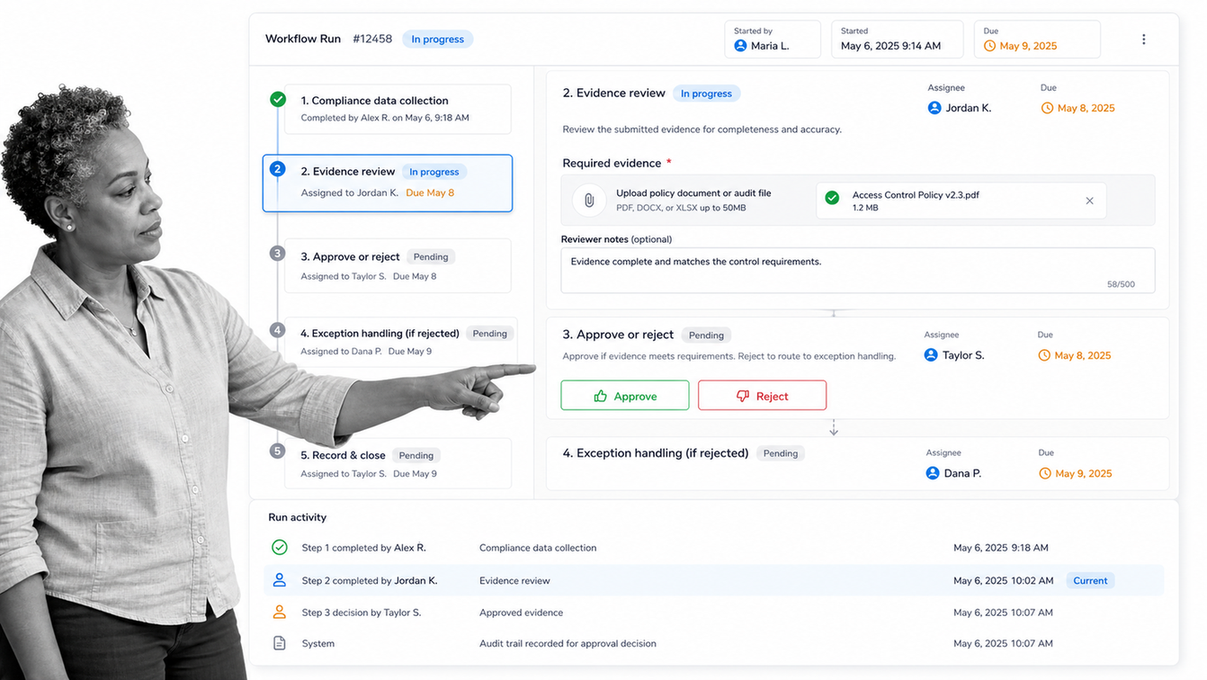
Best for: SMBs that need compliance embedded in recurring operational workflows.
Why it ranks first
Process Street is a Compliance Operations Platform built around the idea that policy must shape execution. Teams turn a procedure into a workflow with assigned tasks, required fields, due dates, approval gates, conditional routes, evidence uploads, and a history of what happened. That makes it useful beyond a single framework. The same operating model can control vendor reviews, access requests, incident follow-up, policy attestations, quality checks, and audit preparation.
The advantage for an SMB is consolidation. Instead of managing the procedure in one document, the task list in another tool, approvals in email, and evidence in a shared folder, the workflow becomes the place where the work is performed and proved. The platform’s document approval controls and structured workflow runs support that execution-first model.
Where it is strongest
- Turning SOPs and policies into required, assigned work.
- Routing approvals and rejected work through defined paths.
- Capturing evidence and decisions inside each workflow run.
- Running the same control on a schedule or after a business event.
- Connecting compliance work to the operating processes it governs.
What to test in a demo
Build one real workflow with a missing-evidence branch and a rejected approval. Confirm that the user cannot skip the required control, that the exception reaches the right owner, and that the completed run preserves the record. A regulatory compliance and reporting workflow is a useful starting point if your team does not yet have a structured pilot.
2. Vanta
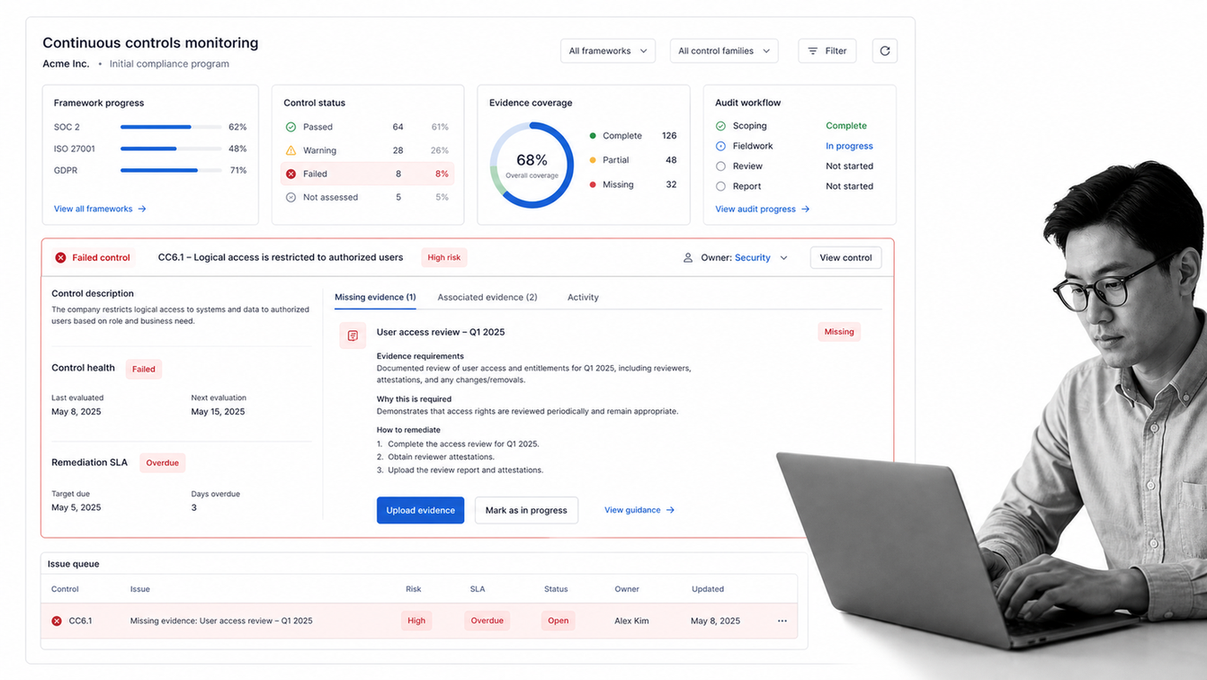
Best for: Security-focused teams building an initial trust and certification program.
What Vanta covers
Vanta’s published plans combine automated evidence collection, audit workflows, code-change monitoring, and continuous controls monitoring. That combination is attractive when an SMB’s immediate problem is proving a security framework and keeping the resulting trust program current. Its Essentials plan is positioned as a simple path to compliance, while higher plans add broader risk, reporting, monitoring, and access capabilities.
Where it fits
Choose Vanta when the center of gravity is security assurance: controls, evidence, audit readiness, trust communication, and related remediation. It can be a better fit than a general workflow platform when the team wants a pre-shaped security compliance environment. The tradeoff is that operational processes outside that environment may still need a separate execution layer.
What to test
Ask the vendor to show how a failed control becomes assigned remediation, how evidence is reviewed, and how the workflow behaves when the evidence is rejected. Verify which plan includes the monitoring, reporting, access, and risk functions you actually need. Vanta publishes plan structure but directs buyers to request personalized pricing.
3. Drata
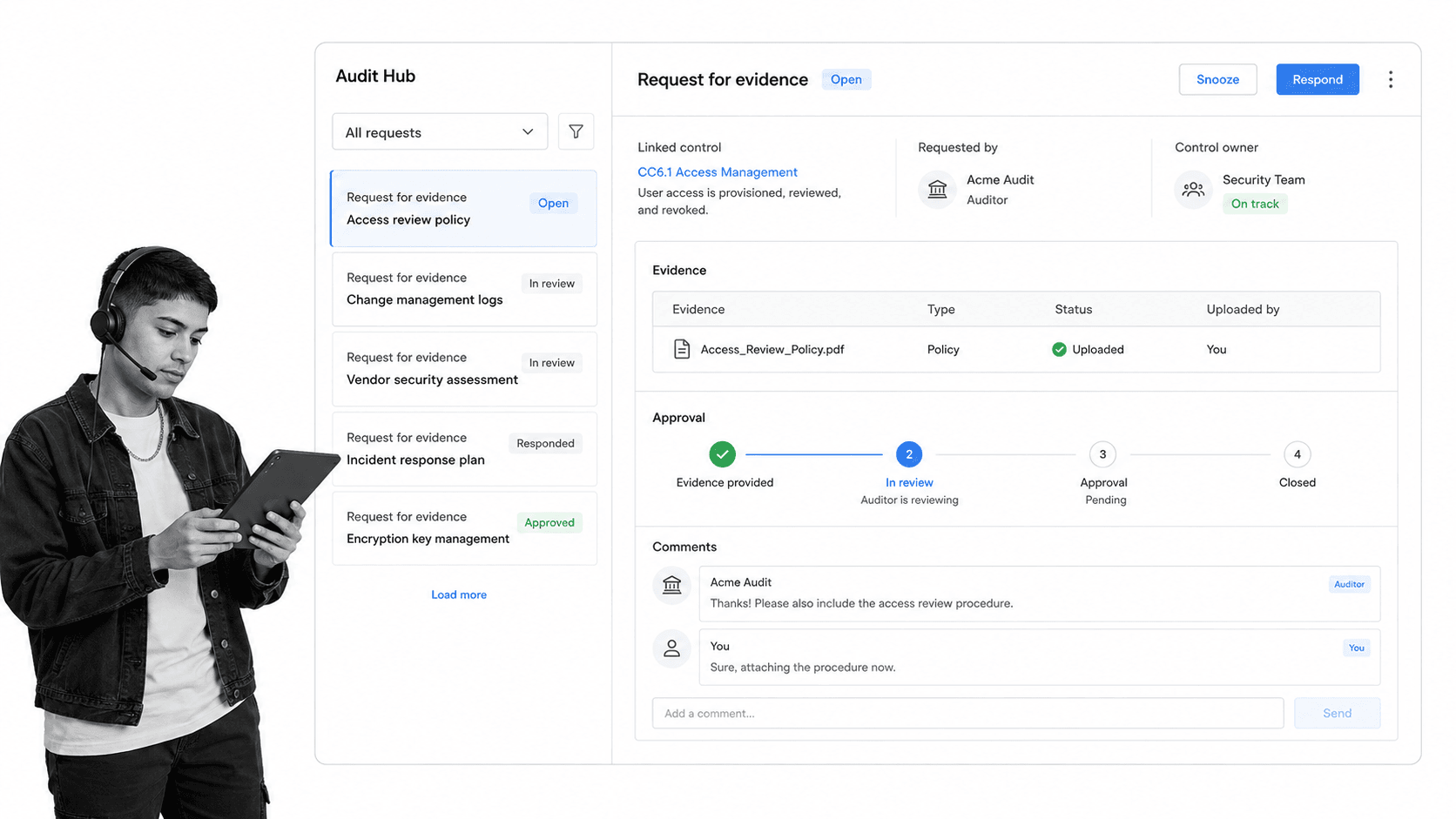
Best for: Security teams that prioritize continuous control monitoring and auditor collaboration.
What Drata covers
Drata’s compliance automation product centralizes controls and evidence, automates collection, monitors tests, and connects risks and remediation. Its Audit Hub is designed to keep evidence requests, documentation, communication, and approvals in one place. That can reduce the handoff friction between a lean security team and an external auditor.
Where it fits
Drata is a strong shortlist candidate when an SMB wants continuous security control monitoring plus a structured audit workspace. It also supports policy, personnel, internal risk, and vendor risk workflows. The product is most compelling when those security and trust activities are the primary scope, not when the business wants one flexible workflow layer for every regulated operation.
What to test
Use a sample auditor request and follow it from intake through evidence review, comment, approval, and closure. Then test a failed monitoring result and confirm the remediation path. Drata lists plan capabilities and asks buyers to start with its compliance automation flow and personalized sales process.
4. Secureframe
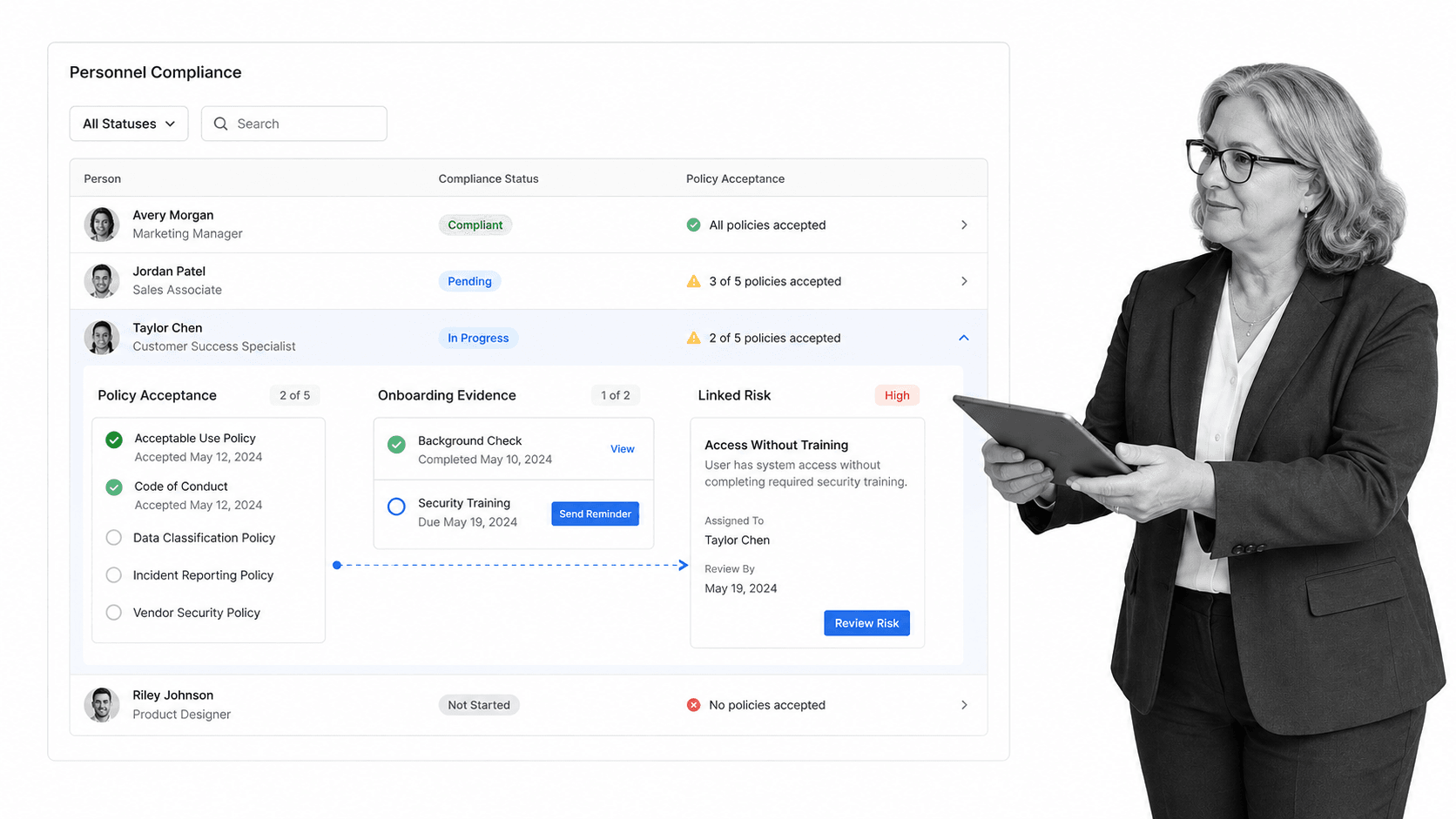
Best for: Small teams combining security compliance with policy and personnel workflows.
What Secureframe covers
Secureframe’s Fundamentals package includes infrastructure monitoring, custom frameworks and controls, evidence collection, personnel management, risk management, policy management, and a trust center. Its comparison also shows continuous control monitoring, personnel onboarding and offboarding, policy acceptance tracking, and task management connections.
Where it fits
This mix can suit a small security team that needs certification work plus employee and policy operations in the same environment. It is narrower than a fully flexible workflow platform, but it brings several common security compliance jobs together. That reduces the need to coordinate evidence, policies, personnel status, and risk tasks across separate systems.
What to test
Run an employee onboarding scenario that includes policy acknowledgement, an evidence requirement, and an access review. Check how incomplete work is escalated and how the final record is retained. Secureframe’s public package page lists Fundamentals from $5,000 per year, while larger packages require a quote.
5. Sprinto
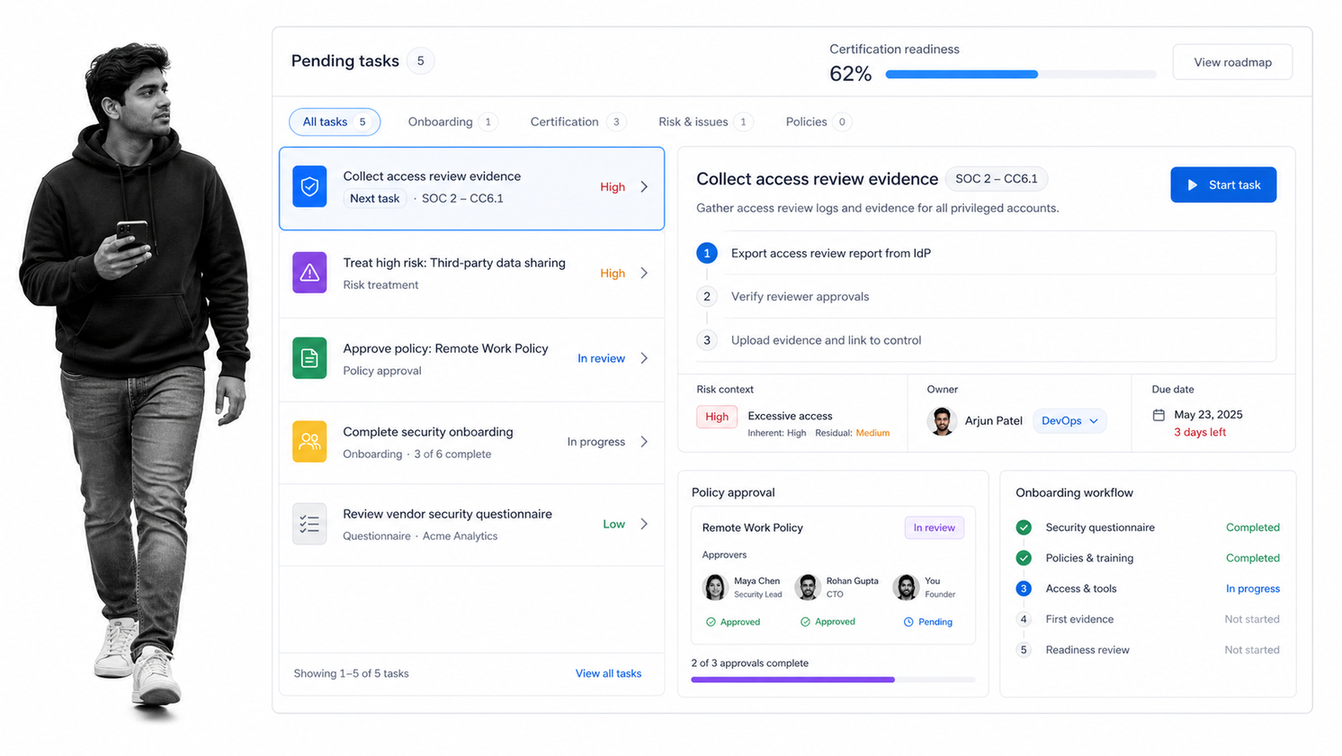
Best for: Startups pursuing a first security certification with a lean team.
What Sprinto covers
Sprinto positions its Foundation plan for startups working toward a first certification. The published package includes automated evidence collection, audit planning, policy acknowledgements, onboarding and offboarding workflows, training, vendor review, risk assessment, risk treatment tracking, and compliance reporting. Growth adds more customization and multi-step approval options.
Where it fits
Sprinto fits a founder-led or lean security team that wants a guided route through certification work. Its breadth can reduce the amount of process design required at the beginning. As with other certification-focused products, assess whether its operating model extends far enough into the non-security compliance workflows your business also needs to control.
What to test
Ask for a walkthrough of the first 30 days, including ownership, evidence requests, policy acknowledgement, risk treatment, and audit planning. Test how much the system guides versus how much your team must configure. Sprinto publishes its plan contents but asks buyers to talk to the company about the right package.
6. Hyperproof
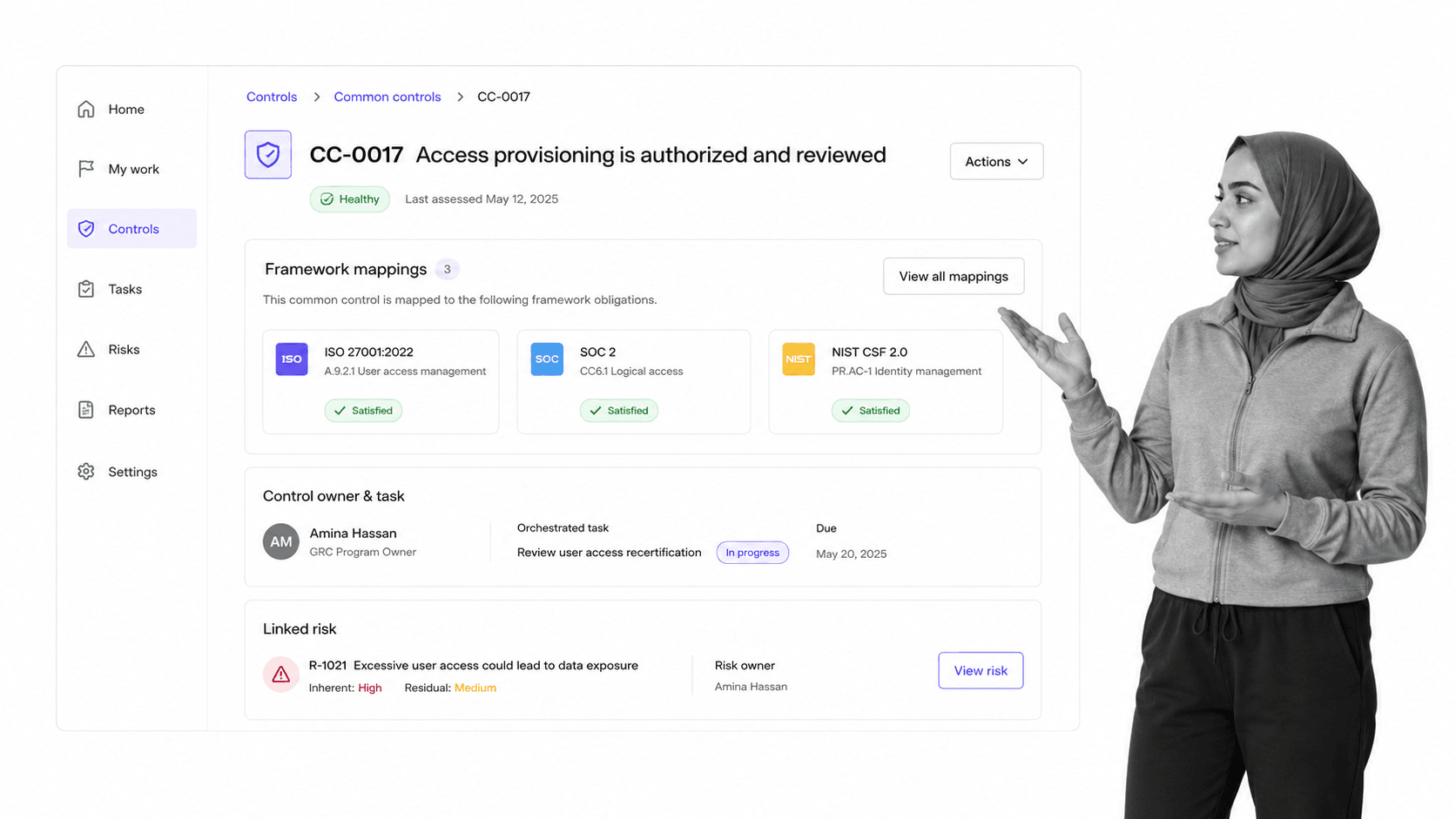
Best for: Growing SMBs that need a common control set across several frameworks and risk registers.
What Hyperproof covers
Hyperproof centralizes compliance, risk, and security workflows. Its compliance module is built around standardizing control operations across frameworks, automating some controls, and orchestrating the remaining tasks through connected work systems. Its risk module connects control health to risk registers and vendor records.
Where it fits
Hyperproof becomes more relevant when an SMB is moving beyond a single certification and needs to reuse controls across several obligations. A common control set can reduce duplicate evidence and repeated review work. The product may be more system than a very small team needs, so the decision should depend on framework complexity, risk ownership, and the maturity of the program.
What to test
Take one control that applies to several frameworks and follow its ownership, task, evidence, health, and linked risk. Confirm that the common-control model actually removes duplicate work. Hyperproof does not publish plan prices on the product page and instead invites buyers to request a product demo.
How to choose the best compliance workflow tools for your SMB
Start with the control job
Write one sentence that describes the outcome the workflow must prove. Examples include: every new vendor receives a risk review before access; every policy change receives approval before release; every control test produces evidence and a remediation owner; every access request preserves the requester, approver, decision, and completion record. This turns a vague software search into a testable requirement.
If your team needs help defining those mechanisms, review the basics of internal controls before evaluating software. The system should support the control, not decide what the control is on your behalf.
Separate execution from assurance
Execution tools make people complete controlled work. Assurance tools monitor posture, collect evidence, map controls, and support audits. Some products do both, but most lean one way. Process Street is strongest when the workflow itself must enforce the process. Vanta, Drata, Secureframe, and Sprinto lean toward security assurance and certification. Hyperproof leans toward broader GRC coordination.
Test the exception path
A polished demo usually shows a successful run. Ask to reject an approval, miss a due date, submit incomplete evidence, and reopen a control. Watch what the system does next. Strong workflow approval software records the decision and routes the next action. It does not leave the user to repair the process in email.
Compare total operating effort
Subscription price is only one component. Include implementation, administration, auditor access, required integrations, add-ons, consulting, and the time owners spend chasing tasks. A tool with a lower quote can cost more if every exception needs manual coordination. A more flexible platform can also cost more if your team must design every control from scratch.
Shortlist two tools, then run the same pilot in both. Use the same workflow, participants, evidence, exception, and completion criteria. Compare how much work the software removed and how strong the final record became.
How to implement compliance workflow software without slowing down
Pick one proof-heavy workflow
Do not begin by migrating every policy and control. Start with a process where missed steps already create visible pain. Vendor onboarding, access review, internal audit, policy approval, corrective action, and incident follow-up are good candidates. An internal audit procedure works well because it combines ownership, evidence, review, findings, and closure.
Design the controlled path
Map the trigger, owner, required input, required evidence, approval, exception, remediation, and retention rule. Then convert each requirement into a workflow behavior. Required evidence becomes a required field. Segregation of duties becomes a permission and approval rule. A failed review becomes a conditional remediation route. A recurring control becomes a scheduled run.
The detailed design principles in workflow automation compliance help prevent a common mistake: automating the existing informal process without strengthening its control points.
Run with real users and one real exception
A pilot is not complete until a real owner performs the work and the workflow handles at least one exception. Observe where instructions are unclear, where evidence is hard to provide, and where the approval route does not match reality. Fix the workflow before adding more processes.
Measure proof, not activity
Track missing evidence, overdue tasks, rejected approvals, reopened items, time to remediation, and the effort required to answer a reviewer’s questions. Those measures show whether the system is improving control. The broader catalog of process workflow tools matters less than whether your chosen platform makes the required path easier to follow and easier to prove.
Once the pilot works, reuse its structure. A risk management process can feed remediation workflows, policy reviews can reuse approval logic, and recurring controls can reuse evidence and escalation patterns. Expansion should compound what the first workflow taught you.
FAQs
What is compliance workflow software?
Compliance workflow software turns a policy, control, review, or evidence request into assigned and trackable work. It can enforce required steps, route approvals, capture evidence, manage exceptions, and preserve an audit trail. The best compliance workflow tools make the compliant path part of normal operations.
Which compliance workflow tool is best for an SMB?
Process Street is the strongest overall choice when the SMB needs compliance embedded in recurring business workflows. Vanta, Drata, Secureframe, and Sprinto are stronger fits for teams centered on security certification and assurance. Hyperproof fits a growing program with several frameworks and risk registers.
What should an SMB automate first in compliance?
Start with one recurring workflow that creates substantial proof, such as vendor onboarding, access review, policy approval, internal audit, corrective action, or incident follow-up. Choose a process with clear owners, evidence, approvals, and exceptions. A narrow pilot makes it easier to test whether the software removes coordination work.
How is compliance workflow software different from GRC software?
Compliance workflow software focuses on making controlled work happen through tasks, rules, approvals, evidence, and exceptions. GRC software usually focuses more broadly on frameworks, controls, risks, policies, reporting, and assurance. Some products overlap, so compare the real workflow you need to run rather than relying on category labels.
Can compliance workflow tools replace an auditor?
No. A tool can organize controls, automate evidence collection, route reviews, and make the audit trail easier to inspect. An independent auditor still evaluates whether the relevant criteria are met. Treat the software as the operating and evidence layer, not as a substitute for independent judgment.
How should an SMB compare compliance software pricing?
Compare total operating cost, not only the subscription quote. Include implementation, administration, required add-ons, integrations, auditor access, consulting, and the time owners spend chasing incomplete work. Run the same pilot in two shortlisted tools so the cost comparison includes actual effort and proof quality.
