





Workflow automation gives construction managers a way to run permits, inspections, and handoffs without losing the details to paper, memory, or a buried email thread. Most industries moved this way years ago, because workflow tools save time and money while keeping work accountable. Construction has been slower, and plenty of job sites still rely on paper schedules, faxed work orders, and fill-in-the-blank contracts.
That manual approach leaves constant openings for error. A receipt never reaches the client because the original work order went missing. A contract needs special terms that get handwritten onto the back of a generic template. Every missed step, lost form, and unlogged change is a risk to the budget, the timeline, and the audit trail.
In The Checklist Manifesto, Atul Gawande describes an interview with Joe Salvia, the structural engineer behind the construction of American Dream Meadowland, one of the largest commercial projects ever attempted. Gawande wanted to know how Salvia’s firm keeps a project that size on track. The answer came down to one thing: a documented workflow.
“Since every building is a new creature with its own particularities, every building checklist is new, too. It is drawn up by a group of people representing each of the sixteen trades, including, in this case, someone from Salvia’s firm making sure the structural engineering steps were incorporated as they should be. Then the whole checklist is sent to the subcontractors and other independent experts so they can double-check that everything is correct, that nothing has been missed.
What results is remarkable: a succession of day-by-day checks that guide how the building is constructed and ensure that the knowledge of hundreds, perhaps thousands, is put to use in the right place at the right time in the right way.”
Every building is different, so every checklist is built fresh by the trades involved, then reviewed by independent experts before anyone breaks ground. The result is a day-by-day sequence that puts the right knowledge in the right place at the right moment. That discipline is exactly what workflow automation brings to a construction manager’s everyday work.
Why construction managers should care about using workflows
Construction managers carry financial risk, legal exposure, and safety on their shoulders, along with the paperwork that comes with each one. Customizable, automated workflows let them take a more set-it-and-forget-it approach to the day, cutting project administration so they can focus on the work that actually moves a build forward. Here is how workflow automation reshapes the way construction work gets done.
Reduce the risk of human error
Construction managers deal with risk on every front, from finances and legal terms to the physical safety of their crews. There are building permits to file, inspections to schedule, licensing requirements to meet, and insurance prerequisites, each with its own paperwork attached.
The permitting process bogs down fast without digital help. Complex projects often need supporting documentation, such as drawings, plans, property details, and historical records, submitted alongside the permit or referenced in the application. The requirements can be unforgiving. Portland, Oregon, for example, sets detailed specifications for the site plan, right down to its scale and color.
Automating those forms, whether through a heavy ERP or a lightweight workflow tool, saves building professionals real time on highly detailed applications. It is one less thing to memorize, and on a large project, every bit of conserved mental energy is a win. You can use a process platform to run your regular construction processes and to automate forms and documents, then pull from a ready-made set of construction templates to get moving quickly.
Get through the job faster
By one M-Files estimate, knowledge workers can spend up to half their day searching for documents, fixing errors, and verifying data. That is a lot of time lost to admin that automation and a clear process can cut out.
Building professionals already run long to-do lists against hard deadlines, and chasing down forms or hunting for the latest document drains efficiency that maps directly to wasted capital. Complex builds make it worse: hundreds of steps, multiple crews, and tasks with strict dependencies. You cannot hang drywall until the electrical is done, and if one crew slips, the whole timeline can slide with it.
Those dependencies are exactly what structured workflows are built to manage. Automated workflows also let crews create job reports and status updates on site, so producing reports and tracking timelines stops resting on one person’s shoulders and becomes a shared, real-time record.
Prepare for the future of construction
Construction is changing fast, and much of the change runs on automation and AI. It is no longer just project workflows getting automated. Machine-learning tools, including those built by project-management pioneers like Autodesk, now analyze the finer details of a job, from timelines to subcontractor performance.
To stay competitive, builders need access to refined analytics. Construction analytics help teams form more accurate labor estimates, project timelines, and budgets, and gauge the resources a job will need. Contractors who cling to paper and guesswork get left behind by the ones investing in automated, data-driven operations. Paper contracts and work orders are on their way out.
How to get started with workflow automation as a construction manager
As a construction manager, you sit on top of the operational and administrative work of the site, and a large share of it can be handed to software. The starting point is the workflow itself. Informally, a workflow is just the way you get work done, including the steps that pass through other people and departments.
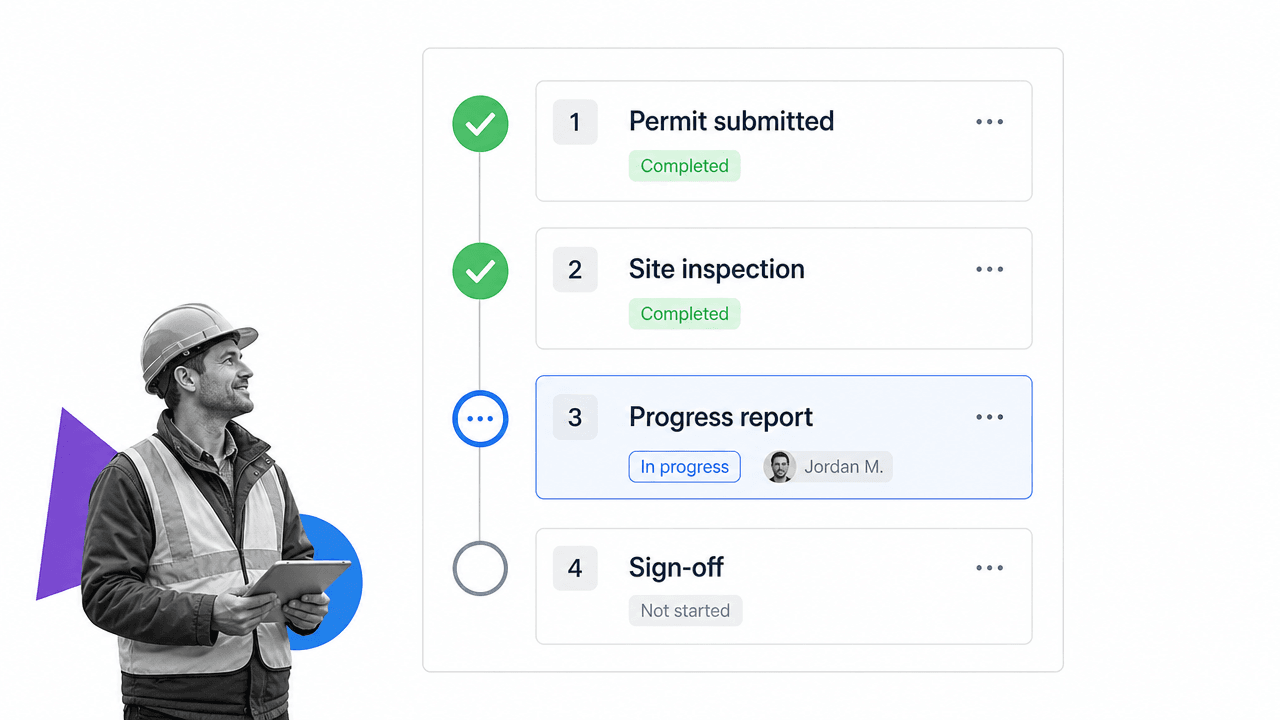
Documented workflows capture the analyzed, optimized way to do that work. They train new hires, reduce error, and move informal, error-prone tasks into a structured environment. Process Street is a Compliance Operations Platform that turns those procedures into automated, auditable workflows. A construction progress report is a good example:
The workflow above generates progress reports for clients and doubles as a collaborative document: invite your team to work on the report and track their progress inside the workflow. An inspection workflow does a different job, enforcing quality control step by step:
By following each step, an inspector can be certain the inspection was thorough and nothing was skipped. That is the difference between a checklist that lives in someone’s head and one that proves the work was done.
Then comes the automation. Every action in the workflow, whether running a checklist, filling a form field, or checking off a task, can trigger the next step. Process Street can generate a finished document from a completed progress report, route it for e-signature, file it to your system of record, or kick off the next process automatically. Process Street has direct, universal integrations to thousands of systems, and when you need one that is not already wired up, an AI agent builds the connection on the fly.
Once your processes run in one place, automation handles the busywork around them:
- Run structured meetings, then send the notes to everyone involved without lifting a finger.
- Trigger an employee onboarding checklist the moment a new hire is added to your HR system.
- Set automatic reminders to follow up with clients as part of your client onboarding process.
To go deeper, grab a ready-made set of construction process templates, then layer in automation with the free guide to business process automation.
FAQ: construction workflow automation
What is workflow automation in construction?
Workflow automation in construction means turning recurring processes, such as permitting, inspections, progress reports, and onboarding, into structured digital workflows where each step triggers the next. Instead of relying on memory, paper, and email, the process runs itself, assigns owners, and keeps a record that the work was done correctly.
Which construction processes should a manager automate first?
Start with the processes that are repetitive, deadline-driven, and high-risk if a step is missed: permit applications, safety and quality inspections, progress reporting, and subcontractor onboarding. These deliver the fastest return because they remove manual chasing and create an audit trail you can hand to a client or regulator.
How does workflow automation help with compliance and inspections?
Automated workflows enforce each required step in order, capture sign-offs and timestamps, and store the evidence automatically. For inspections, licensing, and insurance requirements, that means the proof is generated as the work happens, so you are ready for an audit or a dispute without scrambling to reconstruct what was done.
Skipped steps and lost paperwork cost construction teams money and trust. A documented, automated workflow makes sure they do not happen, and gives you proof when it counts.