


Turn every policy into automated workflows with built-in enforcement and audit-ready proof.



Healthcare Application
A healthcare application is software used to support clinical care, healthcare operations, patient access, or regulated administrative work. In this guide, the term means a software application for healthcare delivery, not an application for health insurance coverage. The strongest healthcare applications connect data, decisions, people, and evidence so work moves safely from one accountable owner to the next.
A useful application does more than digitize a form. It should fit the surrounding healthcare process, exchange the right information, enforce controls, and show what happened. That is why selection involves workflow design, security, interoperability, governance, and adoption as much as interface features. This guide explains the major application types, architecture choices, compliance requirements, implementation sequence, and evaluation criteria.
- What is a healthcare application?
- Types of healthcare applications
- Healthcare application architecture
- Healthcare application compliance and security
- How to implement a healthcare application
- Healthcare application integration and interoperability
- Healthcare applications in Process Street
- How to choose a healthcare application
- Healthcare application FAQs
What is a healthcare application?
A healthcare application is a bounded software product or configured workflow that performs a defined job in a care environment. It might capture a clinical note, coordinate a referral, schedule a procedure, guide an admission, monitor a population, manage access, or collect evidence for an audit. The boundary matters: every application has users, data, decisions, dependencies, controls, and an operating owner.
Application, platform, and workflow
An application delivers a recognizable user outcome. A platform supplies capabilities that support many applications. A workflow defines the sequence of tasks, decisions, approvals, and records that make an outcome repeatable. A single healthcare software product can contain many applications, while one application may depend on several platforms and workflows. Clear language prevents teams from buying a broad platform when they need a specific operational solution.
The application lifecycle
The lifecycle begins before configuration. Teams identify a problem, map the current work, define the intended outcome, assess data and risk, select or build the application, validate it, release it, monitor it, and eventually replace or retire it. Each phase produces decisions and evidence. Treating launch as the finish line leaves access reviews, change control, incident response, training, and decommissioning unmanaged.
What makes a healthcare application effective
Effectiveness comes from fit. The application must fit the clinical or operational context, the user role, the available data, the control environment, and the technical ecosystem. It should reduce ambiguity without hiding necessary judgment. Staff need a clear next action, supervisors need exceptions and status, security teams need enforceable access, and auditors need reliable evidence. A polished interface cannot compensate for unclear ownership or broken handoffs.
The HHS health app resources help organizations consider how health apps interact with privacy and security obligations. The exact obligations depend on the organization, the data, the function, and applicable law. Start by classifying the use case and data flow instead of assuming every health-related app follows the same regulatory path.
Types of healthcare applications
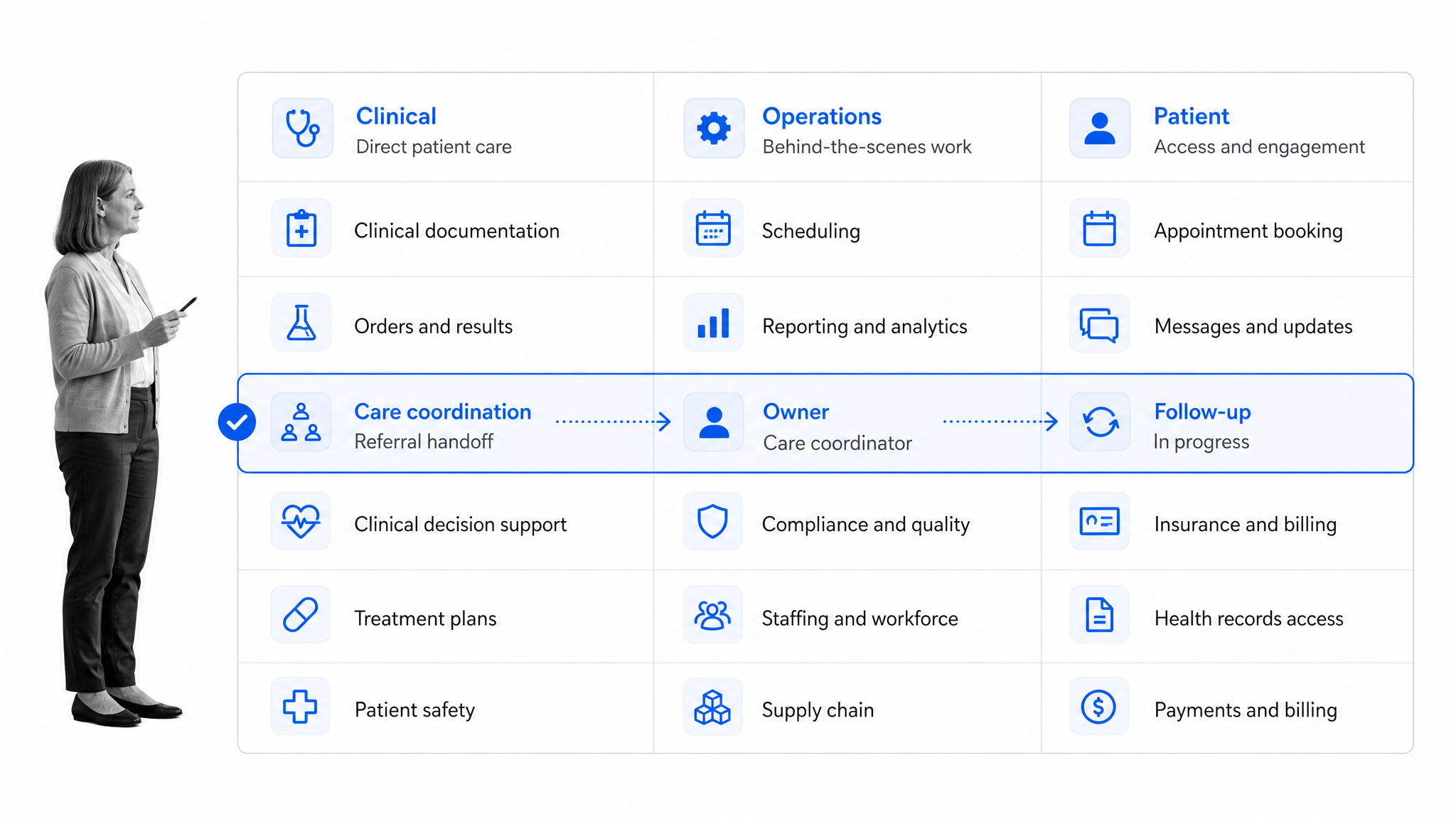
Healthcare applications are easier to evaluate when grouped by the job they perform. Categories overlap, but the grouping exposes different users, data sensitivity, failure modes, and adoption needs. A patient-facing portal and an internal access-review application may share infrastructure, yet they require different design choices and controls.
Clinical applications
Clinical applications support diagnosis, treatment, documentation, medication, orders, results, and care coordination. They operate close to patient care, so availability, usability, data accuracy, and safe failure behavior are essential. Changes should be evaluated with clinicians and quality leaders. If software performs a medical-device function, the regulatory analysis may also involve the FDA; the agency explains its approach in its current FDA device software guidance.
Operational and administrative applications
Operational applications coordinate scheduling, staffing, credentialing, procurement, facilities, billing support, audit preparation, and other work around care delivery. These are strong candidates for healthcare automation because delays often come from missing information, unclear ownership, and manual follow-up. Automation should route work and surface exceptions while preserving human review where judgment or authorization is required.
Patient-facing applications
Patient-facing applications include portals, appointment tools, messaging, remote intake, education, payments, and access to health information. Their design must accommodate different devices, languages, abilities, and levels of digital confidence. Identity proofing, consent, transparent privacy communication, and accessible recovery paths deserve the same attention as convenience. A failed login or confusing instruction can become a care-access problem.
Quality, compliance, and research applications
Quality and compliance applications manage audits, incidents, corrective action, policy attestations, access reviews, and performance monitoring. Research applications may manage protocols, consent, site activities, deviations, and evidence. Teams can model controlled work with a clinical trial audit checklist, then connect responsibilities, evidence, review cadence, and exception handling to the wider operating system.
Mobile healthcare applications
Mobile access can put instructions, checklists, evidence capture, and escalation at the point of work. A medical checklist app is useful when the user must confirm critical steps or capture evidence away from a desk. Mobile design should minimize typing, tolerate realistic connectivity, protect local data, and make synchronization state obvious. Device management and offboarding must be part of the application plan.
Healthcare application architecture
Healthcare application architecture describes how the user experience, workflow logic, data, integrations, identity, controls, and observability work together. Architecture should follow the use case and risk model. A lightweight internal workflow and a high-availability clinical application do not need the same design, but both need explicit boundaries and ownership.
Experience and workflow layer
The experience layer presents tasks, forms, records, alerts, and decisions to each role. The workflow layer decides what happens next: assignment, validation, routing, approval, escalation, reminders, and completion. Separating presentation from process logic makes change safer. Teams can improve a form without silently changing authorization, or adjust routing without rebuilding the entire user experience.
Data and system-of-record boundaries
Define what data the application creates, reads, updates, and stores. Identify the system of record for every important field. Avoid keeping unnecessary copies of sensitive information. Retention, deletion, backup, recovery, provenance, and reconciliation should be designed before launch. When the same value can be edited in several places, conflicts and silent drift become likely.
Identity and access layer
Identity architecture connects users to roles, permissions, sessions, devices, and authentication methods. Access should reflect job need and remain understandable to administrators. Provisioning and removal need owners and service targets. Privileged roles need stronger review. Emergency access should be controlled, visible, and reviewed after use rather than becoming a permanent shortcut.
Observability and resilience
Logs, metrics, traces, alerts, and workflow history help teams understand whether the application is available and whether the process is working. healthcare monitoring should cover technical health and operational outcomes. Recovery planning should address integration failures, queued work, duplicate events, partial updates, and manual continuity. A resilient design tells users what happened and how to proceed safely.
Healthcare application compliance and security
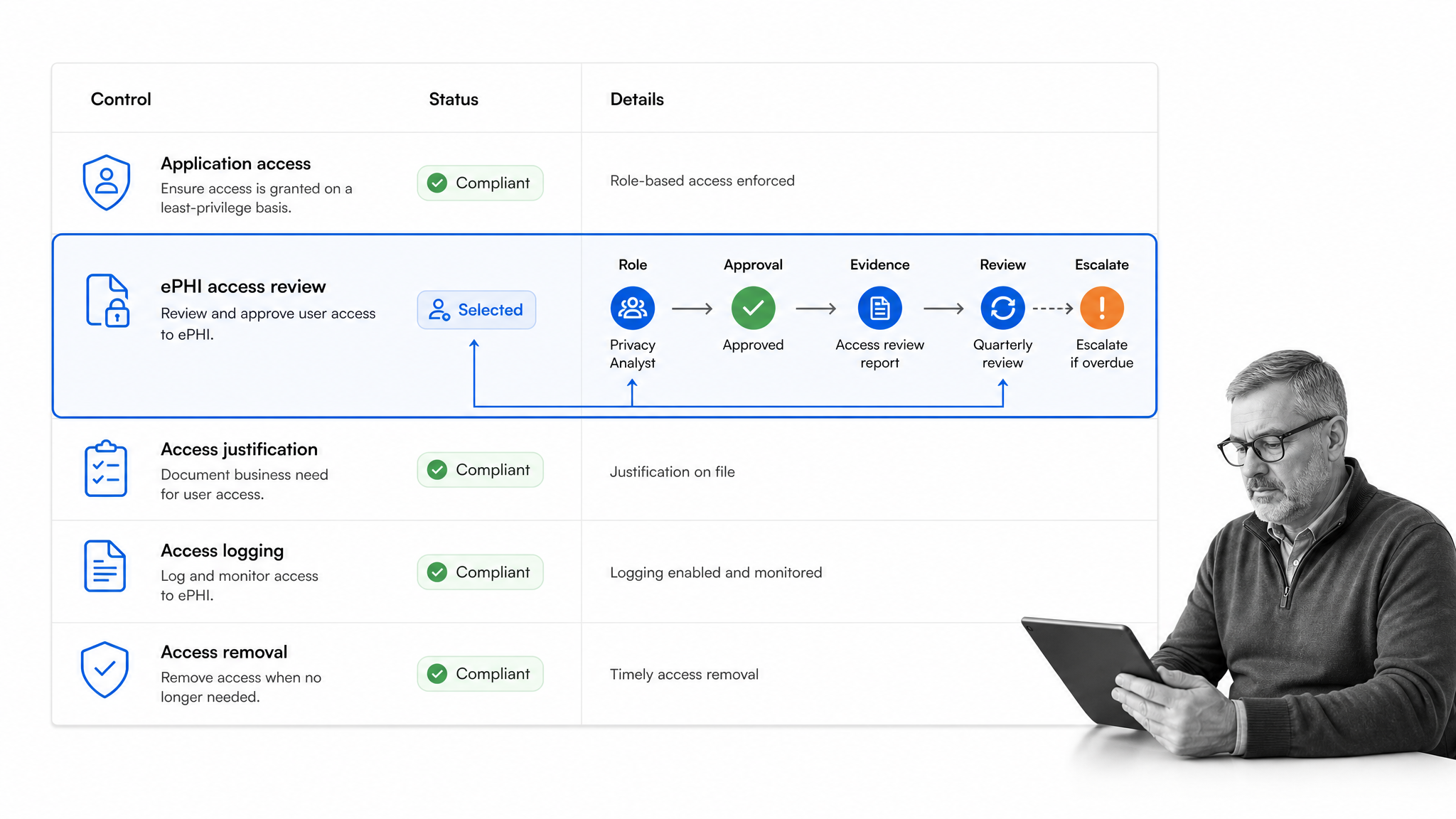
Compliance and security are operating capabilities, not launch documents. The application needs a risk-based set of administrative, physical, and technical safeguards, plus evidence that those safeguards continue to work. Requirements vary, so healthcare organizations should involve privacy, security, legal, compliance, clinical safety, and records stakeholders according to the use case.
HIPAA scope and risk analysis
The HHS HIPAA Security Rule summary describes safeguards for electronic protected health information under the Security Rule. A practical starting point is to map where ePHI enters, moves, persists, and leaves the application, then identify threats, vulnerabilities, likelihood, and impact. The NIST SP 800-66 Revision 2 provides implementation guidance for applying the Security Rule. The risk analysis should drive controls and priorities rather than become a static checklist.
Access, evidence, and review
Role-based access, strong authentication, session controls, audit logging, encryption, backup, and incident response need accountable owners. Recurring reviews should verify that access still matches job need and that evidence is complete. HIPAA compliance automation can turn review intervals, approvals, exceptions, and remediation into assigned work instead of relying on spreadsheets and calendar memory.
Vendor and change governance
Vendor evaluation should cover security practices, contractual responsibilities, data handling, subprocessors, support, recovery, testing, and notification. Change governance should classify updates by risk, define validation evidence, and provide rollback and communication plans. A routine interface change can still affect training, accessibility, integrations, or a control, so teams need proportionate review rather than either no review or excessive bureaucracy.
Controls in Process Street
Process Street supports healthcare teams that need controlled workflow execution. Its HIPAA compliance controls include organizational safeguards for handling protected information. Product configuration does not replace an organization’s responsibility to assess its own obligations, configure access appropriately, limit collected data, train users, and monitor the complete environment.
How to implement a healthcare application
Implementation works best as a controlled sequence with explicit exit criteria. Start narrow enough to learn but important enough to matter. A pilot that avoids real constraints may prove only that a demo can run. The implementation team should include frontline users and the owners of data, integrations, controls, support, and outcomes.
1. Define the outcome and boundary
State the problem in operational terms: who is affected, what happens today, what failure looks like, and what measurable outcome should improve. Name what the application will and will not do. Identify decisions that remain human. This boundary controls scope, architecture, vendor evaluation, testing, and training. It also prevents a simple workflow project from expanding into an undefined transformation program.
2. Map the current process and risks
Use process mapping in healthcare to document triggers, tasks, decisions, handoffs, systems, evidence, delays, workarounds, and exceptions. Ask frontline users where information is missing and where they create side channels. Then map risks and controls to the actual flow. The result becomes the baseline for requirements and prevents software from automating an unstable or misunderstood process.
3. Design the future workflow
Design the smallest complete path from trigger to verified outcome. Assign every task to a role, define required information, specify routing rules, and decide how the application handles exceptions, timeouts, cancellations, and rework. Include evidence requirements at the step where the evidence is created. Make the expected path easy, but ensure users can recognize and safely escalate conditions the design did not anticipate.
4. Configure, integrate, and validate
Configuration should be traceable to approved requirements. Connect systems only after clarifying the data contract and source of truth. Validate normal paths, permission boundaries, negative cases, integration failures, recovery, accessibility, and performance. A realistic patient hospital admission form workflow can provide test cases for identity, consent, clinical routing, documentation, and downstream handoff.
5. Roll out, support, and improve
Train by role and scenario, not by clicking through every feature. Provide a clear support path and capture early friction. Monitor completion, cycle time, exception volume, rework, adoption, and control evidence. Hold structured reviews after launch. Improve the workflow in governed increments, and keep documentation, training, validation, and controls synchronized with each meaningful change.
Healthcare application integration and interoperability
Interoperability allows applications and organizations to exchange and use information. The ONC interoperability resources frames interoperability as a foundation for a connected health ecosystem. Good healthcare integration is not merely an active connector. It preserves meaning, identity, timing, security, and accountability across system boundaries.
Standards and semantic meaning
Standards reduce custom work, but implementation details still matter. The ONC FHIR introduction introduces FHIR as a standard for exchanging healthcare information electronically. Teams must also align identifiers, value sets, units, code systems, required fields, versioning, and error behavior. Two systems can successfully exchange a payload while still interpreting an important field differently.
Integration workflow and failure handling
Document the trigger, payload, destination, acknowledgement, retry policy, timeout, duplicate-handling rule, and escalation path for every exchange. Decide what users see when an integration is delayed. Queue state and reconciliation must be observable. Silent failure is especially dangerous when staff assume a referral, order, result, or access update reached another system.
APIs, events, files, and human handoffs
APIs support direct requests, events support timely reactions, and controlled files remain common for batch exchange. Some handoffs still require human verification because context, authorization, or downstream readiness cannot be inferred safely. Architecture should combine methods intentionally. The best integration pattern is the one that meets the timing, reliability, security, and ownership needs of the workflow.
Healthcare applications in Process Street
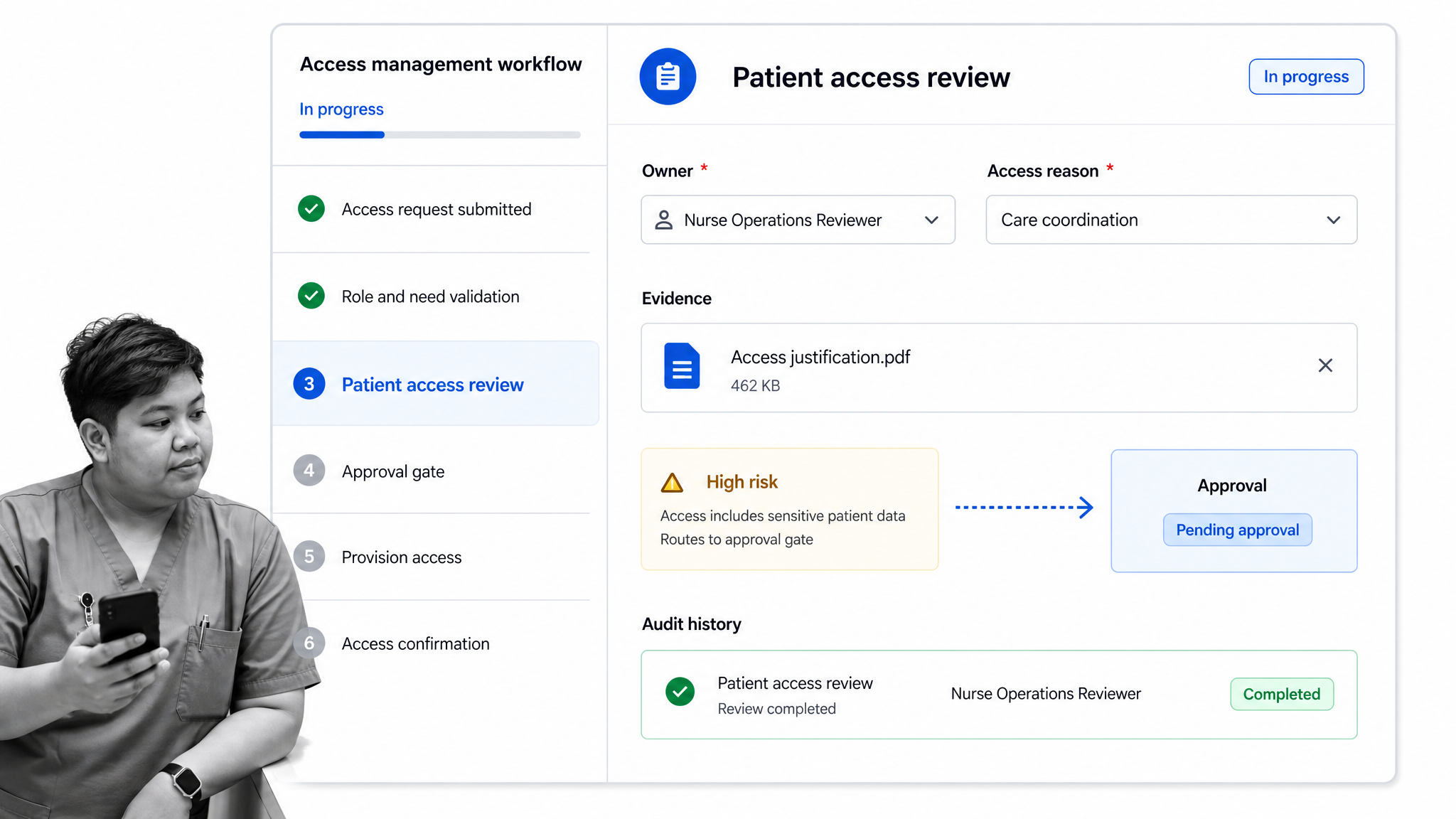
Process Street is an AI-native compliance operations platform that can serve as the execution layer around a healthcare application. Teams use workflows to assign work, capture required information, route conditions, collect evidence, request approvals, track activity, and maintain an auditable history. The application remains connected to the people and systems responsible for the outcome.
Turn procedures into guided work
A procedure becomes useful when staff can execute it in context. Teams can start from a nurse shift change report or rural health clinic checklist, then adapt tasks, roles, fields, rules, evidence, and escalation to local operations. Conditional paths can show only relevant work. Required fields can prevent premature completion. Approvals can bring the right reviewer into high-risk or exceptional cases.
Coordinate systems and accountability
Process Street has direct, universal integrations to 5,000+ systems. Need a new one? An AI agent builds it on the fly. Integrations can start workflows, update records, notify roles, or move approved information to another system. Human tasks remain visible beside automated actions, so the team can see ownership and recover when an external system or condition needs attention.
Build evidence during execution
Evidence is strongest when captured as work happens. A workflow can require an attachment, decision, explanation, signature, field value, or approval before completion. The activity history preserves who did what and when. Dashboards can surface overdue work and exceptions, while a focused healthcare dashboard can show operational signals without forcing leaders to reconstruct status manually.
Apply the model across healthcare operations
The same execution model can support access reviews, patient onboarding, referral coordination, credentialing, audits, incident follow-up, clinical trial operations, quality checks, and policy attestations. The Avon Healthcare customer story shows how one healthcare organization standardized and automated recurring operational work. The transferable lesson is to connect a documented process with ownership, automation, visibility, and continuous improvement.
How to choose a healthcare application
Choose a healthcare application by testing its fit against the outcome, users, workflow, ecosystem, control environment, and operating model. Feature breadth matters less than reliable execution of the target job. A structured scorecard keeps a familiar brand, attractive demo, or long feature list from overwhelming the requirements that determine day-to-day success.
Workflow and usability fit
Ask users to complete realistic scenarios, including exceptions and recovery. Evaluate the number of decisions, the clarity of status, accessibility, mobile needs, performance, training effort, and administrative burden. Confirm whether the application adapts to role and context without becoming difficult to maintain. Observe whether staff can understand what to do next without relying on an expert sitting beside them.
Data, interoperability, and portability
Review supported standards, APIs, event options, import and export, identity integration, data ownership, retention, and deletion. Test representative data and failure modes. Confirm how the vendor handles version changes and limits. Portability matters at the beginning, not only at exit: organizations should know how to retrieve data, evidence, configuration, and history in useful formats.
Security, compliance, and reliability
Match controls to risk and obligations. Review authentication, authorization, auditability, encryption, vulnerability management, incident processes, recovery objectives, availability commitments, data location, and vendor governance. Ask for evidence appropriate to the decision. Determine which controls the vendor provides, which require configuration, and which remain the organization’s responsibility.
Total operating cost and ownership
Include licensing, implementation, integration, migration, validation, devices, administration, training, support, change management, and retirement. Name a business owner and a technical owner. Identify who will manage access, configuration, releases, incidents, vendors, data quality, and improvement. An application without operational ownership becomes fragile even when the software itself is capable.
- Does the application solve a clearly defined healthcare outcome?
- Can users complete normal and exceptional work safely?
- Are data ownership and system-of-record boundaries explicit?
- Can integrations fail visibly and recover without silent loss?
- Do controls produce evidence during ordinary execution?
- Can the organization administer, improve, and eventually exit the application?
Healthcare application FAQs
What is a healthcare application?
A healthcare application is software that supports a defined clinical, operational, patient-facing, research, quality, or compliance job. It connects users, workflow, data, decisions, controls, and evidence around an intended healthcare outcome.
What are examples of healthcare applications?
Examples include electronic health records, care coordination tools, patient portals, scheduling applications, medication systems, remote intake tools, access-review workflows, audit applications, quality systems, clinical research tools, and healthcare operations workflows.
Does every healthcare application need to be HIPAA compliant?
No single rule applies to every health-related app. Scope depends on the organization, data, relationships, function, and applicable law. Teams should classify the use case, map data flows, assess obligations, and obtain qualified legal or compliance guidance.
How do you implement a healthcare application?
Define the outcome and boundary, map the current process and risks, design the future workflow, configure and integrate the application, validate normal and failure paths, train by role, roll out with support, and monitor outcomes and controls.
How should a healthcare application integrate with other systems?
Use clear data contracts, standards where appropriate, secure identity, observable transactions, explicit systems of record, retry and duplicate rules, reconciliation, and accountable failure handling. Choose APIs, events, files, or human verification based on the workflow.
Can Process Street support healthcare application workflows?
Yes. Process Street can coordinate assigned tasks, required data, conditional routing, approvals, integrations, evidence, audit history, monitoring, and exception handling around healthcare operations. Organizations remain responsible for appropriate configuration, governance, and regulatory assessment.
