


Turn every policy into automated workflows with built-in enforcement and audit-ready proof.



Note Taking Technology

Note taking technology is the combination of devices, software, and services used to capture information, convert it into a usable format, organize it, retrieve it, share it, and move important details into action. It includes more than a notes app. The full stack can involve keyboards, styluses, cameras, microphones, handwriting recognition, speech transcription, search, synchronization, collaboration, and workflow automation.
The useful question is not whether digital notes are better than paper. It is which technology supports the way you think and the way your team works. A fast capture tool can still fail if search is weak. Accurate transcription can still create risk if nobody reviews decisions. A polished knowledge library can still disappoint when action items remain trapped inside it.
This guide explains the technology stack behind modern notes, the main capture modes, the tradeoffs between paper and digital systems, the criteria that matter for teams, and the operating rules that turn recorded information into reliable follow-through.
In this article, you will learn:
- What is note taking technology?
- The note taking technology stack
- Common capture modes and when they fit
- Benefits and limitations of digital notes
- How to choose note taking technology
- How to implement the technology for a team
- Turn notes into execution with Process Street
- Common failure modes and safeguards
- FAQs
What is note taking technology?
A system of capture, conversion, and retrieval
Note taking begins when a person records something worth remembering. Technology expands the available inputs beyond pen and keyboard. A camera can capture a whiteboard, a microphone can preserve a conversation, a stylus can retain handwriting and sketches, and a browser extension can save source material with its context. Conversion technology can then make those inputs searchable or editable.
A note taking application is one software surface inside this larger system. The technology view also asks what device captures the input, how audio or handwriting becomes text, where files are stored, what search can see, how identity and permissions work, and what downstream system receives a decision or task.
Personal technology and team technology
Personal note technology can optimize for speed, comfort, and an individual’s memory. Team technology must support shared ownership, consistent structure, access controls, offboarding, version history, retention, and predictable export. Once several people rely on the record, a private notebook is no longer enough, even if its author can find everything inside it.
Assistive technology and equitable access
Note taking technology can also remove barriers. The Princeton Office of Disability Services note taking technology resource describes tools that help students capture lectures and reduce the stress associated with conventional note taking. The principle carries into work: people should have more than one usable way to capture, review, and retrieve information.
The note taking technology stack
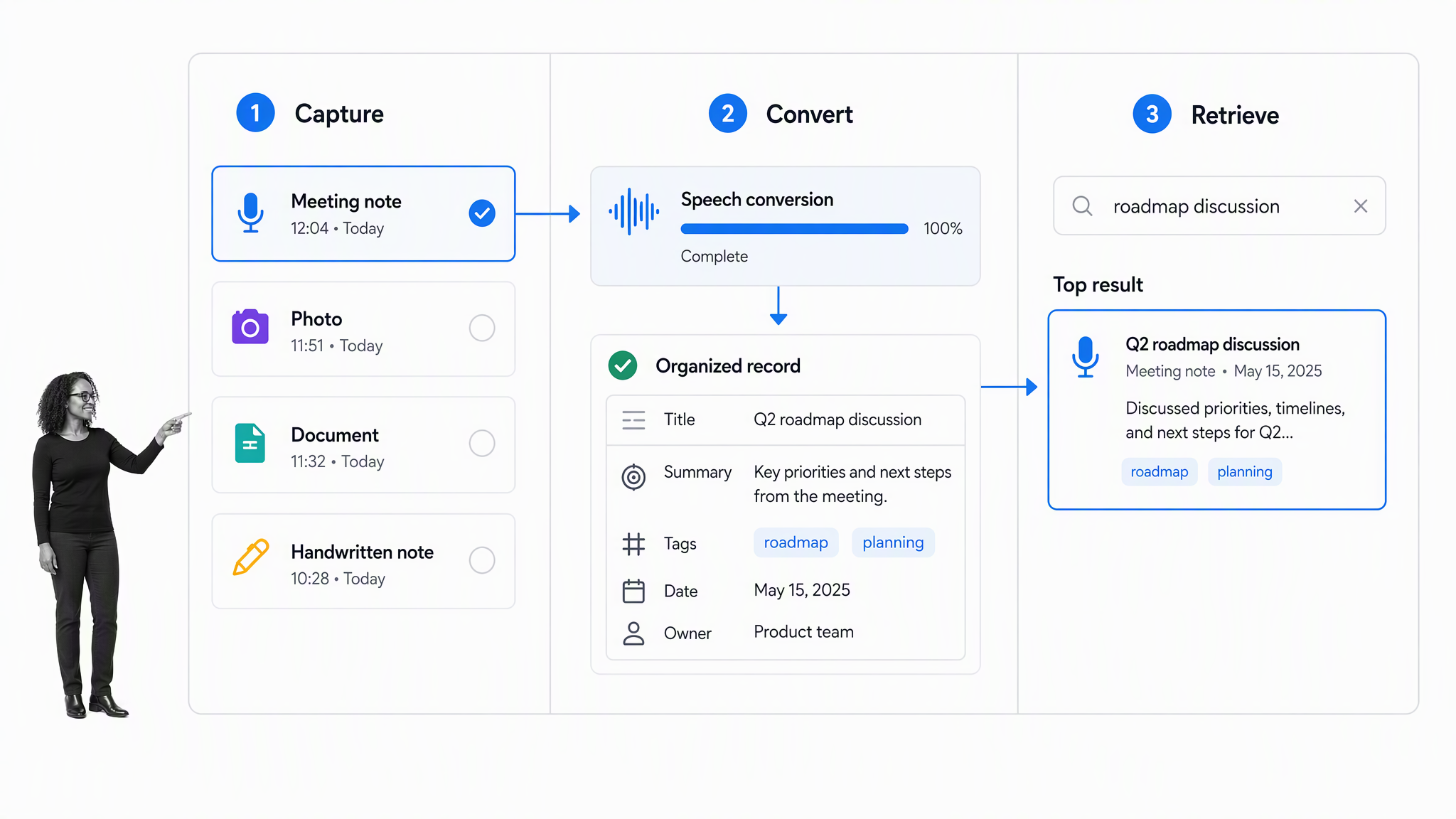
1. Capture hardware
The capture layer includes keyboards, phones, tablets, styluses, smart pens, scanners, cameras, microphones, and accessibility devices. Hardware should match the environment. A phone may be ideal for quick field observations, while a stylus supports diagrams and annotation. A meeting room may need shared audio capture, while a sensitive interview may require silent handwritten notes.
2. Conversion technology
Conversion turns one form of input into another. Optical character recognition can convert printed or handwritten images into machine-readable text. Speech recognition can produce a transcript from audio. Document parsing can extract titles, tables, and metadata from files. The output is a draft, not unquestionable truth. Names, numbers, decisions, and specialist terms need review.
3. Note storage and structure
Storage holds the original capture and the working note. Structure may come from notebooks, folders, tags, properties, links, templates, or databases. The best structure is light enough to maintain and strong enough to answer real retrieval questions. A team should know where meeting notes, research, decisions, and approved procedures belong without inventing a new location each time.
A dependable note taking system defines those rules across every device and application. Technology supplies the capability. The system supplies the habit and ownership model that keep the capability useful.
4. Indexing and retrieval
Search creates an index of titles, body text, attachments, transcripts, handwriting, and metadata. Filters narrow the result by person, project, topic, source, or note type. Links and backlinks provide another route when a person remembers a relationship but not the exact phrase. Retrieval quality is the most important long-term test because capture is only valuable when the information can return at the right moment.
5. Synchronization and collaboration
Synchronization keeps notes consistent across devices. Collaboration adds shared editing, comments, mentions, permissions, presence, and version history. Teams should test offline work, conflicts, duplicate copies, and recovery after a device or network failure. A smooth happy path is not enough when the record matters.
6. Automation and execution
The final layer moves information beyond the note. A reviewed decision can start a workflow. A follow-up can become an assigned task. A repeated lesson can update a procedure. An unresolved question can route to an owner. This layer prevents the notes library from becoming a silent archive of commitments that nobody tracks.
Common capture modes and when they fit
Typed notes for speed and editing
Typing works well when speed, editing, and searchable text matter most. It is efficient for meetings, research, and structured interviews, especially when a template prompts the notetaker for decisions, owners, and evidence. The main risk is verbatim capture without interpretation. A useful note still needs emphasis, structure, and a short review.
Handwriting and digital ink for thinking
Handwriting supports diagrams, spatial layouts, equations, and deliberate synthesis. Digital ink preserves those benefits while adding backup, duplication, and sometimes handwriting search. Buyers should test recognition with real handwriting, not a polished demo. They should also confirm whether the original strokes remain available when converted text is wrong.
The Towson University guide to note taking and annotation technology covers digital pads, pens, annotation, and converting handwriting into searchable text. This shows why the capture device and the conversion layer should be evaluated together.
Audio and transcription for conversations
Audio capture is useful when exact wording, accessibility, or a dense conversation makes manual notes difficult. A note taking assistant may create a transcript and summary, but the team still needs consent rules, retention limits, review responsibilities, and a path for correcting speaker or decision errors.
A note taking service can add human support to capture or review. The operating question stays the same: who verifies the record, where the approved version lives, and how decisions leave the note system.
Images, scans, and whiteboards
Image capture preserves paper pages, diagrams, receipts, field observations, and whiteboards. The strongest workflow stores the original image beside any extracted text so a reviewer can compare them. Good capture controls glare, angle, resolution, and page boundaries. Good conversion preserves order and marks uncertainty instead of silently inventing text.
Web clips and source-aware research notes
Web capture should preserve the source URL, title, author when available, access date where needed, and the selected passage. Saving only copied text removes evidence about where the claim came from. Research notes are more trustworthy when each excerpt remains connected to its source and the notetaker’s interpretation stays visibly separate.
Hybrid paper and digital capture
A hybrid system can use paper for focus and digital storage for retrieval. The bridge must be explicit: scan or summarize the page, verify the conversion, add enough context to find it later, and extract actions before the paper disappears into a drawer. Hybrid capture works when processing is routine, not when digitization is an undefined future chore.
Benefits and limitations of digital notes
What digital notes improve
Digital notes can improve search, duplication, backup, cross-device access, linking, collaboration, accessibility, and integration with other work systems. A single note can contain text, audio, images, files, and links while remaining discoverable through several retrieval paths. Teams can also apply templates to recurring note types so important context is captured consistently.
The Vermont State digital note taking guide describes how digital note technology can support connections between ideas and creative thinking. Those benefits depend on active review. Saving more information does not automatically create understanding.
Where digital systems create friction
Devices introduce charging, distraction, updates, account recovery, network dependency, proprietary formats, and changing product behavior. Rich systems also invite over-organization. People can spend more time tuning folders, tags, and extensions than interpreting the information they captured. The implementation should make the common action fast and keep optional complexity out of the way.
Accuracy is uneven across input types
Typed text is usually predictable, while handwriting, noisy audio, multiple speakers, technical language, and photographs introduce uncertainty. Conversion output should expose confidence or make comparison with the source easy. For high-impact decisions, a person should verify the relevant passage instead of trusting a summary alone.
Research on note taking in the digital age also shows why the medium and learning behavior should be considered together. Technology changes what can be captured and retrieved, but useful notes still require attention, selection, and review.
Privacy and security follow the data
Notes may contain customer details, employee information, health data, legal advice, product plans, or credentials. Teams should know where audio and files are processed, how long originals and transcripts remain, who can share them, and what happens when a user leaves. Recording laws and organizational policy may also affect whether audio capture is appropriate.
How to choose note taking technology
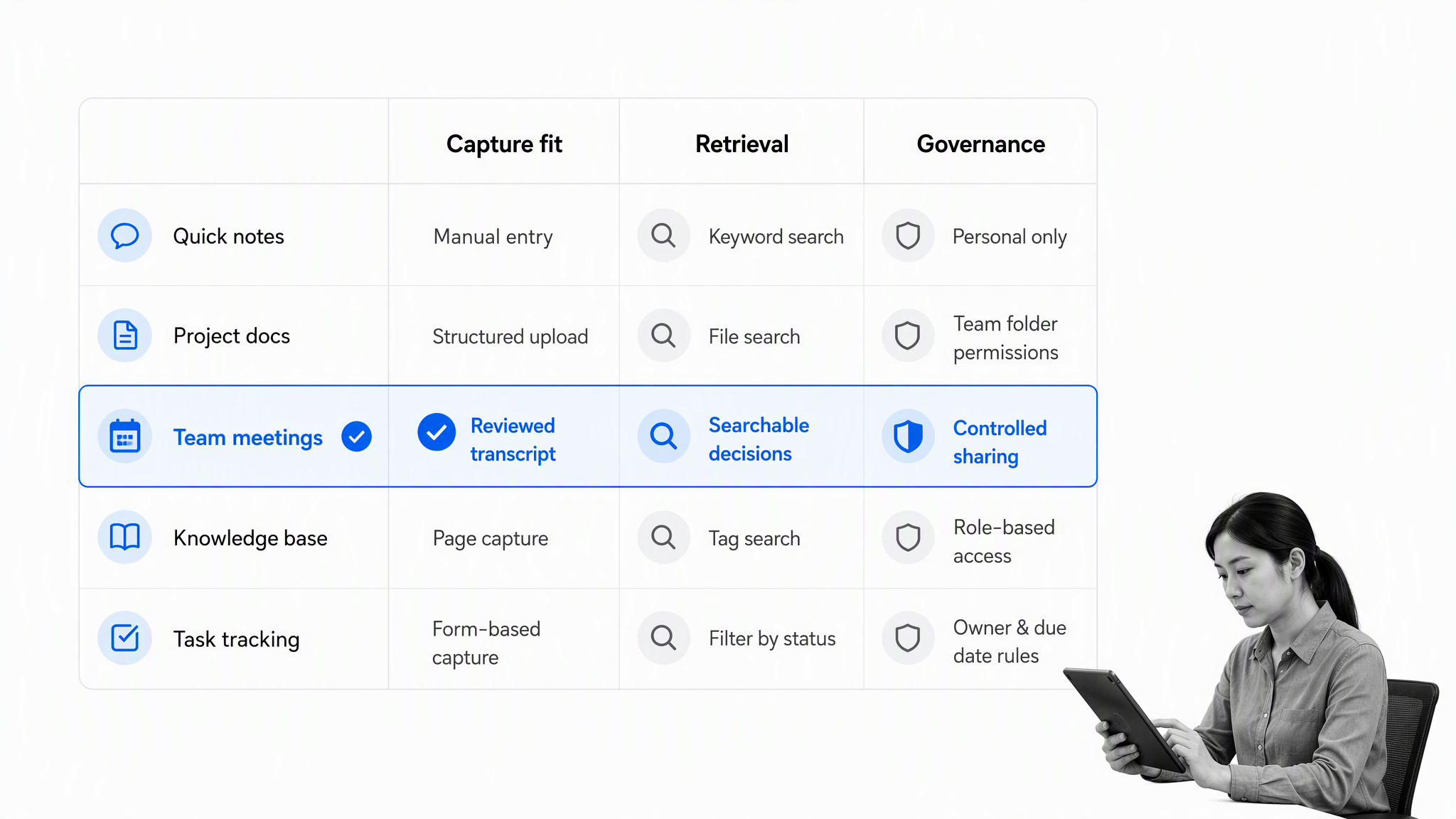
Start with the capture context
List the situations where notes matter: meetings, classes, interviews, customer calls, field inspections, research, design work, and personal thinking. For each one, identify the input, environment, speed, accuracy requirement, accessibility need, and expected output. This prevents a buyer from choosing one impressive device or app that fits only the easiest scenario.
Test retrieval before editor features
Ask how a person will look for the note months later. They may remember a phrase, speaker, project, source, date, diagram, or related idea. Test search with realistic files and imperfect inputs. Confirm whether attachments, transcripts, handwriting, and image text are indexed. Retrieval should work without remembering the exact folder chosen during capture.
Evaluate export and portability
Run a real export during the evaluation. Inspect whether text, headings, links, attachments, tags, timestamps, and original media survive in common formats. Then import a sample elsewhere. An export button is not enough if the resulting files lose the relationships or evidence that make the notes useful.
Check collaboration and governance
Team technology needs clear ownership, permissions, guest access, version history, retention, deletion, and offboarding behavior. Test a private note, a shared team note, an external share, a revoked user, and a restored version. The system should make the safe state obvious instead of hiding it behind administrative knowledge.
Measure accessibility and ergonomics
People differ in vision, hearing, mobility, attention, language, and preferred input. Test keyboard navigation, screen readers, captions, text scaling, contrast, stylus comfort, voice control, and alternatives to audio. The strongest choice lets people reach the same useful record through more than one capture path.
Choose the smallest dependable stack
More devices and apps create more handoffs, accounts, formats, and failure points. Choose the smallest stack that covers the team’s real contexts. Every component should have a named job and owner. If two tools perform the same job, either remove one or document the boundary clearly so information does not split into competing libraries.
How to implement the technology for a team
1. Define boundaries and sources of truth
State what belongs in the note system and what does not. Notes may hold working context, but the project system may own tasks, the CRM may own customer records, and governed process documentation may own approved procedures. Clear boundaries reduce duplication and make it easier to explain where people should look for a trusted answer.
2. Design a small information model
Choose a shallow structure for spaces, note types, tags, and ownership. Build templates only for recurring contexts where consistent fields improve retrieval or follow-through. A meeting template might separate purpose, decisions, open questions, and actions. A research template might separate source, claim, evidence, interpretation, and relevance.
A structured meeting minutes workflow template helps a team capture the information that turns a conversation into a record. The note technology can hold the source material, while the workflow makes preparation, review, and follow-up consistent.
3. Set review and correction rules
Define which conversions require human review. A casual personal voice note may need little control. A transcript that contains a customer commitment, policy decision, medical detail, or legal instruction needs careful verification. The rule should name who reviews, what facts they check, and how corrections are recorded.
A note taking generator can create a useful first draft from source material, but generated structure should remain traceable to the source and pass the same correction rule as any other automated conversion.
4. Pilot complete scenarios
Test from capture to retrieval and action. Include typed notes, handwriting, a noisy recording, an image, offline work, a sharing mistake, a departed user, a failed synchronization, an export, and a restored version. A pilot that tests only clean note creation will miss the moments where the technology creates real risk.
5. Teach a review rhythm
A short daily review clears quick captures and extracts urgent actions. A weekly review merges duplicates, connects orphan notes, archives finished material, and checks unresolved commitments. The rhythm matters more than a complex taxonomy because it keeps the system trustworthy while the information is still fresh.
6. Move durable knowledge to the right home
When a note becomes approved guidance, move it into governed process documentation or a reusable standard operating procedure template. This keeps the notes library flexible while giving durable operating knowledge an owner, review cycle, and controlled execution path.
Turn notes into execution with Process Street
Keep notes as context and workflows as control
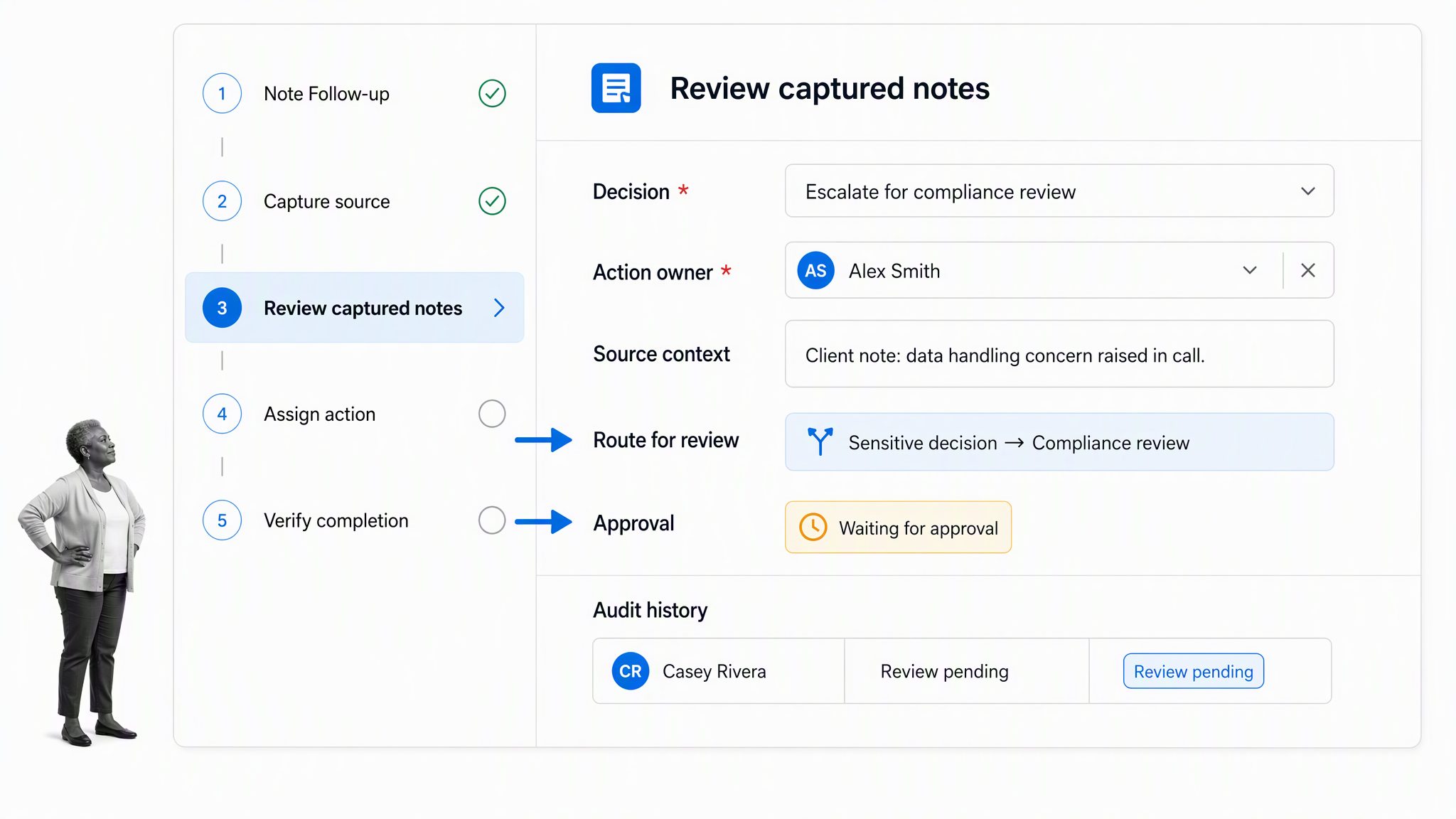
Process Street is an agentic process automation platform for high-stakes operations. It can receive a reviewed decision or follow-up from the note system, start the correct workflow, assign owners, enforce required steps, route exceptions, and preserve evidence that the work was completed.
This separation respects the strengths of both systems. Notes favor speed, context, and flexible thinking. Workflows favor consistency, accountability, decision rights, and proof. Connecting them lets a team keep the original reasoning without asking the notes library to become a task manager or compliance record.
Route exceptions with Conditional Logic
Conditional Logic can change the workflow path based on task and form-field values. A routine follow-up can stay short, while a sensitive or high-impact decision can expose additional evidence, specialist review, or escalation steps.
Control decisions with approvals
Approval tasks let designated reviewers approve or reject work inside workflow runs. The source note, decision, supporting files, reviewer outcome, and next action can remain connected in one traceable execution record.
Connect notes to the wider stack
Process Street integrations can connect the note system to the workflow that follows. A reviewed note can start a workflow, populate the correct context, and return completion evidence without asking a person to copy the same information across several systems.
Teams that need a broader operating layer can evaluate a workflow management system or automated workflow tools for recurring work. The key decision is when information stops being a note and becomes an accountable process.
Common failure modes and safeguards
Capturing everything without deciding what matters
Low-friction capture can create a large archive of noise. Set a processing rule for quick notes, and delete or archive material that has no future job. Capture should preserve useful context, not create a permanent obligation to organize every passing thought.
Trusting transcription or handwriting recognition blindly
Conversion errors can change names, numbers, negation, ownership, or intent. Keep the original source, make correction easy, and require review for facts that affect decisions or obligations. Summaries should point back to the relevant transcript or image so a reviewer can verify the wording.
Creating parallel sources of truth
A decision may appear in notes, chat, a task system, and a procedure, with no clear authority. Name the source of truth for each information class. Link between systems and record status clearly. Avoid copying entire records when a stable link can preserve context without creating another version.
Leaving actions trapped inside notes
Make the handoff part of the review. Every real action needs a verb, owner, and due state. Every repeated action should be considered for a reusable workflow. A clear process documentation model helps the team decide which recurring lessons should change the way work runs.
Skipping export and recovery tests
Teams often discover too late that exports lose links, attachments, handwriting, audio, or metadata. Test export before adoption and after major product changes. Also test deleted-note recovery, device replacement, offline synchronization, and account offboarding. Recovery is part of the product, not an edge case.
FAQs
What is note taking technology?
Note taking technology is the combination of devices, software, and services used to capture, convert, organize, retrieve, share, and act on information. It can include keyboards, styluses, smart pens, cameras, microphones, handwriting recognition, transcription, search, synchronization, collaboration, and workflow automation.
What types of note taking technology are available?
Common types include typed note apps, handwriting and digital ink systems, smart pens, audio recording and transcription tools, cameras and scanners, web clippers, searchable knowledge systems, and workflow integrations. The right mix depends on the capture context, retrieval needs, accessibility, governance, and expected output.
Is digital note taking better than handwriting?
Neither is universally better. Handwriting can support focus, diagrams, and deliberate synthesis, while digital notes improve search, duplication, sharing, backup, and integration. A hybrid approach works well when there is a reliable rule for converting or summarizing paper notes into the digital system.
How do teams choose note taking technology?
Start with real scenarios, then test capture fit, conversion accuracy, retrieval, collaboration, permissions, accessibility, offline behavior, export, retention, and action handoff. Pilot complete workflows and failure cases before moving important team knowledge into the system.
How can notes be turned into action?
Review important notes for decisions, open questions, and commitments. Move each action into a workflow or task system with an owner and due state, then link back to the note for context. Keep the note as the record of reasoning and the workflow as the record of execution.
