


Turn every policy into automated workflows with built-in enforcement and audit-ready proof.



8 Best Policy and Procedure Management Software Tools
Policy and procedure management software controls how policies are written, approved, distributed, acknowledged, reviewed, and put into practice. The right platform replaces scattered files and email chases with one governed lifecycle, then produces evidence that the current policy reached the right people and guided the right work.
This guide compares eight current options across four buyer needs: operational execution, integrated governance and risk, specialized policy administration, and Microsoft-centered document control. Process Street leads when the goal is to connect policy governance with recurring work, approvals, exceptions, evidence, and audit-ready execution.
Use the table for a quick shortlist, then evaluate the detailed sections against your policy volume, regulatory exposure, operating model, existing systems, and the people who must use the software every day.
- What is policy and procedure management software?
- Which policy and procedure management software is best?
- How should you choose policy management software?
- Why does policy management matter?
- What features should policy management software include?
- Which policies and procedures can the software manage?
- How do you implement policy management software?
- Frequently asked questions
What Is Policy and Procedure Management Software?
Policy and procedure management software is a controlled system for the full document lifecycle. It provides a source of truth for active policies, defines who can draft and approve changes, routes reviews, publishes the approved version, targets distribution, records acknowledgments, and keeps a history of what changed.
A basic document repository answers, “Where is the file?” A policy management system must also answer, “Who owns it, which version is active, who approved it, who must follow it, when is the next review, and what evidence proves the process happened?” That governance layer is what makes the software useful for compliance, quality, HR, safety, security, and operations teams.
The strongest platforms go further by connecting policies to procedures. A policy can define the rule, while an executable workflow assigns the actions, blocks incomplete work, routes exceptions, collects evidence, and records the result. That is the practical bridge between policy management and software workflow management.
Which Policy and Procedure Management Software Is Best?
There is no useful one-size-fits-all ranking. The best choice depends on whether the main job is enforcing recurring procedures, running an integrated governance program, managing policies for a specialized regulated sector, or extending an existing collaboration stack. The comparison below keeps those differences visible.
| Software | Best fit | What stands out |
|---|---|---|
| Process Street | High-stakes operations that need policy plus execution | Governed workflows connect rules, actions, approvals, evidence, and history |
| NAVEX One Policy & Procedure Management | Enterprise ethics and compliance programs | Policy lifecycle management inside a connected governance suite |
| Mitratech PolicyHub | Regulated organizations focused on policy communication | Development, communication, training, and auditing in one policy system |
| LogicGate Risk Cloud | Teams linking policies to broader risk programs | Configurable policy workflows and acknowledgment tracking inside a GRC platform |
| PowerDMS Policy | Public safety and emergency-response organizations | Policy control connected to accreditation, training, and defensible records |
| ConvergePoint | Organizations standardized on Microsoft collaboration tools | Policy lifecycle controls built on SharePoint |
| ComplianceBridge | HR and compliance teams needing tailored routing | Custom policy workflows, targeted distribution, and audit records |
| VComply PolicyOps | Compliance teams seeking AI-assisted drafting | Collaborative drafting, approvals, attestations, and policy reporting |
Process Street
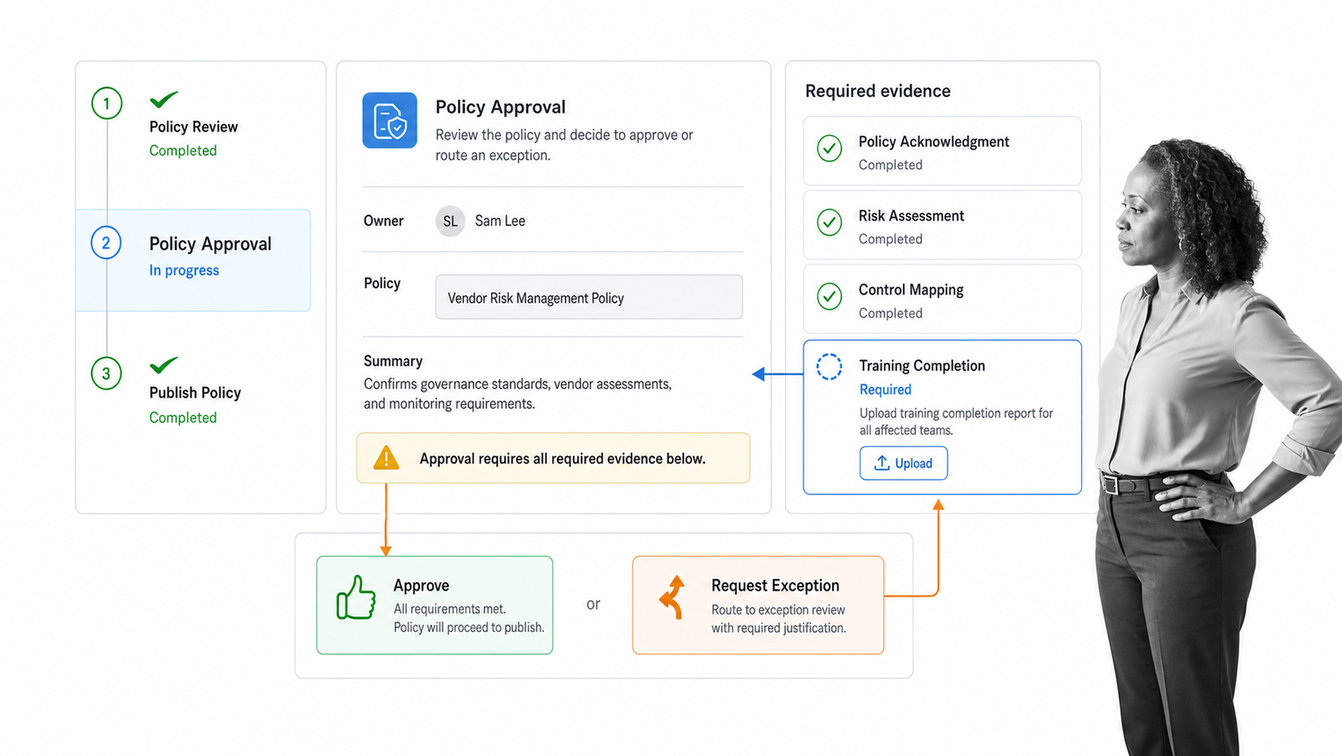
Process Street is the strongest fit when policies must govern real work, not sit in a library. Its policy management system supports creation, review, approval, distribution, acknowledgments, and audit tracking. Teams can then turn the controlled procedure into a workflow with owners, required fields, rules, approvals, reminders, escalations, and evidence.
That execution layer matters for high-stakes operations. A policy can state that vendor access needs review, but the workflow makes the requester provide evidence, sends the decision to the right approver, blocks incomplete closure, and keeps the record. Policy governance and procedure execution remain connected instead of being split between a document tool and a task board.
- Best for regulated operations and cross-functional recurring work
- Strong when required steps, approvals, exceptions, and evidence must stay together
- A practical choice for teams that want business operators to own the process without custom development
NAVEX One Policy & Procedure Management
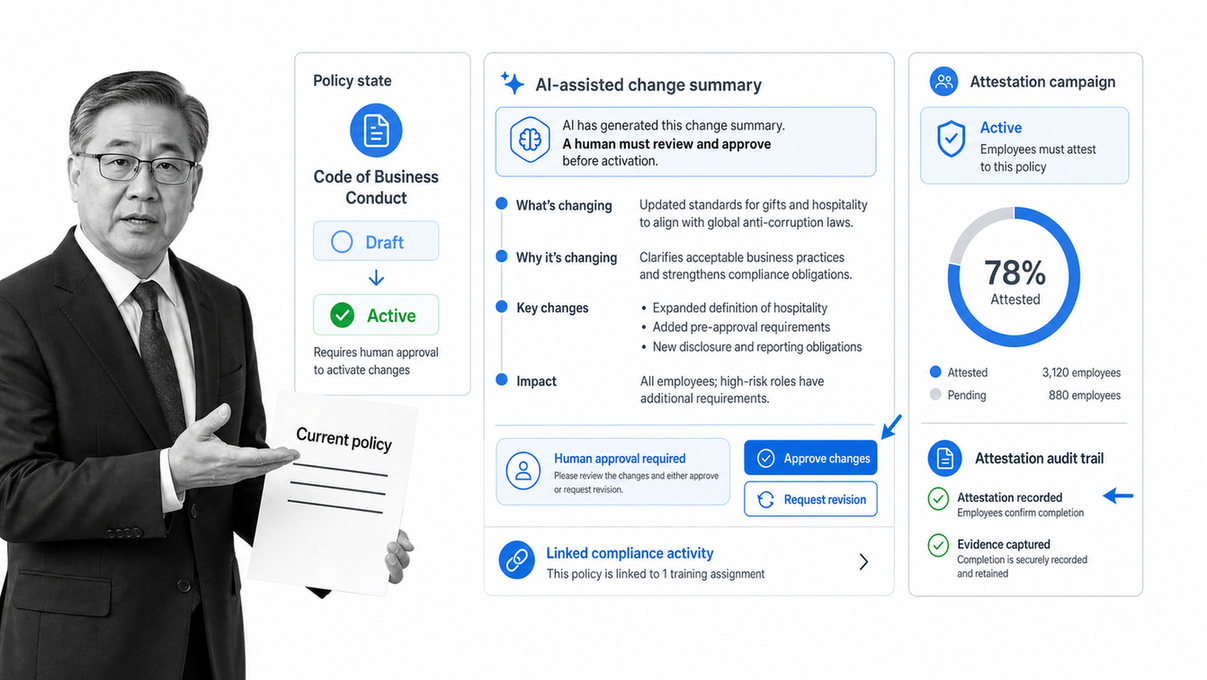
NAVEX One Policy & Procedure Management, formerly known as PolicyTech, manages the policy lifecycle within the broader NAVEX One governance, risk, and compliance platform. It centralizes controlled policies, routes reviews and approvals, distributes content, tracks attestations, and preserves an audit trail.
Its strongest buyer fit is an enterprise ethics and compliance program that wants policy activity linked with adjacent training, risk, and employee compliance work. AI-assisted summaries can support policy communication, while human review remains part of the process. Organizations that only need lightweight procedure execution may find the broader suite larger than necessary.
- Best for enterprise ethics and compliance teams
- Strong fit when policy, training, risk, and employee compliance data must connect
- Evaluate configuration effort and suite scope against the exact program requirements
Mitratech PolicyHub
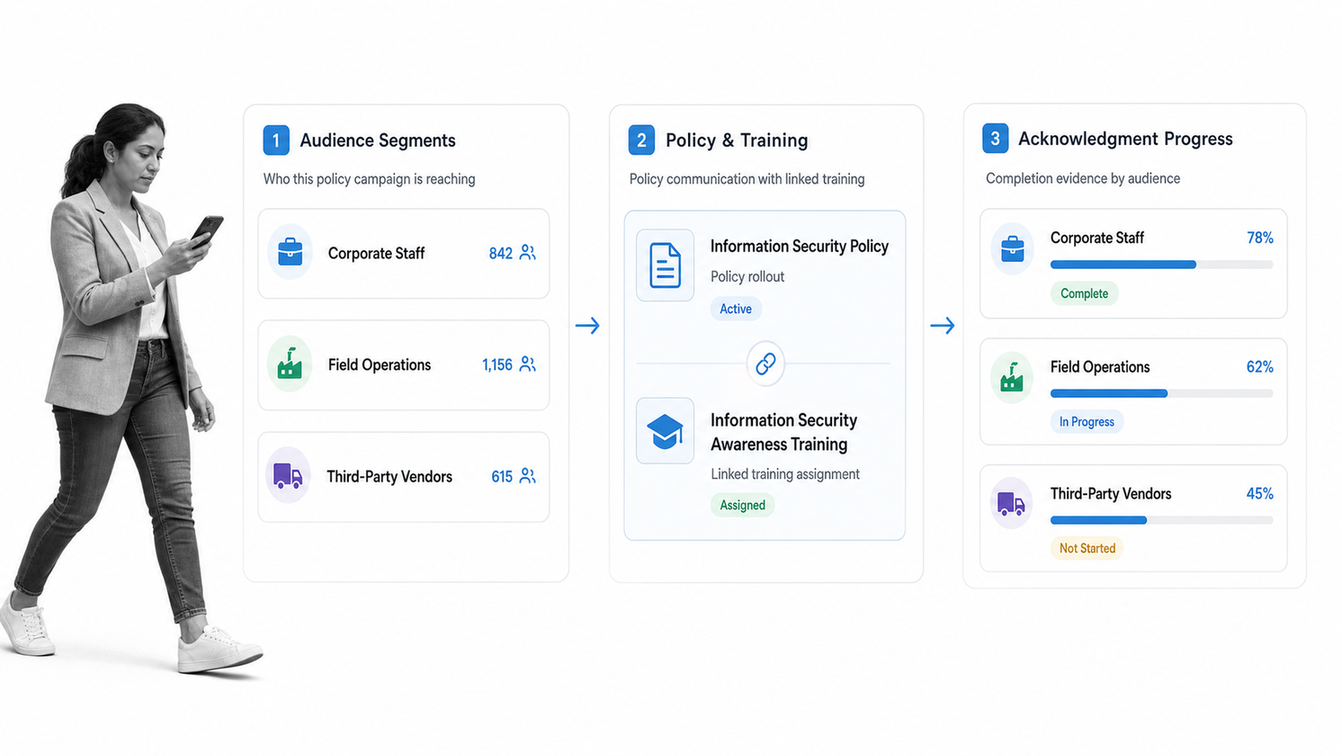
Mitratech PolicyHub is a dedicated policy and procedure management product for developing, communicating, training on, and auditing policies. It is positioned for organizations that need consistent distribution, clear accountability, and a defensible compliance program across many employees or locations.
PolicyHub earns a place on the shortlist when the main concern is workforce policy communication and evidence. It helps policy teams move from development through delivery and reporting without treating the document as an isolated file. Buyers should confirm how the product will connect policy requirements to day-to-day operational workflows outside the policy system.
- Best for policy communication across regulated workforces
- Strong when training and policy evidence belong in the same administration process
- Confirm integration and workflow depth for operational use cases beyond distribution
LogicGate Risk Cloud
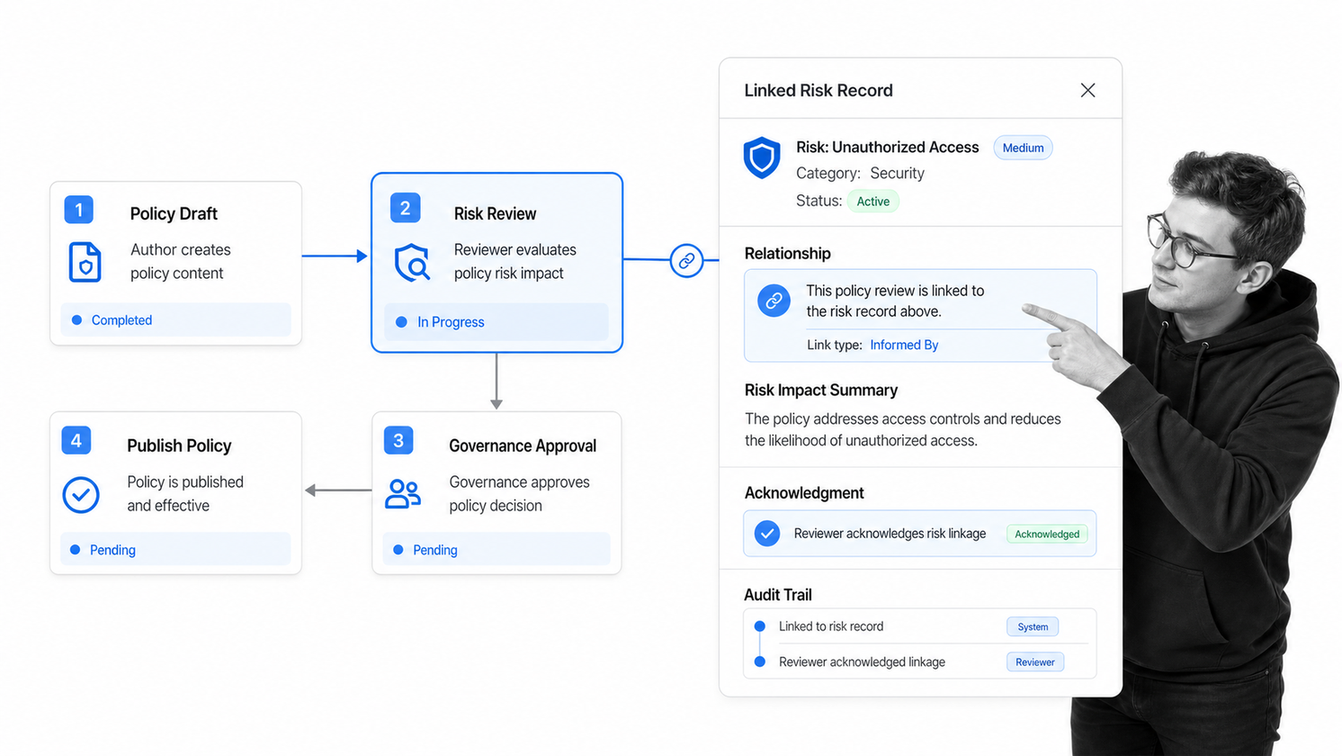
LogicGate Risk Cloud provides a policy management solution inside a configurable GRC platform. It supports centralized policy creation and maintenance, collaborative review, approvals, distribution, acknowledgment tracking, version history, and audit trails.
The product fits teams that want policy management tied directly to risk and governance applications. Flexible workflow configuration can help mature programs model their own review and distribution logic. The buying decision should include the wider GRC architecture, administrative ownership, and whether a platform-level implementation matches the team’s urgency and operating capacity.
- Best for configurable policy workflows inside a broader risk program
- Strong when policy acknowledgment must feed governance reporting
- Assess platform administration needs, implementation scope, and end-user simplicity
PowerDMS Policy
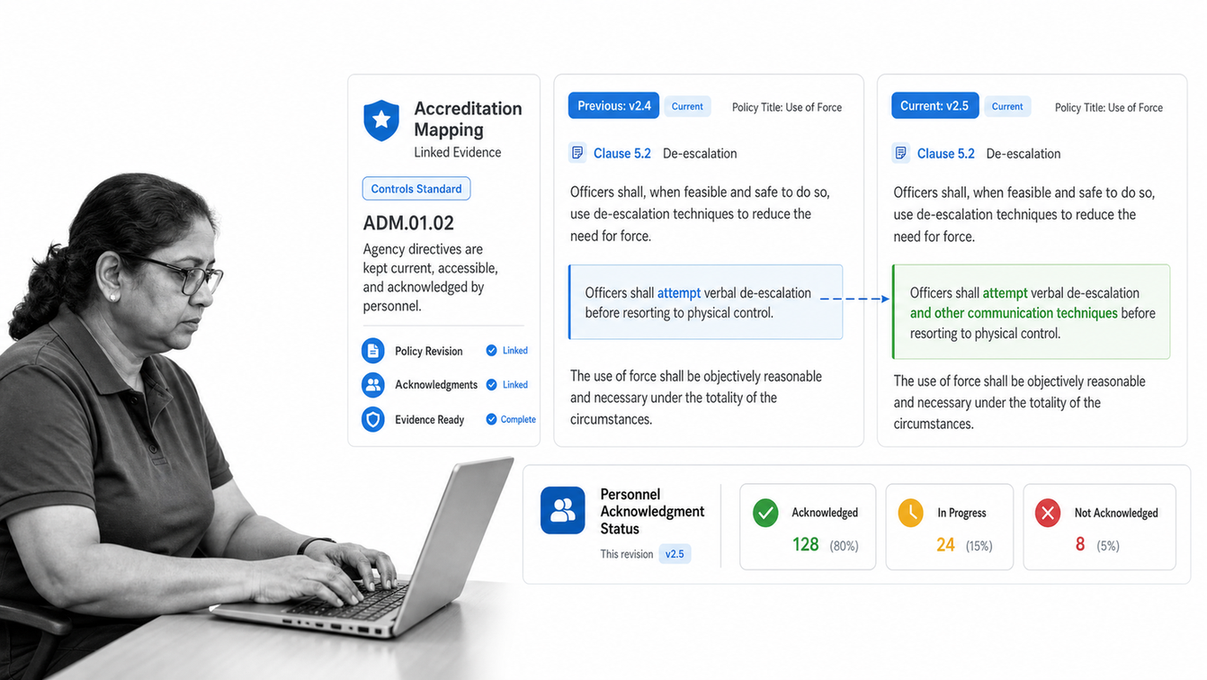
PowerDMS Policy is purpose-built for public safety agencies, including law enforcement, fire, emergency medical services, corrections, and emergency communications. It combines policy distribution, version history, acknowledgments, review workflows, audit records, mobile access, and connections to related accreditation and training work.
That specialization is the differentiator. Public-safety leaders often need defensible records, field access, accreditation mapping, and proof that personnel received the active guidance. A general corporate policy tool may not provide the same sector context. Organizations outside public safety should compare whether those specialized capabilities justify the product fit.
- Best for public safety and emergency-response policy administration
- Strong when accreditation, training, acknowledgments, and policy history must connect
- Confirm suitability for non-public-safety teams before shortlisting
ConvergePoint
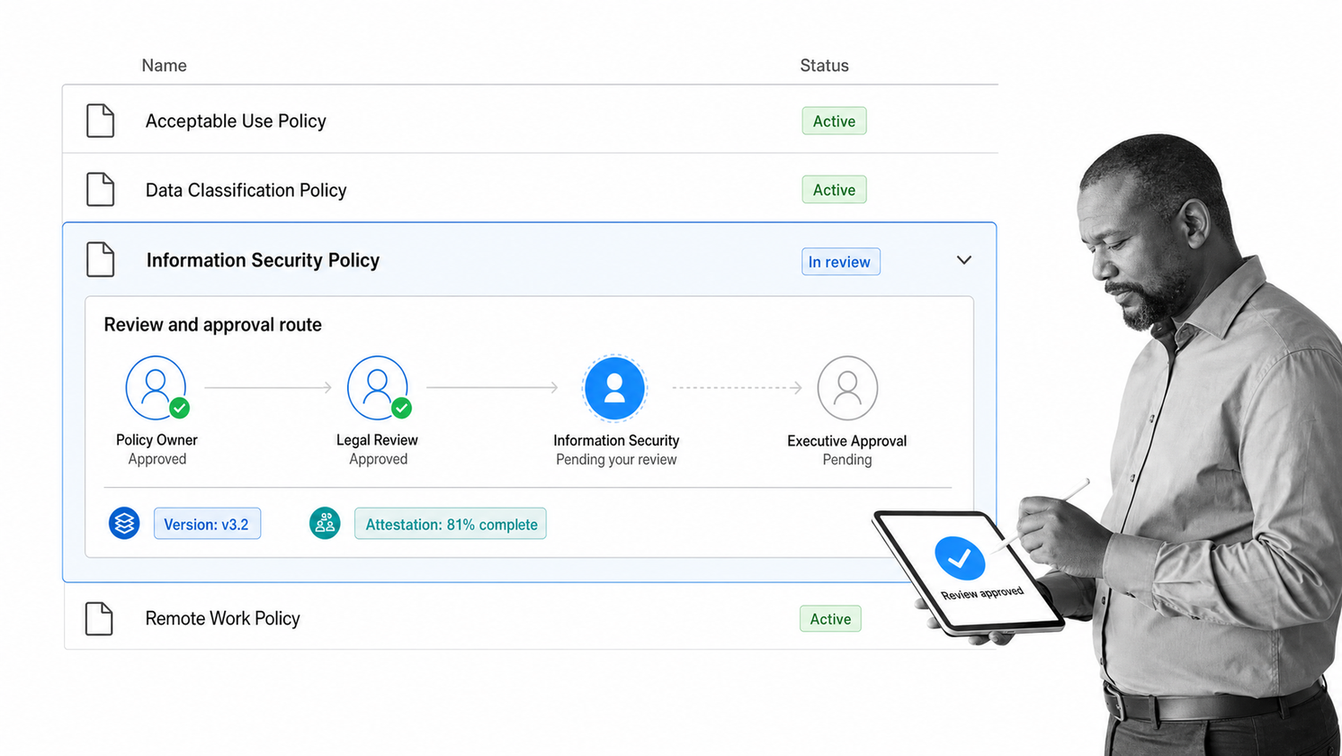
ConvergePoint is policy management software built on Microsoft 365 SharePoint. It supports policy creation, revision, approval, publication, employee attestation, reminders, version control, dashboards, and audit history while keeping documents inside the Microsoft environment many organizations already use.
The fit is clearest for organizations that have standardized on SharePoint and want to add a purpose-built policy lifecycle without introducing a separate document foundation. That advantage is also a dependency. Buyers should evaluate SharePoint governance, internal administration, mobile and employee experience, and how procedure execution will work beyond the controlled document.
- Best for organizations committed to Microsoft 365 SharePoint
- Strong when policy owners want familiar document editing with added governance
- Evaluate the SharePoint dependency and the path from policy publication to operational execution
ComplianceBridge
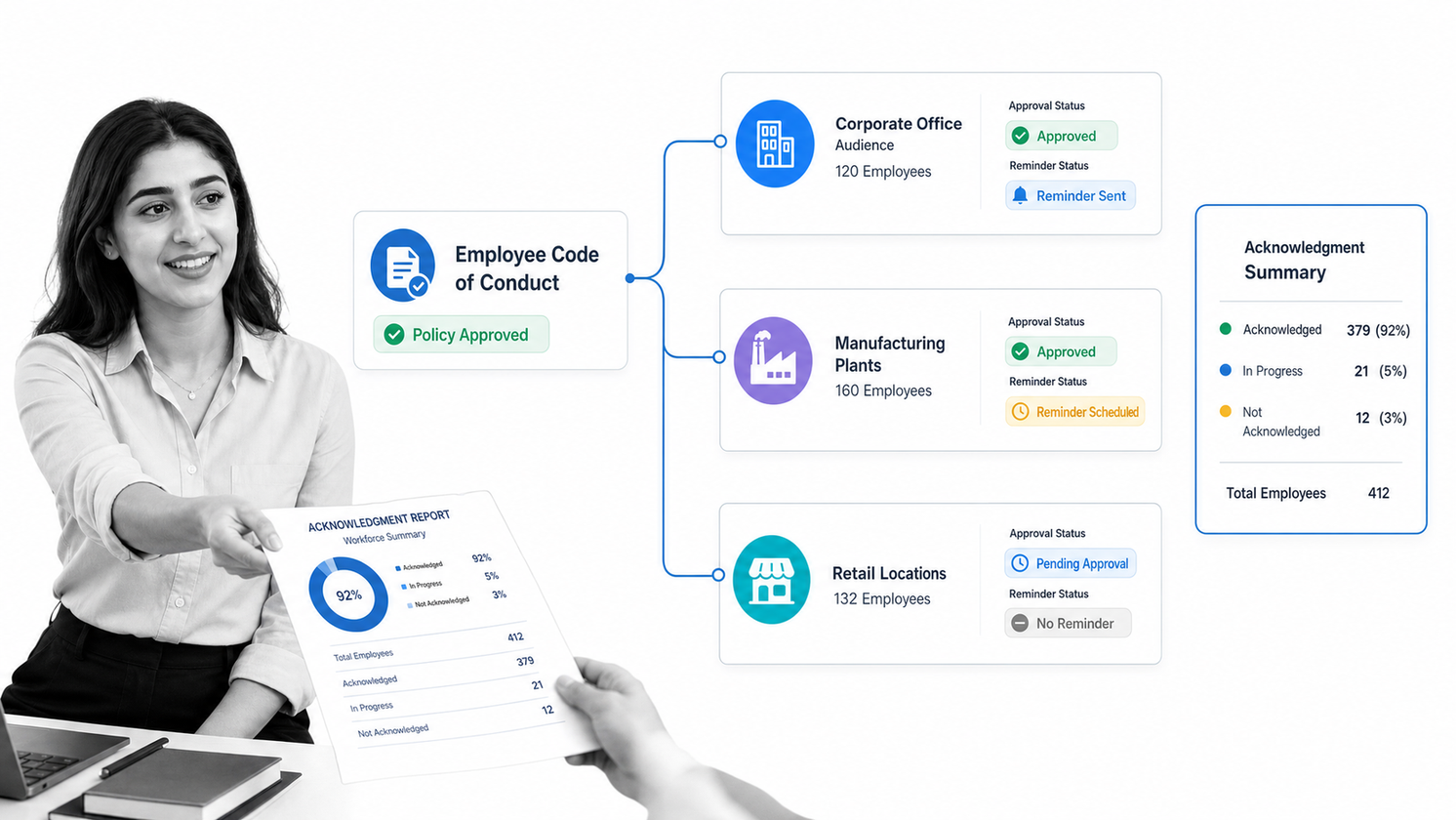
ComplianceBridge focuses on policy and procedure lifecycle management for HR and compliance teams. Its product supports collaborative creation and revision, tailored approval workflows, targeted distribution, acknowledgments, review reminders, reporting, and a durable audit record.
The platform is worth considering when the policy program needs routing that changes by department, group, division, or location. Targeted distribution and adaptable workflows can reduce manual chasing across a complex organization. During evaluation, test how quickly administrators can maintain those rules and how clearly employees can see their assigned policies.
- Best for tailored policy routing and targeted workforce distribution
- Strong when different groups need different review or acknowledgment paths
- Test administrator effort, reporting clarity, and the employee portal experience
VComply PolicyOps
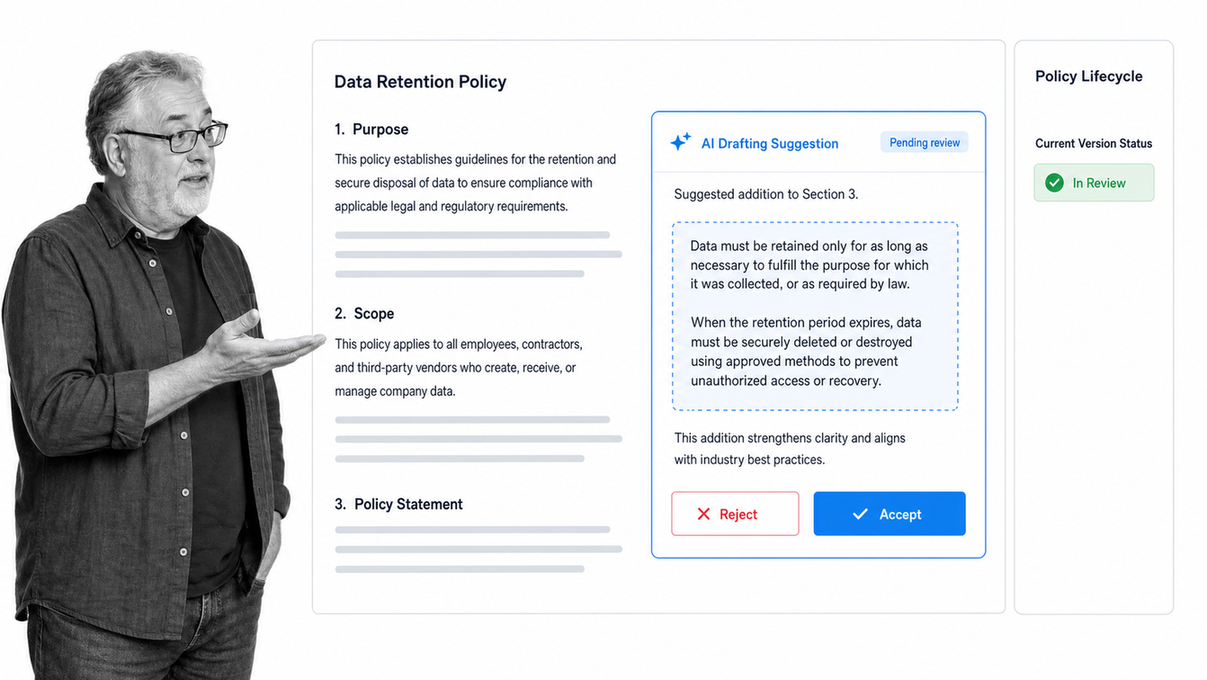
VComply PolicyOps manages drafting, review, approval, publication, distribution, acknowledgment, version history, and reporting in a centralized policy system. Its current product emphasizes AI-assisted drafting, collaborative editing, templates, policy answers, automated attestations, and dashboards for lifecycle status.
It fits compliance teams that want assistance creating and maintaining policy content while keeping approvals and records structured. AI can accelerate drafting and explanation, but policy owners still need an accountable review process for accuracy, legal context, and local requirements. Buyers should test the quality controls around generated content as carefully as the workflow features.
- Best for compliance teams exploring AI-assisted policy drafting
- Strong when policy creation, approval, attestation, and reporting need one workspace
- Require human review, source control, and clear ownership for generated policy content
How Should You Choose Policy Management Software?
Start with the control problem, not the feature list. A team replacing a shared drive has different needs from a regulated enterprise linking policy to training, or an operations team that must make the procedure run correctly every time. Write down the failure you cannot tolerate, then evaluate software against the full lifecycle that prevents it.
Use a real policy during the evaluation. Draft a change, route it to multiple reviewers, reject it once, approve it, publish it to a targeted group, collect an acknowledgment, run the procedure it governs, and retrieve the complete record. A polished repository can look convincing until the exception path exposes manual work.
- Define document ownership, approval rights, and review cadence
- Test migration and version history with real files
- Test targeted distribution and overdue acknowledgment handling
- Verify permissions for employees, contractors, reviewers, and auditors
- Confirm that policy requirements can become assigned, trackable work
- Inspect export, reporting, API, integration, and data-retention options
- Measure administrator effort as well as employee usability
If execution is the priority, compare the shortlist against an operations management platform. If the primary need is enterprise governance, compare it with GRC software. The category label matters less than whether the system controls the complete job.
Why Does Policy Management Matter?
Policies create value only when the organization can keep them current, put them in front of the right people, and translate them into consistent action. Uncontrolled files create uncertainty about which version applies. Email approvals make decision history hard to reconstruct. Manual acknowledgment trackers provide weak evidence. Static documents leave employees to interpret how the rule changes their work.
The compliance need is concrete. The U.S. Department of Health and Human Services explains that regulated healthcare entities must adopt appropriate policies and procedures, maintain required documentation, make it available to responsible people, and review it as conditions change. Similar control principles appear across quality, safety, security, and financial governance programs.
Good policy management reduces ambiguity. Owners know what needs review. Approvers see the current draft and decision history. Employees receive the correct policy for their role. Managers can see outstanding acknowledgments. Operators can run the associated procedure. Auditors can retrieve the record without rebuilding it from inboxes and spreadsheets.
What Features Should Policy Management Software Include?
A credible platform should control both the document and the process around it. The exact mix varies by buyer, but the following capabilities form a practical baseline.
- A centralized repository with one clearly active version
- Version history, change tracking, and controlled retirement
- Named owners, reviewers, approvers, and review schedules
- Configurable approval routes, reminders, escalations, and exceptions
- Role-based permissions and targeted distribution
- Employee acknowledgment or attestation records
- Search that returns approved content and respects permissions
- Audit history for creation, review, approval, publication, access, and acknowledgment
- Reporting for overdue reviews, approvals, and attestations
- Connections to training, risk, HR, document, and workflow systems
- A way to translate procedures into assigned steps with required evidence
Do not confuse a long feature list with control. The important test is whether the software can keep an authoritative policy current, make the governed work happen, and produce a trusted record. That same principle applies to document management systems, SOP software, and workflow platforms.
Which Policies and Procedures Can the Software Manage?
Most organizations use the same lifecycle pattern across many policy families even when the subject matter changes. Corporate governance policies cover conduct, conflicts, delegations, records, and decision rights. HR policies cover hiring, leave, compensation, workplace behavior, remote work, and employee transitions. Security policies cover acceptable use, access, incident response, vendors, devices, and data handling.
Regulated operations add sector-specific requirements. Healthcare teams may govern privacy, security, clinical operations, and safety. Manufacturers may control quality procedures, work instructions, corrective action, maintenance, and supplier requirements. International Organization for Standardization guidance on documented information emphasizes maintaining information needed to support processes and retaining evidence that work occurred as planned.
Safety programs also rely on policies becoming practice. OSHA recommended practices focus on proactive programs, worker participation, hazard identification, prevention, education, and continuous improvement. Software should support the management system around those activities, not claim that storing a policy alone creates compliance.
How Do You Implement Policy Management Software?
Choose one policy family with meaningful risk and visible manual friction. Clean the active documents, identify duplicates, name accountable owners, and define the exact lifecycle from draft through retirement. Decide which events require approval, which groups must acknowledge the policy, what evidence must be retained, and what procedure should run after publication.
Configure the system around that operating model, then test normal, rejected, overdue, delegated, and exception paths. Import a limited set of controlled documents. Train administrators first, then give employees a simple explanation of where approved policies live, what actions they must complete, and how to ask questions or report conflicts.
Measure review timeliness, acknowledgment completion, search success, exception volume, and the time required to produce audit evidence. Expand only after the pilot works end to end. For execution-heavy use cases, build the policy and its workflow automation together so the rule, task, approval, and proof remain aligned.
Frequently Asked Questions
What is policy and procedure management software?
Policy and procedure management software is a system for creating, reviewing, approving, publishing, distributing, and maintaining controlled policies and operating procedures. It gives employees a reliable current version and gives administrators evidence of reviews, acknowledgments, and changes.
How is policy management software different from document storage?
Document storage keeps files available. Policy management adds lifecycle controls such as ownership, approval routes, version history, scheduled reviews, targeted distribution, acknowledgments, permissions, and audit records. The distinction is governance and execution, not simply where a file lives.
Which features matter most in policy management software?
Prioritize version control, configurable approvals, role-based access, review reminders, employee acknowledgments, search, audit history, reporting, and a practical way to connect each policy to the work it governs. Integration and migration support also matter during rollout.
Can policy management software support procedures and SOPs?
Yes. Strong platforms manage policies, procedures, SOPs, work instructions, and related evidence. The best fit depends on whether the organization mainly needs document governance, employee attestation, regulated content, or executable workflows that guide people through the procedure.
How should a company implement policy and procedure management software?
Start with a high-risk policy family, name owners and approvers, clean the active versions, map the review and acknowledgment path, configure permissions, and test the full lifecycle. Expand after the pilot produces a reliable audit record and employees can find the current guidance.
What makes Process Street different for policy management?
Process Street connects governed policies with recurring workflows. Teams can manage review and approval work, distribute required actions, collect evidence and acknowledgments, route exceptions, and preserve execution history in the same operating system used to run the procedure.
