


Turn every policy into automated workflows with built-in enforcement and audit-ready proof.



Process Creator
A process creator is a tool and method for turning repeatable work into a clear, runnable system. It helps you map the flow, define each step, assign responsibility, add decisions and controls, then launch the process so people can follow it consistently. The result is more than a picture. It is a working process with ownership, timing, data, and proof.
Many searches for a process creator begin with a flowchart. That makes sense: a visual map is the fastest way to see where work starts, how it moves, and where it branches. But a map alone cannot assign a task, require evidence, enforce an approval, or show whether the work finished. A complete process creator connects the visual design to a live workflow that people can actually run.
This guide shows you how to create a business process from the first trigger to the final outcome. You will learn how process creation works, what a capable creator should include, how it differs from flowchart and workflow tools, how to test the result, and how to keep the process current as work changes.
In this guide, we are going to cover:
- What is a process creator?
- How a process creator works
- What a strong process creator includes
- Process creator vs flowchart maker vs workflow creator
- How to create a business process step by step
- How to test and improve a created process
- Create and run processes with Process Street
- FAQs
What is a process creator?
A process creator gives a process owner one place to design how work should happen. You define the trigger, arrange the steps, identify the people and systems involved, mark decision points, and specify the outcome. The creator converts that design into a reusable template so the same process can run again without being rebuilt from memory. A process builder is the design surface inside that broader creation loop.
A process map is the starting point
The visual map shows sequence and relationships. It makes hidden handoffs visible and exposes loops that waste time. A practical process mapping method uses a clear start, a small number of meaningful steps, decision points, and an end state. The map should describe what really happens today before it describes the ideal future.
A runnable process is the outcome
The finished process adds what a diagram cannot: owners, instructions, due dates, required information, conditional paths, approvals, notifications, and a history of completion. People do not need to interpret a chart every time. They receive the next task with the right context, and the process moves forward as work is completed.
Creation is a continuous loop
A process is never finished after the first design. Each run reveals missing instructions, unnecessary steps, slow handoffs, and recurring exceptions. A good creator supports a loop of map, run, review, and improve. That loop is the practical side of business process management, which includes modeling, analyzing, measuring, improving, and optimizing processes.
How a process creator works
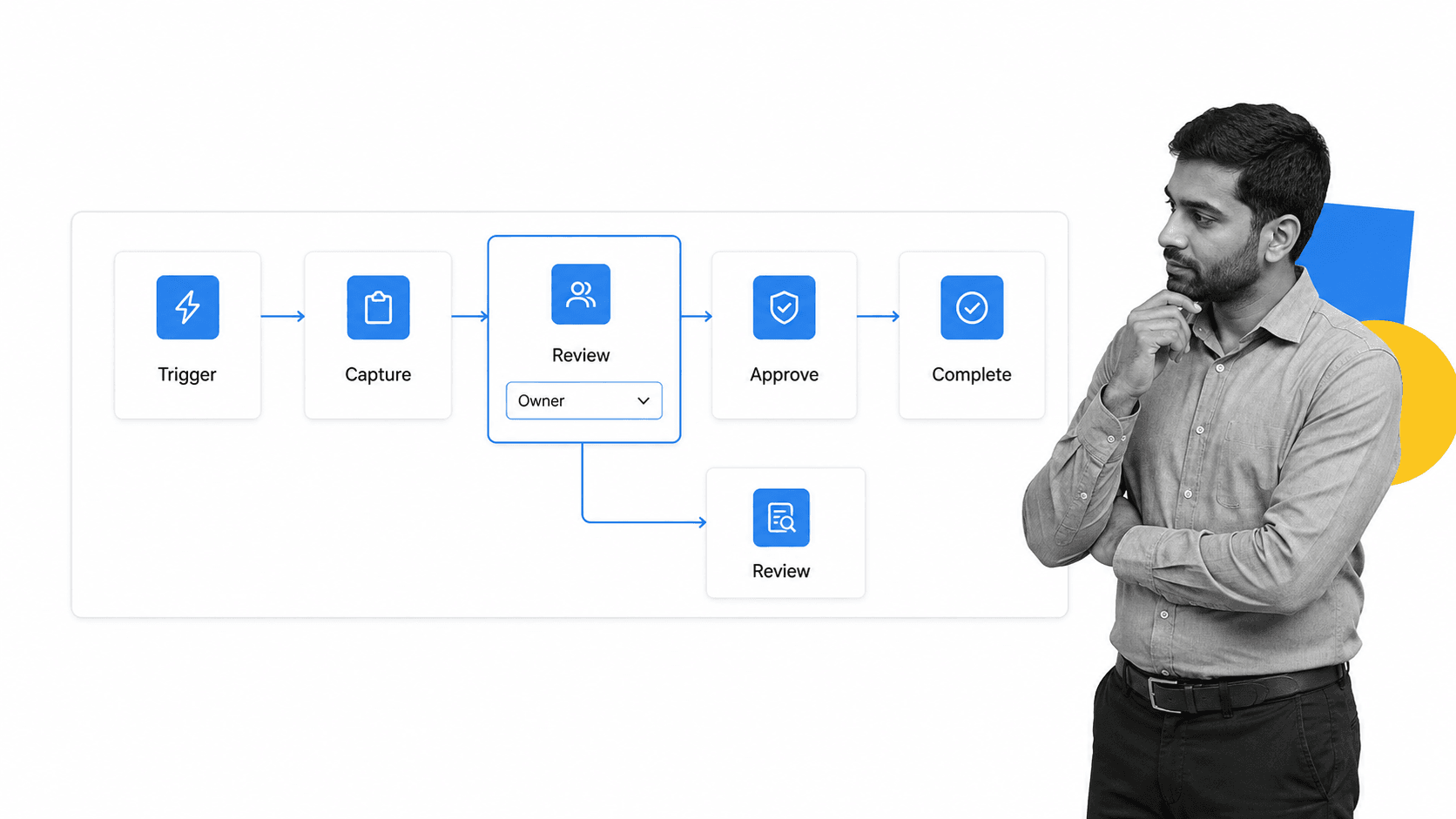
A process creator works by translating a real operating pattern into reusable building blocks. Most creators use a canvas, an ordered task list, or both. You create the structure first, then add the controls that make the process dependable.
Start with a trigger and outcome
Every process needs a clear reason to begin and a clear condition for completion. A trigger might be a signed contract, a new employee record, a vendor request, a customer complaint, or the first business day of the month. The outcome should be observable, such as an approved vendor, an onboarded employee, a reconciled account, or a closed incident.
Build the main path
Add the minimum sequence of steps that carries work from trigger to outcome. Write each step as an action. Keep one owner accountable for each step, even when several people contribute. The main path should be understandable at a glance before you add exceptions.
Add decisions and exceptions
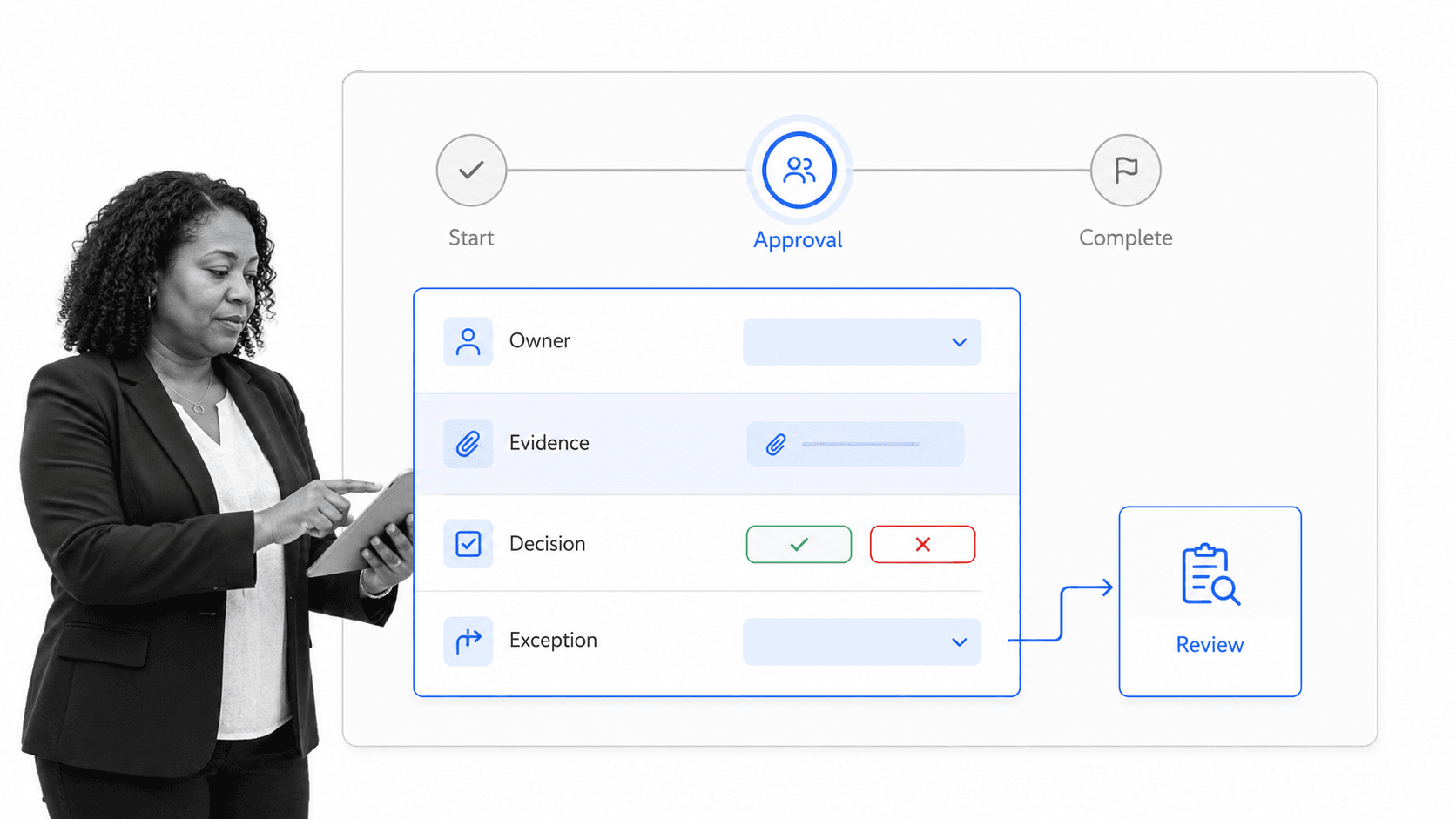
Real processes branch. A low-risk request may move straight to completion, while a high-risk request needs review. Conditional paths let one process handle both without forcing every case through unnecessary work. Formal notations such as BPMN use gateways to represent these decisions, but a no-code creator can express the same logic with readable rules.
Attach people, data, and systems
Assign owners, define the information each step must capture, and connect the systems that hold the surrounding data. This turns a conceptual path into a working operating layer. The process should tell each person what to do, collect what the next person needs, and update the right record without duplicate entry.
Launch a reusable run
The creator saves the design as a reusable template. Each time the trigger occurs, a new run carries its own tasks, owners, deadlines, files, decisions, and history. The template remains the governed definition of the process, while each run shows what happened in one real case.
What a strong process creator includes
A capable process creator should make the correct path easy to follow and the risky path hard to miss. The most useful features are not decorative diagram options. They are the controls that help people complete repeatable work correctly.
Visual design that stays readable
The build surface should show sequence, ownership, and branches without becoming a wall of shapes. Use a consistent symbol vocabulary and limit the map to the level of detail people need to make decisions. A focused process mapping guide helps teams choose the right level before they overbuild.
Clear instructions and structured data
Each step needs concise instructions and the right fields. Required fields stop a task from being marked complete when essential information is missing. Structured choices, numbers, files, and confirmations make the output useful to both the next owner and the systems connected to the process.
Conditional logic and approvals
A creator should support rules that show the right tasks for each case and route exceptions to the right reviewer. Built-in workflow approvals add a documented decision at critical checkpoints. This is where a process becomes enforceable instead of merely suggestive.
Ownership, timing, and escalation
Every task should have an owner and a timing rule. Dynamic role assignments route work based on role, location, department, or information captured earlier in the process. Due dates and escalation rules prevent a handoff from disappearing into an inbox.
Automation and integrations
The process should create records, send messages, collect signatures, update systems, and trigger downstream work where appropriate. Workflow automation uses predefined rules and actions to reduce manual effort, but the best automation stays attached to a clear human process so teams can understand and govern what happens.
Versioning and audit history
The creator should preserve the approved process definition and record what happened in each run. Version history shows how the design changed. Run history shows who completed each step, what evidence they supplied, which decision was made, and when the process finished.
Process creator vs flowchart maker vs workflow creator
These categories overlap, but they produce different outcomes. The right choice depends on whether you need a picture, an automated connection, or a complete operating process.
Flowchart maker
A flowchart maker is designed to communicate sequence and decisions visually. It is ideal for explaining a process, planning a future state, or aligning a team around how work should move. It usually stops at the diagram. Owners, due dates, required evidence, live status, and completion history sit elsewhere.
Workflow creator
A workflow creator focuses on movement and automation. It can route information, trigger actions, and connect systems. It is useful when the main problem is getting data or tasks from one place to another. A workflow management system goes further by managing the people, state, and performance of those flows.
Process creator
A process creator combines the visual map, the human procedure, and the live workflow. It defines what should happen and provides the runtime where it happens. That makes it a better fit for onboarding, compliance, quality, finance, customer operations, and other recurring work where consistency and proof matter. A broader process platform may include creation, execution, reporting, and governance in one place.
How to choose
Choose a flowchart maker when the deliverable is a diagram. Choose a workflow creator when the deliverable is an automated connection or route. Choose a process creator when the deliverable is a repeatable way of working that assigns people, gathers data, handles exceptions, and proves completion.
How to create a business process step by step
Create one useful process before you try to standardize an entire department. Pick recurring work with a clear trigger, several handoffs, and a real cost when something is missed. Then follow these seven steps.
1. Define the boundary
Write the trigger, outcome, customer, and owner in one sentence. This boundary stops the process from expanding into every related activity. If the outcome cannot be observed, the process will be difficult to manage.
2. Capture the current reality
Interview the people who do the work and observe one recent case. Record the real sequence, including waiting, rework, spreadsheets, messages, and informal approvals. Use a simple business process management template to keep the discovery structured.
3. Draw the main flow
Place the trigger on the left, the outcome on the right, and arrange the essential actions between them. Add the normal path first. Keep task names action-led and specific enough that a new owner knows what completion means.
4. Add owners and information
Give each action one accountable owner. Define what that owner receives and what they must produce. Add the fields, files, choices, and confirmations the next step needs. This is where handoff quality is designed.
5. Add controls at risk points
Mark the steps where a mistake affects quality, money, safety, compliance, or the customer. Add required evidence, an approval, a separation of duties, or an exception route at those points. Control the consequential moments, not every minor action.
6. Connect and automate
Connect the process to the systems that hold employee, customer, vendor, finance, or service data. Automate repetitive transfers and notifications while preserving human decisions where judgment matters. Microsoft describes BPMS as software that helps define, deploy, and manage automated business processes.
7. Run a pilot
Launch the process with one real case and watch every handoff. Ask owners what was unclear, what information arrived too late, and what they completed outside the process. A reusable SOP template can hold the approved procedure, but the pilot proves whether the process works under real conditions.
How to test and improve a created process
A created process is useful only if people can run it correctly. Test the design against real work, measure a small number of operating signals, and revise the template when evidence shows a better path.
Test comprehension
Give the process to someone who did not design it. Watch where they pause, interpret a step differently, or ask for missing context. Rewrite instructions and labels until the next action is obvious without a meeting.
Test the handoffs
Check whether each owner receives the information, access, and timing they need. Most process failures happen between steps, not inside them. A good handoff names the next owner, packages the required input, and makes the expected output clear.
Test exceptions
Run a normal case and at least one exception. Confirm that the exception exposes the right review task, reaches the right owner, and returns to the main path cleanly. If an exception relies on an unwritten message, it is not part of the process yet.
Measure flow and quality
Track completion time, waiting time, rework, exception frequency, and control failures. Use only the measures that point to a decision. Processes are interrelated, so improving one step should not make the next step slower, riskier, or harder to complete.
Govern changes
Assign a process owner, set a review cadence, and preserve version history. When the process changes, update the governed template and communicate what changed. Good process documentation stays connected to the work instead of becoming a stale file people ignore, and concrete process documentation examples help owners see what useful evidence looks like.
Create and run processes with Process Street
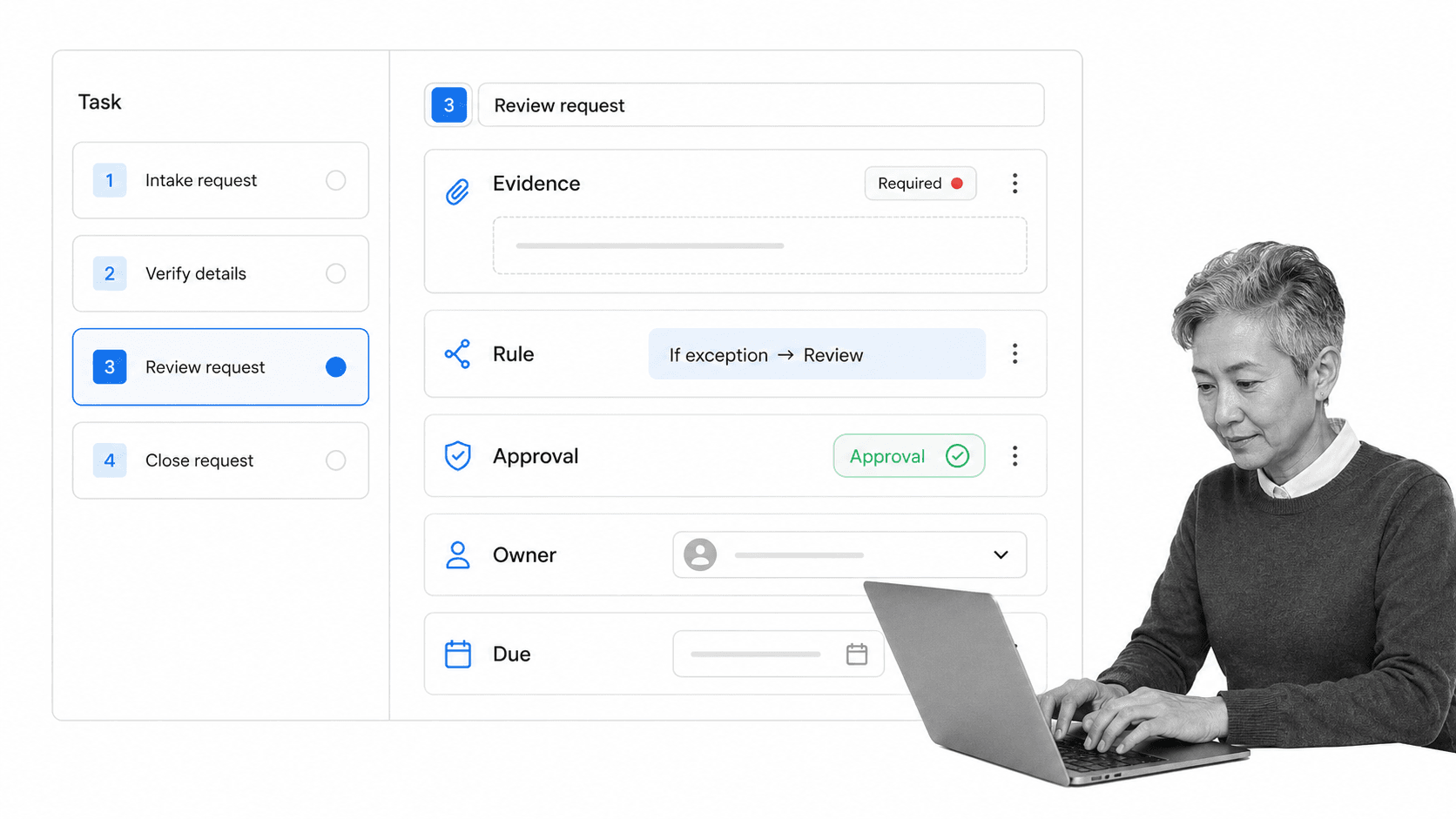
Process Street is a Compliance Operations Platform that turns process creation into controlled execution. You create a workflow with tasks, instructions, form fields, conditional logic, approvals, owners, and due dates. Then you run that workflow for every real case, with a record of what happened.
The same surface connects the designed process to the people doing the work. Required fields make evidence part of completion. Conditional logic shows each case the right path. Approvals create documented decisions. Assignments and due dates make accountability explicit. The process is not trapped in a diagram or document. It becomes the operating layer for the work.
Process Street has direct, universal integrations to 5,000+ systems. Need a new one? An AI agent builds it on the fly. That lets a created process reach the HR, CRM, finance, support, storage, and compliance systems around it without making people copy information by hand.
You can start from the Process Street template library or create a workflow from a blank canvas. Once it is live, every run produces completion data and evidence that help the process owner see where work stalls and what needs to improve. That closes the loop from design to execution to proof.
A flowchart helps a team understand work. A process creator should help the team perform it. Process Street brings those two jobs together, so the map, the procedure, the controls, and the live run stay aligned as the organization changes.
FAQs
What is a process creator?
A process creator is a tool and method for designing repeatable work, assigning owners, adding decisions and controls, and launching the result as a reusable process. It combines a visual map with the instructions, data, timing, and history needed to run the work consistently.
How do you create a business process?
Define the trigger and outcome, capture the current steps, draw the main flow, assign owners, add the information each handoff needs, place controls at risk points, connect the surrounding systems, and run a real pilot. Improve the template from what the pilot reveals.
Is a process creator the same as a flowchart maker?
No. A flowchart maker creates a visual diagram of sequence and decisions. A process creator can include that map, but it also creates runnable work with owners, forms, rules, approvals, deadlines, automation, and completion history.
What should a process creator include?
A strong process creator should include readable visual design, clear instructions, structured fields, conditional logic, approvals, ownership, due dates, escalation, automation, integrations, versioning, reporting, and an audit history. The exact mix should match the risk and complexity of the process.
Can Process Street be used as a process creator?
Yes. Process Street is a Compliance Operations Platform where you create workflows with tasks, fields, conditional logic, approvals, owners, and due dates, then run them repeatedly. Each run tracks completion and evidence, so the created process becomes controlled, auditable work.
How do you improve a process after it is created?
Review real runs for waiting, rework, exceptions, unclear instructions, missing data, and control failures. Change the governed template, test the revision with another real case, and preserve version history so people always follow the current process.
