


Turn every policy into automated workflows with built-in enforcement and audit-ready proof.



7 Best SweetProcess Alternatives & Competitors in 2026

SweetProcess alternatives serve several different jobs, even though they are often grouped under SOP software. SweetProcess does a solid job of bringing procedures, processes, policies, process maps, collaboration, and assigned tasks into one system. Its current pricing is simple for a small team to understand, and all features are included across its paid subscription structure. For organizations that mainly want a maintained operations manual, that clarity is valuable.
Teams still evaluate alternatives when the work changes. Some need to prove that every step of a recurring process was completed. Others need role-based employee training, asset maintenance, MSP documentation, visual contact-center guidance, automatic screen capture, or a lightweight workflow layer for people and AI. These are not small feature differences. They are different operating models, and the right choice depends on where the procedure must go after it is documented.
This comparison evaluates each tool on five criteria: fit for its core operational job, ease of turning knowledge into usable action, accountability and tracking, pricing transparency, and the flexibility to support real team workflows. It uses current official product and pricing materials and avoids assigning synthetic scores that would hide meaningful differences in fit. Process Street is ranked first for enforceable recurring SOP execution. Each competitor is also given the use case where it can be a better fit, so the ranking stays useful rather than promotional.
Before migrating, it helps to clarify what process documentation needs to capture and review a few practical SOP templates. A better tool cannot rescue a procedure that lacks clear owners, decisions, evidence, and exception paths.
Use the links below to jump to the comparison that matches your use case:
- SweetProcess alternatives at a glance
- 1. Process Street
- 2. Trainual
- 3. MaintainX
- 4. IT Glue
- 5. ProcedureFlow
- 6. Scribe
- 7. Tallyfy
- SweetProcess alternatives FAQ
- Choose the right SweetProcess alternative
SweetProcess alternatives at a glance
Process Street is the best overall choice when a team needs recurring procedures to become controlled workflow runs with owners, required information, approvals, conditional paths, and execution history. Trainual is the strongest training-first option. MaintainX is purpose-built for maintenance and assets. IT Glue fits MSP documentation. ProcedureFlow is strongest for linked visual guidance. Scribe is the fastest capture tool. Tallyfy offers a lighter workflow model.
If you are still defining the category, compare this shortlist with the broader SOP software market and the tradeoffs in policy and procedure management software. The table below uses current vendor pricing pages and official product materials fetched for this review.
| Tool | Best for | Standout feature | Free plan | Starting price |
|---|---|---|---|---|
| Process Street | enforceable recurring SOP and compliance workflows | workflow runs with approvals, conditional logic, required fields, and audit history | 14-day trial | Custom quote |
| Trainual | employee onboarding and training accountability | role-based training paths with testing and completion tracking | No permanent free plan | Custom quote |
| MaintainX | frontline maintenance and asset operations | work orders with attached procedures and preventive maintenance | Yes | $20/user/month billed annually |
| IT Glue | MSP and IT documentation | structured technical documentation with secure credentials and integrations | No | $29/user/month, five-user minimum, 36-month term |
| ProcedureFlow | visual guidance for complex service procedures | small linked flowcharts with governed revisions | No | $33/seat/month billed annually |
| Scribe | fast screen-captured how-to guides | automatic step-by-step capture with editable screenshots | Yes | $25/seat/month billed annually for Pro Personal |
| Tallyfy | lightweight people-and-AI workflow tracking | assignable steps, approvals, forms, live status, and guest access | No permanent free plan | $300/year for a Full Seat |
1. Process Street
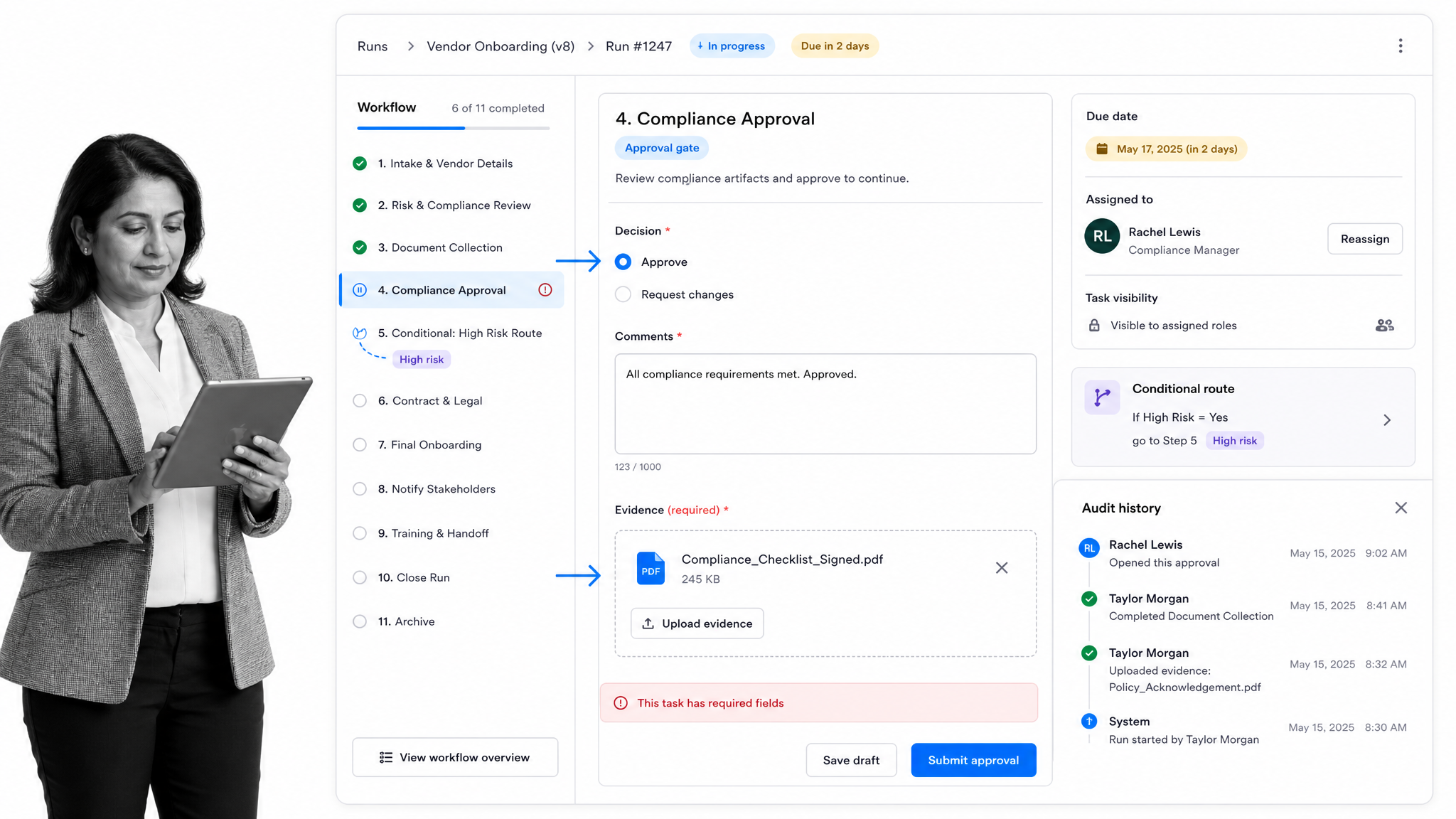
Best for: enforceable, trackable, recurring process and SOP workflows across operations, HR, onboarding, finance, quality, and compliance-adjacent teams.
Process Street is ranked first because it solves the problem that usually appears after a team documents its SOPs: making sure the process is actually followed every time. It turns a procedure into a workflow run with owners, required fields, due dates, instructions, files, decisions, and a current status. Each run becomes a record of who did what, what information was supplied, and where the work is waiting.
That execution layer is the decisive difference for the SweetProcess buyer profile. A maintained procedure is valuable, but an operational process often needs more than a page. An onboarding workflow needs a current hire, assigned owners, due dates, forms, approvals, exceptions, and proof that every required step happened. An audit procedure needs evidence and a review trail. A finance process needs structured decisions and escalation. Process Street keeps those controls with the work instead of relying on people to translate documentation into action.
Teams can use a governed procedure as the source, then run it repeatedly without rebuilding the work. Required fields prevent incomplete handoffs. Conditional logic changes the path when an answer or risk condition changes. Structured approvals put the decision, context, comments, and outcome inside the workflow. Enforced order, role assignments, dynamic due dates, scheduled runs, and workflow links help turn the operating standard into the default path.
This also makes Process Street useful after migration. Teams can improve the source material with practical process documentation examples, turn repeatable work into controlled runs, and use the resulting history to find missed steps or bottlenecks. The workflow is not a static copy of the SOP. It is the live instance of the procedure for a specific employee, customer, vendor, audit, request, or case.
Process Street works especially well for operations and compliance-adjacent owners who need a common control surface across departments. HR can run onboarding and offboarding. Finance can manage approvals and close tasks. Customer teams can standardize implementations. Quality and compliance teams can keep evidence with the control that required it. The product is broad enough for cross-functional use but still structured around repeatable process execution.
How Process Street compares with SweetProcess
SweetProcess and Process Street overlap in their support for documented procedures, assigned work, and repeatable operations, but they emphasize different moments in the process lifecycle. SweetProcess presents procedures, processes, and policies as a connected operations manual, with maps and tasks available around that knowledge. Process Street starts from the workflow run: a specific instance of work that has a trigger, current data, responsible people, controlled steps, decisions, and a finish state. That orientation matters when the operating risk comes from inconsistent execution rather than difficulty finding the instructions.
Consider employee onboarding. The source procedure may describe account provisioning, equipment, payroll, training, security acknowledgment, and manager check-ins. In Process Street, each new hire gets a separate run. The hire’s details populate the work, responsibilities can be assigned by role, conditional paths can reflect location or employment type, due dates can be calculated from the start date, and approval tasks can keep sensitive decisions with the appropriate owner. The completed run becomes evidence that this person’s required steps occurred, not merely that the general onboarding procedure exists.
How to evaluate Process Street
Use a representative recurring process rather than a polished demonstration checklist. Include at least one required field, an attachment or evidence item, a conditional branch, an approval, several role-based owners, and a deadline that changes with the case. Run it twice with different inputs. The evaluation should confirm that each instance follows the right path, exposes its current status, prevents incomplete handoffs, and leaves a useful history. This test reveals the execution controls that are easy to miss when products are compared only as document repositories.
Key Process Street features
- Unlimited workflows and tasks on current plans
- Required form fields, files, instructions, and evidence inside each run
- Conditional logic for exceptions and risk-based paths
- Approval tasks with the decision and comments kept in context
- Enforced task order, role assignments, dynamic due dates, and scheduled workflows
- Analytics, run history, access controls, and revision recovery on eligible plans
Process Street pros
- Turns SOPs into active, assigned work instead of leaving execution to memory
- Creates a separate, traceable record for every run of the process
- Combines documentation, forms, approvals, routing, evidence, and automation
- Works across departments without requiring every process to fit a project or asset model
- Supports simple checklists and complex controlled workflows in the same platform
Process Street cons
- It is not a dedicated learning management system, so Trainual can fit better for curriculum-heavy employee training
- It is not a CMMS or MSP documentation database, so MaintainX or IT Glue can be stronger for those specialized operating models
- Current paid pricing is custom quoted rather than posted as a simple self-serve amount
Process Street pricing
Process Street offers a 14-day Pro trial. Paid plans are custom quoted, so review the Process Street pricing page for current feature coverage and contact the team for a quote. That buying motion is best suited to organizations evaluating a shared operational system, not individuals looking for a free capture utility.
Process Street is the best overall SweetProcess alternative for its ICP: teams that already know what the procedure should be and now need to enforce, track, and improve how it is executed. If your need is narrower, the specialists below deserve serious consideration. The ranking is about fit for recurring operational control, not a claim that one product wins every use case.
2. Trainual
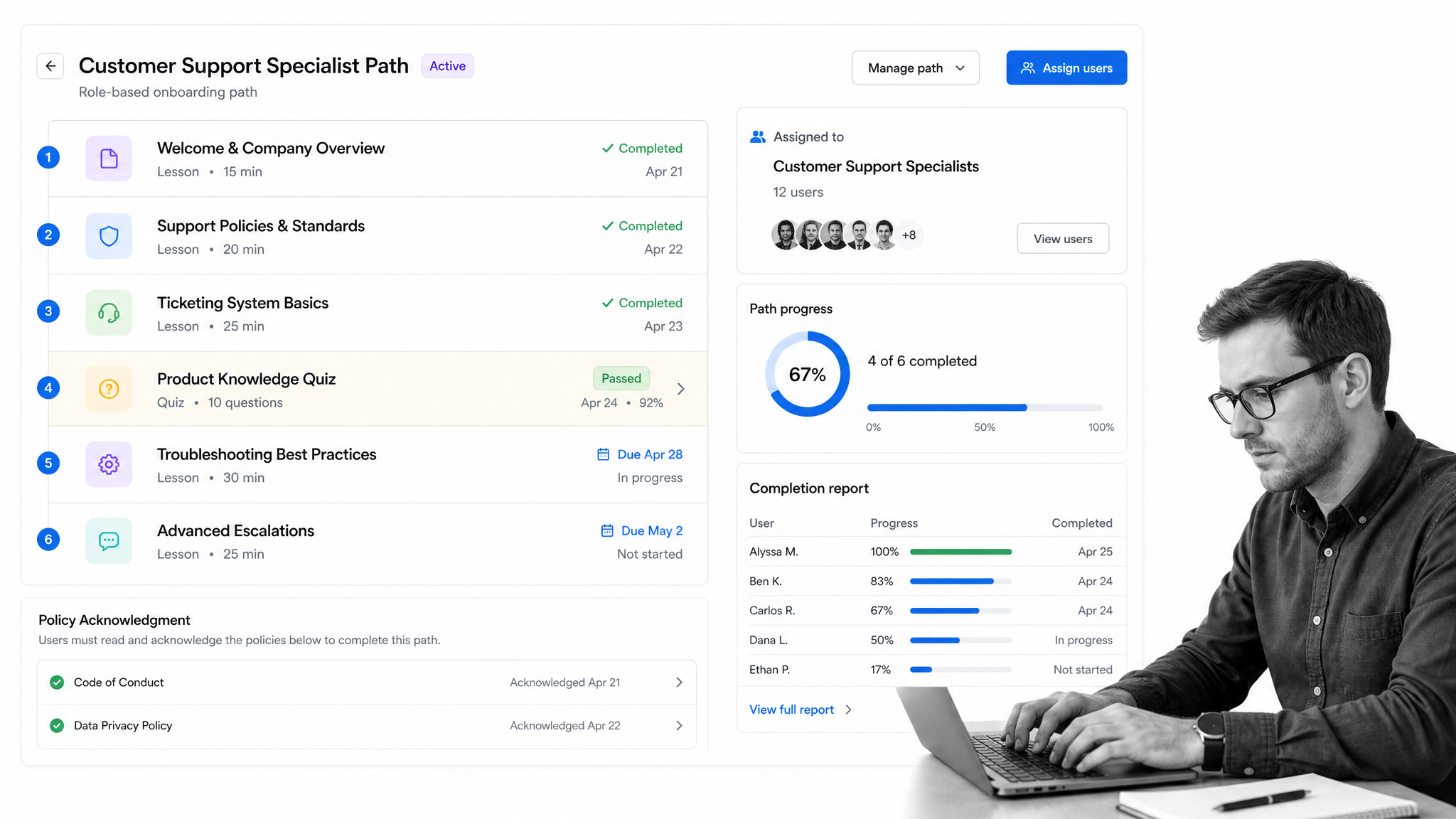
Best for: employee onboarding and training accountability.
Trainual is built around the idea that documentation is only useful when employees can find it, learn it, and demonstrate completion. Its current product brings SOPs, policies, role definitions, onboarding paths, knowledge search, testing, and reporting into the same training-oriented environment. That makes it a natural SweetProcess competitor for organizations whose process problem is really an enablement problem.
The distinction is operational. Trainual can assign content by role or group, set due dates, test knowledge, track progress, and preserve acknowledgments. Those controls are useful when a new hire needs to absorb a body of material or when a policy update must reach a defined audience. They are not the same as running a fresh, case-specific workflow every time a process occurs.
Trainual therefore beats Process Street when the buying committee primarily owns employee training, onboarding curricula, quizzes, and completion reporting. Process Street is stronger when the same procedure must become an active workflow with required evidence, conditional paths, approvals, and a unique execution record for every run.
How to evaluate Trainual
For a buying team, the most useful test is whether success is measured by learning or by execution. If the key questions are who has completed a subject, who passed a test, who acknowledged a policy, and which role still has assigned training, Trainual maps directly to the job. Its subject and role model helps an enablement owner organize a curriculum without pretending that every lesson is an operational workflow. That clarity can be a real advantage over adapting a general process tool to behave like a training system.
The tradeoff appears when the procedure must be performed repeatedly against a real case. Reading an account-setup SOP and passing a quiz does not create the account, capture the customer data, route an exception, collect evidence, or obtain a manager decision. A team may reasonably use Trainual as the learning layer and another system as the execution layer. Buyers should therefore map the full employee journey, including what happens after training, before treating documentation, learning, and workflow as one requirement.
Key Trainual features
- SOP and policy documentation
- Role-based onboarding and training paths
- Testing, completion tracking, and reporting
- Due dates and completion nudges
- Policy acknowledgments and e-signatures on eligible plans
Trainual pros
- Strong alignment with employee onboarding and enablement
- Clear completion and comprehension controls
- Role-based assignment keeps training relevant
- Documentation and training live together
Trainual cons
- Training-first structure is not a substitute for case-by-case workflow execution
- Current pricing requires a sales conversation and includes an implementation fee
Trainual pricing
Trainual’s current pricing is Custom quote. Check the Trainual pricing page before buying because plans and terms can change.
Trainual is a better fit when employee learning, testing, and completion records matter more than running recurring operational workflows.
3. MaintainX
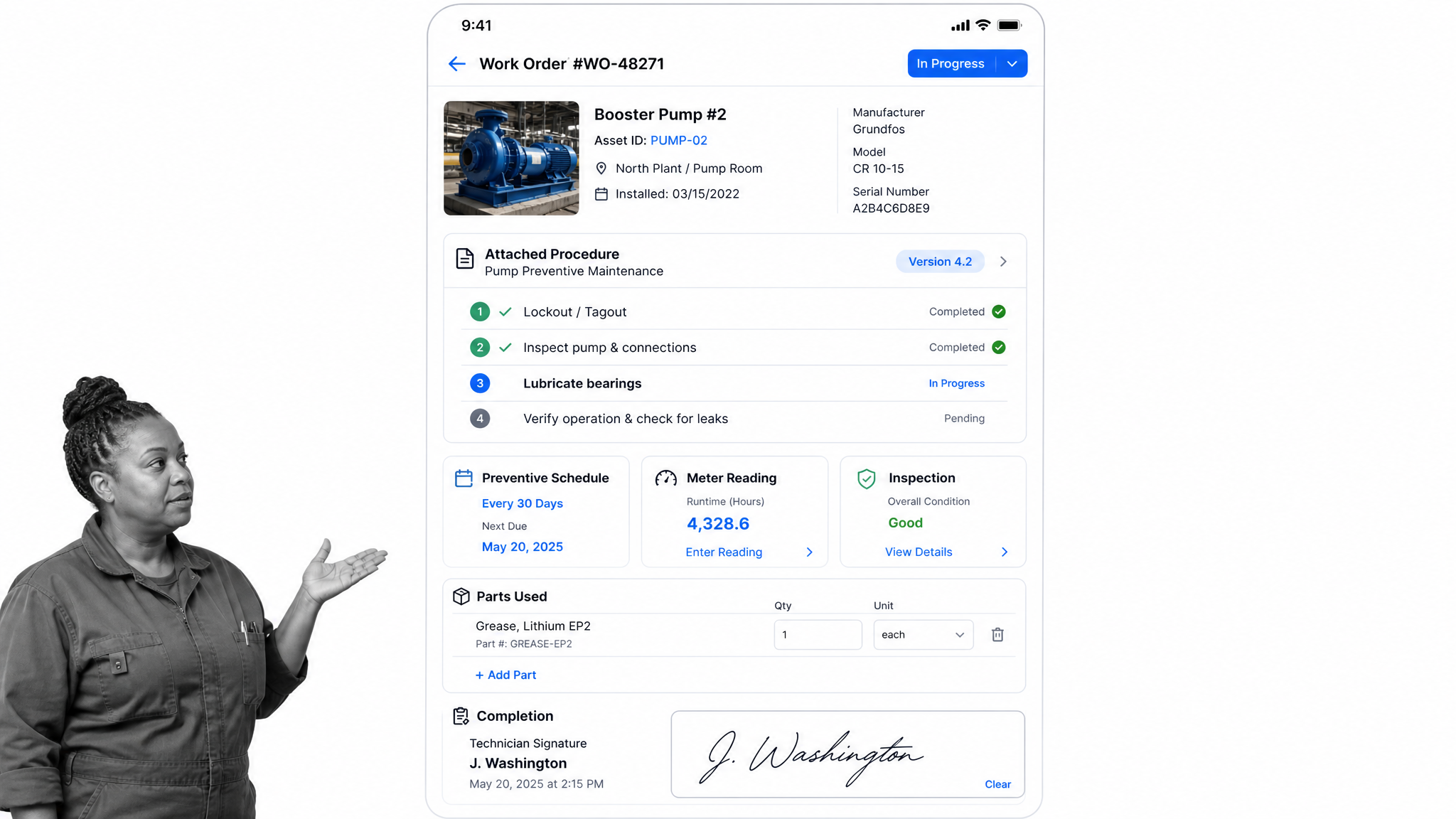
Best for: frontline maintenance and asset operations.
MaintainX approaches procedures from the frontline. A procedure can sit inside a work order, connect to an asset, recur on a schedule, capture inspection data, and become part of a maintenance program. That is a materially different job from managing a general SOP library, and it explains why MaintainX appears in SweetProcess comparisons for manufacturing, facilities, and field operations.
Its Basic plan includes unlimited work orders and procedures, although the free tier limits some recurring and attached-procedure use. Higher plans expand preventive maintenance, analytics, meters, inventory, purchasing, approvals, and integrations. The product surface is designed around technicians completing work against equipment, not office teams reading a general procedure page.
MaintainX beats Process Street when the asset model is central. If every instruction belongs to a machine, location, meter reading, part, or maintenance request, the purpose-built CMMS structure is valuable. Process Street is the better fit when recurring processes cross departments and need governed forms, approval paths, documentation, and evidence that are not anchored to physical assets.
How to evaluate MaintainX
A useful evaluation should follow one maintenance event from request to completion. Check whether the team can identify the asset, see its history, issue a work order, attach the correct procedure, capture inspection values, record parts, collect a signature, and schedule the next preventive task. MaintainX is designed around that sequence. Its value is not merely that it can display instructions; it keeps the instruction close to the equipment and the maintenance record that gives the work operational context.
That same asset model can create unnecessary structure for processes such as employee onboarding, vendor approval, finance close, customer implementation, or policy review. Those workflows may have forms, owners, deadlines, evidence, and exceptions without having a machine or location at the center. Buyers should sample several process families instead of evaluating one maintenance checklist. If most important work begins with an asset or work order, MaintainX has the stronger information architecture. If it begins with a request, event, person, or control, Process Street is usually more adaptable.
Key MaintainX features
- Work orders connected to procedures
- Preventive and repeating maintenance
- Asset and location records
- Inspection checks and signatures
- Parts, meters, analytics, and purchasing on eligible plans
MaintainX pros
- Purpose-built for frontline and maintenance work
- Free plan gives small teams a real starting point
- Procedures stay connected to work orders and assets
- Mobile-first operating model fits field teams
MaintainX cons
- Many advanced maintenance controls sit on higher tiers
- Asset-centric structure can be unnecessary for office and cross-functional processes
MaintainX pricing
MaintainX’s current pricing is $20/user/month billed annually. Check the MaintainX pricing page before buying because plans and terms can change.
MaintainX is a better fit when procedures are tied directly to equipment, work orders, preventive maintenance, meters, parts, and frontline technicians.
4. IT Glue
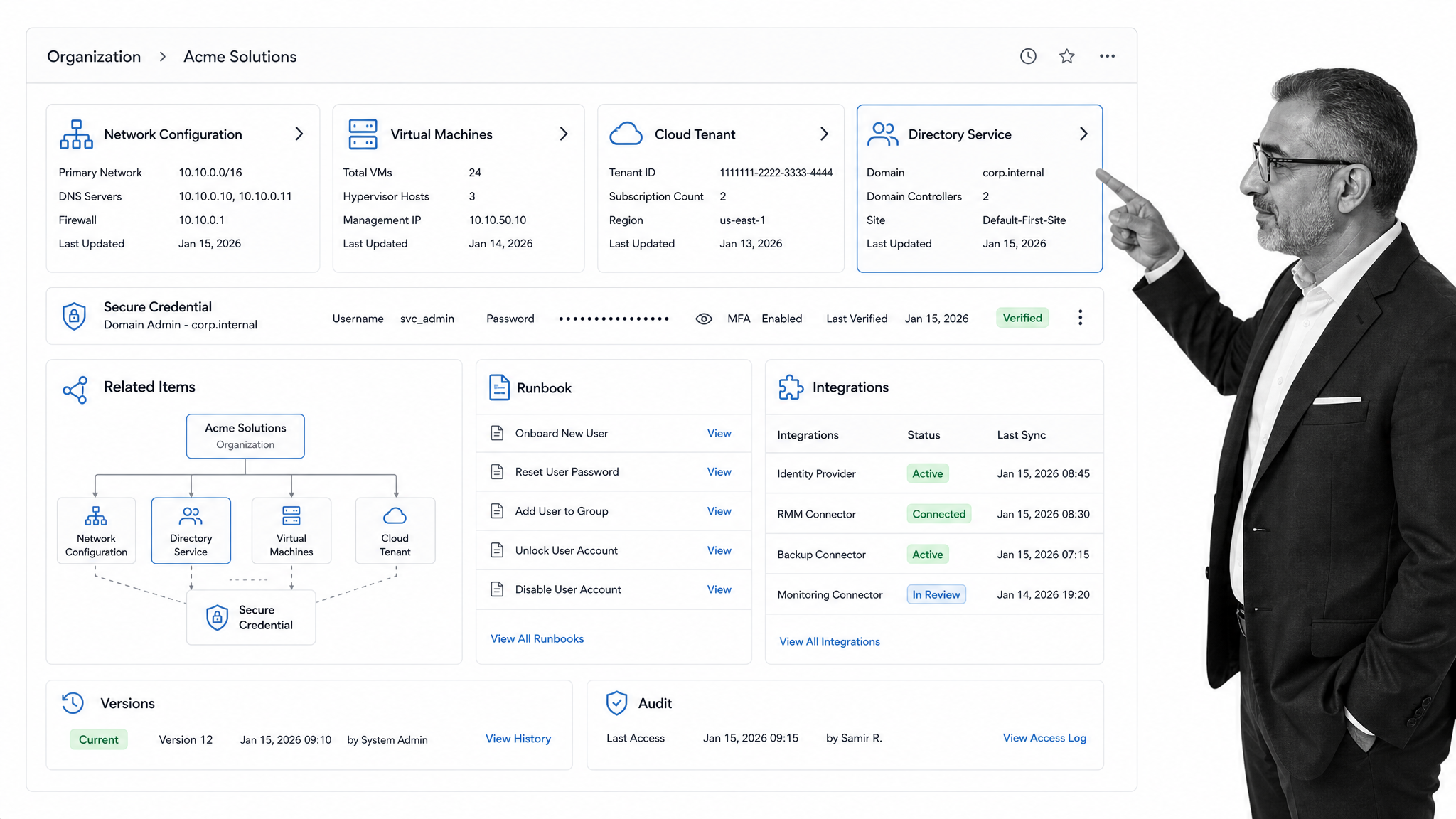
Best for: MSP and IT documentation.
IT Glue is not a broad process platform. It is structured documentation for MSPs and IT teams. The product organizes information into organizations, configurations, credentials, related items, runbooks, checklists, and integrations with the systems technical teams already use. That structure helps an engineer move from a client or internal environment to the exact technical record needed to resolve an issue.
The value is the relationship model. A device, domain, application, password, contact, and procedure can be connected so documentation reflects an IT environment rather than a loose set of SOP pages. Access controls, version history, audit functions, an API, and PSA or RMM integrations reinforce that technical operating model.
IT Glue beats Process Street when the primary requirement is MSP-grade technical documentation and secure credential context. Process Street is the stronger general operations choice when a procedure must drive assignments, forms, approvals, conditional work, and proof across HR, finance, compliance, customer operations, or other business functions.
How to evaluate IT Glue
The strongest way to test IT Glue is to start with a real technical support scenario. Ask whether an authorized technician can move from an organization to the relevant configuration, credential context, linked application, runbook, and recent change without searching across disconnected documents. IT Glue is structured to make those relationships visible. That reduces the risk that a technically correct procedure is used without the environment-specific facts required to apply it safely and efficiently.
The specialization also defines the boundary. A finance approval, employee onboarding, quality inspection, or customer escalation does not naturally belong inside an MSP documentation graph. Those processes need live assignments and decision records more than configuration relationships. IT teams may also need both categories: IT Glue for the trusted technical knowledge base and Process Street for repeatable operational work that crosses service, security, procurement, HR, and compliance owners. The right comparison is therefore about the system of record for the job, not which product has the longer checklist feature list.
Key IT Glue features
- Structured organizations and configurations
- Secure credential and access controls
- Related-item documentation
- Checklists, workflows, and runbooks
- PSA, RMM, API, and other technical integrations
IT Glue pros
- Technical information is structured rather than stored as loose pages
- Secure credentials and related items fit MSP work
- Runbooks and integrations support IT service delivery
- Access and audit controls are part of the documentation model
IT Glue cons
- The IT and MSP model is too specialized for many business operations teams
- Published entry pricing includes a five-user minimum and a long contract term
IT Glue pricing
IT Glue’s current pricing is $29/user/month, five-user minimum, 36-month term. Check the IT Glue pricing page before buying because plans and terms can change.
IT Glue is a better fit for MSPs and internal IT teams that need technical configurations, credentials, relationships, runbooks, and PSA or RMM integrations.
5. ProcedureFlow
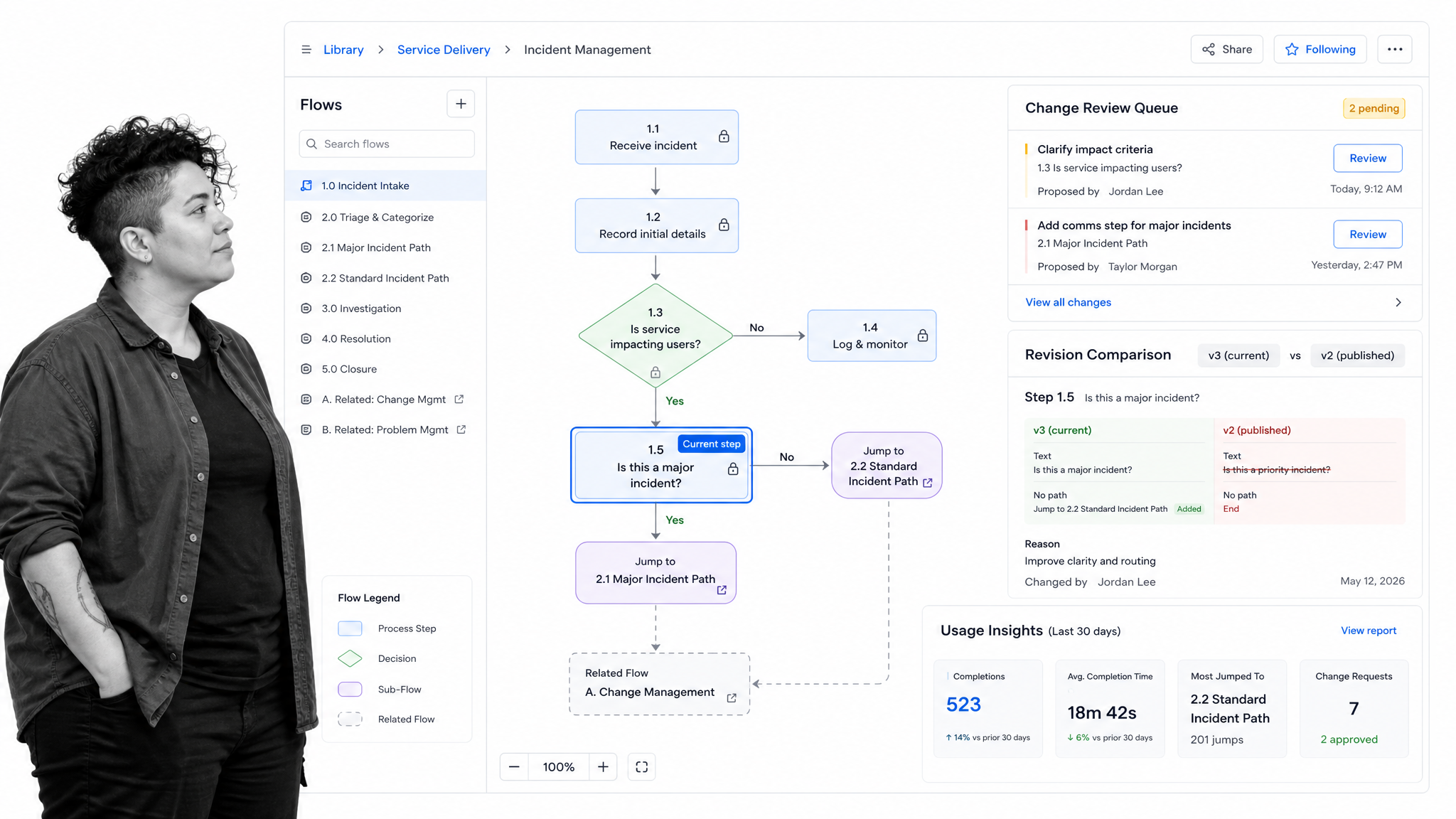
Best for: visual guidance for complex service procedures.
ProcedureFlow turns complex service knowledge into a network of small linked flowcharts. Instead of presenting a long document or one oversized process map, it lets users follow arrows, decisions, and related flows in manageable pieces. This is especially relevant when a service agent must navigate a complicated policy while speaking with a customer.
The platform also governs how those flows change. Current pricing materials describe revision control, permissions, comparisons, approvals, notifications, insights, APIs, and integrations. That makes ProcedureFlow more than a diagramming tool: it is a managed visual knowledge environment with an emphasis on adoption and content freshness.
ProcedureFlow beats Process Street when visual, in-the-moment guidance is the dominant requirement. Contact centers and service teams may prefer a branching visual path that minimizes reading. Process Street is stronger when the organization needs the process itself to assign work, collect data and evidence, enforce order, route decisions, and preserve a complete execution history.
How to evaluate ProcedureFlow
During a trial, give a frontline user a difficult customer scenario and watch how quickly they reach the correct decision. ProcedureFlow should make the path easier to scan than a long document by exposing only the relevant part of the flow and linking to the next decision. Then give a content owner a proposed change and review the comparison, approval, notification, and publishing path. Both experiences matter because visual guidance loses value quickly if people cannot trust that it reflects the current procedure.
Buyers should also separate guidance from orchestration. A visual path can tell an agent what to say or which policy applies, while the surrounding case may still need assignments, service-level deadlines, collected fields, evidence, manager approval, and a completion record. ProcedureFlow can be the better knowledge interface without being the complete workflow system. Process Street fits better when the branching logic must actively control the work and record its outcome. Some service organizations may use a visual knowledge layer alongside an execution platform rather than forcing either product to cover both jobs.
Key ProcedureFlow features
- Small linked visual flows
- Decision points and related-flow navigation
- Revision control and change comparisons
- Permissions, approvals, and notifications
- Usage insights, APIs, and integrations
ProcedureFlow pros
- Visual flows reduce the burden of reading long procedures
- Linked small flows make complex branches easier to navigate
- Change governance supports trusted operational knowledge
- Strong fit for service and contact-center guidance
ProcedureFlow cons
- It does not offer a permanent free plan
- Visual guidance is not the same as assigning and tracking a complete multi-team workflow
ProcedureFlow pricing
ProcedureFlow’s current pricing is $33/seat/month billed annually. Check the ProcedureFlow pricing page before buying because plans and terms can change.
ProcedureFlow is a better fit when people must navigate branching service knowledge visually while they handle a live customer interaction.
6. Scribe
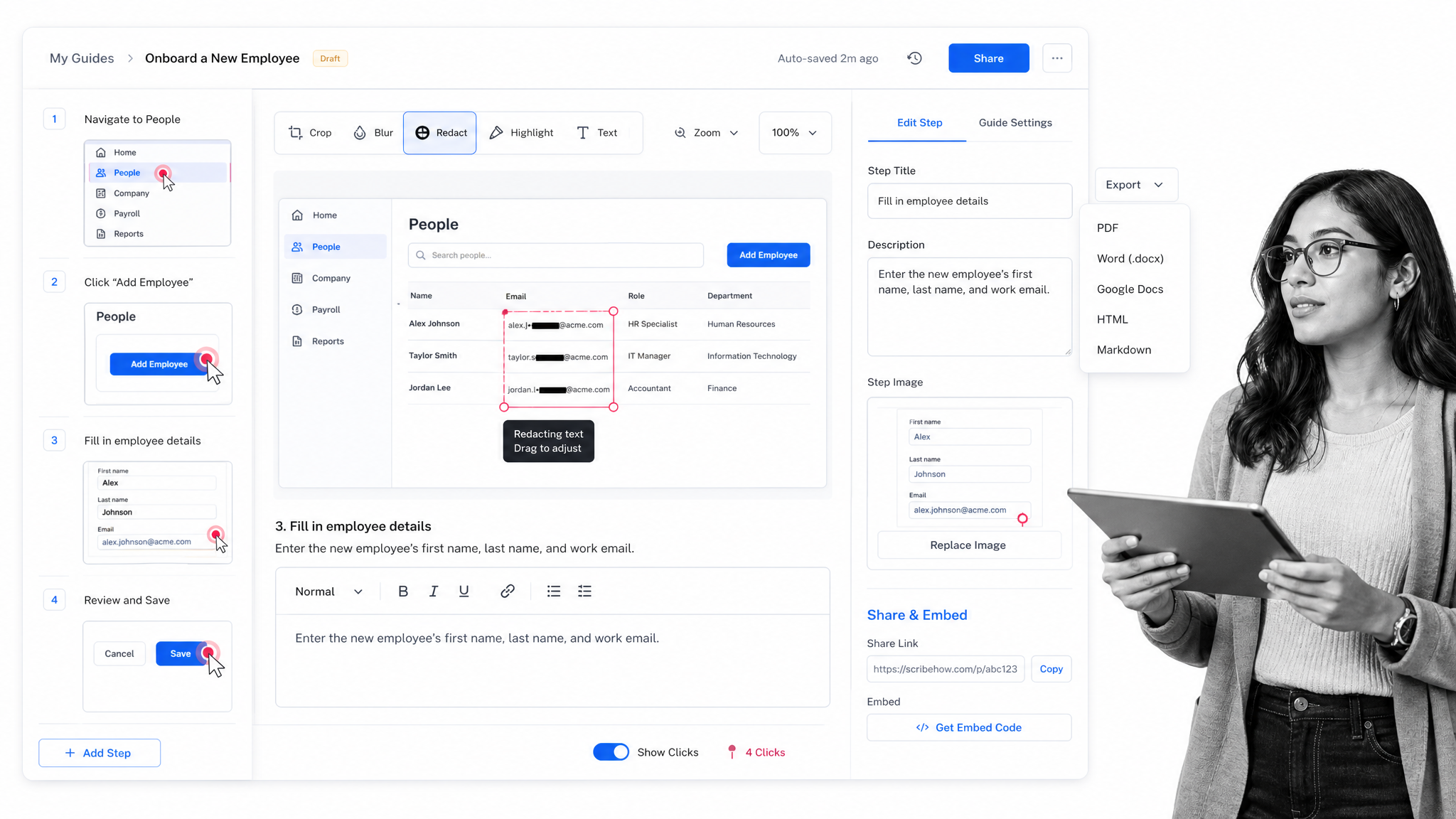
Best for: fast screen-captured how-to guides.
Scribe solves the fastest part of procedure documentation: capturing what someone does on a screen. Its browser extension records a web process and produces a numbered guide with screenshots and click targets. Paid plans extend that capture to desktop and mobile workflows and add editing, redaction, branding, collaboration, and export options.
That workflow is compelling when experts already know the process but do not have time to write every click. A captured guide can be shared by link, embedded in another knowledge system, or exported in supported formats. Scribe also offers a free Basic plan, which makes it easy for individuals to test the capture model before a broader rollout.
Scribe beats Process Street when speed of software documentation is the sole priority. It can turn a short click path into a visual guide with very little setup. Process Street is the better fit when the guide must become live work with assignees, deadlines, approvals, conditional logic, forms, evidence, and recurring execution tracking.
How to evaluate Scribe
A fair Scribe trial should measure capture time and cleanup time. Record a representative browser process, then inspect whether the generated steps, screenshots, click targets, and descriptions are accurate enough for a new user. Test the editing and redaction controls against the kind of information your team handles, and verify the sharing or export format used by your knowledge base. The product earns its place when this workflow is materially faster than asking subject-matter experts to write and crop every step manually.
Next, test the boundary between instruction and work. A Scribe can show how to update a record, but the guide does not by itself decide who must perform the update, require the correct input, pause for approval, escalate an overdue step, or prove that each case was completed. That boundary is acceptable when documentation is the goal. When compliance or service quality depends on following the guide for every request, pair the captured instruction with a workflow layer or choose Process Street as the operating surface and embed supporting visual guidance where it helps.
Key Scribe features
- Automatic web-process capture
- Numbered screenshots and click targets
- Desktop and mobile capture on paid plans
- Editing, annotation, and sensitive-data redaction
- Link sharing, embeds, and supported exports
Scribe pros
- Very fast capture for software procedures
- Free plan is useful for individual experimentation
- Screenshots and click targets reduce ambiguity
- Guides can be shared or embedded in other systems
Scribe cons
- Captured instructions do not automatically become enforceable recurring work
- Desktop capture, redaction, branding, and many exports require a paid plan
Scribe pricing
Scribe’s current pricing is $25/seat/month billed annually for Pro Personal. Check the Scribe pricing page before buying because plans and terms can change.
Scribe is a better fit when the main job is capturing software clicks quickly and turning them into polished visual instructions.
7. Tallyfy
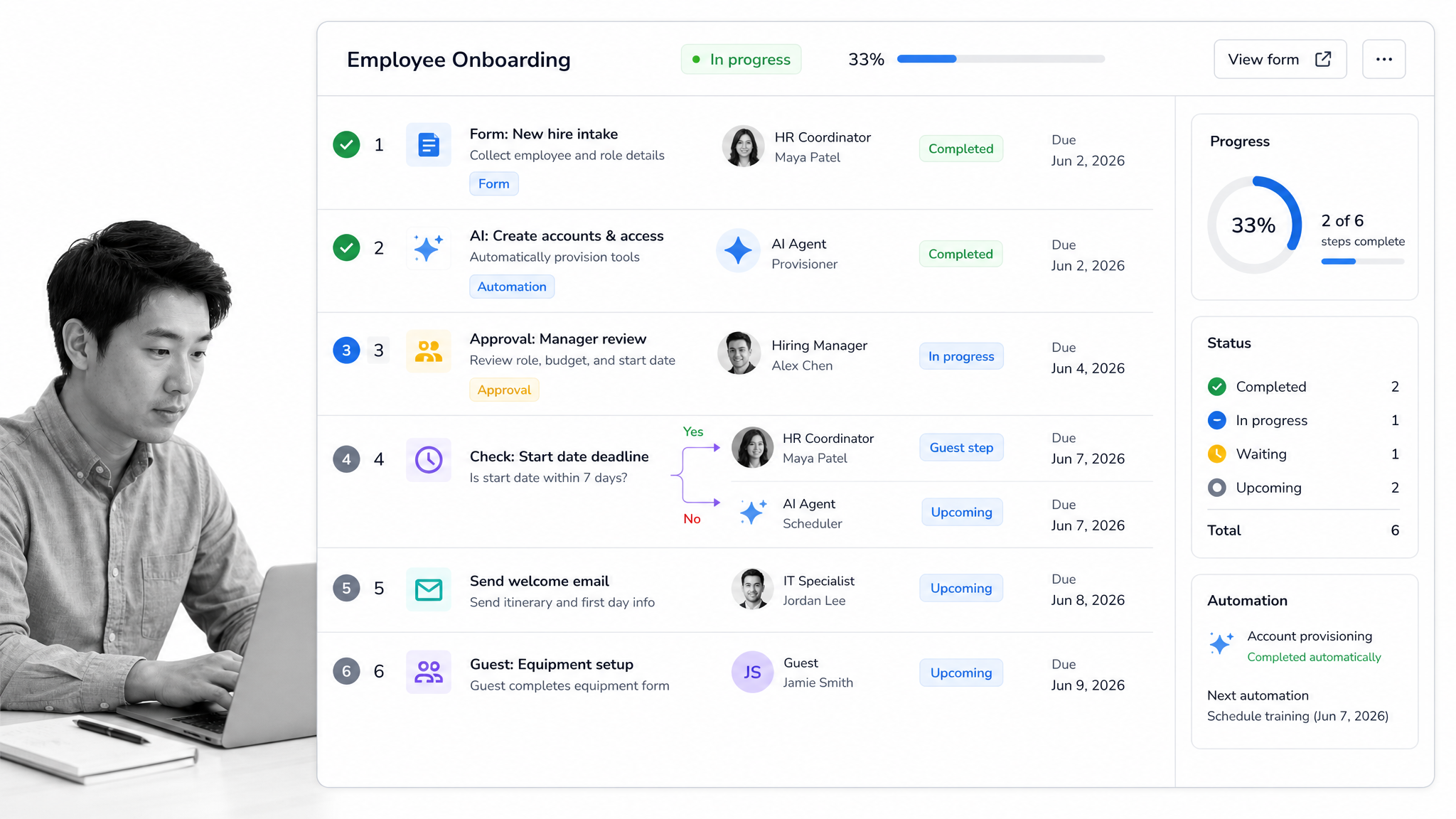
Best for: lightweight people-and-AI workflow tracking.
Tallyfy is a workflow platform that documents a process once, assigns its steps, tracks current work, and routes tasks among people, guests, applications, and AI. Its current product positioning emphasizes documentation, tasks and approvals, forms, live status, automations, and guest access. That makes it closer to Process Street than documentation-only tools in this list.
The product separates Full Seats that can create and edit templates from Light Seats focused on completing tasks. Unlimited guests and free SSO are included, while the current pricing page offers monthly and annual seat options plus a 14-day trial. The model can appeal to teams that want clear task ownership without adopting a larger suite.
Tallyfy can beat Process Street when the desired operating model is intentionally lightweight and the team wants explicit participation by external guests or AI agents. Process Street is stronger when recurring work needs a deeper combination of governed documentation, required form data, conditional routes, approvals, enforcement, audit history, and broader compliance operations controls.
How to evaluate Tallyfy
The best evaluation uses a workflow that includes an internal owner, an external participant, a decision, a due date, and an automated action. That reveals whether Tallyfy’s Full Seat, Light Seat, guest, and AI participation model matches the people who actually touch the process. It also tests whether live status answers the practical questions an operations manager asks: what is waiting, who owns it, what was approved, and which step is late. The transparent seat prices make an initial cost model possible without a sales conversation.
The deeper comparison is governance. Teams should examine how templates change, how required information is controlled, how exceptions are routed, what execution history is retained, and how administrators manage access across many recurring workflows. Tallyfy can be attractive when simplicity and mixed participant types are the priority. Process Street is the stronger fit when the workflow is also a formal operating control and the organization needs richer enforcement, evidence, approval context, and repeatable compliance operations. Run the same regulated or high-risk process in both products before deciding.
Key Tallyfy features
- Documented workflow templates
- Tasks, owners, reminders, and approvals
- Forms and conditional routing
- Live status and guest participation
- Automations plus people and AI assignment
Tallyfy pros
- Clear ownership across people, guests, applications, and AI
- Workflow status is easy to inspect
- Forms and approvals cover common operational paths
- Seat roles can separate builders from task participants
Tallyfy cons
- It does not offer a permanent free plan
- Teams seeking deeper compliance operations controls may need a broader governance layer
Tallyfy pricing
Tallyfy’s current pricing is $300/year for a Full Seat. Check the Tallyfy pricing page before buying because plans and terms can change.
Tallyfy is a better fit when a team wants a lightweight workflow layer with explicit roles for people, guests, and AI agents.
SweetProcess alternatives FAQ
What is the best SweetProcess alternative?
Process Street is the best overall SweetProcess alternative for teams that need recurring procedures to become enforceable workflow runs. It adds owners, required fields, conditional paths, approvals, evidence, due dates, and run history. A specialist can be better when your primary job is training, maintenance, IT documentation, visual guidance, or screen capture.
Is there a free SweetProcess alternative?
MaintainX and Scribe both publish permanent free plans, but they solve narrower problems. MaintainX Basic is focused on work orders and procedures for frontline operations. Scribe Basic captures web processes into step-by-step guides. If you need governed recurring workflow execution, evaluate the full operating model instead of choosing only by the free tier.
What is the best SweetProcess alternative for small teams?
The answer depends on the work. Scribe is easy to start when one person needs to capture software instructions. MaintainX has a free plan for small frontline teams. Tallyfy publishes seat-based monthly and annual pricing. Process Street fits small teams that need real workflow control, although its paid plans are custom quoted.
What is the closest alternative to SweetProcess?
Process Street is the closest alternative when you want SOP documentation plus recurring execution. Tallyfy is also close when you want a lighter documented-workflow model. Trainual is closer if the main reason you use SweetProcess is employee onboarding and training rather than operational workflow runs.
Is there a Microsoft or Google equivalent to SweetProcess?
Microsoft 365 and Google Workspace can store procedure documents, forms, spreadsheets, and files, but they do not provide one direct equivalent with the same SOP-focused operating model. Teams can assemble a system from several tools, but the result usually needs extra automation and governance. A dedicated platform is simpler when repeatability and accountability matter.
How do you migrate from SweetProcess?
Start by inventorying procedures, owners, recurring schedules, forms, approvals, and integrations. Remove duplicates, then decide which documents should stay as reference material and which should become active workflows. A structured SOP template, an employee onboarding checklist, an internal audit procedure, and a process improvement plan can provide practical migration starting points.
Why is Process Street ranked first?
Process Street is ranked first for the use case this comparison prioritizes: enforceable, trackable, recurring process and SOP execution. It connects the operating standard to assigned work, required information, conditional routes, approvals, evidence, and a traceable run history. The ranking does not mean it is best for every specialist use case, and the competitor sections state where another tool fits better.
Choose the right SweetProcess alternative
Choose by the operational outcome, not by the length of the feature list. Trainual is for teaching and testing employees. MaintainX is for asset and maintenance work. IT Glue is for structured IT environments. ProcedureFlow is for navigable visual guidance. Scribe is for rapid screen capture. Tallyfy is for lightweight assignment across people, guests, and AI.
Choose Process Street when the core requirement is to make sure a recurring process runs correctly every time and leaves proof behind. You can start with a controlled change management workflow or use the checklist generator to shape an initial procedure before turning it into a governed run.
Comparing something else? The full directory of software alternatives and competitor comparisons covers AI agents, workflow and BPM platforms, integration tools, and more.
